Dolibarr vs SuiteCRM: Open-Source ERP and CRM Compared
Dolibarr bundles CRM into a full ERP; SuiteCRM is a pure sales CRM forked from SugarCRM. Here is how they compare on modules, hosting, real costs, and which one your sales team should actually run in 2026.
TL;DR
- Dolibarr is an ERP with a CRM inside it. SuiteCRM is a CRM with nothing else. That single sentence decides most evaluations.
- Both are free to self-host. Dolibarr ships under GPLv3, SuiteCRM under AGPLv3. Your real cost is hosting, upgrades, and the person who maintains them.
- SuiteCRM wins on sales depth — workflow automation, quote-to-opportunity flows, campaign tracking, and reporting are deeper out of the box.
- Dolibarr wins on operational breadth — invoicing, stock, purchase orders, projects, payroll-adjacent modules, and accounting exports live in the same database as your contacts.
- Neither ships with contact data. Whichever you pick, you still have to fill it, and that is where an email finder does more for pipeline than any module toggle.
What are Dolibarr and SuiteCRM?#
Dolibarr is an open-source ERP and CRM that started in 2003. It is written in PHP, runs on a standard LAMP stack, and is built around a module switchboard: you enable Third Parties, Proposals, Invoices, Stock, Projects, or Ticketing individually, and the interface grows or shrinks accordingly. A stripped-down Dolibarr looks like a lightweight contact manager. A fully enabled one looks like a small-business ERP that happens to have a sales pipeline bolted to the front.
SuiteCRM is a fork of SugarCRM Community Edition, maintained by SalesAgility since 2013 after SugarCRM closed its open-source edition. It is also PHP, also LAMP, and also modular — but every module points at the same goal: managing relationships and moving deals forward. Accounts, Contacts, Leads, Opportunities, Quotes, Cases, Campaigns, Workflow. SuiteCRM 8 introduced a modernised Angular-based frontend layered over the legacy codebase, which improved the look without rewriting the engine underneath.
The naming causes confusion, so be blunt about it: Dolibarr calls itself "ERP & CRM" and means it. SuiteCRM calls itself a CRM and means only that. If you compare them feature-for-feature on a spreadsheet, Dolibarr will appear to win on count and lose on depth. That is a shape difference, not a quality difference.
How do Dolibarr and SuiteCRM actually differ?#
Five structural differences matter more than any feature checklist:
- Scope. Dolibarr covers quote → invoice → payment → stock movement → accounting export in one database. SuiteCRM stops at the quote and hands off to your finance system.
- Data model. Dolibarr uses a single "Third Party" object that can be a prospect, customer, or supplier at once. SuiteCRM keeps the classic Sugar split — Leads convert into Accounts, Contacts, and Opportunities as separate records.
- Automation. SuiteCRM ships a genuine workflow engine with conditions, scheduled runs, and record actions. Dolibarr relies on triggers, hooks, and third-party modules for equivalent behaviour.
- Extension model. Dolibarr has the Dolistore marketplace with hundreds of paid and free modules. SuiteCRM extensions come from SuiteCRM's own store, the Sugar-era ecosystem, and a healthy pool of agencies.
- Licence. GPLv3 for Dolibarr; AGPLv3 for SuiteCRM. AGPL matters if you plan to expose a modified instance to customers over a network — read it before you build a product on top.
Which one has better sales and CRM features?#
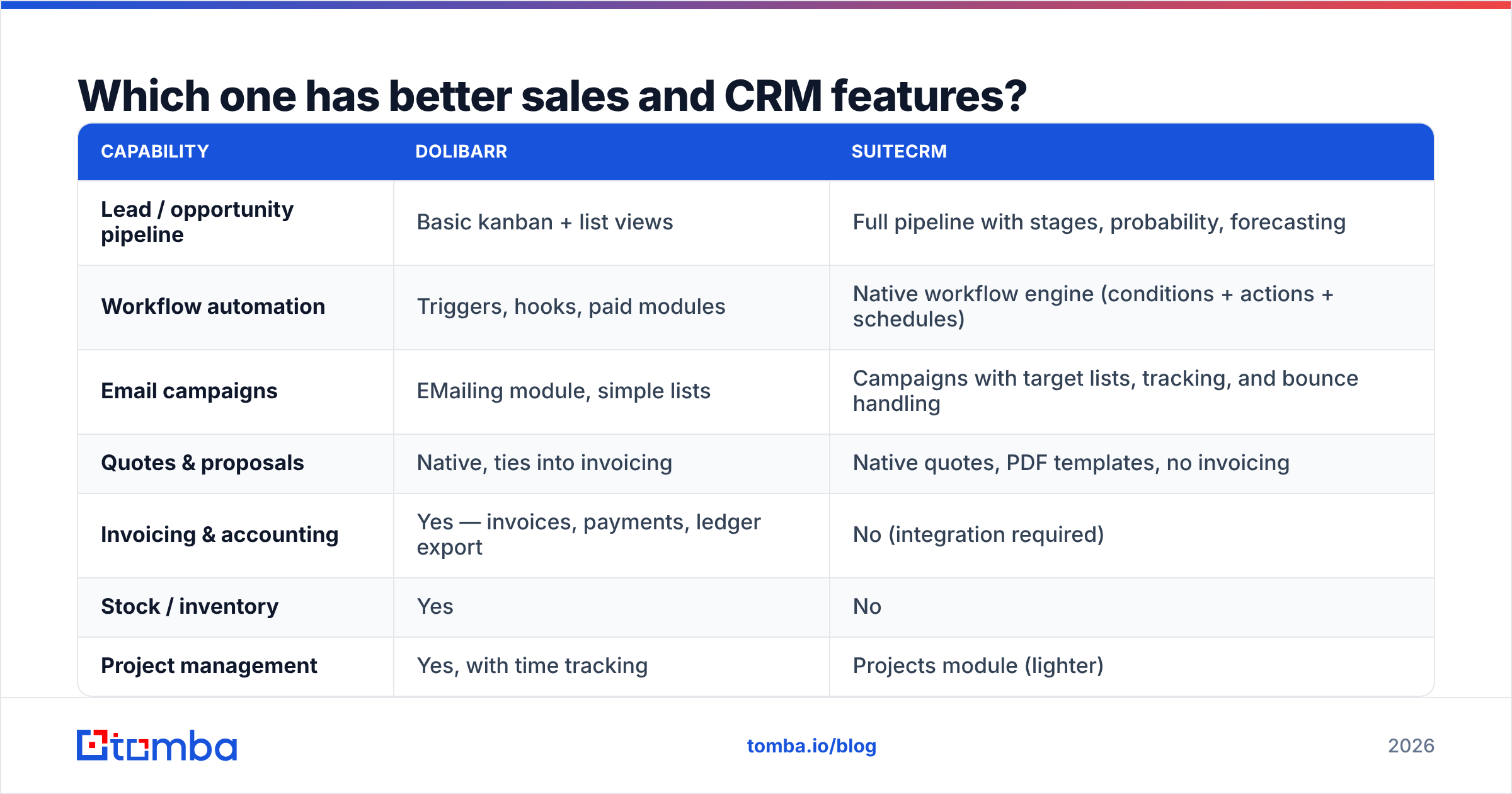
SuiteCRM, by a clear margin, and it should — it is a purpose-built CRM competing against Salesforce and HubSpot rather than against accounting suites.
| Capability | Dolibarr | SuiteCRM |
|---|---|---|
| Lead / opportunity pipeline | Basic kanban + list views | Full pipeline with stages, probability, forecasting |
| Workflow automation | Triggers, hooks, paid modules | Native workflow engine (conditions + actions + schedules) |
| Email campaigns | EMailing module, simple lists | Campaigns with target lists, tracking, and bounce handling |
| Quotes & proposals | Native, ties into invoicing | Native quotes, PDF templates, no invoicing |
| Invoicing & accounting | Yes — invoices, payments, ledger export | No (integration required) |
| Stock / inventory | Yes | No |
| Project management | Yes, with time tracking | Projects module (lighter) |
| Reporting | Module-level reports, exports | Report builder with charts, scheduled delivery |
| Mobile access | Responsive UI + community apps | Responsive UI (SuiteCRM 8), third-party apps |
| REST API | Yes (REST + SOAP legacy) | Yes (V8 API, OAuth2) |
| Licence | GPLv3 | AGPLv3 |
Where Dolibarr pulls ahead is the handoff you never have to build. A rep closes a deal, the proposal converts to an invoice, the invoice hits the ledger, stock decrements, and the customer record shows lifetime revenue — no middleware, no Zapier scenario, no nightly sync job silently failing. For a 15-person distributor or agency, that is worth more than a report builder.
Where SuiteCRM pulls ahead is everything after "we have 40 open opportunities." Forecast by stage, automate follow-up tasks when a deal goes stale, segment a target list, run a campaign, and see which touch preceded the close. Dolibarr can be pushed there with modules, but you are assembling something SuiteCRM already ships.
What do they really cost to run?#
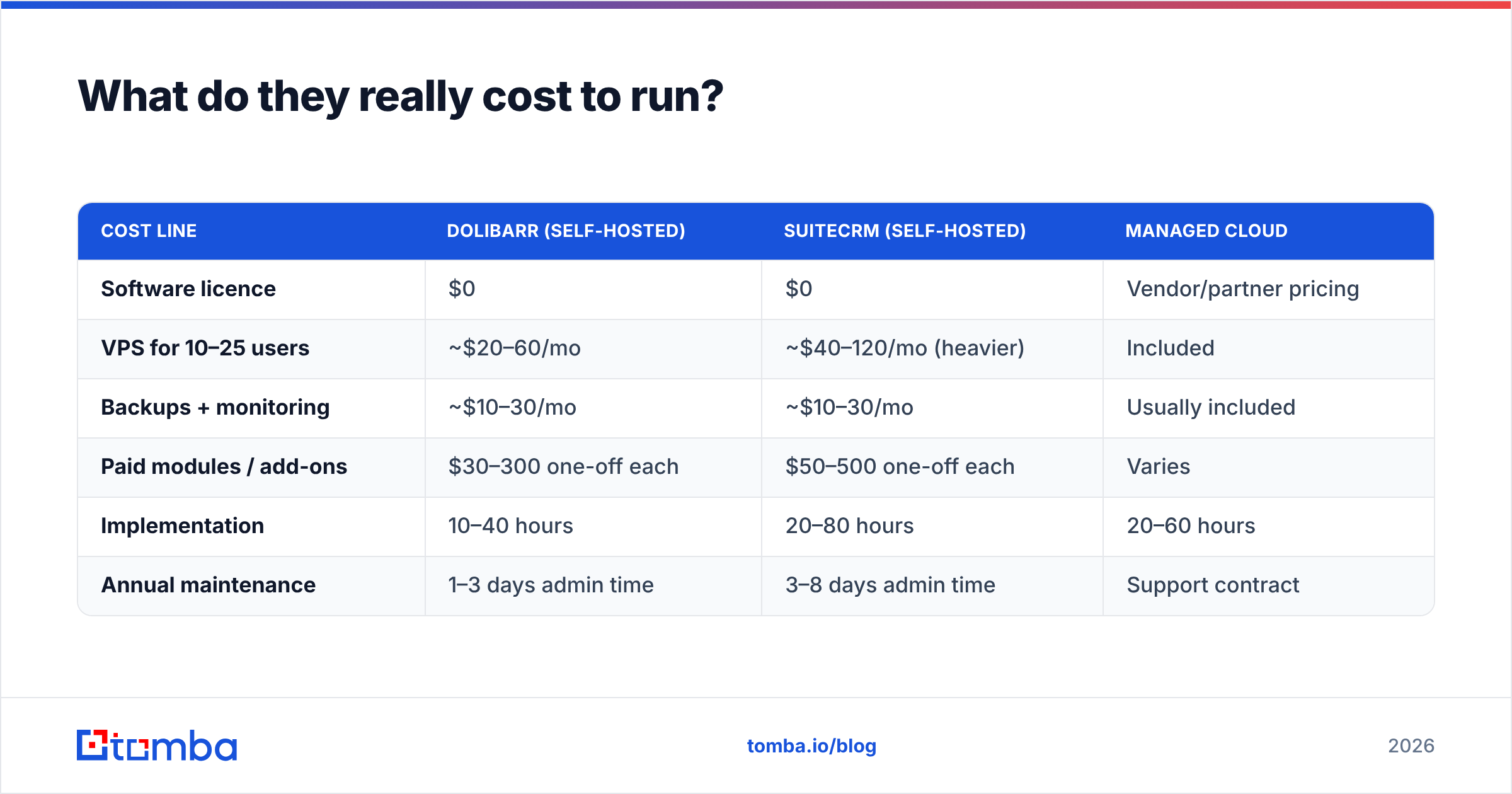
Both are free to download. Nobody runs either for free.
| Cost line | Dolibarr (self-hosted) | SuiteCRM (self-hosted) | Managed cloud |
|---|---|---|---|
| Software licence | $0 | $0 | Vendor/partner pricing |
| VPS for 10–25 users | ~$20–60/mo | ~$40–120/mo (heavier) | Included |
| Backups + monitoring | ~$10–30/mo | ~$10–30/mo | Usually included |
| Paid modules / add-ons | $30–300 one-off each | $50–500 one-off each | Varies |
| Implementation | 10–40 hours | 20–80 hours | 20–60 hours |
| Annual maintenance | 1–3 days admin time | 3–8 days admin time | Support contract |
SuiteCRM is the heavier application. It wants more PHP memory, more MySQL tuning, and more attention during upgrades — the legacy Sugar codebase underneath SuiteCRM 8 is not something you upgrade casually on a Friday afternoon. Dolibarr upgrades are generally gentler, but every enabled module is a surface that can break, and Dolistore modules do not all track the core release cadence.
Managed hosting exists for both. DoliCloud offers hosted Dolibarr on a per-user monthly plan, and SalesAgility sells hosted SuiteCRM plus support. Prices move, so check the vendor pages rather than trusting a number in a blog post — including this one. Independent user reviews on G2 are also worth an hour of your evaluation time, because they surface the upgrade and support complaints that vendor pages never will.
The honest framing: "free and open source" means you trade licence fees for engineering time. If nobody on your team enjoys patching PHP applications, a managed plan on either platform is cheaper than the outage you will eventually cause.
Is Dolibarr better than SuiteCRM for your team?#
Pick by shape of business, not by feature count.
- Choose Dolibarr if you sell physical goods, need invoicing and stock in the same system, run a small services firm that bills by project, or operate in a country where Dolibarr's localisation and accounting exports match your requirements.
- Choose SuiteCRM if you have a real outbound or inbound sales motion, more than three reps, a need for forecasting and workflow automation, or an existing finance system you have no intention of replacing.
- Choose neither if you are two founders with a shared inbox. A spreadsheet plus a bulk email finder will outperform any self-hosted CRM until you actually have process to encode.
- Run both if — and this is more common than people admit — Dolibarr handles operations and SuiteCRM handles the front end of the funnel, joined by their REST APIs. It costs more to maintain, but it stops you from bending one tool into a shape it resists.
A useful test: write down the last ten things that annoyed your team. If seven are about quotes, invoices, or stock, that is Dolibarr's answer. If seven are about follow-ups, forecasting, or "who owns this account," that is SuiteCRM's.
How do you keep either CRM from becoming an empty shell?#
This is where most open-source CRM projects quietly fail, and it has nothing to do with which platform you chose.
You install SuiteCRM. You customise the layouts. You build three workflows. You import 300 contacts from an old spreadsheet, 40% of which bounce. Two months later the team is back in the shared inbox because the CRM had nothing useful in it. The platform did not fail — the data pipeline was never built.
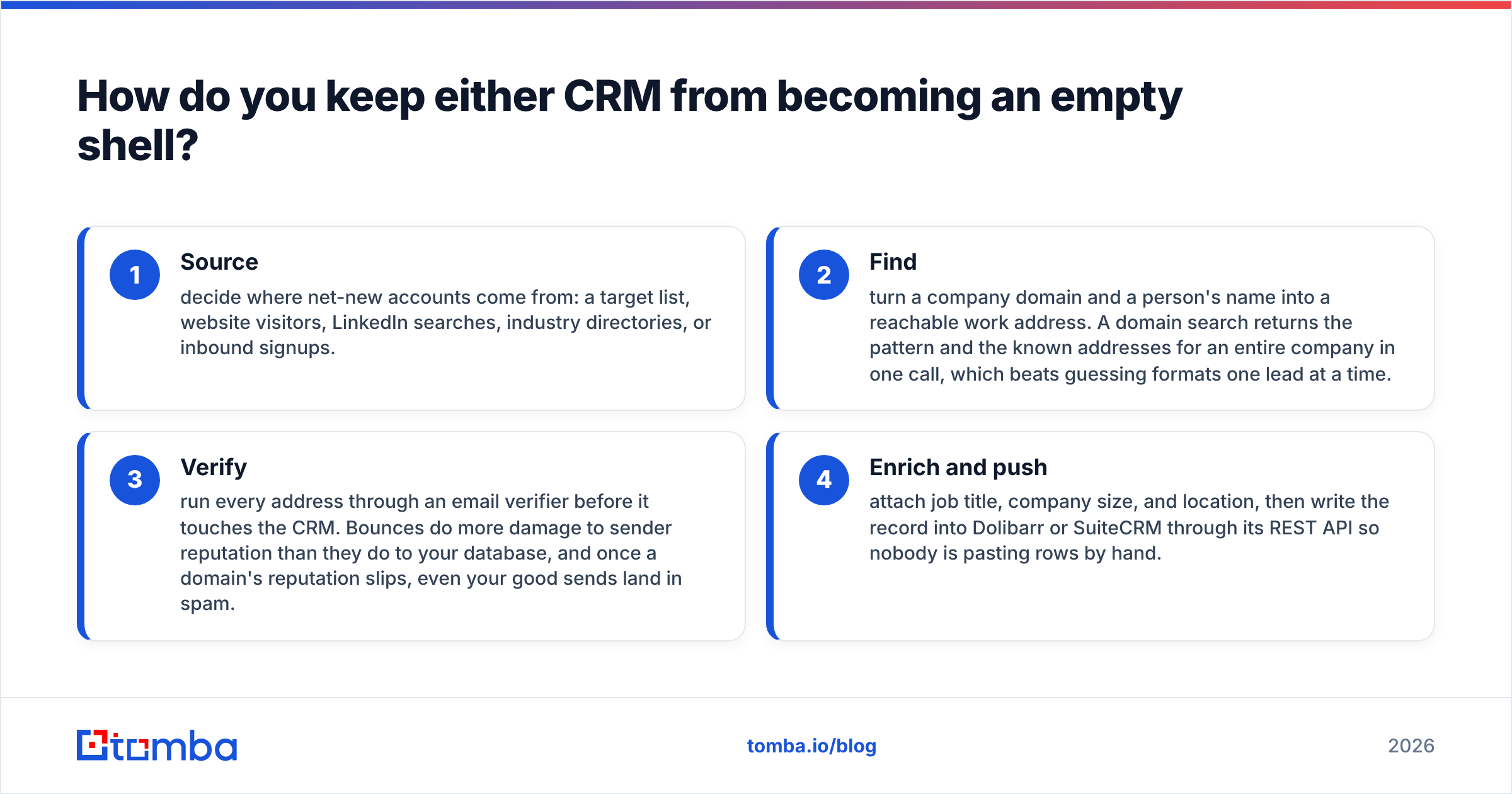
A working data pipeline for a self-hosted CRM has four stages:
- Source — decide where net-new accounts come from: a target list, website visitors, LinkedIn searches, industry directories, or inbound signups.
- Find — turn a company domain and a person's name into a reachable work address. A domain search returns the pattern and the known addresses for an entire company in one call, which beats guessing formats one lead at a time.
- Verify — run every address through an email verifier before it touches the CRM. Bounces do more damage to sender reputation than they do to your database, and once a domain's reputation slips, even your good sends land in spam.
- Enrich and push — attach job title, company size, and location, then write the record into Dolibarr or SuiteCRM through its REST API so nobody is pasting rows by hand.
Both platforms make step four straightforward. Dolibarr exposes a REST API with token auth; SuiteCRM 8 exposes a V8 API with OAuth2. Point either one at the Tomba API and you have a repeatable enrichment job instead of a monthly CSV ritual. If your team lives in spreadsheets during list-building, the Google Sheets add-on covers the same ground before anything gets imported.
The rule that survives every platform migration: garbage in, garbage forever. A CRM cannot verify a contact for you, and neither Dolibarr nor SuiteCRM ships with a single record of B2B contact data. That part is your responsibility no matter which logo ends up on the login screen.
What should you check before committing?#
Run a two-week trial on both, with the same five test scenarios, before you sign anything or provision a server:
- Import 100 real contacts and see how much manual field-mapping each one demands.
- Create a quote, then follow it as far as the system allows. Note exactly where the handoff to another tool begins.
- Build one automation — a follow-up task when a deal has been idle 14 days. Time how long it takes in each.
- Upgrade the instance to the next point release. This is the single most predictive test of long-term cost.
- Ask one non-technical rep to log a call, update a stage, and find last quarter's closed deals without help.
Whichever platform survives that with fewer complaints is your answer. Feature matrices — including the one above — are a starting filter, not a decision.
The verdict#
There is no universal winner in Dolibarr vs SuiteCRM because they are not competing for the same job. Dolibarr is the better system of record for a business that makes, ships, or bills things. SuiteCRM is the better system of record for a business whose main constraint is pipeline. Teams that pick on brand momentum instead of shape end up rebuilding twelve months later.
What both share is a dependency you cannot install: current, verified, reachable contact data. Before you spend a weekend tuning MySQL, make sure you have a repeatable way to fill the database you are about to stand up.
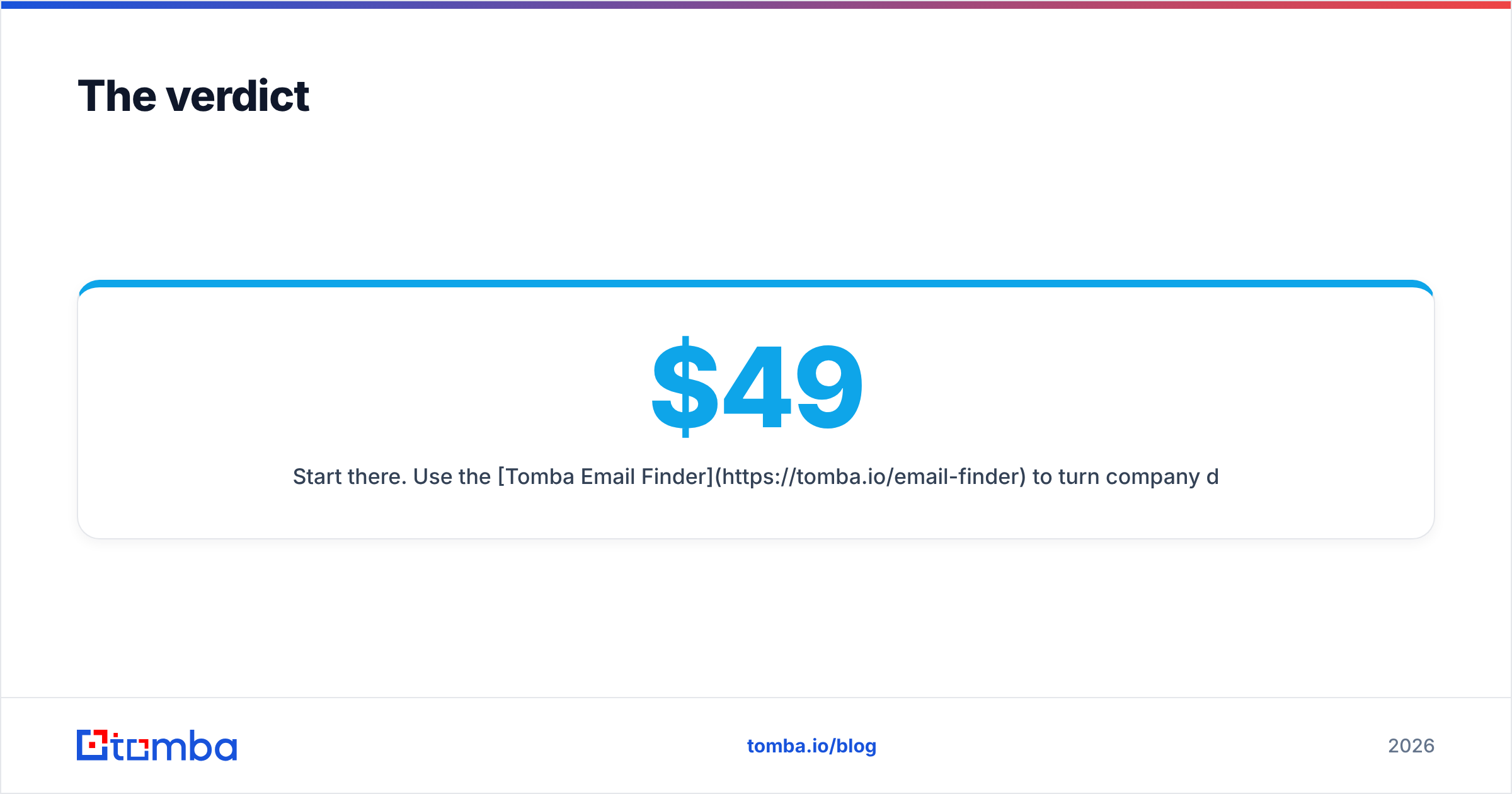
Start there. Use the Tomba Email Finder to turn company domains and names into verified work addresses, then push them straight into Dolibarr or SuiteCRM through the API. The free tier gives you 25 searches a month to test the flow end to end; paid plans start at $49/mo on Starter and scale to Growth at $99/mo and Pro at $249/mo — full Tomba pricing is public, with no per-seat surprises. Get the data pipeline right first, and the CRM debate gets much easier to settle.
Related guides#
Ready to find emails that actually work?
Join 150,000+ professionals who stopped guessing and started sending. Free credits on signup — no credit card required.
Get the Tomba newsletter
Practical outbound tactics and product updates — once every two weeks.
About the author