DoliCloud Pricing Review 2026: Real Costs, Pros, and Cons
A neutral breakdown of what DoliCloud actually costs per user, which add-ons inflate the bill, what reviewers complain about, and when self-hosting Dolibarr or a lighter stack is the smarter call.
TL;DR
- DoliCloud is the managed, hosted version of Dolibarr ERP/CRM. You pay per user, per month, for someone else to run the server, patch it, and back it up.
- The sticker price is low compared to Salesforce or NetSuite, but the bill scales linearly with headcount — and storage, extra modules, and premium support are where budgets drift.
- The real value is operational: no Linux admin, no MySQL tuning, no upgrade weekends. The real cost is flexibility — you inherit DoliCloud's update cadence and module approvals.
- Reviewers consistently praise price-to-function and consistently flag dated UI, uneven documentation, and support that is fine for infrastructure but thin for business-process questions.
- DoliCloud is a system of record, not a lead source. It stores contacts; it does not find them. That gap is where a dedicated email finder belongs in the stack.
What is DoliCloud, and how is it different from Dolibarr?#
Think of Dolibarr as a recipe book anyone can download for free, and DoliCloud as a restaurant that cooks from that same book. The recipes are identical. What you are paying for is the kitchen, the cleanup, and the guarantee that dinner shows up on time.
Dolibarr is an open-source ERP and CRM covering invoicing, quotes, orders, stock, projects, HR, and a contact database. It is free to download and self-host, licensed under GPL. DoliCloud is the official SaaS offering built on top of it: same codebase, hosted infrastructure, automatic upgrades, daily backups, and a control panel where you toggle modules on and off instead of editing config files.
That distinction matters for any pricing conversation. DoliCloud's price is not a software license — the software is free. You are buying hosting, maintenance, and the absence of a sysadmin on payroll. Whether that is a bargain depends entirely on what your time is worth and whether anyone on your team can safely run a LAMP stack.
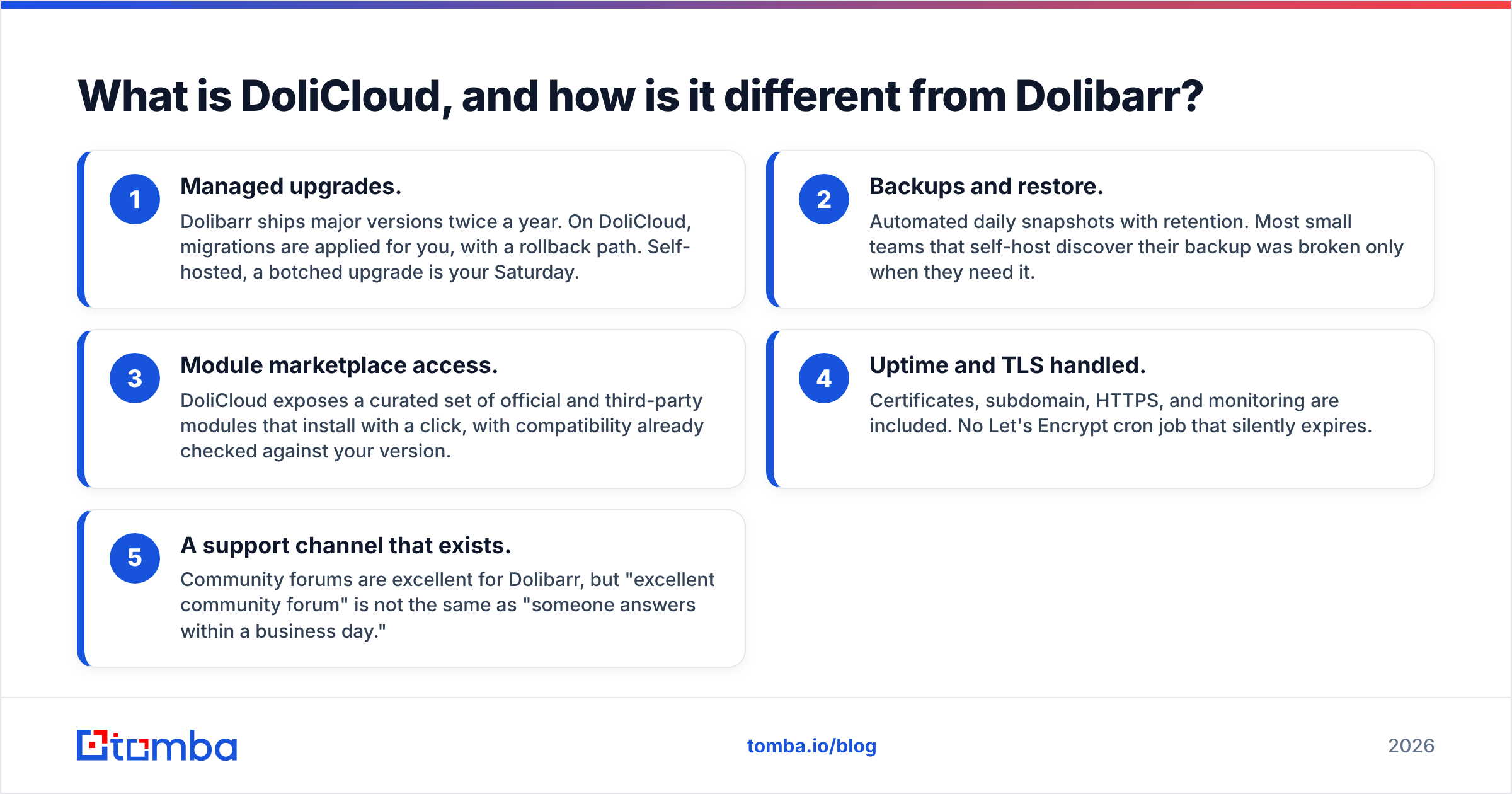
Four things you actually get when you pay for DoliCloud instead of self-hosting:
- Managed upgrades. Dolibarr ships major versions twice a year. On DoliCloud, migrations are applied for you, with a rollback path. Self-hosted, a botched upgrade is your Saturday.
- Backups and restore. Automated daily snapshots with retention. Most small teams that self-host discover their backup was broken only when they need it.
- Module marketplace access. DoliCloud exposes a curated set of official and third-party modules that install with a click, with compatibility already checked against your version.
- Uptime and TLS handled. Certificates, subdomain, HTTPS, and monitoring are included. No Let's Encrypt cron job that silently expires.
- A support channel that exists. Community forums are excellent for Dolibarr, but "excellent community forum" is not the same as "someone answers within a business day."
How does DoliCloud pricing actually work in 2026?#
DoliCloud prices per user, per month, with a free trial period and a discount for annual prepayment. The structure has been stable for years even as the exact figures move with currency and packaging changes.
A few mechanics worth understanding before you model a budget:
- The billing unit is a named user, not a concurrent session. A part-time bookkeeper who logs in twice a month costs the same as your operations lead.
- Tiers unlock modules and capacity, not seats. Moving up a tier does not get you more users — it gets you more storage, more available modules, and better support response.
- Annual billing carries a meaningful discount versus monthly, typically in the 10–20% range. If you are confident in the tool, prepay.
- Storage is the sneaky variable. ERP systems accumulate PDFs — every invoice, quote, delivery note, and supplier document. A five-year-old install is not a light one.
Prices below reflect published rates at the time of writing. DoliCloud lists in EUR and USD and adjusts packaging periodically. Confirm on dolicloud.com before you build a budget around any number here.
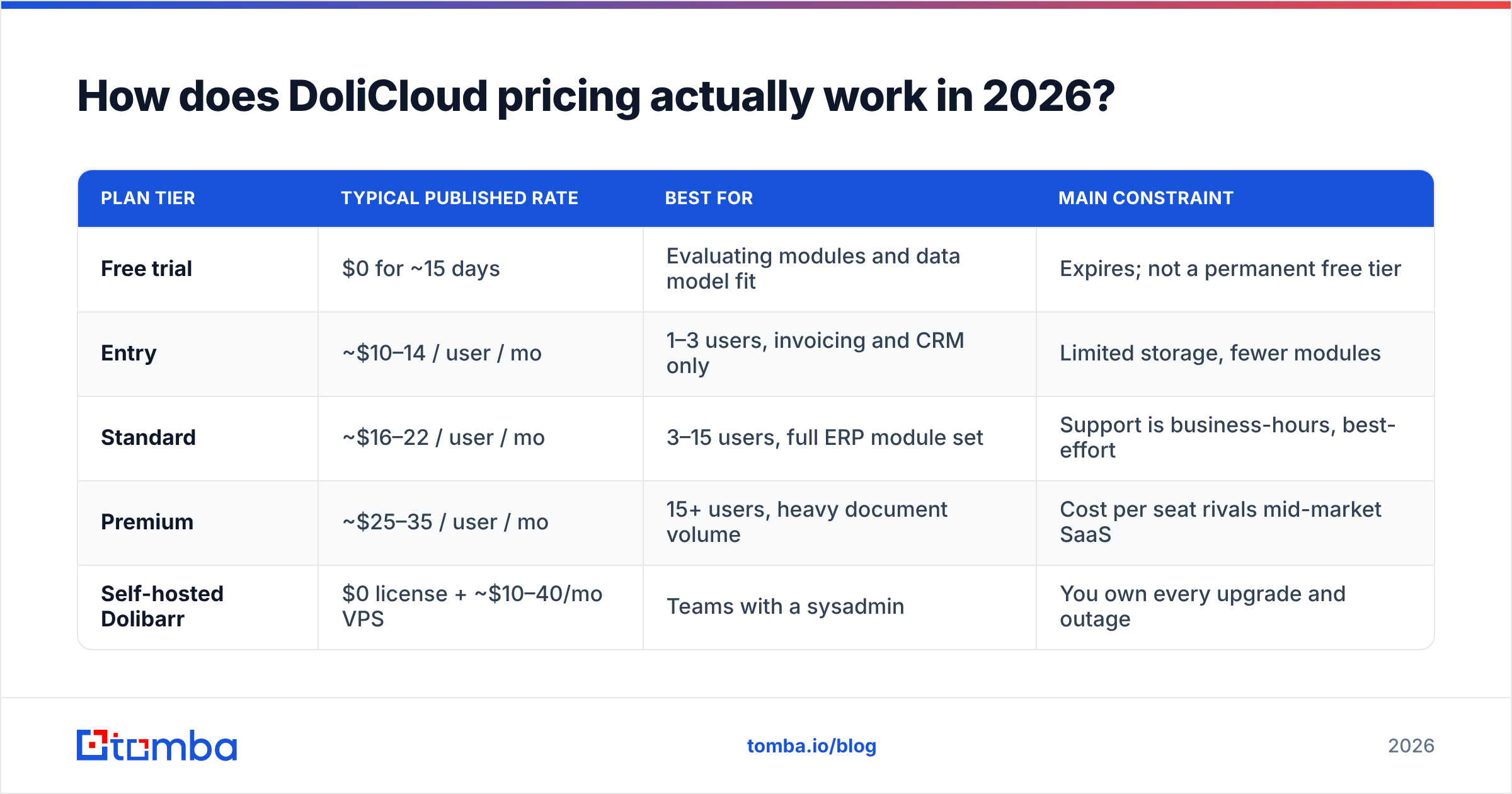
| Plan tier | Typical published rate | Best for | Main constraint |
|---|---|---|---|
| Free trial | $0 for ~15 days | Evaluating modules and data model fit | Expires; not a permanent free tier |
| Entry | ~$10–14 / user / mo | 1–3 users, invoicing and CRM only | Limited storage, fewer modules |
| Standard | ~$16–22 / user / mo | 3–15 users, full ERP module set | Support is business-hours, best-effort |
| Premium | ~$25–35 / user / mo | 15+ users, heavy document volume | Cost per seat rivals mid-market SaaS |
| Self-hosted Dolibarr | $0 license + ~$10–40/mo VPS | Teams with a sysadmin | You own every upgrade and outage |
The last row is the honest comparison nobody at a SaaS vendor makes for you. A five-user team on the Standard tier is spending roughly $80–110/month. The same install on a $20/month VPS costs a fraction of that — plus however many hours per quarter your technical person spends babysitting it. Below about four users, DoliCloud usually loses on pure math and wins on sanity. Above ten users, the per-seat model starts to look expensive relative to what you get.
Where does the bill get bigger than the sticker price?#
Sticker price is the honest part. Total cost of ownership is where teams get surprised.
Seat creep. ERP touches finance, sales, ops, and sometimes warehouse staff. Teams routinely start at four seats and land at eleven within a year because read-only access still requires a paid login. Model your 18-month headcount, not today's.
Paid third-party modules. The Dolibarr marketplace (DoliStore) has hundreds of extensions — advanced stock, payroll variants, e-commerce connectors, better reporting. Many are one-time purchases in the €30–150 range, some are subscriptions. These are not included in your DoliCloud subscription. A "complete" configuration frequently adds a few hundred euros of one-time module spend.
Migration and setup labor. Importing your existing customer list, chart of accounts, product catalog, and open invoices is a project. Dolibarr integrators bill for it. If you do it in-house, expect 20–60 hours for a real business with history.
Storage overage. Document-heavy businesses — construction, distribution, anything that attaches signed PDFs to every order — hit tier storage ceilings faster than expected.
Training. Dolibarr's interface is functional rather than intuitive. Budget real onboarding time. This is the single most common theme in negative user reviews, and it is a labor cost, not a software cost.
What do real DoliCloud reviews say?#
Aggregate the feedback on G2, Capterra, and the Dolibarr community forums and a consistent picture emerges. It is not a polarizing product — the praise and the complaints are remarkably stable across years.
What reviewers like:
- Cost per function is genuinely hard to beat. You get quoting, invoicing, inventory, projects, and CRM in one system for less than most standalone CRMs charge.
- No vendor lock-in on the data layer. It is Dolibarr underneath — you can export and self-host later. That escape hatch is real and rare.
- Module toggling means you can start narrow (invoicing only) and expand without migrating platforms.
- Hosting is reliable. Complaints about downtime are uncommon.
What reviewers criticize:
- The UI looks like enterprise software from a decade ago. It is dense, table-heavy, and unapologetically utilitarian. Sales teams used to modern tools push back.
- Documentation quality varies wildly between core modules and community ones. English docs occasionally lag French.
- Support is competent on infrastructure ("my instance is slow") and thin on business logic ("how should I configure multi-currency VAT?"). The latter pushes you toward paid integrators.
- Reporting is the weakest core area. Most teams end up exporting to spreadsheets or bolting on a BI tool.
- Mobile experience is workable but not a priority.
What are the pros and cons at a glance?#
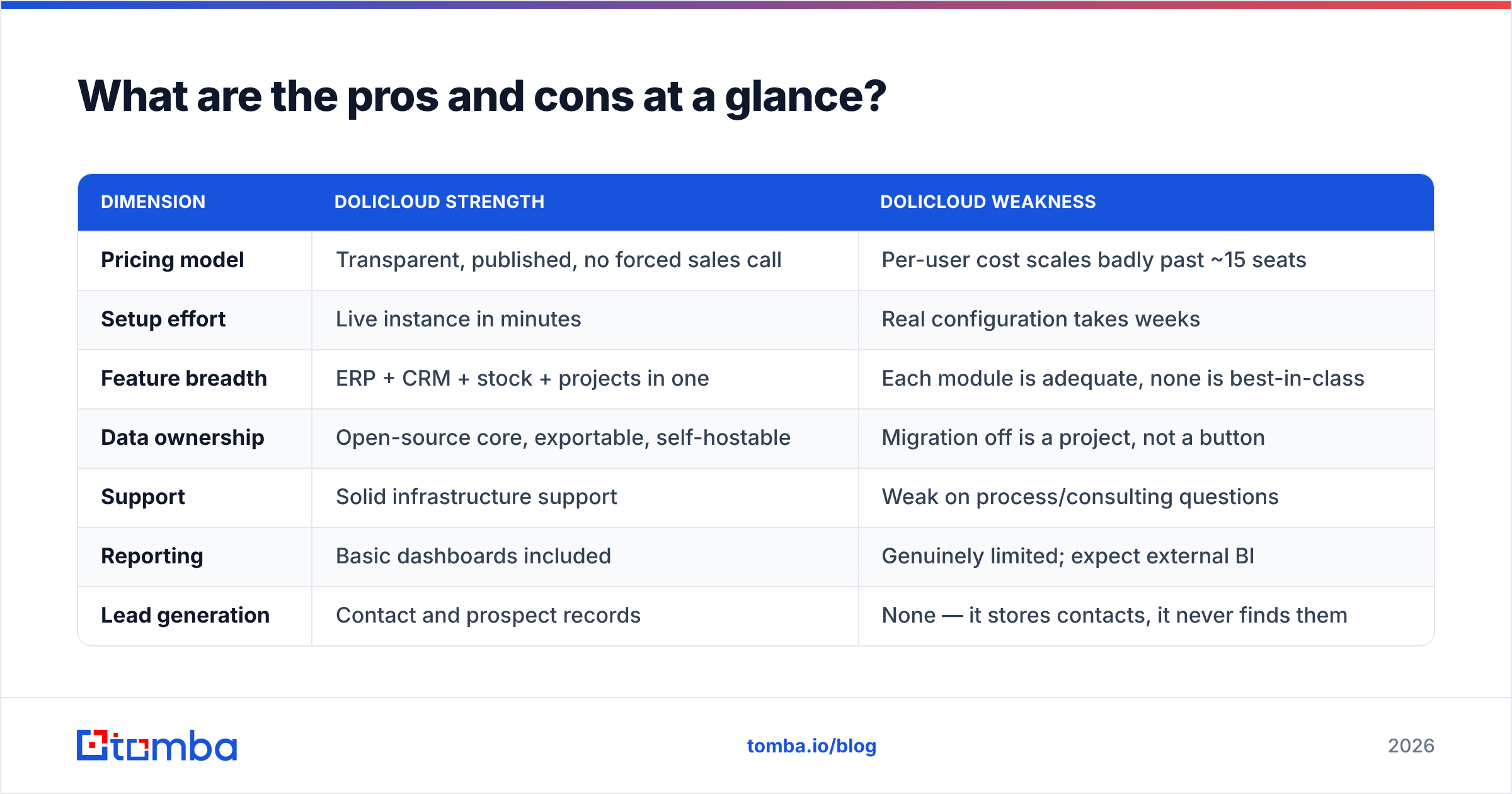
| Dimension | DoliCloud strength | DoliCloud weakness |
|---|---|---|
| Pricing model | Transparent, published, no forced sales call | Per-user cost scales badly past ~15 seats |
| Setup effort | Live instance in minutes | Real configuration takes weeks |
| Feature breadth | ERP + CRM + stock + projects in one | Each module is adequate, none is best-in-class |
| Data ownership | Open-source core, exportable, self-hostable | Migration off is a project, not a button |
| Support | Solid infrastructure support | Weak on process/consulting questions |
| Reporting | Basic dashboards included | Genuinely limited; expect external BI |
| Lead generation | Contact and prospect records | None — it stores contacts, it never finds them |
That last row is the one most buyers underweight. An ERP is a system of record. It answers "who are our customers and what do they owe us." It does not answer "who should we be talking to next quarter."
Who should choose DoliCloud, and who should skip it?#
Choose DoliCloud if: you are a 3–15 person services or distribution business, you need invoicing and inventory in the same system as your customer records, you have no in-house sysadmin, and you would rather spend money than weekends. The value here is real and the pricing is honest.
Skip DoliCloud if: you are a pure sales organization with no inventory or invoicing needs — a dedicated CRM will serve you better and feel less like accounting software. Also skip it if you have a capable technical person and fewer than four users; self-hosted Dolibarr on a cheap VPS delivers identical functionality for near-zero recurring cost. And skip it if pipeline reporting is your primary requirement, because that is where the product is weakest.
The honest middle ground: many teams run DoliCloud as the back office — quotes, invoices, stock, delivery — and keep a separate lightweight prospecting layer in front of it. That split usually costs less than forcing one system to do both jobs badly.
How do you keep a DoliCloud instance from becoming a graveyard of stale contacts?#
Here is the failure mode nobody warns you about: you migrate 4,000 contacts into a shiny new ERP, and within eighteen months a third of those email addresses bounce. People change jobs. Companies rebrand domains. Your invoice reminders start landing in spam because your bounce rate crossed the threshold that mailbox providers actually enforce.
ERPs do not clean themselves. Dolibarr will happily store jsmith@oldcompany.com forever.
Three habits keep the record clean:
- Verify on entry. Every contact that enters the system gets checked before it is saved. A quick pass through an email verifier at import time is cheaper than a deliverability recovery project later.
- Re-verify quarterly. Export the contact table, run a bulk verify, reimport the status. B2B email data decays roughly 2–3% per month, which compounds fast.
- Enrich rather than retype. When a contact's company changes, data enrichment fills in the new domain, title, and role automatically instead of asking a rep to remember to update the record.
How does DoliCloud compare to the alternatives on cost?#
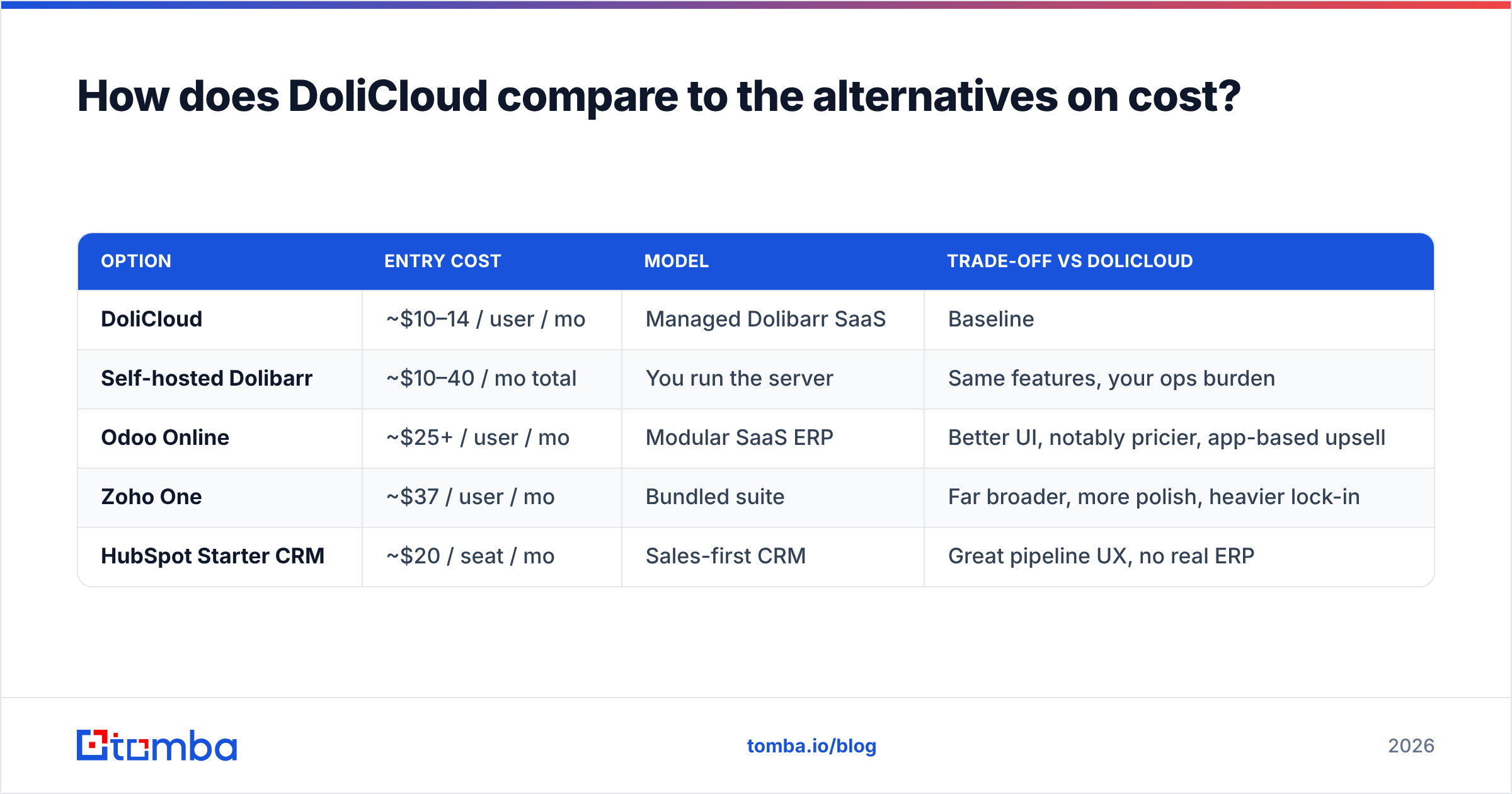
| Option | Entry cost | Model | Trade-off vs DoliCloud |
|---|---|---|---|
| DoliCloud | ~$10–14 / user / mo | Managed Dolibarr SaaS | Baseline |
| Self-hosted Dolibarr | ~$10–40 / mo total | You run the server | Same features, your ops burden |
| Odoo Online | ~$25+ / user / mo | Modular SaaS ERP | Better UI, notably pricier, app-based upsell |
| Zoho One | ~$37 / user / mo | Bundled suite | Far broader, more polish, heavier lock-in |
| HubSpot Starter CRM | ~$20 / seat / mo | Sales-first CRM | Great pipeline UX, no real ERP |
If your bottleneck is invoicing and stock, DoliCloud is the cheapest serious answer on this list. If your bottleneck is pipeline, it is the wrong tool at any price — a HubSpot style CRM plus a prospecting layer will outperform it, and you can connect the two through a HubSpot integration so the data flows both ways.
What's the verdict on DoliCloud pricing?#
DoliCloud is fairly priced for what it is: managed hosting for a capable open-source ERP, sold transparently, with no sales gauntlet and a genuine exit path. For a small team without technical staff, the per-user rate buys back real time.
It is not cheap in the way "open source" implies, because you are paying for operations rather than code. Model your seat count honestly, add third-party modules and setup labor to the first-year number, and compare that total against a VPS plus a few hours of internal admin time. Below four users the math often favors self-hosting; between four and fifteen, DoliCloud wins comfortably; above fifteen, start pricing alternatives.
And regardless of which side of that line you land on, remember what the ERP will never do: fill itself with the right people. If you need verified work emails, direct dials, and enriched company data to feed whatever system of record you choose, start with the Tomba Email Finder. It finds professional addresses by domain, name, or company, verifies them before they touch your database, and pushes clean records into your stack through the API or a spreadsheet. The free tier covers 25 searches a month, and paid Tomba plans start at $49/mo — flat, not per seat, so your data costs stop scaling with headcount even when your ERP bill does not.
Related guides#
Ready to find emails that actually work?
Join 150,000+ professionals who stopped guessing and started sending. Free credits on signup — no credit card required.
Get the Tomba newsletter
Practical outbound tactics and product updates — once every two weeks.
About the author