Domain Email Verification: A Complete 2026 Guide for B2B Teams
Most bounce problems start at the domain, not the mailbox. Here's how domain email verification works in 2026 — MX checks, catch-all handling, spam-trap risk, and what accuracy you should actually expect.

Most bad email lists fail at the domain, not the mailbox. Domain email verification checks the part after the @ first. It looks at MX records, the mail server, and the catch-all setup. That way you stop paying to test addresses that were never going to land. This guide covers what to check, in what order, and what accuracy to expect in 2026.
TL;DR
- Domain email verification checks the receiving domain — MX records, SMTP behavior, catch-all setup, disposable or parked status. It runs before you test any single mailbox.
- Roughly 20–30% of a stale B2B list fails at the domain layer alone. Think dead MX, parked domains, and companies that were acquired and dropped the old name.
- Catch-all domains are the hard part. They accept every address at SMTP time. So a
validverdict from a mailbox-only checker means nothing on its own. - Do domain checks first and mailbox checks second. It cuts spend by 20–40%, because you stop probing addresses at domains that can't receive mail.
- Free MX lookups only tell you a domain resolves. They can't tell you if it's a catch-all, a spam trap, or a shell company. That's the gap a paid verifier fills.
What is domain email verification?#
Domain email verification means validating the domain half of an email address — everything after the @. You do it on its own, before you test the mailbox in front of it.
Think of it like checking whether a building still stands before you knock on apartment 4B. If the building is gone, who lives in 4B doesn't matter. Most email tools skip straight to knocking on doors.
At the domain layer you answer four questions:
- Does the domain resolve, and does it publish MX records that point to a live mail server?
- Is that mail server reachable? Or does it time out, greylist you, or refuse the connection?
- Does the domain accept every address you throw at it (catch-all)? Or does it give real per-mailbox answers?
- Is the domain risky — disposable, parked, brand new, a known spam-trap host, or role-only?
Only after those four pass can per-mailbox checks give you a trustworthy answer. Run them the other way round and you pay to probe domains that were never going to deliver.
Why does the domain layer matter more than the address?#
Because domains fail in bulk. Mailboxes fail one at a time.
When sarah.chen@acme.com bounces, that's one bad record. But when Acme is acquired and moves to acme.newparent.com, every Acme contact in your CRM dies at once. Nothing about the addresses changed. The names are still right. The format is still right. The domain just stopped taking mail.
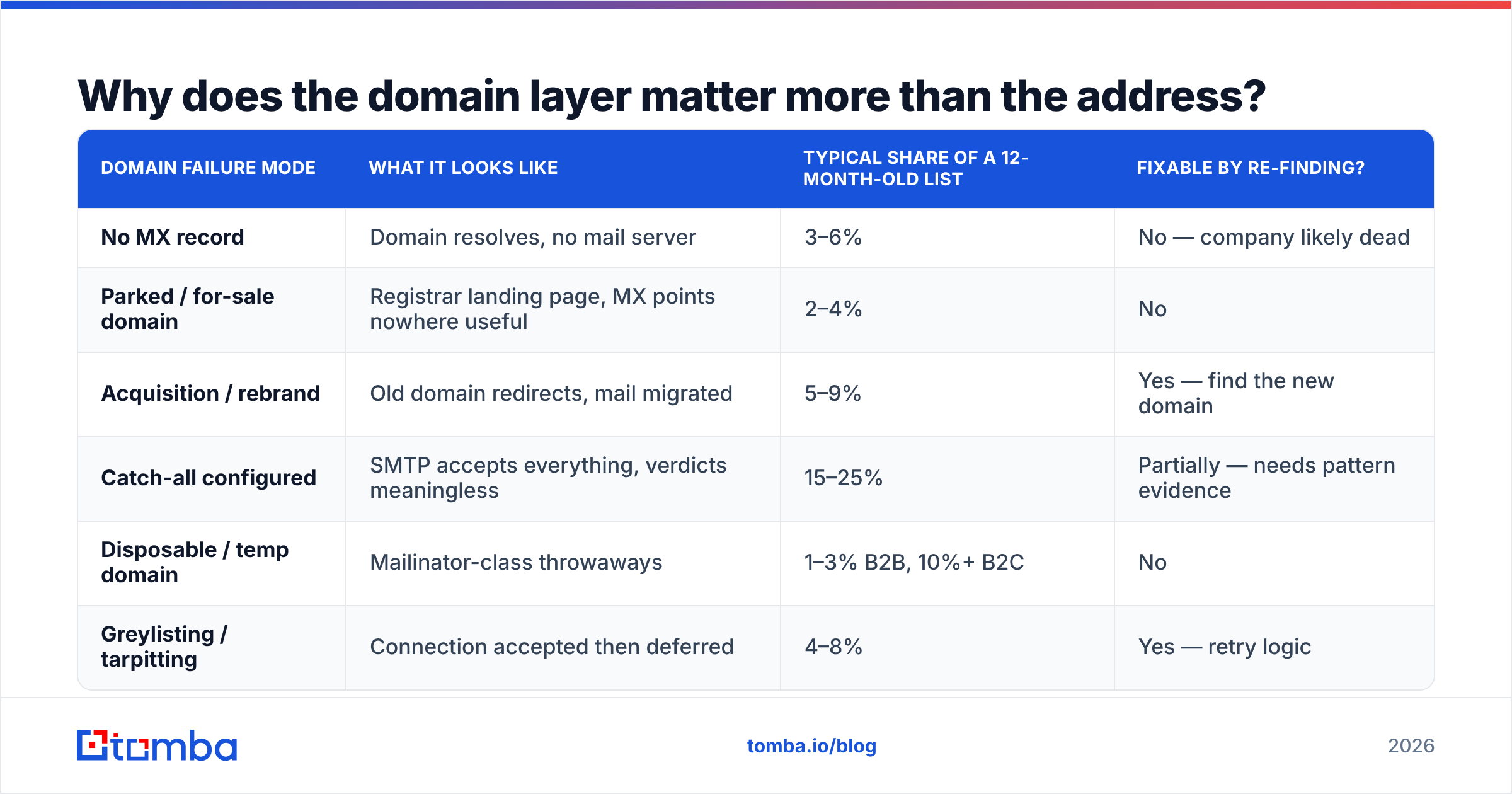
Here's what goes wrong at the domain layer in a typical B2B list. This is the part domain email verification is built to catch:
| Domain failure mode | What it looks like | Typical share of a 12-month-old list | Fixable by re-finding? |
|---|---|---|---|
| No MX record | Domain resolves, no mail server | 3–6% | No — company likely dead |
| Parked / for-sale domain | Registrar landing page, MX points nowhere useful | 2–4% | No |
| Acquisition / rebrand | Old domain redirects, mail migrated | 5–9% | Yes — find the new domain |
| Catch-all configured | SMTP accepts everything, verdicts meaningless | 15–25% | Partially — needs pattern evidence |
| Disposable / temp domain | Mailinator-class throwaways | 1–3% B2B, 10%+ B2C | No |
| Greylisting / tarpitting | Connection accepted then deferred | 4–8% | Yes — retry logic |
Add those up on a list you haven't touched in a year, and the domain itself is the problem on 30%+ of records. Sending into that mix is how email deliverability drops. Mailbox providers read your bounce rate as a sign of whether you know who you're mailing.
Google's sender guidelines set the practical bounce ceiling well under 3% for bulk senders. One un-verified export can blow past that in a single send.
What checks make up domain email verification?#
Start with the cheap, fast checks:
- Syntax and IDN cleanup — check RFC 5322 compliance, handle punycode for non-Latin domains, and strip the
+tagparts that break naive matching. This costs nothing. It catches typos likegmial.combefore you spend a DNS lookup. - DNS and MX resolution — does the domain have an A record and at least one valid MX record? An MX that points to
localhostor.(the null MX) is a flat "we don't accept mail" statement. It's surprising how many tools treat a null MX as a pass. - Mail-server reachability — open a connection to the top-priority MX host, then tell the failure modes apart. Refused means dead. Timeout may just be a firewall, so retry later. Greylisted means retry in 15 minutes — don't mark it invalid.
Almost every verifier does those three. The next three are where tools differ, and where the accuracy gap between a $19/mo tool and a real B2B data platform shows up:
- Catch-all detection — send an RCPT TO for a random local part like
zq7x9k4m@domain.com. Nobody owns that address. If the server accepts it anyway, the domain is catch-all, and every per-mailbox verdict from it is shaky. - Domain risk scoring — check the domain against disposable-domain lists, known spam-trap operators, parked-page fingerprints, and registration age. A domain registered six weeks ago that already sits on three lists you bought is a trap, not a prospect.
- Pattern extraction — for domains that pass, record the email format you see (
first.last,flast,first). Weight it by how many verified addresses back it up. This is what makes catch-all domains workable later.
What is a catch-all domain, and why does it break domain email verification?#
A catch-all (or accept-all) domain accepts mail for any local part. It never rejects unknown mailboxes at SMTP time. So ceo@company.com, xyzzy@company.com, and notarealperson@company.com all get a 250 OK.
Big companies do this on purpose. It keeps real mail from bouncing during staff turnover, and it stops outsiders from mapping the staff list over SMTP. Between 15% and 25% of B2B domains run it, and the share grows with company size.
The catch: SMTP checks can't tell you whether a catch-all address is real. Any verifier that returns valid here, with no caveat, is telling you something it cannot know.
What separates a useful tool is what it does instead of guessing:
- Pattern confidence — if 40 verified addresses at
acme.comall usefirst.last, thensarah.chen@acme.comis very likely real.s.chen@acme.comvery likely isn't. - Outside proof — the address shows up on a public web page, in a press release byline, or in a git commit. No SMTP probe can give you that.
- Honest labels — a tool should return
catch-allorriskyas its own status, not fold it intovalid. A catch-all verifier that grades confidence beats one that flattens everything to yes or no.
If your verifier reports 97% valid on a list full of enterprise domains, it is almost certainly counting catch-alls as clean. Read the status breakdown, not the headline number.
How do domain email verification tools compare?#
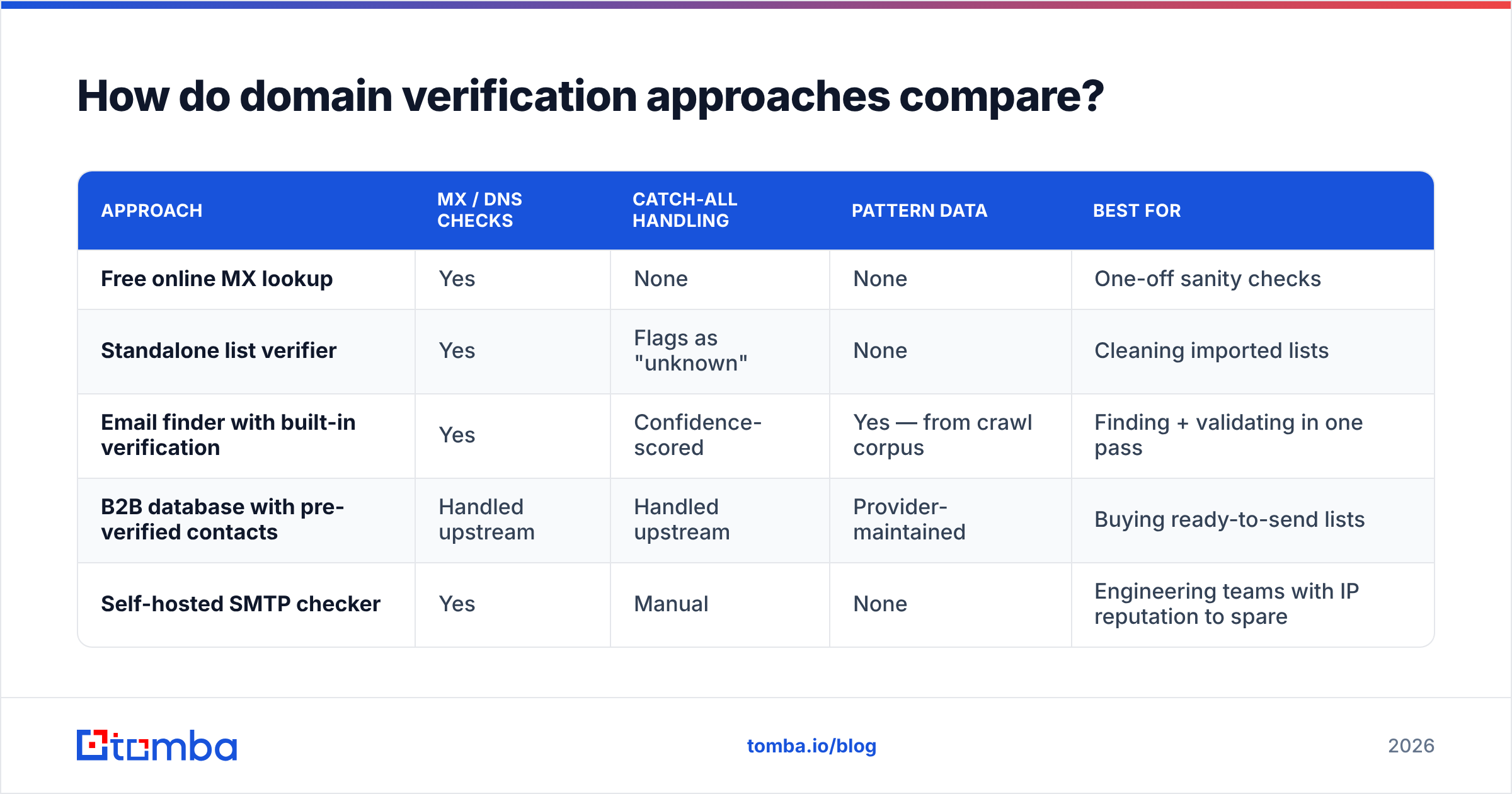
Different tools solve different slices of this. Here's how the main approaches stack up:
| Approach | MX / DNS checks | Catch-all handling | Pattern data | Best for |
|---|---|---|---|---|
| Free online MX lookup | Yes | None | None | One-off sanity checks |
| Standalone list verifier | Yes | Flags as "unknown" | None | Cleaning imported lists |
| Email finder with built-in verification | Yes | Confidence-scored | Yes — from crawl corpus | Finding + validating in one pass |
| B2B database with pre-verified contacts | Handled upstream | Handled upstream | Provider-maintained | Buying ready-to-send lists |
| Self-hosted SMTP checker | Yes | Manual | None | Engineering teams with IP reputation to spare |
One warning about the self-hosted route. SMTP probes at volume from your own IPs get that IP range flagged fast. Mailbox providers treat rapid RCPT TO scanning as recon, because it usually is. Commercial verifiers spread probes across rotating servers, so your sending IPs never touch it.
On the database side, providers like BookYourData sell contact lists with domain checks already done before you see the record. That's a fair fit if you'd rather buy coverage than build it. The trade-off is freshness: you inherit their re-check schedule instead of setting your own.
Some teams want both — finding addresses and checking the domains they sit on. A combined platform saves the export/import shuffle. Tomba's domain search returns every address it can find at a company, plus the observed pattern and a confidence score per address. The domain check and the mailbox check happen in one call.

What does a domain email verification workflow look like?#
Order matters more than tooling. This sequence cuts cost and lifts accuracy at the same time:
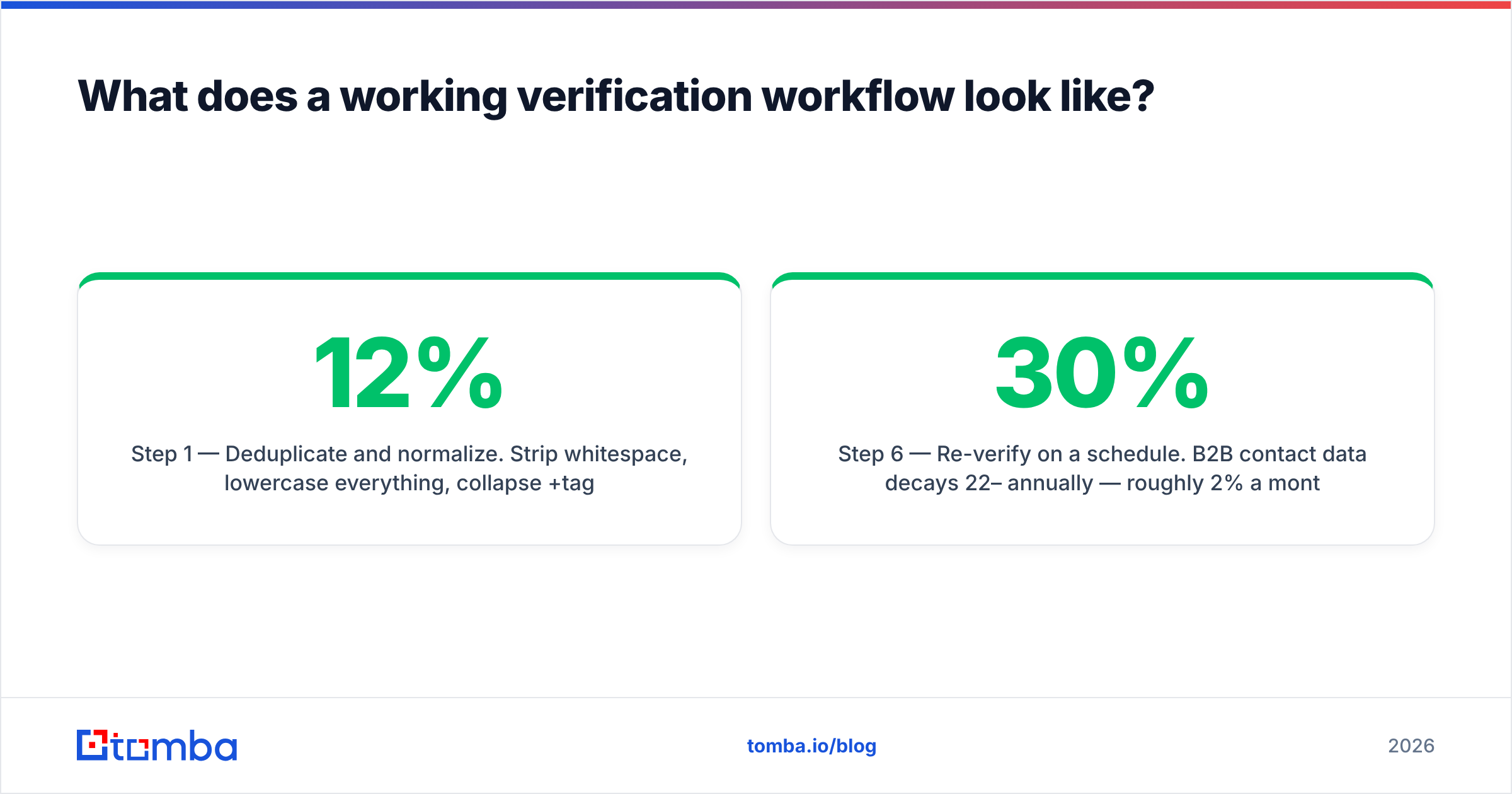
Step 1 — Deduplicate and normalize. Strip whitespace, lowercase everything, collapse +tag variants, and drop exact duplicates. On a typical CRM export this clears 5–12% of rows for free, before you spend a credit.
Step 2 — Group by domain. You may have 4,000 addresses across 900 domains. Verify the 900 domains, not the 4,000 addresses. This is the single biggest cost lever, and almost nobody uses it.
Step 3 — Run the domain pass. MX, reachability, catch-all detection, risk scoring. Drop everything at dead and disposable domains right away. Tag the catch-all domains for special handling.
Step 4 — Mailbox-verify the survivors at non-catch-all domains. These give you real answers. Keep valid, drop invalid, and queue unknown for a retry in 24–48 hours. Greylisting sorts itself out.
Step 5 — Pattern-score the catch-all domains. Use the observed format plus outside proof. Send only to high-confidence records. Park the rest, or route them to a LinkedIn touch instead.
Step 6 — Re-verify on a schedule. B2B contact data decays 22–30% a year, or about 2% a month. Re-run the domain pass every quarter on anything you still plan to mail. A one-time mailbox check will never catch an acquisition or a migration.
For a list of any real size, run this in batch instead of one call at a time. A bulk verify job against grouped domains finishes in minutes and costs a fraction of per-address processing.
What accuracy should you actually expect?#
Be skeptical of the numbers on vendor homepages. "99% accuracy" is usually measured on a curated test set with the catch-alls removed. That's like measuring fuel economy with the engine off.
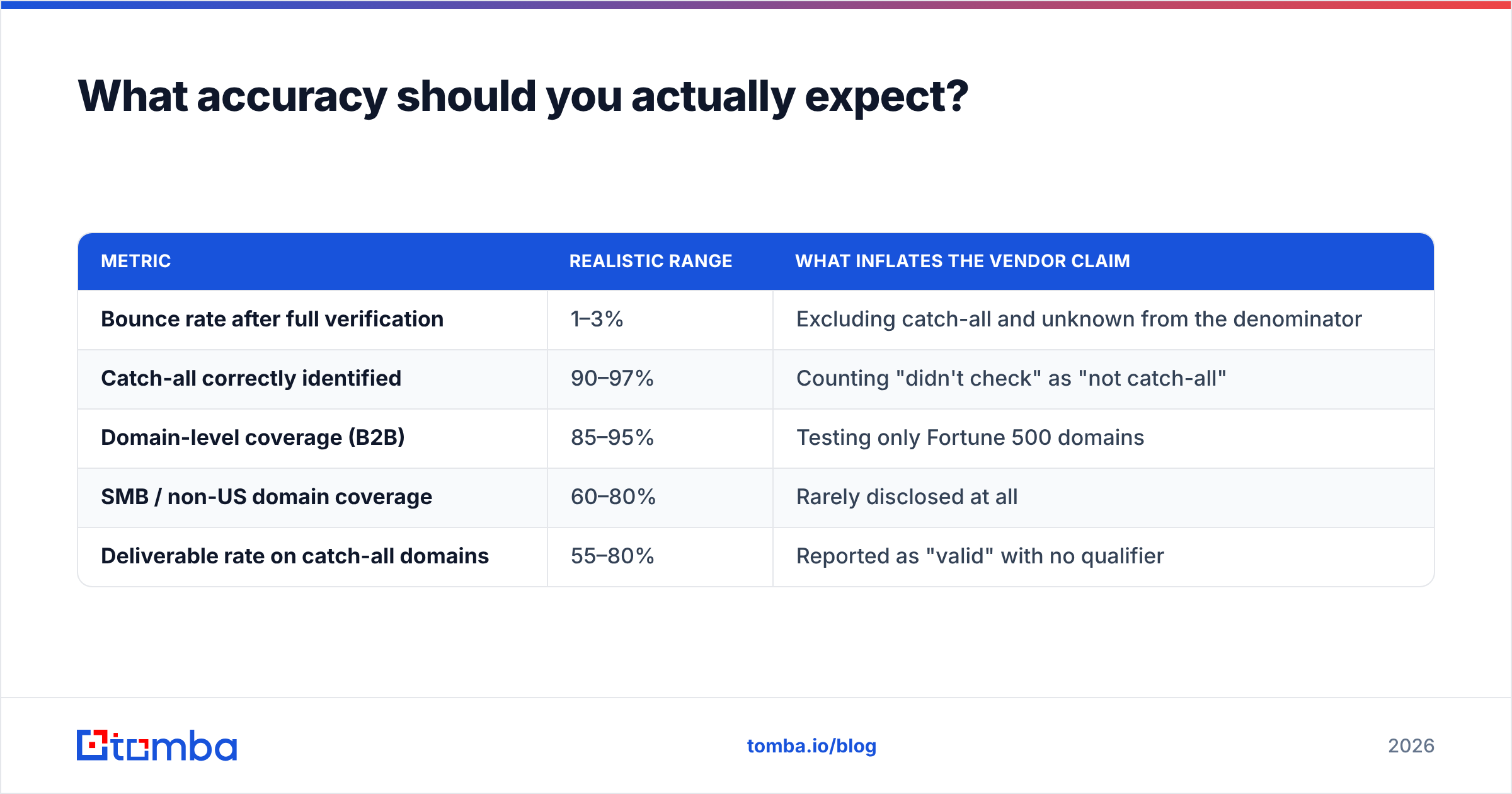
Here's what to expect from domain email verification in 2026:
| Metric | Realistic range | What inflates the vendor claim |
|---|---|---|
| Bounce rate after full verification | 1–3% | Excluding catch-all and unknown from the denominator |
| Catch-all correctly identified | 90–97% | Counting "didn't check" as "not catch-all" |
| Domain-level coverage (B2B) | 85–95% | Testing only Fortune 500 domains |
| SMB / non-US domain coverage | 60–80% | Rarely disclosed at all |
| Deliverable rate on catch-all domains | 55–80% | Reported as "valid" with no qualifier |
The honest version: a good verifier takes you from a 15% bounce rate to a 2% bounce rate. It does not take you to zero. Any vendor who implies otherwise is describing a test set, not your list. Review sites like G2's email verification category read truer than a vendor landing page, because complaints cluster around the exact failure modes vendors leave out.
One practical test: run the same 200-address sample through two verifiers. Compare the full status breakdowns, not just the valid counts. Where they disagree is nearly always catch-all handling. The tool that reports more catch-alls is usually the honest one.
What are the most common domain email verification mistakes?#
- Treating
unknownasinvalid. Greylisting and short timeouts both produceunknown. Deleting those records throws away good contacts. Retry after 24 hours first. - Verifying at send time only. Your ESP's bounce handling is a smoke alarm, not a sprinkler. By the time it goes off, the hit to sender reputation is already on record.
- Ignoring role addresses.
info@,sales@, andsupport@come back valid because they are valid. They're also poor cold outreach targets with high complaint rates. Filter them apart from validity. - Verifying once and never again. A list checked in January is stale by April. Domain changes don't announce themselves.
- Running SMTP probes from your sending IPs. That's the fastest way to get a clean IP range flagged. Let the verifier's servers absorb it.
Where should you start?#
Cleaning an existing list? Start with a domain-grouped pass and a real catch-all breakdown. That alone usually explains most of your bounce problem. Building a list from scratch? Verify at the point of capture, so bad records never reach the CRM.
Tomba's Email Finder does both in one step. It resolves the domain, pulls the company's email pattern from a live crawl, returns candidate addresses with a confidence score, and flags catch-all domains out loud instead of hiding them in the valid bucket. Domain email verification and mailbox checks run in the same request, so you don't pay two vendors for halves of one answer.
The free tier covers 25 searches a month, enough to sanity-check your list's domain health first. Paid plans start at $49/mo, and full Tomba pricing is public, including per-credit costs at each tier. Verify the domain first. The mailbox is the easy part.
Related guides#
Ready to find emails that actually work?
Join 150,000+ professionals who stopped guessing and started sending. Free credits on signup — no credit card required.
Get the Tomba newsletter
Practical outbound tactics and product updates — once every two weeks.
About the author