Domain Finder: How to Find Every Email at a Company in 2026
A domain finder turns one company URL into a verified list of work emails and the pattern behind them. Here's how the tech works, what it costs, and which tool wins in 2026.
TL;DR
- A domain finder takes a company domain (
stripe.com) and returns the work email addresses tied to it, plus the pattern the company uses ({first}.{last}@,{f}{last}@, etc.). - The output quality depends on three things: crawl coverage, pattern inference, and SMTP verification. Tools that skip the third one hand you bounces.
- Expect 60–85% coverage on mid-market companies with public web presence, and far less on stealth startups or heavily-gated enterprises.
- Pricing in 2026 clusters around $39–$99/mo for 1,000–5,000 lookups. Tomba starts at $49/mo for Starter with a free 25-search tier to test accuracy first.
- Never send to a domain-finder result without verifying it. A 3% bounce rate is the line where Google and Microsoft start throttling you.
What is a domain finder?#
A domain finder is a search tool that accepts a company's website domain and returns every professional email address it can associate with that domain, along with names, job titles, departments, and confidence scores.
Think of it like a phone book for a building. You know the address (acme.com). You don't know who's inside or what their extensions are. A domain finder walks the building, reads the name plates it can see, and infers the rest from the numbering system it observes.
That's the honest framing. A domain finder is not a magic database of every employee's inbox — it's an inference engine sitting on top of a crawl index. Understanding which part is observed data and which part is inference is the single most useful thing you can learn about this category, because it tells you exactly when to trust the output.
Related searches that mean roughly the same thing: domain search, company email lookup, email finder by domain, bulk domain email extraction. Vendors use these interchangeably. The underlying mechanics are identical.
How does a domain finder actually work?#
Four stages, in order. Each stage degrades if the previous one is weak.
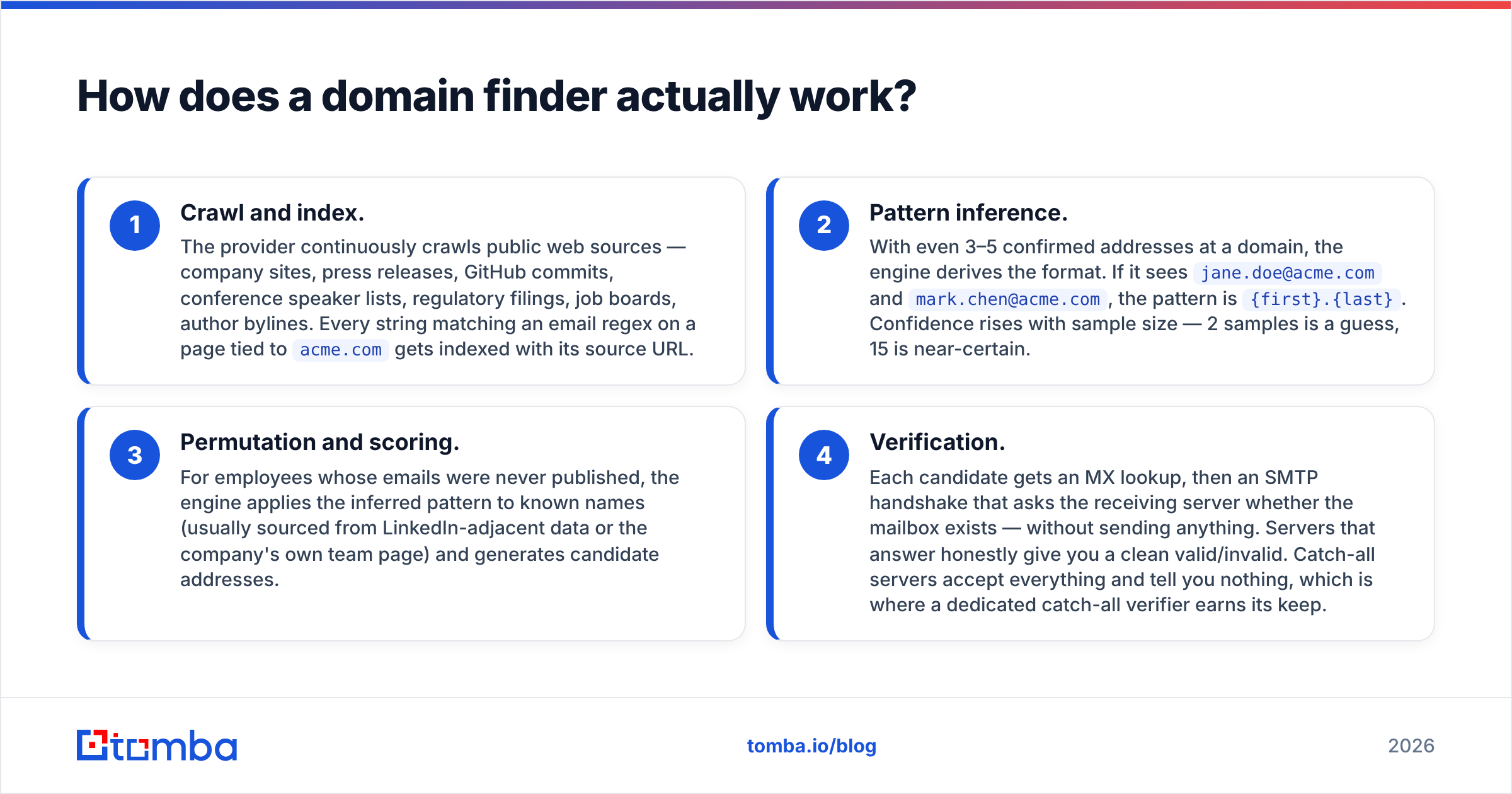
- Crawl and index. The provider continuously crawls public web sources — company sites, press releases, GitHub commits, conference speaker lists, regulatory filings, job boards, author bylines. Every string matching an email regex on a page tied to
acme.comgets indexed with its source URL. - Pattern inference. With even 3–5 confirmed addresses at a domain, the engine derives the format. If it sees
jane.doe@acme.comandmark.chen@acme.com, the pattern is{first}.{last}. Confidence rises with sample size — 2 samples is a guess, 15 is near-certain. - Permutation and scoring. For employees whose emails were never published, the engine applies the inferred pattern to known names (usually sourced from LinkedIn-adjacent data or the company's own team page) and generates candidate addresses.
- Verification. Each candidate gets an MX lookup, then an SMTP handshake that asks the receiving server whether the mailbox exists — without sending anything. Servers that answer honestly give you a clean valid/invalid. Catch-all servers accept everything and tell you nothing, which is where a dedicated catch-all verifier earns its keep.
The gap between step 3 and step 4 is where most bad data lives. A tool that returns step-3 permutations with a green checkmark is selling you arithmetic dressed up as intelligence.

What's the difference between a domain finder and an email finder?#
They're siblings, not synonyms. The input differs, and so does the use case.
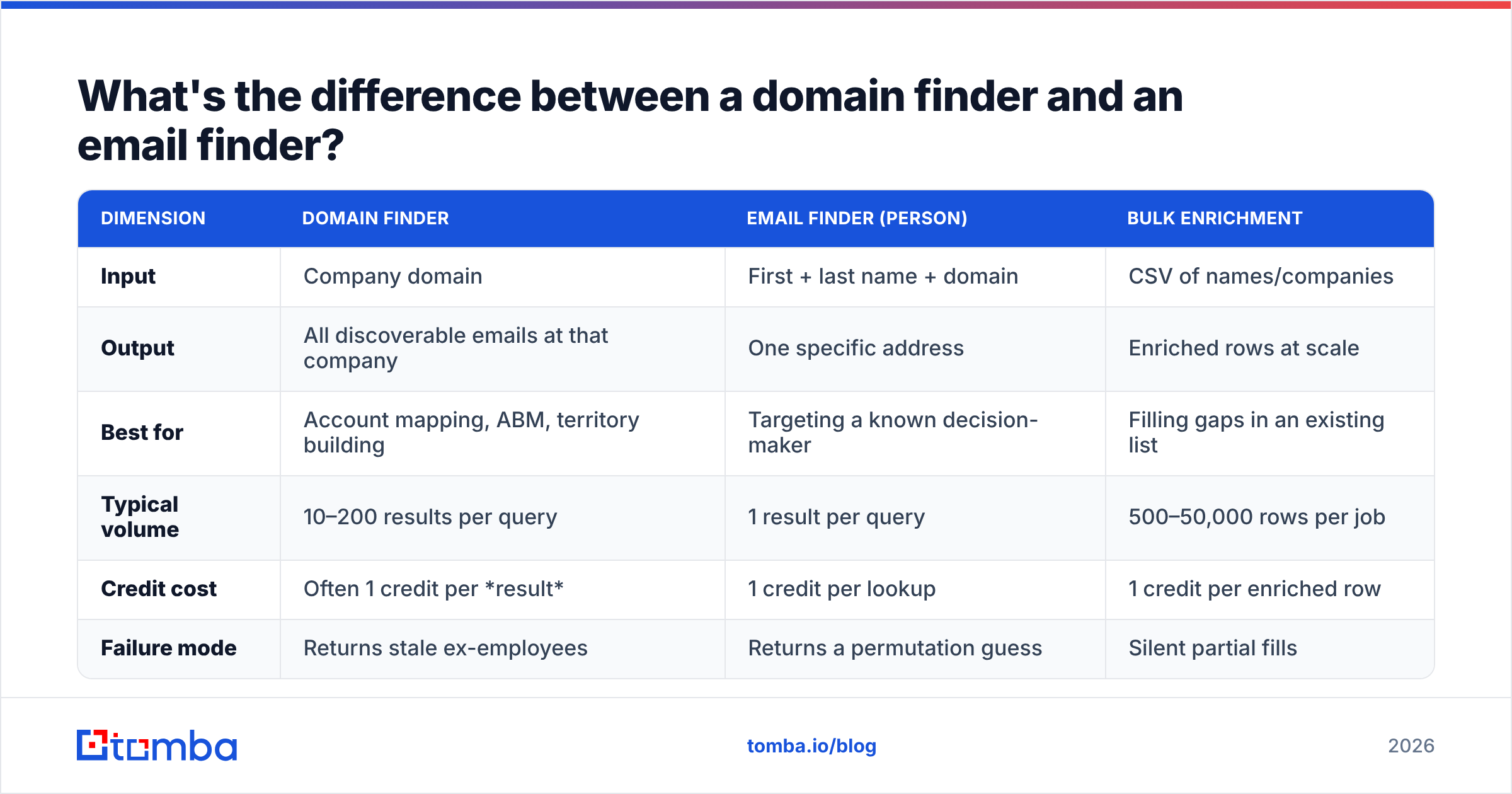
| Dimension | Domain finder | Email finder (person) | Bulk enrichment |
|---|---|---|---|
| Input | Company domain | First + last name + domain | CSV of names/companies |
| Output | All discoverable emails at that company | One specific address | Enriched rows at scale |
| Best for | Account mapping, ABM, territory building | Targeting a known decision-maker | Filling gaps in an existing list |
| Typical volume | 10–200 results per query | 1 result per query | 500–50,000 rows per job |
| Credit cost | Often 1 credit per result | 1 credit per lookup | 1 credit per enriched row |
| Failure mode | Returns stale ex-employees | Returns a permutation guess | Silent partial fills |
The credit-cost row matters more than people expect. Running a domain finder against a 400-person company can drain a monthly allowance in a single query if the vendor bills per returned result. Read the metering rules before you run your first big domain — several teams have burned a month's credits on one curious lookup of microsoft.com.
For person-level work, use a dedicated email finder. For company-level sweeps, use domain search. For lists, use bulk email finder. Same data spine, three different interfaces.
Is domain finder data accurate enough to send to?#
Sometimes. The number that matters is not the vendor's headline accuracy claim — it's your bounce rate on the specific segment you're targeting.
Here's the honest breakdown of what drives accuracy in 2026:
- Company size. Companies with 50–2,000 employees have the best coverage. Below 50, there's not enough published email surface to infer a pattern reliably. Above 10,000, you get accurate patterns but heavily stale rosters.
- Industry. Tech, SaaS, agencies, and media have high public email exposure. Healthcare, finance, and defense are locked down and generate far weaker results.
- Region. North America and Western Europe index well. APAC and LATAM coverage is thinner across every vendor, without exception.
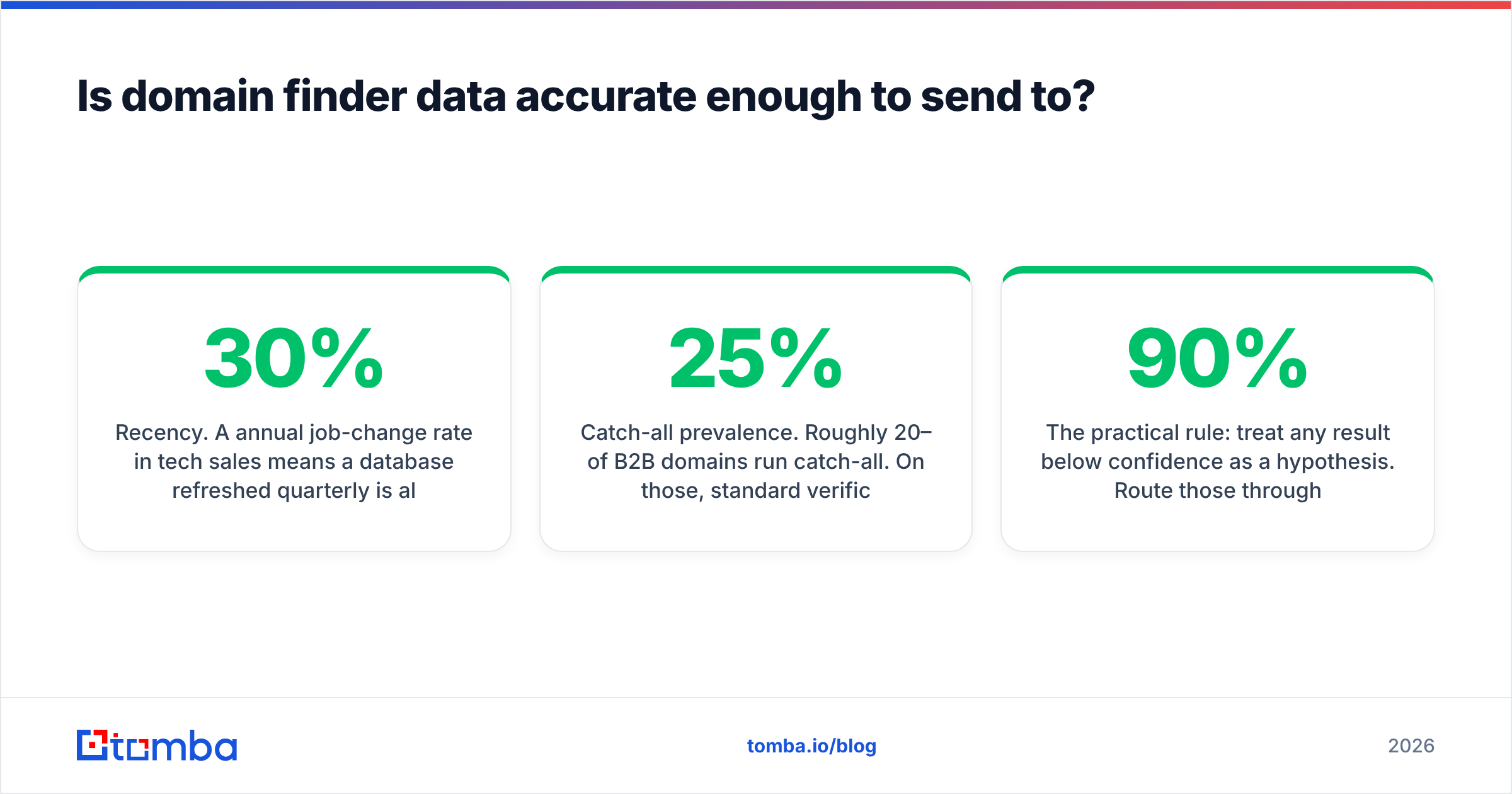
- Recency. A 30% annual job-change rate in tech sales means a database refreshed quarterly is already ~8% stale on the day you query it. Ask vendors when the record was last re-verified, not when it was first collected.
- Catch-all prevalence. Roughly 20–25% of B2B domains run catch-all. On those, standard verification returns "accept-all" and you're back to probability, not certainty.

The practical rule: treat any result below 90% confidence as a hypothesis. Route those through an email verifier before they enter a sequence, and hold your list-level bounce rate under 2%. Google's bulk sender guidelines put the spam-complaint threshold at 0.3%, and while they don't publish a hard bounce ceiling, deliverability teams broadly treat 3% as the point where throttling starts. Your sender reputation is the asset you're protecting — not the extra 40 contacts.
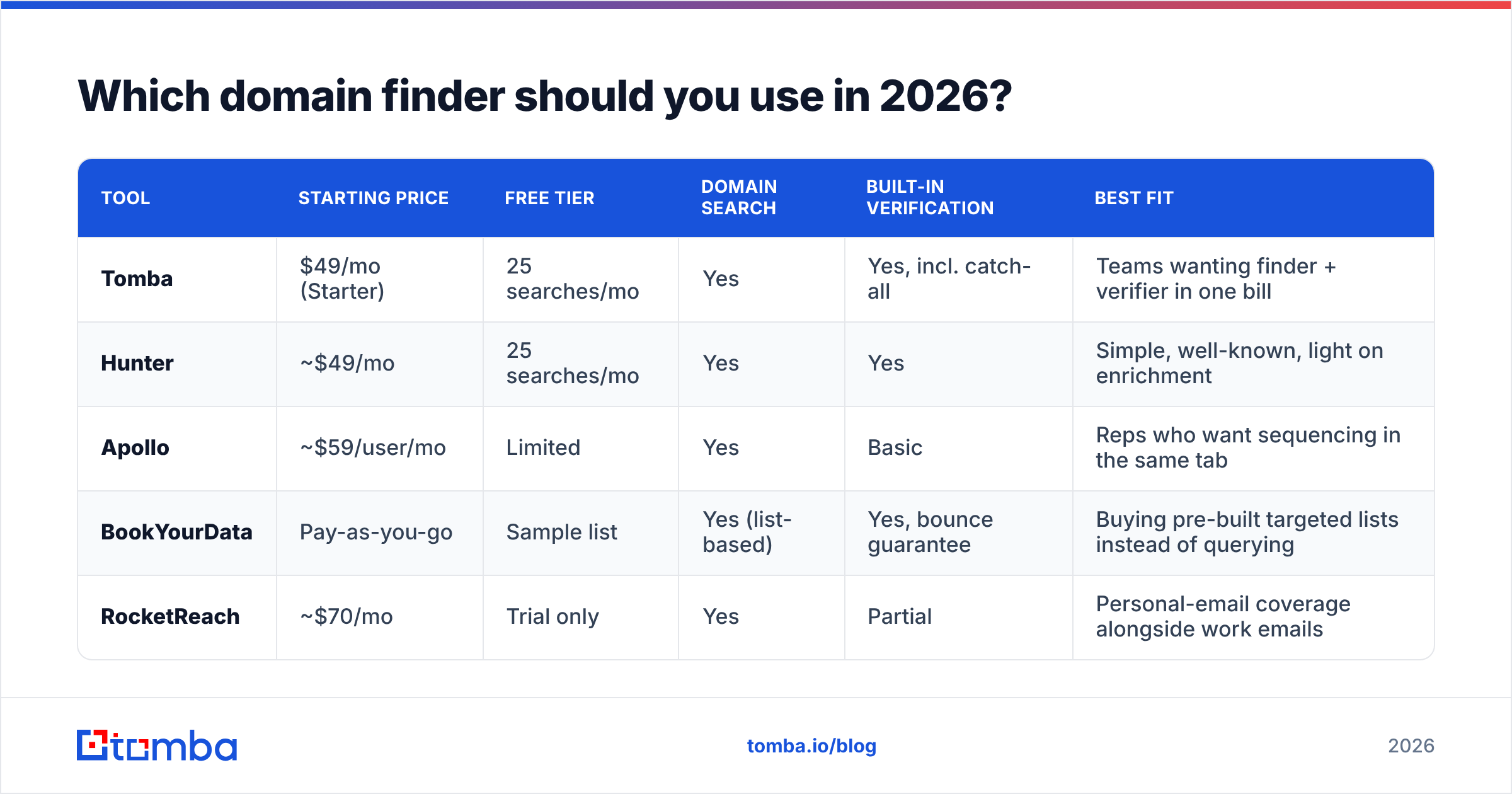
Which domain finder should you use in 2026?#
The category has consolidated. Most tools now fall into one of three buckets: standalone finders, all-in-one sales platforms with a finder bolted on, and verification-first tools that added discovery later.
| Tool | Starting price | Free tier | Domain search | Built-in verification | Best fit |
|---|---|---|---|---|---|
| Tomba | $49/mo (Starter) | 25 searches/mo | Yes | Yes, incl. catch-all | Teams wanting finder + verifier in one bill |
| Hunter | ~$49/mo | 25 searches/mo | Yes | Yes | Simple, well-known, light on enrichment |
| Apollo | ~$59/user/mo | Limited | Yes | Basic | Reps who want sequencing in the same tab |
| BookYourData | Pay-as-you-go | Sample list | Yes (list-based) | Yes, bounce guarantee | Buying pre-built targeted lists instead of querying |
| RocketReach | ~$70/mo | Trial only | Yes | Partial | Personal-email coverage alongside work emails |

A note on fit rather than ranking: BookYourData solves a genuinely different problem. If you want to specify a list — 500 CTOs at Series B SaaS companies in Germany — and receive it, that's a list-purchase motion with a bounce guarantee attached, and it's a legitimate alternative to running hundreds of domain queries yourself. If your motion is "I have 200 target accounts and need the people inside them," a query-based domain finder is the better shape. Many teams run both.
Check independent review volume on G2 before committing — vendor-published accuracy stats in this category are, across the board, measured on samples the vendor chose.
How do you use a domain finder without wasting credits?#
A workflow that respects your allowance:
- Filter the domain list before you query. Strip out domains that are personal (gmail, outlook), parked, or non-corporate. Querying a dead domain still costs you.
- Query with department filters on. Most domain finders let you scope to
sales,engineering,executive. Pulling all 340 emails at a company when you need 4 buyers is the single biggest source of credit waste. - Take the pattern, not just the addresses. Once you know
acme.comuses{f}{last}@, you can construct addresses for names the finder missed — then verify them. A company email pattern lookup is often cheaper than a full domain sweep. - Verify in bulk, not one at a time. Batch verification is faster and usually metered more favorably than per-address calls.
- Push to CRM with a source field. Tag every contact with where it came from and its confidence score. Six months later, when a segment underperforms, you'll know whether it was the message or the data.
- Re-verify anything older than 90 days before reusing it. This is the step everyone skips and everyone regrets.
If you're doing this at volume, the Tomba API handles steps 1–4 programmatically, and there are Chrome, Sheets, and Excel surfaces if you'd rather stay out of code.

What are the legal and compliance limits?#
Short answer: business contact data is treated differently from consumer data in most jurisdictions, but "different" is not "unregulated."
- GDPR (EU/UK). Work emails belonging to identifiable people are personal data. Legitimate interest can be a lawful basis for B2B outreach, but you need a documented balancing test, a clear opt-out in every message, and the ability to honor deletion requests. Country-level rules vary — Germany and France are stricter than Ireland.
- CAN-SPAM (US). No opt-in required for B2B, but you must include a physical address, honest headers, a working unsubscribe, and you must honor opt-outs within 10 business days.
- CASL (Canada). The strictest of the three. Implied consent exists for published business addresses relevant to the recipient's role, but the window is limited and the burden of proof is on you.
- Data provenance. Ask any vendor where their data comes from. If they can't answer clearly, that's your risk, not theirs. Tomba publishes its data sources for this reason.
The compliance-safe pattern is boring and works: target by role relevance, keep messages genuinely relevant to that role, make opting out one click, and delete on request without argument.
What does a good domain finder result actually look like?#
You should get more than an address. A useful result row includes:
- The email address and its confidence score (numeric, not a vague "high/medium/low")
- Verification status — valid, invalid, accept-all, or unknown, as separate states
- Source URLs where the address was observed, if it was observed rather than inferred
- Full name, job title, department, seniority
- Last-seen or last-verified date
- LinkedIn profile URL where available
If a tool gives you an address and a green dot and nothing else, you cannot audit it. The source URL field in particular separates observed data from generated data — and that distinction determines whether you send today or verify first.
For a step further, data enrichment fills in company size, tech stack, funding stage, and headcount growth, which is what actually lets you prioritize the 30 accounts worth a real sequence out of the 300 you just pulled.
Start with the free tier, not the sales call#
Pick two or three real target domains from your ICP — not google.com, actual companies you're trying to reach. Run them through each tool's free tier. Export the results. Verify them independently. Count how many are valid, how many are accept-all, and how many bounce when you actually send.
That 20-minute test tells you more than any vendor benchmark, including the ones in this post.
If you want to run that test now, Tomba's Email Finder includes domain search, pattern detection, catch-all handling, and verification in the same workflow, with 25 free searches a month and no card required. Starter is $49/mo when you're ready to scale — full Tomba pricing is public, with no per-seat surcharge for adding teammates. Run your three domains, compare the valid-rate against whatever you're using today, and let the bounce numbers decide.
Related guides#
Ready to find emails that actually work?
Join 150,000+ professionals who stopped guessing and started sending. Free credits on signup — no credit card required.
Get the Tomba newsletter
Practical outbound tactics and product updates — once every two weeks.
About the author