Domain Search Tool Guide 2026: Find Emails by Domain
A domain search tool turns one company URL into a verified list of work emails, roles, and patterns. Here's how the tech works, what accuracy claims really mean, and how the main options compare in 2026.
TL;DR
- A domain search tool takes one company domain (
stripe.com) and returns the work email addresses attached to it, plus the pattern those addresses follow, plus job titles and sources where available. - The accuracy number a vendor advertises is almost never the number you get. It's measured on their easiest segment — big US tech companies with public email footprints — not on your ICP.
- Pattern inference plus SMTP verification is what separates a usable tool from an email permutator with a nice UI. Ask which one you're paying for.
- Price per verified email matters more than price per credit. A $0.02 credit that returns a bounce costs you more than a $0.10 credit that lands.
- Tomba's domain search starts free at 25 searches/mo and $49/mo on Starter; Hunter, Apollo, Snov.io, and BookYourData each win on a different axis. The comparison table below shows which.
What is a domain search tool?#
A domain search tool is a reverse lookup: you give it a company domain, it gives you the people. Think of it as a phone book that got rebuilt from scratch every week by crawling the open web — except instead of listing everyone alphabetically, it groups them by employer.
Concretely, you type figma.com into the search box and get back something like:
dylan@figma.com— CEO — found on 3 sources, verifiedpress@figma.com— generic — verified- 40+ additional addresses with confidence scores
- The detected pattern:
{first}@figma.com
That last line is the one that actually matters at scale. Once a tool knows the pattern a company uses, it can construct an address for any employee whose name you have — from LinkedIn, from a conference speaker list, from a G2 review. The pattern is the leverage; the individual emails are just the evidence used to derive it.
This is different from an email finder, which goes the other direction: you supply a person's name and their company, and it returns one address. Domain search is discovery (who works here?). Email finder is resolution (what's this specific person's address?). Most serious prospecting workflows use both, in that order.

How does domain search actually find emails?#
Four mechanisms, stacked. Understanding which ones a vendor uses tells you more than any accuracy badge on their homepage.
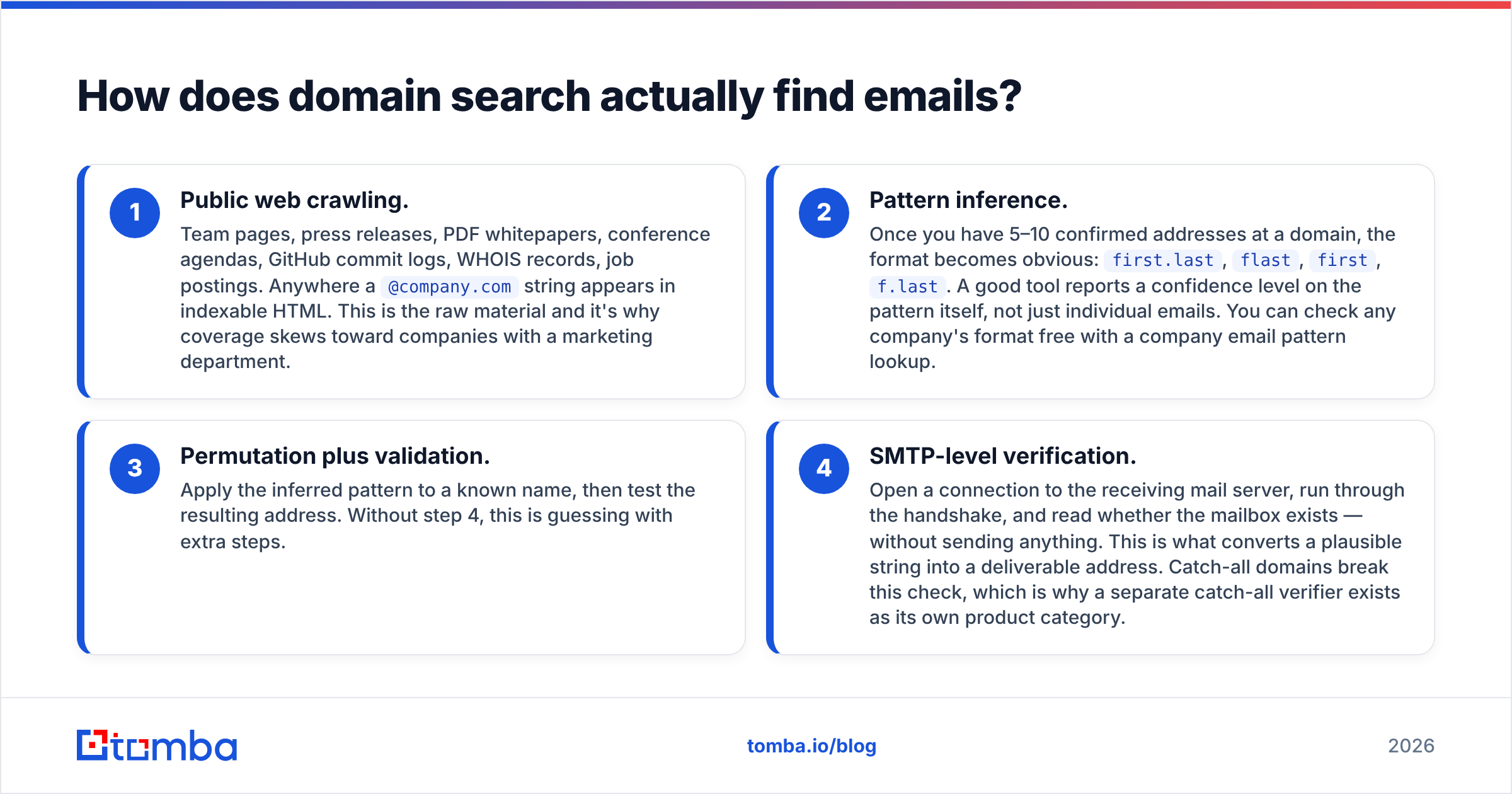
- Public web crawling. Team pages, press releases, PDF whitepapers, conference agendas, GitHub commit logs, WHOIS records, job postings. Anywhere a
@company.comstring appears in indexable HTML. This is the raw material and it's why coverage skews toward companies with a marketing department. - Pattern inference. Once you have 5–10 confirmed addresses at a domain, the format becomes obvious:
first.last,flast,first,f.last. A good tool reports a confidence level on the pattern itself, not just individual emails. You can check any company's format free with a company email pattern lookup. - Permutation plus validation. Apply the inferred pattern to a known name, then test the resulting address. Without step 4, this is guessing with extra steps.
- SMTP-level verification. Open a connection to the receiving mail server, run through the handshake, and read whether the mailbox exists — without sending anything. This is what converts a plausible string into a deliverable address. Catch-all domains break this check, which is why a separate catch-all verifier exists as its own product category.
The gap between tools is almost entirely in steps 2 and 4. Plenty of cheap tools do 1 and 3 and call it a day. You find out when your bounce rate hits 12% and your domain reputation tanks.
Why do published accuracy rates mislead you?#
Because the denominator is chosen by the vendor.
When a tool advertises "98% accuracy," ask three questions: accuracy on which sample, measured how, and counting what as a failure? Vendors typically benchmark against a set of well-indexed North American SaaS companies with 200+ employees. On that sample, nearly everyone scores in the nineties. On a 15-person manufacturing firm in Lyon, the same engine might return nothing at all — and "no result" often isn't counted as a miss, only a wrong result is.
Here's the honest framing: coverage and accuracy trade off against each other. A tool that only returns emails it's certain about will show a beautiful accuracy rate and a thin result set. A tool that returns everything plausible will show high coverage and burn your sender reputation. Neither number is meaningful alone.
What to measure instead: run 100 domains from your actual target list through a free tier, export the results, and compute verified emails per domain searched. That single metric folds coverage and accuracy together and is the only one that predicts your pipeline. It also exposes the tools that quietly return catch-all addresses as "valid."

One more trap: accuracy decays. Contact databases go stale at roughly 25–30% per year through job changes alone, a figure HubSpot and most CRM vendors have cited for years. A tool that re-crawls continuously beats a tool with a bigger but frozen static database, even if the static one looked better on day one.
Which domain search tool should you use in 2026?#
The honest answer depends on whether you need depth on a few accounts or breadth across thousands, and whether you already pay for a sales engagement platform.
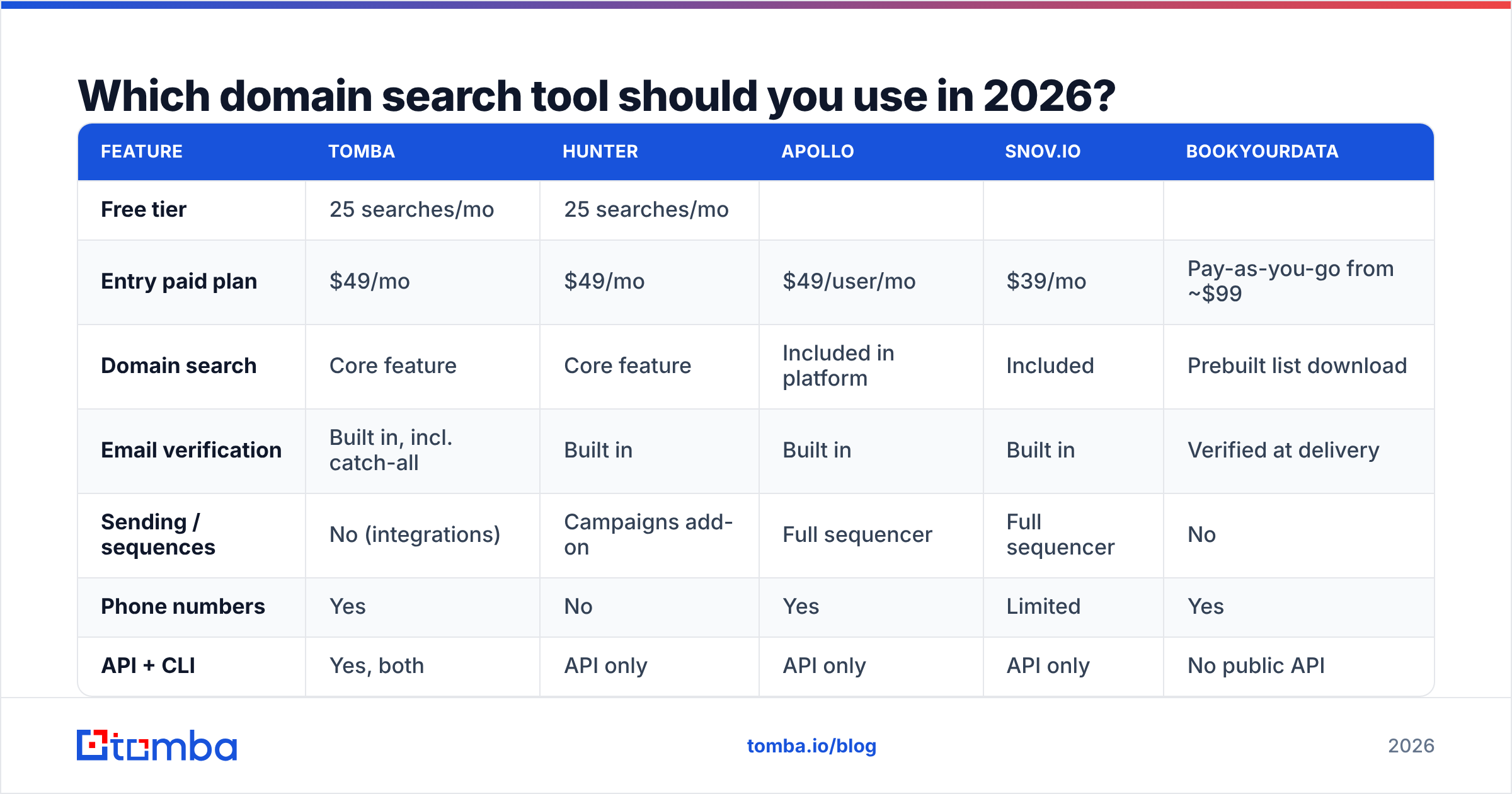
| Feature | Tomba | Hunter | Apollo | Snov.io | BookYourData |
|---|---|---|---|---|---|
| Free tier | 25 searches/mo | 25 searches/mo | |||
| Limited credits | 50 credits/mo | Sample list on request | |||
| Entry paid plan | $49/mo | $49/mo | $49/user/mo | $39/mo | Pay-as-you-go from ~$99 |
| --- | --- | --- | --- | --- | --- |
| Domain search | Core feature | Core feature | Included in platform | Included | Prebuilt list download |
| Email verification | Built in, incl. catch-all | Built in | Built in | Built in | Verified at delivery |
| Sending / sequences | No (integrations) | Campaigns add-on | Full sequencer | Full sequencer | No |
| Phone numbers | Yes | No | Yes | Limited | Yes |
| API + CLI | Yes, both | API only | API only | API only | No public API |
| Best fit | Data accuracy, dev workflows | Simple lookups | All-in-one outbound | SMB outbound on a budget | Instant verified lists, no credits |

Read that table as five different products that happen to share one feature, not as a ranking.
Tomba is the right call when data quality is the constraint and you want to wire lookups into your own systems — the Tomba API, CLI, and MCP server mean domain search can run inside a script, a Zapier step, or an AI agent rather than a browser tab. Pricing runs free (25 searches), Starter $49/mo, Growth $99/mo, Pro $249/mo.
Hunter is the category's default and has the cleanest single-domain UI. If one person on your team does occasional lookups, it's hard to argue against.
Apollo bundles domain search into a full engagement platform. You're not buying a domain search tool; you're buying a sequencer that includes one. Fine if you want consolidation, expensive if you already have Outreach or Salesloft.
Snov.io competes on price for SMB teams that want finding and sending in one place.
BookYourData takes a genuinely different route: instead of searching domains one at a time, you filter a pre-verified database by industry, title, and geography, then download. For teams that want a clean list today without managing credit budgets or verification workflows, that model removes a lot of friction — and their bounce guarantee is a real commitment, not marketing copy.

How do you evaluate a domain search tool without wasting a month?#
Run a structured 90-minute trial. Every tool listed above has a free tier or trial, so this costs you time, not money.
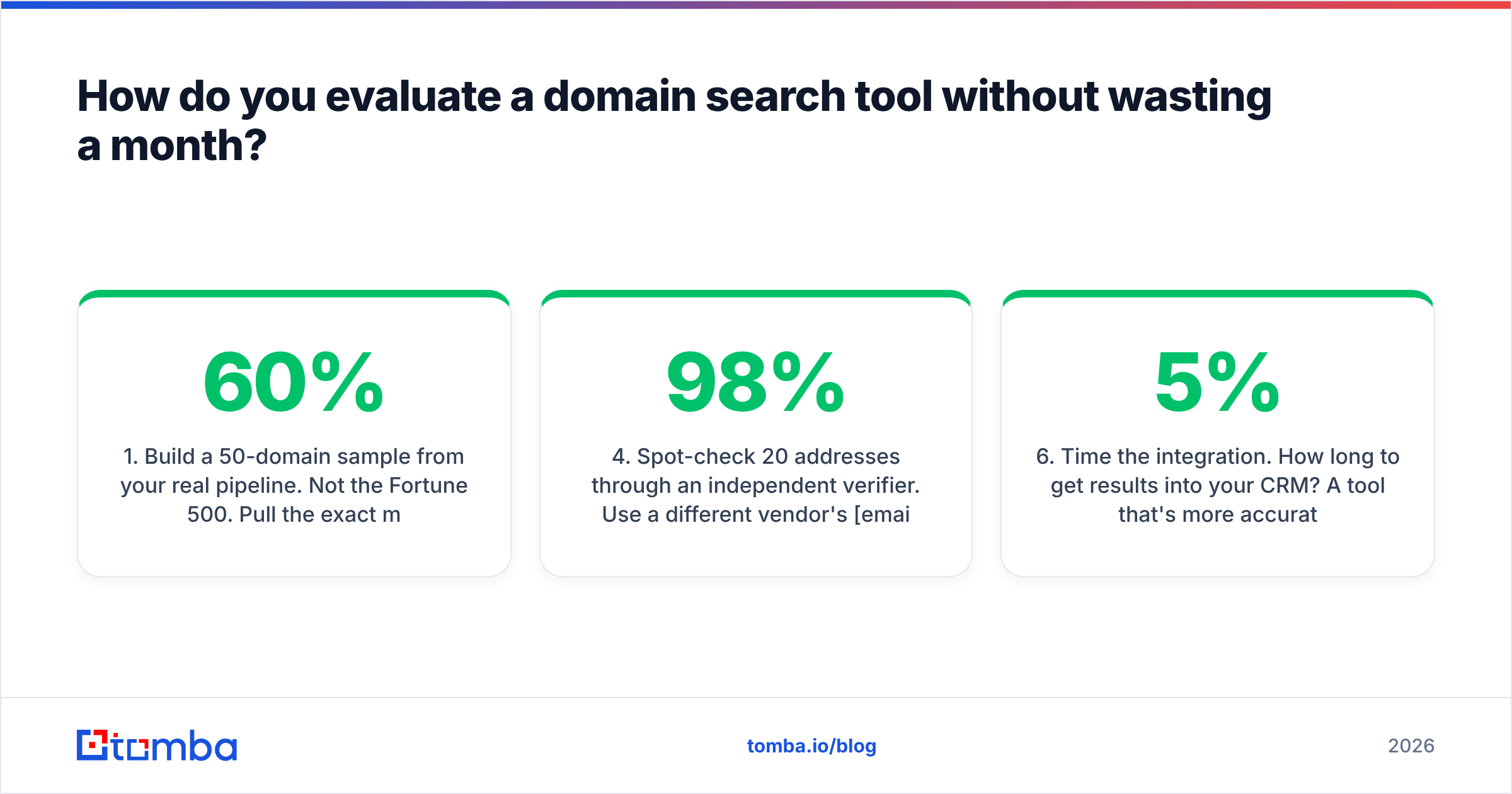
- Build a 50-domain sample from your real pipeline. Not the Fortune 500. Pull the exact mix of company sizes, countries, and industries you actually sell to. If 60% of your accounts are European sub-100-employee firms, your sample is 60% European sub-100-employee firms.
- Run the same 50 domains through 2–3 tools. Export raw CSVs from each. Don't eyeball the UI — the UI is designed to make thin results feel full.
- Count verified emails per domain, not total rows. Strip out catch-all and "accept-all" results into a separate bucket. They're not the same asset as a confirmed mailbox and shouldn't be counted as one.
- Spot-check 20 addresses through an independent verifier. Use a different vendor's email verifier than the one that found the address. Self-graded homework is how 98% accuracy claims survive.
- Test the pattern output, not just the emails. Take a person you know works at a sampled company but who wasn't returned. Apply the tool's inferred pattern, verify the result. If the pattern holds, the tool has real leverage for you.
- Time the integration. How long to get results into your CRM? A tool that's 5% more accurate but needs a manual CSV round-trip loses to one with a native HubSpot integration or a working API.
Whatever comes out of step 3 divided by your monthly plan cost is your true cost per verified contact. Compare that number, not the sticker price.
When is domain search the wrong tool?#
Three situations where you should reach for something else.
When you already have the names. If you've scraped a LinkedIn Sales Navigator list of 400 specific people, domain search is the long way around. Use a bulk email finder that takes name + company pairs directly, or a LinkedIn finder that resolves profiles to addresses.
When you're targeting individuals, not companies. Freelancers, consultants, and creators often use Gmail or a personal domain with one mailbox. Domain search returns one result and you've spent a credit learning what you could have guessed.
When the company is genuinely dark. Some organizations — defense contractors, certain financial firms, small European businesses under strict privacy postures — have no public email footprint at all. No tool will manufacture one. If your ICP is mostly dark companies, budget for phone-first outbound and use a phone finder instead of burning email credits on empty results.
When compliance is the binding constraint. Under GDPR, "publicly available" is not automatically a lawful basis for processing. B2B outbound to work addresses generally rests on legitimate interest, but you need a documented balancing test, a working opt-out, and honest source records. Check what your vendor publishes about data sources before your first send, not after a complaint. G2 reviews are useful here — buyers mention compliance friction that vendor pages never will.
What should you look for in the API?#
If you're doing more than a hundred lookups a month, the UI stops mattering and the API becomes the product.
- Rate limits and burst behavior. Ask what happens at the ceiling — hard 429s or a queue? A hard fail mid-batch means writing retry logic you shouldn't need to write.
- Response shape. Does each result carry a confidence score, a verification status, and the sources it was found on? Sources are what let you audit a bad result instead of guessing.
- Credit accounting. Does a search that returns zero emails consume a credit? Policies differ, and on a large batch of long-tail domains the difference is significant.
- Webhook or async support. Bulk domain searches take time. Polling a synchronous endpoint for 5,000 domains is a bad afternoon.
- Native surfaces beyond REST. A CLI, a Google Sheets add-on, or an MCP server for AI agents means non-engineers can run lookups without filing a ticket.
What does a good domain search workflow look like end to end?#
Here's the sequence that survives contact with a real quarter:
Step 1 — Account list. Start with 200–500 target domains from your ICP definition, not from a purchased list of 50,000. Precision at this stage compounds through every later step.
Step 2 — Domain search sweep. Run all domains, capture emails, titles, and the inferred pattern for each. Expect 60–75% of domains to return something usable if your ICP is well-indexed; lower for small international firms.
Step 3 — Fill the gaps with pattern application. For domains that returned a pattern but not your specific target, apply the pattern to names you have and verify each result. This is where the email permutator plus verification combo earns its keep.
Step 4 — Verify everything before it enters the CRM. Non-negotiable. Bounce rate above 3% starts damaging email deliverability, and Google and Yahoo have both tightened bulk-sender requirements since 2024. A dirty list doesn't just underperform — it degrades every campaign that follows.
Step 5 — Enrich, then segment. Layer on company size, tech stack, and funding signals via data enrichment so your sequences can actually say something specific.
Step 6 — Re-run quarterly. Job changes invalidate a quarter to a third of your list every year. Set a recurring sweep on your top accounts rather than discovering the decay through bounce reports.
Frequently asked questions#
Is using a domain search tool legal? In most jurisdictions, collecting publicly available business contact information is lawful, but sending is regulated separately — CAN-SPAM in the US, GDPR and PECR in Europe, CASL in Canada. The tool isn't your compliance risk; your send practice is. Keep an opt-out in every message and honor it immediately.
How many emails should one domain return? For a well-indexed 200-person SaaS company, 20–60 is normal. For a 12-person agency, 1–5. If a tool returns 300 addresses for a 50-person company, it's likely padding with permutations it never verified.
Can domain search find catch-all domains? It can find the addresses, but it can't confirm them through standard SMTP checks, because catch-all servers accept everything. Use a dedicated catch-all finder that applies alternative signals, and treat those addresses as a lower-confidence tier in your sequencing.
Is free domain search good enough? For under 25 lookups a month, yes — most free tiers cover casual use. Past that, the constraint isn't the search count, it's verification volume. Free tiers rarely include enough verification credits to keep a real list clean.
Start with the domain, not the spreadsheet#
The teams that win at outbound aren't the ones with the biggest lists. They're the ones whose lists are small, current, and verified — because every bounced send costs them reputation they'd need weeks to rebuild.
Pick your 50 most important target accounts, run them through Tomba Email Finder and its domain search alongside one competitor, and measure verified emails per domain. The free tier gives you 25 searches to start; Starter at $49/mo covers most solo prospectors, and Tomba pricing scales to $99/mo Growth and $249/mo Pro when you're running the whole motion through the API. Whatever you pick, pick it on your own data — not on someone's homepage badge.
Related guides#
Ready to find emails that actually work?
Join 150,000+ professionals who stopped guessing and started sending. Free credits on signup — no credit card required.
Get the Tomba newsletter
Practical outbound tactics and product updates — once every two weeks.
About the author