Domain to Company Name: How to Resolve Any URL in 2026
Turning a raw domain into the right company name sounds trivial until you hit holding companies, rebrands, and parked URLs. Here's how domain-to-company-name resolution actually works, which tools do it well, and how to keep your CRM clean.
TL;DR
- Domain to company name resolution maps a raw URL (
stripe.com) to a canonical business identity (Stripe, Inc.) plus firmographics — industry, size, location, logo. - The hard part isn't the lookup. It's disambiguation: holding companies, rebrands, regional subsidiaries, parked domains, and email-service domains all break naive matching.
- Expect 85–95% match rates on established company domains and 50–70% on long-tail SMB domains. Any vendor claiming 99% is measuring something narrower than you are.
- Pick your tool by workflow, not logo count: a spreadsheet enrichment add-on, a REST API, or a bulk CSV run each have different cost curves.
- Normalize before you write to the CRM. Suffix stripping, alias mapping, and a confidence threshold prevent the duplicate-account mess that kills reporting.
What is domain-to-company-name resolution?#
Domain to company name resolution is the process of taking a website domain and returning the business that operates it, along with the attributes you need to act on that record.
Think of it like a reverse phone book. You have the address on the envelope; you want to know who lives there and whether they're the household you were trying to reach. A phone book works because someone maintains the mapping. Domain-to-company data works the same way — a provider crawls, parses, and reconciles public signals into a single record you can query.
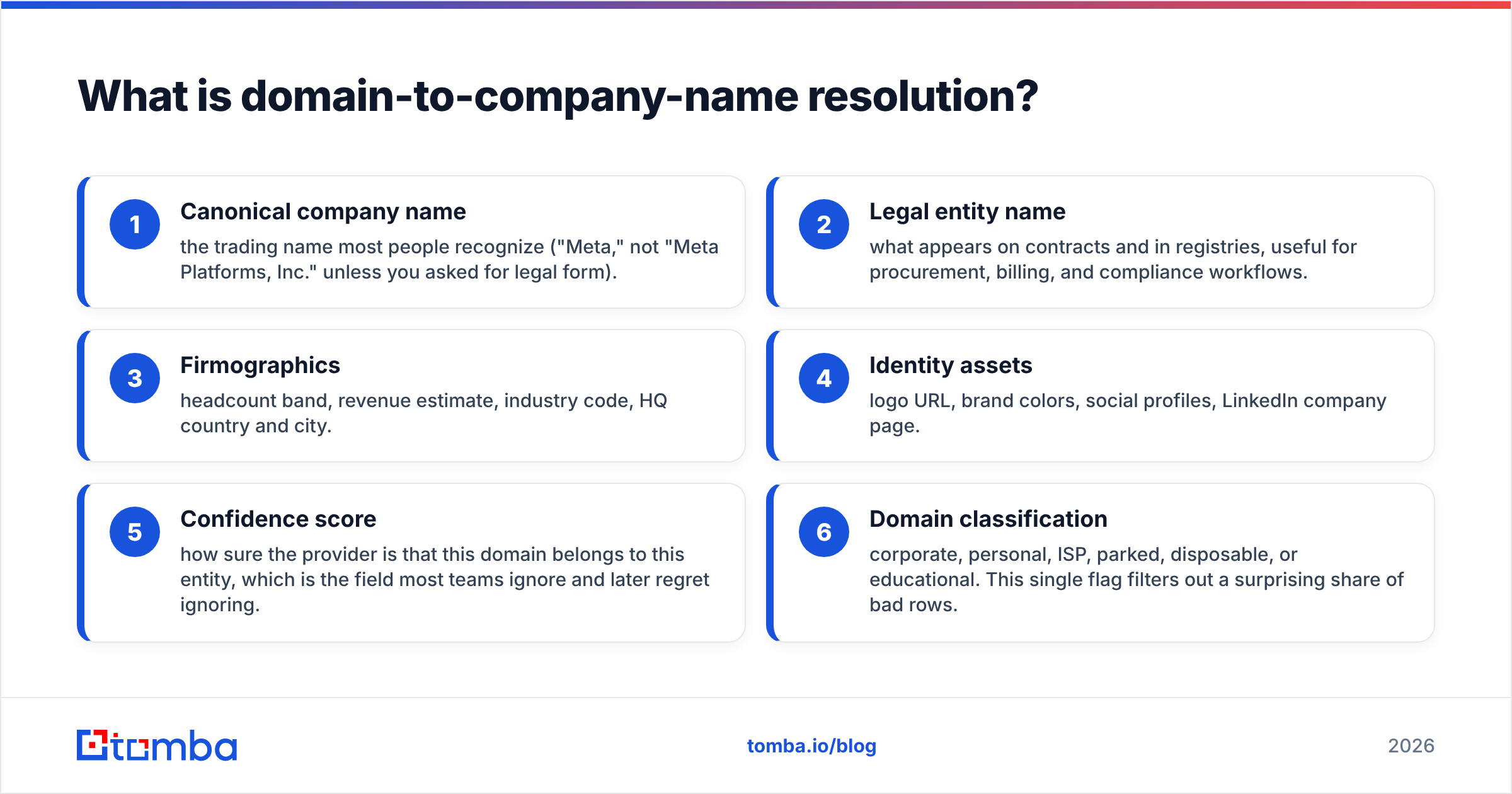
A complete resolution returns more than a string:
- Canonical company name — the trading name most people recognize ("Meta," not "Meta Platforms, Inc." unless you asked for legal form).
- Legal entity name — what appears on contracts and in registries, useful for procurement, billing, and compliance workflows.
- Firmographics — headcount band, revenue estimate, industry code, HQ country and city.
- Identity assets — logo URL, brand colors, social profiles, LinkedIn company page.
- Confidence score — how sure the provider is that this domain belongs to this entity, which is the field most teams ignore and later regret ignoring.
- Domain classification — corporate, personal, ISP, parked, disposable, or educational. This single flag filters out a surprising share of bad rows.
If your provider only gives you item one, you're getting a lookup, not enrichment. The difference shows up the moment you try to route a lead by industry or territory.
Why is turning a domain into a company name harder than it looks?#
Because domains and companies are not a clean one-to-one relationship, and they never have been.
Here are the failure modes that break naive matching:
- One company, many domains. Alphabet operates
google.com,abc.xyz,youtube.com, and hundreds of country-code variants. Which one is "the" company record depends on what you're doing. - One domain, many companies. Agencies, incubators, and shared-hosting setups can put multiple operating entities behind one web presence.
- Rebrands and acquisitions. Facebook became Meta. Twitter became X. Your CRM still has both, and your reporting counts them separately.
- Holding-company noise.
contoso-holdings.commay be the parent of the entity your prospect actually works for. Sales cares about the operating unit; finance cares about the parent. - Non-corporate domains. Free mail providers, ISPs, and universities aren't companies in the sense your pipeline means. Treating
gmail.comas an account is how you end up with a 40,000-contact "Google" record. - Parked and expired domains. A domain that resolved to a real business in 2022 may be a parking page today. Stale datasets happily return the old name.
WHOIS used to solve part of this. Then GDPR-era redaction gutted registrant fields for most domains, and privacy proxies covered the rest. Today, WHOIS tells you a registrar and a creation date. It rarely tells you who the company is.
How do domain-to-company-name tools actually work?#
They stack signals and reconcile them. No single source is reliable alone, so providers blend several and score the agreement between them.
The typical signal stack, in rough order of weight:
- On-page extraction — the
<title>tag, schema.orgOrganizationmarkup, Open Graph metadata, footer copyright line, and the "About" page. The footer copyright is quietly one of the best legal-name sources on the web. - Structured registries — company registers, trademark databases, and stock-exchange listings, matched by name and country.
- Professional network data — company pages that self-declare a website field, which gives a direct domain-to-entity edge.
- DNS and MX records — MX host tells you the mail provider; SPF and DMARC records often name the parent org. Useful for detecting shared infrastructure.
- Email pattern evidence — the domains appearing in verified business email addresses confirm a domain is genuinely corporate and in use.
- Cross-source reconciliation — the fusion step. When four sources agree on "Shopify Inc." and one says "Jaded Pixel Technologies" (Shopify's former name), the model picks a winner and records how close the vote was.
That last step is where quality separates. Anyone can scrape a title tag. Deciding that jadedpixel.com and shopify.com are the same lineage requires history, and history is expensive to maintain.
Which domain-to-company-name tools are worth using in 2026?#
The market splits into three shapes: enrichment platforms that treat domain-to-company as one field among many, brand/logo APIs that focus on identity assets, and free utilities that solve one lookup at a time.
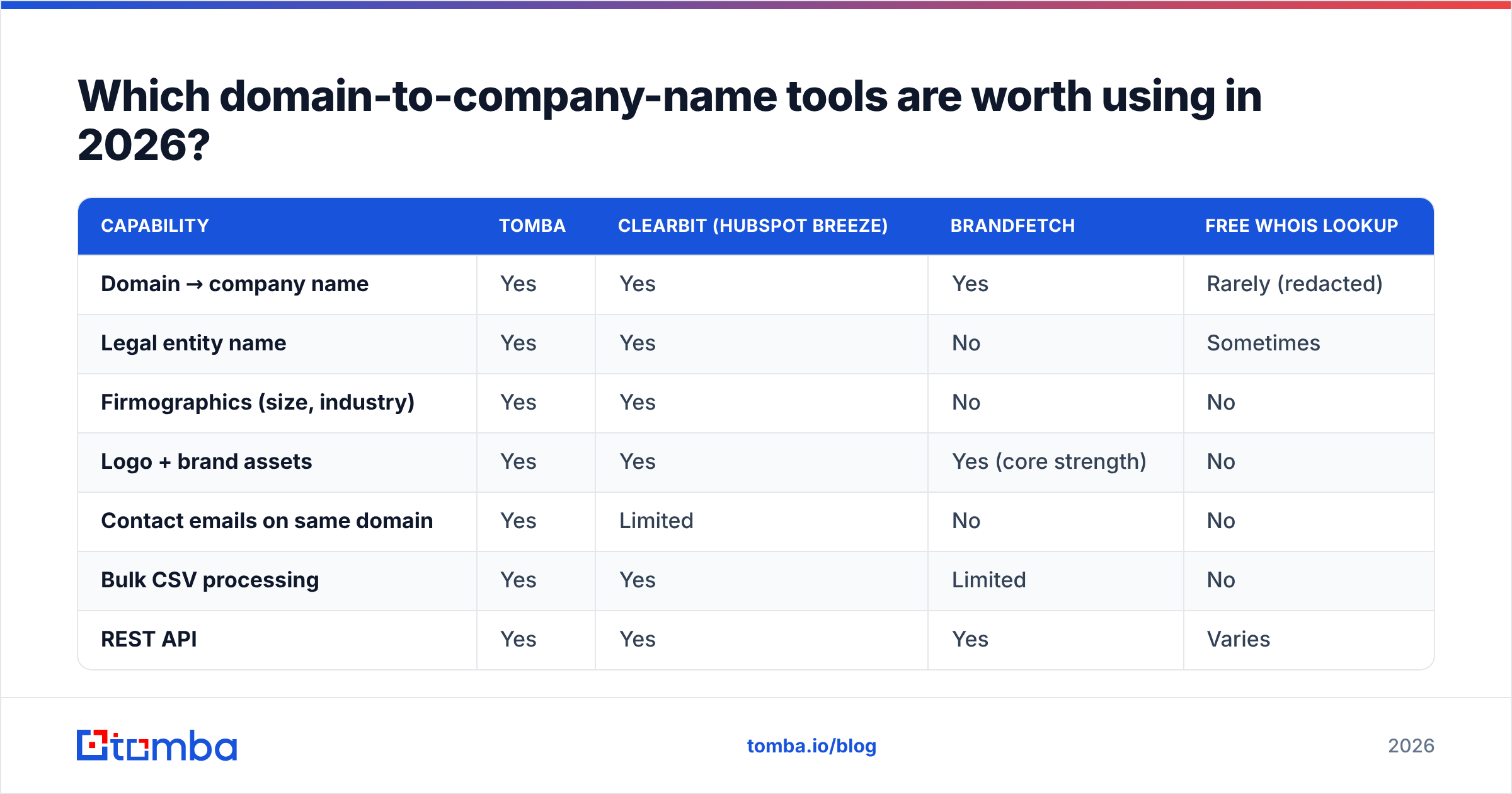
| Capability | Tomba | Clearbit (HubSpot Breeze) | Brandfetch | Free WHOIS lookup |
|---|---|---|---|---|
| Domain → company name | Yes | Yes | Yes | Rarely (redacted) |
| Legal entity name | Yes | Yes | No | Sometimes |
| Firmographics (size, industry) | Yes | Yes | No | No |
| Logo + brand assets | Yes | Yes | Yes (core strength) | No |
| Contact emails on same domain | Yes | Limited | No | No |
| Bulk CSV processing | Yes | Yes | Limited | No |
| REST API | Yes | Yes | Yes | Varies |
| Entry price | Free tier (25 searches/mo), then $49/mo | Bundled with HubSpot tiers | Free tier, paid from ~$29/mo | Free |
| Best for | Sales teams that need contacts, not just company names | Existing HubSpot shops | Design and brand display use cases | One-off manual checks |
A few honest caveats on that table.
Clearbit's standalone product was absorbed into HubSpot's data layer, which is excellent if you already live in HubSpot and awkward if you don't. Check current packaging on hubspot.com before budgeting, because the pricing model changed with the acquisition.
Brandfetch is genuinely the best option if what you need is a logo, a color palette, and a font — brand identity rather than firmographics. It is not a sales-data tool and doesn't pretend to be.
Tomba approaches the problem from the contact side. Its website-to-company lookup resolves the domain, and its domain search returns the actual people and email patterns behind that domain in the same workflow. If your end goal is outreach rather than a dashboard, collapsing those two steps matters more than a marginal difference in name-match accuracy.
BookYourData is worth a look when your need runs the other direction — you want a pre-built list of companies matching a profile rather than resolving domains you already hold. Different starting point, complementary use case.
For broader vendor comparison, G2's data enrichment category has enough review volume to be useful for spotting support and billing complaints that never show up on a pricing page.
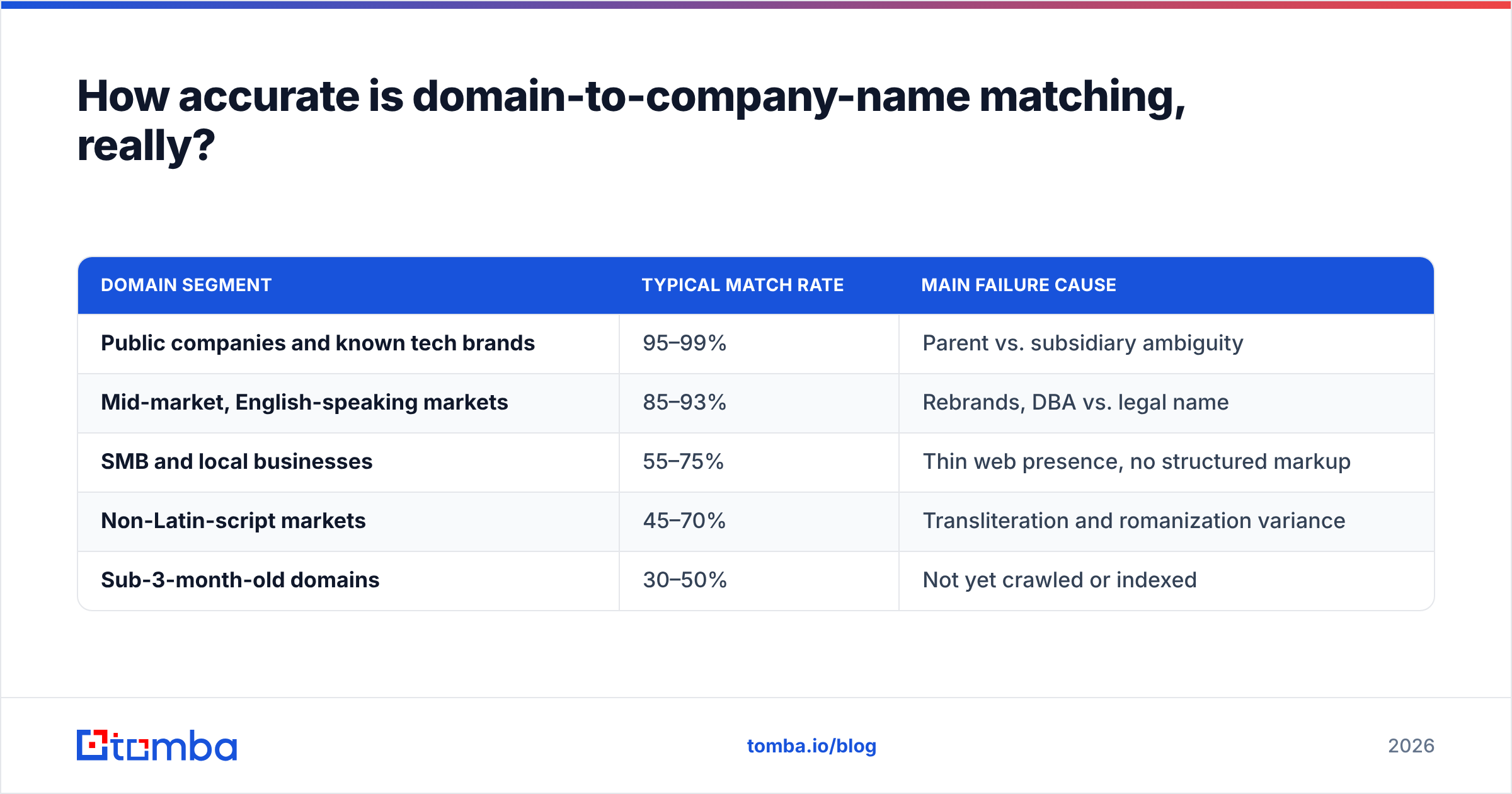
How accurate is domain-to-company-name matching, really?#
Accuracy depends almost entirely on the shape of your input list, and vendors know this when they publish their numbers.
Realistic expectations by segment:
| Domain segment | Typical match rate | Main failure cause |
|---|---|---|
| Public companies and known tech brands | 95–99% | Parent vs. subsidiary ambiguity |
| Mid-market, English-speaking markets | 85–93% | Rebrands, DBA vs. legal name |
| SMB and local businesses | 55–75% | Thin web presence, no structured markup |
| Non-Latin-script markets | 45–70% | Transliteration and romanization variance |
| Sub-3-month-old domains | 30–50% | Not yet crawled or indexed |
Two practical implications.
First, benchmark on your own list. Pull 200 domains from your actual ICP, run them through two or three vendors' free tiers, and hand-check the results. The vendor whose benchmark deck looks best is often not the vendor that wins on your specific segment mix, and a two-hour test settles it permanently.
Second, use the confidence score as a routing key, not decoration. A workable policy: auto-write above 0.85, queue for human review between 0.60 and 0.85, discard below 0.60. That one rule prevents most of the downstream mess.
How do you build a domain-to-company-name workflow that scales?#
Resolution is step three of five. The steps around it are what determine whether the output is usable.
Step 1 — Clean the input. Strip protocols, www., trailing slashes, query strings, and paths. Lowercase everything. Convert internationalized domains to punycode consistently. Roughly a tenth of "no match" results in a typical list are formatting artifacts, not data gaps.
Step 2 — Filter non-corporate domains. Drop free-mail, ISP, and disposable domains before you spend a credit on them. Every provider charges you the same for a hotmail.com lookup that was never going to resolve to a company.
Step 3 — Resolve. Call the API. Batch where the provider supports it; per-record calls at scale burn both rate limits and money. Tomba's enrichment endpoints and bulk processing both handle list-sized jobs, and the API docs spell out the rate ceilings per plan.
Step 4 — Normalize the output. This is the step teams skip. Strip legal suffixes (Inc., Ltd., GmbH, S.A., Pty) into a separate field rather than deleting them. Maintain an alias table for rebrands, so "Twitter" and "X Corp." collapse to one record. Casefold consistently. Without this, "Acme Inc" and "Acme, Inc." become two accounts and your pipeline report double-counts revenue.
Step 5 — Set a refresh cadence. Company data decays at roughly 25–30% a year through rebrands, acquisitions, headcount swings, and closures. Re-enrich active accounts quarterly and dormant ones annually. Stamp every record with a last_enriched_at date so you can tell stale data from missing data.
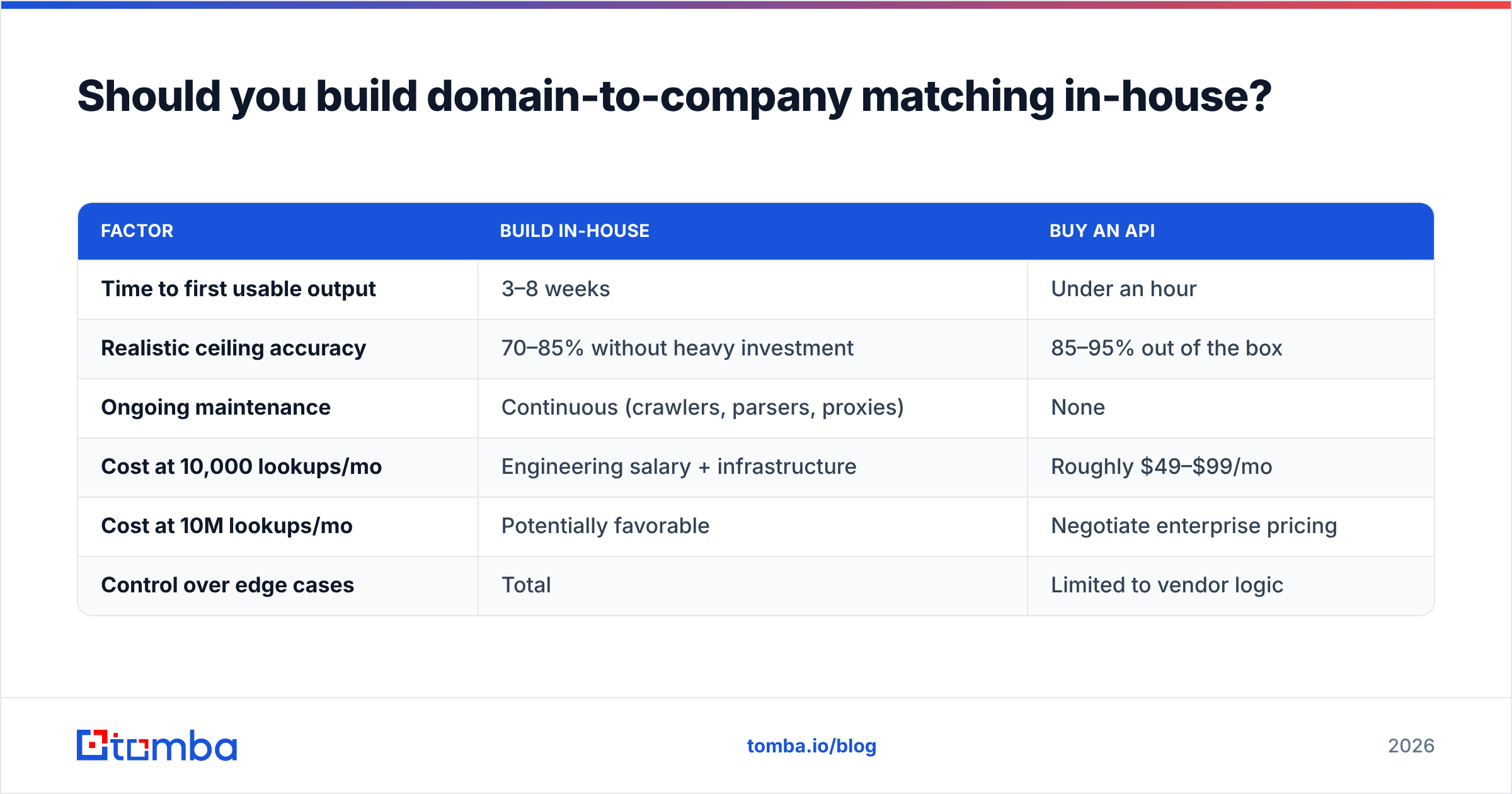
Should you build domain-to-company matching in-house?#
Build it if the mapping is a product feature and you control a proprietary signal nobody else has. Buy it if it's an internal workflow.
The build case looks cheap for a week. You scrape a title tag, strip the suffix, and 70% of your test list resolves. Then the tail arrives: JavaScript-rendered pages, Cloudflare challenges, non-English markup, redirect chains, companies whose title tag is a marketing slogan with no name in it. The last 20% of accuracy costs more engineering time than the first 80%, and it never stops costing — crawlers break, sites redesign, entities merge.
| Factor | Build in-house | Buy an API |
|---|---|---|
| Time to first usable output | 3–8 weeks | Under an hour |
| Realistic ceiling accuracy | 70–85% without heavy investment | 85–95% out of the box |
| Ongoing maintenance | Continuous (crawlers, parsers, proxies) | None |
| Cost at 10,000 lookups/mo | Engineering salary + infrastructure | Roughly $49–$99/mo |
| Cost at 10M lookups/mo | Potentially favorable | Negotiate enterprise pricing |
| Control over edge cases | Total | Limited to vendor logic |
The crossover is real but sits further out than most teams estimate. Below a few million lookups a month, buying wins on total cost almost every time.
What's the difference between legal name, trade name, and brand name?#
They diverge more often than you'd think, and picking the wrong one breaks specific downstream systems.
- Legal entity name — the registered name: "Alphabet Inc.", "Shopify Inc." Use it for contracts, invoicing, KYC, and procurement portals.
- Trade name / DBA — what the business operates as, which may differ entirely from its registration. Use it for anything a human reads.
- Brand name — the consumer-facing mark, which may be one of many owned by a single entity. Use it for personalization and display.
For cold outreach, the brand name is nearly always right. Writing "I noticed Alphabet Inc. is hiring" reads like a form letter, because it is one. Writing "I noticed Google is hiring" reads like a person. Store all three fields; render the brand name in copy and reserve the legal name for the paperwork.
Common questions#
Can you get a company name from a domain for free? Partially. Free tiers across most providers cover 25–100 lookups a month, which is enough for spot checks and evaluation. For anything list-sized, you're paying — the question is only whether you pay a vendor or pay an engineer.
Does WHOIS still work for this? Rarely. Post-GDPR redaction and privacy proxies hide registrant details on the majority of domains. Treat WHOIS as a weak corroborating signal, never a primary source.
What match rate should I accept before buying? Test on your own list and set the bar at your segment's realistic ceiling — around 90% for mid-market, 65% for SMB. Weight partial matches with high confidence over full matches with low confidence.
How do I handle subsidiaries? Store parent and operating entity as separate fields with a relationship key. Route sales activity on the operating entity and roll reporting up to the parent. Flattening the hierarchy into one field is a decision you'll reverse within a year.
Where to start#
If you need company names to display in a UI, a brand API is the cheapest correct answer. If you need company names because you're about to contact someone there, resolve the domain and the people in one pass — that's the workflow that actually shortens the path from a URL to a reply.
Tomba's Email Finder sits at that junction: give it a domain, get the company plus the verified contacts and email pattern behind it, then push the whole record into your CRM through the API or a bulk run. The free tier covers 25 searches a month, and paid plans start at $49/mo — enough to benchmark against your own domain list before you commit to anything.
Run 200 of your real domains through it this week. The match rate you get on your list is the only number that matters.
Related guides#
Ready to find emails that actually work?
Join 150,000+ professionals who stopped guessing and started sending. Free credits on signup — no credit card required.
Get the Tomba newsletter
Practical outbound tactics and product updates — once every two weeks.
About the author