Doodle Pricing Reviews Pros and Cons: A 2026 Buyer's Guide
A neutral breakdown of what Doodle actually costs in 2026, what reviewers complain about, and when a group-poll scheduler is the wrong tool for a sales team.
Doodle is one of the best-known scheduling tools on the market. This guide covers Doodle pricing reviews pros and cons in 2026. You'll see what each plan really costs, what users praise, what they complain about, and when a different tool is the better buy.
TL;DR
- Doodle's free tier still works for one-off group polls, but it carries ads and strips branding — fine internally, awkward with prospects.
- Paid plans jump sharply between monthly and annual billing. Annual costs about half the monthly rate. That gap is where most "Doodle is expensive" complaints come from.
- Reviewers consistently praise the group-poll UX and consistently criticize the mobile app, the notification volume, and support responsiveness.
- Doodle is a scheduling tool, not a pipeline tool. It does nothing about who you're scheduling with — that's a data problem, not a calendar problem.
- If your booking rate is low, the bottleneck is almost never the scheduler. It's bad contact data and a weak first touch.
What is Doodle, and who actually uses it?#
Doodle started as a group poll: paste in a few time slots, send one link, let everyone tick their availability, pick the winner. That single feature is still the reason most people know the product. Over the years it grew into a fuller scheduling suite — 1:1 booking pages, sign-up sheets, a bookable calendar, calendar sync with Google, Outlook, and iCloud.
The user base splits into three rough groups:
- Academics, non-profits, and volunteer coordinators — the original crowd. They need to find one time that works for eleven people and they will never pay for it.
- Small business owners and consultants — using the 1:1 booking page as a lightweight Calendly substitute.
- Enterprise teams with meeting-heavy cultures — using Team plans for shared branding, admin control, and SSO.
That third group is where Doodle makes its money. It's also where the pros-and-cons debate gets interesting. That's the point where you start comparing it against Calendly, Microsoft Bookings, HubSpot Meetings, and Google Calendar's own appointment schedules.
Sales teams are a fourth, quieter group — and the one this post is most useful for, because Doodle's fit there is genuinely mixed.
How much does Doodle cost in 2026?#
Here's the structure at the time of writing. Always check current numbers on Doodle's own pricing page before you buy. Scheduling vendors reprice often, and regional pricing varies.
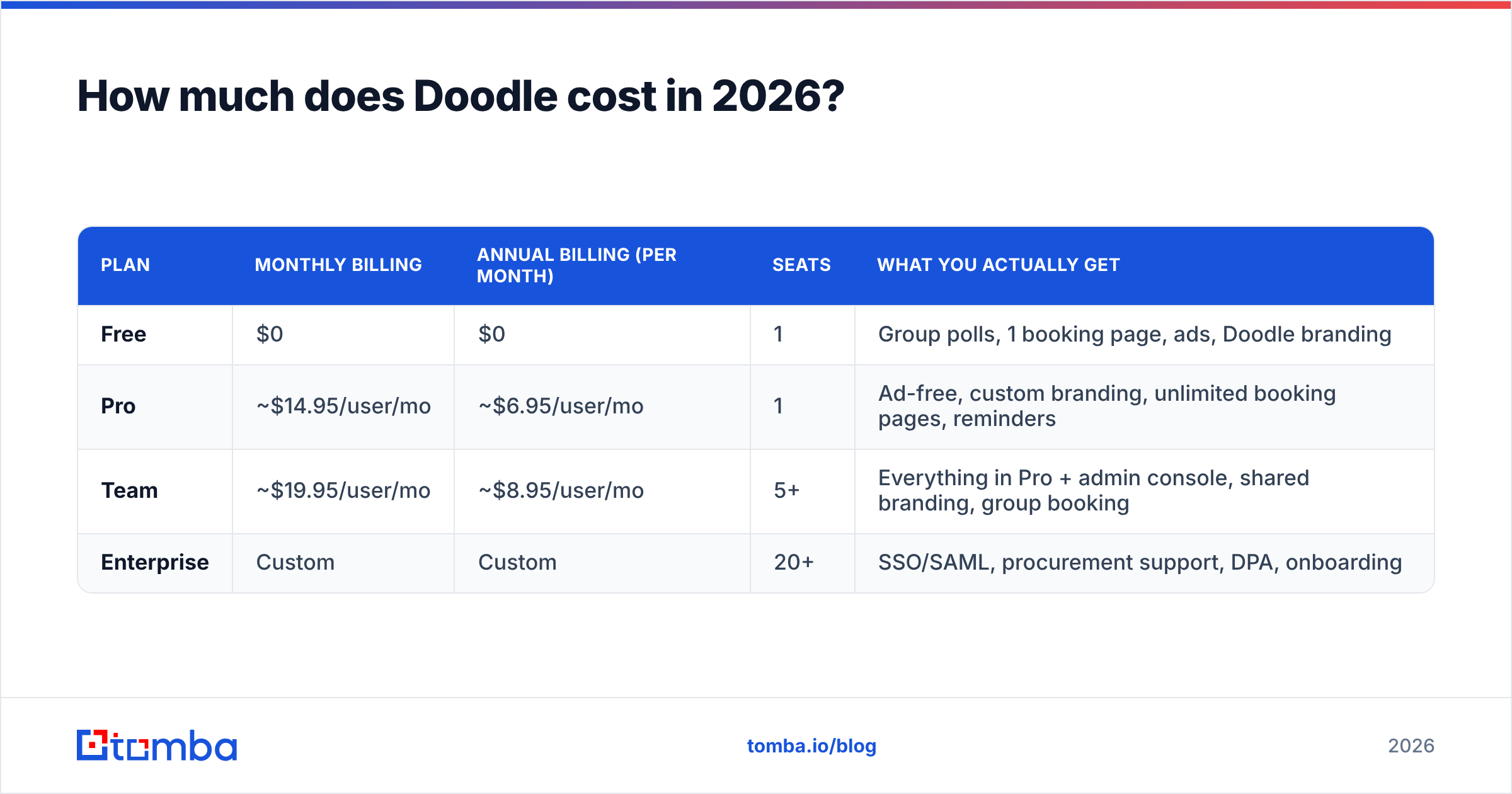
| Plan | Monthly billing | Annual billing (per month) | Seats | What you actually get |
|---|---|---|---|---|
| Free | $0 | $0 | 1 | Group polls, 1 booking page, ads, Doodle branding |
| Pro | ~$14.95/user/mo | ~$6.95/user/mo | 1 | Ad-free, custom branding, unlimited booking pages, reminders |
| Team | ~$19.95/user/mo | ~$8.95/user/mo | 5+ | Everything in Pro + admin console, shared branding, group booking |
| Enterprise | Custom | Custom | 20+ | SSO/SAML, procurement support, DPA, onboarding |
Three things about this table matter more than the headline numbers.
The monthly-to-annual gap is the biggest single lever. Paying month-to-month costs roughly twice as much per user. If you're evaluating Doodle on a monthly plan and calling it expensive, you're comparing the wrong number to competitors' annual pricing. If you're committing annually to a tool you'll use twice a quarter, you're wasting the discount.
Team pricing is per seat with a floor. A five-person sales pod on Team annual lands around $45/month. That's cheap. A thirty-person org lands closer to $270/month, and at that point you're in the same budget conversation as tools that also handle routing, round-robin, and CRM writeback.
"Enterprise" is where SSO lives. This is the standard SaaS pattern and it's worth naming: if your IT team mandates SAML, you are not buying Team, you are buying Enterprise, and the list price stops applying.
Where the hidden costs are#
- Per-seat creep. Schedulers get shared with SDRs, AEs, CS, and recruiting. Budget for the org, not the pilot.
- Duplicate spend. If you already pay for HubSpot, Salesforce, or Microsoft 365, you may already own a scheduler. Check before adding another line item.
- The free-tier tax. Ads and third-party branding on a link you send a prospect is a small credibility cost that's hard to quantify but real.
- Migration friction. Booking links get embedded in email signatures, proposals, and website pages. Switching later means hunting down every instance.
What do Doodle reviews actually say?#
Pull the aggregate review data from G2 and Capterra and a consistent pattern shows up. Doodle scores well overall — typically in the 4.3–4.6 range across thousands of reviews — but the distribution of what people praise and criticize is unusually tight.
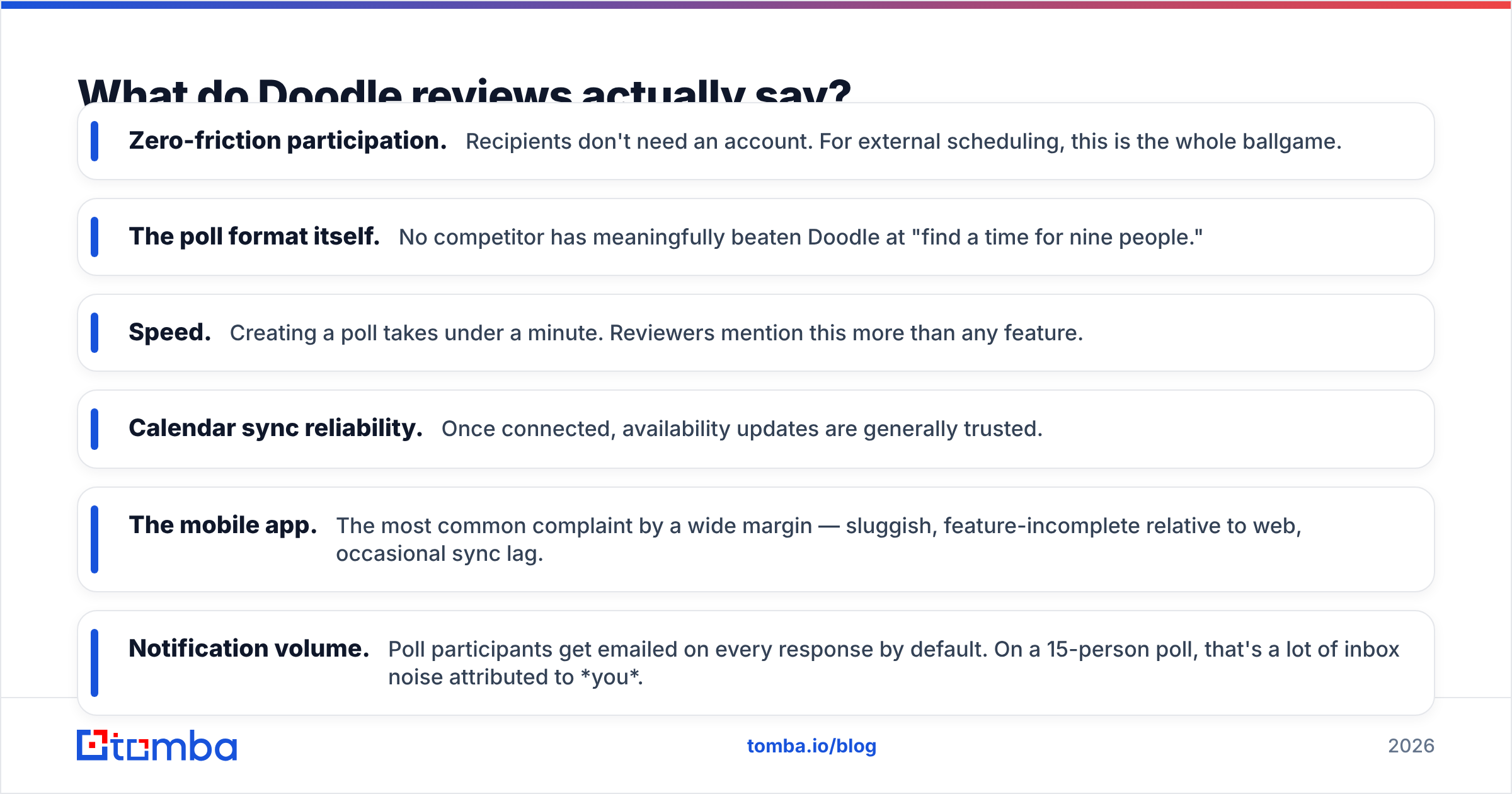
What reviewers repeatedly praise:
- Zero-friction participation. Recipients don't need an account. For external scheduling, this is the whole ballgame.
- The poll format itself. No competitor has meaningfully beaten Doodle at "find a time for nine people."
- Speed. Creating a poll takes under a minute. Reviewers mention this more than any feature.
- Calendar sync reliability. Once connected, availability updates are generally trusted.
What reviewers repeatedly criticize:
- The mobile app. The most common complaint by a wide margin — sluggish, feature-incomplete relative to web, occasional sync lag.
- Notification volume. Poll participants get emailed on every response by default. On a 15-person poll, that's a lot of inbox noise attributed to you.
- Support response times. Recurring theme on lower-star reviews, particularly for free and Pro users.
- Feature gating. Several things that feel basic — removing branding, custom reminders — sit behind Pro.
- UI churn. Long-time users complain about redesigns moving familiar controls.
Read the one-star reviews before the five-star ones. On Doodle, the negative reviews cluster around mobile and support, not the core product. That is a good sign about the core product.
What are Doodle's biggest pros?#
It solves group scheduling better than almost anything else. Calendly, Cal.com, and Microsoft Bookings are all built primarily around 1:1 or round-robin booking. Doodle's poll is a different mechanic, and for committee scheduling, panel interviews, or multi-stakeholder buying groups, it's still the fastest path from "we should meet" to a calendar invite.
No account required for participants. Every point of friction between you and a booked meeting costs you meetings. Doodle's participants click, tick, and leave.
The free tier is genuinely usable. Not a 14-day trial, not a crippled demo. You can run your entire internal scheduling on it forever.
It's simple enough that adoption isn't a project. You don't roll out Doodle. You send someone a link and they figure it out.
Pricing is legible. No credit-based metering, no per-booking overage. You know what you'll pay.
What are Doodle's biggest cons?#
It has no opinion about your pipeline. Doodle books time. It doesn't route leads by territory, doesn't score them, doesn't write activity back to your CRM without help, and doesn't know whether the person booking is a target account or a competitor doing research. For a solo consultant that's fine. For a revenue team running on a defined sales process, it means Doodle is a spoke, not a hub.
Mobile is the weak link. If your reps live on their phones, test this hard during the trial.
Notification defaults are aggressive. Turn them down before you send a poll to a prospect's whole buying committee.
Branding is a paid feature. A Doodle-branded, ad-supported link in a cold outreach sequence undercuts the impression you're trying to make.
Group polls can look indecisive with prospects. Internally, a poll is efficient. Externally, sending a VP six options and asking them to tick boxes can read as "I couldn't be bothered to propose a time." Use the 1:1 booking page for prospects and reserve polls for genuine multi-party coordination.
Is Doodle better than Calendly and the alternatives?#
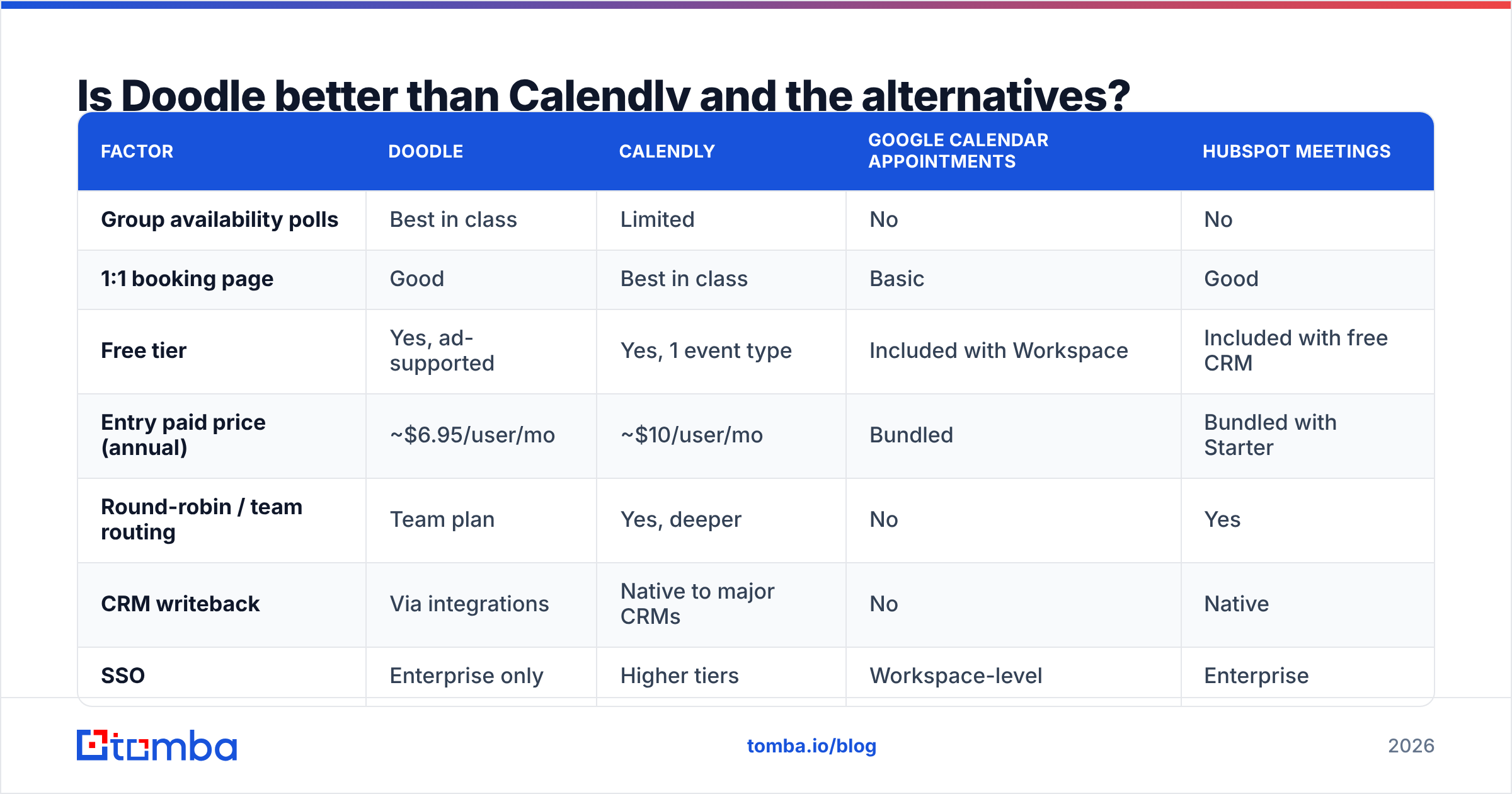
Depends entirely on whether your scheduling problem is many-to-one or one-to-one. Here's the honest comparison:
| Factor | Doodle | Calendly | Google Calendar appointments | HubSpot Meetings |
|---|---|---|---|---|
| Group availability polls | Best in class | Limited | No | No |
| 1:1 booking page | Good | Best in class | Basic | Good |
| Free tier | Yes, ad-supported | Yes, 1 event type | Included with Workspace | Included with free CRM |
| Entry paid price (annual) | ~$6.95/user/mo | ~$10/user/mo | Bundled | Bundled with Starter |
| Round-robin / team routing | Team plan | Yes, deeper | No | Yes |
| CRM writeback | Via integrations | Native to major CRMs | No | Native |
| SSO | Enterprise only | Higher tiers | Workspace-level | Enterprise |
| Best fit | Committee scheduling | High-volume 1:1 booking | Teams already on Workspace | Teams already on HubSpot |
The practical decision rule:
- You schedule mostly 1:1 demos at volume → Calendly or your CRM's native scheduler. Routing and writeback matter more than poll UX.
- You schedule multi-stakeholder meetings weekly → Doodle, and it isn't close.
- You're already fully on Google Workspace or HubSpot → use what you own first; only add Doodle if polls are a real recurring need.
- You need SSO and a DPA → you're pricing Enterprise everywhere, so compare on security review speed, not sticker price.
- You're a solo consultant → Doodle Pro annual is one of the cheapest ad-free booking pages available.
Where does Doodle fit in a B2B outbound workflow?#
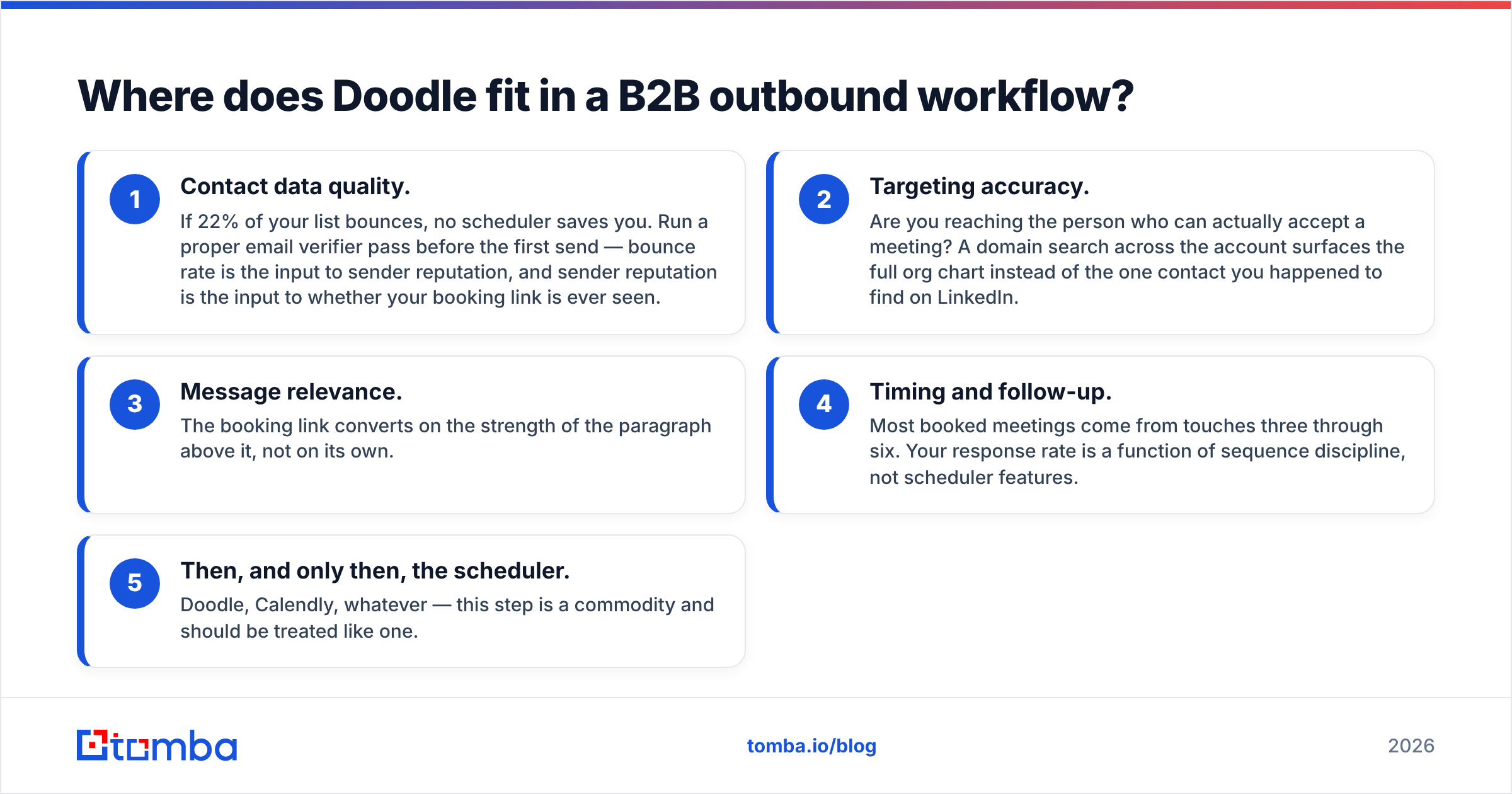
At the very end. And that ordering is the point most teams get backwards.
A scheduler converts intent into a calendar entry. It creates zero intent. If your booking link isn't getting clicked, buying a nicer booking link won't help. Work backwards through the chain:
- Contact data quality. If 22% of your list bounces, no scheduler saves you. Run a proper email verifier pass before the first send — bounce rate is the input to sender reputation, and sender reputation is the input to whether your booking link is ever seen.
- Targeting accuracy. Are you reaching the person who can actually accept a meeting? A domain search across the account surfaces the full org chart instead of the one contact you happened to find on LinkedIn.
- Message relevance. The booking link converts on the strength of the paragraph above it, not on its own.
- Timing and follow-up. Most booked meetings come from touches three through six. Your response rate is a function of sequence discipline, not scheduler features.
- Then, and only then, the scheduler. Doodle, Calendly, whatever — this step is a commodity and should be treated like one.

Teams routinely spend three weeks evaluating schedulers and zero weeks auditing their contact list. The scheduler is the cheapest, most replaceable component in the stack. The data underneath it is the expensive part — and the part that actually moves booked-meeting counts.
Which Doodle plan should you actually buy?#
- Buy Free if: your scheduling is internal, occasional, and nobody outside your organization sees the link. The ads don't matter to your own team.
- Buy Pro (annual) if: you're a solo operator sending links to clients or prospects. The branding removal alone justifies ~$7/month, and monthly billing at ~$15 is poor value for the same thing.
- Buy Team (annual) if: you have 5–20 people who all schedule externally and you need consistent branding plus an admin who can revoke access when someone leaves.
- Buy Enterprise if: security review requires SSO. Not before. Enterprise is a compliance purchase, not a features purchase.
- Buy nothing if: you already pay for HubSpot, Salesforce, or Google Workspace and your scheduling is 1:1. Use what you own and spend the budget on data.
One last note on trials: run yours during a genuinely busy scheduling week, not a quiet one. Every scheduler looks great at four meetings a week. The differences appear at forty — in mobile responsiveness, in notification noise, in how gracefully reschedules are handled. That's the week that tells you whether the Doodle pricing reviews pros and cons you read online match your actual workload.
Doodle pricing reviews pros and cons: the verdict#
Doodle is a solid, fairly priced product with a real moat in group polling and two genuine weak spots in mobile and support. If group scheduling is a weekly pain for you, Pro or Team annual is easy to justify. If it isn't, you probably already own an adequate scheduler.
But a calendar link only works if it lands in a real inbox, in front of a real decision-maker, attached to a message worth answering. That's where most outbound pipelines actually leak — not at the booking step.
Start upstream. Use the Tomba Email Finder to pull verified, deliverable addresses for the exact people who can say yes at your target accounts — by name, by company, or across an entire domain. The free tier gives you 25 searches a month to test the accuracy yourself, and paid plans start at $49/month; full Tomba pricing is on the site. Fix the list first. The scheduler is the easy part.
Related guides#
Ready to find emails that actually work?
Join 150,000+ professionals who stopped guessing and started sending. Free credits on signup — no credit card required.
Get the Tomba newsletter
Practical outbound tactics and product updates — once every two weeks.
About the author