Dooly Pricing Reviews, Pros and Cons: 2026 Buyer Guide
Dooly promises to kill CRM admin work with connected notes and one-click Salesforce sync. Here is what the plans actually cost, where the value breaks down, and who should pick something else.
Short version: Dooly is worth the money for Salesforce-heavy AE teams, and hard to justify for everyone else. This Dooly pricing reviews pros and cons guide shows what each plan costs, what users praise, and where the tool falls short.
TL;DR
- Dooly is a sales-notes and revenue-enablement layer that sits on top of Salesforce. It is not a prospecting tool, not a data provider, and not a sequencer.
- Pricing runs from a limited free plan to roughly $25–$30 per user/month on Growth and $40+ per user/month on Premier, with annual billing required for the best rates and an enterprise tier quoted on request.
- The strongest reviews come from AE-heavy teams already deep in Salesforce with MEDDIC or MEDDPICC discipline. The weakest come from HubSpot shops and small teams.
- The biggest hidden cost is not the license — it is that Dooly assumes your CRM is already populated with the right accounts and contacts. It improves note hygiene; it does not create pipeline.
- If your actual bottleneck is finding and verifying contacts rather than logging calls, spend the budget on a data layer first.
What is Dooly and what problem does it actually solve?#
Dooly is a connected workspace for sales notes. Reps take notes in a Dooly document during a call, and fields inside that document map directly to Salesforce objects — opportunity stage, next steps, MEDDIC fields, close date — so the CRM updates without anyone opening Salesforce.
Think of it like a smart order pad at a restaurant. The waiter still writes the order the way that feels natural, but every line item lands in the kitchen system correctly formatted. Dooly's pitch is the same: let reps write like humans, let the CRM receive structured data.
The product line has three practical pillars:
- Connected notes — templates with embedded Salesforce fields that sync on save.
- Pipeline manager — a spreadsheet-style grid for bulk-editing opportunities without loading Salesforce list views.
- Playbooks and DealSpace — real-time battlecards that surface when a competitor or objection keyword appears in a note, plus shareable deal rooms.
- Admin controls — required fields, validation, and templates enforced by sales ops so the data model stays intact.
Dooly was acquired in 2024. It now sits inside a larger revenue-intelligence portfolio. That matters for the pricing talk: work on the standalone product has slowed since its 2021–2022 peak. Several reviewers on G2 also report slower support since the deal.
What does Dooly pricing actually cost in 2026?#
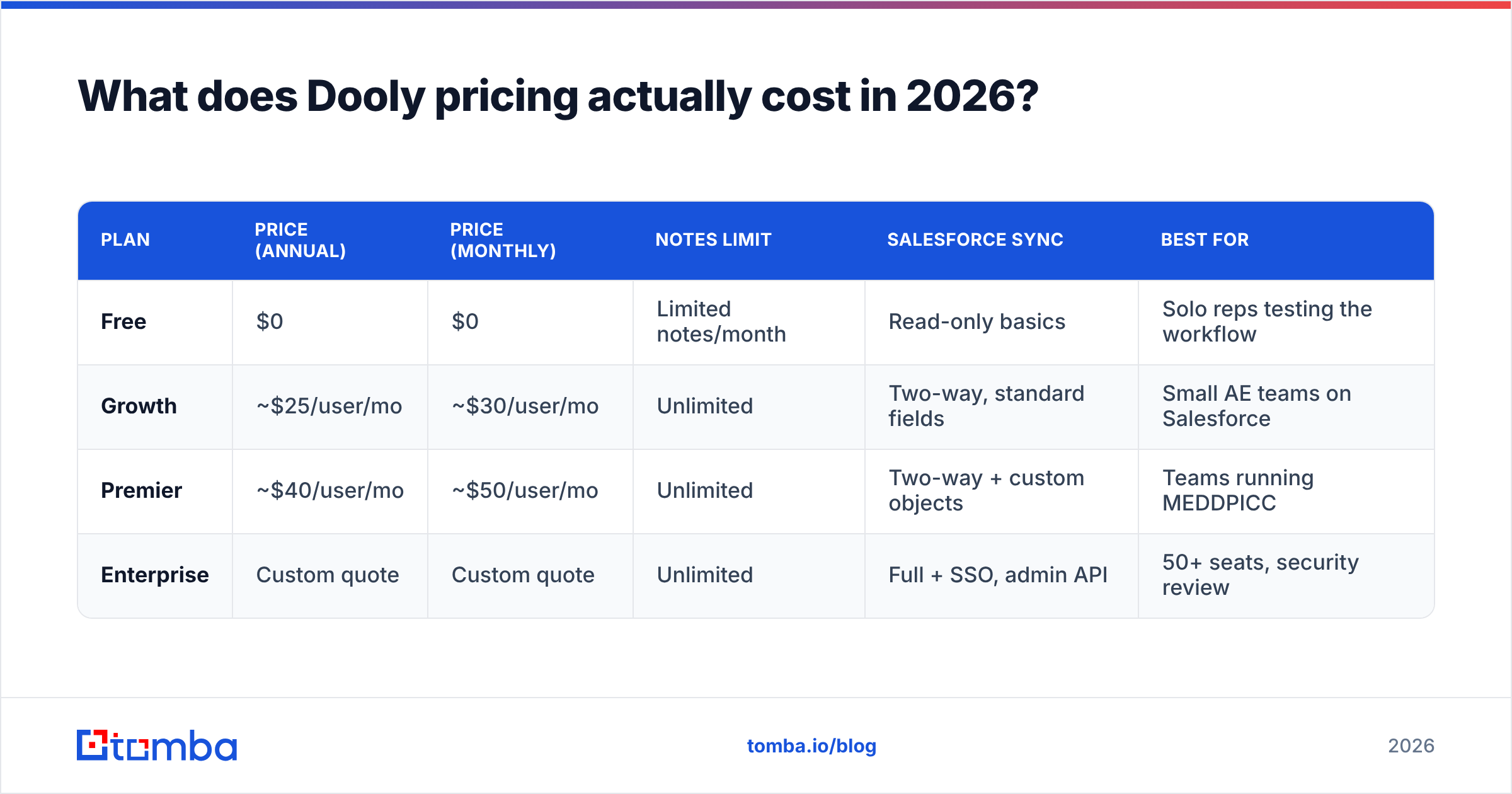
Dooly publishes per-seat pricing with the usual annual discount. Here is the shape of it, alongside what you actually get.
| Plan | Price (annual) | Price (monthly) | Notes limit | Salesforce sync | Best for |
|---|---|---|---|---|---|
| Free | $0 | $0 | Limited notes/month | Read-only basics | Solo reps testing the workflow |
| Growth | ~$25/user/mo | ~$30/user/mo | Unlimited | Two-way, standard fields | Small AE teams on Salesforce |
| Premier | ~$40/user/mo | ~$50/user/mo | Unlimited | Two-way + custom objects | Teams running MEDDPICC |
| Enterprise | Custom quote | Custom quote | Unlimited | Full + SSO, admin API | 50+ seats, security review |
Three things the pricing page does not put in bold:
- The free plan is a demo, not a tier. It caps notes and strips the pipeline manager, which is the feature most teams actually buy for.
- Custom Salesforce objects live on Premier. If your org has customised opportunity structures — and most orgs past 50 reps have — Growth will frustrate you within a month.
- You still pay for Salesforce. Dooly only pays off if you already own a Salesforce license. That seat costs $165–$330 per user/month on Enterprise and Unlimited editions. So Dooly is a $25 tax on a $200 seat, not a $25 CRM.
For a 15-rep team on Premier annual, you are looking at roughly $7,200/year on top of CRM. That is a real number to justify, and the justification has to be time saved.
Is the time-saved claim in Dooly reviews credible?#
Partly. The commonly cited figure is 5–10 hours saved per rep per month on CRM admin. Reviews on Capterra and G2 cluster around 4.5 stars. The praise is specific rather than vague, which is a good sign in review data.
What reviewers consistently say works:
- Note-to-CRM sync is genuinely fast. Reps who hated Salesforce data entry stop complaining. That alone can be worth the seat cost if your forecast accuracy depends on stage hygiene.
- Pipeline manager beats Salesforce list views. Bulk-editing 40 opportunities takes minutes instead of an afternoon.
- Templates enforce methodology. If you have rolled out MEDDIC and it keeps decaying, Dooly is one of the few tools that makes the framework the path of least resistance.
What reviewers consistently say does not:
- Non-Salesforce CRMs are second-class. HubSpot support exists but reviewers describe it as thinner. If you are on Pipedrive or a CRM outside the big two, this is not your tool.
- Mobile is weak. Field reps report editing notes on a laptop after the fact, which defeats the purpose.
- Search across historical notes degrades at scale. Several reviews mention slow retrieval once a workspace passes tens of thousands of documents.
- Onboarding is admin-heavy. Someone in sales ops has to build the templates. Budget two weeks of a RevOps person's attention, not an afternoon.
Adoption is the swing factor. A team where 9 of 10 reps use Dooly daily gets a great return. A team where 4 of 10 use it gets a line item that shows up in every budget review.
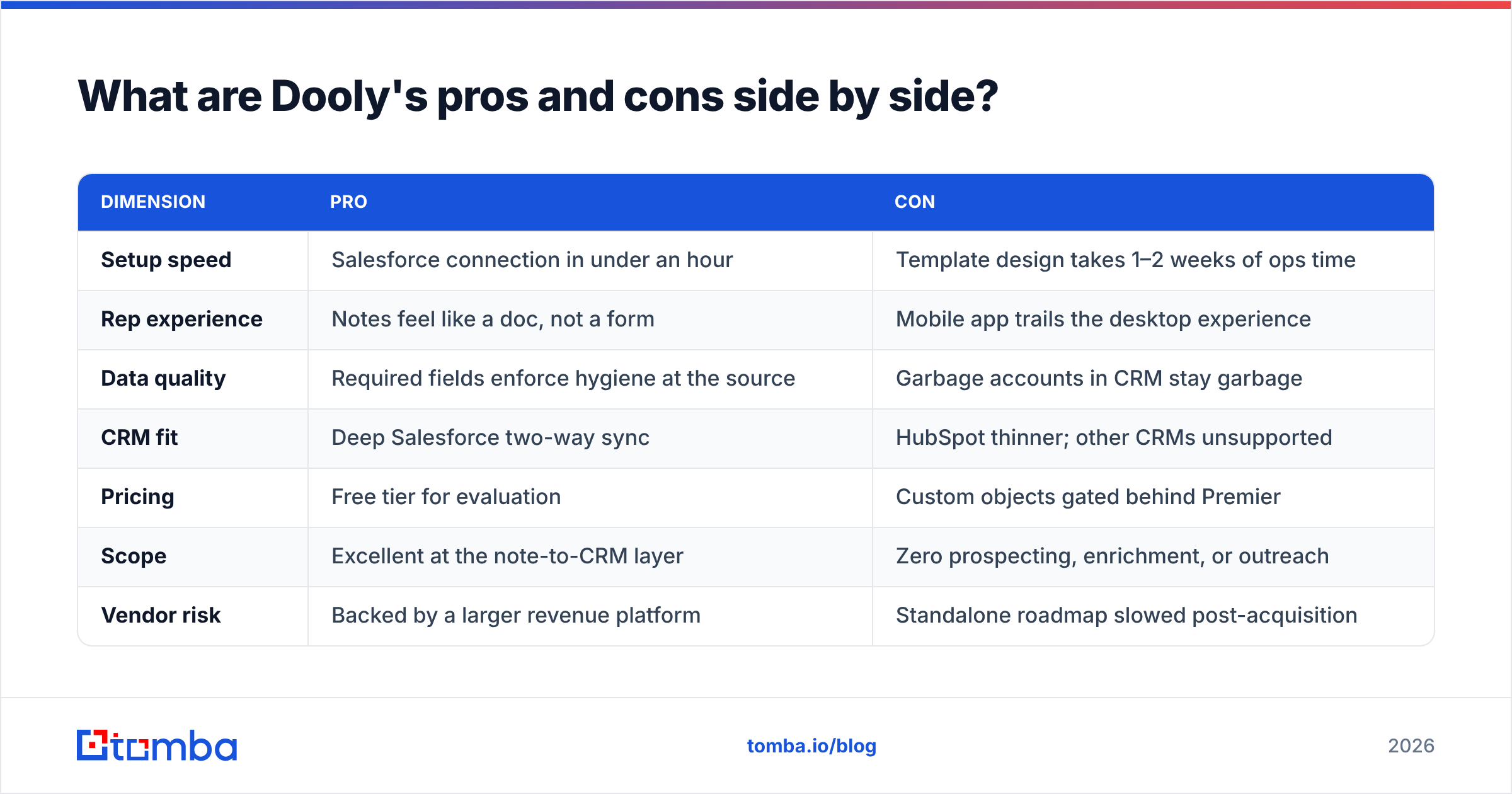
Dooly pricing reviews pros and cons, side by side#
| Dimension | Pro | Con |
|---|---|---|
| Setup speed | Salesforce connection in under an hour | Template design takes 1–2 weeks of ops time |
| Rep experience | Notes feel like a doc, not a form | Mobile app trails the desktop experience |
| Data quality | Required fields enforce hygiene at the source | Garbage accounts in CRM stay garbage |
| CRM fit | Deep Salesforce two-way sync | HubSpot thinner; other CRMs unsupported |
| Pricing | Free tier for evaluation | Custom objects gated behind Premier |
| Scope | Excellent at the note-to-CRM layer | Zero prospecting, enrichment, or outreach |
| Vendor risk | Backed by a larger revenue platform | Standalone roadmap slowed post-acquisition |
The pattern is clear. Dooly is a specialist that is very good at one job — turning rep conversation into structured CRM data — and deliberately does nothing else. That is a strength when you already have the rest of the stack and a weakness when you are trying to consolidate vendors.
Who should buy Dooly, and who should not?#
Buy it if:
- You run Salesforce Enterprise or Unlimited, and at least 10 AEs live in it daily.
- Forecast accuracy is a board-level problem traced to stale opportunity data.
- You have a sales methodology on paper that reps ignore in practice.
- You have a RevOps owner who can build and maintain templates.
Skip it if:
- You are on HubSpot, Pipedrive, Close, or anything outside Salesforce's orbit.
- Your team is under 5 reps — the admin overhead of setup outweighs the savings.
- Your CRM is thin. If your pipeline has 60 accounts and half the contact records are blank, note hygiene is not your constraint.
- You are an SDR-heavy org. Dooly is built for the AE motion — discovery calls, multi-stakeholder deals, stage progression. SDRs booking meetings get much less from it.
That last case is where budget gets misallocated most often. A team buys a note-sync tool to fix "CRM problems" when the real problem is that reps have nobody good to call.
How does Dooly compare to adjacent tools?#
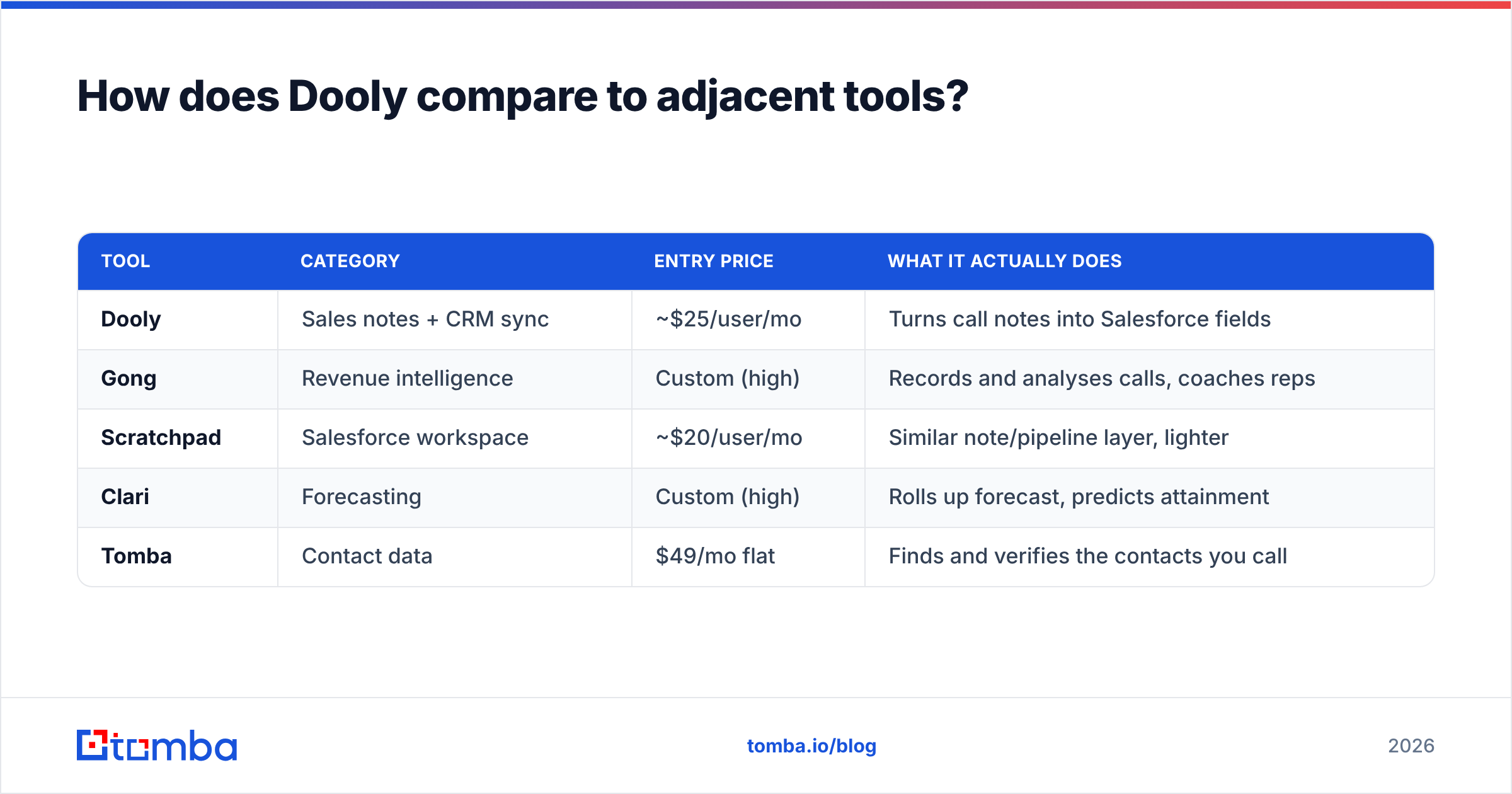
Dooly is often shortlisted next to tools that solve different problems. Getting the category right saves money.
| Tool | Category | Entry price | What it actually does |
|---|---|---|---|
| Dooly | Sales notes + CRM sync | ~$25/user/mo | Turns call notes into Salesforce fields |
| Gong | Revenue intelligence | Custom (high) | Records and analyses calls, coaches reps |
| Scratchpad | Salesforce workspace | ~$20/user/mo | Similar note/pipeline layer, lighter |
| Clari | Forecasting | Custom (high) | Rolls up forecast, predicts attainment |
| Tomba | Contact data | $49/mo flat | Finds and verifies the contacts you call |
Notice the pricing model in the last row. Dooly, Scratchpad, and Gong all charge per seat, so cost grows with headcount. Data tools like Tomba charge by usage. A 20-person team on Tomba pricing pays the same $99/month Growth plan as a 5-person team on the same credit volume. On a 20-rep org, Dooly Premier runs roughly $9,600/year. A data layer for the same team costs a fraction of that.
If you want a Gong comparison specifically, look at the Gong alternative breakdown — the two products get confused constantly, and they are not substitutes.
What is the hidden cost most teams miss?#
Dooly makes existing pipeline cleaner. It does not make more of it.
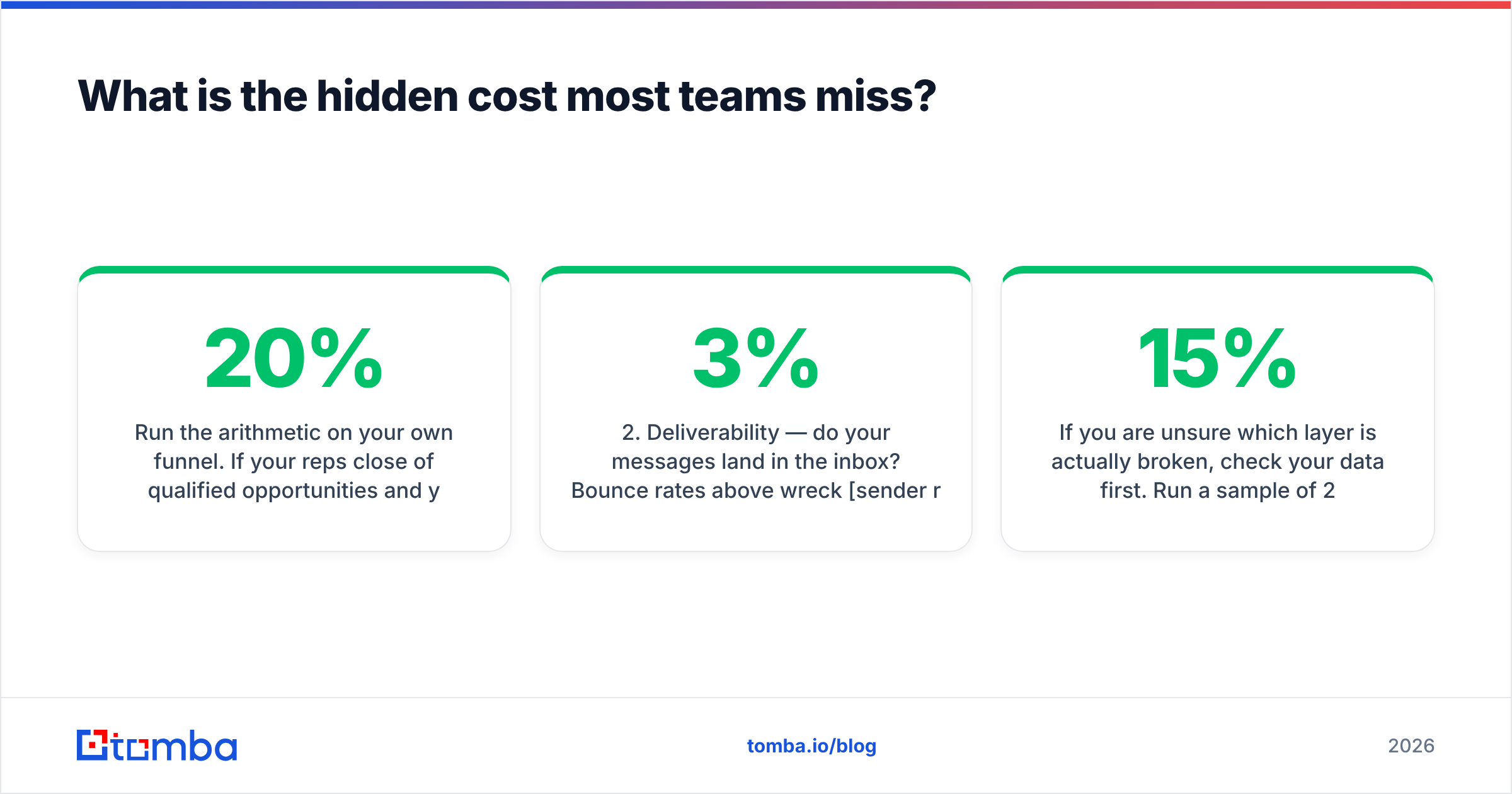
Run the arithmetic on your own funnel. Say your reps close 20% of qualified opportunities, and each rep only sees 12 opportunities a quarter. A note-sync tool changes nothing about that outcome. The constraint sits one stage earlier — in whether reps can reach the right people at all.
This is where the ordering matters:
- Contact acquisition — do you have verified emails and direct numbers for the accounts in your ICP?
- Deliverability — do your messages land in the inbox? Bounce rates above 3% wreck sender reputation and quietly kill campaigns.
- Conversation capture — this is Dooly's layer.
- Forecast rollup — Clari, or Salesforce reports if you are disciplined.
Teams routinely buy layer 3 before layer 1 is solved, because layer 3 has a cleaner demo. The measurable result is a beautifully documented empty pipeline.
Not sure which layer is broken? Check your data first. Run a sample of 200 CRM contacts through an email verifier and see how many come back invalid or catch-all. Above 15% means you do not have a note-taking problem. You have a data problem, and connected notes will not fix it. A bulk email finder pass fills the gaps. A quick domain search on your target accounts tells you within an hour whether the pipeline is thin because of hygiene or because of coverage.
For teams that want validated B2B lists rather than self-service lookups, BookYourData is a solid option in the pre-built database category and pairs reasonably with a verification step.
What is the final verdict on Dooly pricing?#
Dooly is fairly priced for what it is and easy to over-buy for what it is not. Put the Dooly pricing reviews pros and cons together and the answer is short: good tool, narrow fit.
At roughly $25–$40 per user per month, it is cheaper than Gong and close to Scratchpad. It is defensible for a Salesforce-native AE team of 10 or more where forecast hygiene is a named business problem. Reviews back that up. The pros — real time savings, methodology enforcement, a pipeline grid that beats native Salesforce — show up again and again from users who stuck with it.
The cons are equally real. It is Salesforce-first to the point of being Salesforce-only in practice, custom objects sit behind the higher tier, mobile lags, and setup costs you RevOps time that nobody budgets for. Post-acquisition roadmap uncertainty is worth one question in your sales call.
The honest recommendation: run the free tier with three reps for 30 days, measure whether their opportunity records actually improve, and only then buy seats for the whole team. If the improvement is marginal, the constraint was never note-taking.
And before you sign anything, confirm your top-of-funnel is not the real leak. Tomba's email finder covers domain, name, and company lookups with verification built in. It starts free at 25 searches a month and $49/month on Starter — cheaper than two Dooly seats. It also fixes the layer that has to work before CRM hygiene matters at all. Fill the pipeline first, then buy the tool that keeps it tidy.
Related guides#
Ready to find emails that actually work?
Join 150,000+ professionals who stopped guessing and started sending. Free credits on signup — no credit card required.
Get the Tomba newsletter
Practical outbound tactics and product updates — once every two weeks.
About the author