Dooly vs Scratchpad: Which Sales Note Tool Wins in 2026?
Both promise to kill Salesforce data entry, but they solve different problems. A hands-on breakdown of pricing, MEDDIC support, pipeline hygiene, and which one your reps will actually open every day.
Dooly vs Scratchpad comes down to one question: where does the work happen? Dooly puts the work in the note. Scratchpad puts it in the pipeline grid. Both write back to Salesforce, and both have free plans, so the wrong pick costs you adoption more than money.
TL;DR
- Dooly is a note-taking-first tool. Reps write notes in a clean doc editor, and fields sync back to Salesforce. Strongest for teams running MEDDIC/MEDDPICC and formal call templates.
- Scratchpad is a pipeline-hygiene-first tool. It's a fast Salesforce grid, inline editing, Kanban, and Slack alerts. Strongest for teams whose real problem is stale close dates and missing next steps.
- Price is close enough that it shouldn't decide for you. Both sit roughly in the $20–$40/user/mo band on paid tiers, with free plans that are genuinely usable for a single rep.
- Neither tool creates pipeline. They clean up the pipeline you already have — so if your problem is "not enough qualified accounts in the funnel," a note tool is the wrong purchase.
- Pick Dooly if your managers coach off call notes. Pick Scratchpad if your managers coach off the forecast sheet.
What problem are Dooly and Scratchpad actually solving?#
Salesforce is a system of record, not a system of work. Reps hate it for a simple reason. Logging a 40-minute discovery call means five tabs, three picklists, and a required field someone in RevOps added last quarter. So they don't. Then the forecast is wrong. The manager asks for an update in Slack. The rep retypes what they already wrote in a Google Doc.
Both Dooly and Scratchpad attack that gap. They sit between the rep and the CRM and make the CRM update itself as a side effect of work the rep was doing anyway.
The difference is where they place the "work."
Dooly says the work is the note. Write the call note in a template. The fields you filled in — budget, decision criteria, champion, next step — push into Salesforce on their own.
Scratchpad says the work is the deal review. Open a fast grid of your deals. Edit close dates and amounts inline, like a spreadsheet. Slack nudges you when a deal goes stale, and the CRM stays accurate.
Same category, different center of gravity. That distinction drives almost every other decision below.
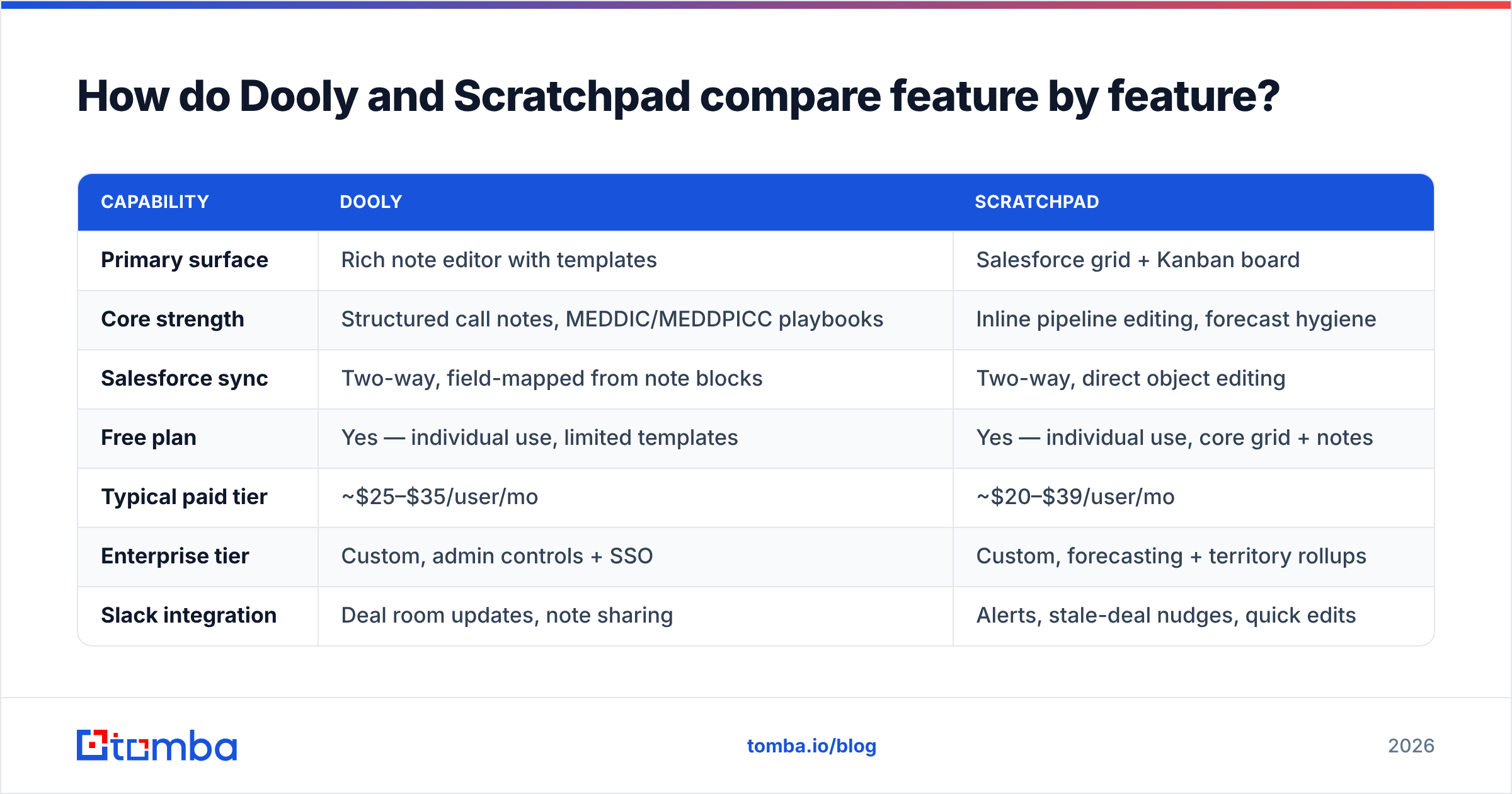
Dooly vs Scratchpad: how do they compare feature by feature?#
| Capability | Dooly | Scratchpad |
|---|---|---|
| Primary surface | Rich note editor with templates | Salesforce grid + Kanban board |
| Core strength | Structured call notes, MEDDIC/MEDDPICC playbooks | Inline pipeline editing, forecast hygiene |
| Salesforce sync | Two-way, field-mapped from note blocks | Two-way, direct object editing |
| Free plan | Yes — individual use, limited templates | Yes — individual use, core grid + notes |
| Typical paid tier | ~$25–$35/user/mo | ~$20–$39/user/mo |
| Enterprise tier | Custom, admin controls + SSO | Custom, forecasting + territory rollups |
| Slack integration | Deal room updates, note sharing | Alerts, stale-deal nudges, quick edits |
| Playbooks / battlecards | Yes — surfaced inline while writing | Limited; more focus on pipeline views |
| Forecasting module | Light | Yes — commit/best-case/pipeline rollups |
| Best for | AEs on complex, multi-stakeholder deals | AEs and managers with heavy pipeline volume |
| Learning curve | Low if reps already write notes | Low if reps already live in spreadsheets |
| Weakest point | Thin as a forecasting tool | Thin as a knowledge/playbook tool |
Two honest caveats on that table. First, both vendors change packaging often. Check the live pricing page before you budget. The tiers above reflect public plans, so treat them as close, not exact. Second, both are Salesforce-centric. If you're on HubSpot or Pipedrive, your shortlist looks different, and you should start from the native tooling in your CRM instead.
Is Dooly better than Scratchpad for note-taking?#
Yes, and it isn't especially close.
Dooly's editor is the product. You open a template — say a discovery template with MEDDPICC blocks — and type. Slash commands insert fields. Highlighted text can push straight into a Salesforce field. Playbook cards fire based on what you type, so when a prospect says "we're also evaluating [competitor]," the battlecard appears without a tab switch.
That matters more than it sounds. The reason CRM notes are garbage isn't laziness. The note lives in one place. The structured data lives in another. Reps refuse to write things twice. Dooly collapses the two. One artifact, two destinations.
Scratchpad has notes. They're competent. They're not the point of the product. If your enablement motion depends on template-driven call notes that managers actually read, you'll feel the gap by week three.
Where Dooly gets criticized: it's opinionated. If your reps don't take structured notes today, buying a structured-note tool doesn't create the habit. You'll get a tool with an adoption problem instead of a CRM with an adoption problem.
Is Scratchpad better than Dooly for pipeline hygiene?#
Yes — and this is the more common buying trigger.
Scratchpad's grid view is the fastest way to bulk-edit Salesforce opportunities that most reps have ever used. Fifteen deals, inline close-date edits, tab-tab-tab, done in ninety seconds. The Kanban board makes stage progression physical. Slack alerts catch the deal that hasn't moved in 21 days before the forecast call, not during it.
For a sales manager, that's the whole pitch. The Monday pipeline review stops being an archaeology exercise. Every deal has a next step because Scratchpad nagged until it did.
There's a second-order effect worth naming. Clean pipeline data makes your revenue operations reporting trustworthy. Dashboards built on fields reps update once a quarter are fiction. Dashboards built on fields reps touch daily are decisions.
Where Scratchpad gets criticized: it's a hygiene layer, not a coaching layer. It'll tell you the deal is stale. It won't tell you the champion left the company three weeks ago — that's in a note somewhere, and Scratchpad isn't where your team writes notes.
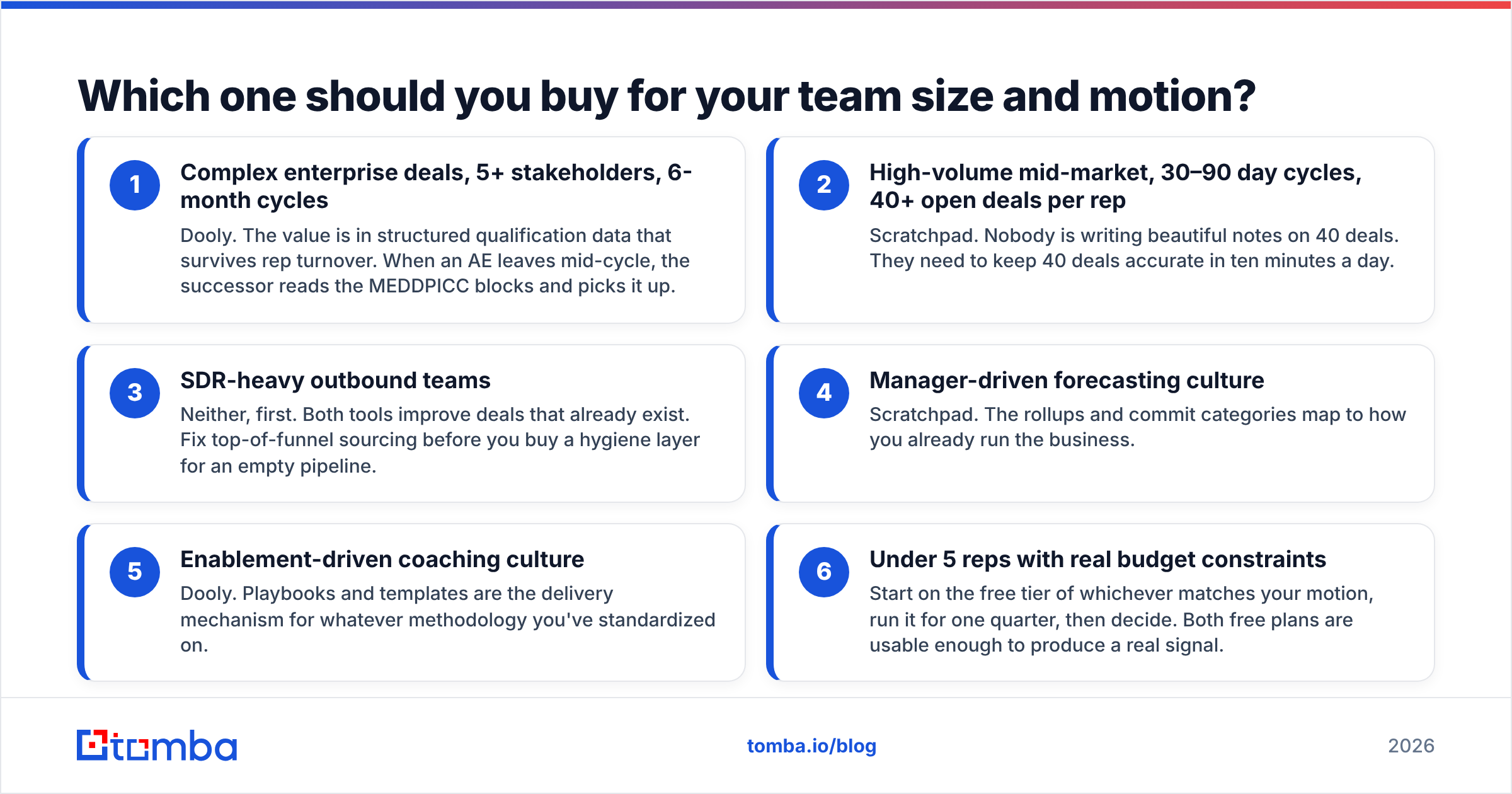
Which one should you buy for your team size and motion?#
Use the deal shape, not the headcount.
- Complex enterprise deals, 5+ stakeholders, 6-month cycles — Dooly. Structured qualification data survives rep turnover. When an AE leaves mid-cycle, the next rep reads the MEDDPICC blocks and picks it up.
- High-volume mid-market, 30–90 day cycles, 40+ open deals per rep — Scratchpad. Nobody writes beautiful notes on 40 deals. They need 40 deals accurate in ten minutes a day.
- SDR-heavy outbound teams — Neither, first. Both tools improve deals that already exist. Fix sourcing before you buy a hygiene layer for an empty pipeline.
- Manager-driven forecasting culture — Scratchpad. Rollups and commit categories map to how you run the business.
- Enablement-driven coaching culture — Dooly. Playbooks and templates deliver whatever methodology you standardized on.
- Under 5 reps on a tight budget — Start free on whichever matches your motion. Run it a quarter, then decide. Both free plans give a real signal.
If you're comparing these against broader sales stacks, G2's sales enablement category is a reasonable place to sanity-check the reviews — just weight the reviews from companies with your deal shape and ignore the rest.
What do these tools NOT solve?#
This is where most evaluations go wrong, so be blunt about it.
Neither Dooly nor Scratchpad puts a single new name in your pipeline. They are both downstream tools. They make existing opportunities cleaner, better documented, and easier to forecast. If your board deck problem is "coverage ratio is 1.8x and we need 3.2x," a note-taking tool is a rounding error.
The upstream problem is contact data. Reps can't work an account they can't reach, and the average B2B contact record decays fast. People change jobs. Domains get acquired. Titles shift. A pristine Salesforce opportunity attached to a bounced email address is still a dead deal.
That's a different purchase. You need a way to find verified work emails at target accounts and keep those records fresh, so you stop burning sender reputation on invalid addresses. An email finder plus an email verifier sits at the front of the funnel. Dooly and Scratchpad sit at the back. Buying one when you needed the other is the most expensive mistake in this category.
A practical sequence that works:
- Source accounts that match your ICP
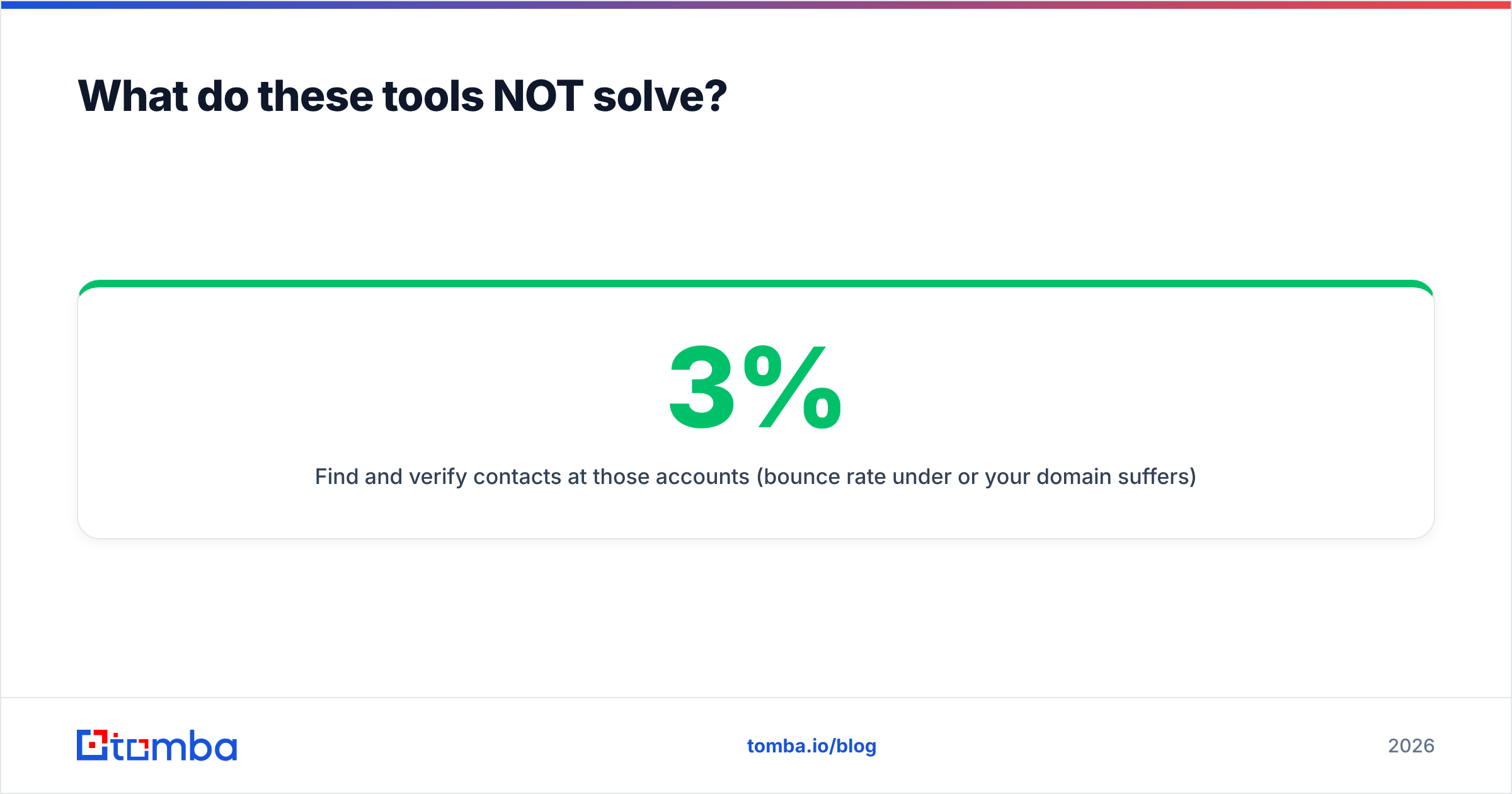
- Find and verify contacts at those accounts (bounce rate under 3% or your domain suffers)
- Run outbound, book meetings, create opportunities
- Then apply Dooly or Scratchpad to keep those opportunities honest
Skip step two and you'll have an immaculately documented pipeline of eleven deals.

How do the pricing models actually compare?#
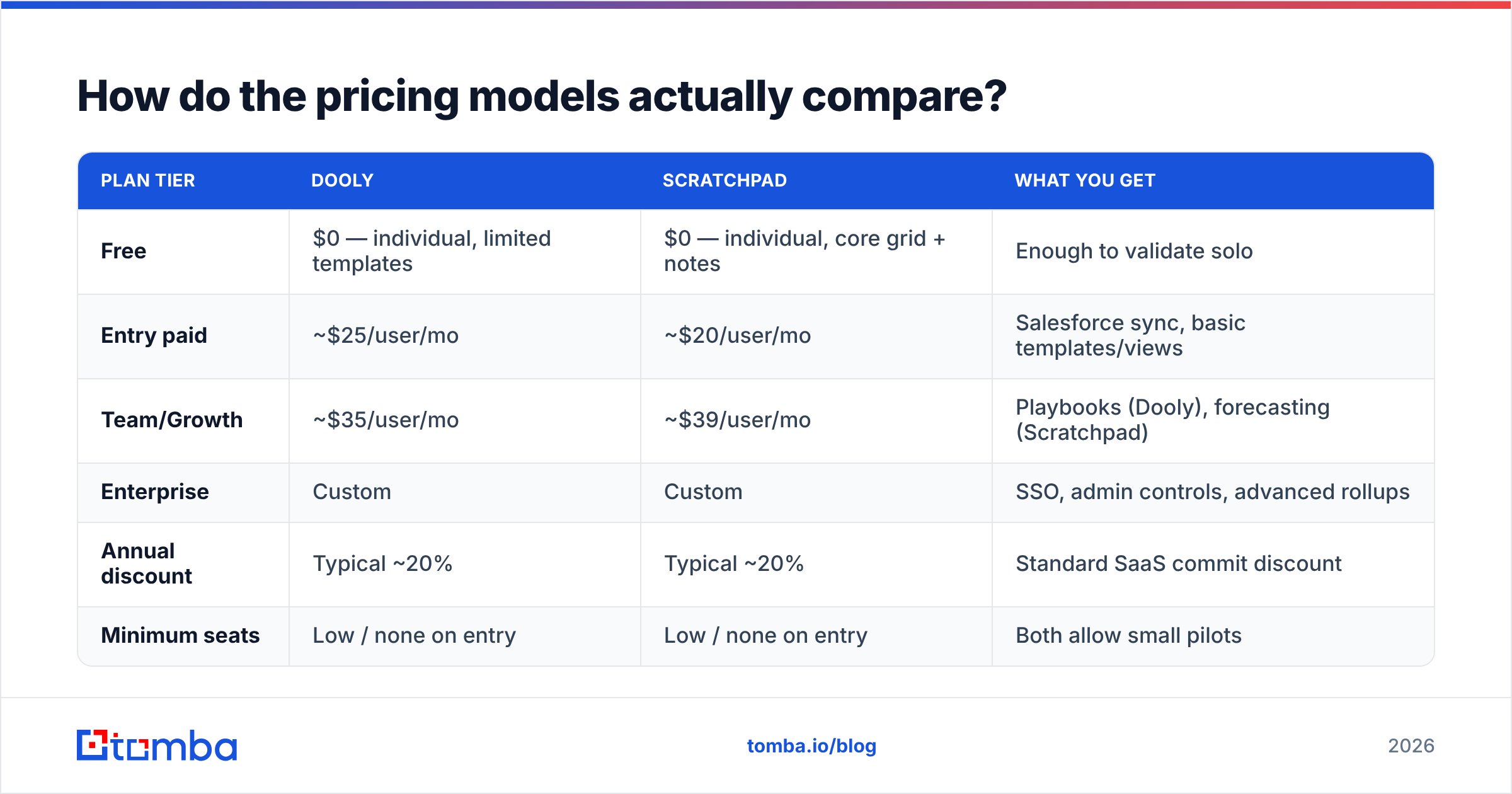
| Plan tier | Dooly | Scratchpad | What you get |
|---|---|---|---|
| Free | $0 — individual, limited templates | $0 — individual, core grid + notes | Enough to validate solo |
| Entry paid | ~$25/user/mo | ~$20/user/mo | Salesforce sync, basic templates/views |
| Team/Growth | ~$35/user/mo | ~$39/user/mo | Playbooks (Dooly), forecasting (Scratchpad) |
| Enterprise | Custom | Custom | SSO, admin controls, advanced rollups |
| Annual discount | Typical ~20% | Typical ~20% | Standard SaaS commit discount |
| Minimum seats | Low / none on entry | Low / none on entry | Both allow small pilots |
Cost is not the deciding variable here. At 20 reps, the annual gap between these two is roughly the price of one mid-tier conference booth. Buy the one your reps will open daily. A $20/user tool with 30% adoption is more expensive than a $39/user tool with 90% adoption.
What does move the number: implementation. Dooly needs field mapping work. Someone has to decide which note block writes to which Salesforce field, and that person needs to know your object model. Scratchpad needs view configuration and alert tuning. Budget a week of RevOps time either way, and more if your Salesforce instance has a decade of custom fields nobody can explain.
What does a fair verdict look like?#
There isn't a universal winner in Dooly vs Scratchpad, which is the boring but correct answer.
Choose Dooly when: your sales process is methodology-driven, deals are complex and long, your enablement team owns real playbooks, and note quality is a coaching input your managers actually use. Dooly turns notes into structured CRM data with less friction than anything else in the category.
Choose Scratchpad when: your pain is forecast accuracy, your reps carry high deal counts, your managers live in pipeline reviews, and the recurring complaint is "close dates are always wrong." Scratchpad makes updating Salesforce fast enough that reps stop avoiding it.
Choose neither when: the honest diagnosis is pipeline volume, not pipeline quality. Fix sourcing first.
One more note for 2026 buyers. Both categories are being squeezed from above. Salesforce keeps shipping native productivity features, and AI note-takers now write CRM fields straight from call recordings. That doesn't make either tool a bad buy today. It does mean you should sign annual, not triennial, and re-evaluate at renewal.
If you want a third data point, run a two-week trial of both with the same four reps and measure one thing: percentage of closed opportunities with a populated next-step field. Not survey scores. Not "reps liked it." One field, measured before and after. Whichever tool moves it more wins your bake-off, whatever any comparison post — including this one — concludes.
Where should you start if your pipeline is the real problem?#
Dooly vs Scratchpad only matters once you have deals worth documenting. Fix the input before you optimize the output. If your reps spend their mornings guessing at email formats and their afternoons watching bounces roll in, no amount of CRM hygiene tooling will move the number.
Start by getting verified contact data into the top of the funnel. Tomba Email Finder locates professional email addresses by domain, name, or company, with verification built into the same workflow. The contacts hitting your sequences are real before they ever become opportunities.
The free tier covers 25 searches a month if you just want to test accuracy against a list you already have, and Tomba pricing starts at $49/mo on Starter for teams running volume. Pair that with data enrichment to keep existing Salesforce records from rotting. Then let Dooly or Scratchpad do what they're genuinely good at: keeping the deals you earned from falling through the cracks.
Related guides#
Ready to find emails that actually work?
Join 150,000+ professionals who stopped guessing and started sending. Free credits on signup — no credit card required.
Get the Tomba newsletter
Practical outbound tactics and product updates — once every two weeks.
About the author