Download Email Extractor for Chrome: 2026 Extension Guide
Most Chrome email extractors scrape whatever text looks like an email and hand you a list that bounces. Here's how to pick one that actually verifies, what the extension permissions really mean, and which tools survive a real test.
Search for a download email extractor for Chrome and you'll find dozens of extensions promising the same thing. Most of them just scrape text off the page. A few actually verify what they find. Here's how to tell them apart before you install one.
TL;DR
- Most "free email extractor" Chrome extensions are regex scrapers: they pull anything matching
something@something.tldoff the rendered page. No verification, no source attribution, no confidence score. - The single biggest quality difference between extensions is whether extraction is followed by SMTP-level verification. Unverified scrapes commonly land in the 25–45% bounce range; verified pipelines land under 3%.
- Check permissions before you install. "Read and change all your data on all websites" is normal for extractors — but it also means the extension can see your webmail, your CRM, and your bank tab.
- Extensions are for one-off, in-context capture. For anything above ~200 contacts a month, move to a domain search or bulk workflow instead.
- Best-fit picks: Tomba's Chrome extension for verified extraction inside LinkedIn and company sites, Hunter for broad domain coverage, BookYourData for pre-built verified lists when you don't want to source at all.
What does a Chrome email extractor actually do?#
Think of a browser extension as a very fast intern with a highlighter. It reads the page you already have open, highlights everything that looks like an email address, and drops it into a list. That's the entire mechanic behind most free extensions on the Chrome Web Store.
Three very different builds hide behind the same "email extractor" label. They give you very different results:
- Pure DOM scrapers. They run a regex against the HTML of the open tab. Fast, free, and blind. They grab
noreply@,image-1234@2x.pngfragments, and support aliases too. Accuracy is whatever the page holds. - Pattern generators. They take a name and a company domain, then build candidate addresses from known patterns (
first.last@,f.last@,first@). Without a verification step, you're guessing between six options. Our email permutator shows that guesswork in the open. - API-backed finders with verification. The extension is just a thin UI. The real work runs server-side: an index of crawled sources plus a live SMTP check. Each lookup is slower, the hit quality is far better, and you pay per credit.
Only the third type gives you a list you can send to. The first two give you a list you have to clean first. That moves the cost; it doesn't remove it.
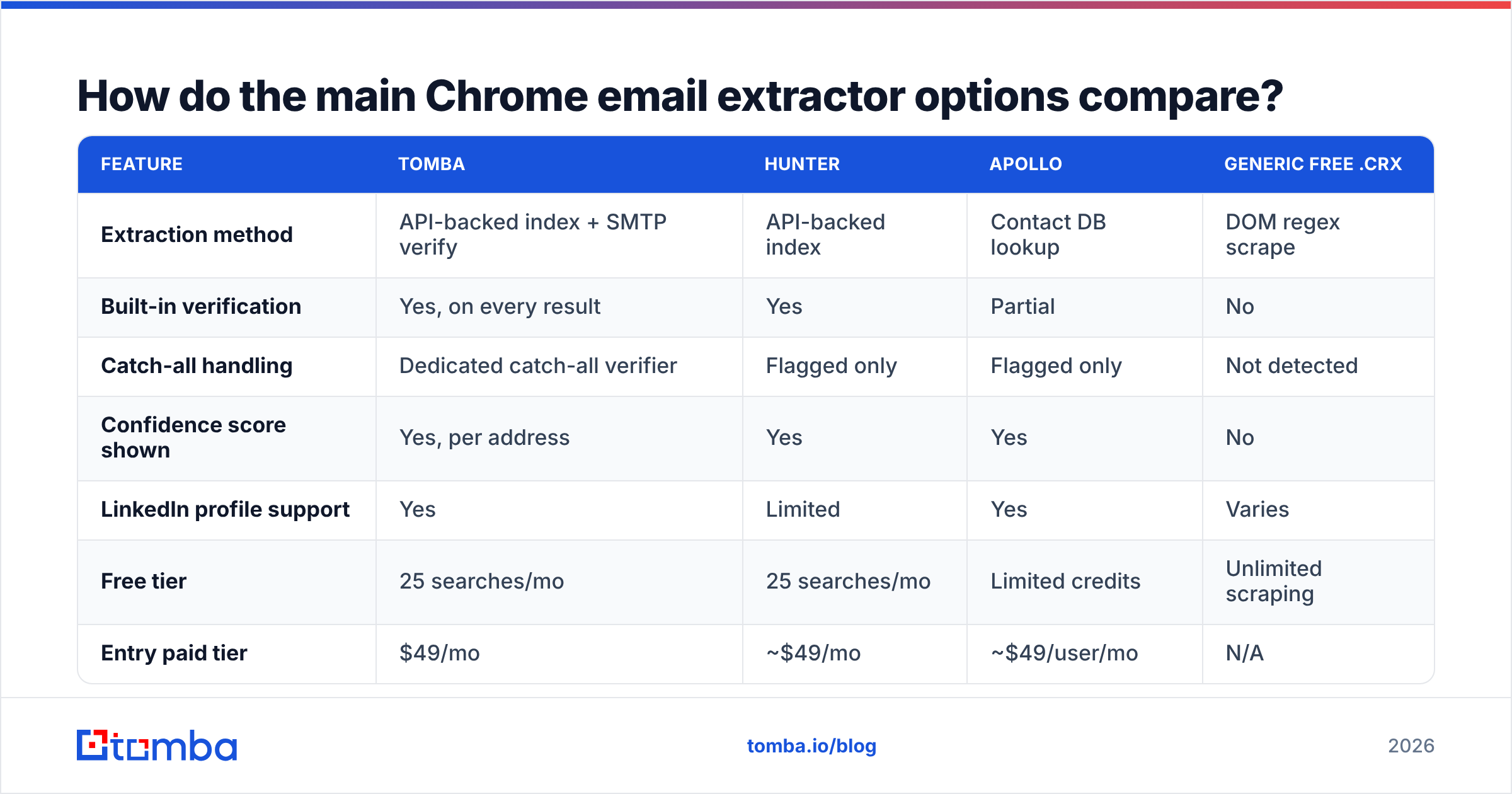
Download email extractor for Chrome: how do the main options compare?#
The table below compares what you get when you search download email extractor for Chrome in 2026. Prices are the published entry tiers at time of writing — always confirm on the vendor's own page.
| Feature | Tomba | Hunter | Apollo | Generic free .crx |
|---|---|---|---|---|
| Extraction method | API-backed index + SMTP verify | API-backed index | Contact DB lookup | DOM regex scrape |
| Built-in verification | Yes, on every result | Yes | Partial | No |
| Catch-all handling | Dedicated catch-all verifier | Flagged only | Flagged only | Not detected |
| Confidence score shown | Yes, per address | Yes | Yes | No |
| LinkedIn profile support | Yes | Limited | Yes | Varies |
| Free tier | 25 searches/mo | 25 searches/mo | Limited credits | Unlimited scraping |
| Entry paid tier | $49/mo | ~$49/mo | ~$49/user/mo | N/A |
| Bulk / CSV upload | Yes | Yes | Yes | No |
| API access | Yes, all plans | Yes | Yes | No |
| Data source disclosure | Public | Public | Partial | None |
The last row matters more than people expect. If an extension won't tell you where an address came from, you can't answer a GDPR data-subject request. You also can't tell whether the address is three days old or three years old. Tomba publishes its data sources openly for exactly this reason.

Why do scraped lists bounce so hard?#
Because a page with an email address on it only proves the address existed once. It doesn't prove a human reads it today.
Break down a typical 500-row scrape from company "team" and "contact" pages:
- Role accounts (
info@,sales@,hello@,careers@) — routinely 30–40% of a scraped set. They deliver fine but route to a shared inbox where cold outreach dies. - Departed employees. Team pages age badly. A page updated 14 months ago is a list of people who used to work there.
- Obfuscation artifacts. Sites that write
name [at] company [dot] comdefeat naive regex; sites that render emails via JavaScript image sprites produce garbage matches. - Catch-all domains. The domain accepts every address, so a naive SMTP check returns "valid" for
asdfgh@company.com. Without a dedicated catch-all verifier, your list looks clean and still burns your sender reputation. - Spam traps. Recycled addresses that mailbox providers use to identify list-buyers. One trap hit can move you from inbox to spam folder across an entire ISP.
That last point is where an extraction problem becomes a deliverability problem. Google's own sender guidelines set a hard spam-complaint ceiling of 0.3% for bulk senders. You can't stay under it while mailing an unverified scrape. Once your domain reputation drops, every campaign you send for the next quarter underperforms — including the ones with good lists.
The fix is boring: verify before send. Run any extracted set through an email verifier and drop the risky and unknown buckets. A 500-row list that becomes 310 deliverable rows beats the full 500 every time. The 190 you removed were the ones hurting the other 310.
What permissions should you check before installing?#
Almost nobody reads this part. It's the part that should decide your install.
Chrome extensions list their permissions in the manifest. The Web Store shows them at install time. For email extractors, expect to see:
<all_urls>host permission — "Read and change all your data on all websites." Unavoidable for an extractor that works on arbitrary pages. It also means the extension's content script runs on your Gmail tab, your Salesforce tab, and your bank tab.storage— local caching of results and API keys. Benign.activeTab— a narrower alternative to<all_urls>where the extension only gets access to the tab you clicked on. If an extension offers this instead, that's a good sign.clipboardWrite— copy-to-clipboard buttons. Benign.webRequest/declarativeNetRequest— inspecting or modifying network traffic. Legitimate for some tools, but ask why an extractor needs it.
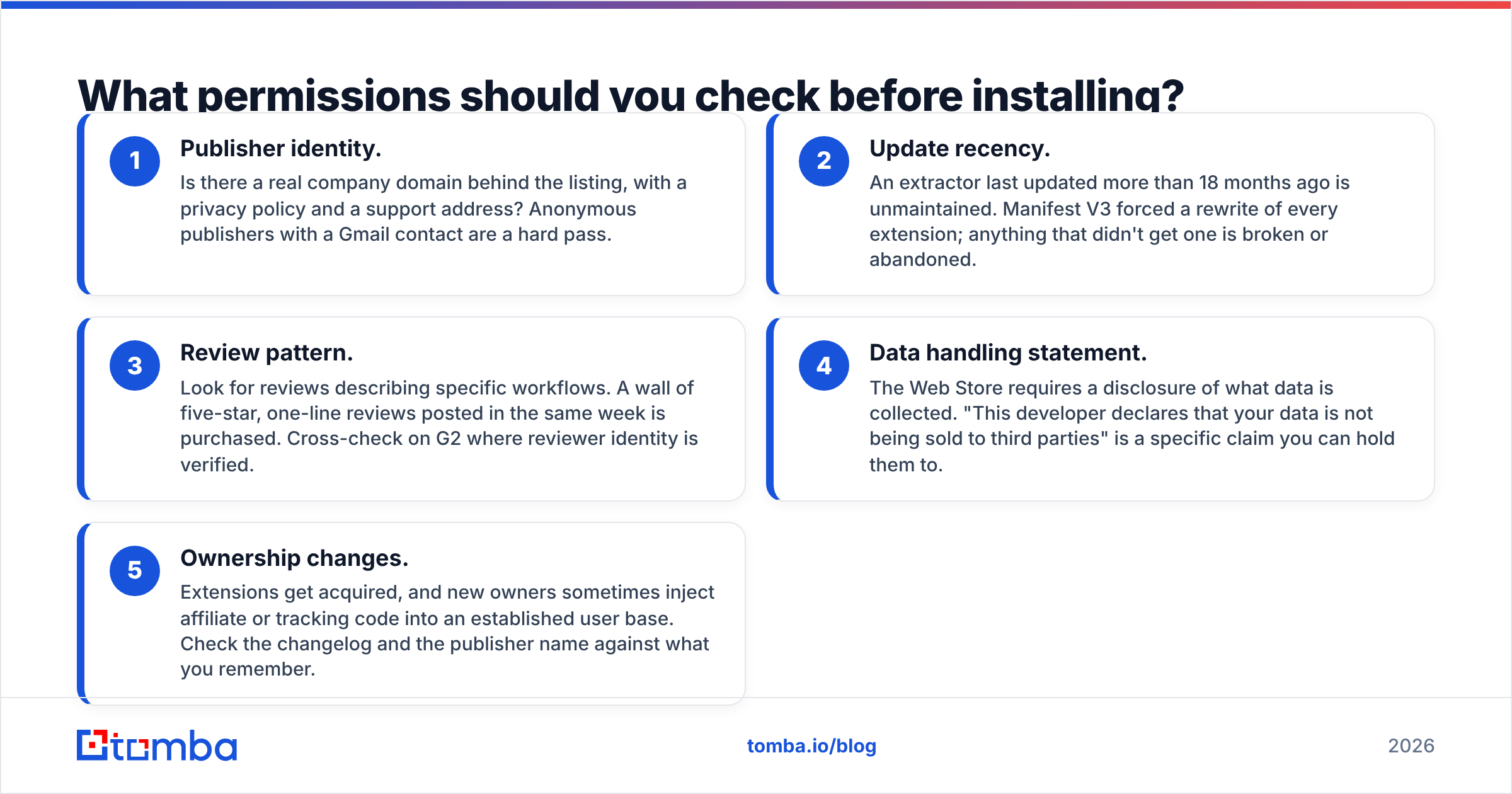
Before you install anything, run this five-point check:
- Publisher identity. Is there a real company domain behind the listing, with a privacy policy and a support address? Anonymous publishers with a Gmail contact are a hard pass.
- Update recency. An extractor last updated more than 18 months ago is unmaintained. Manifest V3 forced a rewrite of every extension; anything that didn't get one is broken or abandoned.
- Review pattern. Look for reviews describing specific workflows. A wall of five-star, one-line reviews posted in the same week is purchased. Cross-check on G2 where reviewer identity is verified.
- Data handling statement. The Web Store requires a disclosure of what data is collected. "This developer declares that your data is not being sold to third parties" is a specific claim you can hold them to.
- Ownership changes. Extensions get acquired, and new owners sometimes inject affiliate or tracking code into an established user base. Check the changelog and the publisher name against what you remember.
The general rule: an extension that charges you money has a business model you understand. A free unlimited scraper has a business model you don't.
How do you actually run a clean extraction workflow?#
Here's the sequence that produces a sendable list rather than a cleanup project.
Step 1 — Define the account list first, not the contact list. Decide which 50 or 200 companies you want before you open a single tab. Extraction driven by "who happens to be on this page" produces incoherent segments and unusable messaging.
Step 2 — Use domain-level search for coverage, extension for precision. If you want everyone at a company, a domain search returns the full known set with roles and confidence scores in one call. The extension is for when you're already looking at a specific person's profile and want that one address.
Step 3 — Capture the source URL alongside the address. You will need it for compliance, and it's the fastest way to spot a stale record later.
Step 4 — Verify everything, including the results that came back "verified." Different providers use different thresholds. Run the merged set through a single verifier so your quality bar is consistent, and route catch-all domains to a separate, slower track rather than mixing them into your main sends.
Step 5 — Deduplicate across sources. Extension pulls, CSV imports, and CRM exports overlap constantly. Duplicates in a sequence mean the same person gets your email twice, which is the fastest route to a complaint.
Step 6 — Cap your volume to your infrastructure. A freshly warmed domain handles perhaps 30–50 cold sends a day. Extracting 5,000 addresses in an afternoon doesn't change that. Size your extraction to your actual sending capacity.
When should you skip the extension entirely?#
Extensions are a manual tool. They're excellent when you're researching a specific account and terrible when you need volume. Three situations where you should reach for something else:
You need more than a few hundred contacts a month. Clicking through profiles doesn't scale, and browser automation against LinkedIn risks your account. Use a bulk email finder with a CSV of names and domains, or hit the email finder API directly from your enrichment pipeline.
You already have partial records. If your CRM has names and companies but no emails, that's an enrichment job, not an extraction job. Push the list through data enrichment and get the missing fields filled server-side.
You don't want to source at all. Some teams are better served buying a pre-verified list for a defined segment. BookYourData is a solid option here. It sells verified B2B contact data with a bounce guarantee, so the sourcing step disappears. The tradeoff: you work from someone else's segmentation, not your own account research. It fits best when your ICP maps cleanly to standard firmographic filters.
You're working inside a spreadsheet all day. Skip the browser UI and use the Google Sheets add-on or Excel add-in so lookups happen where your data already lives.
What does a good extraction result look like?#
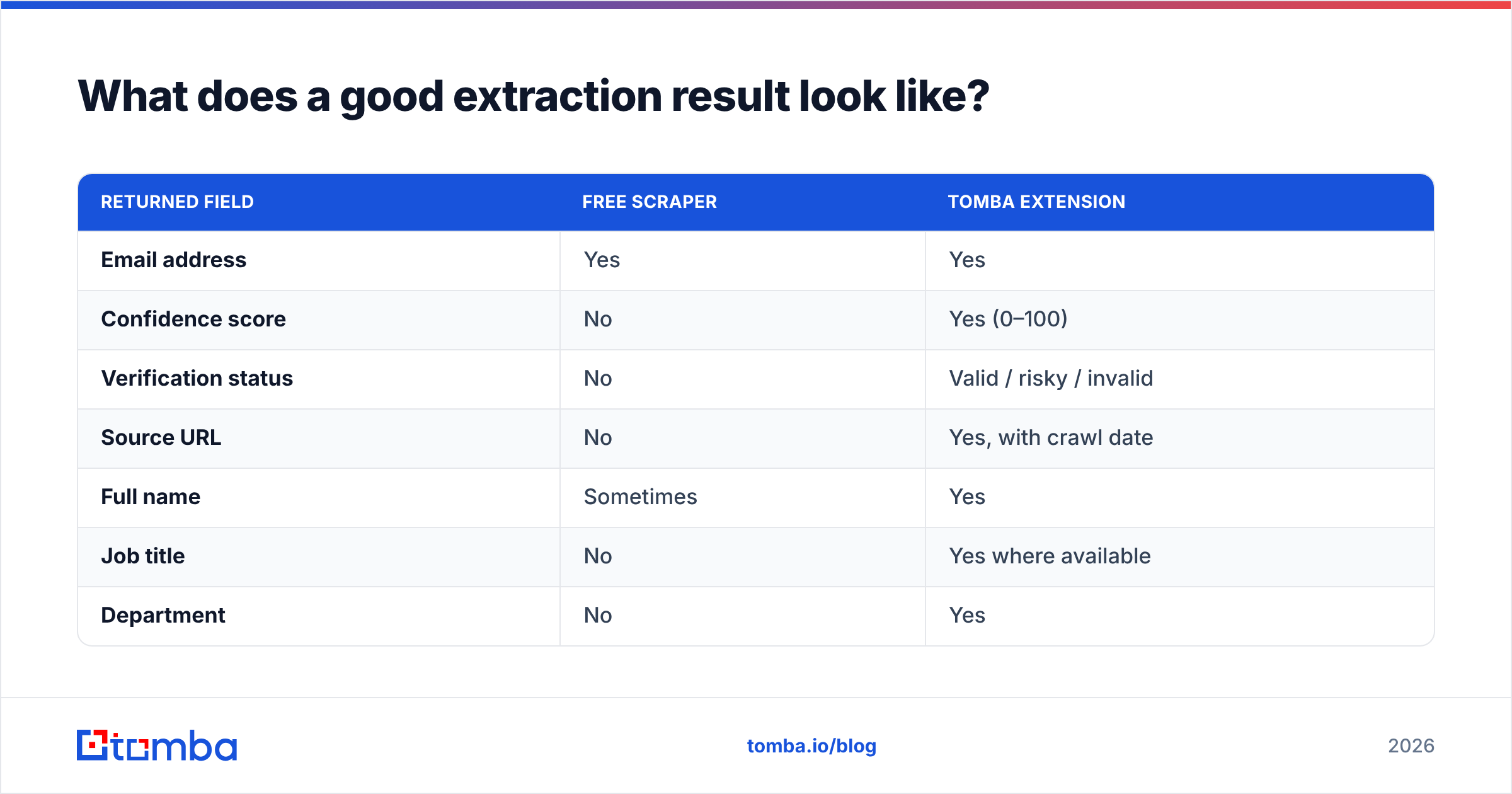
A usable record has more than an address. Compare what each tier returns for the same lookup:
| Returned field | Free scraper | Tomba extension |
|---|---|---|
| Email address | Yes | Yes |
| Confidence score | No | Yes (0–100) |
| Verification status | No | Valid / risky / invalid |
| Source URL | No | Yes, with crawl date |
| Full name | Sometimes | Yes |
| Job title | No | Yes where available |
| Department | No | Yes |
| Company domain | Implied | Explicit |
| Catch-all flag | No | Yes |
| Export format | Copy-paste | CSV, API, CRM push |
The fields you don't get are the ones that make a list segmentable. Without a job title you can't write a relevant first line. Without a source and crawl date you can't judge freshness. Without a catch-all flag you can't route the risky records away from your main sending domain.
How much should you expect to pay?#
Free tiers exist and are genuinely useful for evaluation. Tomba's free tier gives 25 searches a month, which is enough to test accuracy against a set of contacts you already know. Do that test before you pay anyone: pick 20 colleagues or known contacts, run them through the tool, and count the exact matches. Vendor-published accuracy percentages are marketing; your own 20-row test is data.
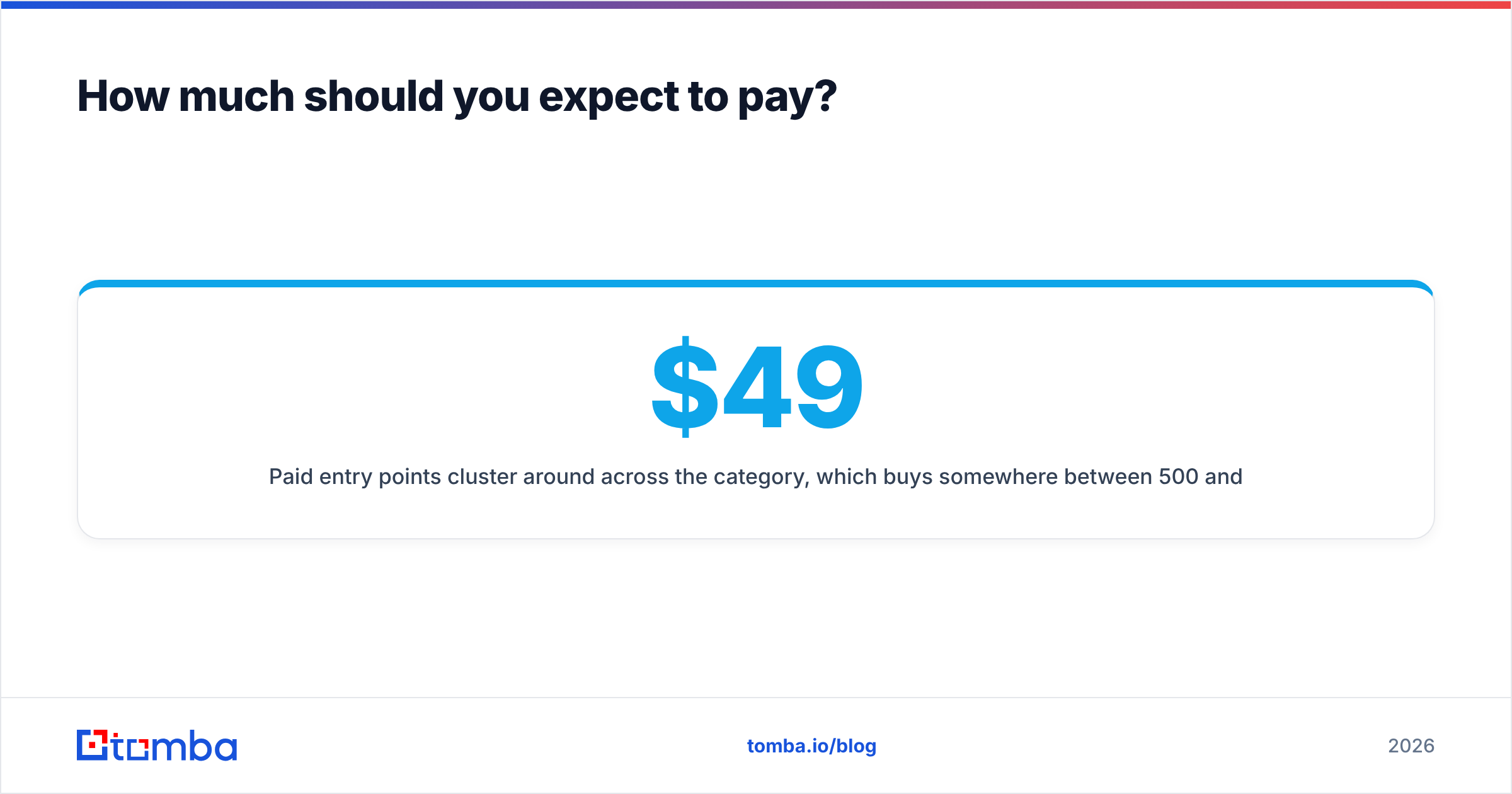
Paid plans start around $49 a month across the category. That buys 500 to 1,000 verified lookups, depending on the vendor. Tomba's Growth plan at $99/mo and Pro at $249/mo scale that up with higher bulk limits and API throughput. The per-lookup math matters more than the sticker price: a $49 plan returning 60% usable addresses costs more than a $99 plan returning 95%.
Watch for three pricing traps:
- Credits burned on failed lookups. Some vendors charge whether or not they find an address. Confirm the policy before committing.
- Seat-based pricing. Tools priced per user get expensive fast on a team of five, even when only two people extract regularly.
- Verification sold separately. If finding and verifying are metered independently, your real cost per usable address is roughly double the headline rate.
Which extension should you download?#
There's no single best download email extractor for Chrome. Match the tool to the job instead:
- You're doing account-based research inside LinkedIn and company sites, and you need addresses you can send to immediately. Use a verified, API-backed extension. The LinkedIn finder plus verification is the workflow this is built for.
- You want breadth of domain coverage above all. Hunter has the widest publicly-indexed domain footprint and a clean confidence model.
- You want data without sourcing it. BookYourData's pre-verified lists skip the extraction stage entirely.
- You need one address, once, and you'll never do this again. A free scraper is fine. Just don't build a campaign on it.
Whatever you install, keep the verification step non-negotiable. Extraction is the cheap part. Repairing a sender reputation you burned on an unchecked list is the expensive part.
Ready to stop cleaning up after your scraper? The Tomba Email Finder runs extraction and SMTP-level verification in the same call, so what lands in your CSV is what you can actually send to — with a confidence score, source URL, and catch-all flag on every row. Install the Chrome extension to capture contacts in-context, start on the free tier at 25 searches a month, and scale into bulk or the API when your volume outgrows clicking.
Related guides#
Ready to find emails that actually work?
Join 150,000+ professionals who stopped guessing and started sending. Free credits on signup — no credit card required.
Get the Tomba newsletter
Practical outbound tactics and product updates — once every two weeks.
About the author