Download Email Verifier Software: What Actually Works in 2026
Downloadable email verifiers promise offline, unlimited list cleaning for a one-time fee. Here's what desktop SMTP checkers can and can't do in 2026 — and when a cloud verifier is the safer call.
TL;DR
- "Download email verifier" usually means one of three different things: a desktop SMTP checker, a browser extension, or an API/CLI client you install locally. Only the last two are safe defaults in 2026.
- Desktop verifiers run SMTP checks from your IP address. Most residential and office ISPs block outbound port 25, and mailbox providers throttle or blacklist unknown IPs that probe thousands of addresses.
- A one-time $89 license looks cheaper than a subscription until you count the false "valid" results, the burned domain reputation, and the hours spent babysitting a run.
- Cloud verifiers pool thousands of rotating IPs, cache provider responses, and handle catch-all logic — which is exactly the part a downloadable tool cannot replicate.
- If you genuinely need local execution (compliance, air-gapped data, engineering workflows), install a CLI or API client instead of a scraping-style desktop app.
What does "download email verifier" actually mean?#
The phrase gets typed into Google by three very different people, and they want three very different products.
1. The desktop SMTP checker. A Windows executable — often shareware-era UI, sometimes still shipping a 32-bit build — that you point at a CSV. It resolves MX records, opens a socket to the mail server, issues HELO, MAIL FROM, and RCPT TO, then reads the response code. If the server answers 250, the tool marks the address valid. This is the classic "download and clean your list forever" pitch.
2. The browser extension. Not really a download in the software sense — it's a Chrome or Edge add-on that verifies addresses inline while you browse LinkedIn or a company site. The verification still happens in the cloud; only the interface is local.
3. The local client for a hosted API. A CLI binary, an SDK package, or a spreadsheet add-in. Your data stays in your environment until the moment you send it; the actual mailbox probing happens on infrastructure built for it.
Those three options share a search phrase and almost nothing else. The rest of this guide is mostly about whether option 1 still deserves a place in your stack — and what to install instead if it doesn't.
Why do people want a downloadable email verifier in the first place?#
The motivations are reasonable, which is why the category refuses to die:
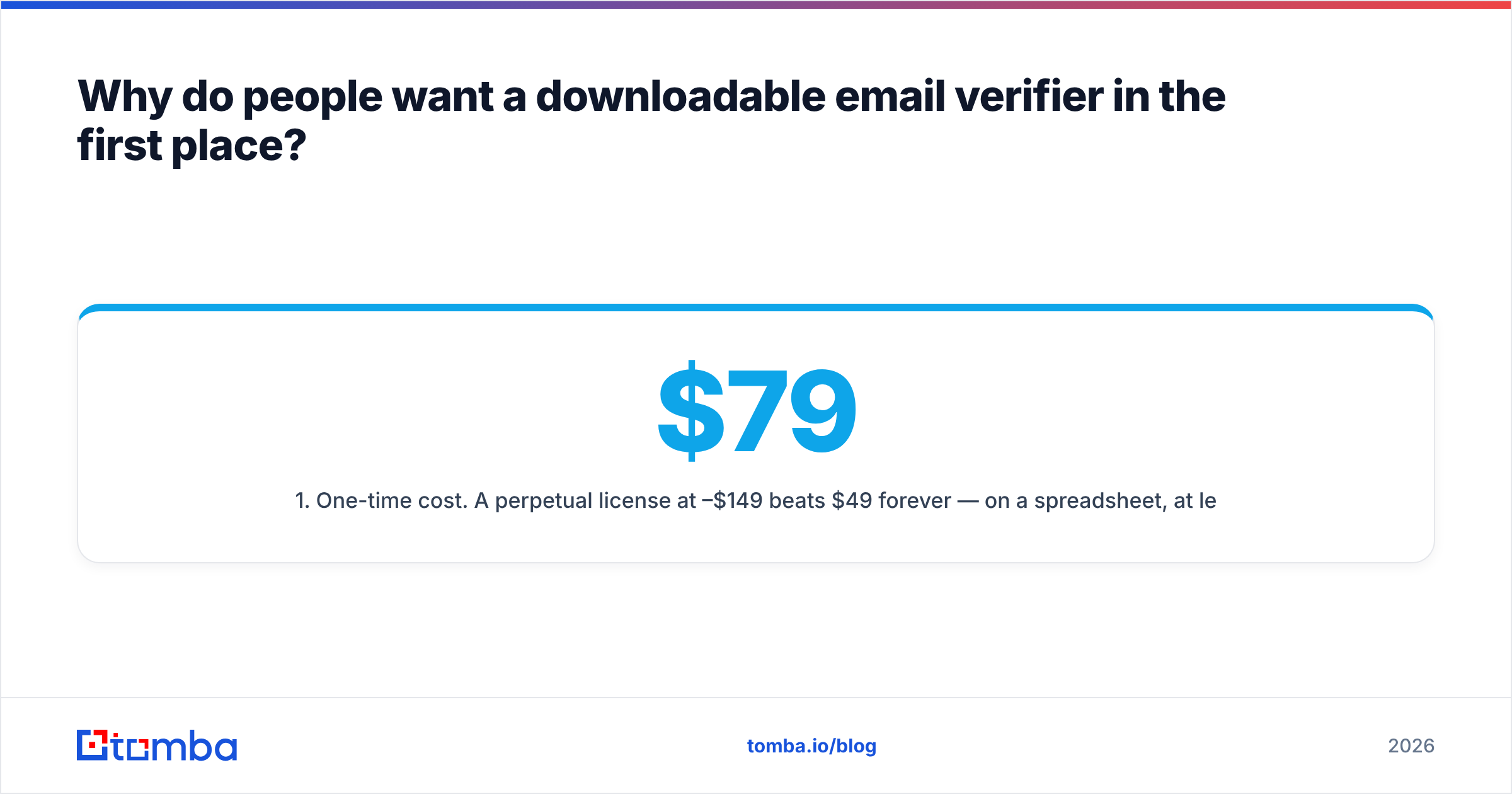
- One-time cost. A perpetual license at $79–$149 beats $49/mo forever — on a spreadsheet, at least.
- Unlimited volume. No credits, no overage, no metering. Verify 4 million rows if your patience allows.
- Data residency. Legal, healthcare, and government teams sometimes cannot upload contact lists to a third-party SaaS without a DPA and a review cycle.
- Offline or air-gapped work. Rare, but real — some environments have no outbound SaaS access at all.
- Distrust of "credits." Buyers who have been burned by verifiers charging for unknown/risky results want a flat model.
Points 3 and 4 are legitimate architectural requirements. Points 1, 2, and 5 are usually solved better by pricing choice than by software category.

Do desktop email verifiers still work in 2026?#
Partially — and the failure modes are the expensive kind, because they produce confident wrong answers rather than errors.
Port 25 is blocked on most consumer and business connections. Comcast, Spectrum, Orange, BT, and nearly every mobile carrier drop outbound port 25 traffic by default to limit spam relays. Your verifier can't open the socket, so it returns "unknown" for every address — or worse, silently marks them as valid. Cloud hosting doesn't fix this either: AWS, Google Cloud, and Azure all restrict port 25 egress on new accounts by default.
Your IP has no reputation, and mailbox providers notice. SMTP verification looks identical to a directory harvest attack from the receiving server's perspective. Google and Microsoft rate-limit unknown IPs aggressively; after a few hundred RCPT TO probes, they start returning generic 250 for everything, or greylist you entirely. A run that "succeeds" against Google Workspace domains after 2,000 checks is almost certainly returning garbage.
Microsoft 365 does not honestly answer RCPT TO. Exchange Online accepts nearly all recipients at SMTP time and bounces later. Since Microsoft hosts a large share of B2B mailboxes, a naive desktop checker is flying blind on a big chunk of any B2B list.
Catch-all domains break the whole model. A catch-all server accepts every address at the SMTP layer, so asdkjh@company.com returns valid. Desktop tools typically flag the domain as catch-all and stop there, handing you a bucket of unresolved rows. Distinguishing a real mailbox on a catch-all domain requires pattern data, historical response signals, and provider-specific heuristics — none of which fit in a standalone binary. That's the job of a dedicated catch-all verifier.
Nobody updates the provider quirks for you. Yahoo changed its response behavior. Zoho added new throttling. Proofpoint and Mimecast gateways answer differently than the mailbox behind them. A hosted verifier ships these fixes weekly; a downloaded .exe ships them when the vendor feels like cutting a release.
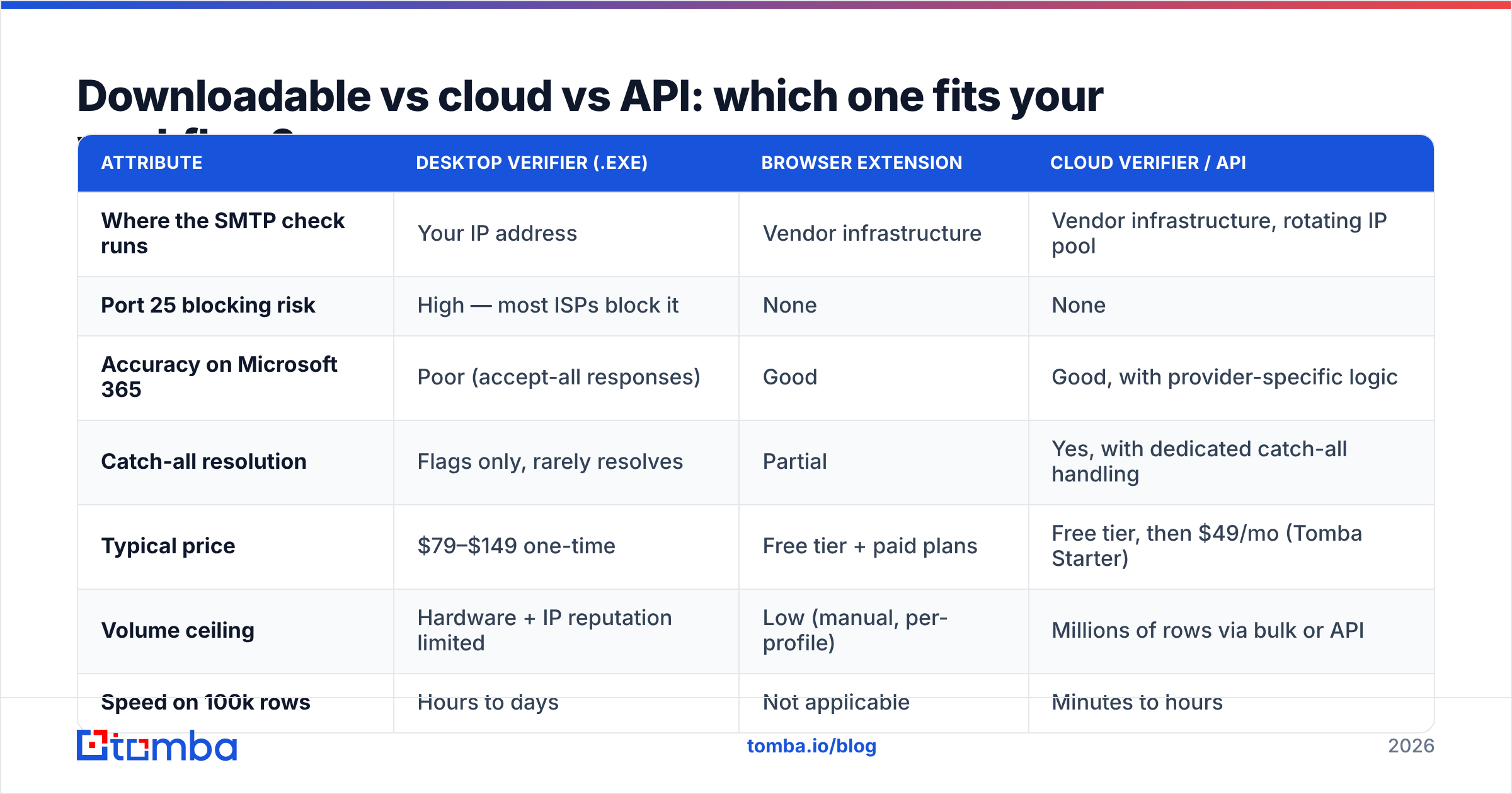
Downloadable vs cloud vs API: which one fits your workflow?#
| Attribute | Desktop verifier (.exe) | Browser extension | Cloud verifier / API |
|---|---|---|---|
| Where the SMTP check runs | Your IP address | Vendor infrastructure | Vendor infrastructure, rotating IP pool |
| Port 25 blocking risk | High — most ISPs block it | None | None |
| Accuracy on Microsoft 365 | Poor (accept-all responses) | Good | Good, with provider-specific logic |
| Catch-all resolution | Flags only, rarely resolves | Partial | Yes, with dedicated catch-all handling |
| Typical price | $79–$149 one-time | Free tier + paid plans | Free tier, then $49/mo (Tomba Starter) |
| Volume ceiling | Hardware + IP reputation limited | Low (manual, per-profile) | Millions of rows via bulk or API |
| Speed on 100k rows | Hours to days | Not applicable | Minutes to hours |
| Data residency control | Full — file never leaves the machine | None | Contractual (DPA), not physical |
| Ongoing provider updates | Vendor release cycle | Automatic | Automatic |
| Blacklist risk to your domain | Real — your IP does the probing | None | None |
| Best fit | Air-gapped or compliance-locked teams | One-off checks while prospecting | Everything else |
The interesting row is the last-but-one. When a desktop tool hammers mailbox providers from your office IP, and that IP is shared with your outbound mail relay or your VPN egress, you can degrade the deliverability of mail you actually send. That's a cost no license fee shows you. If you're not already tracking sender reputation, a bulk desktop verification run is a great way to learn about it the hard way.
What should a real email verifier check?#
Whether it's local or hosted, judge any verifier on how many of these layers it actually performs. Most downloadable tools stop at step 3.
- Syntax and RFC compliance — malformed addresses, illegal characters, encoding issues. Cheap, instant, and table stakes.
- Domain and MX record validation — does the domain resolve, and does it publish mail exchanger records? Dead domains are the largest single source of hard bounces on old lists.
- SMTP mailbox probe — the
RCPT TOhandshake. Useful, but only as trustworthy as the IP and the receiving provider's honesty. - Catch-all and accept-all detection — testing a random address on the domain to see whether the server accepts anything. Detection is easy; resolution is the hard part.
- Role, disposable, and spam-trap filtering —
info@,sales@,abuse@, ten-minute-mail domains, and known trap patterns. Role addresses aren't always bad, but they should be labeled, not silently passed. - Historical and pattern signals — has this address bounced elsewhere recently? Does it match the company's dominant naming format? This is where hosted verifiers pull ahead permanently, because a local binary has no corpus to compare against.
A verifier that reports a binary valid/invalid with no risk tier is hiding uncertainty from you. You want three buckets — safe to send, risky, do not send — so you can route the middle bucket to a warmed secondary domain instead of your primary.
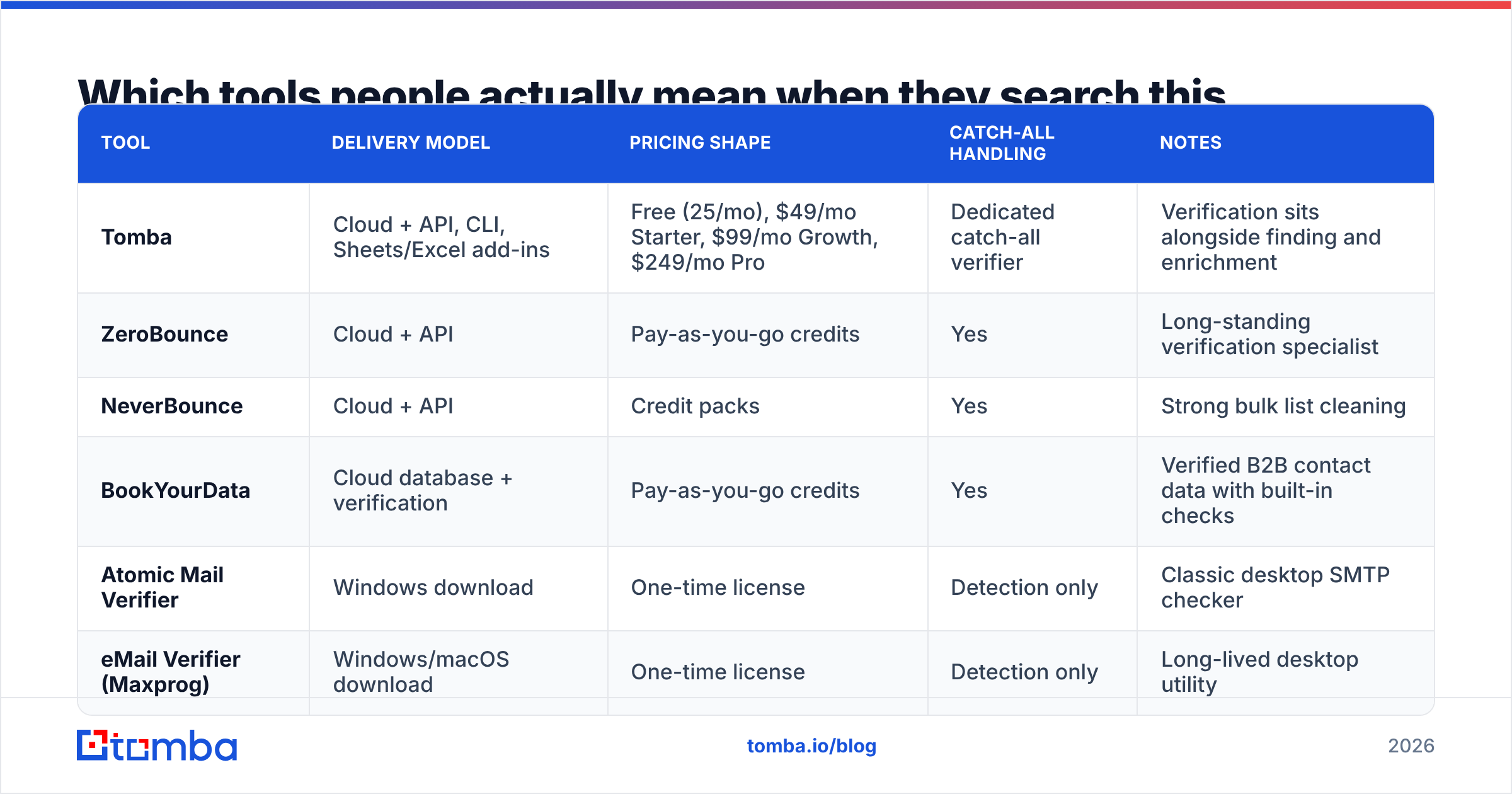
Which tools people actually mean when they search this#
| Tool | Delivery model | Pricing shape | Catch-all handling | Notes |
|---|---|---|---|---|
| Tomba | Cloud + API, CLI, Sheets/Excel add-ins | Free (25/mo), $49/mo Starter, $99/mo Growth, $249/mo Pro | Dedicated catch-all verifier | Verification sits alongside finding and enrichment |
| ZeroBounce | Cloud + API | Pay-as-you-go credits | Yes | Long-standing verification specialist |
| NeverBounce | Cloud + API | Credit packs | Yes | Strong bulk list cleaning |
| BookYourData | Cloud database + verification | Pay-as-you-go credits | Yes | Verified B2B contact data with built-in checks |
| Atomic Mail Verifier | Windows download | One-time license | Detection only | Classic desktop SMTP checker |
| eMail Verifier (Maxprog) | Windows/macOS download | One-time license | Detection only | Long-lived desktop utility |
The desktop entries are the honest representatives of the "download" category. They do what they say — they just do it from your IP, with all the constraints described above. If you want to sanity-check the wider field, G2's email verification category is a reasonable place to see how buyers actually rate delivery models against each other.

When is a downloadable verifier genuinely the right call?#
Three scenarios, and they're narrower than the search volume suggests:
- Contractual data residency. If your legal team cannot approve sending contact data to a US-hosted processor, and no EU-region option exists for your vendor, local processing is the only path. Accept the accuracy tradeoff knowingly.
- A tiny, one-off list. Fifty addresses, no budget, no recurring need. Honestly, a free web checker handles that faster than an install — you can run a single address through a free email checker in seconds without downloading anything.
- Engineering pipelines. You want verification inside a script, a nightly job, or a data warehouse transform. This is the case where "downloading" makes real sense — but what you download is a client, not a verifier. Install a CLI or SDK that calls a hosted email verification API and you get local orchestration with cloud-grade accuracy.
That third pattern is what most technical buyers actually want. Your data pipeline stays on your infrastructure; only the SMTP probing — the part that needs IP reputation you'll never build — gets delegated.
How do you clean a large list without installing anything?#
A workflow that survives contact with a 200,000-row export:
Step 1 — Deduplicate first. Paying to verify the same address four times is the most common wasted spend in list hygiene. Strip exact duplicates and normalize casing before anything else.
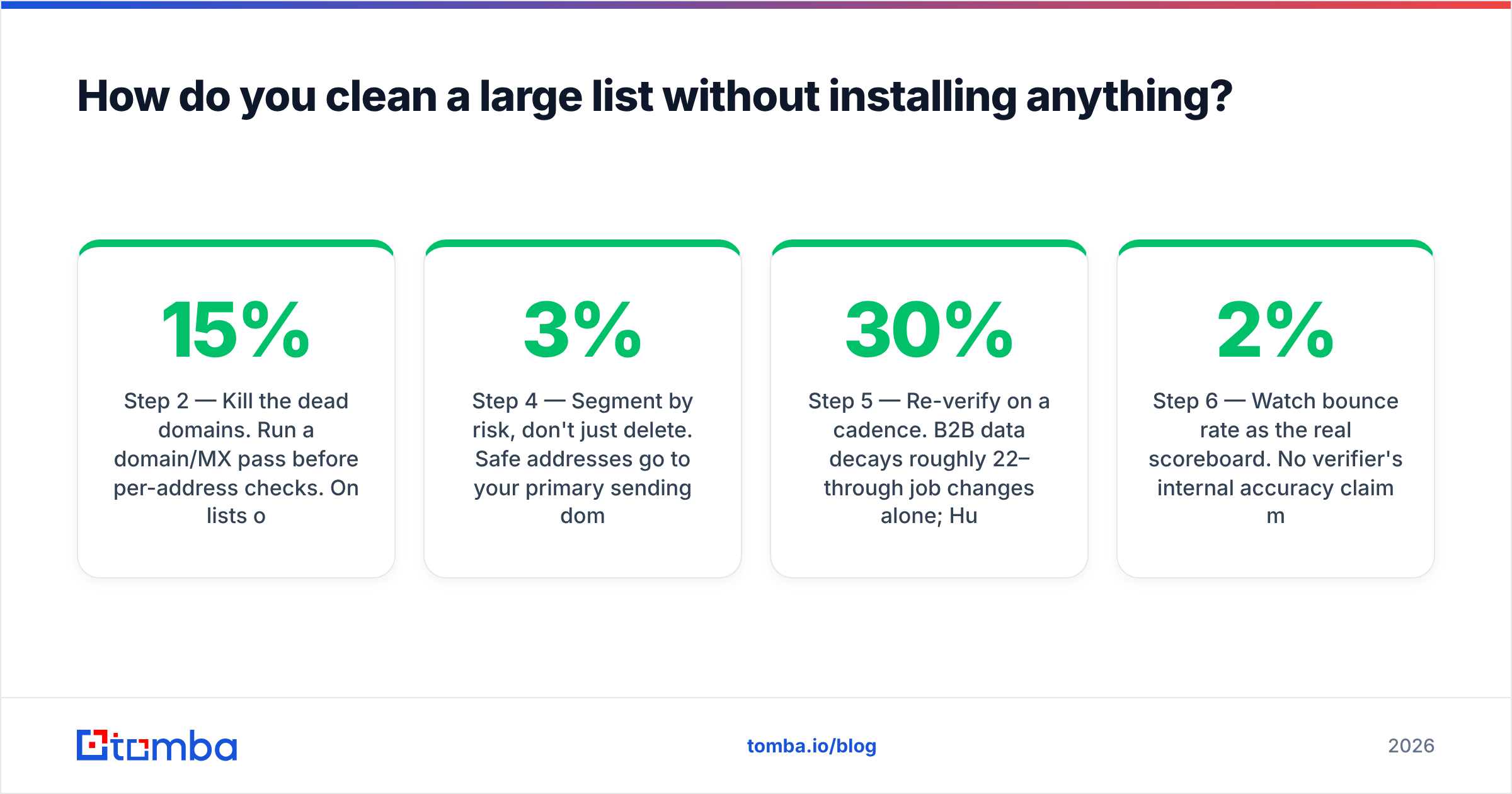
Step 2 — Kill the dead domains. Run a domain/MX pass before per-address checks. On lists older than 18 months, 8–15% of domains typically no longer accept mail at all. Removing them up front cuts your verification volume meaningfully.
Step 3 — Bulk verify the survivors. Upload the remainder to a bulk verify job rather than looping single API calls. Batch endpoints deduplicate internally, respect provider rate limits, and finish far faster than a desktop tool grinding through a queue.
Step 4 — Segment by risk, don't just delete. Safe addresses go to your primary sending domain. Risky and catch-all addresses go to a secondary domain, in smaller volumes, with a plain-text template. If your bounce rate on the risky segment stays under 3%, promote it. If it doesn't, you learned that cheaply.
Step 5 — Re-verify on a cadence. B2B data decays roughly 22–30% per year through job changes alone; HubSpot's own research on database decay puts the annual figure in that range. A list verified in January is not a verified list in September. Schedule a quarterly re-run on anything you still email.
Step 6 — Watch bounce rate as the real scoreboard. No verifier's internal accuracy claim matters as much as your actual bounce rate over the next 5,000 sends. Under 2% is healthy; above 5% and mailbox providers start treating your domain as a risk, which is the whole reason email deliverability work exists.
What about verifying addresses you don't have yet?#
Half the people searching for a downloadable verifier don't have a list problem — they have a sourcing problem. They scraped or exported a set of names and companies, guessed the email patterns, and now want software to tell them which guesses are real.
Guess-then-verify is a losing loop. Permutation generates 6–12 candidates per person; even a good verifier can't cleanly resolve them on catch-all domains, and the SMTP volume required to test them all is exactly the behavior that gets IPs throttled. Sourcing the address from pattern data and confirming it in one step is both cheaper and more accurate than brute force. That's the difference between an email verifier used defensively and one used as a search engine.
If your list is already clean but small, the bottleneck isn't verification at all — it's volume of qualified contacts. Check the Tomba pricing tiers against how many new contacts you actually need per month before buying either category of tool.
The verdict#
Download a client, not a verifier.
If you're bound by data residency rules, a desktop SMTP checker is a defensible compromise — just budget for lower accuracy on Microsoft 365 and catch-all domains, and never run it from the same IP range as your outbound mail. For everyone else, the one-time license saves $600 a year and costs you bounce rate, sender reputation, and hours of manual triage. That's a bad trade in 2026, and it gets worse every time a mailbox provider tightens its rate limits.
Start with the free tier — 25 searches a month, no card, no installer — and run your worst list segment through the Tomba Email Finder and verifier together. Compare the bounce rate against whatever your desktop tool told you was valid. That single test answers the download question better than any feature table, including this one.
Related guides#
Ready to find emails that actually work?
Join 150,000+ professionals who stopped guessing and started sending. Free credits on signup — no credit card required.
Get the Tomba newsletter
Practical outbound tactics and product updates — once every two weeks.
About the author