Drip Campaign Templates That Actually Convert in 2026
Nine drip campaign templates with real timing, real copy, and the trigger logic behind each one — plus how to know when a drip is the wrong tool entirely.
TL;DR
- A drip campaign is time-based and pre-written; a nurture sequence is behavior-triggered. Most teams call everything a "drip" and then wonder why reply rates sit under 2%.
- The nine templates below cover cold outbound, trial onboarding, demo no-shows, re-engagement, webinar follow-up, and closed-lost revival. Copy the structure, rewrite the words.
- Four emails over 12–16 days beats seven emails over 30 days in almost every B2B test we've seen reported. Length of sequence is not the lever — relevance of trigger is.
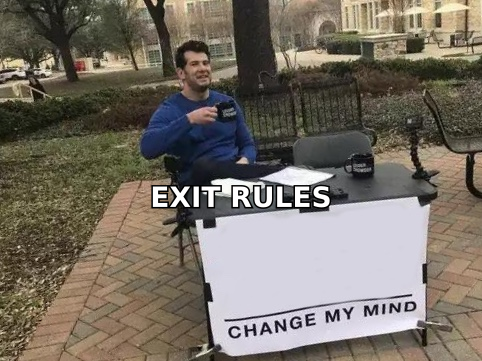
- Exit rules matter more than subject lines. A drip that keeps sending after someone books a call is worse than no drip at all.
- Every template dies without clean data. Bounces above 3% will torpedo the whole domain before template quality ever gets measured.
What is a drip campaign, exactly?#
A drip campaign is a pre-written series of emails sent on a fixed schedule after a single entry trigger. Someone downloads a guide on Tuesday; they get email one immediately, email two on Friday, email three the following Wednesday. The content is decided in advance. The timing is decided in advance. Nothing branches based on what the recipient does — except stopping.
That last part is the whole game, and most teams get it wrong.
Think of it like a slow cooker versus a stovetop. A drip is the slow cooker: you set it, you walk away, and it produces a predictable result. A nurture sequence is the stovetop — you're adjusting heat based on what's happening in the pan. Both cook food. Only one of them lets you leave the kitchen.
Technically: drip = time-delayed, linear, one entry condition. Nurture = event-driven, branching, multiple entry and exit conditions. Lifecycle marketing = both of those plus scoring, plus routing to sales. When a vendor sells you "drip campaign software" and shows you a branching visual builder, they're selling you nurture and calling it drip because that's what people search for.
The five decisions every drip template forces you to make:
- Entry trigger — what single action or list membership puts someone in? Vague triggers ("signed up") produce vague copy. "Downloaded the SOC 2 checklist" produces email one that writes itself.
- Cadence — the gap between sends. Cold outbound tolerates 3–4 days. Trial onboarding needs 1–2 days because the trial clock is running. Re-engagement can stretch to 7–10.
- Length — how many emails before you stop. Diminishing returns hit hard after email four in cold, after email six in onboarding.
- Exit conditions — reply, meeting booked, page visited, purchase, unsubscribe. Missing any of these is how you end up emailing a customer a "still interested?" note.
- The ask — one per email, and it should escalate slowly. Email one asking for a 30-minute call is a cold email pretending to be a drip.
Which drip campaign templates should you actually build first?#
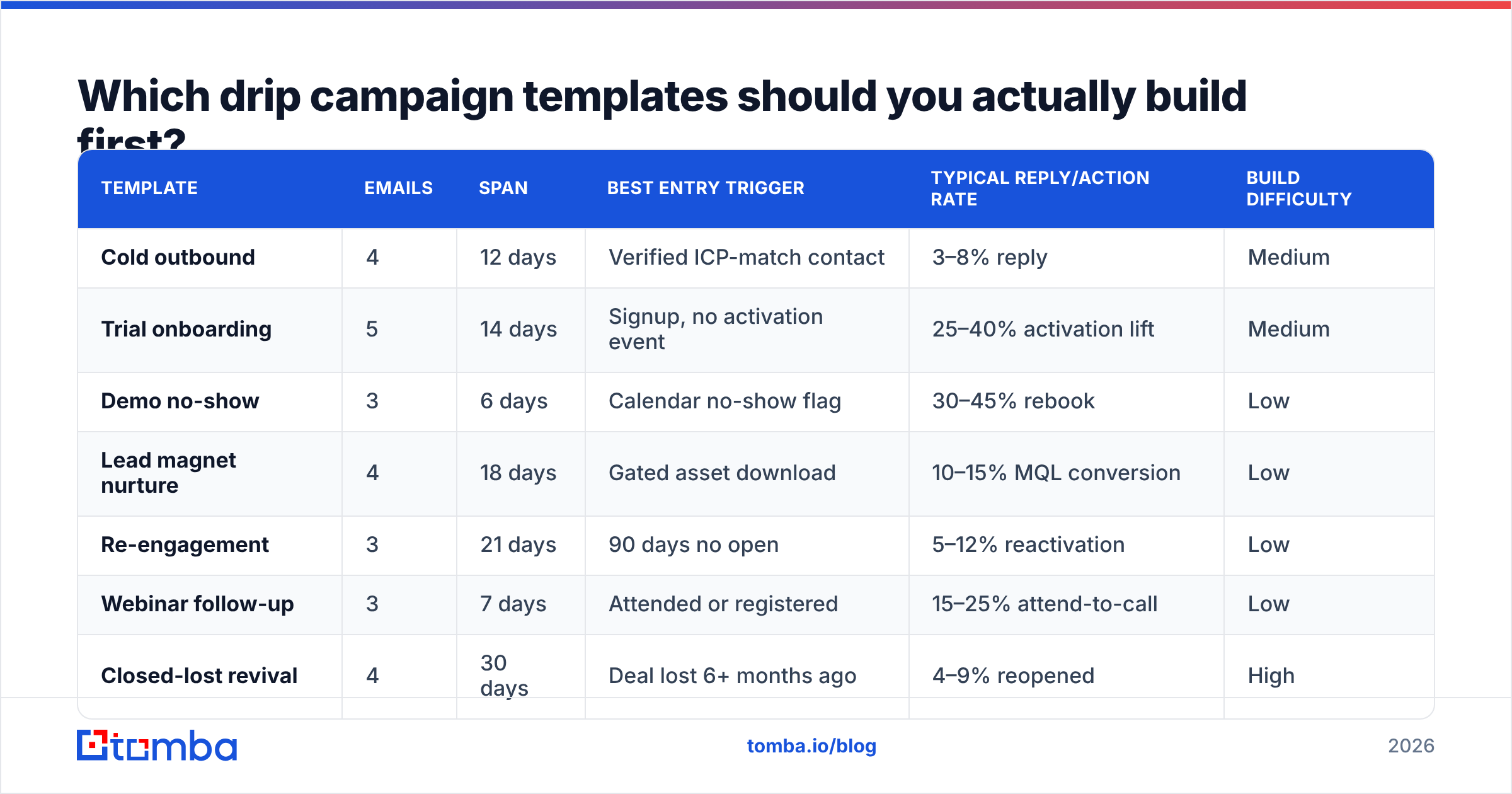
Build in this order, because each one compounds off the last. Here's the honest comparison of what each template costs to build and what it typically returns.
| Template | Emails | Span | Best entry trigger | Typical reply/action rate | Build difficulty |
|---|---|---|---|---|---|
| Cold outbound | 4 | 12 days | Verified ICP-match contact | 3–8% reply | Medium |
| Trial onboarding | 5 | 14 days | Signup, no activation event | 25–40% activation lift | Medium |
| Demo no-show | 3 | 6 days | Calendar no-show flag | 30–45% rebook | Low |
| Lead magnet nurture | 4 | 18 days | Gated asset download | 10–15% MQL conversion | Low |
| Re-engagement | 3 | 21 days | 90 days no open | 5–12% reactivation | Low |
| Webinar follow-up | 3 | 7 days | Attended or registered | 15–25% attend-to-call | Low |
| Closed-lost revival | 4 | 30 days | Deal lost 6+ months ago | 4–9% reopened | High |
| Free-to-paid upgrade | 4 | 10 days | Usage limit hit | 8–18% conversion | Medium |
| Post-purchase expansion | 3 | 45 days | 60 days active + healthy usage | 5–10% upsell | High |
Start with demo no-show. It's three emails, it takes an afternoon, and it recovers revenue you already earned. Teams routinely skip it to go build a nine-email cold sequence that nobody replies to.
What does a cold outbound drip template look like?#
Four emails. Twelve days. Every one under 90 words.
Email 1 — Day 0. Subject: quick question about {{trigger_event}}
Hi {{first_name}},
Saw {{company}} just {{specific_trigger — hired 3 SDRs / launched in EMEA / posted a RevOps role}}.
Usually when that happens, {{specific_problem}} shows up within a quarter. We built {{one-line solution}} for exactly that window.
Worth a look, or is this already handled?
{{sender}}
The last line is doing real work. "Is this already handled?" is easier to answer than "do you want to book a call," and a no is still a reply you can learn from.
Email 2 — Day 3. Subject: reply in the same thread, no new subject.
One more data point: {{customer similar to them}} cut {{metric}} by {{number}} in {{timeframe}}. Their setup looked a lot like yours — {{one specific similarity}}.
Happy to send the two-paragraph version if useful.
Email 3 — Day 7. New thread. Subject: {{company}} + {{your_company}}
Switch angle entirely. If email one led with a pain point, email three leads with a resource — a benchmark, a teardown, a short doc. No ask beyond "want it?"
Email 4 — Day 12. Subject: reply to thread one.
I'll stop here. If {{problem}} moves up your list in Q{{next}}, reply "later" and I'll check back then. Otherwise I'll assume the timing's off.
That "reply later" instruction converts surprisingly well because it costs the recipient nothing and gives them an exit that isn't a rejection.
What kills this template isn't the copy — it's sending it to addresses that don't exist. A 6% bounce rate on email one means emails two through four land in spam regardless of how good they are. Run your list through an email verifier before the first send, and use a catch-all verifier for the domains that come back ambiguous. Those are usually 20–30% of a B2B list and most tools just guess on them.
How do you write a trial onboarding drip?#
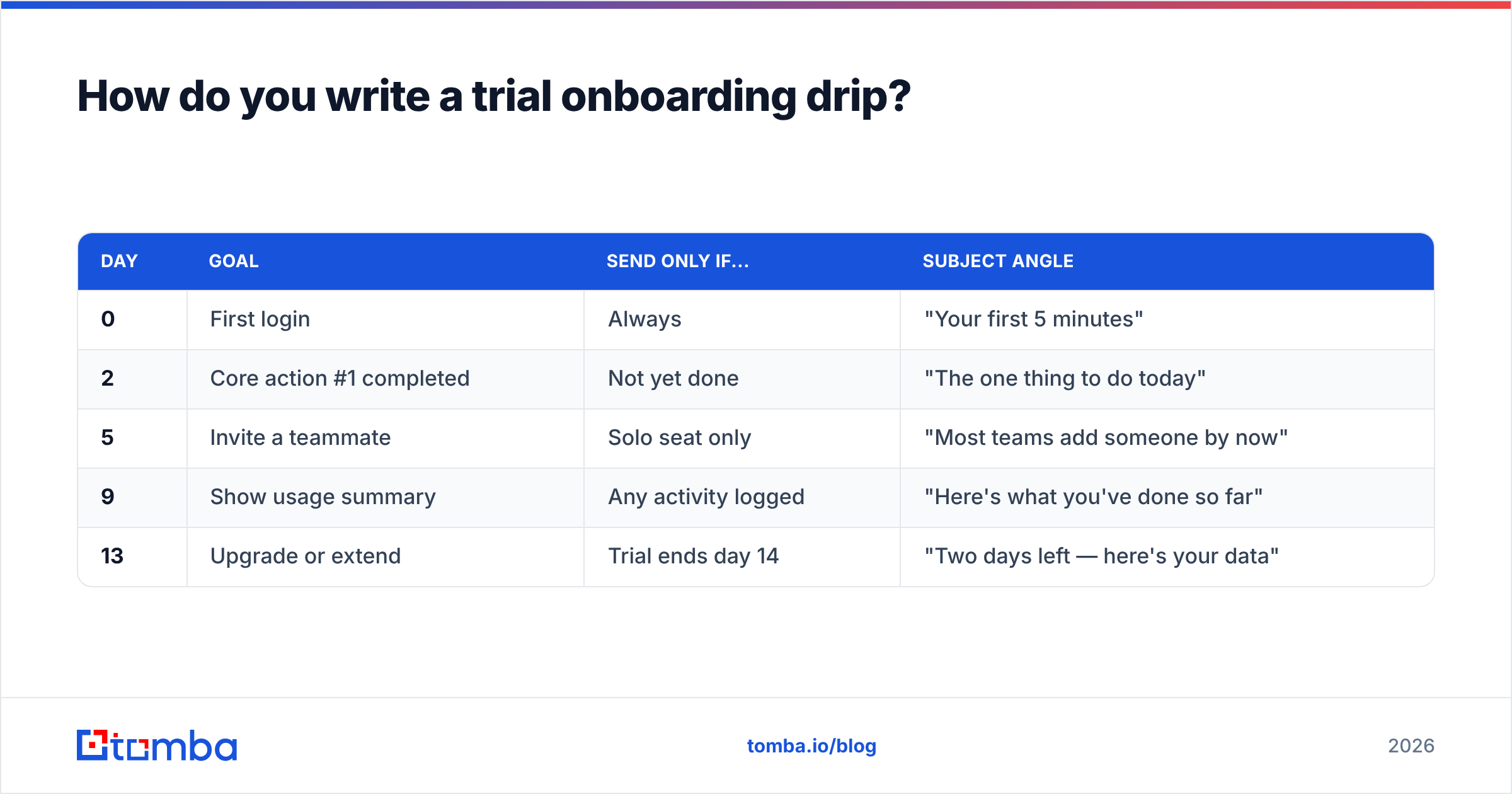
Five emails, fourteen days, and each one maps to a single activation step — not a feature tour.
| Day | Goal | Send only if... | Subject angle |
|---|---|---|---|
| 0 | First login | Always | "Your first 5 minutes" |
| 2 | Core action #1 completed | Not yet done | "The one thing to do today" |
| 5 | Invite a teammate | Solo seat only | "Most teams add someone by now" |
| 9 | Show usage summary | Any activity logged | "Here's what you've done so far" |
| 13 | Upgrade or extend | Trial ends day 14 | "Two days left — here's your data" |
The "send only if" column is what separates a drip that converts from one that annoys. If someone completed the core action on day one, email two is not just useless — it signals you aren't watching. Most email platforms support suppression by event; if yours doesn't, that's the upgrade to prioritize before you write more copy.
Day 9 is the sleeper. A usage summary email — "you've run 47 searches and saved 12 contacts" — outperforms feature education consistently, because it makes the value already received concrete. People don't upgrade for features. They upgrade to keep what they already have.
When is a drip campaign the wrong tool?#
Three situations, and pushing through anyway is how good lists get burned.
When the trigger is stale. A contact who downloaded something 14 months ago is not in market; they're in your database. Dripping them produces spam complaints, not pipeline. Suppress anything older than 180 days without an engagement signal, or run it through a genuine re-engagement flow with a hard three-email cap.
When the deal is active. The moment a rep is in a live thread, the automation must stop. This sounds obvious and it breaks constantly — a prospect replies to a rep's manual email, but the drip runs from a different tool with no shared suppression list, and email three fires two days later. Nothing undoes trust faster.
When you need one conversation, not ten touches. Enterprise deals with a five-person buying committee are not drip problems. They're research-and-relevance problems. Twelve automated emails to a VP who needs one well-researched note is negative ROI.
What are the timing rules that actually hold up?#
Timing gets over-theorized. Four rules survive contact with reality:
- Front-load the value, back-load the ask. Emails one and two give something. Emails three and four ask for something. Reversing this is the single most common structural mistake.
- Widen the gaps as you go. 0 → 3 → 7 → 12 works. 0 → 3 → 6 → 9 feels like pressure. The widening gap reads as patience, not persistence.
- Send Tuesday through Thursday, 7–10am recipient local time. Not because those hours are magic, but because Monday inboxes are triaged in bulk and Friday sends get buried by Monday. Adjust per segment; test rather than inherit.
- Never send two emails within 24 hours of each other in a cold sequence. In onboarding, sure — the trial clock justifies it. In cold, it reads as automation and gets flagged.
On deliverability specifically: sequence design cannot rescue a damaged sending domain. If your sender reputation is already degraded, fix authentication and warm the domain before you launch anything. Google's own bulk sender guidelines spell out the SPF, DKIM, DMARC, and spam-rate thresholds — the 0.3% complaint ceiling is the one that catches most teams by surprise.
How do the major tools compare for running drips?#
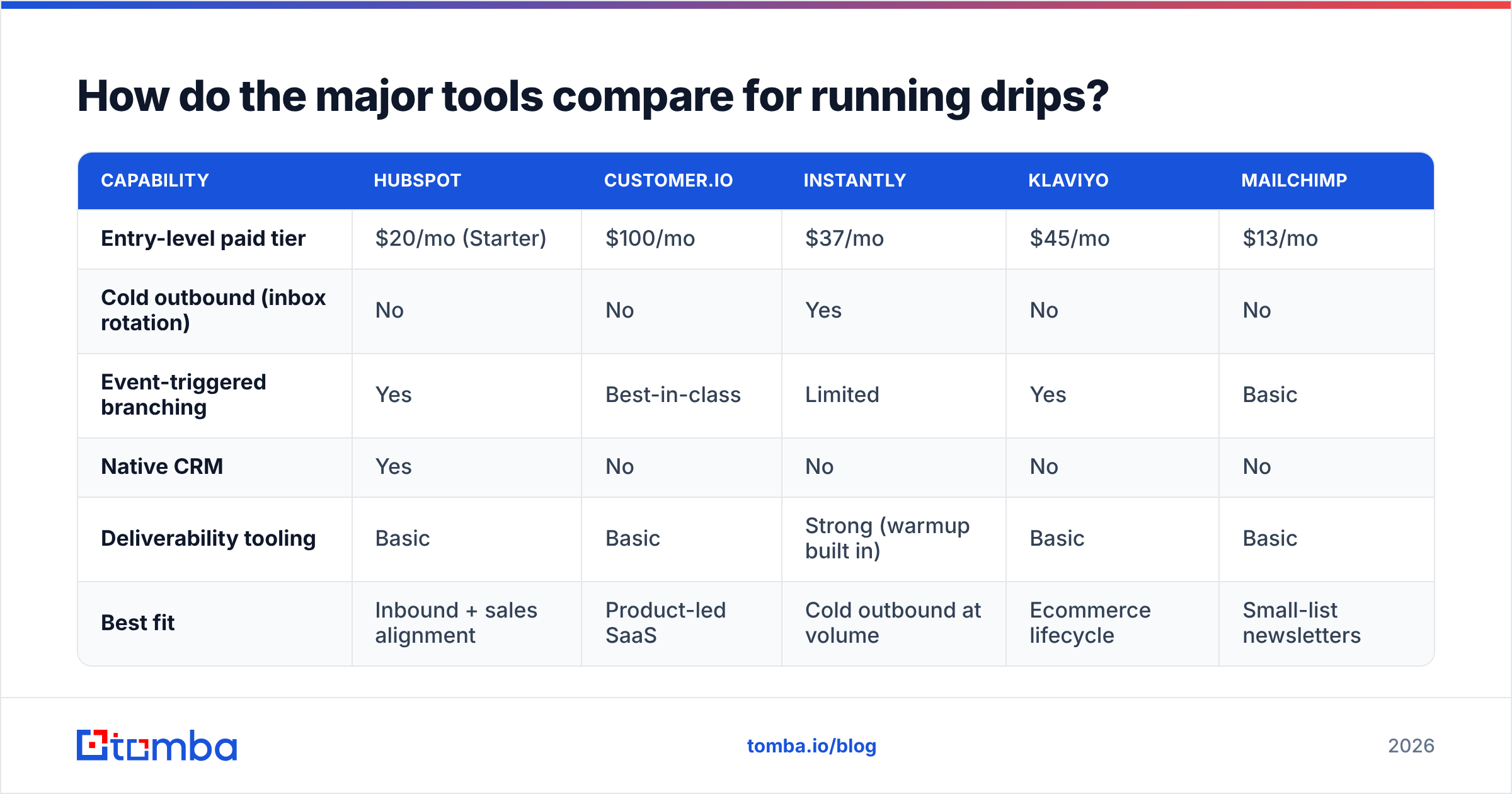
There's no universally correct pick — it depends on whether your drips are outbound, lifecycle, or both.
| Capability | HubSpot | Customer.io | Instantly | Klaviyo | Mailchimp |
|---|---|---|---|---|---|
| Entry-level paid tier | $20/mo (Starter) | $100/mo | $37/mo | $45/mo | $13/mo |
| Cold outbound (inbox rotation) | No | No | Yes | No | No |
| Event-triggered branching | Yes | Best-in-class | Limited | Yes | Basic |
| Native CRM | Yes | No | No | No | No |
| Deliverability tooling | Basic | Basic | Strong (warmup built in) | Basic | Basic |
| Best fit | Inbound + sales alignment | Product-led SaaS | Cold outbound at volume | Ecommerce lifecycle | Small-list newsletters |
A practical read: if your drips start from product events, Customer.io or a similar behavioral tool is worth the premium. If they start from a prospect list you built, an outbound-specific platform with inbox rotation and warmup matters far more than branching logic. If they start from form fills and you already run sales in a CRM, HubSpot's workflow tooling is the path of least resistance. Cross-check current feature sets on G2 before committing — these products change quarterly and pricing pages move faster than review sites.
For teams sourcing contacts rather than importing them, BookYourData is a solid option when you want pre-built, region-filtered B2B lists with pay-as-you-go credits — a different shape of problem than finding a specific person at a specific company, which is where a domain search approach fits better.
What should you measure, and what should you ignore?#
Ignore open rate as a primary metric. Apple Mail Privacy Protection inflates it, and it has been unreliable as a sequence-quality signal since 2021. Use it only for relative comparison inside a single sequence.
Track these instead:
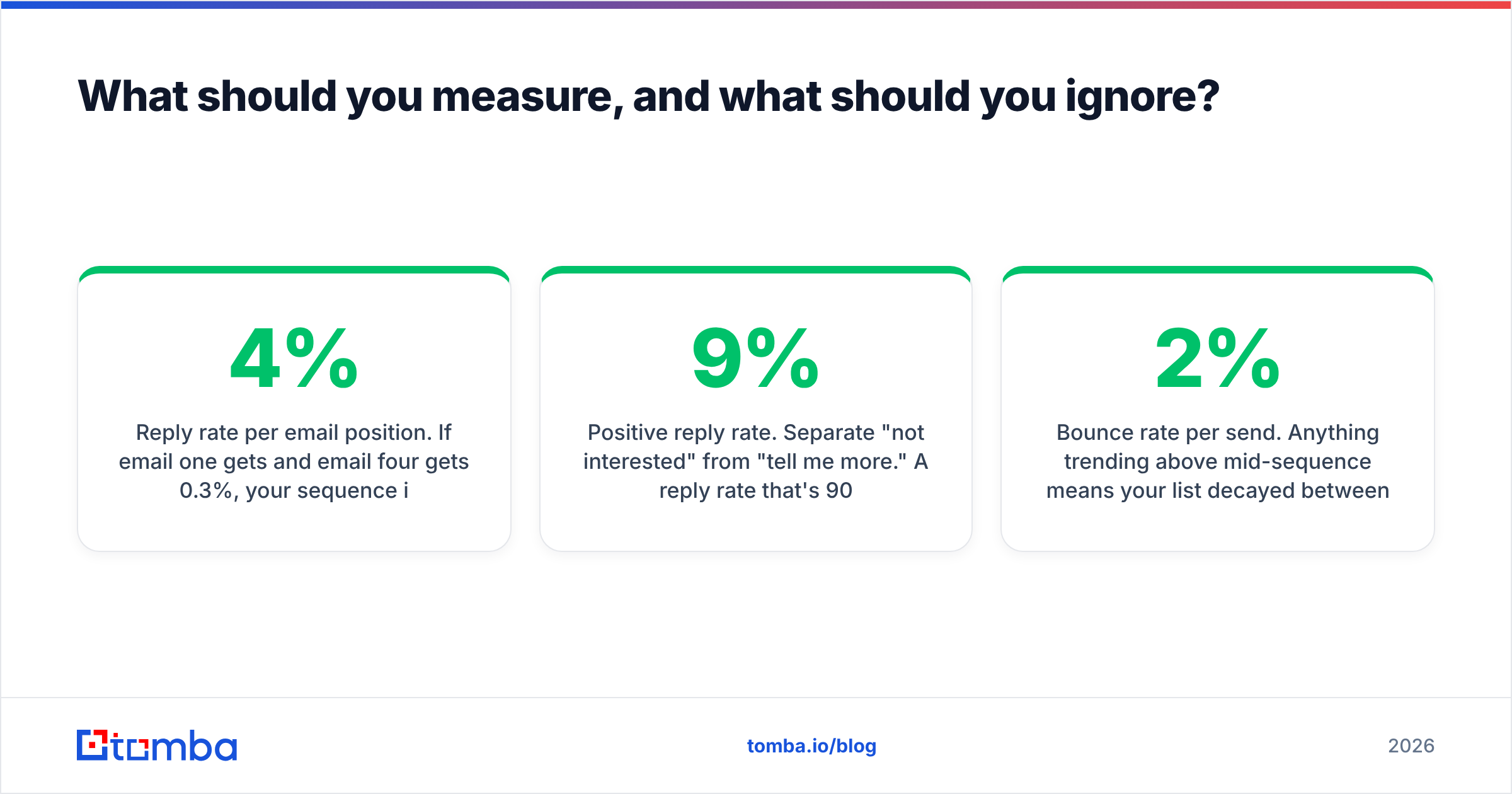
- Reply rate per email position. If email one gets 4% and email four gets 0.3%, your sequence is one email long and three emails of noise.
- Positive reply rate. Separate "not interested" from "tell me more." A 9% reply rate that's 90% rejections is a targeting problem, not a copy problem.
- Bounce rate per send. Anything trending above 2% mid-sequence means your list decayed between build and launch. B2B contact data goes stale at roughly 2–2.5% per month as people change jobs.
- Unsubscribe by email position. A spike at email three tells you exactly where the sequence overstays its welcome.
- Meetings booked per 1,000 sends. The only number that ties to revenue. Everything else is diagnostic.
Set a review cadence of every 500 sends for a new sequence, then monthly once it stabilizes. Rewriting copy after 40 sends is superstition, not optimization.
How do you keep the data underneath from rotting?#
Templates are the easy part. The sequences that fail almost always fail on inputs.
Three habits that hold up:
Verify at build time and at send time. A list verified in January and sent in April is a different list. Re-verify anything older than 60 days, especially at companies that announced layoffs or restructures.
Enrich before you segment. Personalization tokens are only as good as the fields behind them. If {{job_title}} is blank for 30% of your list, either enrich it or write copy that doesn't need it. Half-personalized emails read worse than fully generic ones. Contact enrichment fills the gaps that form fills leave behind.
Keep one suppression list, not five. Every tool that sends email must read from the same do-not-contact source. This is boring infrastructure work and it prevents the single most damaging drip failure — emailing someone who already bought, already opted out, or is already in a live deal.
If you're building lists from scratch rather than importing them, the sequencing tool is downstream of the sourcing problem. Getting verified, ICP-matched addresses in the first place decides whether any of these templates get a fair test.
Where should you start this week?#
Pick one template. Build the demo no-show sequence if you run demos, the trial onboarding sequence if you run a trial. Three to five emails, hard exit rules, one ask per email. Ship it, watch 500 sends, then adjust.
And before the first send, fix the input. Every template above assumes the addresses are real and the person still works there — an assumption that's wrong for roughly a quarter of any B2B list older than six months. The Tomba Email Finder sources verified professional addresses by domain, name, or company, with confidence scoring so you know which contacts are safe to send to and which need a second check. The free tier gives you 25 searches a month to test the workflow; Tomba pricing starts at $49/mo on Starter when you're ready to run real volume, with bulk and API access for teams building sequences at scale.
Good templates on a bad list produce nothing. Fix the list, then the templates start earning.
Related guides#
Ready to find emails that actually work?
Join 150,000+ professionals who stopped guessing and started sending. Free credits on signup — no credit card required.
Get the Tomba newsletter
Practical outbound tactics and product updates — once every two weeks.
About the author