Drip Campaign Workflow: How to Build One That Converts in 2026
Most drip campaigns fail on plumbing, not prose. Here's the full build — triggers, branch logic, delay math, exit rules, and the data hygiene step almost everyone skips.
TL;DR
- A drip campaign workflow is a pre-built chain of triggered emails with defined entry conditions, delays, branch logic, and exit rules. The copy is maybe 30% of the outcome; the plumbing is the rest.
- The single biggest killer is not bad subject lines — it's dirty entry data. Unverified addresses entering a 7-email drip multiply one bad record into seven bounces.
- Delay math matters: 1–2 days between the first three touches, then widening to 4–7 days. Fixed 3-day gaps for every step is the default nobody should keep.
- Every workflow needs an exit rule (reply, meeting booked, unsubscribe, negative intent) or you will email someone who already said yes.
- Build four workflows before you build forty: new-lead nurture, cold outbound, demo no-show, and dormant re-engagement.
What is a drip campaign workflow?#
A drip campaign workflow is the logic map behind an automated email series — who enters, what they receive, how long between sends, what changes their path, and what pulls them out.
Think of it like a hotel sprinkler system. The sprinkler heads (your emails) matter less than the pipes, the pressure valves, and the sensor that shuts everything off once the fire is out. Most teams obsess over sprinkler heads and never check whether the shut-off sensor works. That's why prospects who booked a meeting on Tuesday still get "just following up?" on Thursday.
Formally, a drip workflow has five components:
- Entry trigger — the event that drops a contact into the campaign (form fill, list import, CRM stage change, website visit, webinar registration).
- Entry conditions — the filters applied at the door. Job title, company size, geography, lifecycle stage, and — critically — email deliverability status.
- Steps and delays — the ordered sends and the wait time between them, sometimes with business-hours-only windows.
- Branch logic — if/then splits based on opens, clicks, replies, page visits, or CRM field changes.
- Exit rules — the conditions that remove someone immediately, plus the suppression list they land on afterward.
Miss any one of these and the campaign still "runs." It just runs badly, and the dashboard will happily show you a 41% open rate while a third of your sends never reached a human.
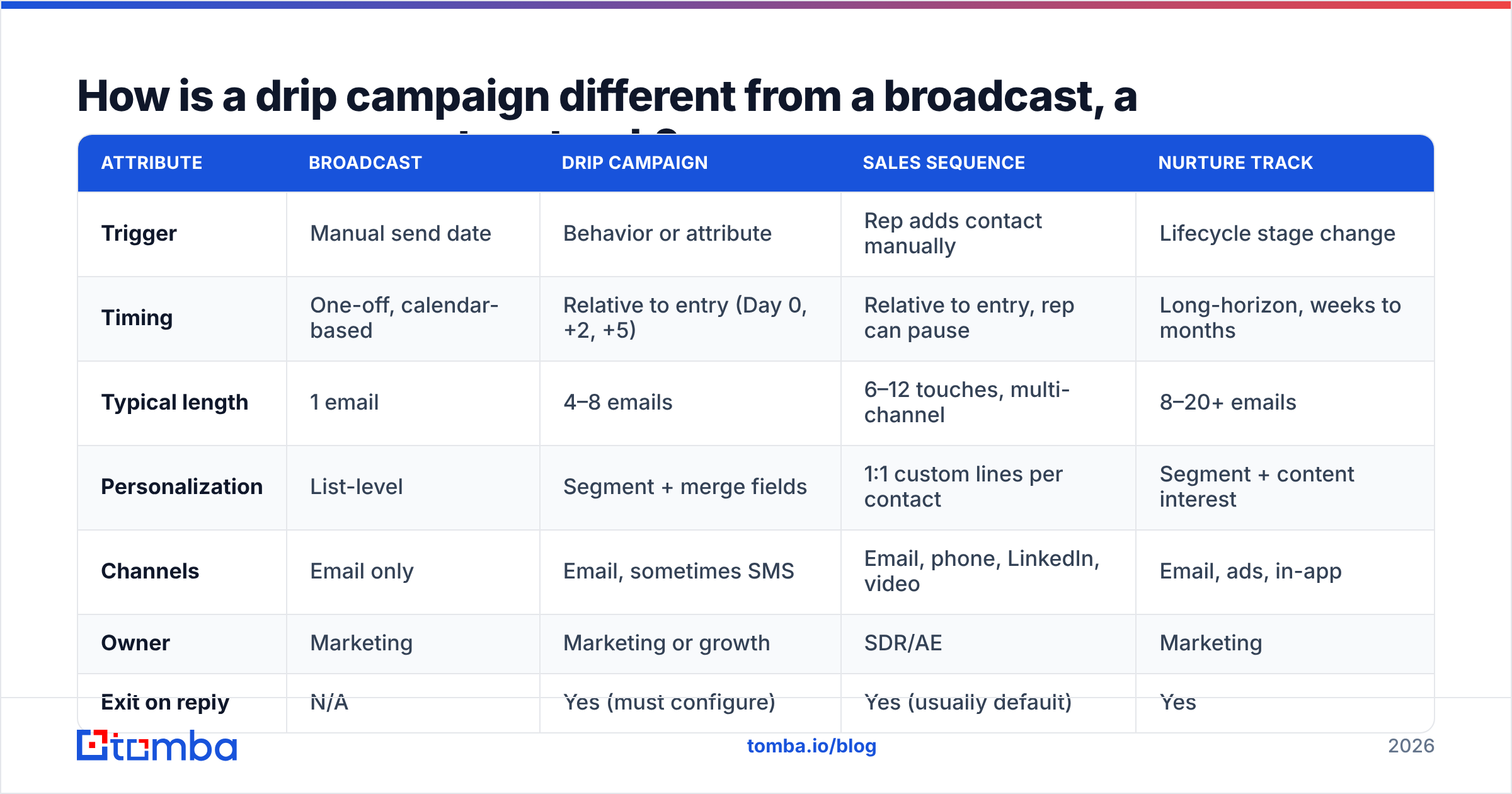
How is a drip campaign different from a broadcast, a sequence, or a nurture track?#
These four terms get used interchangeably in the same Slack thread, which is how teams end up building the wrong thing. They differ on trigger type, personalization depth, and who owns them.
| Attribute | Broadcast | Drip campaign | Sales sequence | Nurture track |
|---|---|---|---|---|
| Trigger | Manual send date | Behavior or attribute | Rep adds contact manually | Lifecycle stage change |
| Timing | One-off, calendar-based | Relative to entry (Day 0, +2, +5) | Relative to entry, rep can pause | Long-horizon, weeks to months |
| Typical length | 1 email | 4–8 emails | 6–12 touches, multi-channel | 8–20+ emails |
| Personalization | List-level | Segment + merge fields | 1:1 custom lines per contact | Segment + content interest |
| Channels | Email only | Email, sometimes SMS | Email, phone, LinkedIn, video | Email, ads, in-app |
| Owner | Marketing | Marketing or growth | SDR/AE | Marketing |
| Exit on reply | N/A | Yes (must configure) | Yes (usually default) | Yes |
| Best for | Announcements, newsletters | Onboarding, re-engagement, evergreen offers | Net-new pipeline, ABM | Long sales cycles, education |
The practical takeaway: if a human rep needs to add judgment between touches, build a sequence. If the logic can be written down in advance and never changes, build a drip workflow. Drip campaigns scale; sequences convert harder but cap out at rep capacity.
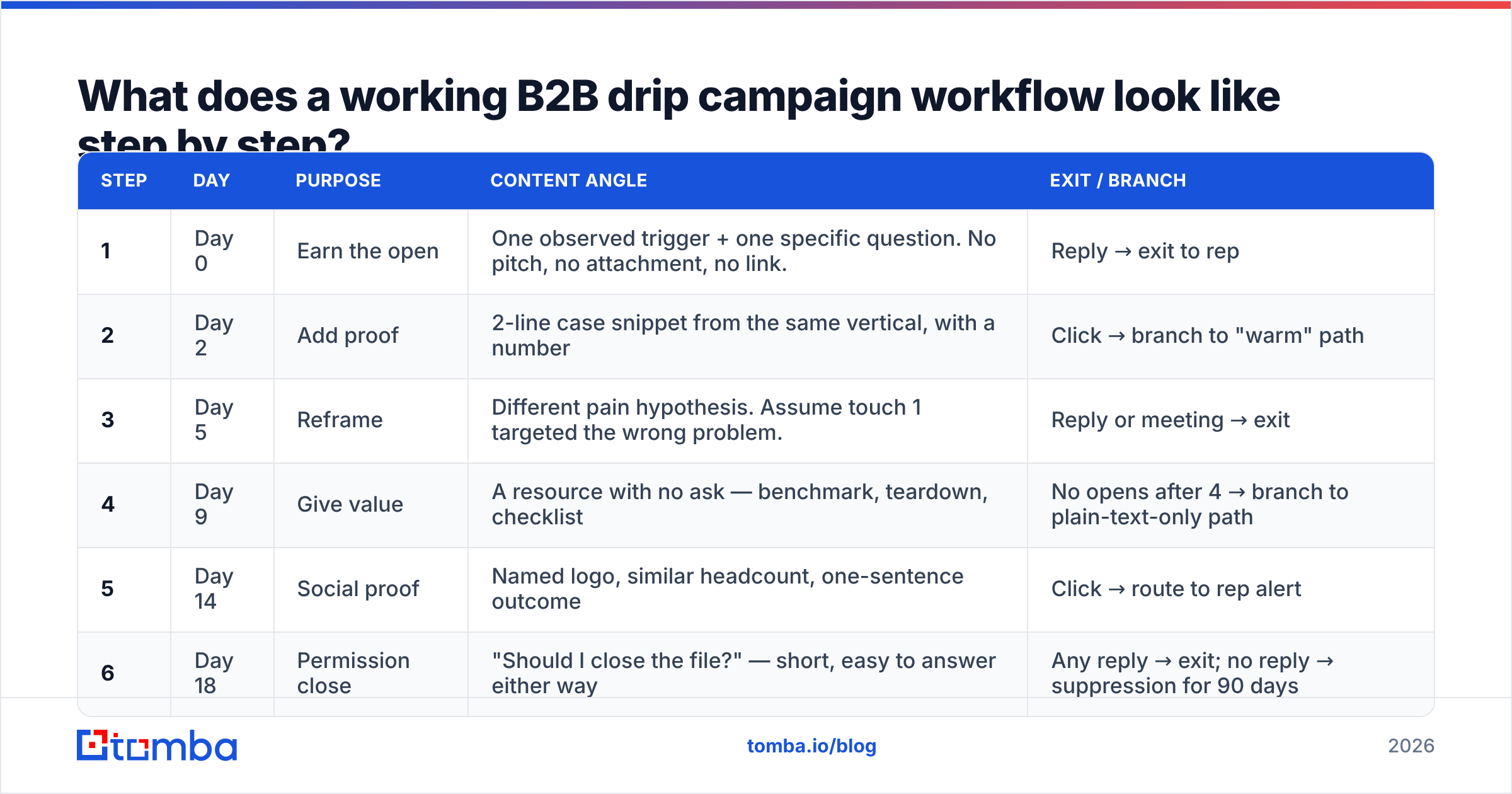
What does a working B2B drip campaign workflow look like step by step?#
Here's a concrete cold-outbound drip that holds up in 2026 — six touches over 18 days, with the exit rules that keep it from embarrassing you.
| Step | Day | Purpose | Content angle | Exit / branch |
|---|---|---|---|---|
| 1 | Day 0 | Earn the open | One observed trigger + one specific question. No pitch, no attachment, no link. | Reply → exit to rep |
| 2 | Day 2 | Add proof | 2-line case snippet from the same vertical, with a number | Click → branch to "warm" path |
| 3 | Day 5 | Reframe | Different pain hypothesis. Assume touch 1 targeted the wrong problem. | Reply or meeting → exit |
| 4 | Day 9 | Give value | A resource with no ask — benchmark, teardown, checklist | No opens after 4 → branch to plain-text-only path |
| 5 | Day 14 | Social proof | Named logo, similar headcount, one-sentence outcome | Click → route to rep alert |
| 6 | Day 18 | Permission close | "Should I close the file?" — short, easy to answer either way | Any reply → exit; no reply → suppression for 90 days |
Two things people get wrong here. First, the Day 18 breakup email consistently outperforms touches 3–5 in reply rate, which tempts teams to shorten the whole campaign to three emails. Don't — the breakup works because of the prior touches, not despite them. Second, the branch at step 4 is the one that saves your domain. If a contact has opened nothing after four sends, stop sending them HTML with tracking pixels and links; either downgrade to plain text or exit them entirely.
How long should the delays between drip emails be?#
Start tight, then widen. The interval should roughly track how fresh the trigger is.
- Days 0–5: 2-day gaps. Whatever prompted the entry (a form fill, a pricing-page visit, a funding announcement) is still in their working memory. Waiting a week wastes the trigger's half-life.
- Days 5–14: 4-day gaps. You're now in follow-up territory. Tighter than this reads as pressure; wider and you're starting from zero on recognition each time.
- Days 14+: 7-day gaps or longer. At this point you're a background presence. Weekly is the ceiling for cold audiences.
- Onboarding and product-led drips: invert this. Day 0, Day 1, Day 3, Day 7 — activation windows close fast, and a trial user who hasn't done the core action by day 3 rarely does it on day 20.
- Always respect business hours in the recipient's timezone. A Tuesday 8:12am local send beats a Saturday 3am send by a wide margin, and every serious ESP supports timezone-aware scheduling now. Use it.
One caveat on "best time to send" studies: they describe averages across millions of consumer sends, and your B2B segment of 400 VPs of Engineering is not that. Run your own two-week split before you commit to a global send window.
Which drip campaign workflows should you build first?#
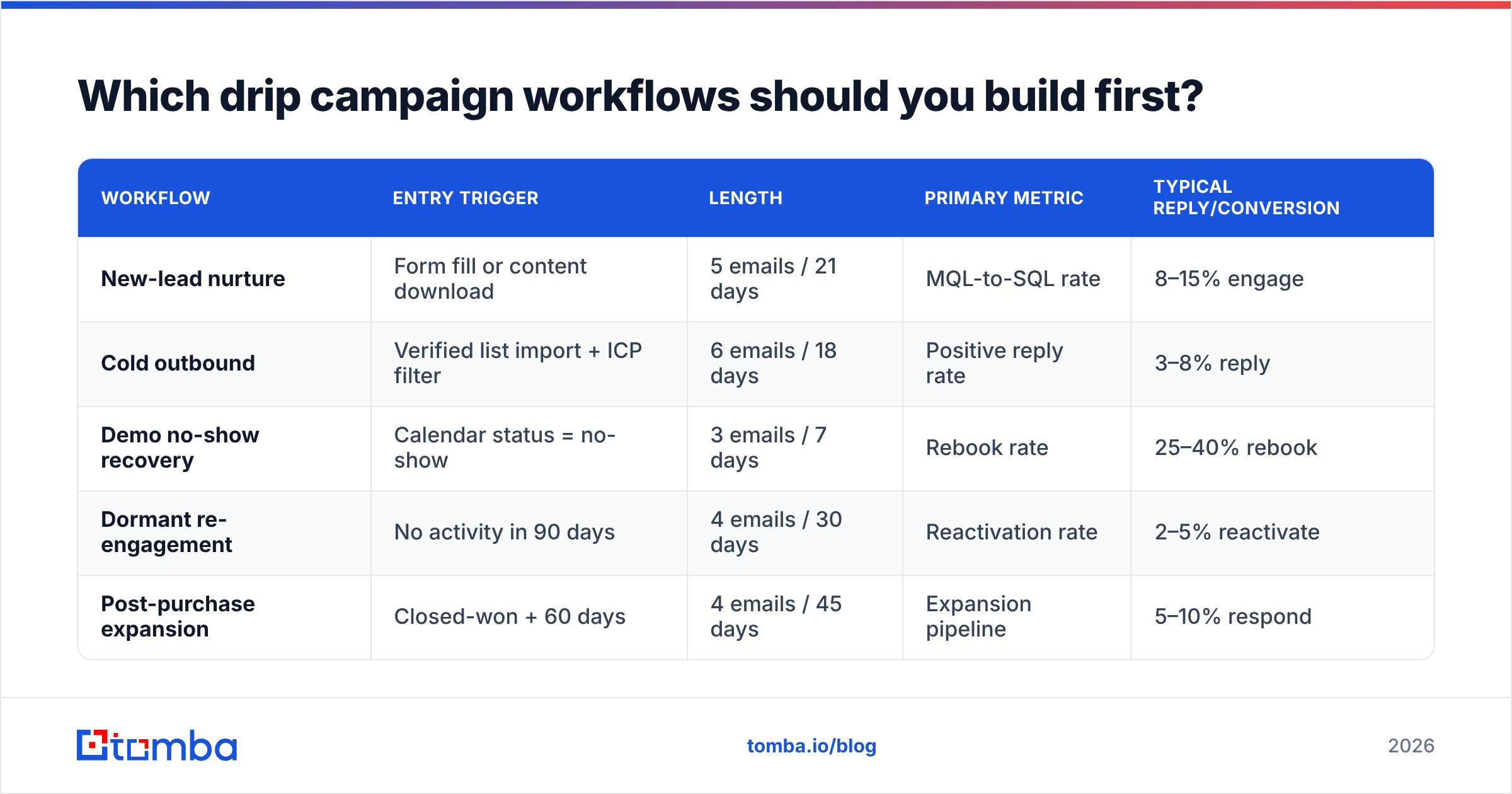
Four workflows cover most of the value. Build these, measure them for a quarter, then expand.
| Workflow | Entry trigger | Length | Primary metric | Typical reply/conversion |
|---|---|---|---|---|
| New-lead nurture | Form fill or content download | 5 emails / 21 days | MQL-to-SQL rate | 8–15% engage |
| Cold outbound | Verified list import + ICP filter | 6 emails / 18 days | Positive reply rate | 3–8% reply |
| Demo no-show recovery | Calendar status = no-show | 3 emails / 7 days | Rebook rate | 25–40% rebook |
| Dormant re-engagement | No activity in 90 days | 4 emails / 30 days | Reactivation rate | 2–5% reactivate |
| Post-purchase expansion | Closed-won + 60 days | 4 emails / 45 days | Expansion pipeline | 5–10% respond |
Demo no-show recovery is the cheapest win on this list and the one most teams skip. The contact already agreed to a meeting; you're recovering intent that's fully paid for. Three emails over a week, first one within two hours of the missed slot.
Why do most drip campaign workflows fail?#
Rarely because of the copy. In order of blast radius:
1. Unverified entry data. This is the compounding failure. A 12% invalid rate on a 5,000-contact list is 600 bad addresses — but in a six-email drip, that's 3,600 bounce events hitting your sending domain over 18 days. Mailbox providers read that as spam-trap behavior, and your good sends start landing in Promotions or worse. Run every list through an email verifier before the import, not after the first bounce report. Catch-all domains need their own handling — they don't return a clean SMTP verdict, so use a catch-all verifier rather than guessing.
2. No exit on reply. The most reputationally expensive bug in outbound. Someone answers "yes, send me pricing" and gets an automated "still interested?" 48 hours later. Test this before every launch by replying to your own test send.
3. Missing suppression logic. Customers, open opportunities, competitors, and current-quarter closed-lost should all be excluded at the entry gate. Build a single master suppression list and reference it from every workflow rather than maintaining exclusions per campaign.
4. Identical delays across every step. A flat 3-day cadence means your Day 0 urgency and your Day 18 breakup are treated the same. They aren't.
5. Volume without warmup. New domain, 400 sends on day one, everything to spam. Ramp over 3–4 weeks and monitor email deliverability signals throughout — authentication records, complaint rate, and inbox placement, not just open rate.
6. Optimizing opens after Apple Mail Privacy Protection. Open rate has been partially synthetic since 2021 and is worse now. Reply rate, click-to-reply ratio, and meetings booked are the metrics that survive contact with reality.
What tools do you need to run a drip campaign workflow?#
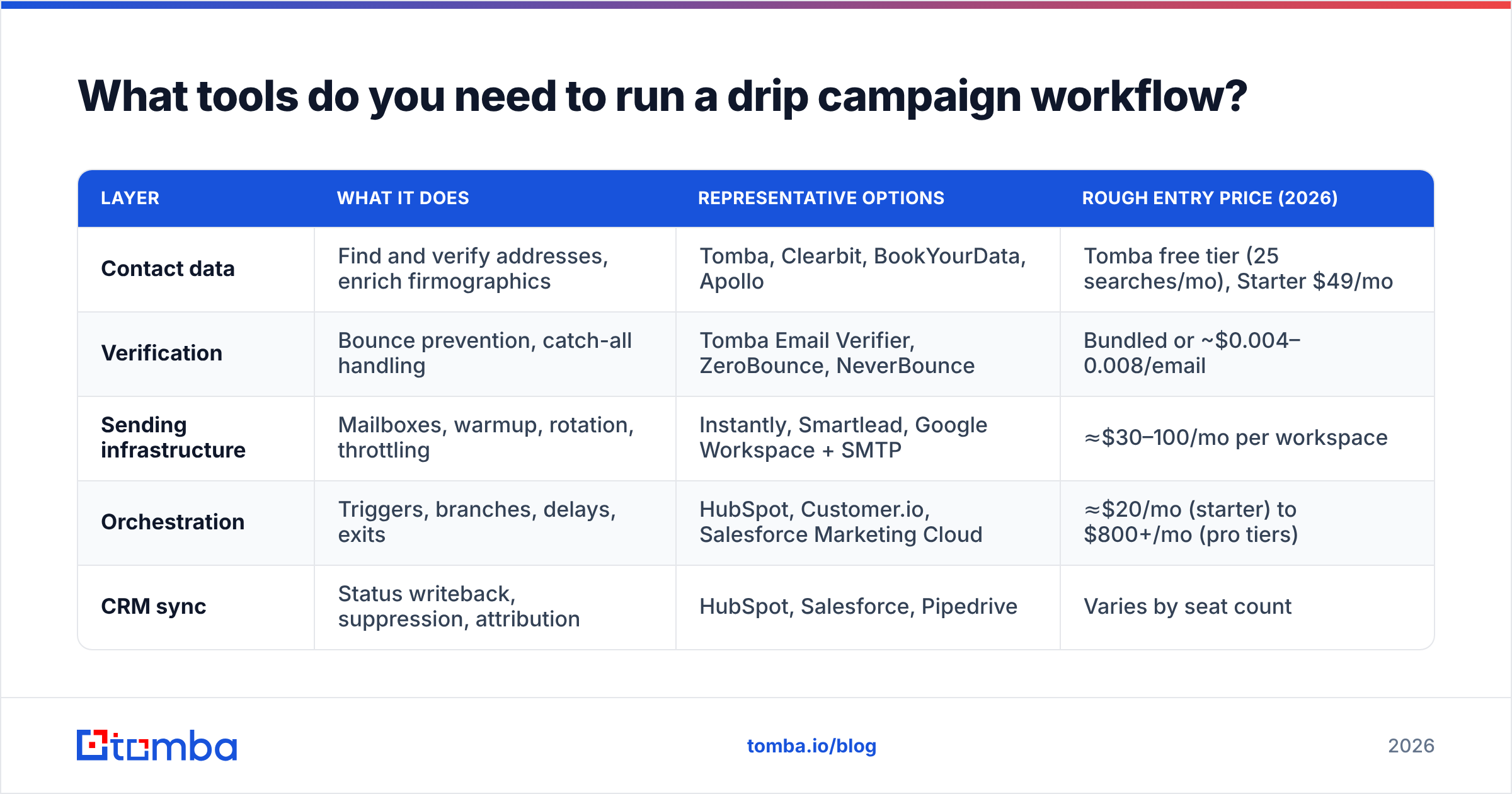
Three layers: data, sending, and orchestration. Some platforms bundle all three, usually at the cost of depth in one.
| Layer | What it does | Representative options | Rough entry price (2026) |
|---|---|---|---|
| Contact data | Find and verify addresses, enrich firmographics | Tomba, Clearbit, BookYourData, Apollo | Tomba free tier (25 searches/mo), Starter $49/mo |
| Verification | Bounce prevention, catch-all handling | Tomba Email Verifier, ZeroBounce, NeverBounce | Bundled or ~$0.004–0.008/email |
| Sending infrastructure | Mailboxes, warmup, rotation, throttling | Instantly, Smartlead, Google Workspace + SMTP | ≈$30–100/mo per workspace |
| Orchestration | Triggers, branches, delays, exits | HubSpot, Customer.io, Salesforce Marketing Cloud | ≈$20/mo (starter) to $800+/mo (pro tiers) |
| CRM sync | Status writeback, suppression, attribution | HubSpot, Salesforce, Pipedrive | Varies by seat count |
Prices move; check vendor pages before budgeting. The one line worth defending in a tooling review: don't pay a marketing-automation platform's per-contact pricing for records you haven't verified. You're renting storage on garbage.
For sourcing the contacts themselves, a dedicated email finder plus domain search covers most B2B use cases without the seat minimums of a full sales-intelligence suite. If you're building lists at volume, the bulk email finder handles CSV in, verified CSV out, which is exactly the shape a drip workflow's entry gate wants. BookYourData is a solid option when you'd rather buy a pre-built, region-filtered list than assemble one; the two approaches complement each other more than they compete.
On the orchestration side, HubSpot remains the default for teams that want workflows and CRM in one object model, and Salesforce wins on complex branch logic at enterprise scale. If you're comparing beyond those two, the G2 marketing automation category is the least-biased starting point for peer reviews.
How do you measure a drip campaign workflow?#
Measure per step, not per campaign. A campaign-level 4% reply rate hides the fact that step 3 does 9% and step 5 does 0.4%.
Track these five, in this priority order:
- Bounce rate per step. Should be under 2%. Above 3% means your entry data failed, and it will keep failing until you fix the source.
- Positive reply rate. Replies minus unsubscribes, out-of-offices, and "not interested." Everything else is vanity.
- Step-level drop-off. Which touch loses the most people to unsubscribe? That's your rewrite candidate.
- Time-to-first-reply. If most replies come on day 2, your later steps are subsidizing a handful of slow responders. Consider trimming.
- Meetings booked per 1,000 sends. The only number your CRO cares about, and the one that makes cross-campaign comparison honest.
Rebuild or retire any workflow that hasn't been touched in six months. Trigger conditions drift, ICPs change, and the case study you cited in step 2 is now three product versions old.
What's the fastest way to get a drip campaign workflow live this week?#
Compress it to five days:
- Day 1 — Define the entry trigger and write the exit rules first. Exit rules before copy, every time.
- Day 2 — Source and verify the list. Nothing enters the workflow that hasn't cleared verification, including catch-all handling.
- Day 3 — Write six emails in one sitting so the voice stays consistent. Keep each under 120 words.
- Day 4 — Build the workflow in your platform, then run five test contacts through every branch, including the reply-exit and the unsubscribe path.
- Day 5 — Launch at 20% of intended volume. Check bounce rate at 24 hours. Scale only if it's under 2%.
The verification step is the one people cut when the week gets short, and it's the one that decides whether the other four days mattered.
Start there. Tomba's Email Finder resolves names and domains into verified, deliverable addresses before they ever reach your workflow's entry gate — free tier covers 25 searches a month to test the quality on your own ICP, and paid plans start at $49/mo with bulk processing, catch-all handling, and API access if you'd rather wire verification directly into the trigger. Full Tomba pricing is public, no demo required. Clean the input, and the workflow does its job.
Related guides#
Ready to find emails that actually work?
Join 150,000+ professionals who stopped guessing and started sending. Free credits on signup — no credit card required.
Get the Tomba newsletter
Practical outbound tactics and product updates — once every two weeks.
About the author