Driving Revenue in 2026: The 5 Levers That Actually Move Pipeline
Most revenue plans fail on execution, not ambition. Here's a concrete 2026 framework for driving revenue: the five levers that compound, the metrics that expose fake pipeline, and a 90-day sequence.
TL;DR
- Driving revenue is not "more activity." It's removing the constraint that caps output — usually data quality, not headcount or effort.
- Five levers compound: data accuracy, ICP tightness, channel sequencing, deal velocity, and expansion. Pull them in that order.
- Most teams add SDRs before fixing contact data, then wonder why cost per meeting doubled. Bad data taxes every downstream dollar you spend.
- Measure leading indicators that can't be gamed: verified-contact rate, reply-to-meeting ratio, stage-to-stage conversion, and net revenue retention.
- A realistic 90-day sequence: audit data (weeks 1–2), rebuild the ICP list (3–6), sequence and test (7–10), then scale only what cleared the bar (11–13).
What does "driving revenue" actually mean in 2026?#
Driving revenue means increasing the rate at which qualified demand converts into closed, retained contract value — with a cost structure that doesn't scale linearly with output.
That definition matters because it rules out three things most teams call revenue work:
- Adding activity volume without changing conversion rates. Doubling sends against a 42% bounce list doubles your domain damage, not your bookings.
- Booking meetings that never reach a decision stage. Meeting count is the easiest metric to inflate and the least correlated with revenue.
- Discounting to hit a quarter. That's borrowing revenue from Q3, with interest.
The 2026 context makes the distinction sharper. Inbox providers tightened bulk-sender enforcement, buying committees grew, and budget scrutiny means most deals now need a documented business case. Gartner's B2B buying research has been consistent on this for years: buyers spend a small fraction of their journey with any single vendor. You don't win by being louder. You win by being accurate, early, and relevant to a specific account.
So the operational question isn't "how do we do more?" It's "what is currently capping our output, and what does removing it cost?"
Why do most revenue plans stall before they compound?#
They optimize the visible layer and ignore the layer underneath it. Here are the five failure patterns that show up most often in revenue operations reviews:
- The data layer is assumed, not audited. Teams treat their CRM as truth. In practice, B2B contact data decays roughly 25–30% per year through job changes, acquisitions, and domain migrations. Nobody budgets for that decay, so it silently eats conversion.
- The ICP is a paragraph, not a filter. "Mid-market SaaS companies with a modern GTM motion" isn't targetable. "150–800 employees, US/UK, hiring 2+ AEs in the last 60 days, using HubSpot" is.
- Channels run in parallel instead of in sequence. Email, LinkedIn, and phone all fire on day one with no shared narrative, so the prospect sees three disconnected pitches from three tools.
- Velocity is never measured per stage. Teams track win rate but not where deals sit and rot. The 34-day gap between demo and proposal is where most of your forecast dies.
- Expansion is somebody else's job. Existing customers are the cheapest revenue you will ever book, and they're usually owned by a CS team with no quota and no pipeline tooling.
Each of these is fixable. None of them is fixed by hiring another rep.
Which levers actually move revenue, and in what order?#
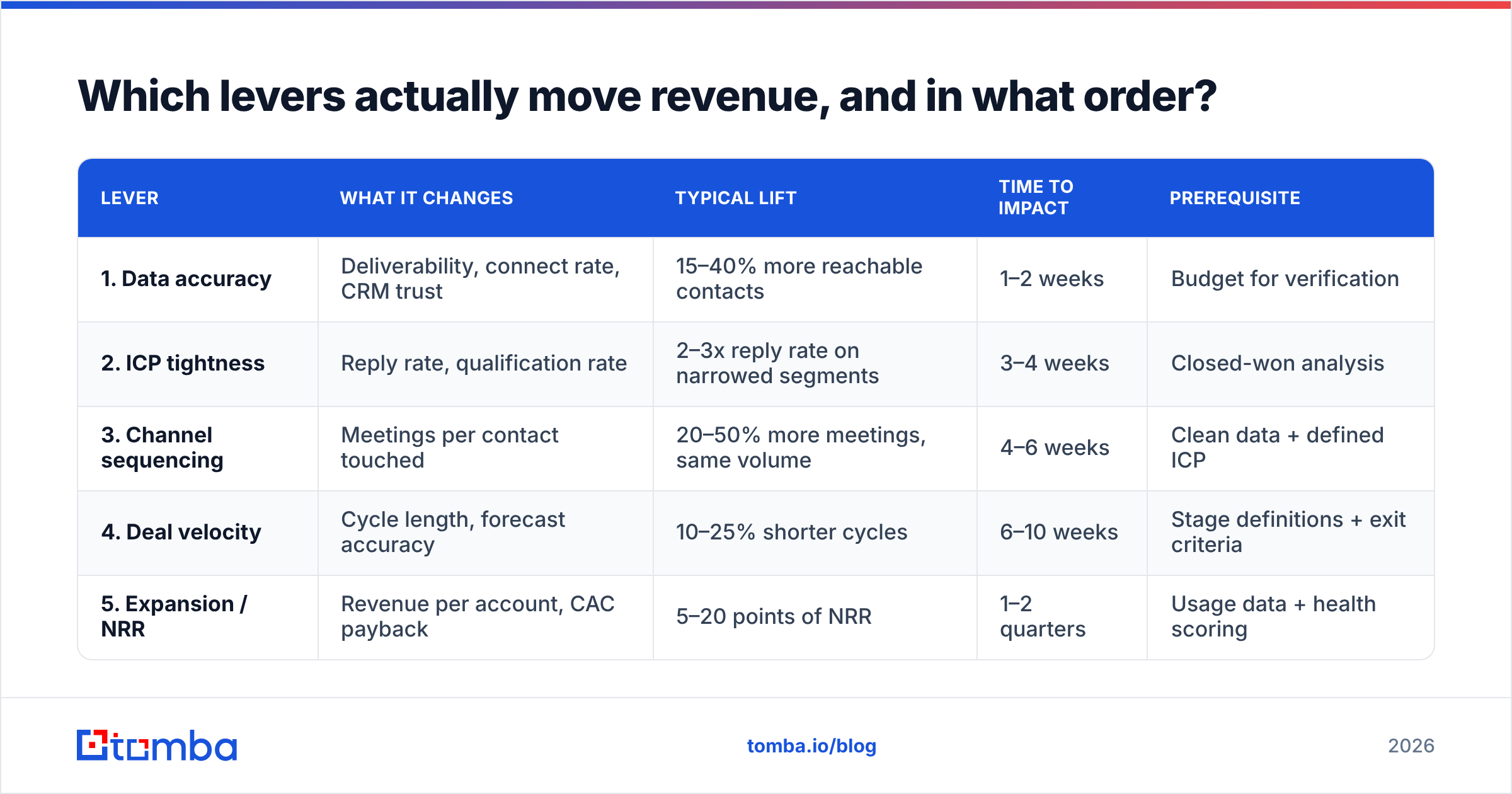
Pull them in dependency order. Lever 2 doesn't work if lever 1 is broken, and lever 5 barely matters if you have 20 customers.
| Lever | What it changes | Typical lift | Time to impact | Prerequisite |
|---|---|---|---|---|
| 1. Data accuracy | Deliverability, connect rate, CRM trust | 15–40% more reachable contacts | 1–2 weeks | Budget for verification |
| 2. ICP tightness | Reply rate, qualification rate | 2–3x reply rate on narrowed segments | 3–4 weeks | Closed-won analysis |
| 3. Channel sequencing | Meetings per contact touched | 20–50% more meetings, same volume | 4–6 weeks | Clean data + defined ICP |
| 4. Deal velocity | Cycle length, forecast accuracy | 10–25% shorter cycles | 6–10 weeks | Stage definitions + exit criteria |
| 5. Expansion / NRR | Revenue per account, CAC payback | 5–20 points of NRR | 1–2 quarters | Usage data + health scoring |
The ordering isn't arbitrary. Lever 1 is cheap and fast, and it multiplies every lever after it. If 30% of your contacts are invalid, a 2x improvement in copy quality still leaves you paying for 30% waste on every send, every dial, and every enrichment credit.
That's why the first move in any serious revenue plan is boring: audit the list.
How do you fix the data layer before spending anything else?#
Run a four-step audit. It takes about a week and it's the highest-ROI work available to most teams.
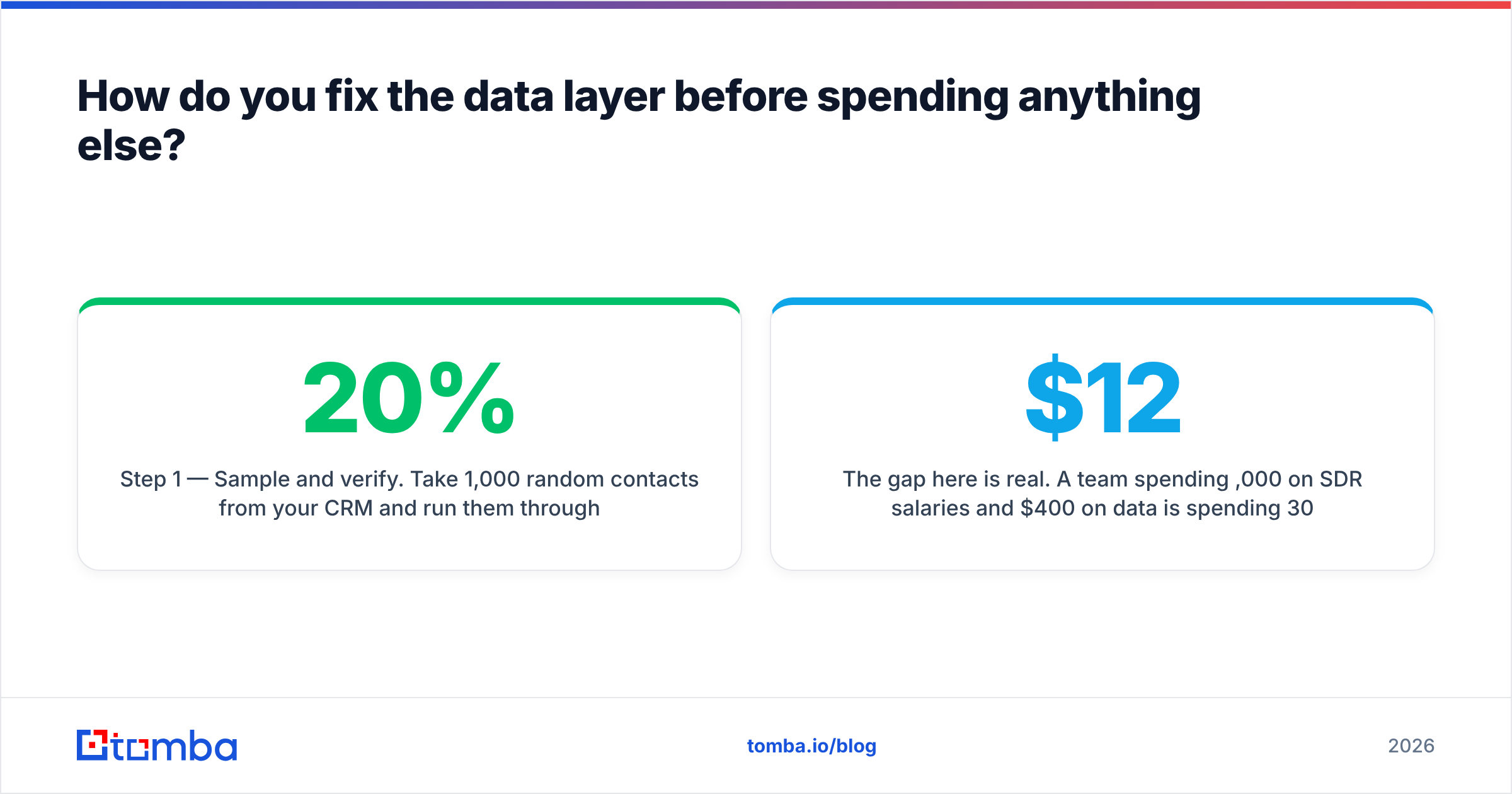
Step 1 — Sample and verify. Take 1,000 random contacts from your CRM and run them through an email verifier. You're looking for the invalid rate, the catch-all rate, and the unknown rate. If invalid + unknown exceeds 20%, your outbound numbers are not measuring your messaging — they're measuring your data.
Step 2 — Check pattern coverage. For your top 50 target accounts, confirm you actually have the right email format. A domain search returns known addresses and the dominant pattern per company, which is faster than guessing first.last@ and hoping.
Step 3 — Re-enrich the decayed rows. Anything untouched for 12+ months should be re-run through data enrichment before a rep touches it. Job title, company size, and domain are the three fields that most often go stale and most often break your segmentation.
Step 4 — Set a decay policy. Pick a cadence (quarterly is standard) and re-verify. Data hygiene is a subscription cost, not a project.

The gap here is real. A team spending $12,000/month on SDR salaries and $400/month on data is spending 30x more on people to work a list they refuse to clean.
What should a revenue-driving stack actually cost?#
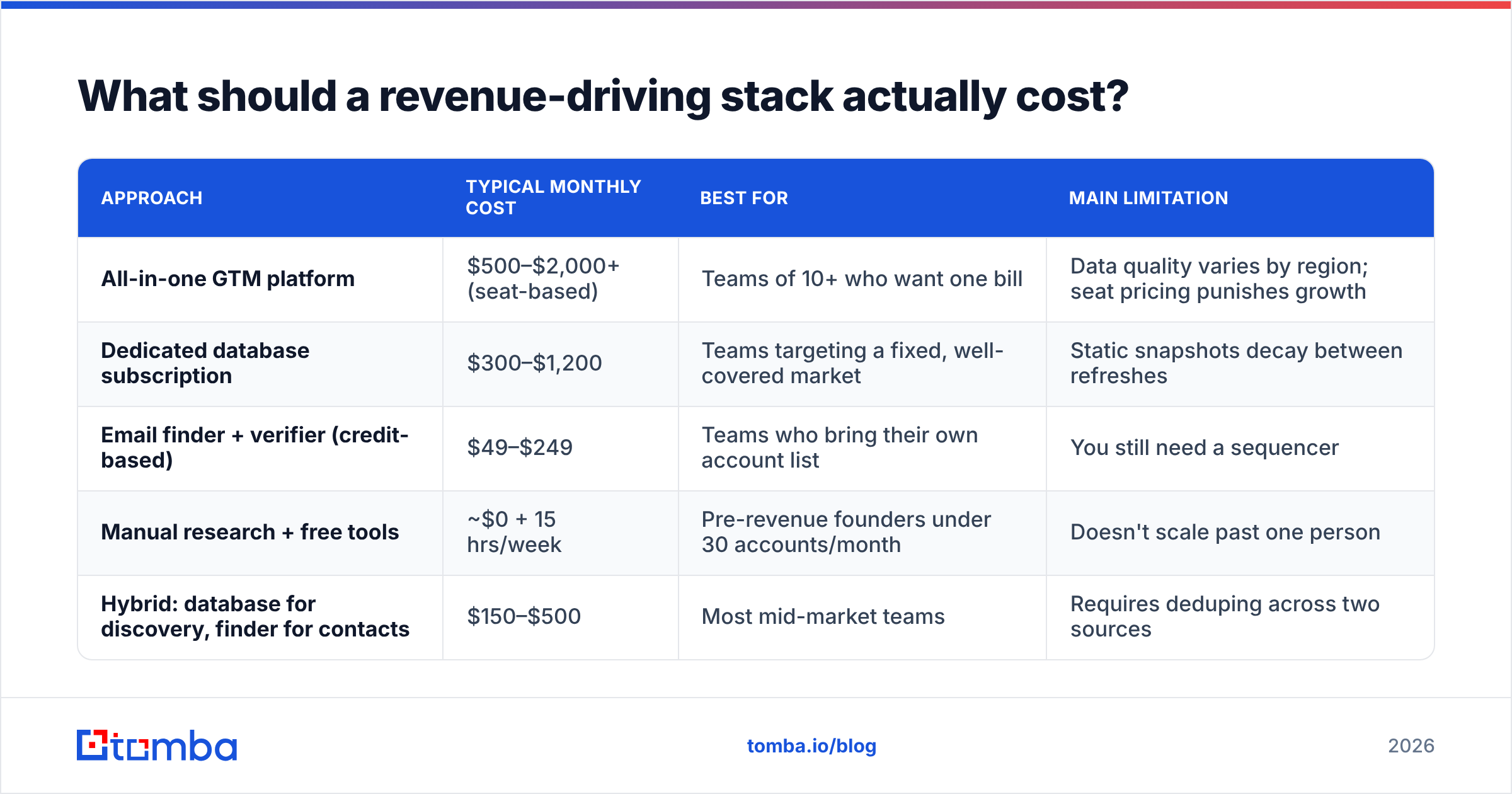
You don't need fifteen tools. You need a data source, a verification layer, a sequencer, and a CRM that people actually update. Here's how the common approaches compare on cost and fit:
| Approach | Typical monthly cost | Best for | Main limitation |
|---|---|---|---|
| All-in-one GTM platform | $500–$2,000+ (seat-based) | Teams of 10+ who want one bill | Data quality varies by region; seat pricing punishes growth |
| Dedicated database subscription | $300–$1,200 | Teams targeting a fixed, well-covered market | Static snapshots decay between refreshes |
| Email finder + verifier (credit-based) | $49–$249 | Teams who bring their own account list | You still need a sequencer |
| Manual research + free tools | ~$0 + 15 hrs/week | Pre-revenue founders under 30 accounts/month | Doesn't scale past one person |
| Hybrid: database for discovery, finder for contacts | $150–$500 | Most mid-market teams | Requires deduping across two sources |
A few honest notes on that table. Purpose-built list vendors like BookYourData do well when you need a large, pre-built segment quickly with a pay-as-you-go structure — that's a different job from resolving contacts for accounts you've already identified. Broad platforms bundle sequencing and dialing, which is convenient but usually means accepting whatever their data coverage is in your target geography.
For the credit-based lane, Tomba's pricing runs a free tier at 25 searches/month, Starter at $49/mo, Growth at $99/mo, Pro at $249/mo, and custom enterprise. The Tomba API matters more than the UI for revenue teams — it lets you resolve and verify contacts inside your existing workflow instead of adding another tab a rep has to remember to open.
Whatever you pick, apply one rule: don't buy a tool for a lever you haven't measured yet. Buying an AI SDR before auditing your data is how you get very efficient at emailing invalid addresses.
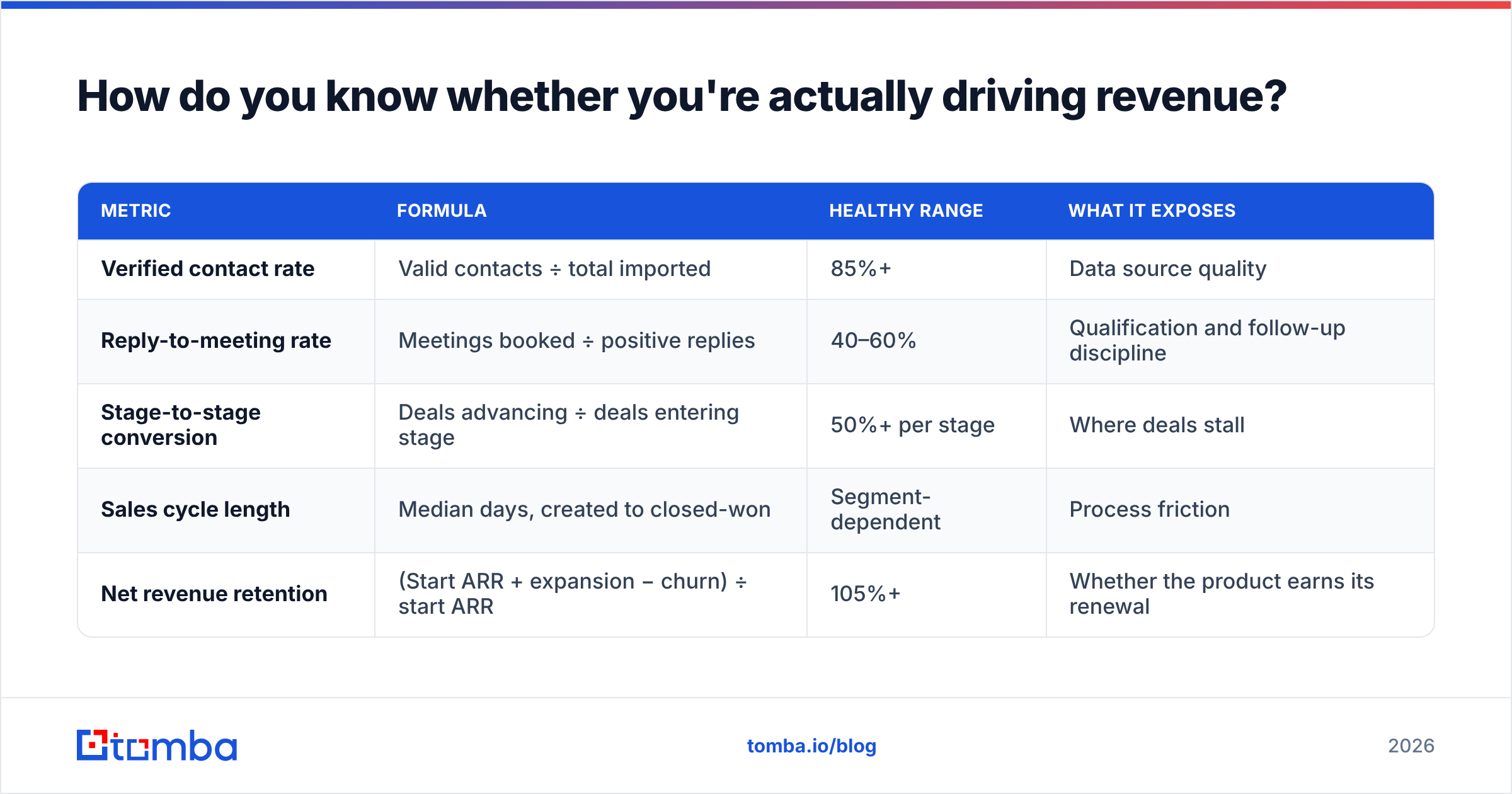
How do you know whether you're actually driving revenue?#
Track four leading indicators and one lagging one. Leading indicators tell you what's working this week. The lagging one tells you whether you were right.
| Metric | Formula | Healthy range | What it exposes |
|---|---|---|---|
| Verified contact rate | Valid contacts ÷ total imported | 85%+ | Data source quality |
| Reply-to-meeting rate | Meetings booked ÷ positive replies | 40–60% | Qualification and follow-up discipline |
| Stage-to-stage conversion | Deals advancing ÷ deals entering stage | 50%+ per stage | Where deals stall |
| Sales cycle length | Median days, created to closed-won | Segment-dependent | Process friction |
| Net revenue retention | (Start ARR + expansion − churn) ÷ start ARR | 105%+ | Whether the product earns its renewal |
Two traps to avoid.
First, don't average across segments. A blended 22% reply rate hides the fact that one segment converts at 41% and three convert at 4%. Cut the three, double the one. This single move is often worth more than any tooling change.
Second, don't measure activity as an outcome. Calls made, emails sent, and touches logged are inputs. When a manager puts a quota on inputs, reps optimize the input. HubSpot's ongoing sales research has documented this pattern repeatedly: activity metrics rise, conversion metrics don't move, and everyone gets busier without getting richer.

That reaction is avoidable. The bounce rate was knowable before the campaign launched — it just wasn't checked.
What does a realistic 90-day revenue plan look like?#
Thirteen weeks, four phases, one gate between each.
Weeks 1–2: Audit. Sample and verify 1,000 CRM contacts. Pull the last 12 months of closed-won deals and find the three attributes those accounts actually share. Document current stage-to-stage conversion. Do not launch anything new. Gate: you can state your true reachable-contact percentage and your real ICP in one sentence.
Weeks 3–6: Rebuild. Construct a fresh target list against the documented ICP, not the aspirational one. Resolve contacts with an email finder, verify every address, and drop anything that comes back invalid or unknown. Aim for 300–800 accounts, not 5,000. Gate: 85%+ verified contact rate on the new list.
Weeks 7–10: Sequence and test. Run two or three message variants against clearly separated segments. One channel first — usually email — with LinkedIn as a second touch and phone reserved for engaged accounts. Keep daily volume low enough to protect sender reputation. Gate: at least one segment clears a 5% positive reply rate.
Weeks 11–13: Scale the winner. Increase volume only on the segment and message that cleared the gate. Add headcount only after you know cost per meeting on the winning motion. Kill everything that didn't clear.
The discipline is in the gates. Most teams skip them, scale all four segments at once, and end the quarter unable to tell which part worked.
What are the most expensive mistakes to avoid?#
- Scaling before the unit economics are known. If you can't state cost per meeting and meeting-to-close rate for a specific motion, adding budget to it is gambling.
- Treating verification as optional. Every invalid address costs you a send, a slot in your daily volume budget, and a small piece of your domain reputation. The third cost is the one that compounds.
- Owning too many channels badly. Two channels executed well beats five executed at 40%.
- Ignoring expansion revenue. Existing customers convert at multiples of cold prospects and cost a fraction to reach. If nobody owns expansion pipeline, nobody builds it.
- Rewriting copy to fix a data problem. If your bounce rate is 30%, no subject line will save the campaign. Fix the list first, then test the message. G2's category reviews are a reasonable sanity check when you're evaluating where your current data vendor sits against alternatives.
Where should you start this week?#
Start with the cheapest lever that multiplies everything else: your contact data.
Pull 1,000 rows out of your CRM, verify them, and calculate what percentage of your outbound spend is currently going to addresses that will never receive a message. That number is usually between 15% and 35%, and it's the clearest, least political case for change you will find in a revenue org.
Then rebuild one list properly. Tomba's Email Finder resolves professional addresses by domain, name, or company, verifies them before they enter your sequence, and runs through the API, a Chrome extension, Google Sheets, or a bulk upload — whichever fits your existing workflow. The free tier gives you 25 searches per month to test coverage on your own target accounts before you commit to anything. Start there, measure your verified-contact rate honestly, and let that number decide what you fund next.
Related guides#
Ready to find emails that actually work?
Join 150,000+ professionals who stopped guessing and started sending. Free credits on signup — no credit card required.
Get the Tomba newsletter
Practical outbound tactics and product updates — once every two weeks.
About the author