Dubb Pricing Reviews: Pros, Cons and an Honest 2026 Guide
Dubb sells video-first selling at a per-seat price. Here's what the plans actually cost in 2026, what real reviewers complain about, and when a cheaper stack beats it.
Most Dubb pricing reviews stop at the sticker price. This guide does not. You get the real per-seat math, the praise, the gripes, and the point where a cheaper stack wins.
TL;DR
- Dubb is a video-first sales platform: record, host, send, track, and attach CTAs and booking links to async video. It is not a prospecting or data tool.
- Pricing is per seat and tiered. There's a free plan, roughly $40/user/mo for Pro, and $80/user/mo for Pro Plus at list. Annual billing cuts about 20%. Enterprise is custom — always confirm current numbers on Dubb's own pricing page.
- Reviewers praise the CTA-rich video pages, the mobile app, and fast support. The common gripes: UI clutter, a learning curve on automations, and per-seat cost that scales badly past 10–15 reps.
Who it suits:
- Dubb wins when video is a core part of your motion (real estate, insurance, agency, high-ACV SaaS demos). It's overkill if you send five videos a month.
- Dubb does nothing about who you send to. Video with a bad contact list is an expensive way to talk to nobody — pair it with a verified email source.
What is Dubb, and who actually uses it?#
Dubb is a video sales platform. The everyday analogy: it's the difference between mailing someone a letter and mailing them a letter plus a short home movie, a signed order form, and a calendar you can write on. The video is the hook; the page around it is where the deal moves.
Practically, that means you record from a Chrome extension, desktop app, or phone; Dubb hosts the video on a branded landing page; and that page carries buttons — "Book a call," "Reply with video," "See pricing," "Sign here." Everything is tracked: opens, watch percentage, click-throughs, and replies feed back into a dashboard and, if you connect it, your CRM.
The core buyer profile is a rep or small team whose job depends on trust built at a distance:
- Real estate and mortgage — property walkthroughs, rate explanations, document handholding.
- Insurance and financial services — policy comparisons where a talking head beats a PDF.
- Agencies and consultancies — audit videos, proposal walkthroughs, client updates.
- SaaS AEs and CS — personalized demo snippets, onboarding, QBR recaps.
- Recruiting — role pitches and candidate updates that don't read like a template.
What Dubb is not: a database, an enrichment layer, or a deliverability platform. It assumes you already have the contact. That distinction matters a lot when you're pricing the full stack, and we'll come back to it.
What does Dubb cost in 2026?#
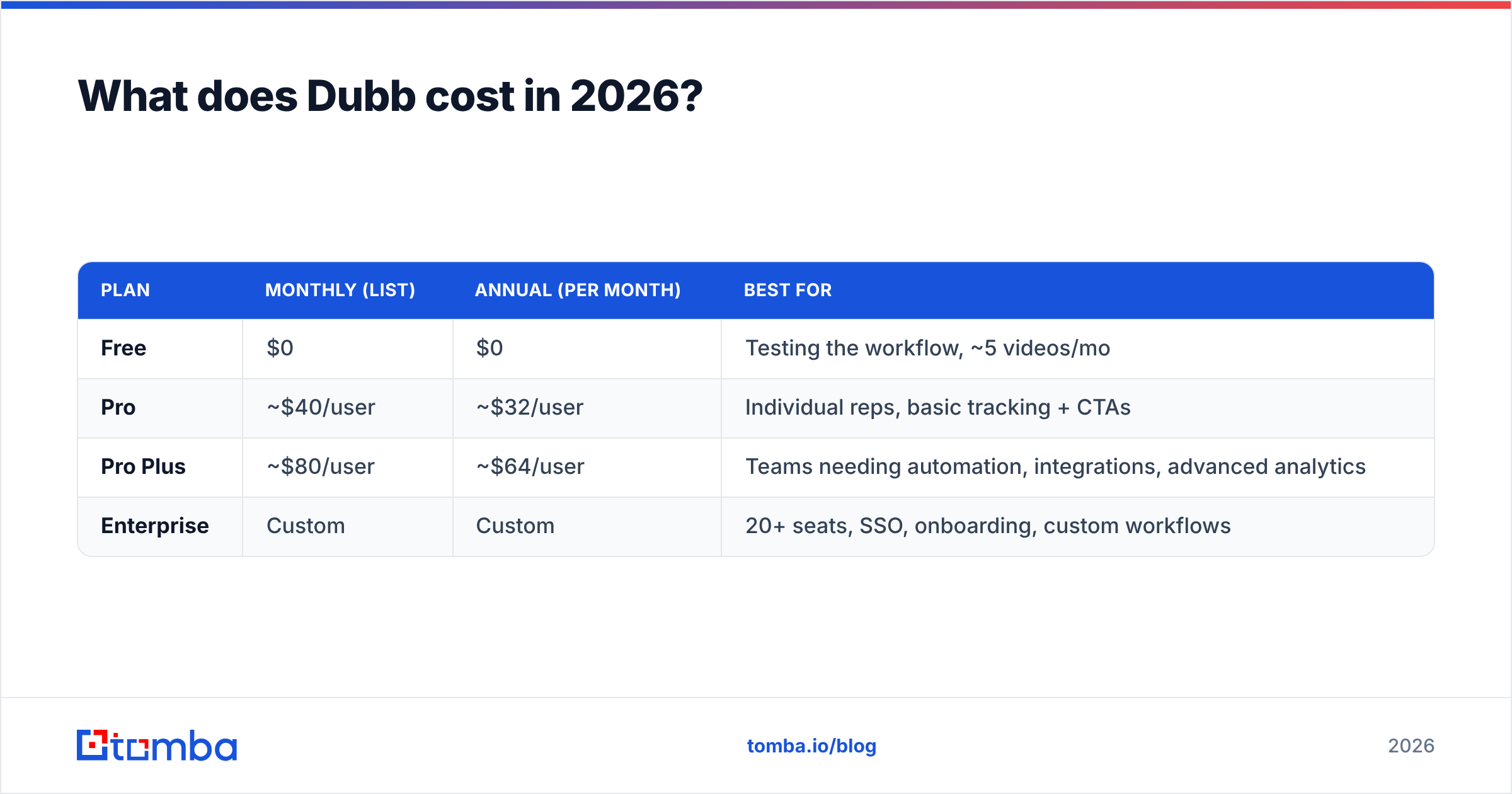
Dubb uses a per-seat SaaS model with a genuinely usable free tier and two paid steps before Enterprise. List prices at the time of writing look like this — verify on Dubb's official pricing page before you budget, because video vendors reshuffle tiers often.
| Plan | Monthly (list) | Annual (per month) | Best for |
|---|---|---|---|
| Free | $0 | $0 | Testing the workflow, ~5 videos/mo |
| Pro | ~$40/user | ~$32/user | Individual reps, basic tracking + CTAs |
| Pro Plus | ~$80/user | ~$64/user | Teams needing automation, integrations, advanced analytics |
| Enterprise | Custom | Custom | 20+ seats, SSO, onboarding, custom workflows |
The number that surprises people is the second one. Pro Plus is where most of the interesting machinery lives — automated video sequences, deeper CRM sync, team management, richer reporting. At roughly $80 per user per month, it is priced like a full sales engagement platform rather than a video recorder.
Run the math before you sign:
- 1 rep on Pro, annual: ~$384/year. Cheap. Easy yes if you send video weekly.
- 5 reps on Pro Plus, annual: ~$3,840/year. Defensible if video is core.
- 20 reps on Pro Plus, annual: ~$15,360/year. Now you're in Enterprise-negotiation territory whether you asked for it or not.
The free plan deserves credit. Unlike vendors that gate hosting behind a card, Dubb's free tier lets you record, host, and share a small number of videos with basic tracking. It's enough to answer the only question that matters in week one: will my prospects actually watch?

Where the bill grows beyond the sticker#
Three line items catch teams off guard:
- Per-seat, not per-usage. A rep who records twice a month costs the same as one who records twice a day. Audit seat utilization quarterly or you'll pay for dormant licenses.
- The tier jump is binary. If one workflow you need sits in Pro Plus, the whole team upgrades. There's no à la carte add-on for a single automation.
- The stack around it. Dubb replaces your video tool. It does not replace your CRM, your sending infrastructure, or your contact data. Budget the full picture, not just the video line.
Dubb pricing reviews: what do users actually say?#
Aggregate sentiment across G2's Dubb reviews and similar directories lands in the strong-but-not-flawless band. Most Dubb pricing reviews score it in the low-to-mid 4s out of 5. The review base skews toward small business and solo operators rather than enterprise.
What reviewers repeat on the positive side:
- The landing page beats the attachment. Buyers describe the branded video page with stacked CTAs as the actual product. The video is the excuse; the CTA is the conversion.
- Support responds like a startup should. Multiple reviews call out fast, human replies and hands-on onboarding help. This is a genuine differentiator against larger video vendors.
- Mobile recording is good. For field-heavy roles (real estate especially), recording and sending from a phone without a desktop round-trip is the whole workflow.
- Tracking granularity. Watch percentage and CTA click data are specific enough to prioritize follow-up rather than just feel good.
What reviewers repeat on the negative side:
- UI density. The most common complaint by a distance. Dubb has accumulated features, and the interface shows it. New users report hunting for settings and taking a week to feel fluent.
- Automation learning curve. The sequence and workflow builder is powerful and not intuitive. Teams that don't invest onboarding time end up using Dubb as an expensive Loom.
- Per-seat cost at scale. Reviewers at 10+ seats question the ROI versus a cheaper recorder plus their existing sequencer.
- Integration depth varies. Native connections are decent, but several reviewers route through Zapier for anything specific, which adds another bill and another failure point.
Read reviews with the usual discipline. Sort by date. Ignore anything older than 18 months, because the product has changed. Weight reviewers whose company size matches yours. A five-star review from a solo realtor tells a 30-rep SaaS team almost nothing.
What are the pros and cons of Dubb?#
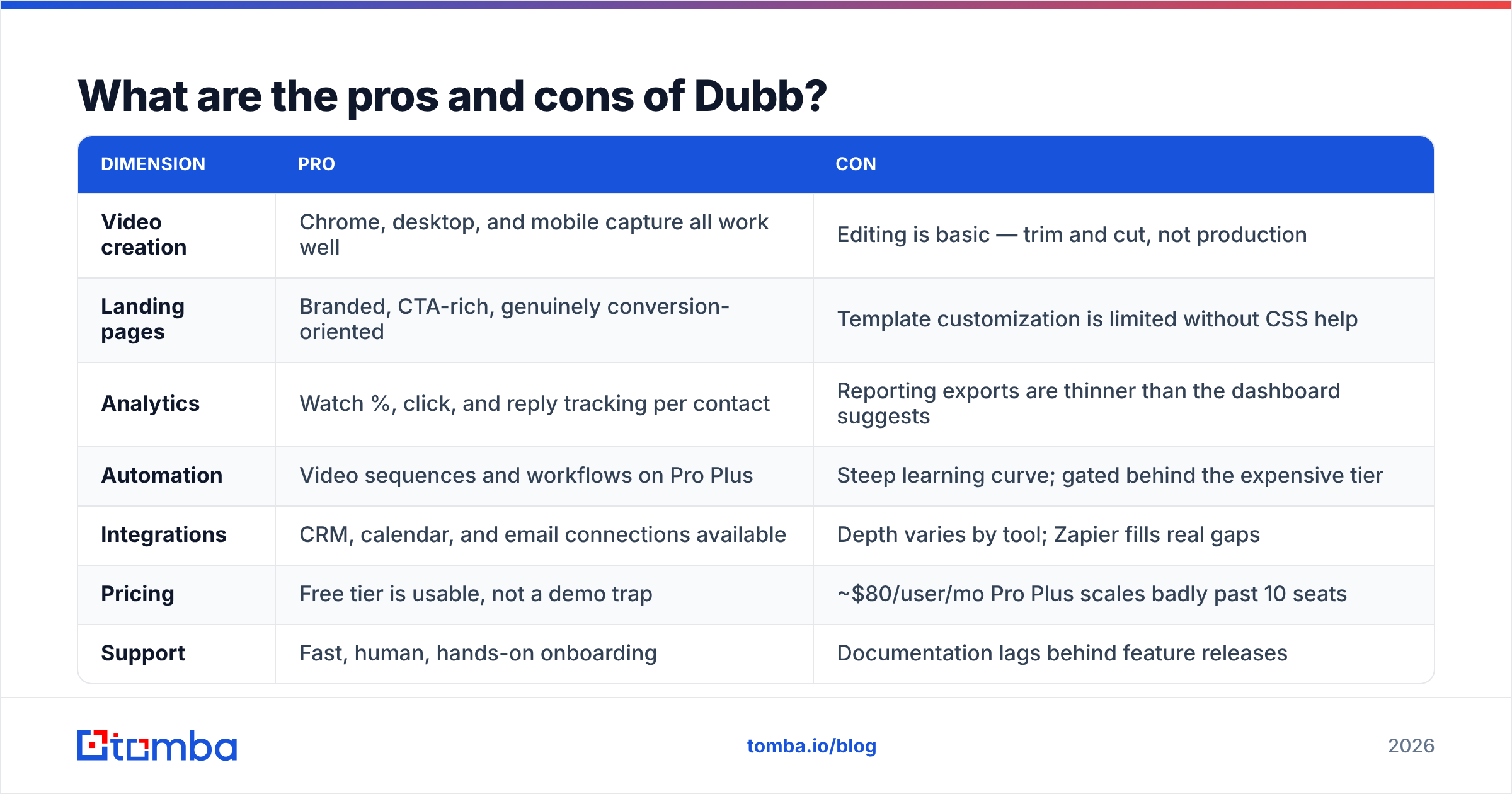
Here's the honest ledger.
| Dimension | Pro | Con |
|---|---|---|
| Video creation | Chrome, desktop, and mobile capture all work well | Editing is basic — trim and cut, not production |
| Landing pages | Branded, CTA-rich, genuinely conversion-oriented | Template customization is limited without CSS help |
| Analytics | Watch %, click, and reply tracking per contact | Reporting exports are thinner than the dashboard suggests |
| Automation | Video sequences and workflows on Pro Plus | Steep learning curve; gated behind the expensive tier |
| Integrations | CRM, calendar, and email connections available | Depth varies by tool; Zapier fills real gaps |
| Pricing | Free tier is usable, not a demo trap | ~$80/user/mo Pro Plus scales badly past 10 seats |
| Support | Fast, human, hands-on onboarding | Documentation lags behind feature releases |
| Data | — | No contact discovery or verification at all |
That last row is the one nobody puts in a comparison chart, and it's the one that quietly determines your results. A video platform improves the quality of a touch. It does nothing for the validity of the address you send it to. If 18% of your list bounces, Dubb's beautiful landing page never renders for those people, and your sender reputation takes the hit anyway.
How does Dubb compare to other video sales tools?#
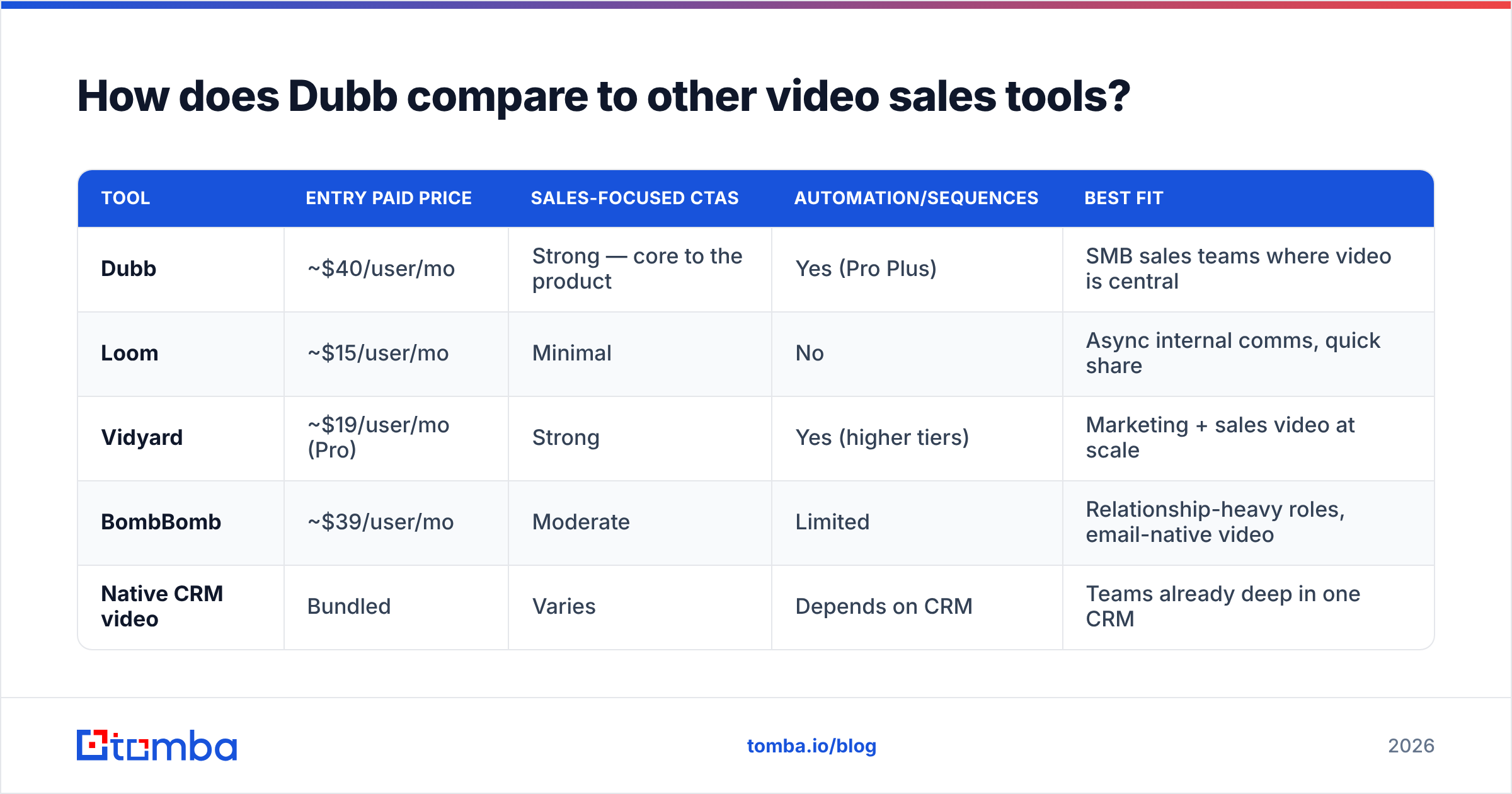
Dubb sits in a crowded middle: more sales-oriented than Loom, cheaper and lighter than Vidyard's enterprise tier, more feature-dense than BombBomb. List prices below are approximate and change frequently — treat them as ballpark, not quotes.
| Tool | Entry paid price | Sales-focused CTAs | Automation/sequences | Best fit |
|---|---|---|---|---|
| Dubb | ~$40/user/mo | Strong — core to the product | Yes (Pro Plus) | SMB sales teams where video is central |
| Loom | ~$15/user/mo | Minimal | No | Async internal comms, quick share |
| Vidyard | ~$19/user/mo (Pro) | Strong | Yes (higher tiers) | Marketing + sales video at scale |
| BombBomb | ~$39/user/mo | Moderate | Limited | Relationship-heavy roles, email-native video |
| Native CRM video | Bundled | Varies | Depends on CRM | Teams already deep in one CRM |
The decision usually collapses to three questions. Do you need CTAs and conversion tracking, or just a shareable recording? If just a recording, Loom is a third of the price. Do you need video inside an existing sequencer? Then check whether your sequencer's native video is good enough before adding a seat cost. And do you have enough video volume to justify per-seat pricing? Below roughly one video per rep per week, the ROI math stops working.
For a wider look at how buyers evaluate this category, G2's video email category is a reasonable starting point, and HubSpot's sales resources cover the underlying video-selling motion well.
Is Dubb worth it for your team?#
Yes, if three things are true. Video is a repeated part of your sales motion. Your deals are big enough to justify $400–$1,000 per rep per year. And someone on the team will actually learn the automation builder. Hit all three and Dubb is a good buy — the CTA-first landing pages are legitimately better than a bare video link, and the tracking gives follow-up a real signal instead of a guess.
No, if you're sending occasional videos, if your team is 20+ reps and price-sensitive, or if nobody owns adoption. Dubb's failure mode isn't the product breaking. It's a team paying Pro Plus prices while using 20% of Pro. That's not Dubb's fault, but it is the most common outcome I see.
A pragmatic path: start every rep on Free for 30 days. Measure who actually records. Upgrade only the reps who hit a real threshold — say, eight videos a month — and keep everyone else on Free until they earn a seat. Revisit quarterly. This one policy typically cuts a video-tool bill by a third.
What does Dubb not solve — and what should sit next to it?#
Dubb starts working the moment you have a name, a company, and a valid email address. Everything before that moment is someone else's job.
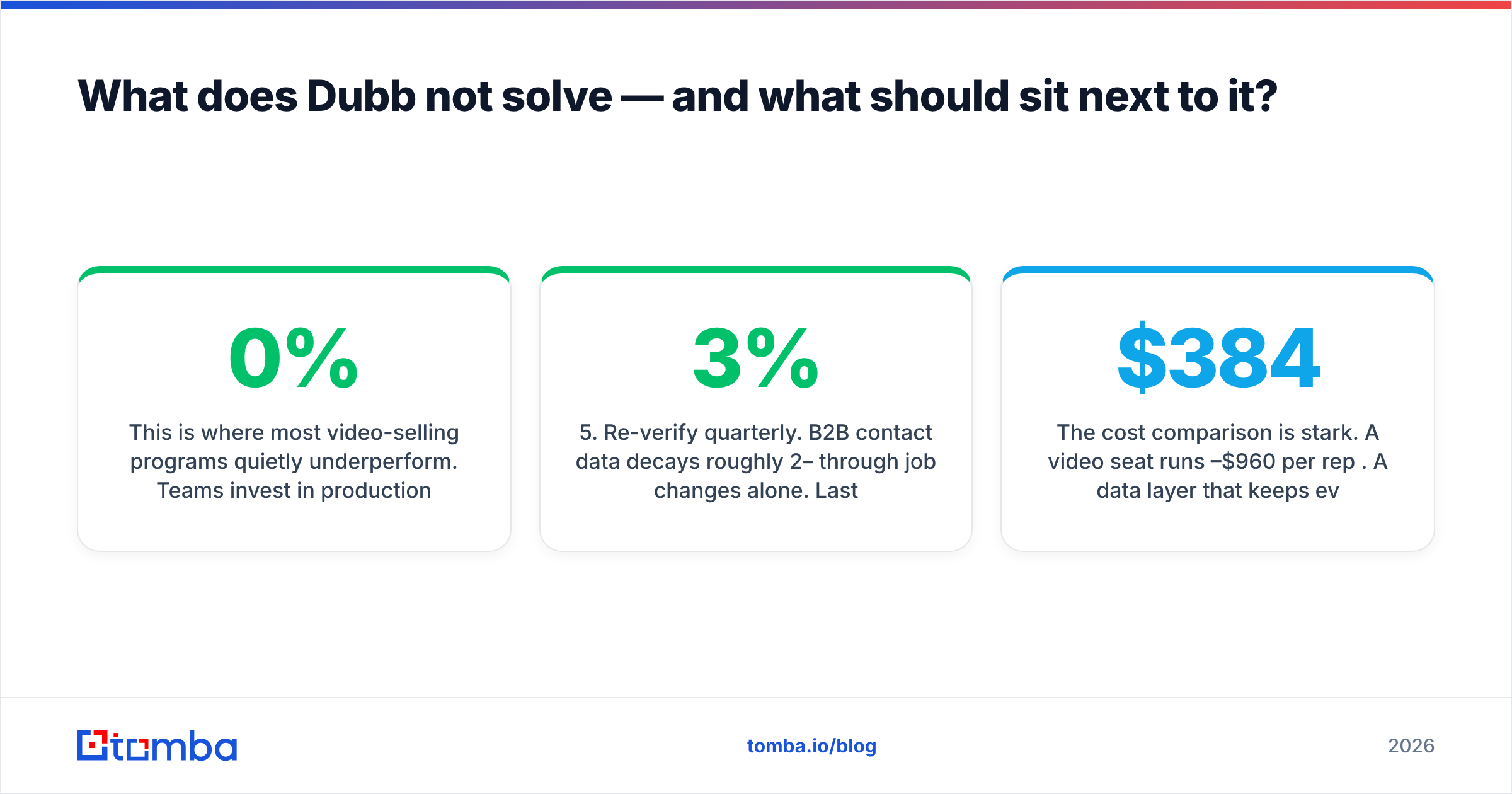
This is where most video-selling programs quietly underperform. Teams invest in production quality, thumbnails, and scripting, then push it all through a contact list scraped six months ago. The video is excellent. The address is dead. No dashboard tells you that clearly, because a hard bounce never becomes a "0% watched" row — it just disappears.
The fix is boring and cheap relative to your seat costs:
- Source contacts from a live index, not a stale export. Use an email finder that resolves a name plus domain against current patterns instead of guessing
first.last@. - Verify before you send. Run every address through an email verifier and drop anything that isn't deliverable. Catch-all domains need their own handling.
- Build lists by company, not by lucky guess. Domain search pulls the addressable people at a target account in one pass, which is how you find the second and third stakeholder your video should also reach.
- Enrich for personalization inputs. Title, seniority, and company details are what make the first eight seconds of a video specific rather than generic.
- Re-verify quarterly. B2B contact data decays roughly 2–3% per month through job changes alone. Last quarter's clean list isn't clean.
The cost comparison is stark. A video seat runs $384–$960 per rep per year. A data layer that keeps every one of those videos landing in a real inbox costs a fraction of a single seat — Tomba's plans start free at 25 searches a month and run $49/mo for Starter, $99/mo for Growth, and $249/mo for Pro, with flat team pricing rather than per-seat multiplication. That asymmetry is the argument: you don't need to choose between video and data, but spending on video while ignoring data is spending in the wrong order.
What's the final verdict on Dubb pricing?#
Dubb is a well-built, sales-native video platform. Entry pricing is fair and the free tier is genuinely useful. The Pro Plus step is expensive enough to need a real business case. Dubb pricing reviews back the product up: the criticisms are about interface density and per-seat scaling, not about whether it works.
Buy it if video is a repeatable part of how you win deals, and buy the tier you'll actually use, not the one with the longest feature list. Audit seats every quarter. And before you spend a dollar on production value, make sure the contact list underneath it is real — because the highest-converting video in your library still converts at zero if it lands on a bounced address.
Start with the list, not the camera. Tomba's Email Finder resolves verified professional email addresses by name, company, or domain, so every video you record reaches a real person at a real inbox. Free tier included — 25 searches a month, no card, enough to clean up a target account list before your next recording session.
Related guides#
Ready to find emails that actually work?
Join 150,000+ professionals who stopped guessing and started sending. Free credits on signup — no credit card required.
Get the Tomba newsletter
Practical outbound tactics and product updates — once every two weeks.
About the author