Dubb vs Loom (2026): Which Video Sales Tool Wins?
Dubb and Loom both record video, but they solve different problems. Here's a side-by-side breakdown of pricing, CRM depth, analytics, and which one actually moves pipeline in 2026.
TL;DR
- Loom is an async communication tool. It wins on speed, polish, viewer experience, and internal team use. Free tier: 25 videos, 5 minutes each.
- Dubb is a video sales platform. Screen recording is one feature among many — landing pages, CTA buttons, email sending, CRM sync, and pipeline reporting are the real product.
- Price gap is smaller than you think. Loom Business runs ~$15/user/mo annually; Dubb Pro sits around $32/user/mo annually. The difference buys you sales workflow, not better video.
- Pick Loom if your videos are explanations, handoffs, bug reports, and customer support. Pick Dubb if your videos are outbound touches you need to track to closed-won.
- Neither finds your prospects. A video with no verified recipient is a video nobody watches — that's an email finder problem, not a video problem.
What is the actual difference between Dubb and Loom?#
Loom sells time saved. Dubb sells meetings booked.
That's the whole thing, and every feature difference downstream traces back to it.
Loom launched as a Chrome extension for replacing meetings with recordings. Its center of gravity is the viewer page: fast load, transcript, comments, emoji reactions, timestamped threads, AI summaries. It has been widely adopted inside product, engineering, and support teams — Atlassian acquired it in 2023, which pushed it further toward internal collaboration and away from revenue tooling.
Dubb was built for sellers from day one. The recorder is table stakes; what surrounds it is a sales stack — branded video landing pages, calendar-booking CTAs under the player, email and SMS sending from inside the tool, video-in-email GIF previews, contact lists, drip sequences, and reporting that connects a watch event to a pipeline stage.
Analogy: Loom is a really good camera. Dubb is a camera bolted onto a storefront with a checkout counter, a doorbell, and a visitor log. If you already have a storefront (Outreach, Salesloft, HubSpot Sequences), the camera is all you need. If you don't, the bundle is worth paying for.

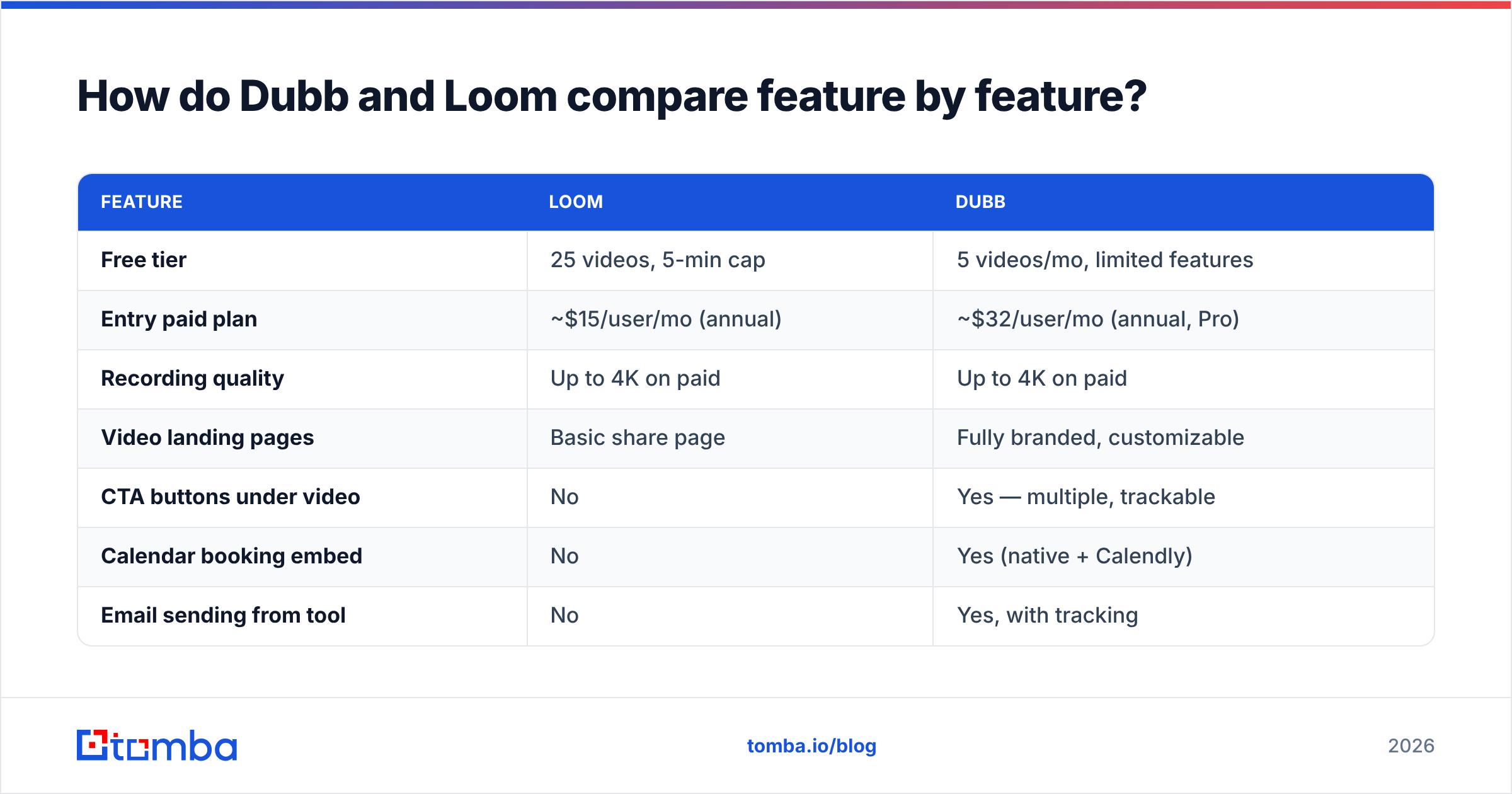
How do Dubb and Loom compare feature by feature?#
| Feature | Loom | Dubb |
|---|---|---|
| Free tier | 25 videos, 5-min cap | 5 videos/mo, limited features |
| Entry paid plan | ~$15/user/mo (annual) | ~$32/user/mo (annual, Pro) |
| Recording quality | Up to 4K on paid | Up to 4K on paid |
| Video landing pages | Basic share page | Fully branded, customizable |
| CTA buttons under video | No | Yes — multiple, trackable |
| Calendar booking embed | No | Yes (native + Calendly) |
| Email sending from tool | No | Yes, with tracking |
| Animated GIF thumbnails | Limited | Yes, core feature |
| CRM integration depth | Zapier + a few natives | Native HubSpot, Salesforce, Pipedrive |
| Video-level analytics | Views, viewers, watch % | Views, watch %, CTA clicks, contact-level |
| AI features | Summaries, chapters, filler-word removal, title generation | Scripts, transcription, AI editing |
| Team library / workspace | Strong | Adequate |
| Mobile app | iOS + Android | iOS + Android |
| Best for | Internal async comms, support, product | Outbound sales, account management |
Two honest notes on that table.
First, Loom's viewer experience is better. The player loads faster, the transcript UI is cleaner, and comment threading is more mature. If your video is going to a technical audience that will scrub, comment, and reference it later, Loom's page is nicer to sit in.
Second, Dubb's analytics are the ones a sales manager actually asks for. Loom tells you who watched. Dubb tells you who watched, how far they got, whether they clicked "Book a call," and pushes that event into your CRM as an activity. That difference decides more deals than resolution does.
Which one is better for cold outreach?#
Dubb, and it isn't close — but with a caveat most comparison posts skip.
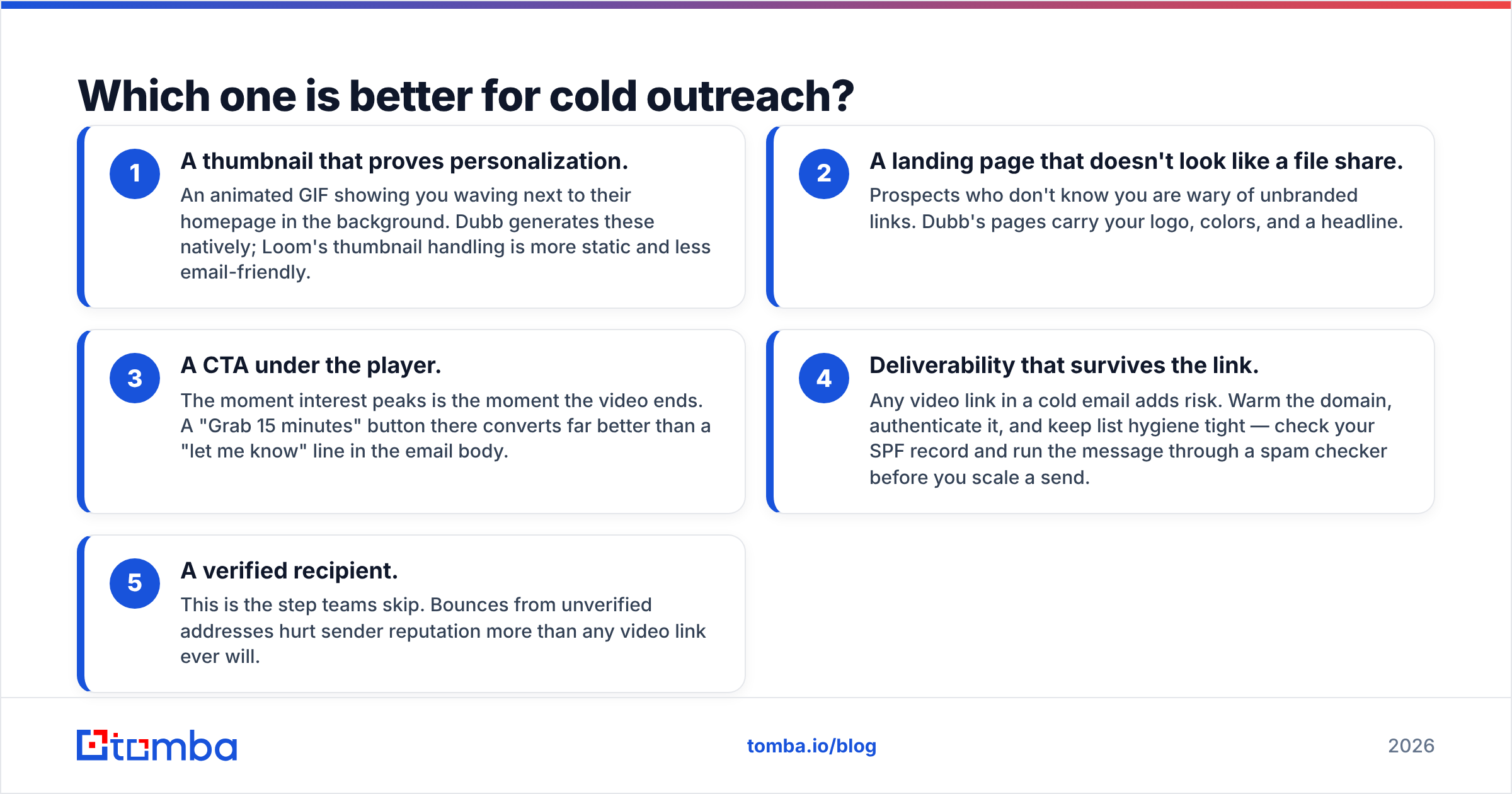
Video in cold outreach works because it's asymmetric effort: a 45-second personalized recording signals you did homework. The mechanics that make it convert are:
- A thumbnail that proves personalization. An animated GIF showing you waving next to their homepage in the background. Dubb generates these natively; Loom's thumbnail handling is more static and less email-friendly.
- A landing page that doesn't look like a file share. Prospects who don't know you are wary of unbranded links. Dubb's pages carry your logo, colors, and a headline.
- A CTA under the player. The moment interest peaks is the moment the video ends. A "Grab 15 minutes" button there converts far better than a "let me know" line in the email body.
- Deliverability that survives the link. Any video link in a cold email adds risk. Warm the domain, authenticate it, and keep list hygiene tight — check your SPF record and run the message through a spam checker before you scale a send.
- A verified recipient. This is the step teams skip. Bounces from unverified addresses hurt sender reputation more than any video link ever will.
Loom can do cold outreach. Plenty of reps paste Loom links into Gmail and book meetings. But you're doing the sequencing, tracking, and follow-up in three other tools, and you lose the CTA-click signal entirely.
If your outbound already lives in a sequencer, the calculus flips: Loom + your existing stack is cheaper and simpler than paying for Dubb's overlapping features.
What does each one cost in 2026?#
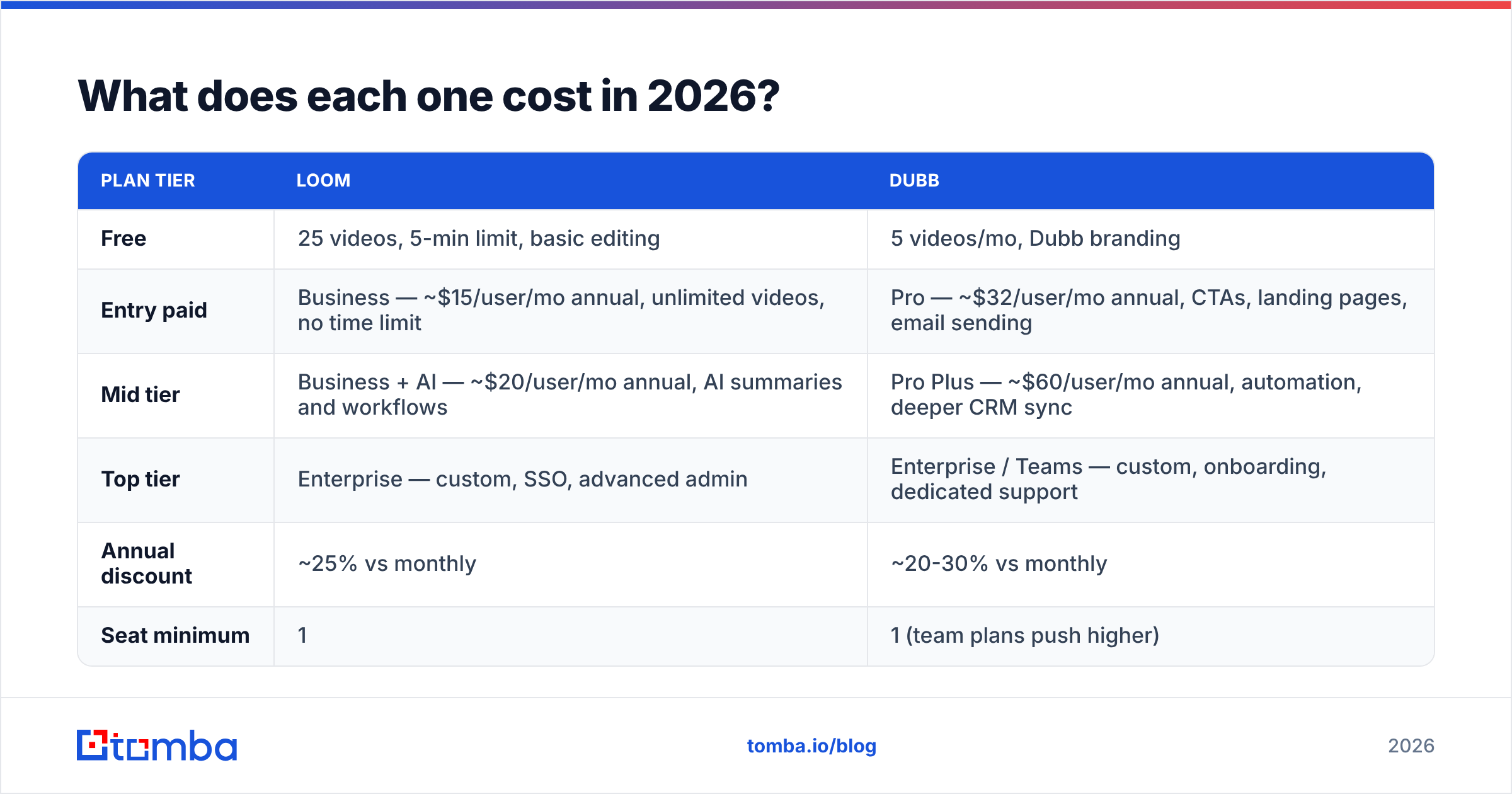
| Plan tier | Loom | Dubb |
|---|---|---|
| Free | 25 videos, 5-min limit, basic editing | 5 videos/mo, Dubb branding |
| Entry paid | Business — ~$15/user/mo annual, unlimited videos, no time limit | Pro — ~$32/user/mo annual, CTAs, landing pages, email sending |
| Mid tier | Business + AI — ~$20/user/mo annual, AI summaries and workflows | Pro Plus — ~$60/user/mo annual, automation, deeper CRM sync |
| Top tier | Enterprise — custom, SSO, advanced admin | Enterprise / Teams — custom, onboarding, dedicated support |
| Annual discount | ~25% vs monthly | ~20-30% vs monthly |
| Seat minimum | 1 | 1 (team plans push higher) |
Check both vendors directly before you commit — pricing pages move. Loom's is at loom.com and Dubb's at dubb.com. Verified buyer reviews for both live on G2.
The real cost question isn't the sticker. It's overlap. If you pay for Dubb Pro at ~$32/user and you're also paying for a sequencer with its own tracking, landing pages, and CRM sync, you're buying the same capability twice. Run that audit before you sign.
Is Dubb worth it if you already use HubSpot or Salesforce?#
Sometimes — depends on how much of your video workflow you want to live outside the CRM.
Dubb's native integrations log video views, watch percentage, and CTA clicks as CRM activities. That's genuinely useful: your reps see "watched 87%, clicked Book a Call" on the contact timeline without switching tabs. HubSpot has its own video tooling baked into Sales Hub, and Salesforce shops often already have video via their engagement platform. If either is true, Dubb's main value proposition shrinks to the landing pages and GIF thumbnails.
Loom integrates too, mostly through Zapier and a lighter set of native connectors. It'll drop a link into a CRM note. It won't build you a watch-to-pipeline attribution chain.
Practical test: open your CRM and ask whether a video watch is currently a trackable event. If yes, buy Loom and keep it simple. If no and you want it to be, Dubb earns its premium.

What are the honest weaknesses of each tool?#
Where Loom falls short for sales teams:
- No CTA layer. The video ends and the viewer has nowhere to go.
- Share pages carry Loom's branding on lower tiers, which reads as "generic tool" to a cold prospect.
- No native sending. You're composing in Gmail, tracking in a sequencer, reporting in a spreadsheet.
- Free tier's 5-minute cap is fine for outreach, annoying for demos.
- Analytics stop at "who viewed" — no downstream intent signal.
Where Dubb falls short:
- The interface has more surface area than most reps need. Onboarding takes longer.
- Video player and viewer page are functional but less refined than Loom's.
- If you only need internal recordings, you're paying roughly double for features you'll never open.
- Smaller ecosystem — fewer third-party integrations, smaller community, fewer templates floating around.
- Editing tools are adequate, not best-in-class.
Neither is a bad product. They're aimed at different buyers, and most of the disappointment in reviews on Capterra traces back to someone buying the wrong one for their use case.
Which should you pick — a decision framework#
Skip the feature grid and answer four questions.
- Who watches your videos? Colleagues and existing customers → Loom. Strangers you're trying to convert → Dubb.
- Do you already own a sequencer? Yes → Loom, and let the sequencer handle CTAs and tracking. No → Dubb consolidates three tools into one bill.
- Does anyone report on video performance? If a manager asks "did video move pipeline this quarter," you need CTA-level attribution. That's Dubb.
- How many seats? At 3 seats the price gap is ~$50/mo — noise. At 40 seats it's ~$8,000/year — a real decision that deserves a pilot on both.
A pattern that works well: Loom for the whole company, Dubb for the outbound team only. You're not obligated to standardize. Internal comms and cold outreach are genuinely different jobs, and the cost of running both is usually smaller than the cost of forcing one tool to do both badly.
How do you make video outreach actually work?#
Video is the second half of the problem. The first half is knowing who to send it to.
Here's the sequence that produces meetings, in order:
- Build the target list. ICP-fit accounts, named contacts, correct titles. Use domain search to pull every reachable contact at a target company in one pass instead of guessing at patterns.
- Verify every address before recording. A personalized 60-second video sent to a dead mailbox is 60 seconds and one reputation hit. Run the list through an email verifier first — it's the cheapest step in the whole chain.
- Personalize the first 8 seconds. Name, company, and one specific observation. Everything after that is context.
- Keep it under 90 seconds. Watch-completion falls off a cliff past that on cold sends.
- Put one CTA under the player. One. Booking link or reply prompt, not both.
- Follow up without the video. The second touch should be text-only and reference the video: "sent you a 60-second walkthrough Tuesday — happy to resend."
Teams that get burned by video outreach almost always skipped step two. They blame the channel when the actual failure was list quality. A 12% bounce rate will sink a campaign no matter how good the recording is, and it takes weeks to repair the email deliverability damage.
What about other options in this category?#
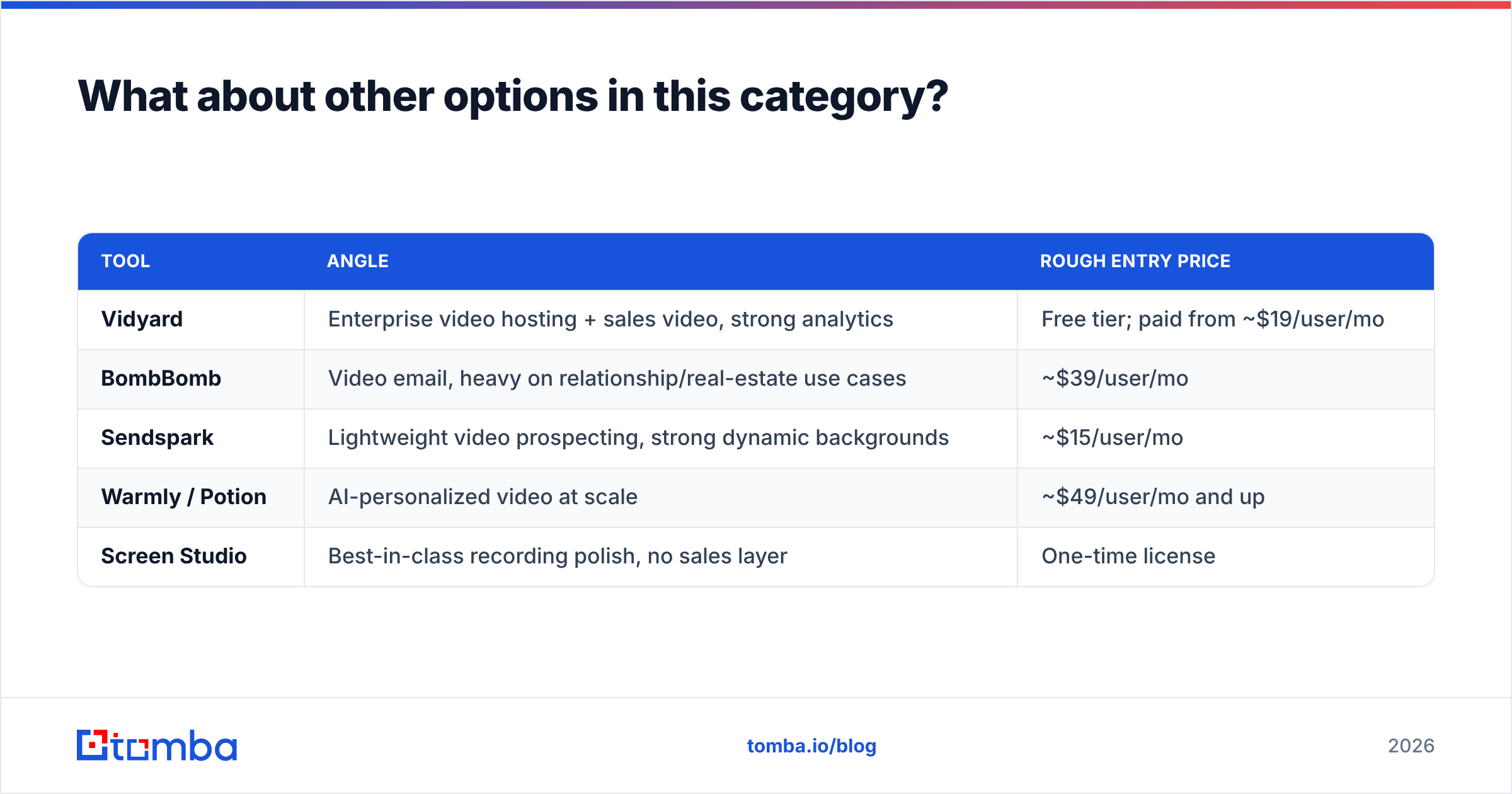
The Dubb-vs-Loom framing is narrower than the market. Adjacent tools worth a look:
| Tool | Angle | Rough entry price |
|---|---|---|
| Vidyard | Enterprise video hosting + sales video, strong analytics | Free tier; paid from ~$19/user/mo |
| BombBomb | Video email, heavy on relationship/real-estate use cases | ~$39/user/mo |
| Sendspark | Lightweight video prospecting, strong dynamic backgrounds | ~$15/user/mo |
| Warmly / Potion | AI-personalized video at scale | ~$49/user/mo and up |
| Screen Studio | Best-in-class recording polish, no sales layer | One-time license |
Vidyard is the closest true alternative to both — it sits between Loom's polish and Dubb's sales tooling, and larger orgs often land there. Sendspark is worth testing if you want Dubb-style CTAs at Loom-style pricing and can live with a smaller feature set.
Ready to fill the top of your video funnel?#
The best video tool in the world can't help you if your list is guesswork. Before you commit to Dubb, Loom, or anything else, fix the input: find the right people, confirm their addresses are live, and only then hit record.
Tomba Email Finder locates verified professional email addresses by name, domain, or company, so every video you record lands in a real inbox. Start on the free tier with 25 searches a month, or move to Starter at $49/mo when you're sending at volume — full Tomba pricing is public, no sales call required.
Record fewer videos. Send them to the right people. Watch your reply rate stop being a rounding error.
Related guides#
Ready to find emails that actually work?
Join 150,000+ professionals who stopped guessing and started sending. Free credits on signup — no credit card required.
Get the Tomba newsletter
Practical outbound tactics and product updates — once every two weeks.
About the author