Dun Bradstreet vs Wiza (2026): Which B2B Data Tool Wins?
One platform sells firmographic depth and credit risk data. The other sells fast, LinkedIn-sourced contacts. Here is the honest breakdown of where each wins, what they really cost, and which one your outbound team should actually buy in 2026.
Dun Bradstreet vs Wiza is not really a fair fight. The two tools solve different problems: one sells company truth, the other sells contact speed. Here is which one your outbound team should pay for in 2026.
TL;DR
- Dun & Bradstreet and Wiza are not really competitors. D&B is a firmographic and risk-data platform for enterprise data governance. Wiza is a LinkedIn-native contact extractor for SDRs who need emails and phone numbers today.
- Pick D&B if you need company-level truth: legal entity hierarchies, D-U-N-S numbers, and credit signals finance will accept.
- Pick Wiza if you live in LinkedIn Sales Navigator. It turns a saved search into a verified contact list in ten minutes.
- Neither is cheap per contact. D&B is quote-based and usually lands in five figures a year. Wiza is credit-metered and gets pricey at volume.
- Most teams overbuy. If 80% of your need is "find and verify work emails at scale," a dedicated email finder at $49/mo covers it.
What is Dun & Bradstreet, and what is Wiza?#
Think of it like buying a car versus buying a tank of gas. Dun & Bradstreet sells you the vehicle — a whole commercial data infrastructure you register your business universe against. Wiza sells you the fuel for this week's outbound sprint.
Dun & Bradstreet has been in commercial data since 1841. Its core asset is the D-U-N-S Number, a nine-digit ID for each business location. On top of that sits corporate linkage: the map that ties a branch office to its global parent. Around that sit credit scores, payment behavior (PAYDEX), firmographics, technographics, intent signals, and compliance screening. Modern packaging shows up as D&B Hoovers for sales prospecting and D&B Connect for data cleansing and CRM matching.
What D&B is genuinely great at: matching identities. It tells you that the "Acme Ltd" in your CRM and the "ACME Limited (UK)" your rep just entered are the same legal entity, and that their parent is a $4B group in Delaware. That is a hard problem. Almost nobody solves it as completely.
Wiza started as a LinkedIn Sales Navigator export tool and grew into a prospecting platform. You run a search in Sales Nav and hit export. Wiza turns those profiles into rows with verified work emails, personal emails, and phone numbers. It also offers a Chrome extension, a bulk CSV enrichment flow, an API, and CRM pushes to HubSpot, Salesforce, Outreach, and Salesloft.
What Wiza is genuinely great at: collapsing "I found 400 good-looking prospects on LinkedIn" into "I have 400 contactable rows in my sequencer" with no manual copy-paste.
So the real question is not which tool is better. It is which problem you actually have.

Dun Bradstreet vs Wiza: how do they compare head-to-head?#
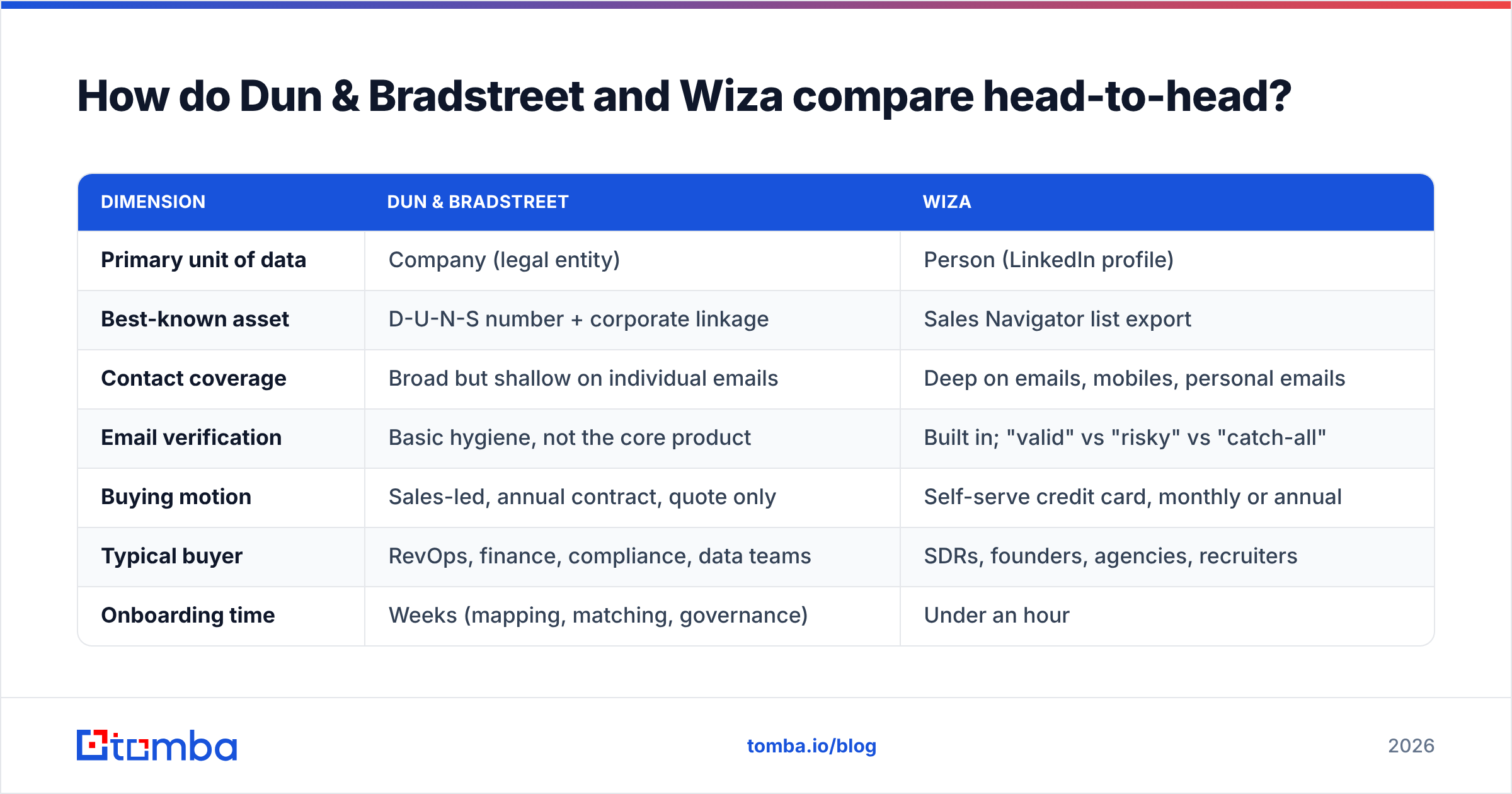
Here is the practical comparison, stripped of both vendors' marketing language.
| Dimension | Dun & Bradstreet | Wiza |
|---|---|---|
| Primary unit of data | Company (legal entity) | Person (LinkedIn profile) |
| Best-known asset | D-U-N-S number + corporate linkage | Sales Navigator list export |
| Contact coverage | Broad but shallow on individual emails | Deep on emails, mobiles, personal emails |
| Email verification | Basic hygiene, not the core product | Built in; "valid" vs "risky" vs "catch-all" |
| Buying motion | Sales-led, annual contract, quote only | Self-serve credit card, monthly or annual |
| Typical buyer | RevOps, finance, compliance, data teams | SDRs, founders, agencies, recruiters |
| Onboarding time | Weeks (mapping, matching, governance) | Under an hour |
| International strength | Excellent — global entity coverage | Good where LinkedIn is strong; weaker in DACH/JP |
| CRM integration depth | Deep, bidirectional, match-key driven | Push-style export to major CRMs and sequencers |
| Where it breaks down | Contact-level freshness, cost, speed | Non-LinkedIn prospects, company hierarchy, compliance |
The pattern is consistent. D&B gives you authority at the account level. Wiza gives you velocity at the contact level. A well-run outbound team usually needs both kinds of data — but rarely needs to buy both from these two vendors.
Which one gives you better contact data?#
Wiza, clearly — if by "contact data" you mean an email address a human will actually read.
D&B's contact records exist, and D&B Hoovers will show you named executives with titles and sometimes direct dials. But contact-level data ages faster than anything else in the B2B stack. Job changes run 20–30% a year in tech sales roles. A database built around durable company identifiers is tuned for stability, not churn. That is a design tradeoff, not a defect.
Wiza's advantage is that it reads from LinkedIn, and people update LinkedIn themselves because their careers depend on it. When a VP of Marketing moves to a new company, LinkedIn knows within days. A firmographic database might take a quarter.
Where Wiza's model shows strain:
- Catch-all domains. Many mid-market companies accept every address at the SMTP layer. No verifier can confirm a specific mailbox by handshake alone. Wiza marks these as "risky" or "catch-all." That is honest labeling, but you still have to decide whether to mail them. A dedicated catch-all verifier scores these addresses against pattern and engagement history, and recovers a real slice of leads most teams throw away.
- Prospects who are not on LinkedIn. Manufacturing, logistics, local services, healthcare admin, and most of the public sector are badly underrepresented. If your ICP is a 60-person plastics distributor in Ohio, LinkedIn-first tooling will fail you.
Two more limits are worth naming, because both hit your budget rather than your coverage:
- Credit consumption on failures. Read any credit policy carefully. Across this category, plans differ on whether you are charged for a lookup that returns nothing or returns a risky result. That changes effective cost per usable contact by 20–40%.
- No account-level truth. Wiza will not tell you that two subsidiaries you are prospecting roll up to a customer you already have under contract. That is exactly the overlap D&B exists to prevent.
The honest summary: Wiza wins raw contact freshness. D&B wins knowing who the company actually is. If you conflate those two jobs, you will buy the wrong tool.
What does Dun Bradstreet vs Wiza really cost in 2026?#
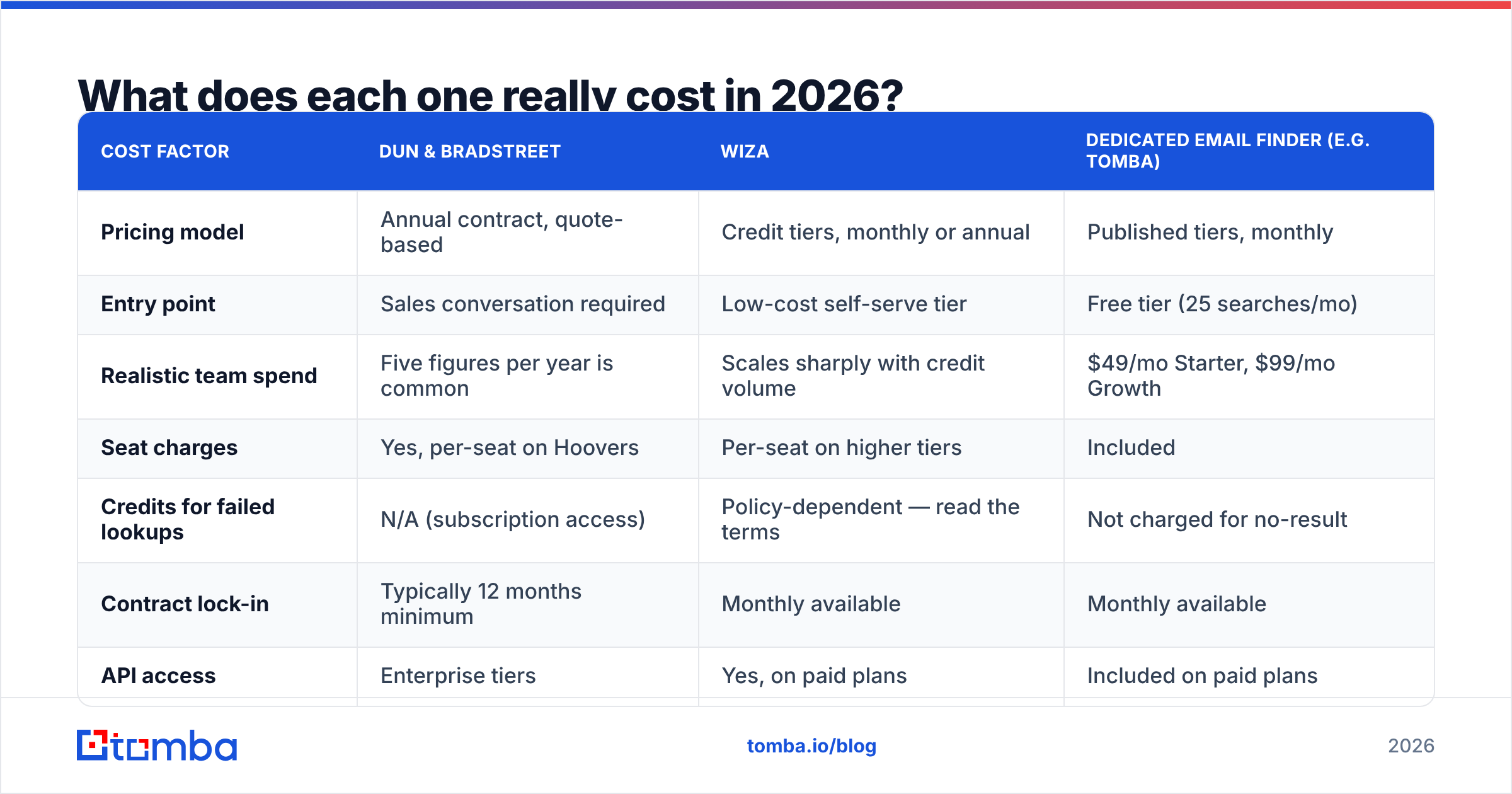
This is where the comparison gets uncomfortable, because the two vendors do not price on the same axis.
| Cost factor | Dun & Bradstreet | Wiza | Dedicated email finder (e.g. Tomba) |
|---|---|---|---|
| Pricing model | Annual contract, quote-based | Credit tiers, monthly or annual | Published tiers, monthly |
| Entry point | Sales conversation required | Low-cost self-serve tier | Free tier (25 searches/mo) |
| Realistic team spend | Five figures per year is common | Scales sharply with credit volume | $49/mo Starter, $99/mo Growth |
| Seat charges | Yes, per-seat on Hoovers | Per-seat on higher tiers | Included |
| Credits for failed lookups | N/A (subscription access) | Policy-dependent — read the terms | Not charged for no-result |
| Contract lock-in | Typically 12 months minimum | Monthly available | Monthly available |
| API access | Enterprise tiers | Yes, on paid plans | Included on paid plans |
Three things to check before you sign anything:
- Ask D&B for the all-in number, not the license number. Enterprise data deals often carry implementation, matching, and refresh fees on top of the license. The quote you get in month one is rarely the invoice you pay in month three.
- Model Wiza at your real volume, not your pilot volume. Credit pricing looks fine at 500 contacts a month and much less so at 15,000. Do the math on cost per deliverable contact, after you strip out risky and catch-all results.
- Separate "find" from "verify" in your budget. These are two different jobs. Bundling them into one premium price is the most common way teams overpay. A standalone email verifier run against any source list is cheap, and it catches problems before your sender reputation does.
Who should pick Dun & Bradstreet?#
Buy D&B when the question you are answering is a company question, not a person question.
- You have a compliance or credit requirement. KYC, supplier risk screening, export controls, sanctions checks. Nothing in the prospecting-tool category comes close.
- Your CRM is a mess of duplicates. D&B Connect's match-and-append against D-U-N-S keys is the standard fix for a 200,000-record account object with four spellings of every company.
- You sell into enterprise with complex hierarchies. Knowing that a target is a subsidiary of an existing customer changes routing, territory, and commission. Getting that wrong is expensive.
- Finance or procurement is a stakeholder. D&B carries institutional credibility that a startup data vendor does not, and that matters in a boardroom.
- You need global entity coverage. Non-US legal entity data is where D&B's 180-year head start compounds.
Skip D&B if you are a ten-person startup that just needs 2,000 emails a month. You will pay enterprise prices for infrastructure you will never touch, and the procurement cycle alone will cost you a quarter of pipeline.
Who should pick Wiza?#
Buy Wiza when your prospecting already starts inside LinkedIn and your bottleneck is export speed.
- You run Sales Navigator daily. Wiza is built around that workflow and it shows.
- You need mobile numbers alongside emails. Recruiters and multichannel SDR teams get real value from both on one row. If phone coverage is the priority, benchmark it against a dedicated phone finder first — coverage varies a lot by geography and seniority.
- You want self-serve. No demo, no procurement, no annual commitment on the entry tiers.
- Your ICP is tech, SaaS, agencies, or professional services. LinkedIn density is high, so extraction hit rates are high.
- You are an agency running many small campaigns. Credit-based pricing flexes better than seat-based pricing when client volume is lumpy.
Skip Wiza if your prospects are not well-represented on LinkedIn, if you need to enrich by domain rather than by profile, or if your monthly volume pushes credit costs past what a flat-rate finder would charge.
Is there a third option that beats both on cost per verified contact?#
For the specific job of "get me a verified work email from a name and a domain," yes — and it is not close on price.
Both sides of the Dun Bradstreet vs Wiza comparison bundle email discovery inside a bigger product. You pay for the bundle. If your actual need is finding and verifying business emails at volume, a purpose-built finder does that one job for far less:
- Domain-first discovery. Give a company domain and get back the people plus the company's email pattern. Domain search works even when a prospect has no LinkedIn presence — which is exactly where LinkedIn-native tools return nothing.
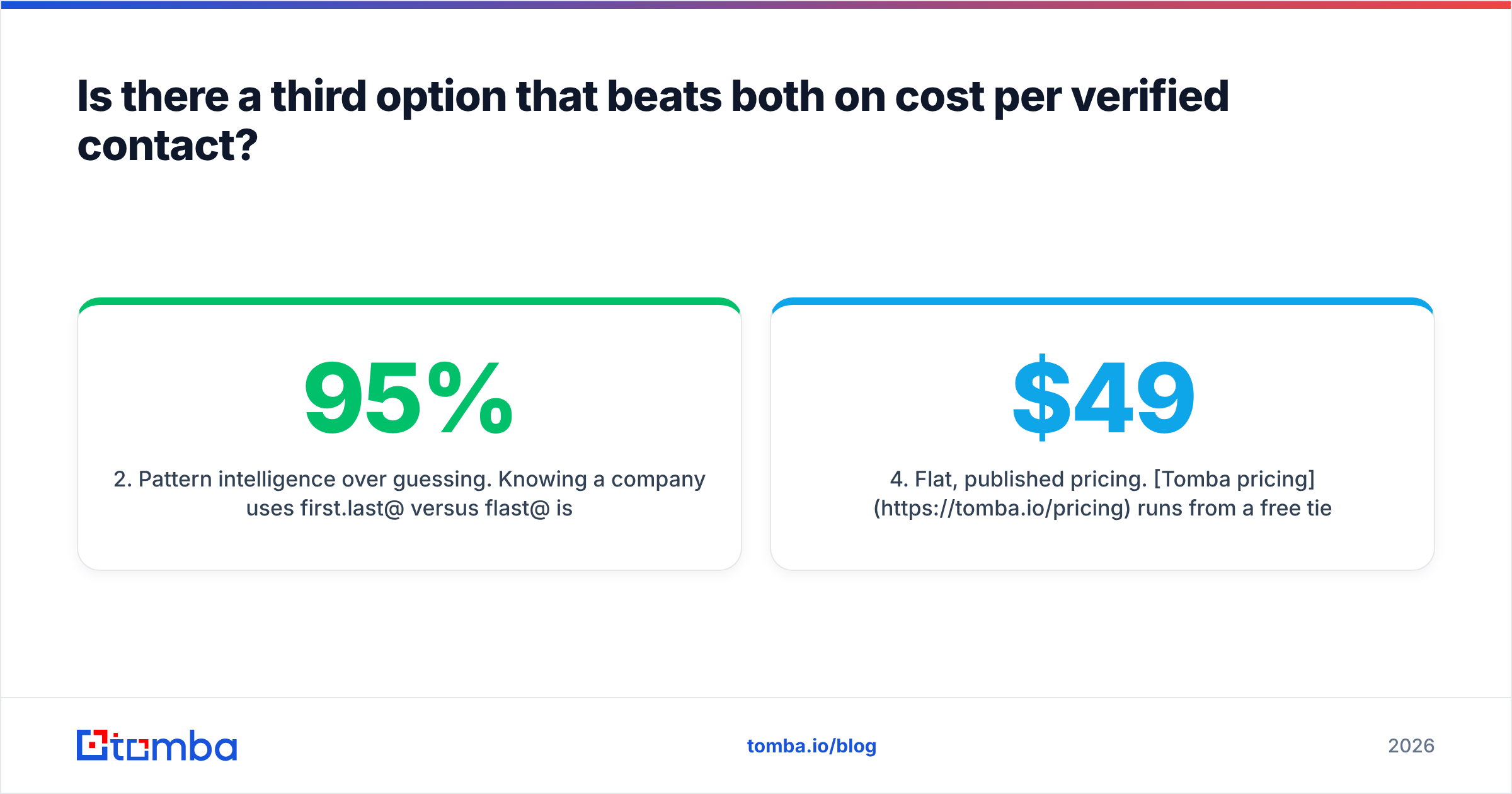
- Pattern intelligence over guessing. Knowing a company uses
first.last@versusflast@is what separates a 95% hit rate from a 60% one. Pattern detection generalizes across an org, so one confirmed employee unlocks the rest. - Verification as a first-class step, not a checkbox. SMTP handshake, MX validation, role-account detection, disposable-domain screening, and explicit catch-all scoring — all before the address reaches your sequencer.
The commercial terms matter just as much as the data:
- Flat, published pricing. Tomba pricing runs from a free tier at 25 searches a month to Starter at $49/mo and Growth at $99/mo, with Pro at $249/mo. No quote, no annual lock, no charges for lookups that return nothing.
- Bulk and API from day one. Upload a CSV of 10,000 rows or hit the API from your own pipeline. Bulk email finder handles list-scale work without a per-seat penalty.
- Stack composability. Because it does one job well, it slots underneath whatever else you run — including D&B for account intelligence. Cheap fuel, whatever car you drive.
The realistic 2026 stack for most mid-market teams has three layers. Firmographic and hierarchy data from an enterprise provider, but only if compliance or finance requires it. LinkedIn extraction for the accounts where LinkedIn is strong. And a flat-rate finder-plus-verifier doing the high-volume grunt work underneath both. Buying two premium platforms to do overlapping work is how data budgets quietly triple.
Cross-check any vendor claim against third-party reviews. G2's B2B data category is the least-filtered public source for how these tools perform at real volume, and the complaint patterns tell you more than the star ratings.
How should you actually decide?#
Settle Dun Bradstreet vs Wiza with your own data, not with a vendor deck. Run this test in one afternoon:
- Pull 100 real accounts from your CRM — not a curated list, a random sample of your actual pipeline.
- Run the same 100 through each candidate. Measure match rate, email hit rate, and how many of those emails survive independent verification.
- Compute cost per deliverable contact, not cost per credit. Divide total plan cost by verified, deliverable results. This number is usually 2–3x the headline rate, and it is the only one that matters.
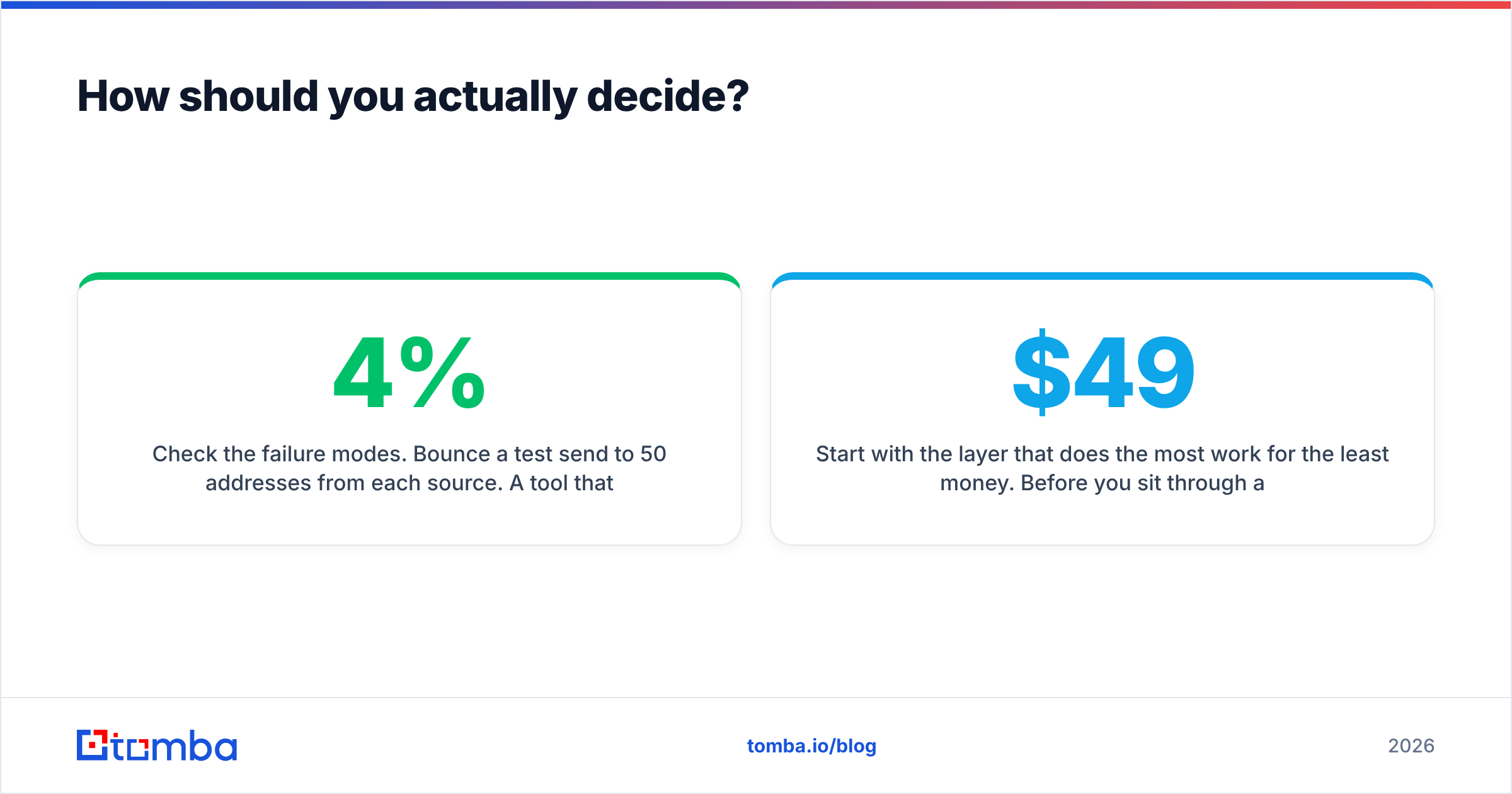
- Check the failure modes. Send a test batch to 50 addresses from each source. A tool that produces a 4% bounce rate is costing you email deliverability, which costs you everything downstream.
- Read the credit policy on failures and the auto-renewal clause. Both are where the surprise costs live.
If D&B wins that test on account intelligence, buy it for account intelligence. If Wiza wins on LinkedIn-sourced contacts, buy it for that. Just do not let either one become your default answer for every data question. That is how you end up paying enterprise rates for a lookup that costs cents elsewhere.
Start with the layer that does the most work for the least money. Before you sit through a D&B demo or model out Wiza credit tiers, run your real prospect list through Tomba Email Finder. The free tier gives you 25 searches a month to test hit rates on your own ICP. Starter is $49/mo, and you keep verification, domain search, and API access without a sales call or an annual contract. Benchmark it against whatever else you are considering, then buy the expensive platform only for the job it uniquely does.
Related guides#
Ready to find emails that actually work?
Join 150,000+ professionals who stopped guessing and started sending. Free credits on signup — no credit card required.
Get the Tomba newsletter
Practical outbound tactics and product updates — once every two weeks.
About the author