Dynamacs Pricing, Reviews, Pros and Cons: 2026 Buyer Guide
Dynamacs does not publish a price list, which makes budgeting guesswork. Here is an independent breakdown of how Dynamacs pricing is structured, what reviewers actually complain about, and how to pressure-test the quote before you sign.
TL;DR
- Dynamacs sells through quotes, not a public price page. Any number you see online is a secondhand estimate, not a list price — treat it that way.
- The license fee is rarely the biggest line item. Implementation, data migration, per-user seats, and annual maintenance typically dominate the three-year bill.
- Reviews cluster around the same theme: solid vertical depth and responsive support, weaker modern UI, thin native integrations, and slow reporting at scale.
- Dynamacs is an operations system, not a pipeline system. It does not find or enrich new contacts — you still need a separate data layer for outbound.
- Before you sign anything, get the quote broken out by license, implementation, support, and overage. Vendors that resist that breakdown are telling you something.
What is Dynamacs and who actually buys it?#
Dynamacs sits in the category of vertical business software — a suite built for one industry's workflow rather than a general-purpose platform you configure yourself. That positioning explains almost everything about how it is priced and how it reviews.
Vertical suites win deals on domain fit. The forms, the compliance fields, the reporting formats, and the terminology already match how the industry works, so the buyer avoids six months of customizing a horizontal platform. They lose deals on flexibility, integration breadth, and interface polish — because the vendor's engineering budget goes into regulatory depth, not design systems.
The typical buyer is an operations lead or owner at a small-to-mid-sized company who is currently running the business on spreadsheets, a legacy on-prem system, or a general-purpose tool bent into a shape it was never meant to hold. The purchase is usually driven by a specific pain: inventory that never reconciles, compliance reporting that eats a week per month, or an aging system the original vendor no longer supports.
That context matters because it changes what "expensive" means. If Dynamacs removes 40 hours of manual reconciliation a month, the license fee is not the number to optimize. The implementation risk is.
How does Dynamacs pricing actually work?#
Dynamacs does not publish list pricing. You request a demo, describe your company size and module needs, and receive a custom quote. This is standard for vertical software — the vendor's cost to serve varies wildly by deployment complexity, so a single public number would be either misleadingly low or uncompetitively high.
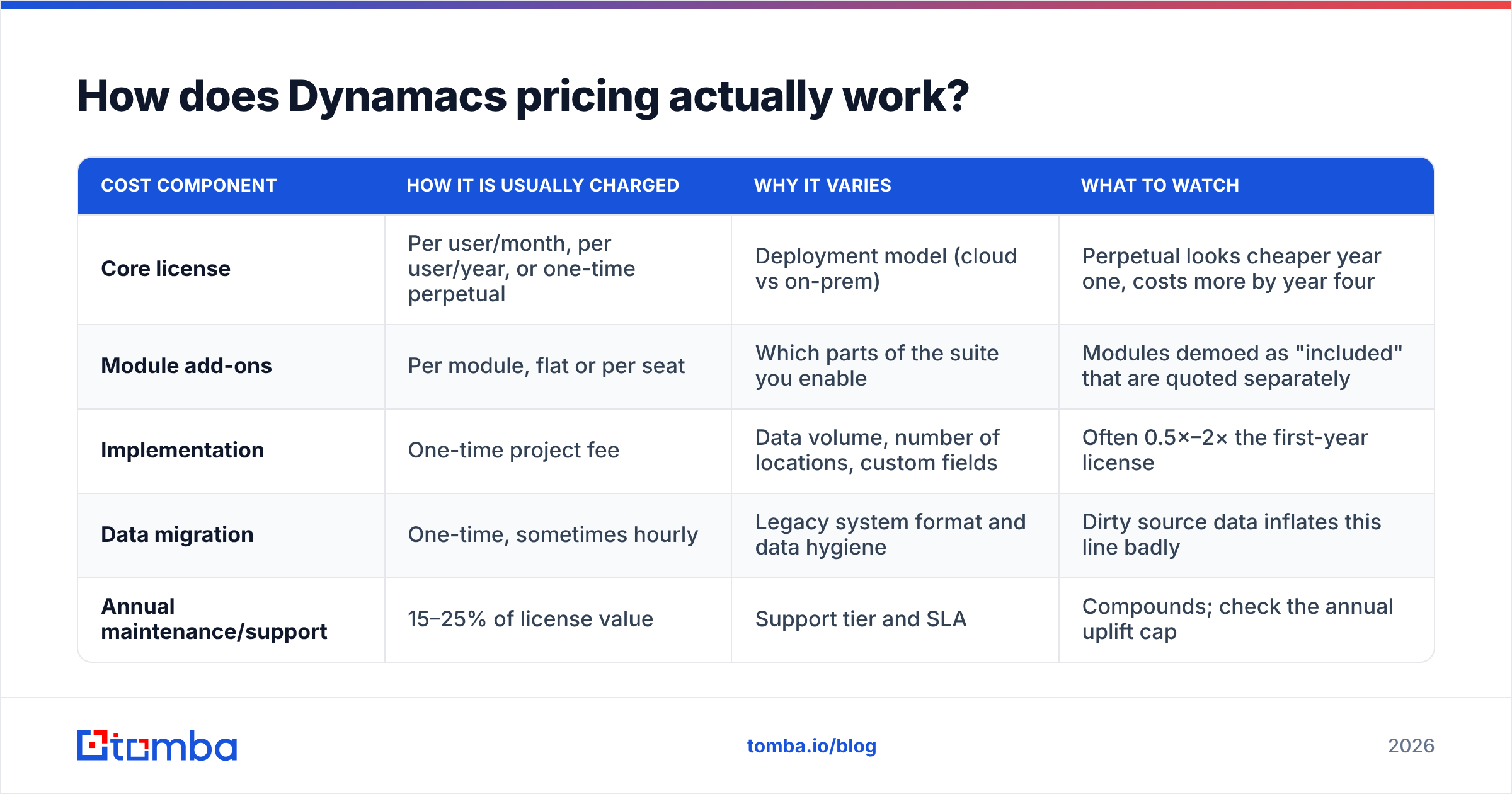
The practical consequence: you cannot budget from a website. You have to reverse-engineer the quote structure. Quote-based vertical software almost always assembles cost from the same five components.
| Cost component | How it is usually charged | Why it varies | What to watch |
|---|---|---|---|
| Core license | Per user/month, per user/year, or one-time perpetual | Deployment model (cloud vs on-prem) | Perpetual looks cheaper year one, costs more by year four |
| Module add-ons | Per module, flat or per seat | Which parts of the suite you enable | Modules demoed as "included" that are quoted separately |
| Implementation | One-time project fee | Data volume, number of locations, custom fields | Often 0.5×–2× the first-year license |
| Data migration | One-time, sometimes hourly | Legacy system format and data hygiene | Dirty source data inflates this line badly |
| Annual maintenance/support | 15–25% of license value | Support tier and SLA | Compounds; check the annual uplift cap |
Two structural questions decide most of your bill:
- Cloud or on-premise? On-prem shifts cost to your infrastructure and your IT staff, and usually pairs with a perpetual license plus annual maintenance. Cloud spreads cost into a subscription. Neither is automatically cheaper — model both over 36 months.
- Named seats or concurrent seats? Concurrent licensing lets 30 employees share 10 seats if only 10 are ever logged in at once. Named licensing does not. For shift-based operations, this single term can halve or double the price.
What does a realistic total cost of ownership look like?#
Here is the framework to build your own estimate, regardless of what number lands in the quote. Work through these in order:
- Year-one license. Take the quoted per-seat rate times your real seat count — not your headcount. Count only people who will log in weekly.
- Implementation multiplier. Budget implementation at 50–100% of the first-year license for a straightforward single-location rollout, and up to 200% for multi-site or heavy customization. Ask the vendor for three reference implementations of your size and their actual project fee.
- Internal labor. Your team will spend real hours on data cleanup, testing, and training. A typical mid-market rollout consumes 150–400 internal hours. Price those hours — most buyers do not, and it is why "the software cost more than we thought" is the most common post-mortem line.
- Annual escalation. Subscription contracts frequently include a 3–7% annual uplift. Over five years, a 5% uplift adds roughly 22% to your cumulative license spend. Negotiate a cap before signing, not at renewal.
- Exit cost. Ask what a full data export looks like: format, cost, and timeline. A vendor that charges for your own data in a usable schema is a vendor that has priced switching out of your reach.

The uncomfortable truth about quote-based pricing is that your leverage peaks exactly once — before you sign. After go-live, migration cost becomes your ceiling on negotiation, and the vendor knows it.
What do Dynamacs reviews say?#
Independent review volume for Dynamacs is thin compared to horizontal platforms, which is normal for niche vertical software. Check the current listings on G2 and Capterra directly rather than trusting any roundup — including this one — since review counts and scores shift quarterly.
When you read them, filter deliberately. Vertical software reviews follow a predictable pattern, and the signal is in a few specific places:
- Read the 3-star reviews first. Five-star reviews from vertical software are often collected at go-live, before the honeymoon ends. One-star reviews are usually a failed implementation, which may say more about the buyer's data than the product. Three-star reviews are where you find the honest trade-offs.
- Sort by recency, hard. A review from three years ago describes a different product. Anything older than 18 months is history, not evidence.
- Match reviewer size to yours. A 12-person company and a 400-person company have completely different experiences with the same vertical suite. A glowing review from an org 20× your size predicts nothing.
- Look for the word "support." For vertical software, support responsiveness is the single strongest predictor of satisfaction, because you cannot Google your way out of a niche-product problem at 2am. There is no Stack Overflow for industry-specific ERP edge cases.
The recurring themes across products in this class — and Dynamacs is not an exception — are strong domain fit and attentive support on one side, dated interface and limited native integrations on the other. If your team has spent the last five years in modern SaaS interfaces, budget for a real adoption curve.
What are the pros and cons of Dynamacs?#
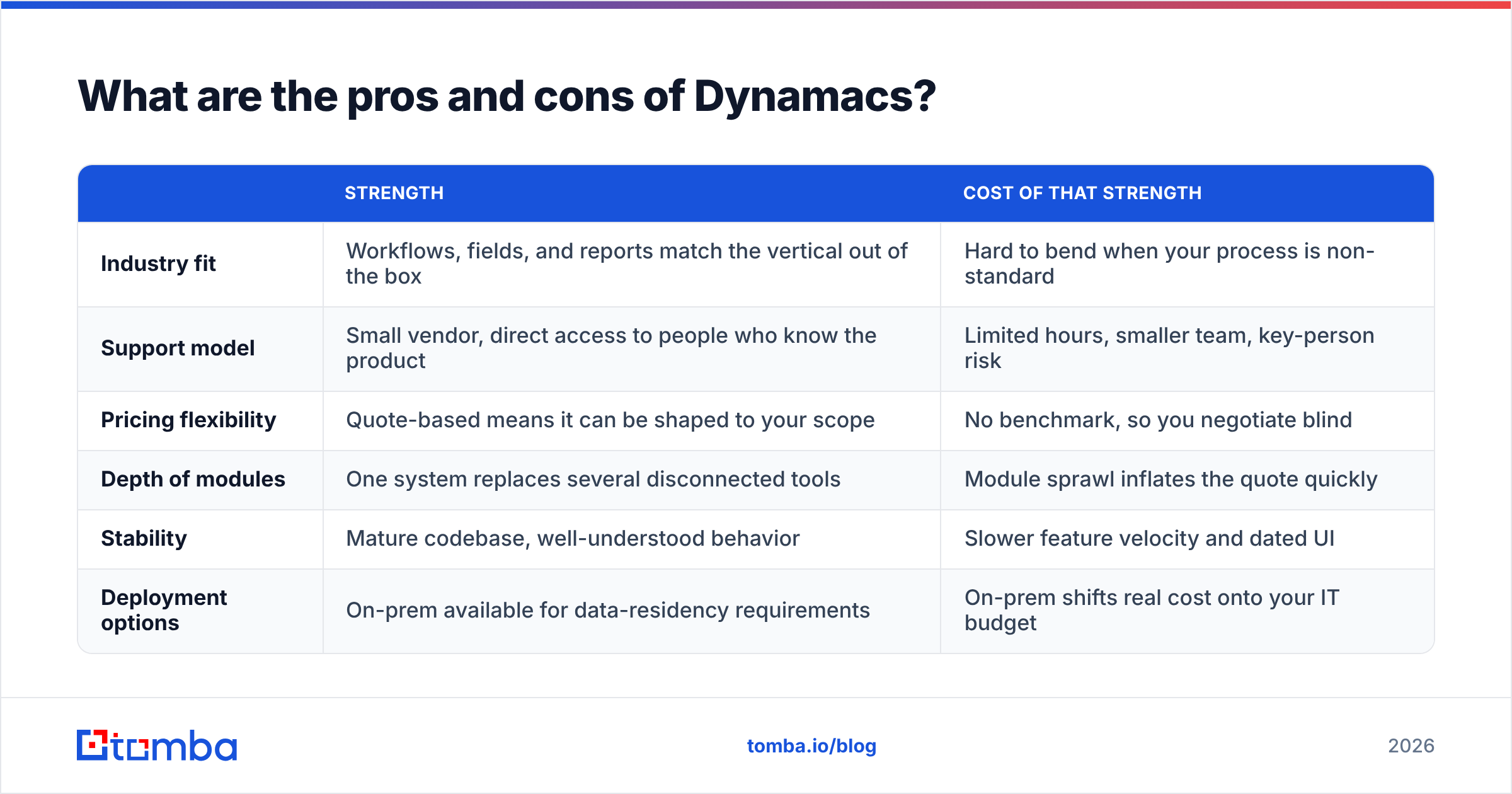
| Strength | Cost of that strength | |
|---|---|---|
| Industry fit | Workflows, fields, and reports match the vertical out of the box | Hard to bend when your process is non-standard |
| Support model | Small vendor, direct access to people who know the product | Limited hours, smaller team, key-person risk |
| Pricing flexibility | Quote-based means it can be shaped to your scope | No benchmark, so you negotiate blind |
| Depth of modules | One system replaces several disconnected tools | Module sprawl inflates the quote quickly |
| Stability | Mature codebase, well-understood behavior | Slower feature velocity and dated UI |
| Deployment options | On-prem available for data-residency requirements | On-prem shifts real cost onto your IT budget |
The honest summary: Dynamacs and products like it are strong when your requirements are highly specific to your industry and weak when your requirements are highly specific to you. Vertical depth is a substitute for configurability, not a complement to it.
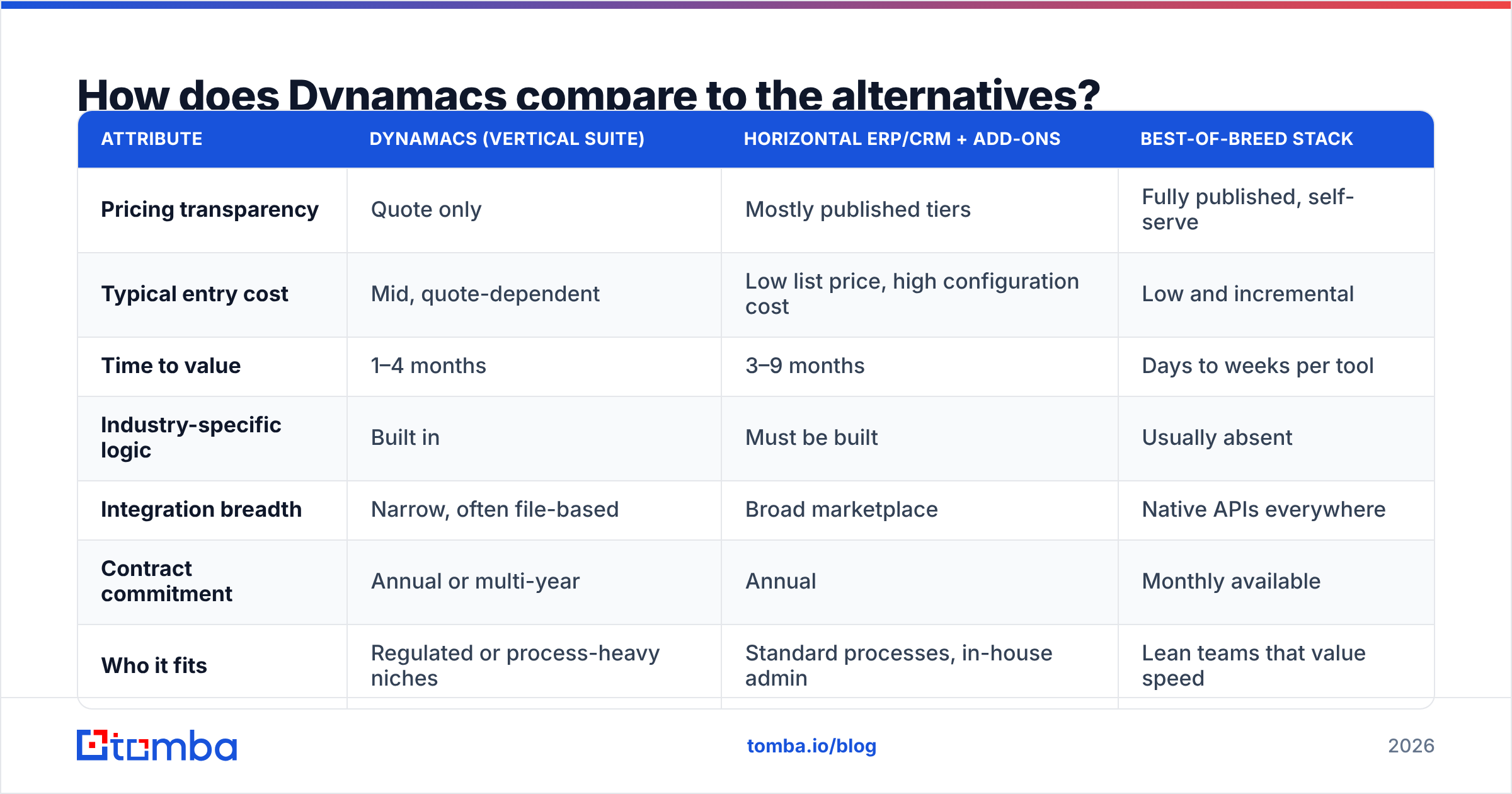
How does Dynamacs compare to the alternatives?#
There are three viable paths, and the right one depends less on features than on how weird your operation is.
| Attribute | Dynamacs (vertical suite) | Horizontal ERP/CRM + add-ons | Best-of-breed stack |
|---|---|---|---|
| Pricing transparency | Quote only | Mostly published tiers | Fully published, self-serve |
| Typical entry cost | Mid, quote-dependent | Low list price, high configuration cost | Low and incremental |
| Time to value | 1–4 months | 3–9 months | Days to weeks per tool |
| Industry-specific logic | Built in | Must be built | Usually absent |
| Integration breadth | Narrow, often file-based | Broad marketplace | Native APIs everywhere |
| Contract commitment | Annual or multi-year | Annual | Monthly available |
| Who it fits | Regulated or process-heavy niches | Standard processes, in-house admin | Lean teams that value speed |
A fourth option that buyers underrate: keep the vertical suite for operations and run everything customer-facing on separate, cheap, transparent tools. You get regulatory depth where you need it and modern software where your team lives. The integration tax is real but usually smaller than the cost of forcing one system to do both jobs badly.
If you go that route, define the boundary clearly. Operations data — inventory, compliance, fulfillment, billing — stays in the vertical system. Pipeline data lives in a proper CRM. Prospect discovery and contact data live somewhere else entirely.
What should you ask before you sign?#
Bring this list to the second call, not the first. The demo is theater; the second call is where numbers get real.
- "Send the quote itemized by license, implementation, migration, training, and year-two support." One blended number is not a quote, it is a negotiating position.
- "Is the annual uplift capped in the contract?" Get a number in writing. Uncapped means whatever they decide at renewal.
- "What is the seat model, and what counts as a seat?" Named vs concurrent. Read-only users. API access. Get it defined.
- "Which modules in that demo are quoted separately?" Demos are assembled from the full suite. Buyers routinely budget for what they saw and receive a quote for less.
- "What does a full data export produce, in what format, at what cost?" Test the answer against a real scenario.
- "Give me two references at my size who went live in the last 12 months." Not logos. Phone numbers.
If any of those get a soft answer, that is your finding. Vendors with clean pricing structures answer all six in one email. Gartner's guidance on software evaluation makes the same point in more words: the risk in enterprise software purchasing concentrates in the terms, not the feature list.
Where does Dynamacs leave a gap in your stack?#
Here is the part most Dynamacs pricing comparisons skip. Vertical operations suites manage the customers you already have. They do almost nothing to help you find new ones.
If growth depends on outbound — reaching decision-makers at companies that have never heard of you — no operations system fills that gap. You need a contact data layer: something that turns a company domain or a name into a verified, reachable business email address. That is a separate purchase, a separate budget line, and one where pricing is refreshingly public.
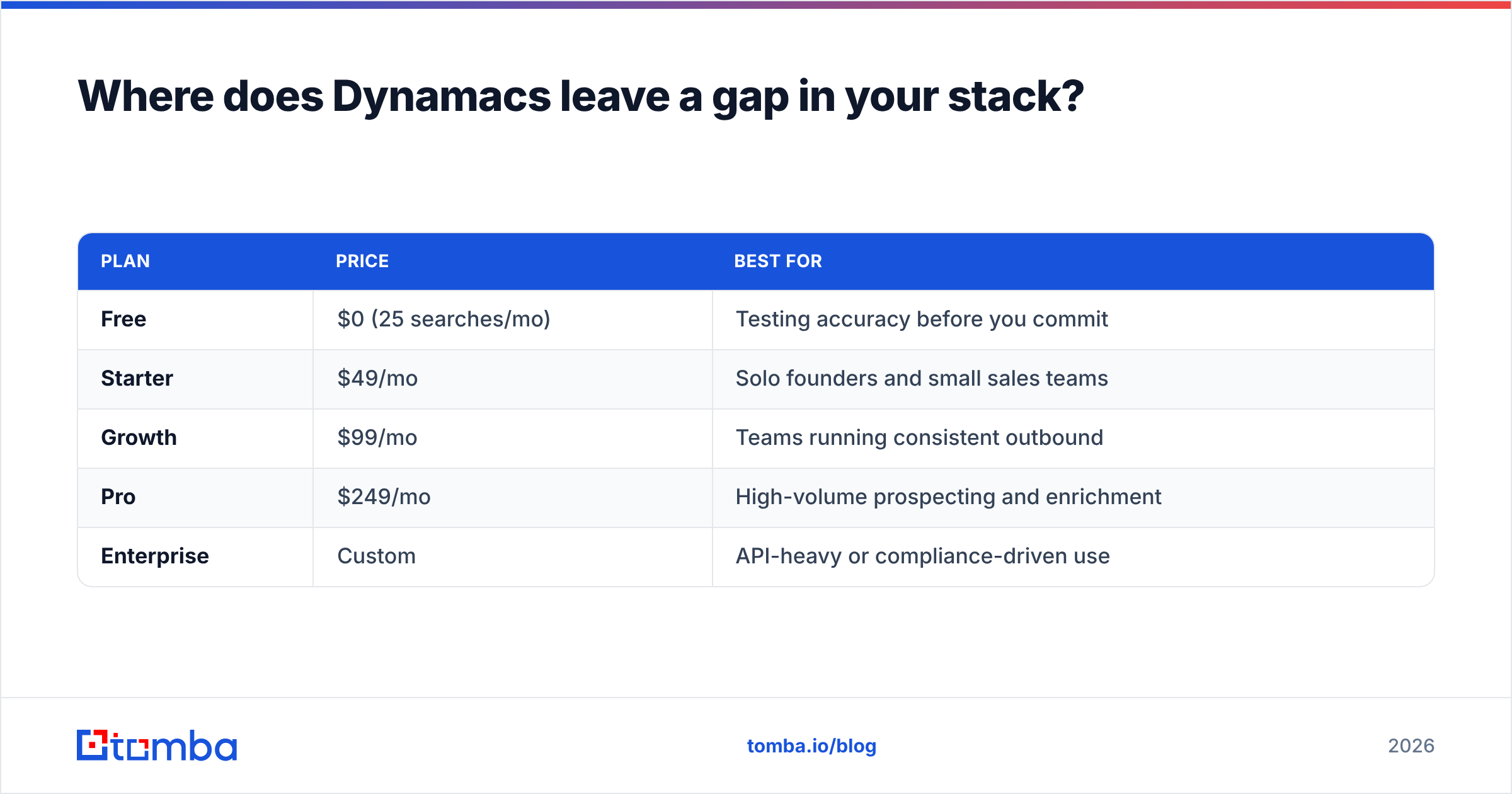
| Plan | Price | Best for |
|---|---|---|
| Free | $0 (25 searches/mo) | Testing accuracy before you commit |
| Starter | $49/mo | Solo founders and small sales teams |
| Growth | $99/mo | Teams running consistent outbound |
| Pro | $249/mo | High-volume prospecting and enrichment |
| Enterprise | Custom | API-heavy or compliance-driven use |
The contrast is instructive. You can evaluate Tomba pricing in 30 seconds and test the product for free before spending anything. That is what a transparent pricing model looks like — and it is a fair benchmark to hold every quote-based vendor against. If a vendor cannot explain why their pricing must be private, the reason is usually commercial, not technical.
Practically, the split looks like this: Dynamacs (or whatever vertical suite you choose) runs operations. A dedicated email finder builds the top of funnel. Data enrichment fills in firmographics on the leads worth pursuing. Three tools, three clear jobs, three separately negotiable contracts — which is exactly the leverage you lose when you buy one system that claims to do everything.
Is Dynamacs worth it in 2026?#
It depends entirely on how much of your process is industry-specific. If 70% of your daily workflow is standard business operations, a horizontal platform with published pricing will serve you better and cost less to leave. If 70% is industry-specific logic, compliance reporting, and domain workflows, a vertical suite like Dynamacs earns its quote — because rebuilding that logic on a generic platform costs more than the license ever will.
What you should not do is evaluate it on the license number alone. Model 36 months. Include internal hours. Cap the uplift. Get the export terms in writing. Then decide.
And whatever you decide about your operations system, do not let it double as your growth engine. If your pipeline depends on reaching people who do not know you yet, start with the data. Tomba's Email Finder turns a name and a company domain into a verified business email — 25 free searches a month, $49/mo when you outgrow that, and no quote call required. Test it against a list of 25 target accounts this week, and you will know more about your outbound ceiling than any demo will tell you.
Related guides#
Ready to find emails that actually work?
Join 150,000+ professionals who stopped guessing and started sending. Free credits on signup — no credit card required.
Get the Tomba newsletter
Practical outbound tactics and product updates — once every two weeks.
About the author