Dynamic Content in Emails: A Practical 2026 Playbook
Dynamic content in emails only lifts replies when the data behind it is clean. Here's how merge tags, conditional blocks, and spintax actually perform in 2026 — plus the failure modes nobody warns you about.
TL;DR
- Dynamic content in emails means swapping blocks, images, or sentences per recipient at send time — it's a layer above simple
{{first_name}}merge tags. - The lift is real but modest on its own: expect 5–15% relative reply-rate gains from conditional blocks, not 3x. The bigger win is avoiding the negative lift from broken tokens.
- Every dynamic field is a dependency on your data. A 12% null rate on job title turns into a 12% "Hi there, as a ," disaster unless you set fallbacks.
- Verify and enrich before you templatize. Clean records make dynamic content work; dirty records make it a liability.
- Start with three variables — first name, company, and one researched trigger — before you build a 14-branch conditional monster.
What is dynamic content in emails?#
Dynamic content in emails is any part of a message that changes per recipient, decided at send time by rules against your contact data. That's the whole definition. The implementation ranges from trivial to elaborate.
Think of it like a restaurant menu that prints itself per table. Everyone gets the same paper, the same layout, the same prices — but the "chef's recommendation" line reads differently depending on whether you ordered fish last time. The kitchen isn't cooking 400 unique menus; it's running one template against 400 rows of data.
Technically, three mechanisms do almost all the work:
- Merge tags — direct field substitution.
{{first_name}},{{company}},{{city}}. Simplest, most used, most likely to break in public. - Conditional blocks — if/then logic that shows or hides whole paragraphs, CTAs, or images.
{% if industry == "SaaS" %}...{% endif %}. This is where "dynamic content" starts earning its name. - Spintax and variants — randomized phrasing (
{Hi|Hey|Hello}) used mostly to vary sending fingerprints, not to personalize. Different goal, often confused with the other two. - Dynamic assets — images, tracked links, or calendar embeds that resolve per recipient. Common in lifecycle marketing, rarer in cold outbound because image-heavy cold email hurts inbox placement.
- AI-generated snippets — a model writes one or two custom lines per lead from a scraped source. Powerful, expensive, and the highest-variance option on this list.
The distinction that matters commercially: merge tags personalize identity, conditional blocks personalize relevance. Identity is table stakes in 2026. Relevance is what still moves reply rates.
Why does dynamic content break more often than it works?#
Because it inherits every flaw in your CRM.
A merge tag is a promise you make to a stranger: "I know who you are." When the token fails, you've broadcast the opposite — that you scraped a list and never looked at it. The classic failures:
- Null values rendering raw.
Hi {{first_name}},shipping literally, because the field was empty and no fallback existed. - Case and formatting garbage.
Hi JOHN,orHi john smith,from an unnormalized import. - Wrong entity.
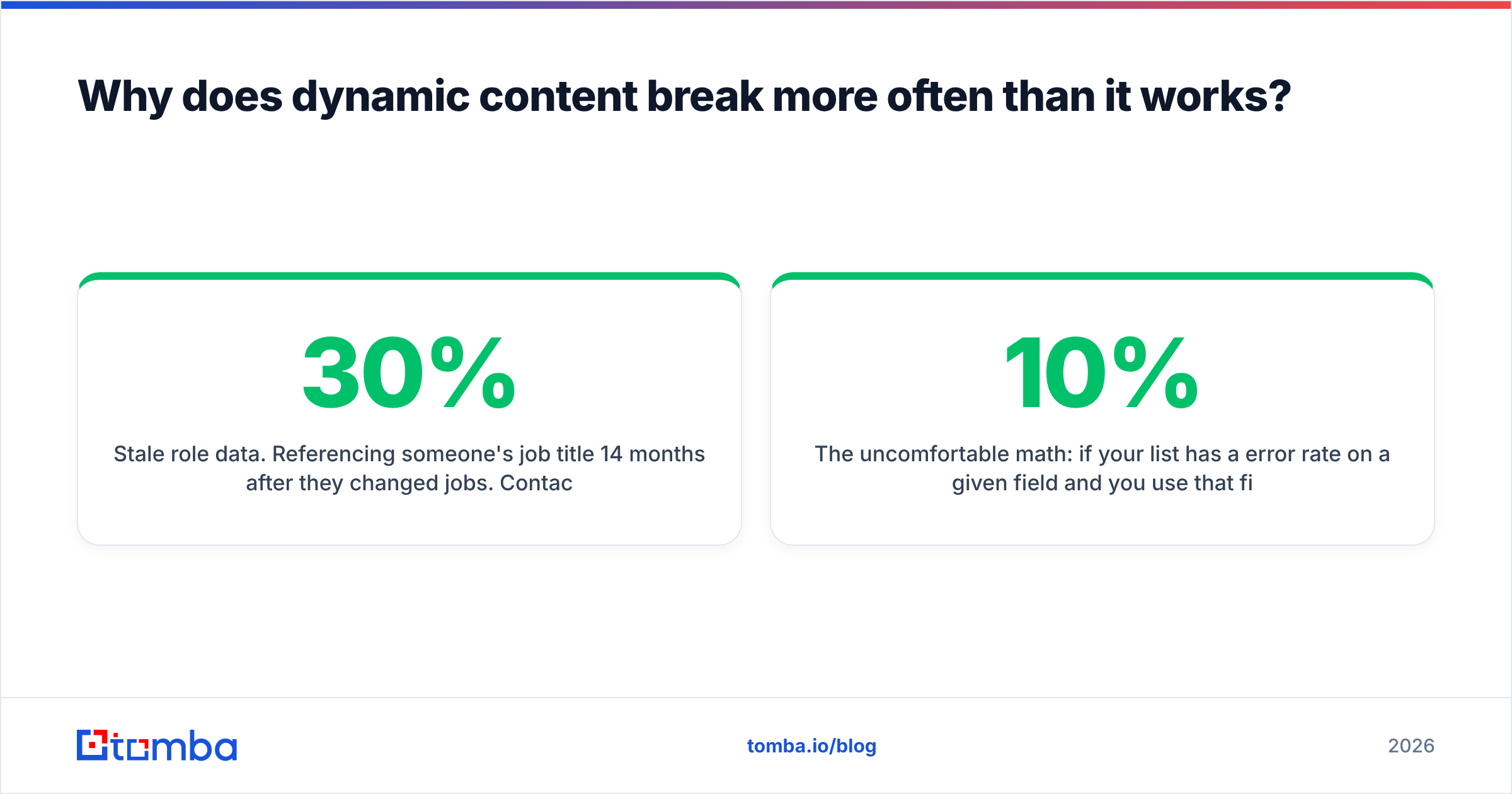
I saw Acme Corp Inc. LLC just raised a Series Bwhen the company field carries legal suffixes nobody uses in speech. - Stale role data. Referencing someone's job title 14 months after they changed jobs. Contact data decays roughly 25–30% per year, and titles decay fastest.
- Conditional logic with no default branch. The recipient falls through every
ifand gets a paragraph-shaped hole in your email.
The uncomfortable math: if your list has a 10% error rate on a given field and you use that field in your opening line, one in ten prospects gets an email that actively signals low effort. Those recipients don't just ignore you — a share of them mark it as spam, which feeds directly into your sender reputation and drags down the 90% you got right.
This is why data hygiene precedes template sophistication. Running an email verifier pass before a campaign removes the bounces; enriching gaps with data enrichment removes the nulls. Both are cheaper than a burned domain.
What kinds of dynamic content actually lift reply rates?#
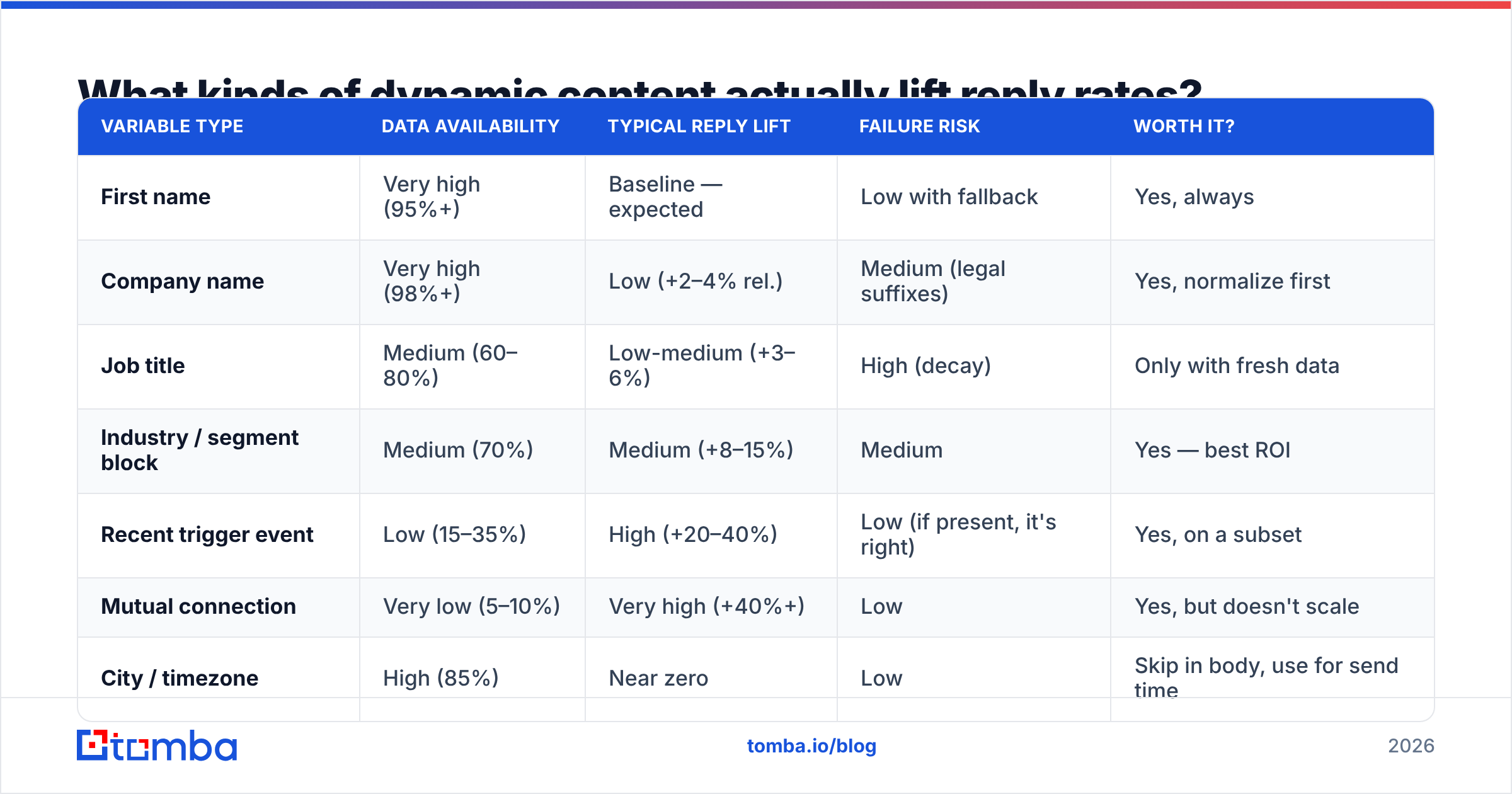
Not all variables carry equal weight. Here's how the common ones stack up in cold outbound, based on what consistently shows up in campaign post-mortems rather than vendor case studies.
| Variable type | Data availability | Typical reply lift | Failure risk | Worth it? |
|---|---|---|---|---|
| First name | Very high (95%+) | Baseline — expected | Low with fallback | Yes, always |
| Company name | Very high (98%+) | Low (+2–4% rel.) | Medium (legal suffixes) | Yes, normalize first |
| Job title | Medium (60–80%) | Low-medium (+3–6%) | High (decay) | Only with fresh data |
| Industry / segment block | Medium (70%) | Medium (+8–15%) | Medium | Yes — best ROI |
| Recent trigger event | Low (15–35%) | High (+20–40%) | Low (if present, it's right) | Yes, on a subset |
| Mutual connection | Very low (5–10%) | Very high (+40%+) | Low | Yes, but doesn't scale |
| City / timezone | High (85%) | Near zero | Low | Skip in body, use for send time |
| Tech stack detected | Medium (50%) | Medium-high (+10–20%) | Medium (detection errors) | Yes for technical sells |
| AI-written custom line | Depends on source | Wildly variable | High (hallucination) | Test at 200 leads first |
Read that table as a coverage-versus-impact tradeoff. Trigger events and mutual connections produce the biggest lift and cover the fewest leads. Names and companies cover everything and lift almost nothing on their own — they're hygiene, not strategy.
The practical move is tiered sending: segment your list by how much you actually know, and let each tier get a different template. Your top tier — the 15% with a real trigger — gets a genuinely researched email. Your bottom tier gets a short, honest, low-personalization message that doesn't pretend to know anything. Pretending is what gets flagged.
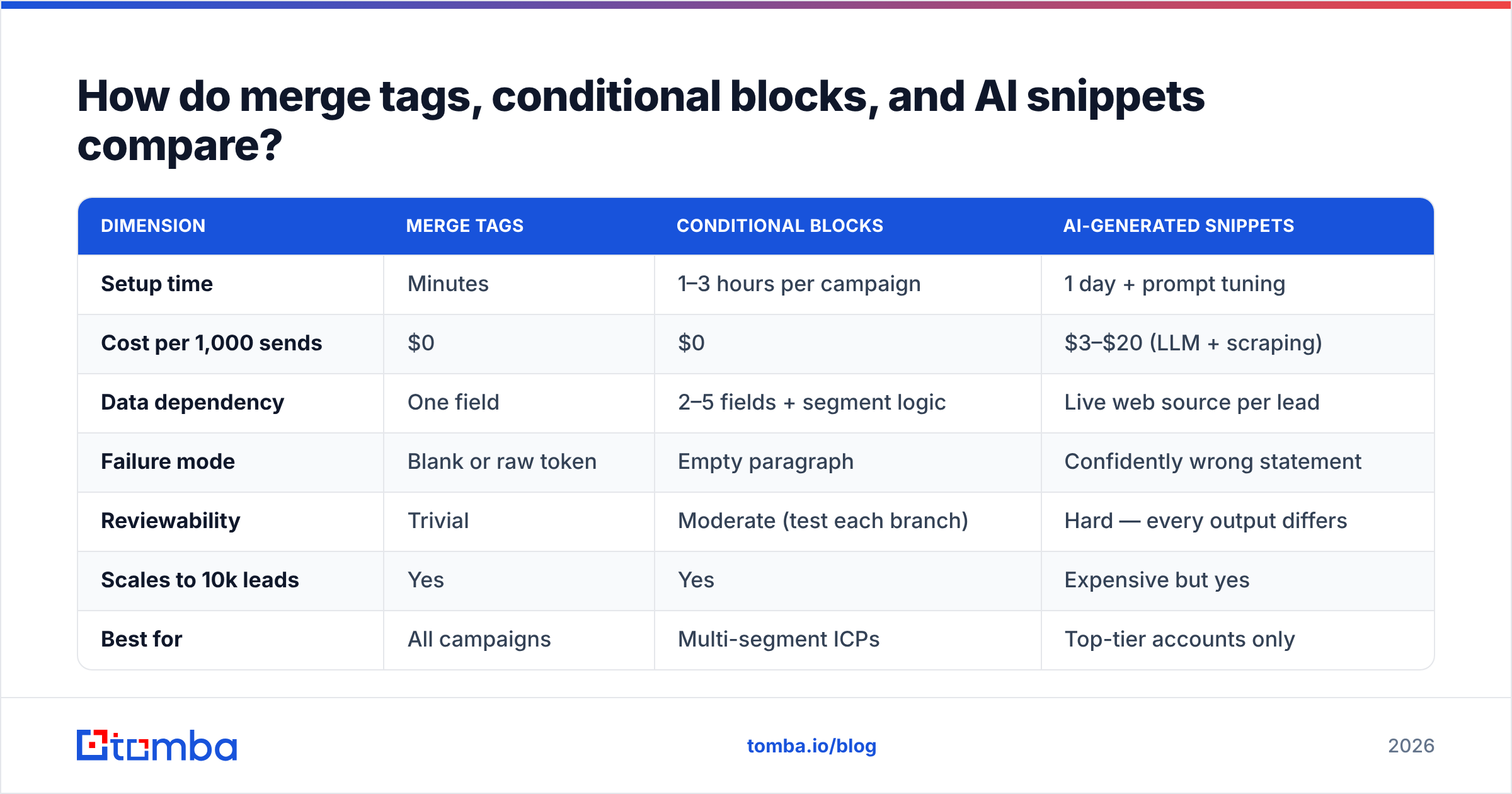
How do merge tags, conditional blocks, and AI snippets compare?#
| Dimension | Merge tags | Conditional blocks | AI-generated snippets |
|---|---|---|---|
| Setup time | Minutes | 1–3 hours per campaign | 1 day + prompt tuning |
| Cost per 1,000 sends | $0 | $0 | $3–$20 (LLM + scraping) |
| Data dependency | One field | 2–5 fields + segment logic | Live web source per lead |
| Failure mode | Blank or raw token | Empty paragraph | Confidently wrong statement |
| Reviewability | Trivial | Moderate (test each branch) | Hard — every output differs |
| Scales to 10k leads | Yes | Yes | Expensive but yes |
| Best for | All campaigns | Multi-segment ICPs | Top-tier accounts only |
| Deliverability impact | Neutral | Neutral | Neutral (content quality varies) |
Most tools support the first two natively. Instantly, Smartlead, Lemlist, HubSpot, and Salesforce all handle merge tags and conditional logic — HubSpot's documentation on personalization tokens is a decent neutral reference for how the conditional syntax generally works, even if you send from something else. The differences between platforms are mostly syntax, not capability.
AI snippets are the genuinely new variable in 2026, and they're overprescribed. The failure mode is specific and damaging: the model reads a company's homepage, misreads a case study as the company's own product, and writes "loved what you're building with the new logistics API" to a healthcare recruiter. That's worse than no personalization, because it proves you automated the research and didn't check it.
Use AI snippets where a human reviews the output. That caps you at a few hundred per week, which is fine — those should be your best accounts anyway.
How do you set up dynamic content without breaking it?#
Six steps, in order. Skipping any of them is where campaigns go wrong.
- Audit field coverage before you write a word. Export your list, count nulls per column. If job title is 41% empty, you cannot build an opener around job title. This takes ten minutes and saves entire campaigns.
- Normalize the fields you'll use. Strip
Inc.,LLC,Ltd.from company names. Title-case first names. Trim whitespace. Split full names into first/last correctly (watch for two-word first names and hyphenates). - Set a fallback on every single tag. Most platforms support
{{first_name | "there"}}or similar. The fallback should read naturally in the full sentence — test by mentally replacing the tag. "Hi there," works. "I noticed [company] is hiring" with fallback "your team" gives "I noticed your team is hiring," which also works. - Verify deliverability of the list. Dynamic content is irrelevant if the message lands in spam. Run a bulk verify pass, drop the invalids, and handle catch-all domains separately with a catch-all verifier rather than guessing.
- Preview every conditional branch. If you have four industry branches plus a default, send yourself five test emails — one per branch. Not one test email. Five. Include the default branch, which is the one that always gets forgotten.
- Send 50, read the actual rendered output, then scale. Pull five delivered messages from your seed inboxes and read them as a recipient would. You will find something wrong. Everyone does.

Step 3 deserves a stronger emphasis than it usually gets. A missing fallback is the single most common cause of embarrassing sends, and it's a one-character fix per tag. There's no excuse for shipping without them.
Does dynamic content hurt deliverability?#
Mostly no — with three specific exceptions.
Dynamic content itself is neutral to mailbox providers. Gmail doesn't penalize you for merge tags; it can't even tell you used one. What it evaluates is engagement, authentication, and complaint rate. Personalization affects deliverability only through its effect on those signals.
The three exceptions:
- Heavy image or HTML payloads. Dynamic image blocks pull in remote assets and inflate message size. In cold outbound, plain-text-style emails consistently outperform designed templates for inbox placement. Keep dynamic assets for opt-in lifecycle mail.
- Excessive tracked links per recipient. Dynamic CTAs often mean dynamic redirect URLs. Multiple tracking domains in one message reads as promotional. One link, one domain.
- Spintax used as an evasion tactic. Rotating phrasing to dodge filters is a 2018 strategy that current filtering handles trivially. It also produces awkward sentences. If you use spintax, use it for genuine variety, not as a workaround — and check the output with a spam checker before scaling.
Beyond that, the fundamentals decide your fate: SPF, DKIM, DMARC configured correctly, warmed domains, sensible volume ramps, and a low complaint rate. Google's and Yahoo's sender requirements — documented publicly at Google's Postmaster guidelines — set a 0.3% complaint ceiling, and bad personalization drives complaints faster than almost anything else. That's the real deliverability link: sloppy dynamic content makes people report you.
What does a good dynamically-generated cold email look like?#
Here's a template with three variables and one conditional block. Deliberately restrained.
Subject: {{company}} + {{pain_point_short}}

Hi {{first_name | "there"}},

{% if trigger_event %}
Saw {{company | "your team"}} {{trigger_event}} — usually that means
{{implied_consequence}} lands on someone's desk fast.
{% else %}
Most {{industry | "B2B"}} teams your size hit the same wall around
{{common_problem}}.
{% endif %}

We help {{peer_company_1}} and {{peer_company_2}} cut that from
{{before_metric}} to {{after_metric}}.

Worth a 12-minute look, or is this not a priority this quarter?

— {{sender_first_name}}
Why this works structurally: the conditional branch means both a well-researched lead and a thin-data lead get a coherent, non-embarrassing email. Neither reads like a mail merge failure. The else branch makes a general claim about a segment rather than a specific claim about a person — honest, and it never breaks.
Note what's absent: no {{city}}, no {{job_title}} in the opener, no fake "I was just on your website" line. Every variable in the template is either high-coverage or wrapped in a conditional. That's the discipline.
If you want a starting point rather than a blank editor, Tomba's cold email templates library and subject line generator cover the structural patterns; the variables are yours to fill from real data.
How do you measure whether dynamic content is working?#
A/B test at the block level, not the campaign level.
Most teams test "personalized version vs generic version" and learn nothing actionable, because they changed six things at once. Instead, hold the entire email constant and swap a single dynamic block. Run it across at least 400 sends per arm before you believe a difference — reply rates in cold outbound are low enough that small samples produce noise that looks like signal.
Metrics worth tracking, in priority order:
- Positive reply rate, not total reply rate. "Unsubscribe" is a reply. Segment your responses.
- Reply rate by data tier. If your high-data tier isn't beating your low-data tier by a wide margin, your enrichment isn't earning its cost.
- Branch-level performance in conditional emails. One industry branch is usually carrying the average while another quietly underperforms.
- Complaint rate by template. A template with a broken tag shows up here before it shows up anywhere else.
- Bounce rate as a data-freshness proxy. Rising bounces mean your list is decaying, which means your dynamic fields are decaying too.
Third-party review data on outbound tooling — G2's sales engagement category is the usual reference point — consistently shows that teams rate data accuracy above feature depth when they churn. That tracks with what the metrics above measure. Nobody leaves a platform because the conditional syntax was clunky. They leave because the data underneath was wrong.
Where should you start?#
If you're building this from scratch, do it in this order:
- Get clean, verified contact data with the fields you intend to use.
- Add first name and company merge tags with fallbacks. Ship.
- Add one conditional block splitting your two largest segments. Measure.
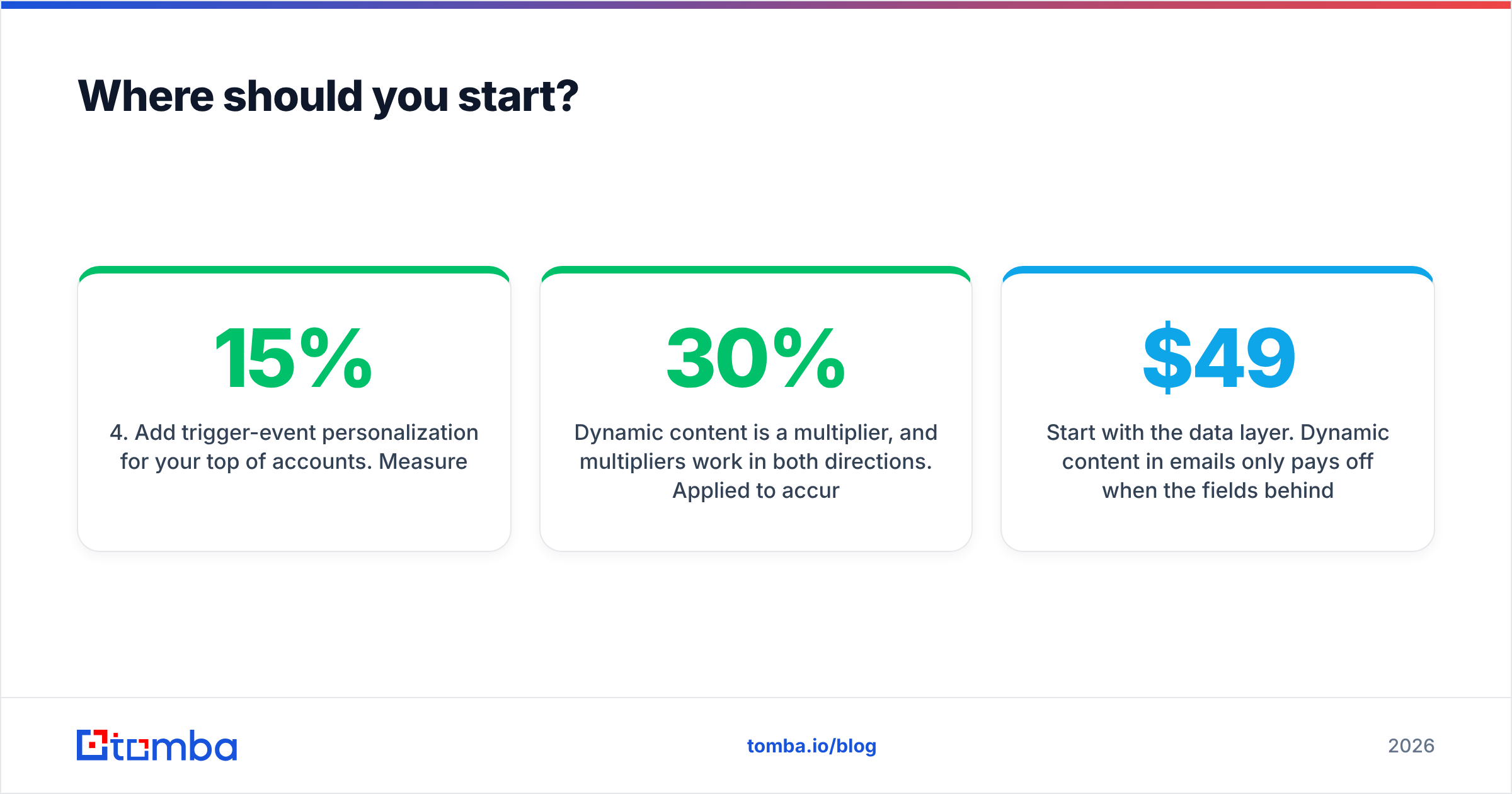
- Add trigger-event personalization for your top 15% of accounts. Measure.
- Only then consider AI-generated snippets, and only with human review.
Most teams try step 5 first and wonder why it underperformed. The sequence matters because each step depends on the data quality established by the one before it.
Dynamic content is a multiplier, and multipliers work in both directions. Applied to accurate data, it makes a good email better. Applied to a scraped list with 30% nulls, it makes a mediocre email actively worse than the plain version would have been.
Start with the data layer. Dynamic content in emails only pays off when the fields behind your merge tags are real, current, and complete. The Tomba Email Finder gives you verified addresses plus the firmographic fields — company, role, domain — that conditional blocks depend on, and the free tier includes 25 searches per month so you can test coverage on your own ICP before committing. Paid plans start at $49/mo for Starter, $99/mo for Growth, and $249/mo for Pro; full Tomba pricing is public. Verify first, templatize second — that order is the whole game.
Related guides#
Ready to find emails that actually work?
Join 150,000+ professionals who stopped guessing and started sending. Free credits on signup — no credit card required.
Get the Tomba newsletter
Practical outbound tactics and product updates — once every two weeks.
About the author