What Is a Dynamic Dialer? 2026 Guide for Sales Teams
A dynamic dialer picks the number, the caller ID, and the pace for you. Here is how it differs from power and predictive dialers, what it costs in 2026, and when it quietly wastes your budget.
TL;DR
- A dynamic dialer decides what to call, from which number, and at what pace — using rules and real-time signals instead of a fixed queue. It is a layer of logic on top of auto-dialing, not a separate hardware category.
- The practical difference from a power dialer is control: a power dialer marches down a static list one call at a time; a dynamic dialer reorders that list mid-shift based on timezone, lead score, prior attempts, and local-presence rules.
- Connect-rate gains come mostly from three levers — local caller ID, call timing, and number hygiene — not from raw dial volume. Buying a dialer without fixing the data underneath it just gets you to voicemail faster.
- Compliance is the real cost center in 2026. STIR/SHAKEN attestation, consent tracking, and abandonment-rate caps decide which pacing modes you are actually allowed to run.
- Budget roughly $25–$150 per seat per month for the dialer, plus telephony usage, plus whatever you spend on the contact data feeding it.
What is a dynamic dialer?#
A dynamic dialer is an outbound calling system that chooses each next call at runtime, rather than executing a pre-built list in order.
Think of it like a GPS versus a printed route. A printed route gives you the same turns every time regardless of traffic. A GPS re-plans continuously: it knows a road is jammed, that you passed an exit, and that your destination closes at 6pm. A dynamic dialer works the same way over your call list — it re-plans which contact to dial next based on conditions that change during the shift.
Technically, "dynamic dialer" describes three overlapping behaviors that vendors bundle together:
- Dynamic list selection. The next record is chosen by a rules engine — lead score, last-touch recency, campaign priority, timezone eligibility, CRM stage — instead of by row order in a CSV.
- Dynamic caller ID (local presence). The outbound number shown to the prospect is picked to match their area code or region from a pool of owned numbers.
- Dynamic pacing. The system adjusts how many lines it opens per available rep based on live answer rates, so agents are neither idle nor dropping calls.
Some vendors also market "dynamic scripting" — the on-screen talk track changes with the contact's persona or industry — under the same label. That is a UI feature, not a dialing mode, but it often ships in the same tier.
The category sits inside the broader auto-dialer market that G2 tracks as auto-dialer software, where dozens of tools now claim some version of dynamic behavior.
How does a dynamic dialer actually work?#
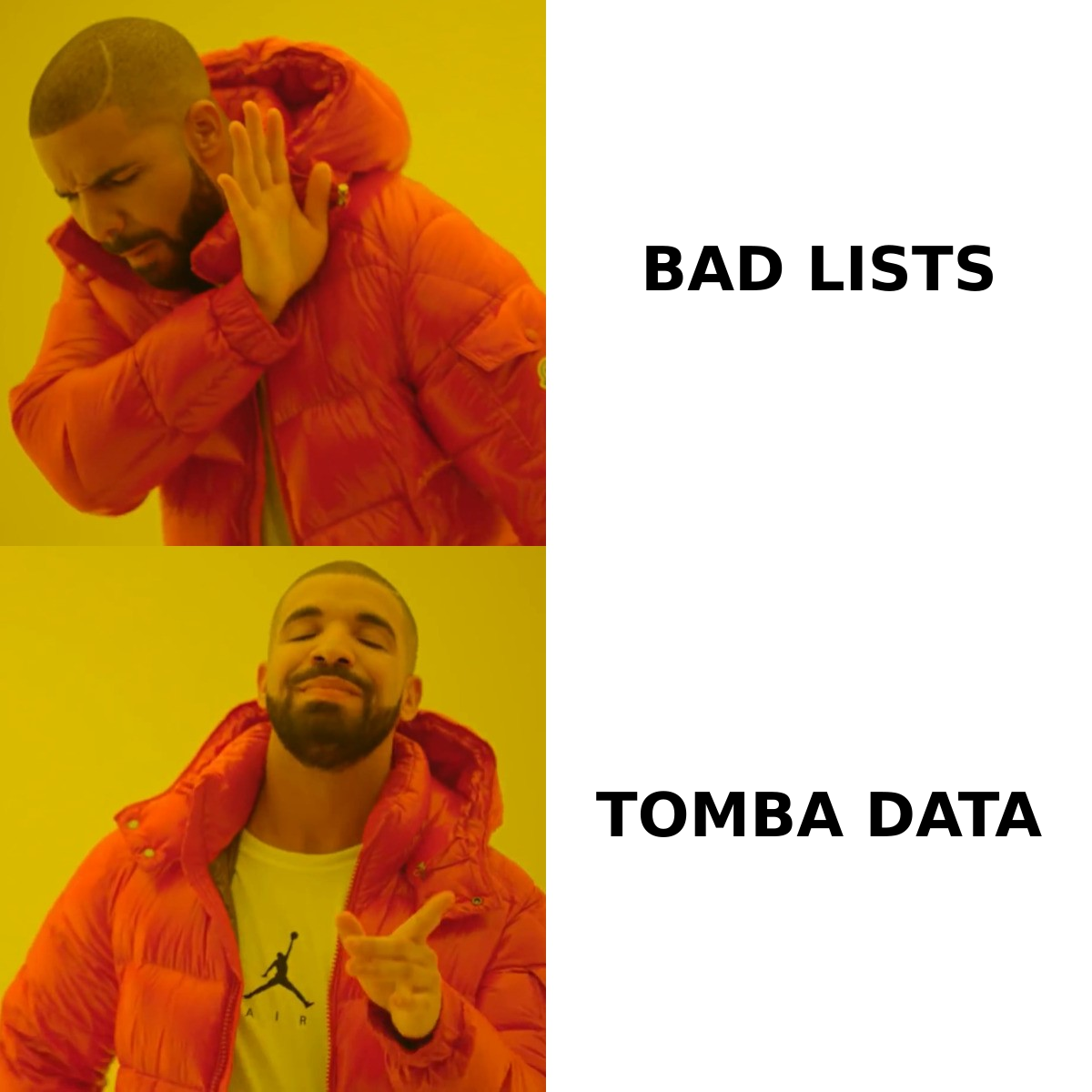
Here is the loop that runs behind every call, in order:
- Eligibility filter. Records are excluded if they violate calling-hours rules for the prospect's timezone, sit on a DNC or internal suppression list, or exceed your per-contact attempt cap. This filter runs first, every time — not once at import.
- Priority scoring. Remaining records are ranked. Common inputs: recent website activity, campaign SLA (a demo-request lead outranks a cold record), number of prior attempts, and time-since-last-attempt.
- Number selection. The system picks a caller ID from your owned pool. Local presence matches area code; branded caller ID displays your company name where carrier support exists.
- Pacing decision. The dialer opens N concurrent lines per available agent. At a 12% answer rate with predictive pacing, that might be 4–6 lines; in progressive mode it is exactly 1.
- Connect and route. A live answer is routed to a rep with the CRM record already open. Answering machines are detected, dropped or voicemail-dropped, and logged.
- Disposition writeback. Outcome, recording, and next-action date sync to the CRM, which feeds step 2 on the next cycle.
Step 6 is the one teams skip and then wonder why the dialer "isn't smart." Without clean disposition data flowing back, the priority engine has nothing to learn from and degrades into a glorified queue.
Is a dynamic dialer better than a power or predictive dialer?#
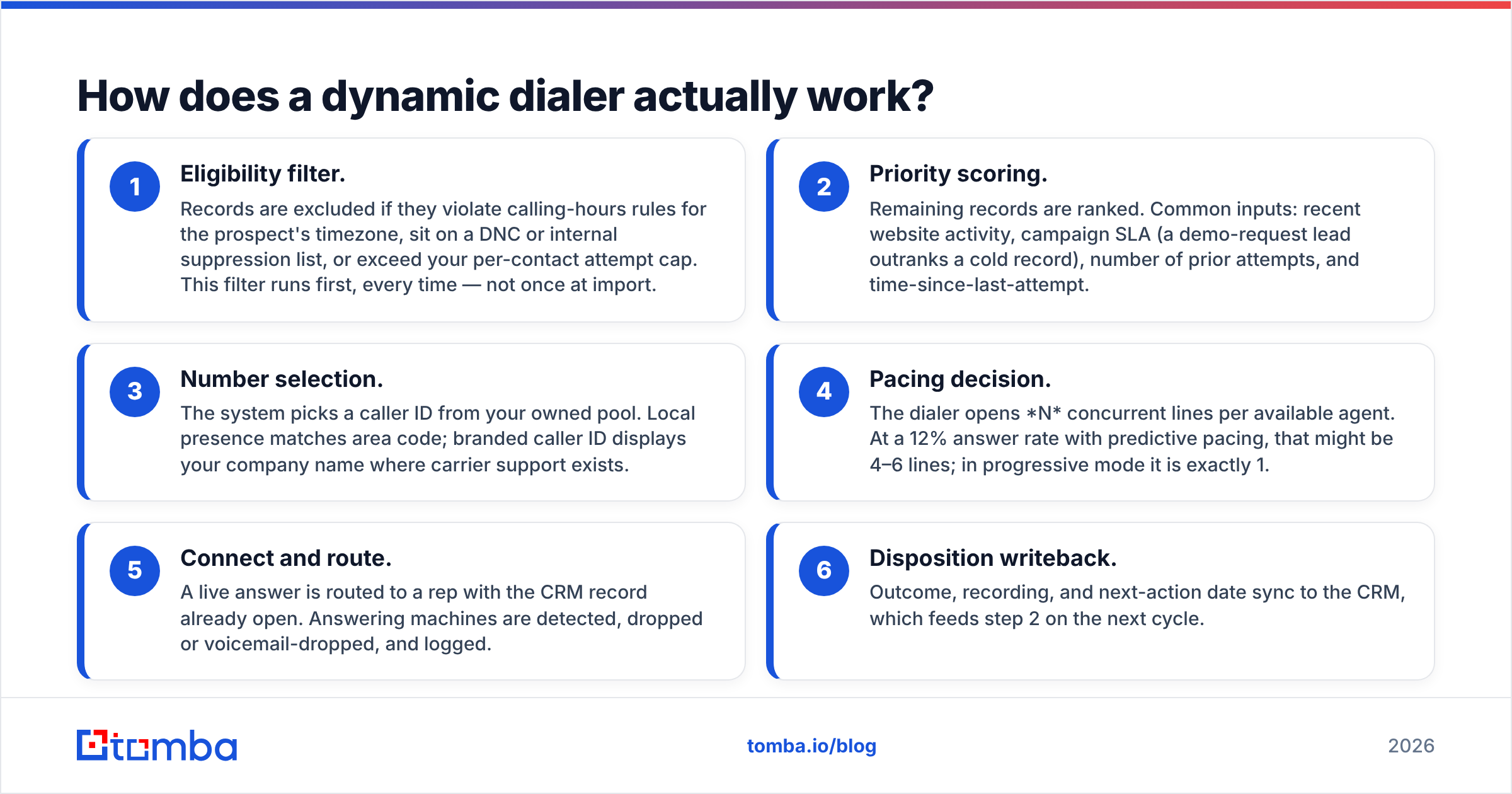
Not universally. It is better when your list is large enough that ordering matters and your deal value is low enough that agent idle time is expensive. For a six-figure enterprise cycle with 40 named accounts, a preview dialer beats everything — you want the rep reading the account brief, not being fed the next record.
| Dimension | Preview dialer | Power (progressive) dialer | Dynamic dialer | Predictive dialer |
|---|---|---|---|---|
| Lines per agent | 1, agent-initiated | 1, auto-initiated | 1–4, rule-driven | 3–6, algorithm-driven |
| List order | Manual pick | Fixed queue | Re-ranked in real time | Fixed or re-ranked |
| Agent idle time | Highest | Moderate | Low | Lowest |
| Abandoned-call risk | None | Very low | Low to moderate | Highest |
| Local caller ID | Rare | Sometimes | Standard | Standard |
| Best team size | 1–5 reps | 3–15 reps | 5–50 reps | 25+ reps |
| Typical use case | Enterprise ABM | SMB outbound, follow-ups | Mid-market SDR teams | High-volume call centers |
| Typical seat price | $20–$60/mo | $30–$80/mo | $50–$120/mo | $80–$150/mo |
| Compliance overhead | Low | Low | Moderate | High |
Two honest caveats about that table. First, the price bands blur — most vendors sell one platform with pacing modes as a toggle, so you are often buying the tier, not the dialer type. Second, predictive pacing only pays off above roughly 20–25 concurrent agents; below that, the algorithm has too few data points to predict answer timing and you get abandoned calls without the efficiency gain. Wikipedia's overview of predictive dialing covers the queuing math if you want the underlying model.
What does a dynamic dialer cost in 2026?#
Three line items, and the first one is usually the smallest.
Software seats. $50–$120 per rep per month for a standalone dialer. Bundled inside a sales engagement platform, it is often included in a $100–$165 tier alongside email sequencing.
Telephony usage. $0.01–$0.03 per outbound minute in North America, plus $1–$3 per month per owned number. A local-presence pool covering 50 area codes is a real recurring cost — often $100–$200/month before a single call.
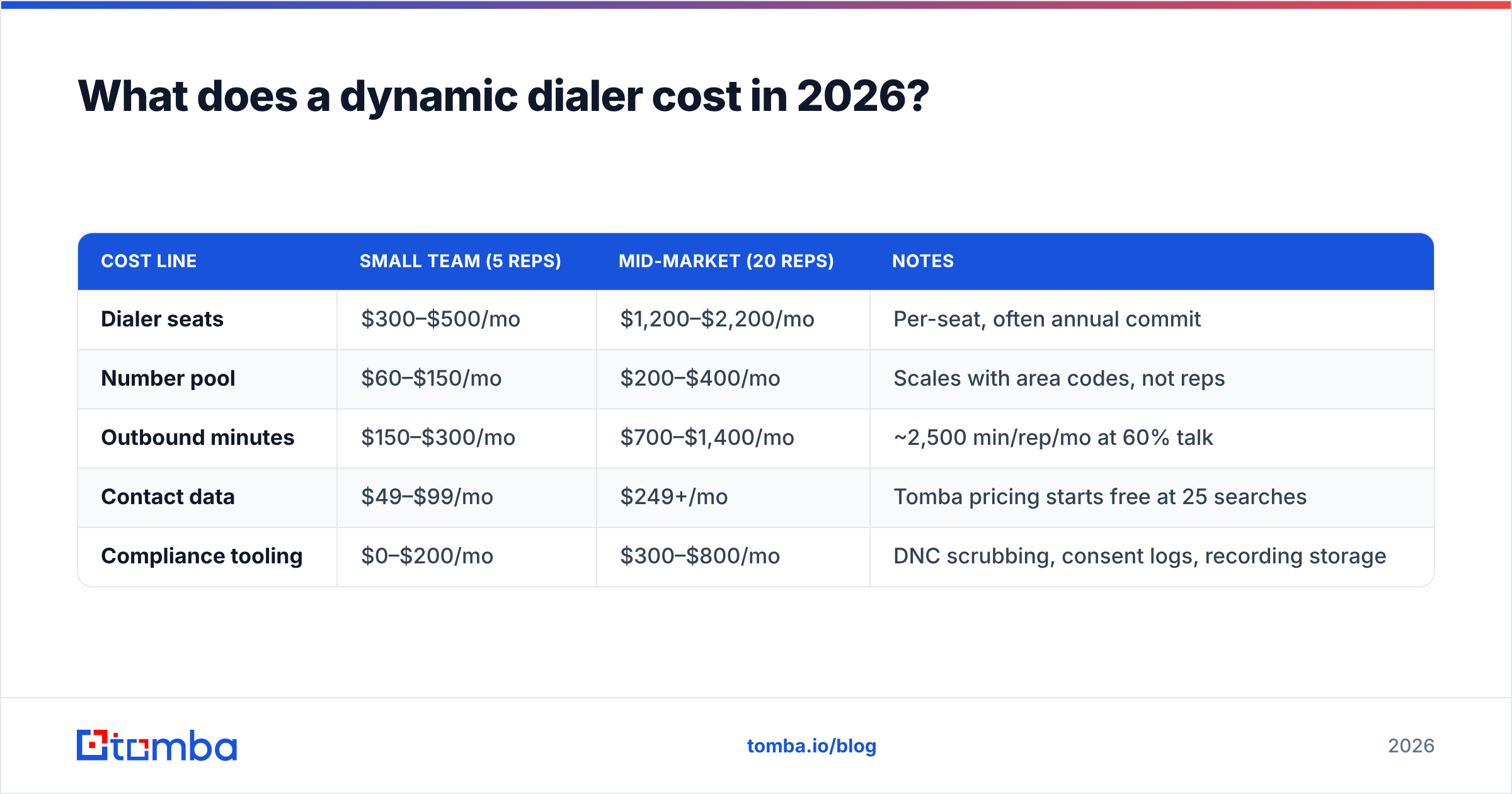
Data. This is the line item that decides your ROI. A dialer running at 35 dials/hour against a list with 20% wrong numbers is burning 7 dials an hour on nothing. At 8 reps, that is roughly 450 wasted dials a week.
| Cost line | Small team (5 reps) | Mid-market (20 reps) | Notes |
|---|---|---|---|
| Dialer seats | $300–$500/mo | $1,200–$2,200/mo | Per-seat, often annual commit |
| Number pool | $60–$150/mo | $200–$400/mo | Scales with area codes, not reps |
| Outbound minutes | $150–$300/mo | $700–$1,400/mo | ~2,500 min/rep/mo at 60% talk |
| Contact data | $49–$99/mo | $249+/mo | Tomba pricing starts free at 25 searches |
| Compliance tooling | $0–$200/mo | $300–$800/mo | DNC scrubbing, consent logs, recording storage |
Note the data row against the rest. Contact data is typically 5–10% of total dialer spend but determines whether the other 90% produces conversations.
Does a dynamic dialer improve connect rates?#
Yes, but the gains come from specific mechanisms, and each has a ceiling.
Local presence is the biggest single lever. Matching area codes lifts answer rates meaningfully in most B2B tests, though the effect has eroded as consumers grew wary of unknown local numbers. Do not expect 2019 numbers in 2026.
Call timing matters more than most teams model. A dynamic dialer that respects the prospect's local 8–10am and 4–6pm windows will outperform one that dials your whole list at your convenience — for no extra spend.
Number reputation is the quiet killer. If your outbound numbers get flagged as spam by carrier analytics, connect rates collapse regardless of pacing. Rotating a pool, keeping per-number daily volume modest, and registering your numbers under the FCC's call authentication framework is maintenance work, not a one-time setup.
Data accuracy sets the ceiling on all three. If 25% of your numbers are wrong, no pacing algorithm recovers those dials. This is where a phone validator pass before import pays for itself — you strip disconnected and invalid lines before they consume dialer minutes.

What compliance rules should you check before buying?#
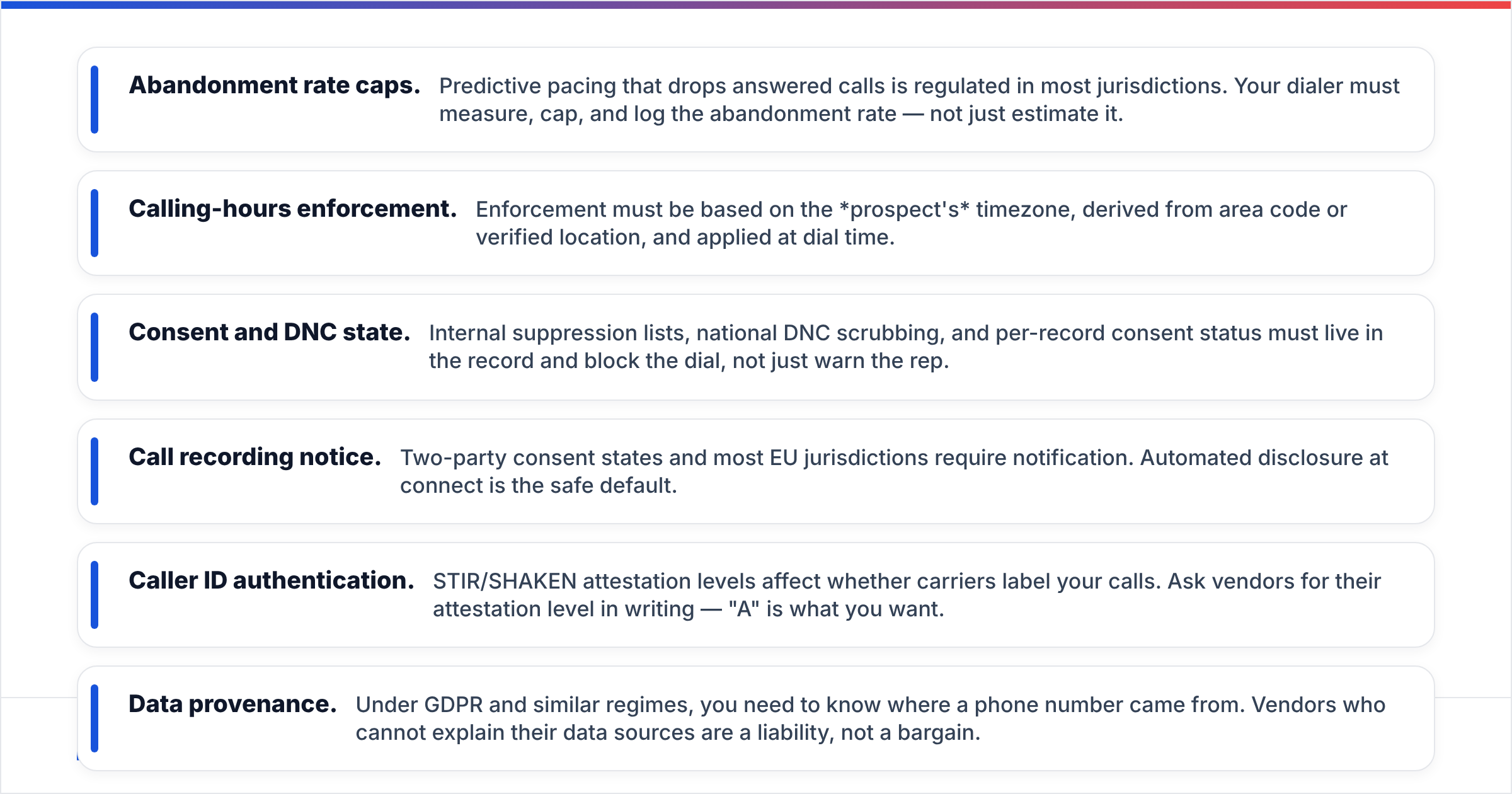
Compliance determines which pacing modes you can legally run, so check this before you compare feature grids.
- Abandonment rate caps. Predictive pacing that drops answered calls is regulated in most jurisdictions. Your dialer must measure, cap, and log the abandonment rate — not just estimate it.
- Calling-hours enforcement. Enforcement must be based on the prospect's timezone, derived from area code or verified location, and applied at dial time.
- Consent and DNC state. Internal suppression lists, national DNC scrubbing, and per-record consent status must live in the record and block the dial, not just warn the rep.
- Call recording notice. Two-party consent states and most EU jurisdictions require notification. Automated disclosure at connect is the safe default.
- Caller ID authentication. STIR/SHAKEN attestation levels affect whether carriers label your calls. Ask vendors for their attestation level in writing — "A" is what you want.
- Data provenance. Under GDPR and similar regimes, you need to know where a phone number came from. Vendors who cannot explain their data sources are a liability, not a bargain.
Ask each vendor for a compliance one-pager. If they hand you marketing copy instead, that is your answer.
How do you feed a dynamic dialer good data?#
The dialer is the engine; contact data is the fuel. A workable pipeline looks like this:
Build the account list first, not the contact list. Define your ICP by firmographics, then find the companies. Contact-first lists tend to be whoever a vendor happened to have.
Find the people at those accounts. Use domain search to map who works at a target company and which roles exist, then pull direct contact details for the specific titles you sell to.
Layer phone onto verified email. Email verification is a cheap proxy for whether a record is current — a bouncing work email usually means the person left. Run the email verifier first, then pull direct dials with a phone finder for records that survive.
Validate numbers before import. Strip invalid formats, disconnected lines, and mismatched country codes. Every one you catch here is a dialer minute you do not pay for.
Enrich for routing rules. Your priority engine needs fields to sort on: company size, timezone, tech stack, funding stage. Data enrichment fills those so the "dynamic" part of the dialer has something to be dynamic about.
Sync bidirectionally with the CRM. Dispositions must flow back. A dialer that writes to a silo is a dialer that never improves. Most platforms handle this through native connectors or HubSpot and Salesforce integrations; HubSpot's own calling documentation is a reasonable reference for how the writeback should behave.
Who should skip a dynamic dialer entirely?#
Three profiles genuinely should not buy one:
Founders doing fewer than 20 calls a week. The setup cost — number pools, CRM mapping, compliance config — exceeds any efficiency gain at that volume. Dial manually.
Enterprise ABM teams. When your total addressable list is 200 accounts and average contract value is six figures, research time per call is the constraint. A preview dialer with good account briefs beats dynamic pacing.
Teams with a data problem they have not fixed. If your connect rate is 4% because a quarter of your numbers are wrong, buying a dialer converts a data problem into a more expensive data problem. Fix the list, then automate the dialing.
What should you evaluate in a demo?#
Push past the dashboard tour and ask for these specifically:
- Show me the priority rules editor. Can I sort on a custom CRM field, or only on built-in scores?
- What is your STIR/SHAKEN attestation level, and can you show a call trace?
- How does the system detect and retire a number flagged as spam?
- What happens to a record when a rep marks it "wrong number" — does it re-enter the queue?
- Show me the abandonment-rate report for a live predictive campaign.
- What is the actual per-minute rate for my top five destination countries?
Vendors who answer all six cleanly are usually the ones worth shortlisting.
Where to start#
Get the data right before you get the dialer right. Build a clean, verified contact base for your target accounts — correct company mapping, verified work emails as a freshness signal, and validated direct dials — and almost any competent dialer will perform.
That is the job the Tomba Email Finder does at the front of the pipeline: find the right people at the right companies, verify they are current, and hand your dialer a list that is worth calling. The free tier gives you 25 searches a month to test the accuracy on your own accounts, and paid plans start at $49/month. Run 200 of your existing records through it, compare the wrong-number rate against your current source, and let the number decide.
Related guides#
Ready to find emails that actually work?
Join 150,000+ professionals who stopped guessing and started sending. Free credits on signup — no credit card required.
Get the Tomba newsletter
Practical outbound tactics and product updates — once every two weeks.
About the author