E-Introduction Emails: How to Write One That Gets Replies
An e-introduction is the cheapest way into a conversation you have no right to yet. Here is the anatomy, four formats compared, subject lines that survive the preview pane, and the mistakes that quietly kill your reply rate.
TL;DR
- An e-introduction email is a short first-contact message whose only job is to establish who you are, why you are relevant, and what the single next step is. It is not a pitch.
- There are four distinct formats — cold self-introduction, warm referral, double opt-in intro, and account handover — and they have wildly different reply expectations. Using the wrong one is the most common failure.
- The anatomy that works is boring and repeatable: 5-8 word subject, one line of proof you did your homework, one line of relevance, one specific ask, no attachments.
- Most "my intros don't work" problems are not copy problems. They are targeting and data problems: wrong person, wrong address, or a message that never reached the inbox at all.
- Verify the address before you write the sentence. A perfect e-introduction sent to
info@is a deleted e-introduction.
What is an e-introduction email?#
An e-introduction (short for electronic introduction, sometimes written "e-intro") is the email equivalent of a handshake. You are not selling anything yet. You are establishing standing — the right to be in someone's inbox at all.
That is the useful analogy: an e-introduction is a business card, not a brochure. A business card has four things on it and nothing else. The moment you staple a 14-slide deck to it, it stops being a card and starts being junk mail.
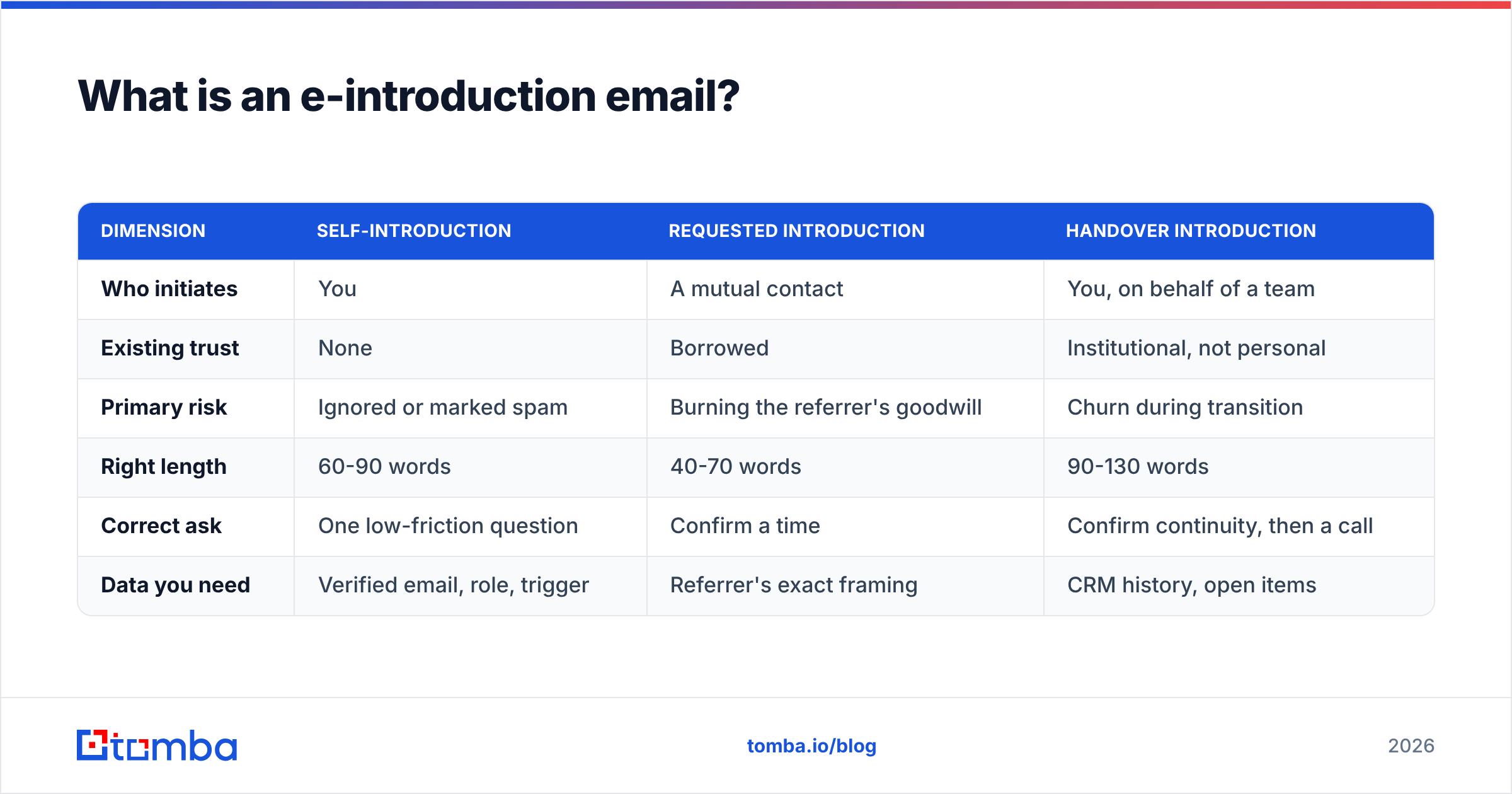
In practice, "e-introduction" covers three related things that people confuse constantly:
- Self-introduction. You email someone who has never heard of you. Highest volume, lowest baseline reply rate, and the one everyone means when they say "cold email."
- Requested introduction. Someone connects you to a third party — the classic "Sarah, meet Dan" forward. The sender's credibility transfers to you, which is why these convert several times better than anything you can write alone.
- Handover introduction. An existing customer or contact is being passed to a new owner: a new account executive, a new CSM, a new agency lead. Relationship exists, trust is at zero, and the risk of churn is real.
| Dimension | Self-introduction | Requested introduction | Handover introduction |
|---|---|---|---|
| Who initiates | You | A mutual contact | You, on behalf of a team |
| Existing trust | None | Borrowed | Institutional, not personal |
| Primary risk | Ignored or marked spam | Burning the referrer's goodwill | Churn during transition |
| Right length | 60-90 words | 40-70 words | 90-130 words |
| Correct ask | One low-friction question | Confirm a time | Confirm continuity, then a call |
| Data you need | Verified email, role, trigger | Referrer's exact framing | CRM history, open items |
Everything below assumes you know which of the three you are writing. If you do not, stop and decide, because the copy rules invert between them.
Why do most e-introduction emails get ignored?#
Because they are written from the sender's perspective. The typical draft opens with the sender's company, the sender's product category, and the sender's request for 15 minutes. Nothing in the first screen answers the recipient's actual question, which is: why is this in front of me right now?
There are four failure modes, roughly in order of frequency:
- It reached the wrong human. You emailed a VP of Marketing about an engineering pain, or you emailed a generic mailbox monitored by nobody.
- It never reached the inbox. Bad address, hard bounce, spam folder. Bounce rate is the fastest way to destroy sender reputation, and once reputation drops, even your good emails stop landing. Google's own sender guidelines are explicit about keeping complaint and bounce rates low.
- It asked for too much. "Can we book 30 minutes Thursday?" from a stranger is a request to spend money (time) on an unpriced item.
- It was indistinguishable from the last nine. If your first line could be pasted into 500 other emails unchanged, the recipient has already read it and already ignored it.
Note what is not on that list: sentence-level polish. Rewriting "I hope this email finds you well" into something wittier moves almost nothing if the underlying targeting is wrong. Copy is the last 20%.
What does a good e-introduction actually look like?#
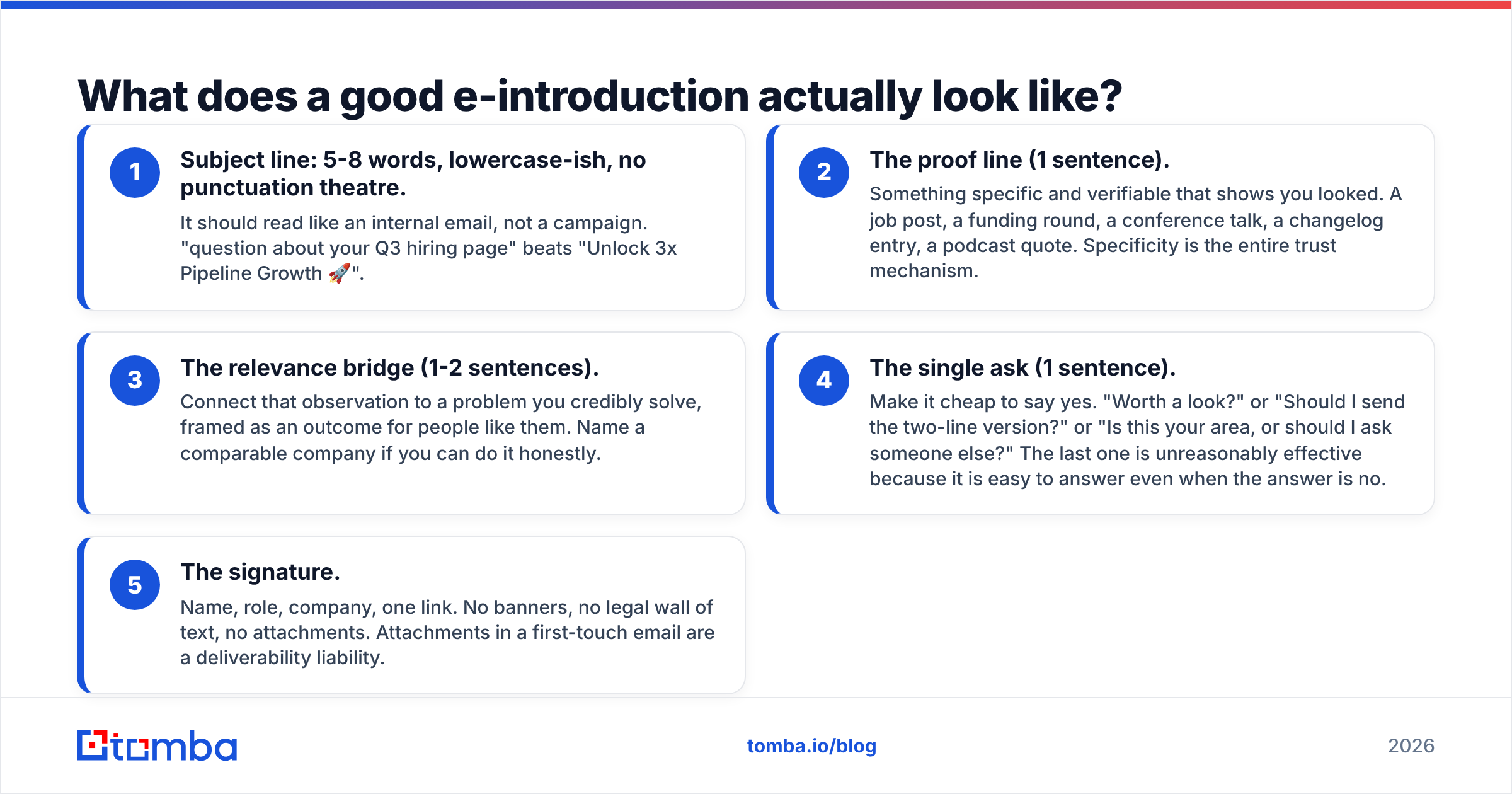
Five components, in this order. Cut anything that does not fit one of them.
- Subject line: 5-8 words, lowercase-ish, no punctuation theatre. It should read like an internal email, not a campaign. "question about your Q3 hiring page" beats "Unlock 3x Pipeline Growth 🚀".
- The proof line (1 sentence). Something specific and verifiable that shows you looked. A job post, a funding round, a conference talk, a changelog entry, a podcast quote. Specificity is the entire trust mechanism.
- The relevance bridge (1-2 sentences). Connect that observation to a problem you credibly solve, framed as an outcome for people like them. Name a comparable company if you can do it honestly.
- The single ask (1 sentence). Make it cheap to say yes. "Worth a look?" or "Should I send the two-line version?" or "Is this your area, or should I ask someone else?" The last one is unreasonably effective because it is easy to answer even when the answer is no.
- The signature. Name, role, company, one link. No banners, no legal wall of text, no attachments. Attachments in a first-touch email are a deliverability liability.
Total target: under 100 words, readable on a phone without scrolling. HubSpot's sales team has published the same directional finding for years in its sales resources — shorter first-touch emails outperform longer ones, and single-CTA emails outperform multi-CTA ones.
Which e-introduction format should you use?#
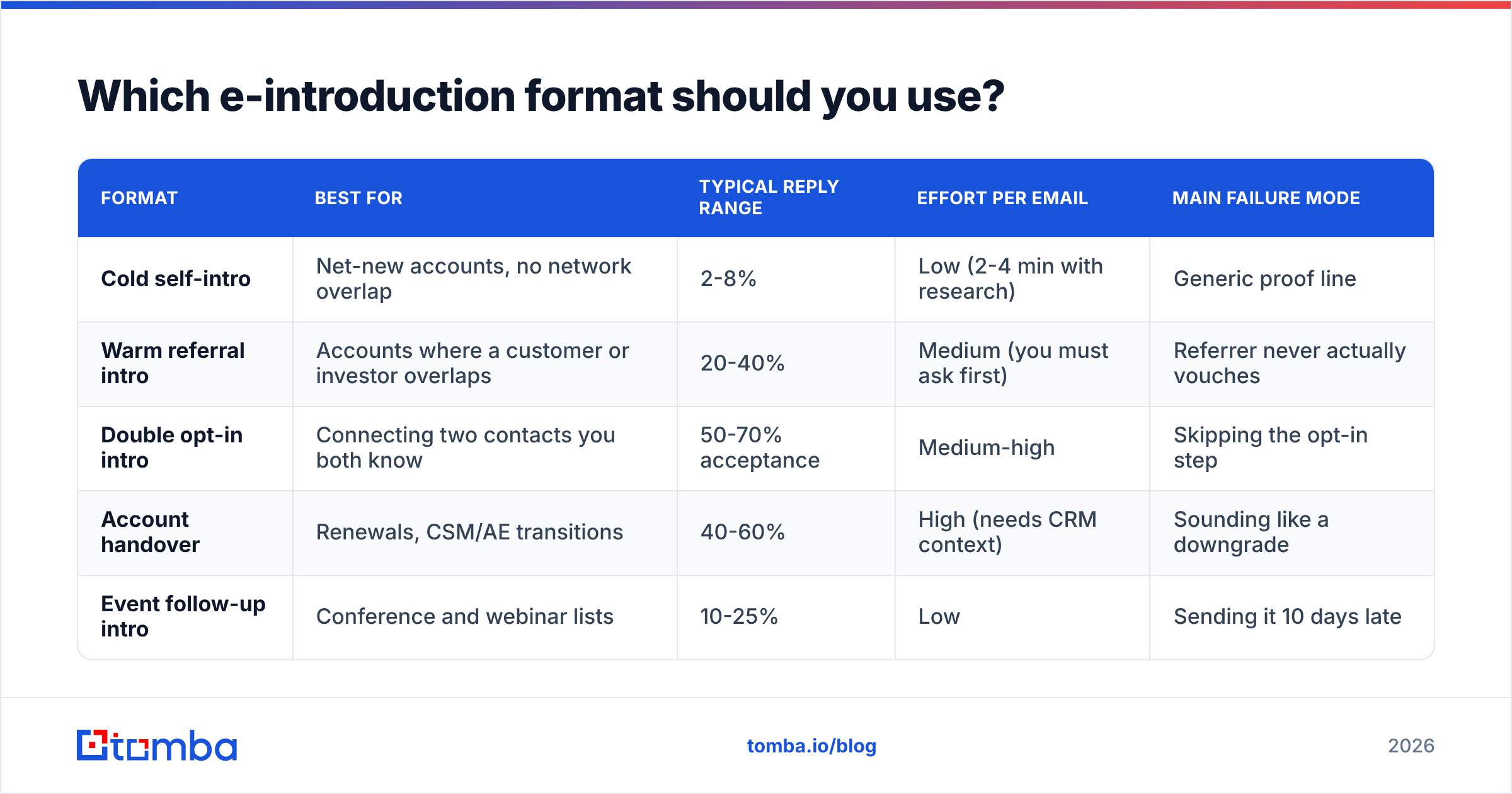
This is the table to actually act on. Reply-rate columns are directional ranges seen across B2B outbound, not guarantees — your list quality swings them more than your copy does.
| Format | Best for | Typical reply range | Effort per email | Main failure mode |
|---|---|---|---|---|
| Cold self-intro | Net-new accounts, no network overlap | 2-8% | Low (2-4 min with research) | Generic proof line |
| Warm referral intro | Accounts where a customer or investor overlaps | 20-40% | Medium (you must ask first) | Referrer never actually vouches |
| Double opt-in intro | Connecting two contacts you both know | 50-70% acceptance | Medium-high | Skipping the opt-in step |
| Account handover | Renewals, CSM/AE transitions | 40-60% | High (needs CRM context) | Sounding like a downgrade |
| Event follow-up intro | Conference and webinar lists | 10-25% | Low | Sending it 10 days late |
Two practical rules fall out of this table.
Rule one: always check for a warm path before writing a cold one. The delta between 4% and 30% is not a copywriting delta. Search your CRM, your investor network, and shared LinkedIn connections first. LinkedIn outreach and email are complements here, not substitutes.
Rule two: never forward an intro without a double opt-in. Ask both sides privately before making the connection. The "double opt-in intro" is standard practice in venture and partnerships circles for a reason: it protects the introducer's reputation, which is the only asset that made the intro valuable in the first place.
What subject lines work for e-introduction emails?#
The subject line is not a headline, it is a routing decision. The recipient is answering one question: internal or external? Personal or bulk? Anything that smells bulk gets archived unread.
Patterns that hold up:
- The specific reference:
your talk at SaaStr/the pricing page change - The question:
question about your onboarding flow - The mutual name:
Dan Cooper suggested I reach out(only if true — this is the single highest-lift subject line in B2B, and the single fastest way to torch a relationship if you invent it) - The direct handover:
taking over your account from Priya - The blunt one-worder:
intro?— works surprisingly well from a real domain with a real signature, and terribly from a lookalike domain
Patterns to drop: ALL CAPS, Re: when there is no prior thread, fake urgency, emoji, and any phrase containing "quick sync," "circle back," or "touch base." If you want to pressure-test variants before sending, run them through a subject line tester rather than guessing, then still A/B the winner.
What do the templates look like?#
Template 1 — cold self-introduction (78 words)
Subject: your job post for two SDRs
Hi Maya,
Saw you're hiring two SDRs in Austin — usually means the outbound motion is about to double in volume.
We work with ops teams at that exact stage; the recurring problem is that new reps burn their first three weeks emailing addresses that bounce, which drags the whole domain down. We fix the data layer before the headcount lands.
Is contact data your call, or is that RevOps?
— Ben, Growth, Tomba
Note the ask. It is not a meeting. It is a routing question a busy person can answer in four words, and either answer moves you forward.
Template 2 — warm referral (54 words)
Subject: Dan Cooper suggested I reach out
Hi Priya,
Dan mentioned you're rebuilding the outbound list process at Northwind and thought the overlap was worth 10 minutes.
Short version: we cut his team's bounce rate from 11% to under 2% in a month, mostly by verifying before import.
Happy to send the two-line summary instead of meeting, if that's easier.
— Ben
Template 3 — account handover (104 words)
Subject: taking over your account from Priya
Hi Tom,
Priya has moved to our enterprise team, and I'm your point of contact from today. Nothing changes on your side — same plan, same pricing, same renewal date in November.
I've read the thread on the API rate limits and the Salesforce sync issue from May. Both are still open on my list, and I'll come back with a status by Friday.
If you'd rather keep everything in email than book a call, that's completely fine — just tell me which you prefer.
— Ben
The handover template does the one thing handovers usually forget: it names specific open items. Anyone can write "excited to work with you." Only the person who actually read the history can write "the API rate limits and the Salesforce sync issue from May."
How do you make sure the e-introduction actually lands?#
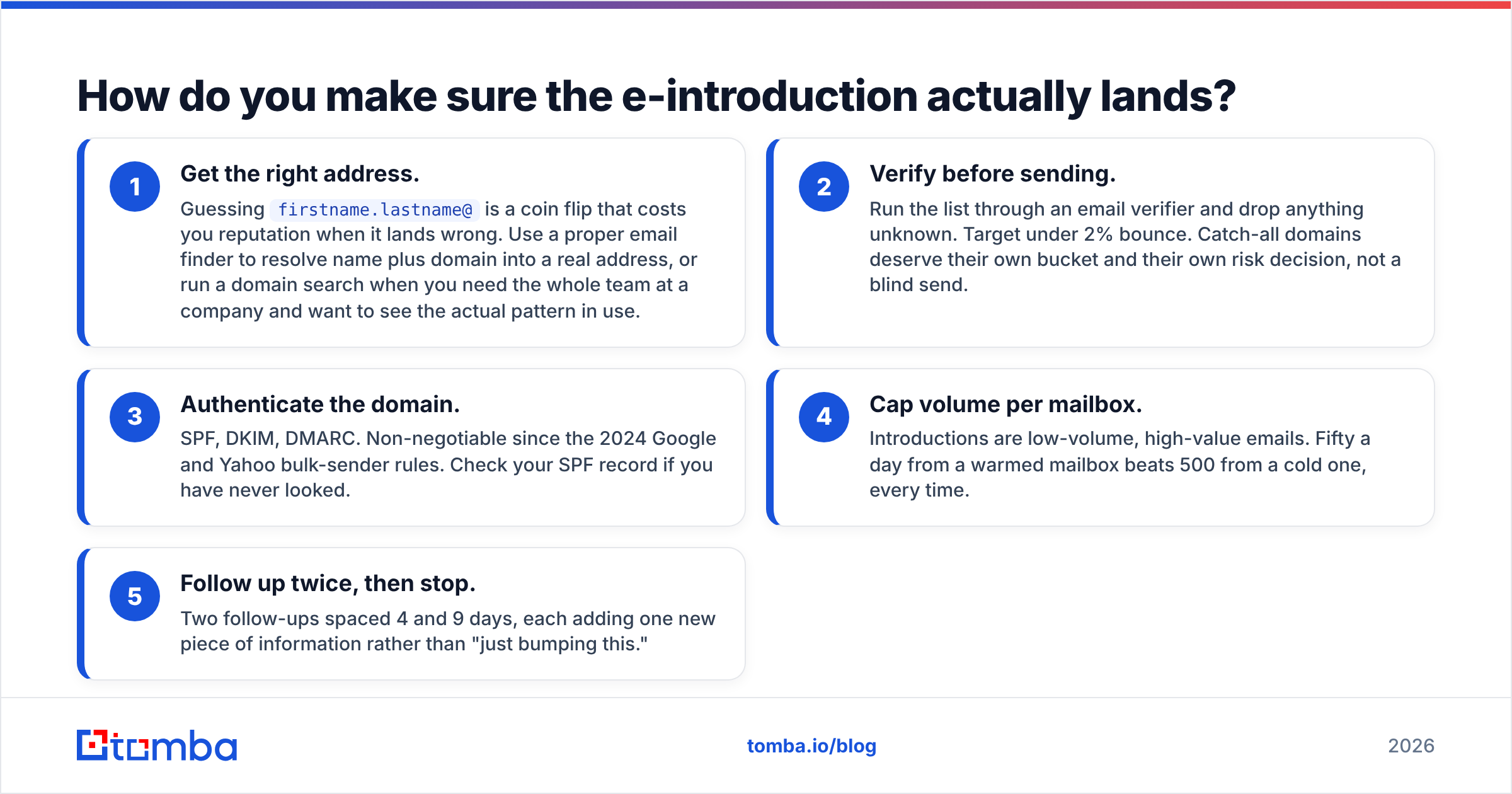
Copy is downstream of delivery. Work the stack in this order:
- Get the right address. Guessing
firstname.lastname@is a coin flip that costs you reputation when it lands wrong. Use a proper email finder to resolve name plus domain into a real address, or run a domain search when you need the whole team at a company and want to see the actual pattern in use. - Verify before sending. Run the list through an email verifier and drop anything unknown. Target under 2% bounce. Catch-all domains deserve their own bucket and their own risk decision, not a blind send.
- Authenticate the domain. SPF, DKIM, DMARC. Non-negotiable since the 2024 Google and Yahoo bulk-sender rules. Check your SPF record if you have never looked.
- Cap volume per mailbox. Introductions are low-volume, high-value emails. Fifty a day from a warmed mailbox beats 500 from a cold one, every time.
- Follow up twice, then stop. Two follow-ups spaced 4 and 9 days, each adding one new piece of information rather than "just bumping this."
If you want an outside read on which tools do which part of this, category pages on G2 are a reasonable starting point — filter by segment (SMB versus enterprise) because the leaders differ sharply between them.
What mistakes kill an e-introduction?#
- Fabricating a mutual connection. It gets discovered, and the cost is permanent.
- The double ask. "Book a call and also check out our whitepaper." Pick one.
- Writing to a title instead of a person. "As a VP of Sales, you probably struggle with..." tells the reader you know their job title and nothing else.
- Skipping the opt-in on third-party intros. You are spending someone else's credibility without asking.
- Sending from a brand-new lookalike domain. No history, no authentication, no chance.
- Treating the handover as a formality. This is the one with real revenue attached, and it is the one people spend the least time on.
- Measuring opens instead of replies. Open tracking has been unreliable since privacy proxies became default. Reply rate and meetings booked are the only honest numbers left.
What should you do next?#
Pick one account list of 25 names. For each one, spend 90 seconds looking for a warm path. Write the cold self-intro only for the names where no warm path exists, using the five-part anatomy. Verify every address before the first send. Measure replies, not opens, and rewrite only the proof line between rounds — it is the highest-leverage sentence in the email.
The part you should not do by hand is the data. If you are guessing addresses, your reply rate is telling you about your list, not your writing.
Start with the Tomba Email Finder — search by name and domain, get a verified address with a confidence score, and stop sending your best introductions into the void. The free tier gives you 25 searches a month to test the difference, and paid Tomba pricing starts at $49/mo for Starter when you are ready to run real volume.
Related guides#
Ready to find emails that actually work?
Join 150,000+ professionals who stopped guessing and started sending. Free credits on signup — no credit card required.
Get the Tomba newsletter
Practical outbound tactics and product updates — once every two weeks.
About the author