E Mail Checker Guide 2026: How to Verify Any Address
An e mail checker tells you whether an address will bounce before you press send. Here is how SMTP checks actually work, what the accuracy numbers really mean, and how the main tools compare on price.
TL;DR
- An e mail checker runs four layers of validation — syntax, domain/MX, mailbox (SMTP), and risk scoring. Free tools usually stop at layer two.
- A list at 3%+ bounce rate is in Google and Microsoft penalty territory. Verification is the cheapest fix available.
- Catch-all domains are where most checkers quietly fail. They return "accept all" and leave you guessing on 15–25% of B2B lists.
- Paid checkers land between $0.0005 and $0.004 per verification. The spread comes from catch-all handling and bulk throughput, not core SMTP accuracy.
- Verify at capture, re-verify anything older than 90 days, and never bulk-blast an unverified list from a warm domain.
What is an e mail checker?#
An e mail checker is a tool that answers one question before you hit send: will this address accept mail, or will it bounce?
Think of it like a courier checking an address before loading the van. The street exists (domain check). The building number is real (MX record). Someone actually lives in apartment 4B (mailbox check). And the neighborhood isn't known for returning every package (risk scoring). A checker runs those four inspections in roughly 200–800 milliseconds without ever delivering a message.
The confusion in this space is naming. "Email checker," "email validator," "email verifier," and "email hygiene tool" all describe the same core function. Some vendors split hairs — calling syntax-only tools "validators" and SMTP-capable tools "verifiers" — but buyers use the terms interchangeably, and so does most of the market.
What a checker is not: an email finder. A finder discovers an address you don't have (given a name and a domain). A checker evaluates an address you already possess. Most serious platforms ship both, because finding without verifying produces guesses, and verifying without finding leaves you with nothing to check.
How does an e mail checker actually validate an address?#
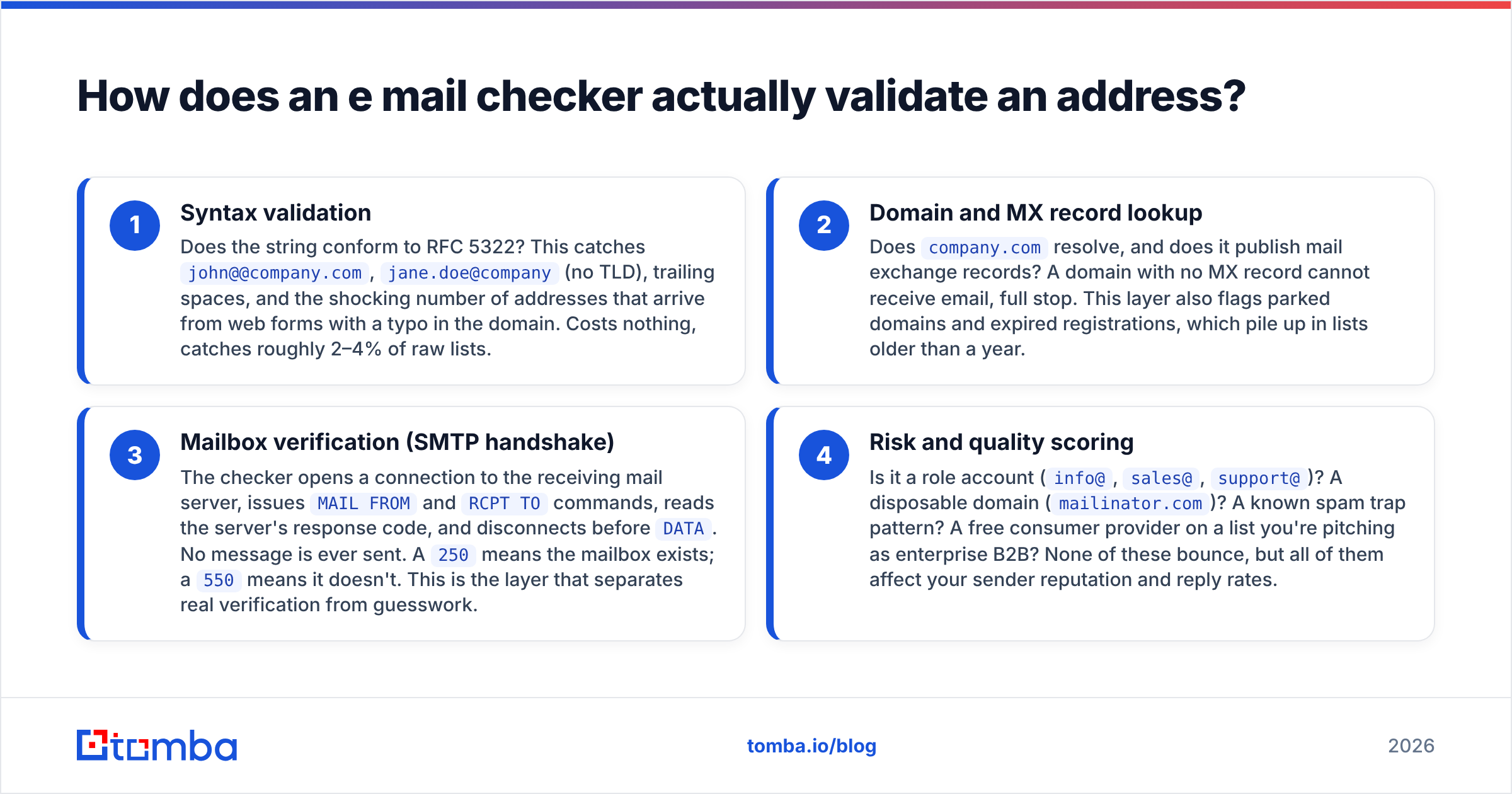
Four layers, run in sequence, each cheaper than the one after it. A good checker short-circuits as soon as it has a definitive answer.
- Syntax validation — Does the string conform to RFC 5322? This catches
john@@company.com,jane.doe@company(no TLD), trailing spaces, and the shocking number of addresses that arrive from web forms with a typo in the domain. Costs nothing, catches roughly 2–4% of raw lists. - Domain and MX record lookup — Does
company.comresolve, and does it publish mail exchange records? A domain with no MX record cannot receive email, full stop. This layer also flags parked domains and expired registrations, which pile up in lists older than a year. - Mailbox verification (SMTP handshake) — The checker opens a connection to the receiving mail server, issues
MAIL FROMandRCPT TOcommands, reads the server's response code, and disconnects beforeDATA. No message is ever sent. A250means the mailbox exists; a550means it doesn't. This is the layer that separates real verification from guesswork. - Risk and quality scoring — Is it a role account (
info@,sales@,support@)? A disposable domain (mailinator.com)? A known spam trap pattern? A free consumer provider on a list you're pitching as enterprise B2B? None of these bounce, but all of them affect your sender reputation and reply rates.

The output is usually a status label — valid, invalid, catch-all/accept-all, unknown, disposable, role — plus a confidence score. Treat "unknown" as a genuine third state, not a soft "valid." Servers greylist, rate-limit, and time out; a responsible checker admits it rather than guessing.
Why do catch-all domains break most e mail checkers?#
Because a catch-all server says yes to everything, including asdfgh@company.com.
A catch-all (or "accept-all") configuration tells the mail server to accept any address at the domain and sort it out internally. From the outside, the SMTP handshake returns 250 for a real CFO and for a random string. Roughly 15–25% of B2B domains run this way, and the number skews higher among enterprises and companies using certain security gateways.
Cheap checkers handle this by returning "catch-all" and moving on, which pushes the decision back onto you. Better tools layer on additional signals:
- Pattern confidence — Does the address match the company's dominant format? If 94% of confirmed addresses at the domain are
first.last@, thenf.last@is suspect. - Cross-source corroboration — Has this exact address appeared in crawled public sources, signature blocks, or previously confirmed sends?
- Historical engagement data — Has this address bounced or accepted mail in the provider's own network before?
- Gateway fingerprinting — Some security vendors (Proofpoint, Mimecast, Barracuda) have identifiable behavior that changes what a
250means.
If you send B2B, catch-all handling is the single biggest accuracy differentiator between tools. Test it explicitly. Take 100 addresses at known catch-all domains, run them through each candidate, then send a small campaign and compare predicted vs. actual bounces. A dedicated catch-all verifier exists precisely because generic SMTP checks can't resolve these on their own.

What happens if you skip verification?#
Your domain reputation degrades, and it degrades faster than it recovers.
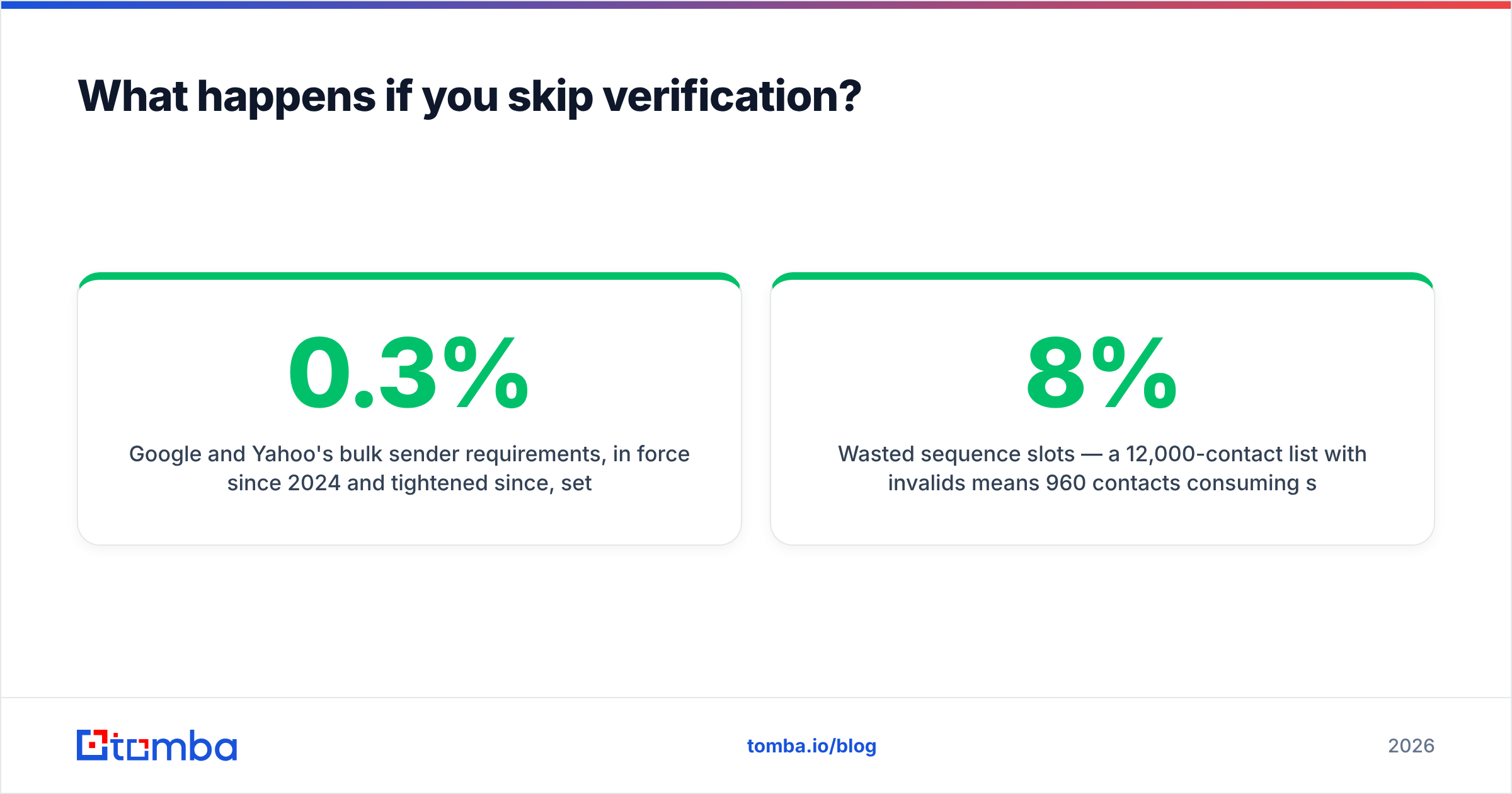
Google and Yahoo's bulk sender requirements, in force since 2024 and tightened since, set a spam complaint threshold of 0.3% and expect bounce rates well under 2%. Microsoft applied comparable rules to Outlook.com traffic in 2025. Cross those lines consistently and your mail starts landing in spam — not just for the bad addresses, but for everyone on your list.
The mechanics are worth understanding:
- Hard bounces signal to mailbox providers that you're sending to a list you didn't earn. Three percent is a warning; five percent gets you filtered.
- Spam traps are recycled addresses that once belonged to real people. Sending to one is treated as proof you're using stale or purchased data. A single hit on a pristine trap can blacklist a sending domain.
- Wasted sequence slots — a 12,000-contact list with 8% invalids means 960 contacts consuming sequence steps, sending-window capacity, and per-contact platform fees for nothing.
- Corrupted metrics — open and reply rates calculated against a denominator inflated by dead addresses make every A/B test you run unreliable.
Run a blacklist checker against your sending domain before and after a large campaign. If the number moved, verification wasn't optional.
How do the main e mail checkers compare in 2026?#
Pricing below reflects published list rates as of mid-2026. Verify current numbers on each vendor's page before you commit — this segment repositions often.
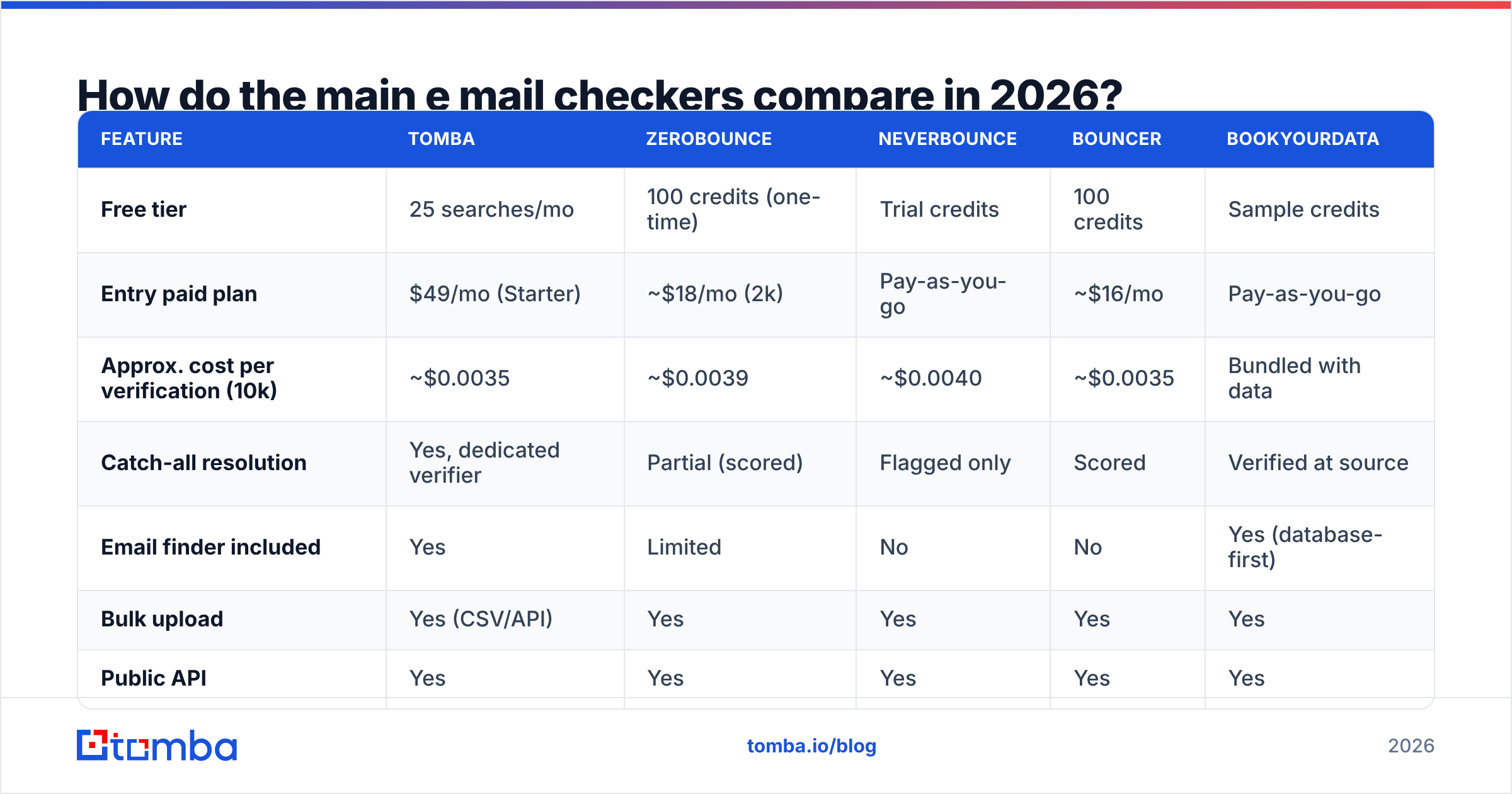
| Feature | Tomba | ZeroBounce | NeverBounce | Bouncer | BookYourData |
|---|---|---|---|---|---|
| Free tier | 25 searches/mo | 100 credits (one-time) | Trial credits | 100 credits | Sample credits |
| Entry paid plan | $49/mo (Starter) | ~$18/mo (2k) | Pay-as-you-go | ~$16/mo | Pay-as-you-go |
| Approx. cost per verification (10k) | ~$0.0035 | ~$0.0039 | ~$0.0040 | ~$0.0035 | Bundled with data |
| Catch-all resolution | Yes, dedicated verifier | Partial (scored) | Flagged only | Scored | Verified at source |
| Email finder included | Yes | Limited | No | No | Yes (database-first) |
| Bulk upload | Yes (CSV/API) | Yes | Yes | Yes | Yes |
| Public API | Yes | Yes | Yes | Yes | Yes |
| Native spreadsheet add-ons | Sheets, Excel, Airtable | Sheets | Limited | Limited | Export-based |
| Best fit | Find + verify in one stack | Deliverability-focused teams | High-volume list cleaning | EU-based, GDPR-first | Pre-verified purchased lists |
The honest read: on pure SMTP verification of standard domains, every tool in this table lands within a couple of percentage points of the others. The differences show up in three places.
Catch-all resolution. Tools that only flag catch-alls leave you with a pile of maybes. Tools that resolve them with pattern and corroboration data convert a meaningful chunk into usable contacts.
Whether finding and checking live in one system. If you're building lists from scratch, a checker alone means stitching together two vendors, two credit pools, and two APIs. A platform that does domain search, finding, and verification in one pass removes an entire integration.
Data provenance. BookYourData takes a different route — selling contact records that are verified before they reach you, rather than a checker you point at your own list. That's a genuinely reasonable model if you'd rather buy clean data than clean dirty data, and it's a fair alternative to consider alongside a verification-first approach.

Is a free e mail checker good enough?#
For spot checks, yes. For a list you're about to send from your primary domain, no.
Free tools almost universally stop at layers one and two — syntax and MX. That's genuinely useful for validating a single address someone typed into a form, or sanity-checking an address you found on LinkedIn. A free email checker handles that case in seconds with no account.
Where free breaks down:
- No SMTP layer, or a heavily rate-limited one. Mailbox-level checks require a pool of reputable IPs, because receiving servers throttle unfamiliar connections aggressively. Maintaining that pool costs money, so free tools rarely offer it at volume.
- No catch-all intelligence. This requires proprietary historical data, which by definition isn't free.
- Volume caps that don't match reality. Fifty checks a month doesn't clean a 5,000-row export.
- Unclear data handling. If you're uploading customer emails to an unknown free service, read the privacy terms first. Under GDPR, that upload is a processing event you're accountable for.
The pragmatic split: use free tools for one-off checks and pattern discovery, pay for anything that touches a real campaign. Verification typically costs less than one-half of one percent of what you spend on the sending platform and the rep's time.

When should you run verification?#
At four points. Skipping any one of them creates a gap that fills with dead addresses.
- At capture — Real-time API validation on signup forms, gated content, and demo requests. Blocks typos and disposables at the source, where the fix costs nothing. This is the highest-ROI integration point and the one most teams skip.
- At list build — Every time you export from a database, scrape, or enrichment run. Data decays at roughly 22–30% per year in B2B; a list that was clean in January is measurably worse by summer.
- Before every send — Especially for lists you didn't build this week. Re-verify anything older than 90 days. The marginal cost is trivially small next to the reputation cost of a 6% bounce.
- On bounce feedback — Suppress hard bounces immediately and permanently. Track soft bounces; three in a row from the same address means it's functionally dead regardless of what the SMTP check said.
For teams doing this at scale, the API route beats manual uploads. Point an email verification API at your form handler and your CRM sync, and verification becomes infrastructure instead of a chore someone remembers on Fridays. If you're working from spreadsheets, a Google Sheets add-on keeps the same logic where your list already lives.
What accuracy claims should you actually believe?#
Treat every "99% accurate" claim as marketing until you've tested it on your own data.
The number is unfalsifiable as usually stated. Accurate against what baseline? Measured on which mix of domains? Counting "catch-all" and "unknown" results as correct, incorrect, or excluded entirely? A vendor testing on a corpus of Gmail and Outlook addresses will post spectacular numbers that collapse on a list of mid-market SaaS companies behind security gateways.
Run your own benchmark instead:
- Take a 500-address sample from a list representative of what you actually send to — same industries, same company sizes, same geography.
- Run it through 2–3 candidate tools. Record the status for every address from each.
- Send a real campaign to the addresses all tools marked valid, plus every address any tool marked catch-all.
- Compare predicted vs. actual bounces. The tool whose "valid" set bounced least, and whose catch-all handling recovered the most real contacts, wins for your data.
This takes an afternoon and settles the question permanently for your use case. It also surfaces the metric nobody advertises: how many good addresses each tool wrongly discarded. Over-aggressive filtering is a real cost — a checker that marks 12% of a clean list "risky" is quietly deleting pipeline. Read the vendor's data sources documentation before you assume the score means what you think it means.
For deeper background on the underlying protocol behavior, the SMTP entry on Wikipedia covers response codes properly, and peer reviews on G2's email verification category give you unfiltered complaints that vendor pages never will. HubSpot's guide to email deliverability is a solid primer on how bounces feed into inbox placement.
What should you look for when choosing a checker?#
Six criteria, in the order that actually matters for most B2B teams:
- Catch-all handling — Ask directly: do you resolve accept-all domains, or just flag them? Demand a sample output on your own domains before signing anything.
- Finding plus verifying in one place — If you're sourcing contacts as well as cleaning them, one vendor and one credit pool beats two of each. An integrated email finder means the address arrives pre-verified rather than needing a second round trip.
- API quality and rate limits — Read the docs before you buy. Latency under a second, clear status enums, sane rate limits, and real error messages separate a checker you can build on from one you'll fight.
- Credit model — Do invalid results consume credits? Do unknowns? Do credits roll over? These details change effective cost more than the sticker price does.
- Compliance posture — GDPR data processing agreement, EU processing options, documented retention policy. If you send into Europe, this is a purchasing requirement, not a nice-to-have.
- Integration surface — CRM connectors, spreadsheet add-ons, Zapier, browser extension. A checker your team has to leave their workflow to use is a checker your team won't use.
Compare list prices honestly, including the free tier. Tomba pricing starts with a free tier at 25 searches per month, then Starter at $49/mo, Growth at $99/mo, Pro at $249/mo, and custom enterprise terms. Run the per-verification math at your monthly volume, not the volume in the vendor's example table — the ranking flips depending on where you land.
Start with verified addresses instead of cleaning bad ones#
The cheapest bounce is the one you never generated. If you're building B2B lists — by domain, by company, or from names you already have — the Tomba Email Finder returns addresses that have already been through the full verification stack, so there's no second pass and no second vendor. Pair it with the email verifier for lists you inherited, start on the free tier at 25 searches a month, and move up only when your volume justifies it.
Related guides#
Ready to find emails that actually work?
Join 150,000+ professionals who stopped guessing and started sending. Free credits on signup — no credit card required.
Get the Tomba newsletter
Practical outbound tactics and product updates — once every two weeks.
About the author