E Mail Search in 2026: How to Find Anyone's Work Email
Most e mail search results are guesses dressed up as data. Here's how the search actually works, which methods hold up in 2026, what accuracy numbers really mean, and how the main tools compare on price and coverage.
TL;DR
- An e mail search is not one action. It is a chain: find the domain, learn the company's email pattern, generate candidates, then verify which one actually accepts mail.
- Pattern guessing alone gets you roughly 60-70% right on large companies and much worse on small ones. Verification is what turns a guess into a usable lead.
- Free e mail search tools are fine for 5-20 lookups a month. Past that, credit math and bounce rates decide the winner, not the marketing page.
- Catch-all domains break most tools silently — they return "valid" for addresses that don't exist. Ask any vendor how they handle catch-alls before you pay.
- Budget honestly: $49-$99/mo covers most one-person or small-team prospecting. Enterprise database seats cost 5-20x that and buy volume, not accuracy.
What is an e mail search, actually?#
An e mail search is the process of resolving a person plus a company into a deliverable work email address.
Think of it like finding an apartment number. You know the person's name and the building (the company domain). You do not know the unit. Some buildings number units in an obvious sequence, some don't, and some have a doorman who accepts every package regardless of whether the resident exists. That last one is a catch-all domain, and it is the reason so many "verified" lists still bounce.
Three things get conflated under the same phrase, and they are not interchangeable:
- Email lookup by name + domain — you know exactly who you want.
sarah chen+stripe.com→ one address. Highest precision, lowest volume. - Domain-wide search — you want everyone at a company, or everyone in a department. This is where domain search tools return 10-500 addresses per company with role labels.
- Reverse lookup — you have an address and want the person behind it. Useful for enrichment and dedupe, not for building lists.
Most people typing "e mail search" into Google want #1, discover they need #2 to scale, and only learn about #3 when their CRM fills with duplicates.
How does an e mail search tool find an address?#
Under the hood, nearly every tool runs the same five-step pipeline. The differences between vendors are in how well each step is executed, not in the concept.
- Domain resolution — Map the company name to its actual mail domain.
Acme Corpmight send fromacme.com,acmecorp.io, or a regional variant. Getting this wrong invalidates everything downstream. - Pattern detection — Analyse addresses already known for that domain to infer the format:
first.last@,flast@,first@,firstl@. A good tool reports the pattern with a confidence score and a sample size. If it won't tell you the sample size, treat the pattern as a guess. - Candidate generation — Apply the pattern to the target name, plus fallbacks. A name like "María José Fernández-López" generates a dozen plausible candidates once you account for accents, hyphens, and compound surnames.
- Validation — Check syntax, MX records, and then run an SMTP handshake that asks the receiving server whether the mailbox exists, without sending anything. This is the expensive step and the one cheap tools skip.
- Scoring and enrichment — Return a confidence score, plus context: job title, LinkedIn URL, company size, sometimes a direct phone.
Steps 1-3 are commodity. Step 4 is where tools separate. A vendor that returns a result for every query is not more capable — it is less honest. "Not found" is a legitimate, valuable answer.

Which e mail search methods actually work in 2026?#
You have five realistic options, and they trade off precision, volume, and effort differently.
| Method | Typical hit rate | Cost per 1,000 | Best for | Main failure mode |
|---|---|---|---|---|
| Manual (site, LinkedIn, GitHub) | 30-50% | Your time only | 5-20 high-value targets | Doesn't scale past a day of work |
| Email permutator + verifier | 55-70% | $5-15 | Known patterns, big companies | Burns verification credits on dead guesses |
| Dedicated e mail search API | 75-92% | $20-60 | Repeatable, automated prospecting | Coverage gaps in non-English markets |
| Purchased B2B database | 70-88% | $30-150 | Volume outbound, fixed ICP | Data ages fast; 2-3% decay per month |
| Website visitor identification | Varies | $100+ | Warm inbound traffic | Only works on people already visiting you |
The honest recommendation: combine a search API with a verifier, and only fall back to manual work for accounts worth more than an hour of your time. Buying a static database makes sense when your ICP is stable and your volume is high enough that per-lookup pricing stops being competitive.
One method that no longer works: scraping LinkedIn at scale with a browser extension you found in a forum. Detection got good, account bans got fast, and the data quality was never better than the API alternatives.
How accurate is e mail search, really?#
Vendor accuracy claims are close to meaningless without knowing the denominator.
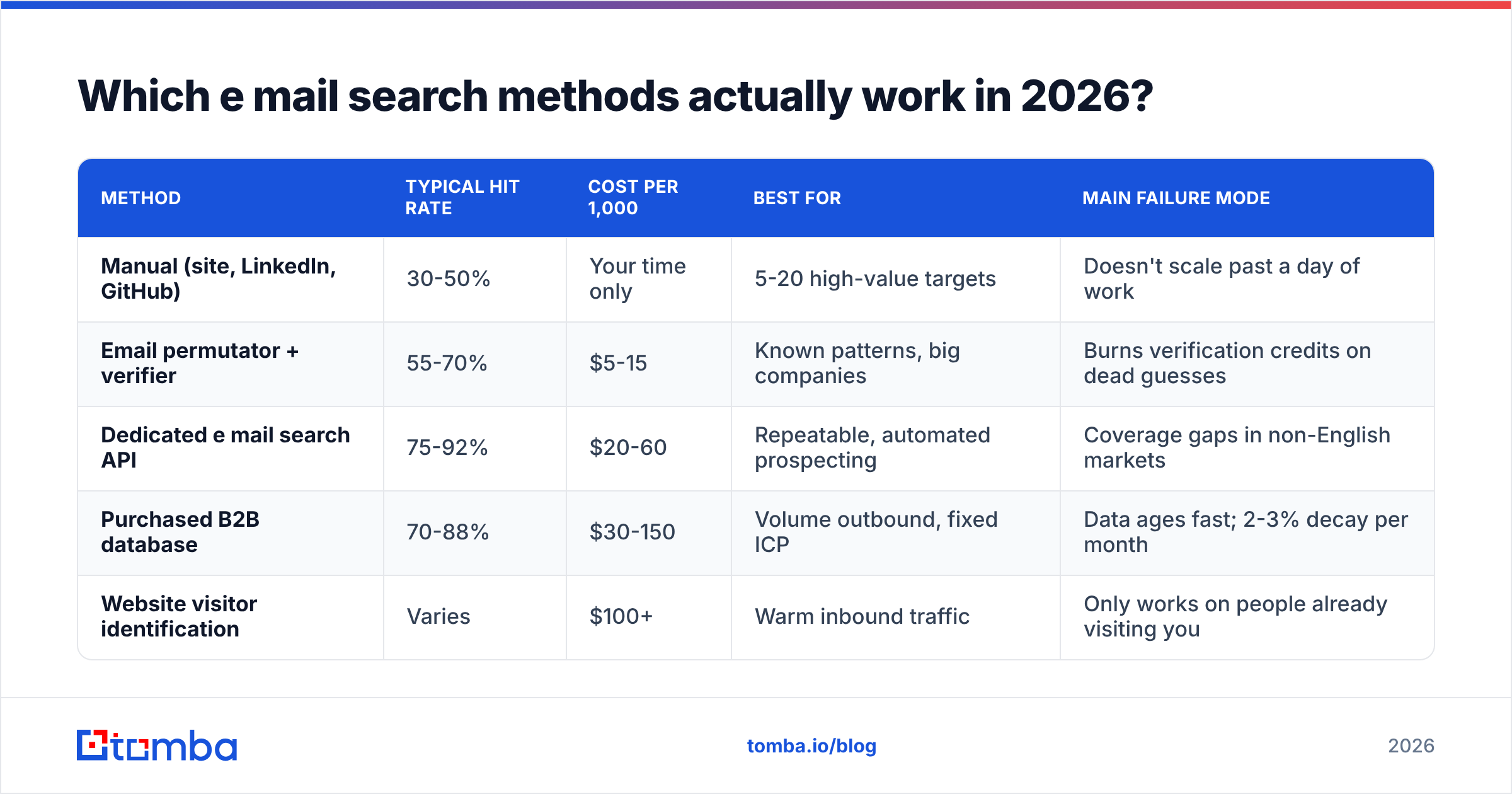
When a tool says "98% accuracy," it usually means: of the addresses we chose to return, 98% passed our own validation. It says nothing about the queries where the tool returned nothing. A tool that answers only the 40% of queries it is confident about can post a beautiful accuracy number while leaving most of your list empty.
Three numbers you should actually ask for:
- Coverage / hit rate — what percentage of your input rows get any address at all.
- Bounce rate on delivery — of the addresses returned, what percentage hard-bounce when you actually send. Under 3% is good, under 2% is very good.
- Catch-all share — what percentage of results come back "accept-all" rather than definitively valid. On some industries this is 25%+ and it directly affects your usable list.

Run your own test before committing. Take 100 contacts you already have verified addresses for, strip the emails, and feed the names and domains through each candidate tool. Compare returned addresses to your known-good set. This takes about 40 minutes and tells you more than every review site combined. G2's lead intelligence category is useful for shortlisting vendors, but it cannot tell you how a tool performs on your specific market.
Accuracy also varies wildly by segment. Nearly every tool does well on US-based SaaS companies with 200+ employees. Coverage collapses on European SMBs, agencies under 20 people, and anything in manufacturing or logistics. If that's your market, weight your test accordingly.
How do the main e mail search tools compare?#
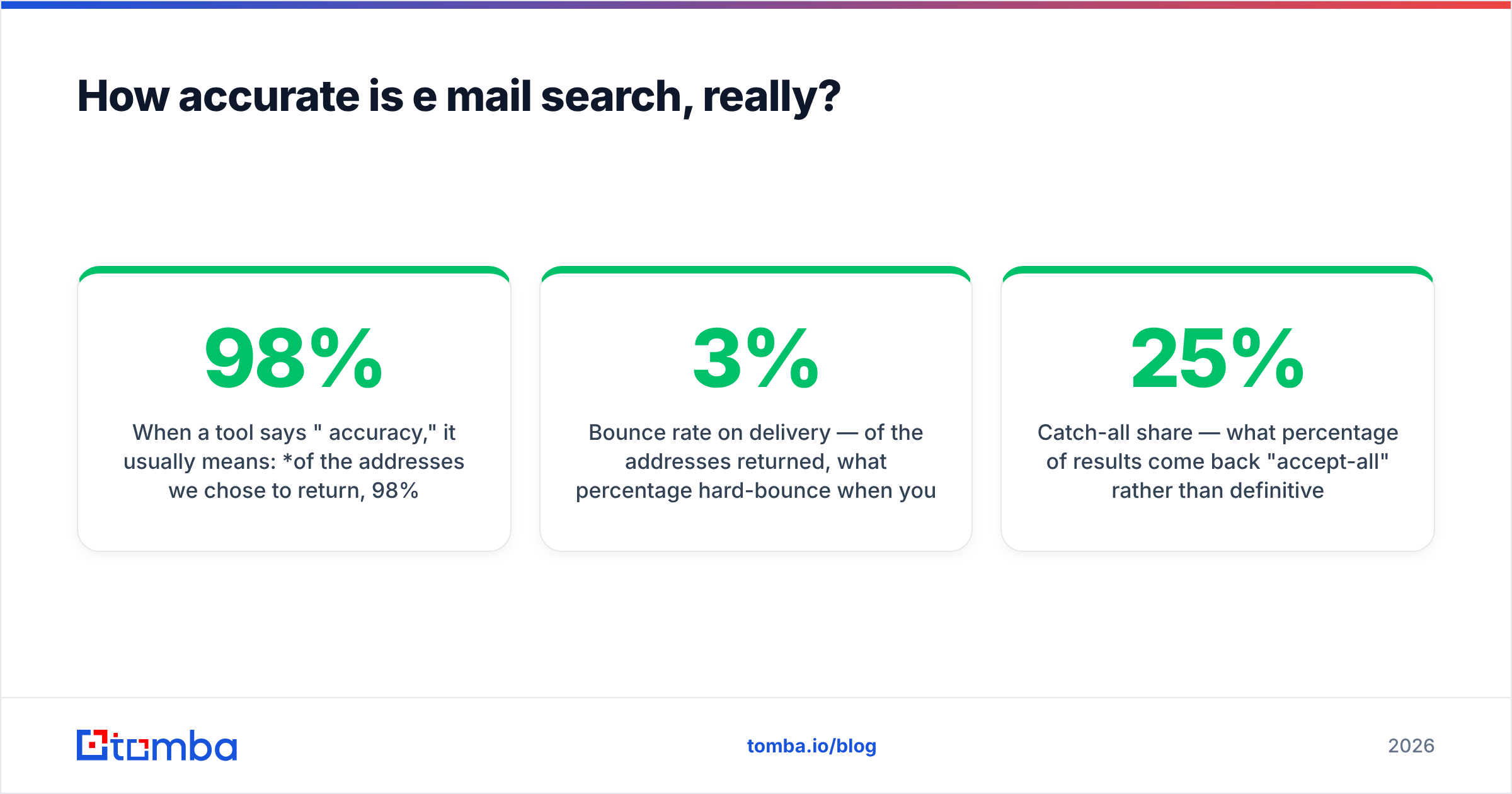
Here is a practical shortlist. Prices are entry-level published rates and shift often — check each vendor's page before you buy.
| Tool | Entry paid tier | Free tier | Core strength | Watch out for |
|---|---|---|---|---|
| Tomba | $49/mo (Starter) | 25 searches/mo | Finder + verifier + catch-all handling in one API | Newer brand, smaller US enterprise dataset |
| Hunter | ~$49/mo | 25-50/mo | Mature domain search, strong brand recognition | Credits consumed by low-confidence results |
| Apollo | ~$49/user/mo | Limited | Database + sequencing in one seat | Per-user pricing adds up fast on teams |
| RocketReach | ~$70/mo | Trial only | Deep personal contact coverage | Higher price per lookup at low volume |
| BookYourData | Pay-as-you-go credits | Sample list | Prebuilt, filterable B2B lists with a bounce guarantee | Static purchase model, best when your ICP is stable |
| ZeroBounce | ~$16 per 2k | 100 verifications | Verification only, not discovery | You still need a finder upstream |

Read that table as two families rather than six competitors. Discovery tools (Tomba, Hunter, Apollo, RocketReach) answer "what is this person's address?" Verification tools (ZeroBounce and similar) answer "is this address alive?" List providers like BookYourData skip discovery entirely and sell you a filtered set of contacts up front — a genuinely different workflow that suits teams with a well-defined, slow-changing ICP and no appetite for per-lookup infrastructure.
Most functional stacks in 2026 use a discovery API with built-in verification, then a second opinion from a standalone verifier on anything scored below 90% confidence. Redundancy on the last 10% is cheaper than a damaged sending domain.

What does e mail search actually cost?#
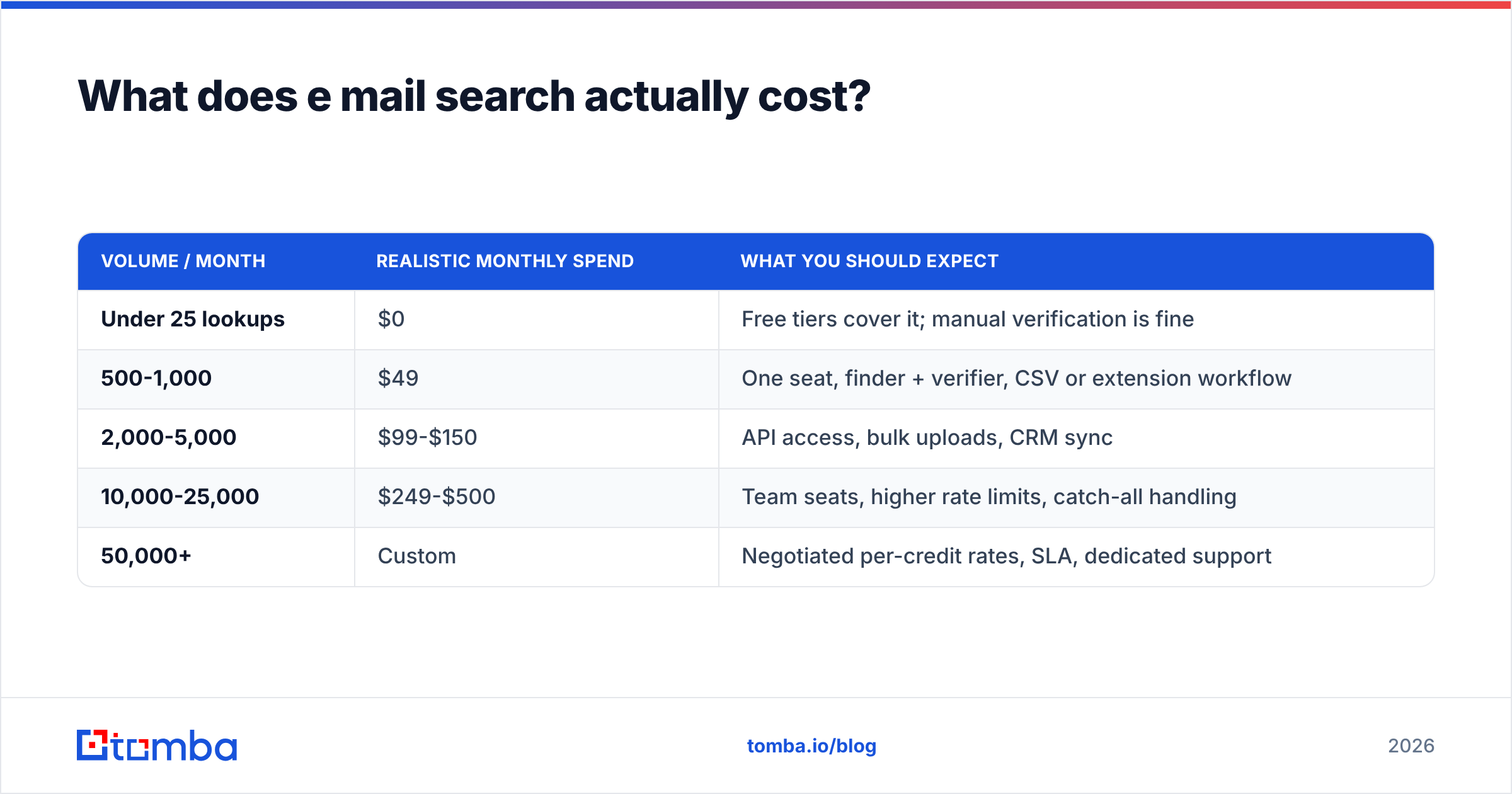
Per-lookup cost matters less than cost per usable address. A $0.02 lookup with a 50% hit rate costs $0.04 per contact. A $0.05 lookup with a 90% hit rate costs $0.056 — barely more, with half the wasted list-building time.
| Volume / month | Realistic monthly spend | What you should expect |
|---|---|---|
| Under 25 lookups | $0 | Free tiers cover it; manual verification is fine |
| 500-1,000 | $49 | One seat, finder + verifier, CSV or extension workflow |
| 2,000-5,000 | $99-$150 | API access, bulk uploads, CRM sync |
| 10,000-25,000 | $249-$500 | Team seats, higher rate limits, catch-all handling |
| 50,000+ | Custom | Negotiated per-credit rates, SLA, dedicated support |
Tomba pricing follows that curve: free at 25 searches/month, $49/mo Starter, $99/mo Growth, $249/mo Pro, custom above that. Most vendors land in a similar band at the low end and diverge sharply at enterprise volume, where negotiation matters more than the list price.
Two costs that never appear on a pricing page:
- Credit burn on failures. Some tools charge for a query that returns nothing. Over 5,000 lookups at a 70% hit rate, that's 1,500 wasted credits. Ask explicitly.
- Deliverability damage. A 12% bounce rate on a cold campaign puts your domain reputation in a hole that takes weeks of warmup to climb out of. That cost dwarfs any subscription difference.
What breaks an e mail search, and how do you fix it?#
Four failure modes account for most bad results.
Catch-all domains. The receiving server accepts mail to every address, so SMTP validation always returns "yes." Roughly 15-25% of B2B domains behave this way. A naive tool marks these valid and you find out the truth from your bounce report. Use a catch-all verifier that applies pattern confidence and secondary signals instead of trusting the handshake, or route catch-all results into a separate, lower-volume send.
Greylisting and rate limiting. Some mail servers deliberately delay or refuse first-contact SMTP probes. A single-pass verifier reads this as "invalid" and discards a perfectly good address. Tools that retry with backoff recover a meaningful slice of these.
Personal names that resist patterns. Hyphenated surnames, transliterated names, married-name changes, and people who go by a nickname internally. If robert.johnson@ bounces, bob.johnson@ and rjohnson@ are worth generating before you give up.
Stale data. B2B contact data decays about 2-3% per month — people change jobs, companies rebrand, domains migrate. A list you bought in January is meaningfully worse by June. Re-run an email verifier pass over any list older than 90 days before you send to it. It costs a fraction of a cent per row and protects the sender reputation you spent months building. HubSpot's research on email engagement consistently shows list hygiene as a bigger lever on results than copy changes.
Is e mail search legal?#
Short answer: finding a work email is generally legal in most jurisdictions; how you use it is where the rules bite.
Under GDPR, a business email address tied to an identifiable person is personal data. You can process it under legitimate interest for B2B outreach, but you owe the recipient transparency about where you got their data, an easy opt-out, and deletion on request. CAN-SPAM in the US is looser — accurate headers, a real physical address, working unsubscribe — but it applies to every message you send. CASL in Canada is stricter and generally requires consent or a demonstrable existing relationship.
Practical rules that keep you clear: target role-relevant business addresses only, never personal Gmail or Yahoo accounts; say plainly in the first email how you found them; honor unsubscribes within 24 hours, not the legal maximum; and keep a suppression list that survives tool migrations. The general overview of email address structure and standards is worth a skim if you are building any validation logic yourself.
None of this is legal advice — if you operate at volume across regions, get an actual lawyer to review your process once. It is a cheaper line item than a complaint.
How do you run a bulk e mail search without wrecking your domain?#
The workflow that consistently works:
- Start with a clean input file. Company domain, first name, last name, in separate columns. Deduplicate before you upload — you pay per row, not per unique person.
- Run discovery in bulk. Upload the CSV, let the tool process asynchronously, download results with confidence scores attached.
- Split by confidence. Above 95%: send. 80-95%: verify with a second tool. Below 80% or catch-all: hold, or route to LinkedIn outreach instead of email.
- Warm the sending domain before volume. New domain or new mailbox means 2-4 weeks of ramping from 10-20 sends a day. Skipping this is the single most common cause of a campaign that "just doesn't work."
- Re-verify quarterly. Set a calendar reminder. Every list decays.
Automate the whole chain if you send regularly — most teams wire discovery into their CRM so a new company record triggers a lookup automatically, then a verification pass, then enrollment in a sequence. That removes the manual export/import step where lists usually go stale.
Where should you start?#
If you're doing fewer than 25 lookups a month, start free and stay free — no tool earns its subscription at that volume. If you're building repeatable outbound, pick one discovery tool with verification built in, run the 100-contact benchmark against your actual target market, and check bounce rates after your first 500 sends. Those two numbers will tell you within a week whether you chose correctly.
When you're ready to test properly, the Tomba Email Finder covers the full chain in one place — name-and-domain lookup, domain-wide search, verification, and catch-all handling, with 25 free searches a month to run your own benchmark before you commit a dollar. Feed it the 100 contacts you already have verified addresses for, compare the output, and let the results decide.
Related guides#
Ready to find emails that actually work?
Join 150,000+ professionals who stopped guessing and started sending. Free credits on signup — no credit card required.
Get the Tomba newsletter
Practical outbound tactics and product updates — once every two weeks.
About the author