9 Easy Email Verification Alternatives Compared for 2026
Easy Email Verification is cheap and simple, but it stops at list cleaning. Here are nine alternatives compared on price, catch-all handling, API depth, and whether they also find the emails you are missing.

TL;DR
- Easy Email Verification is a low-cost, pay-as-you-go list cleaner. It does one job. If that job is all you need, the main reason to switch is accuracy on catch-all domains and API depth.
- The cheapest per-email price is almost never the cheapest total cost. A verifier that marks 30% of your list "unknown" forces you to either delete good contacts or send blind.
- If your real problem is finding contacts and not just cleaning a CSV, a combined finder + verifier (Tomba, Findymail, Apollo-style platforms) removes a whole tool from your stack.
- For teams buying data rather than scraping it, a pre-verified database like BookYourData skips the verification step entirely.
- Budget roughly $0.002–$0.008 per email for standalone verification, or $49–$99/mo for a platform that finds and verifies in one place.
What is Easy Email Verification, and why look for alternatives?#
Easy Email Verification is a bulk email verification service: you upload a list, it runs syntax checks, MX record lookups, SMTP handshakes, and role/disposable detection, then hands back a scored file. It is priced pay-as-you-go, it is inexpensive, and the UI is genuinely simple. That is the whole pitch, and for a solo operator cleaning a 5,000-row export once a quarter, it is often enough.
The reasons people start shopping for easy email verification alternatives are consistent:
- Catch-all domains eat the result. A large share of B2B domains accept every address at the SMTP layer, so a plain handshake tells you nothing. Weak verifiers dump these into "unknown" and leave you to guess.
- The API is thin. If you want verification inside a signup form, a CRM workflow, or an enrichment pipeline, you need real-time endpoints, webhooks, and predictable rate limits.
- It only verifies. Verification is the last mile. If you are still hunting for the addresses themselves, you are paying for a second tool anyway.
- Compliance and sourcing questions. Enterprise buyers ask where data comes from and how bounces are handled contractually. Small vendors often cannot answer that in writing.
None of that makes Easy Email Verification bad. It makes it narrow. The right alternative depends entirely on which of those four walls you hit first.
How should you judge an email verification tool?#
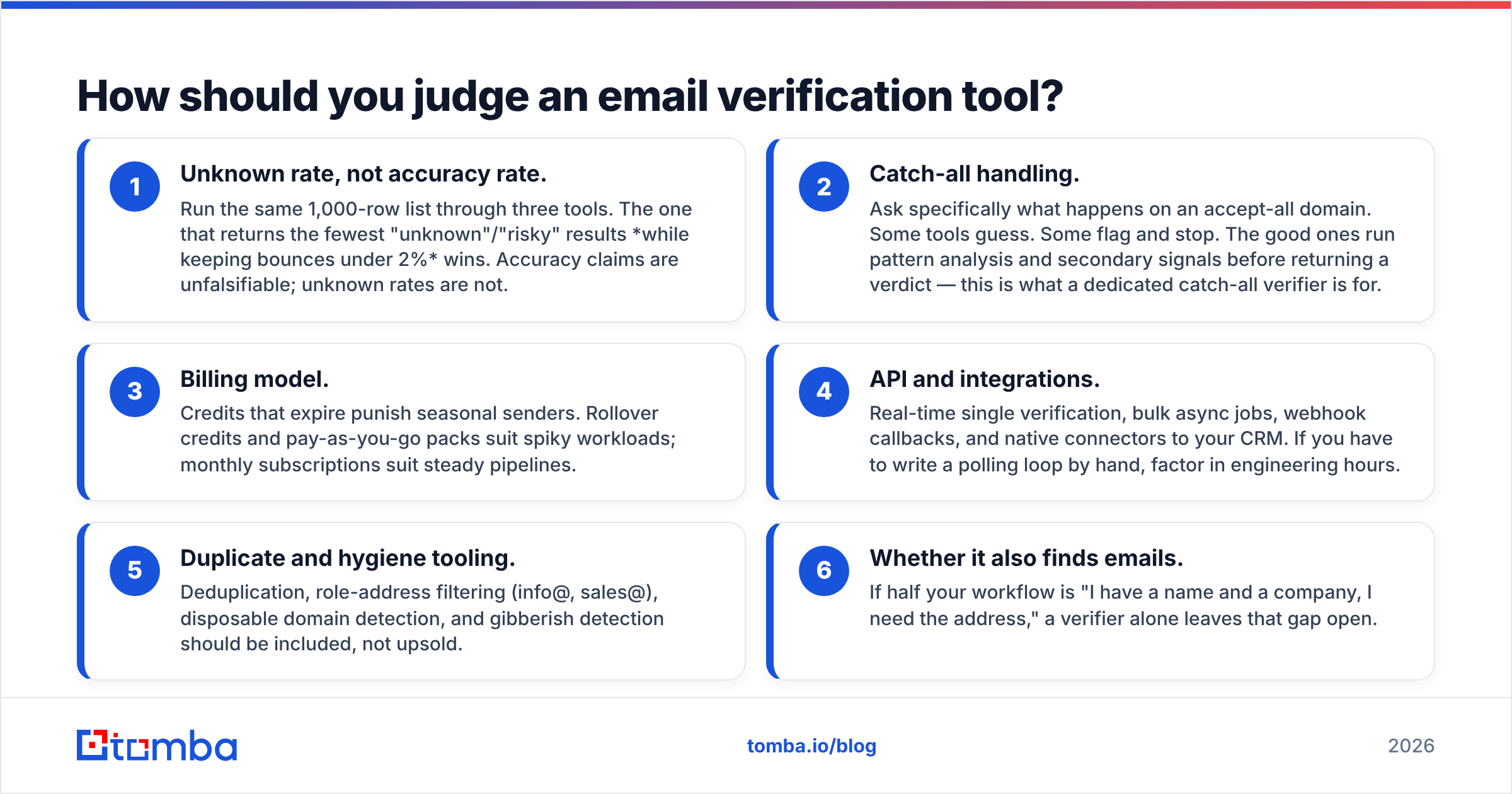
Ignore the marketing accuracy number on the homepage. Every vendor claims 98%+, and nobody publishes the test set. Score tools on these six things instead:
- Unknown rate, not accuracy rate. Run the same 1,000-row list through three tools. The one that returns the fewest "unknown"/"risky" results while keeping bounces under 2% wins. Accuracy claims are unfalsifiable; unknown rates are not.
- Catch-all handling. Ask specifically what happens on an accept-all domain. Some tools guess. Some flag and stop. The good ones run pattern analysis and secondary signals before returning a verdict — this is what a dedicated catch-all verifier is for.
- Billing model. Credits that expire punish seasonal senders. Rollover credits and pay-as-you-go packs suit spiky workloads; monthly subscriptions suit steady pipelines.
- API and integrations. Real-time single verification, bulk async jobs, webhook callbacks, and native connectors to your CRM. If you have to write a polling loop by hand, factor in engineering hours.
- Duplicate and hygiene tooling. Deduplication, role-address filtering (info@, sales@), disposable domain detection, and gibberish detection should be included, not upsold.
- Whether it also finds emails. If half your workflow is "I have a name and a company, I need the address," a verifier alone leaves that gap open.
Which easy email verification alternatives are worth testing in 2026?#
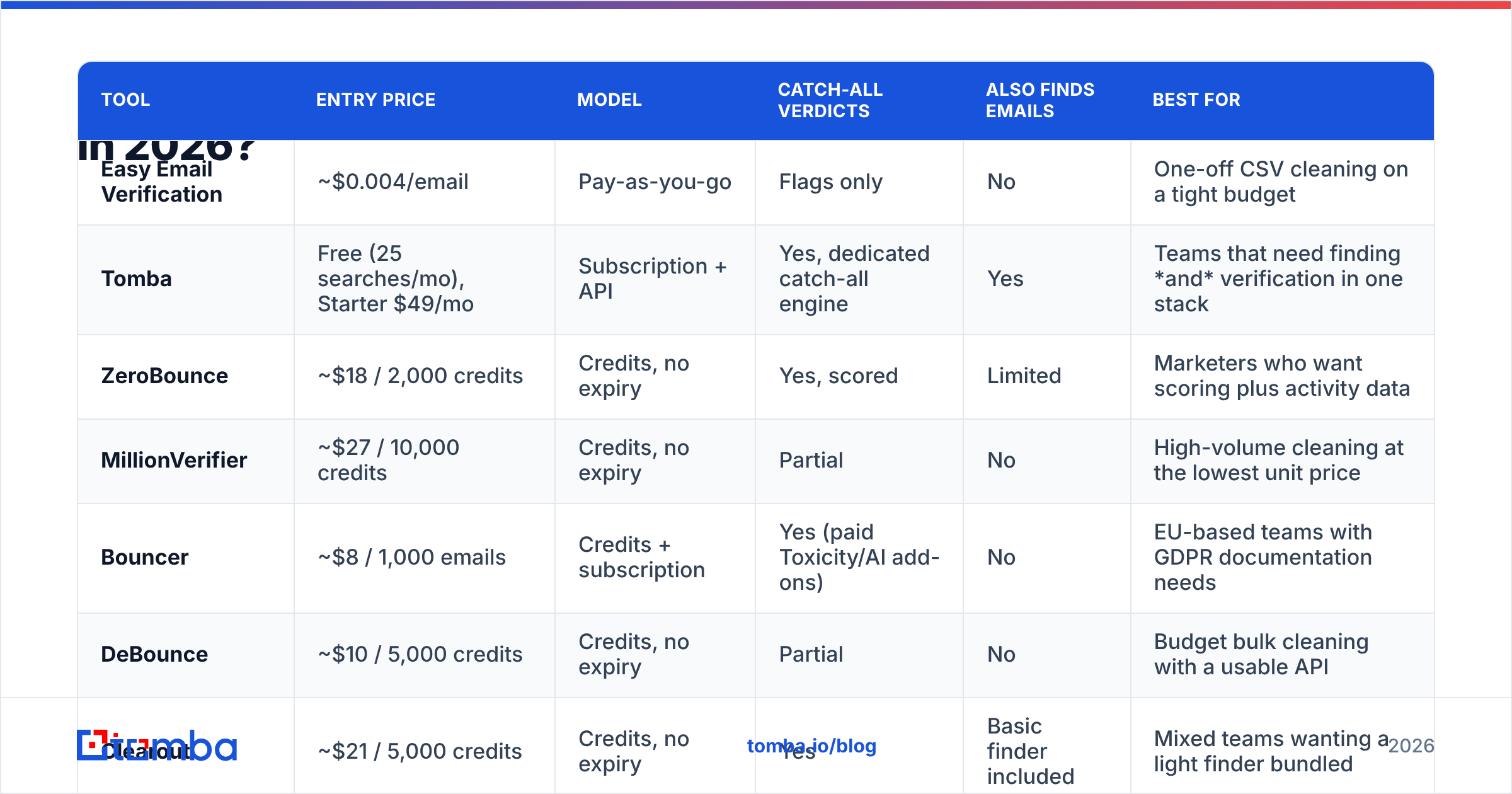
Here is the shortlist, scored on what actually differs. Prices are list prices at the time of writing and move often — check each vendor's pricing page before you commit.
| Tool | Entry price | Model | Catch-all verdicts | Also finds emails | Best for |
|---|---|---|---|---|---|
| Easy Email Verification | ~$0.004/email | Pay-as-you-go | Flags only | No | One-off CSV cleaning on a tight budget |
| Tomba | Free (25 searches/mo), Starter $49/mo | Subscription + API | Yes, dedicated catch-all engine | Yes | Teams that need finding and verification in one stack |
| ZeroBounce | ~$18 / 2,000 credits | Credits, no expiry | Yes, scored | Limited | Marketers who want scoring plus activity data |
| MillionVerifier | ~$27 / 10,000 credits | Credits, no expiry | Partial | No | High-volume cleaning at the lowest unit price |
| Bouncer | ~$8 / 1,000 emails | Credits + subscription | Yes (paid Toxicity/AI add-ons) | No | EU-based teams with GDPR documentation needs |
| DeBounce | ~$10 / 5,000 credits | Credits, no expiry | Partial | No | Budget bulk cleaning with a usable API |
| Clearout | ~$21 / 5,000 credits | Credits, no expiry | Yes | Basic finder included | Mixed teams wanting a light finder bundled |
| EmailListVerify | ~$24 / 10,000 credits | Credits, no expiry | Partial | No | Agencies cleaning large purchased lists |
| BookYourData | Pay-per-record | Prepaid data credits | Pre-verified at source | Delivers verified contacts | Buyers who want verified B2B contacts, not a cleaning tool |
A few notes on reading that table honestly.
Tomba is the option that changes the shape of your stack rather than swapping one component. The email verifier sits alongside a finder, domain search, and enrichment, so a single credit pool covers "find the address" and "confirm it's real." Plans run Free (25 searches/mo), Starter $49/mo, Growth $99/mo, and Pro $249/mo — see Tomba pricing for the full breakdown. If you only ever clean lists someone else built, this is more tool than you need. If you build the lists, it's fewer tools than you have.
ZeroBounce is the heavyweight on brand recognition and add-on data (activity scoring, appends). Its product pages are the most polished in the category, and its credits do not expire. You pay for that positioning; unit price is above the budget tier.
MillionVerifier, DeBounce, and EmailListVerify occupy the same square: very low per-email cost, credits that don't expire, functional APIs, and honest-but-limited catch-all logic. If your list is mostly Gmail/Outlook-hosted SMBs, catch-all matters less and these are excellent value. If your list is enterprise domains, expect a chunky unknown bucket.
Bouncer is the one to shortlist if procurement asks about GDPR and data residency. It is EU-headquartered with clear documentation, and its optional toxicity/spam-trap analysis is genuinely useful before a big send.
Clearout splits the difference — solid verification with a lightweight finder attached, which suits teams that occasionally need an address but do not prospect daily.
BookYourData is not really a verifier and should not be compared as one. It sells B2B contact records that arrive already verified, with a bounce guarantee attached. If your bottleneck is "I don't have enough contacts," buying verified records is often faster and cheaper than sourcing raw data and paying to clean it. Teams frequently run both: purchased records for coverage, a verifier for anything sourced elsewhere.
Is a cheaper per-email price actually cheaper?#
No, and this is the single most common budgeting mistake in the category.
Work the math on a 50,000-contact list. Vendor A charges $0.0025/email and returns 22% unknown. Vendor B charges $0.006/email and returns 7% unknown.
- Vendor A: $125 spent, 11,000 contacts you cannot confidently send to.
- Vendor B: $300 spent, 3,500 contacts you cannot confidently send to.
Vendor B costs $175 more and gives you 7,500 additional sendable contacts — about $0.023 per recovered contact. If a contact is worth more than two cents to your pipeline (it is, by orders of magnitude), the "expensive" tool is the cheap one. The only scenario where Vendor A wins is when you have infinite raw list supply and finite budget, which is rare in B2B.
The second hidden cost is deliverability damage. A verifier that passes addresses it should have caught pushes your bounce rate up, and mailbox providers read sustained bounce rates as a spam signal. That degrades sender reputation for every campaign on that domain, not just the one with the bad list. Recovering a burned sending domain takes weeks. Buy the better verifier.

What should you do about catch-all domains?#
Catch-all (accept-all) domains are where verification tools separate. The server says "yes" to every address you test, including asdfgh@company.com, so the SMTP handshake carries zero information.
Three strategies exist, and you should know which one your vendor uses:
- Flag and abstain. The tool returns "unknown" and lets you decide. Safest, least useful. Most budget tools do this.
- Pattern inference. The tool checks whether the address matches the company's dominant format (
first.last@,flast@), cross-references known-good contacts at that domain, and returns a confidence score. This is what Tomba's catch-all finder does, and it is why the unknown bucket shrinks. - Behavioural signals. Some vendors layer engagement or historical bounce data on top. Powerful when the vendor has scale; useless when they don't.
Practical rule: for catch-all domains that pass pattern inference with high confidence, send — but segment them into their own campaign so a bad batch cannot contaminate your main domain's reputation. Warm up, watch the bounce rate for the first 200 sends, then merge or cut.
Do you need a verifier, a finder, or both?#
Answer this by looking at where your list comes from.
You need a verifier only if lists arrive pre-built — purchased data, event attendee exports, inbound signups, CRM records that have aged. Your job is hygiene. Pick on unknown rate and price: MillionVerifier, DeBounce, or ZeroBounce depending on budget and how much catch-all exposure you carry.
You need a finder plus a verifier if you build lists from company names, LinkedIn profiles, or domains. Running two vendors here means two bills, two APIs, two credit pools, and a manual CSV handoff between them. A single platform that does domain search, finds the address, and verifies it in the same call removes that seam. It also removes an entire class of bug — the one where you find 4,000 emails, forget to verify 600 of them, and discover it on Monday when the bounce report lands.
You need neither if you buy pre-verified records. That is the BookYourData model, and for teams that value speed over sourcing control it is a legitimate shortcut. You are paying for the verification implicitly, in the record price.
How do you switch without breaking your sending?#
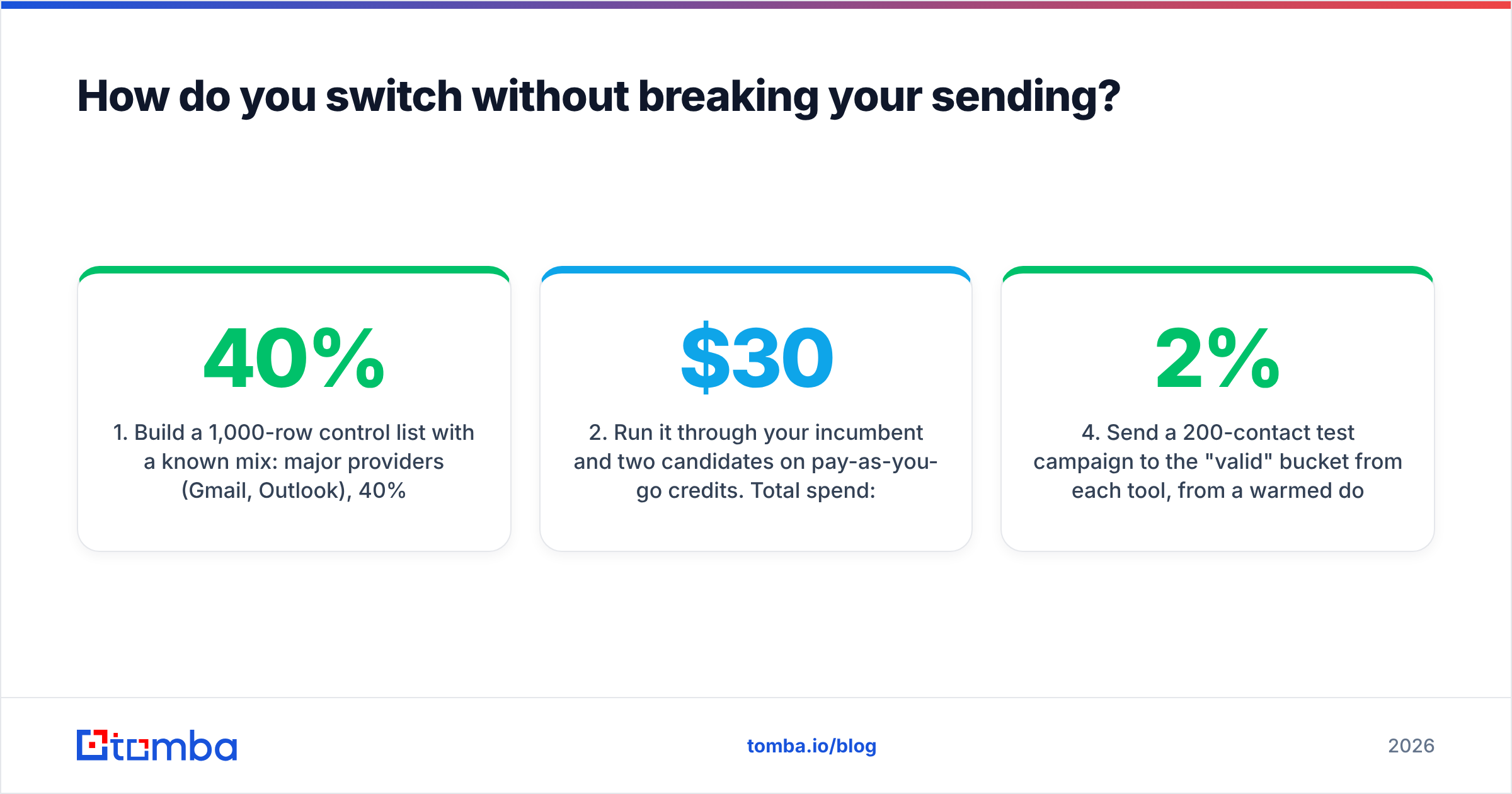
Run a controlled bake-off. It takes about an hour of work and one afternoon of waiting.
- Build a 1,000-row control list with a known mix: 40% major providers (Gmail, Outlook), 40% corporate domains, 20% domains you already know are catch-all. Include ten addresses you know are dead and ten you know are live.
- Run it through your incumbent and two candidates on pay-as-you-go credits. Total spend: under $30.
- Compare the four buckets — valid, invalid, catch-all/risky, unknown. Check that all ten known-dead addresses were caught and all ten known-live addresses passed. A tool that fails the known-dead test is dangerous regardless of its unknown rate.
- Send a 200-contact test campaign to the "valid" bucket from each tool, from a warmed domain. Measure hard bounce rate. Under 2% is fine; over 3% means the tool is passing junk.
- Check the API before you commit, not after. Verify a single address, submit a bulk job, and confirm the webhook fires. Tomba publishes its endpoints openly if you want a reference implementation to compare against — see the Tomba API docs.
- Read recent third-party reviews for support responsiveness, which no benchmark captures. The G2 email verification category is the least noisy source; filter to reviews from the last twelve months.
Keep your incumbent's credits until step 4 passes. Verification vendors have bad weeks, and having a fallback configured costs nothing.
What is the honest verdict?#
If Easy Email Verification is clearing your lists at an unknown rate you can live with, and you have no API ambitions, staying put is a defensible decision. Cheap and adequate beats expensive and marginally better.
Switch when one of three things is true: your unknown bucket is over 15% and it is costing you real contacts; you need verification inside a product or workflow and the API cannot support it; or you are paying separately to find the addresses you are then paying to verify. The third case is the most common and the most wasteful.
For that third case specifically — you are sourcing contacts and cleaning them in two different tools — consolidate. Tomba's Email Finder finds addresses by domain, name, or company and verifies them in the same workflow, with catch-all handling built in rather than bolted on. Start on the free tier with 25 searches a month, run your 1,000-row control list against whatever you use today, and compare the unknown buckets side by side. If your current verifier wins, you have lost an hour and learned something. If it doesn't, you have just removed a tool, a bill, and a CSV handoff from your week.
Related guides#
Ready to find emails that actually work?
Join 150,000+ professionals who stopped guessing and started sending. Free credits on signup — no credit card required.
Get the Tomba newsletter
Practical outbound tactics and product updates — once every two weeks.
About the author