Easy Email Verification vs GetProspect: 2026 Comparison
One tool only cleans lists. The other builds them. Here's how Easy Email Verification and GetProspect actually compare on accuracy, pricing, catch-all handling, and which one belongs in your stack.
Easy Email Verification vs GetProspect looks like a head-to-head. It isn't one. One tool cleans the list you already own. The other finds new contacts on LinkedIn. Pick the wrong one and you pay for a job you don't have.
TL;DR
- These two tools do not compete on the same axis. Easy Email Verification is a cleaning tool — you bring a list, it tells you what will bounce. GetProspect is a sourcing tool. It finds contacts from LinkedIn and company domains, then verifies them as a secondary feature.
- If your only problem is a dirty list you already own, a dedicated verifier is cheaper per record and usually faster on bulk uploads.
- If you have no list yet, a verifier is useless to you. You need a finder first, and GetProspect's LinkedIn-centric workflow is its strongest argument.
On accuracy and stack design:
- Catch-all domains are where both categories get exposed. Roughly 15–20% of B2B domains accept everything at the SMTP layer, so "valid" from any verifier is a probability, not a fact.
- The stack that actually works for most outbound teams is find → verify → enrich in one place. That's the gap Tomba fills at $49/mo on Starter, with a free tier for testing before you commit.
What is Easy Email Verification and what does it actually do?#
Easy Email Verification belongs to the bulk-verification category — the same shelf as ZeroBounce, Bouncer, and Clearout. You upload a CSV or hit an API endpoint with an address, and it returns a status: deliverable, undeliverable, risky/catch-all, unknown, plus role-account and disposable flags.
Under the hood, every tool in this category runs roughly the same five checks:
- Syntax validation — does the string parse as a legal address per RFC 5322? Catches typos like
jane@@acme.com. - Domain and MX record lookup — does the domain exist, and does it publish mail exchanger records? A domain with no MX cannot receive mail at all.
- Disposable and role detection — flags
mailinator.comthrowaways and generic inboxes likeinfo@,sales@,support@that rarely convert on cold outreach. - SMTP handshake — opens a connection to the receiving server and asks whether the mailbox exists, without sending a message. This is where the real signal comes from.
- Catch-all detection — probes a deliberately fake address on the domain. If the server accepts it, the domain accepts everything, and per-mailbox certainty collapses.
The differences between verifiers show up in step 4 and step 5. Vendors run different IP pools, different retry logic, and different heuristics for reading a soft-fail. Two verifiers pointed at the same list will disagree on 3–8% of records. Almost all of that disagreement lives in the catch-all and "unknown" buckets.
What Easy Email Verification does not do is generate contacts. No LinkedIn scraping, no domain search, no prospecting database. That is a scoping decision, not a flaw — but it decides whether the tool is relevant to you at all.
What is GetProspect and how is it different?#
GetProspect is a B2B lead-generation platform built around a Chrome extension and a contact database. The core loop is simple. You browse LinkedIn or Sales Navigator, run a search, and pull names, titles, companies, and email addresses into a list you can filter and export. On top of that sit a light CRM-ish list manager, some enrichment fields (company size, industry, location), and built-in verification so exports are not pure garbage.
The strategic difference is direction of travel:
- Easy Email Verification assumes you already have addresses and questions their quality.
- GetProspect assumes you have an ICP definition and no addresses at all.
So "which is better" is the wrong question. The right one is which problem do you have this quarter. Then ask whether you want to pay two vendors to solve both.

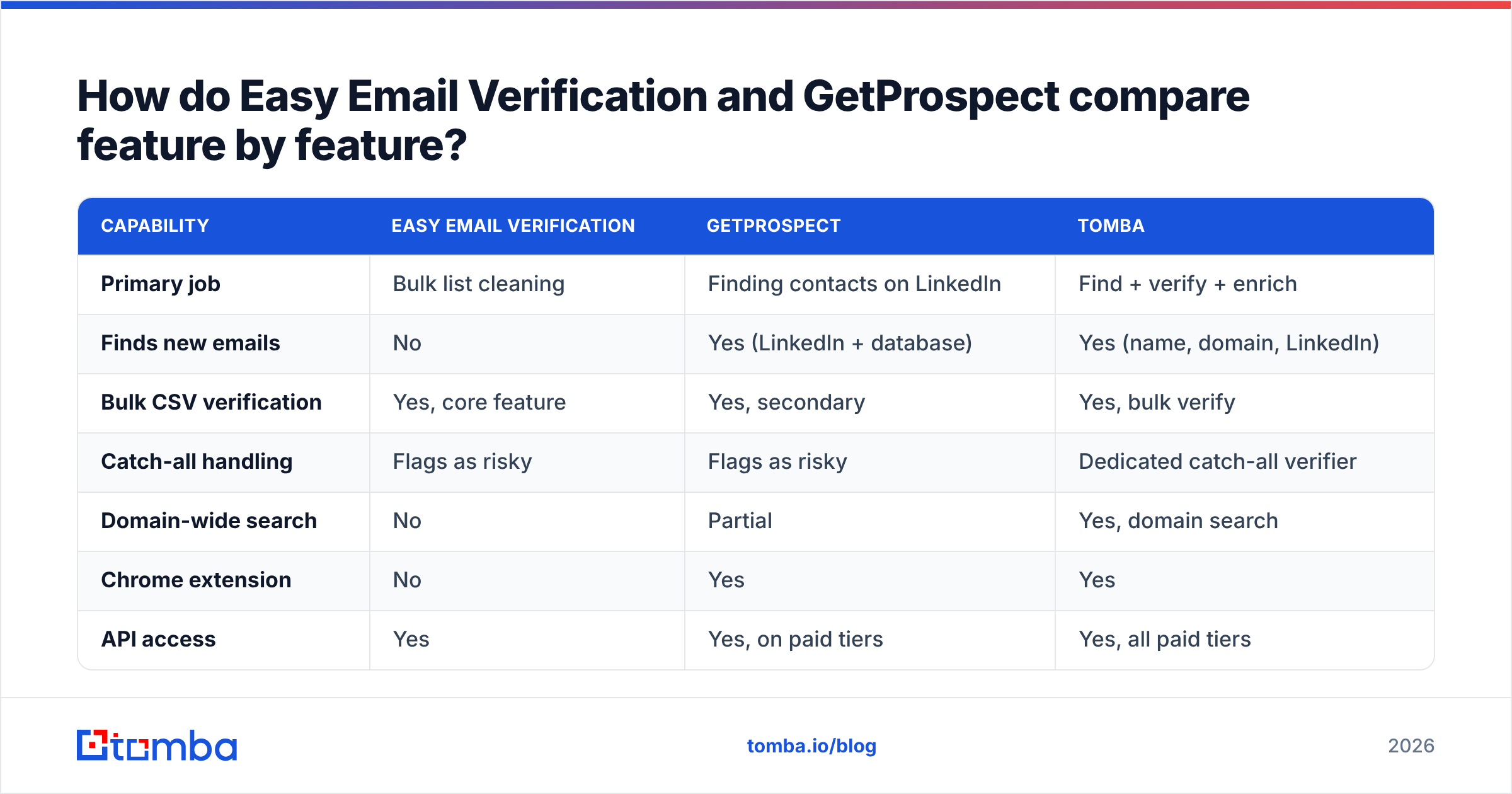
Easy Email Verification vs GetProspect: how do they compare feature by feature?#
Here is the practical matrix. Check current numbers on each vendor's own pricing page before you buy. This category changes plans often, and published tiers shift without announcement.
| Capability | Easy Email Verification | GetProspect | Tomba |
|---|---|---|---|
| Primary job | Bulk list cleaning | Finding contacts on LinkedIn | Find + verify + enrich |
| Finds new emails | No | Yes (LinkedIn + database) | Yes (name, domain, LinkedIn) |
| Bulk CSV verification | Yes, core feature | Yes, secondary | Yes, bulk verify |
| Catch-all handling | Flags as risky | Flags as risky | Dedicated catch-all verifier |
| Domain-wide search | No | Partial | Yes, domain search |
| Chrome extension | No | Yes | Yes |
| API access | Yes | Yes, on paid tiers | Yes, all paid tiers |
| Phone numbers | No | Limited | Yes, phone finder |
| Entry price | Pay-as-you-go credits | Free tier, then subscription | Free (25/mo), $49/mo Starter |
| Best for | Cleaning an inherited list | LinkedIn-first prospecting | Full outbound pipeline |
Read the table twice. The row that decides most purchases is "Finds new emails." If that row matters to you, a verification-only tool is not a candidate — it is a component you buy later.
Which one is more accurate?#
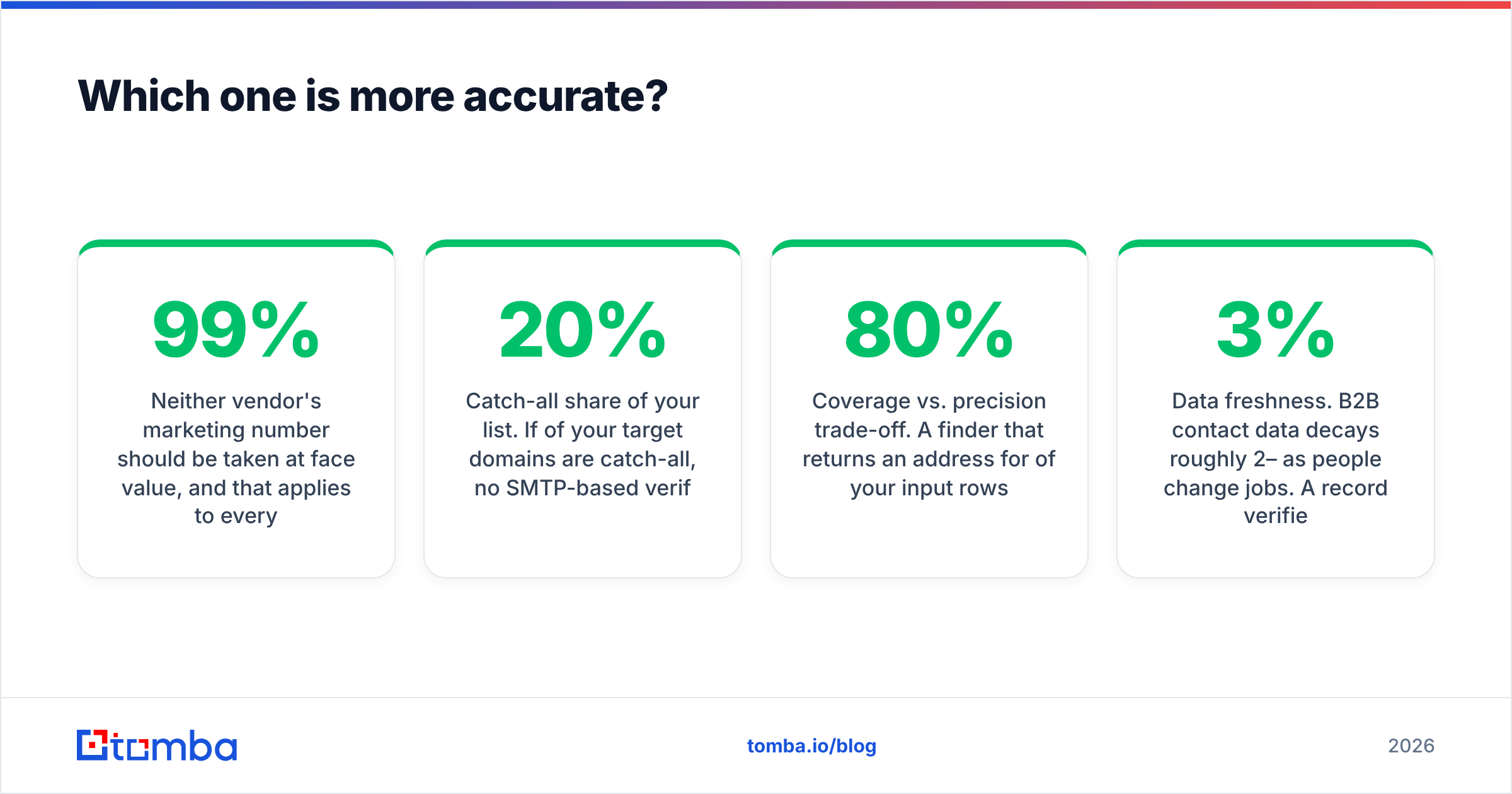
Take no vendor's marketing number at face value. That includes Tomba's. "99% accuracy" claims are usually measured on a curated internal test list — corporate domains with real MX records and no catch-all. Run the same test on a real prospect list from a mid-market SaaS ICP and the numbers drop fast.

The three things that actually move measured accuracy:
- Catch-all share of your list. If 20% of your target domains are catch-all, no SMTP-based verifier can give you a hard yes on those. A tool that honestly returns "risky" is more useful than one that guesses "valid" and lets you eat the bounce.
- Coverage vs. precision trade-off. A finder that returns an address for 80% of your rows but is wrong 10% of the time is worse than one that returns 55% at 98% precision. Bounces cost you sender reputation, and that damage is not recoverable inside a single campaign.
- Data freshness. B2B contact data decays roughly 2–3% per month as people change jobs. A record verified 90 days ago is far less reliable than one verified this week, whatever vendor produced it.
The only accuracy test worth trusting is your own. Take 200 rows you already know the answers to — customers, past demos, people who replied to you — and run them through each candidate. Compare against ground truth. It takes an hour and it settles the argument.
What do they cost, and where does the real spend go?#
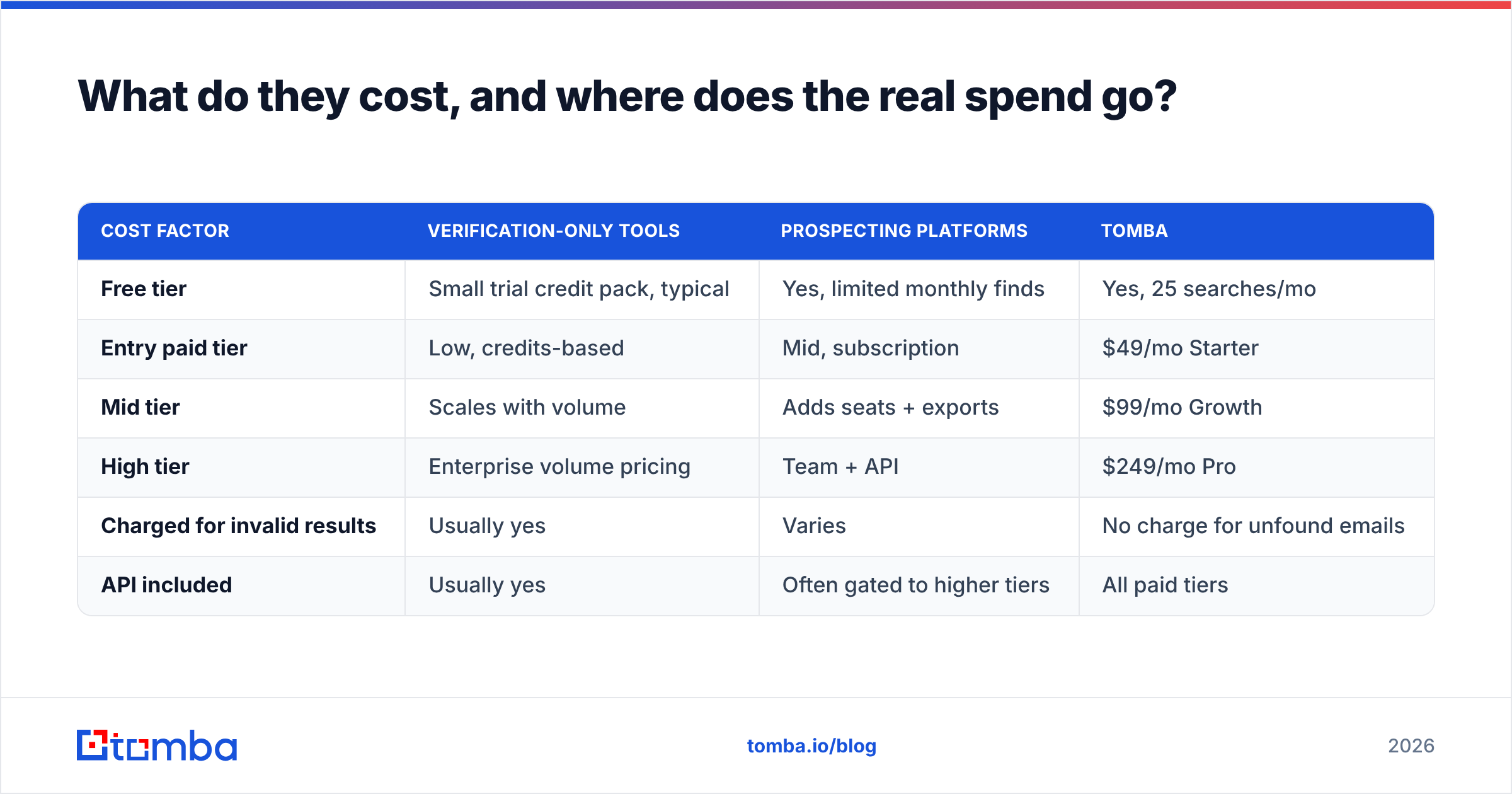
Pricing here comes in two shapes: credits (pay per lookup, roll over or expire) and subscriptions (monthly quota, unused volume lost). Verification tools skew toward credits. Prospecting tools skew toward subscriptions.
| Cost factor | Verification-only tools | Prospecting platforms | Tomba |
|---|---|---|---|
| Free tier | Small trial credit pack, typical | Yes, limited monthly finds | Yes, 25 searches/mo |
| Entry paid tier | Low, credits-based | Mid, subscription | $49/mo Starter |
| Mid tier | Scales with volume | Adds seats + exports | $99/mo Growth |
| High tier | Enterprise volume pricing | Team + API | $249/mo Pro |
| Charged for invalid results | Usually yes | Varies | No charge for unfound emails |
| API included | Usually yes | Often gated to higher tiers | All paid tiers |
Two cost traps to check before signing anything:
- Do credits expire monthly? Outbound volume is spiky. A quota that resets on the 1st punishes a team that runs three big campaigns a quarter instead of steady daily volume.
- Are you charged for misses? Some finders deduct a credit even when they return nothing. Over a 10,000-row list with a 60% hit rate, that is 4,000 credits spent on empty cells. Check Tomba pricing and your other candidates on this line item. It can change your real cost per usable contact by 40% or more.

Which tool should you pick for your situation?#
The Easy Email Verification vs GetProspect choice gets easy once you name the job. Skip the feature grid and match the tool to the work:
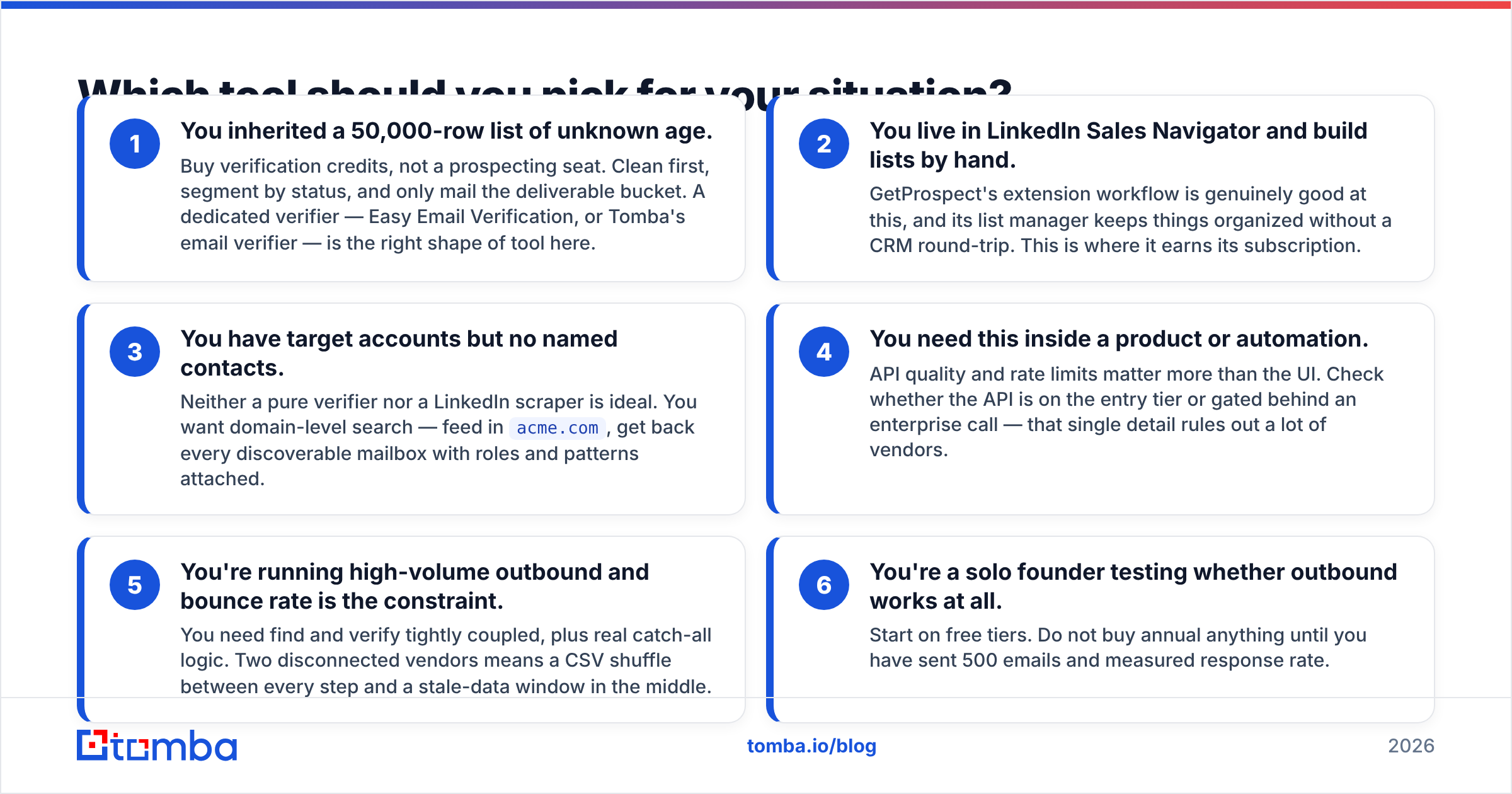
- You inherited a 50,000-row list of unknown age. Buy verification credits, not a prospecting seat. Clean first, segment by status, and only mail the deliverable bucket. A dedicated verifier — Easy Email Verification, or Tomba's email verifier — is the right shape of tool here.
- You live in LinkedIn Sales Navigator and build lists by hand. GetProspect's extension workflow is genuinely good at this. Its list manager keeps things organized without a CRM round-trip. This is where it earns its subscription.
- You have target accounts but no named contacts. Neither a pure verifier nor a LinkedIn scraper is ideal. You want domain-level search — feed in
acme.com, get back every discoverable mailbox with roles and patterns attached.
The next three cases are where a single-purpose tool starts to break down:
- You need this inside a product or automation. API quality and rate limits matter more than the UI. Check whether the API sits on the entry tier or behind an enterprise call. That one detail rules out a lot of vendors.
- You're running high-volume outbound and bounce rate is the constraint. You need find and verify tightly coupled, plus real catch-all logic. Two disconnected vendors means a CSV shuffle between every step and a stale-data window in the middle.
- You're a solo founder testing whether outbound works at all. Start on free tiers. Do not buy annual anything until you have sent 500 emails and measured response rate.
How do you handle catch-all domains, and why does it matter here?#
This is the most misunderstood part of the comparison. It is also where cheap tools quietly cost you money.
A catch-all domain accepts mail for any address at that domain. jane@acme.com and asdkjfh@acme.com both get a 250 OK at the SMTP layer. The server sorts out delivery internally afterward. Roughly one in five B2B domains behaves this way, and it is most common at enterprises running Microsoft 365 with a spam gateway in front of the mail server.
What this means in practice:
- Any verifier that reports "valid" on a catch-all domain is reporting the domain's behavior, not the mailbox's existence.
- Your bounce rate can look fine while your emails land nowhere — accepted, then silently discarded by an internal rule.
- The honest handling is a separate "catch-all / accept-all" status, plus pattern confidence scoring based on how the company's other verified addresses are formatted.
If catch-all domains are a big share of your ICP — common in enterprise SaaS, finance, and healthcare — this capability should outrank price. Tools that surface a catch-all finder with pattern-based confidence give you something to act on. Tools that flag everything "risky" leave you guessing.
Is a combined find-and-verify tool actually better than two specialists?#
Sometimes. Not always. Here's the honest split.
Two specialists win when you have different teams doing different jobs — a data ops person cleaning warehouse exports at 500k-row scale, and an SDR team sourcing 200 contacts a week. Bulk verification at that volume is a commodity, and buying it standalone on credits is cheap.
A combined tool wins when the same person does both jobs in the same session. Export from the finder, upload to the verifier, wait for the job, download, re-merge on email, re-import to your sequencer. That is 20–40 minutes per campaign, and it opens a staleness window where records age between find and send.
That workflow tax is the real argument for consolidation. It is why platforms in this category keep absorbing adjacent features. You can sanity-check how buyers weigh it on G2, where the recurring complaint is not accuracy — it's data going stale between tools.
Where Tomba sits: it is a finder first, with verification, catch-all checks, data enrichment, and phone lookup on the same credit pool and the same API. That answers the workflow tax. It is not a claim of category-wide superiority. If you only need bulk cleaning, a pure verifier will be cheaper per record, and you should buy that instead.
What should you actually do next?#
Run a controlled test before you commit budget:
- Pull 200 rows you know the truth about.
- Run them through each candidate's free tier.
- Score three things: hit rate, precision against ground truth, and how each tool labels your catch-all domains.
- Time the end-to-end workflow, including exports. That number is a real cost.
If your Easy Email Verification vs GetProspect test says you only need cleaning, buy a verifier on credits. If it says you need contacts, buy a finder. If it says you need both — the common answer for teams running outbound at real volume — consolidate.
Start with the Tomba Email Finder. The free tier gives you 25 searches a month to run exactly the test above. Starter is $49/mo when you're ready to scale, and find, verify, catch-all checks, and enrichment all sit behind one API key instead of three CSV round-trips.
Related guides#
Ready to find emails that actually work?
Join 150,000+ professionals who stopped guessing and started sending. Free credits on signup — no credit card required.
Get the Tomba newsletter
Practical outbound tactics and product updates — once every two weeks.
About the author