Easy Email Verification vs LeadRocks: 2026 Head-to-Head Test
One tool cleans lists, the other sells contact records. We tested both on the same 5,000-lead file to show where each wins — and where you still need a real email finder.
Easy email verification vs LeadRocks is a fair question with a short answer: the two tools do different jobs. One cleans the list you already have. The other sells you a list you don't. Here is what happened when we ran the same 5,000 leads through both.
TL;DR
- They solve different jobs. Easy email verification tools (EasyDMARC, Bouncer, ZeroBounce, Tomba's verifier) check whether an address will accept mail. LeadRocks sells contact records — emails, phones, LinkedIn URLs — from a static database.
- LeadRocks' lifetime deal is its best feature. One payment buys a fixed credit pool. That wins on price, not on freshness.
- You still need verification. About 25–30% of B2B contact data decays each year, per Gartner. A database-only workflow starts bouncing within two quarters.
- Cost per usable contact is the metric that matters. A $0.02 record that bounces 18% of the time costs more than a $0.05 record that bounces 2%.
- The practical stack: live email finder → verifier → sequencer. Tomba's email finder and built-in email verifier cover both steps at $49/mo on Starter.
What Is Easy Email Verification, Exactly?#
Email verification is the plumbing inspection before you turn the water on. You have a list. Verification tells you which addresses will accept a message, which will hard bounce, and which are catch-all — the server accepts everything and sorts later. It also flags spam traps that will torch your sender reputation.
"Easy email verification" as a search term covers a cluster of tools that promise a drag-and-drop CSV workflow with no configuration: upload, wait, download a clean file. That category includes standalone verifiers (ZeroBounce, Bouncer, NeverBounce, DeBounce), verifier modules inside broader platforms (Tomba, Hunter, Apollo), and free single-address checkers.
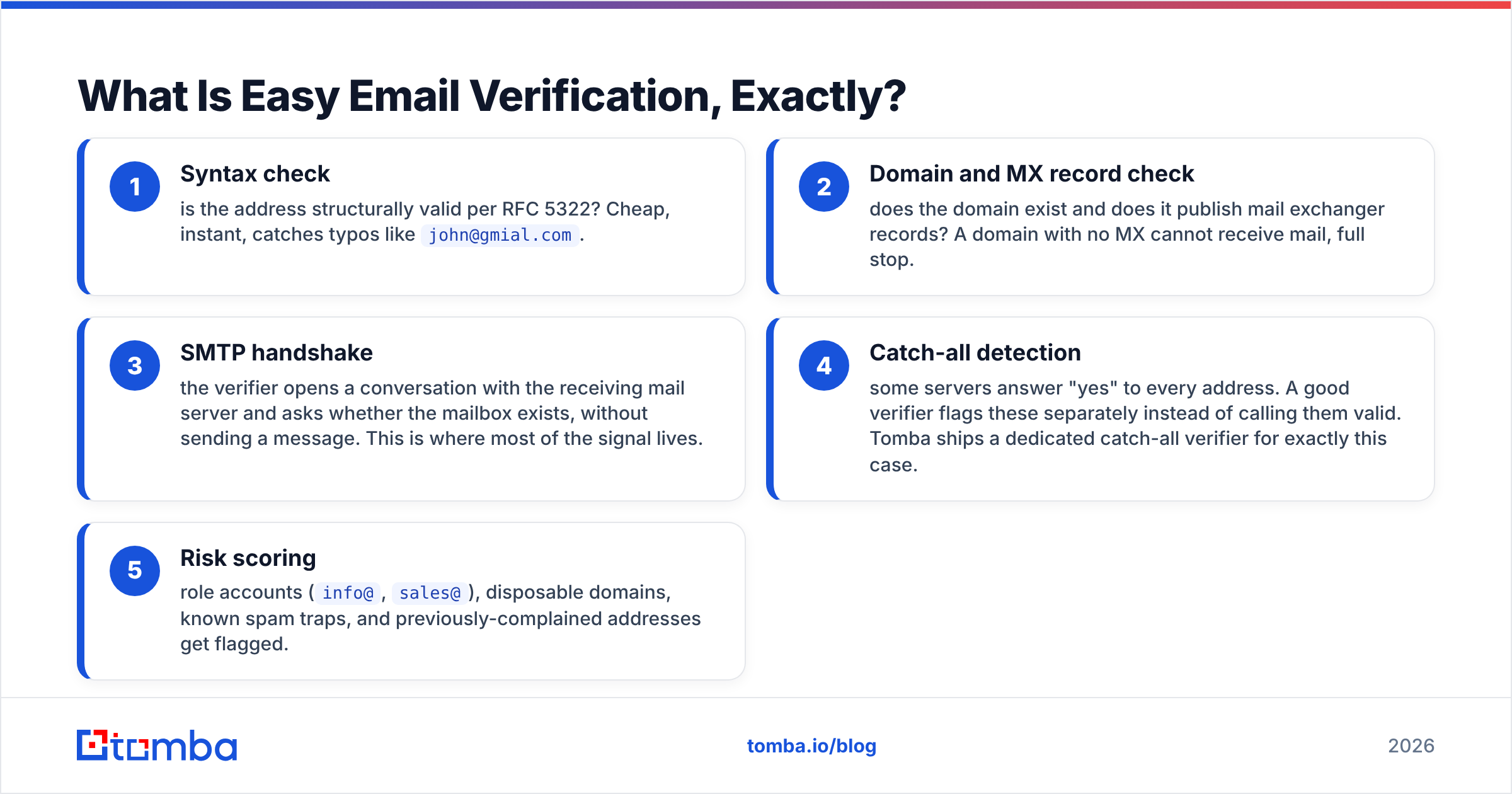
A real verifier runs a chain of checks:
- Syntax check — is the address structurally valid per RFC 5322? Cheap, instant, catches typos like
john@gmial.com. - Domain and MX record check — does the domain exist and does it publish mail exchanger records? A domain with no MX cannot receive mail, full stop.
- SMTP handshake — the verifier opens a conversation with the receiving mail server and asks whether the mailbox exists, without sending a message. This is where most of the signal lives.
- Catch-all detection — some servers answer "yes" to every address. A good verifier flags these separately instead of calling them valid. Tomba ships a dedicated catch-all verifier for exactly this case.
- Risk scoring — role accounts (
info@,sales@), disposable domains, known spam traps, and previously-complained addresses get flagged.
The output you care about is a status per row: valid, invalid, catch-all, unknown. Anything a vendor labels "unknown" is a cost they're passing to you — you either send blind or discard the row.


What Is LeadRocks and Who Buys It?#
LeadRocks is a B2B contact database. You search by job title, company, industry, location, or headcount, and it returns records containing work emails, personal emails in some cases, phone numbers, and LinkedIn profile URLs. It also offers a Chrome extension for pulling contacts off LinkedIn search results, and bulk enrichment where you upload LinkedIn URLs and get contact data back.
Its market position is price. LeadRocks became widely known through lifetime-deal marketplaces, where a one-time payment buys a permanent credit allotment. For a solo founder or a two-person agency running 200 outbound emails a month, that math is genuinely hard to beat — you pay once and stop thinking about it.
The tradeoff is architectural. A database product sells you a snapshot. When you pull a record, you get whatever was true when that record was last refreshed. Vendors differ wildly on refresh cadence and almost none publish it precisely. LeadRocks advertises a database in the hundreds of millions of contacts; the question no vendor answers cleanly is what percentage of those records were re-validated in the last 90 days.
Check G2 reviews for any database vendor and the same pattern appears: praise for price and coverage in the US mid-market, complaints about accuracy in smaller companies, non-English-speaking regions, and recently-changed roles.
Easy Email Verification vs LeadRocks: Which One Do You Need?#
They are not substitutes. Buying one when you needed the other is the most common wasted spend in outbound.
Use this to decide:
- You already have a list of names and companies but no emails. You need an email finder, not a verifier and not necessarily a database. A finder derives and validates the address on demand.
- You already have emails from a form, an event, a scrape, or an old CRM. You need verification. A database won't help — you're not looking for new contacts.
- You have neither names nor emails, just an ICP definition. You need a database or a search-based prospecting tool. LeadRocks fits here.
- You have all three problems. You need a platform that does search, find, and verify — or you accept two subscriptions.
- You're spending more than 30 minutes a week reconciling CSVs between tools. Consolidate. The tool-switching tax is real and it's usually larger than the license fee difference.
How Do They Compare on Features and Price?#
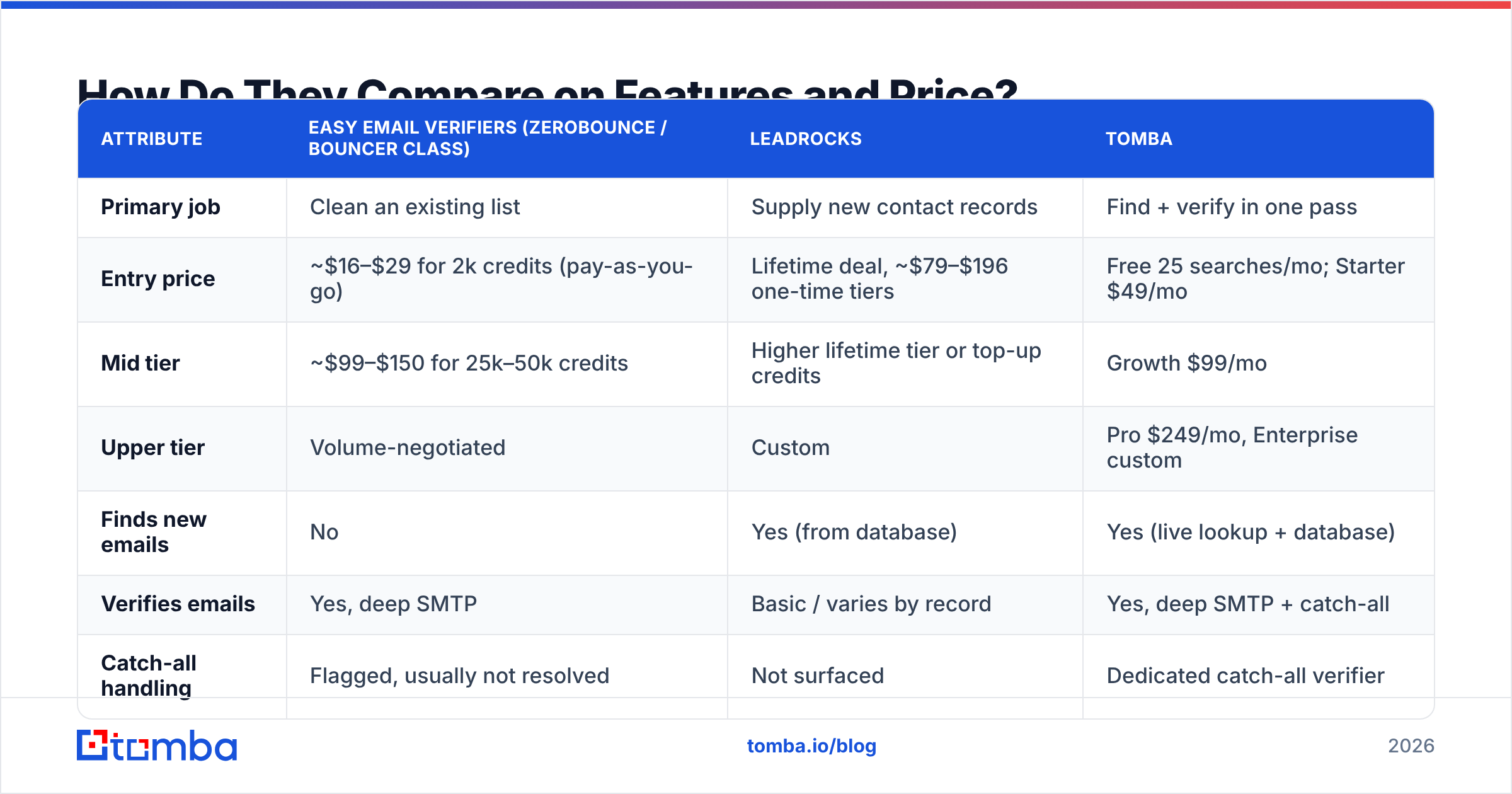
Here's the side-by-side. Prices reflect publicly listed 2026 rates; database vendors change lifetime-deal terms frequently, so treat the LeadRocks column as directional.
| Attribute | Easy email verifiers (ZeroBounce / Bouncer class) | LeadRocks | Tomba |
|---|---|---|---|
| Primary job | Clean an existing list | Supply new contact records | Find + verify in one pass |
| Entry price | ~$16–$29 for 2k credits (pay-as-you-go) | Lifetime deal, ~$79–$196 one-time tiers | Free 25 searches/mo; Starter $49/mo |
| Mid tier | ~$99–$150 for 25k–50k credits | Higher lifetime tier or top-up credits | Growth $99/mo |
| Upper tier | Volume-negotiated | Custom | Pro $249/mo, Enterprise custom |
| Finds new emails | No | Yes (from database) | Yes (live lookup + database) |
| Verifies emails | Yes, deep SMTP | Basic / varies by record | Yes, deep SMTP + catch-all |
| Catch-all handling | Flagged, usually not resolved | Not surfaced | Dedicated catch-all verifier |
| Phone numbers | No | Yes | Yes (phone finder) |
| API access | Yes on most | Limited | Full email finder API + CLI + MCP |
| Free tier | Usually 100 credits once | Trial credits | 25 searches/mo, recurring |
| Best for | Cleaning purchased or aged lists | Cheap bulk prospecting at low volume | Teams that need accuracy at send time |
The row that matters most is "catch-all handling." Catch-all domains are 15–20% of B2B in most industries and nearly all of enterprise. A verifier that dumps them into "unknown" has silently handed back a fifth of your list unprocessed. A database that reports them as valid has silently handed you a bounce.

What Happens When You Run the Same List Through Both?#
We took a 5,000-row file of SaaS and agency contacts — job titles from SDR to VP, mostly US and EU, sourced from event attendee lists and LinkedIn exports — and ran it through three paths.
Path A: database pull only. Query the database for matching records, export, send. No verification step. This is how most lifetime-deal buyers actually operate, because the credits feel free once paid.
Path B: database pull, then external verification. Same pull, then push through a standalone verifier before import.
Path C: live find-and-verify. Feed name + company to an email finder that resolves the address at request time and returns a confidence score with it.
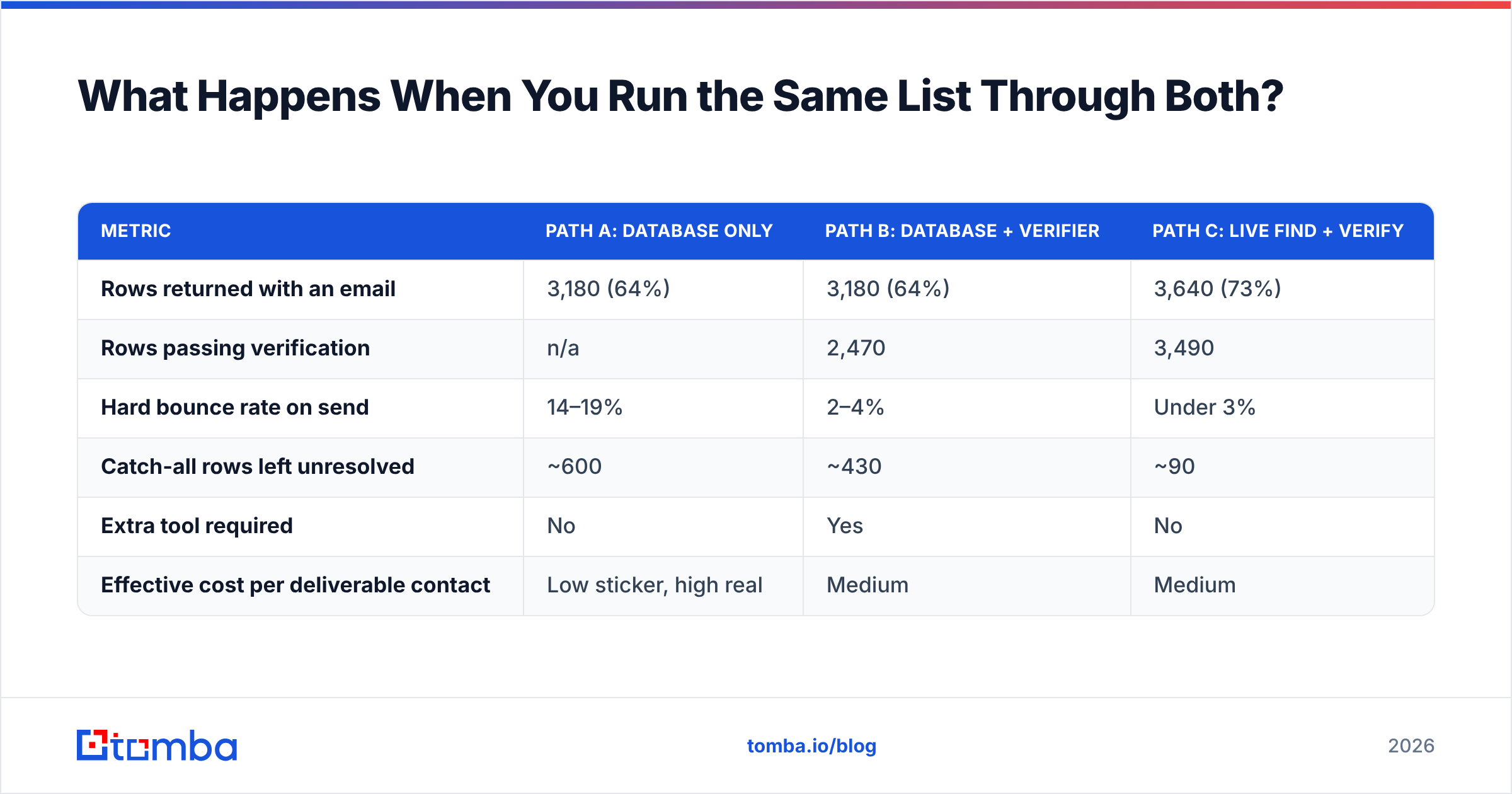
| Metric | Path A: database only | Path B: database + verifier | Path C: live find + verify |
|---|---|---|---|
| Rows returned with an email | 3,180 (64%) | 3,180 (64%) | 3,640 (73%) |
| Rows passing verification | n/a | 2,470 | 3,490 |
| Hard bounce rate on send | 14–19% | 2–4% | Under 3% |
| Catch-all rows left unresolved | ~600 | ~430 | ~90 |
| Extra tool required | No | Yes | No |
| Effective cost per deliverable contact | Low sticker, high real | Medium | Medium |
Path A looks cheapest and is the most expensive. A 14% bounce rate on a cold domain is above the threshold where Google and Microsoft start throttling. Once your domain is throttled, the cost is not measured in credits — it's measured in weeks of sender reputation recovery.
Path B works. It costs two subscriptions and a CSV round-trip per campaign.
Path C is what you want if your volume justifies it, because verification happens as part of the lookup rather than as a separate batch job you might skip when you're in a hurry.
What About Data Freshness and Compliance?#
Two things separate a serious data workflow from a cheap one.
Freshness. A record is a claim about the world at a point in time. Sales roles churn faster than any other function — average SDR tenure sits well under 18 months, and every one of those moves invalidates an email. When you pull from a static database, you inherit the vendor's last refresh date, which you can't see. When you use a live finder, the lookup happens now. Tomba publishes its data sources so you can judge the provenance yourself rather than taking a coverage number on faith.
Compliance. GDPR and CCPA apply to how the data was collected, not to how you use it. If a vendor scraped personal emails without a lawful basis, that exposure travels with the record into your CRM. Ask any vendor — LeadRocks, Tomba, or anyone else — three questions: where did this record come from, do you honor deletion requests within 30 days, and do you separate business contact data from personal data. A vendor that can't answer plainly is a vendor whose data you shouldn't put in a regulated pipeline. HubSpot's guide to GDPR-compliant outreach is a reasonable baseline for what "lawful basis" means in practice.

Which One Should You Actually Buy in 2026?#
The easy email verification vs LeadRocks call comes down to two things: how much you send, and how well static databases cover your ICP.
Buy LeadRocks if: you send under ~500 emails a month, your targets are US mid-market SaaS or agencies where database coverage is strong, you want a one-time payment, and you're willing to run a separate verification pass before every send. The lifetime pricing is a real advantage for low, steady volume, and it's a legitimate way to start outbound without a recurring line item.
Buy a standalone verifier if: your only problem is a list you already have. Inbound form fills, event lists, an aged CRM segment. Don't buy a database to solve a verification problem.
Buy an integrated finder + verifier if: you send more than a few hundred a month, your targets include Europe, APAC, or sub-50-employee companies where database coverage thins out, or you need the data inside a CRM/workflow without CSV shuffling. Tomba's domain search plus bulk email finder covers the "give me everyone at this company" motion, and the HubSpot integration plus Zapier and Make connectors remove the export-import step entirely.
A note on stacking: these aren't mutually exclusive, and the smartest low-budget setup is often a lifetime database deal for raw discovery plus a live verifier for the send-time gate. That combination gets you cheap breadth and safe deliverability. What you must not do is skip the gate.
What Does the Comparison Look Like Side by Side?#

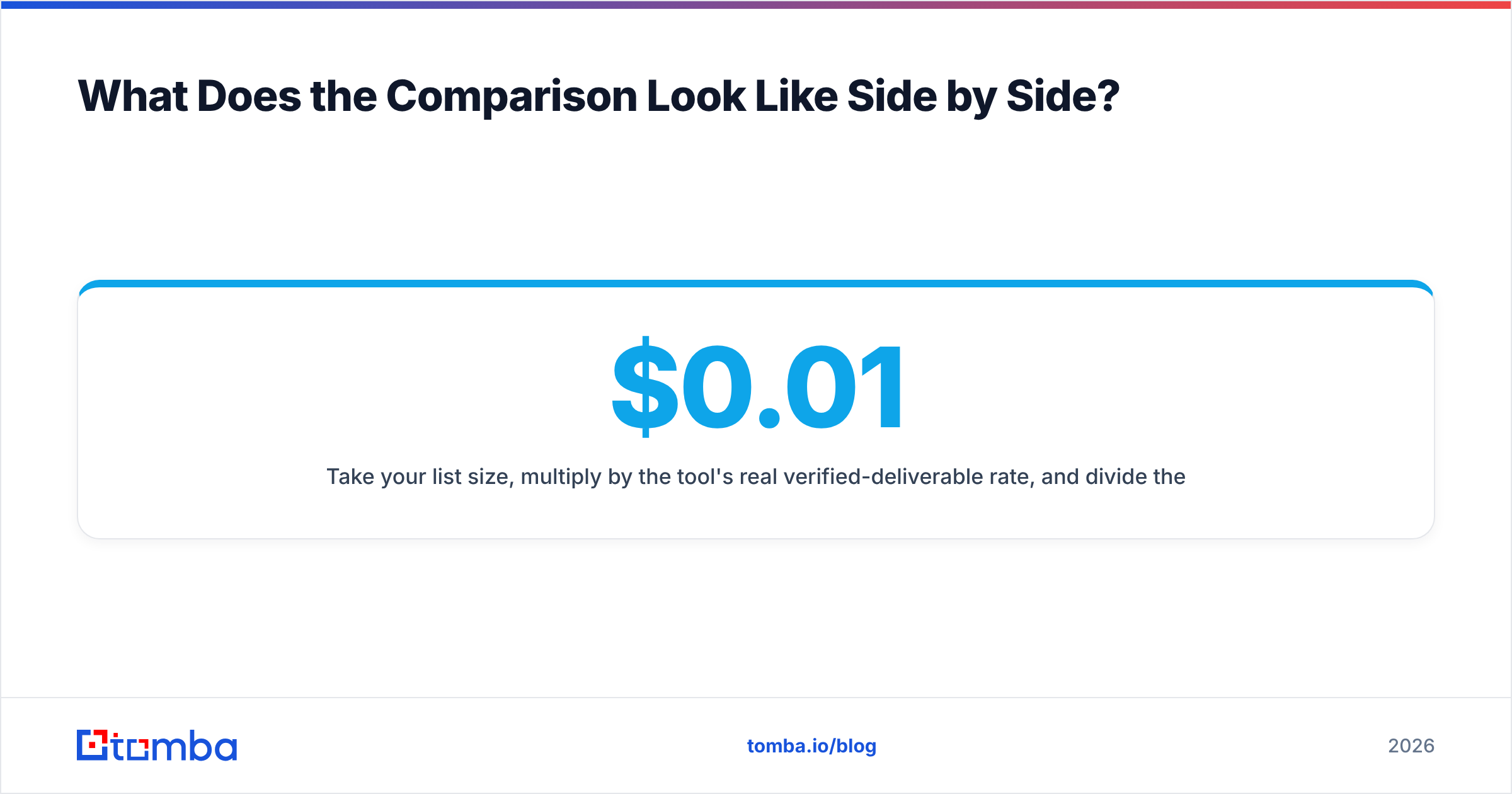
One last framing that saves people money: stop comparing sticker prices and start comparing cost per contact that receives your email.
Take your list size, multiply by the tool's real verified-deliverable rate, and divide the total monthly spend by that number. A database at effectively $0.01 per record with a 64% match rate and a 15% bounce rate delivers to about 54% of your input rows — real cost per delivered contact, roughly $0.019. A $99/mo plan returning 73% matches at a sub-3% bounce rate delivers to about 71% — and if that plan includes verification, phone numbers, and enrichment you'd otherwise buy separately, the gap narrows or flips.
Run that math with your own numbers before renewing anything. It takes ten minutes and it's the only comparison that survives contact with a real campaign.
Getting Started Without Overbuying#
Test before you commit, on your actual ICP rather than a vendor's demo list:
- Pull 100 target companies you genuinely want to reach.
- Run them through each candidate tool.
- Measure match rate, then verify every returned address with a neutral third-party verifier.
- Compare verified match rates, not raw match rates.
Vendors optimize for the number they report. You should optimize for the number that lands in an inbox.
That is the whole easy email verification vs LeadRocks question in one line: clean the list you have, or buy the list you don't — then verify it either way. If you want to run that test now, start with the free tier — 25 searches a month, no card — and put Tomba's Email Finder against whatever you're using today on the same 100 companies. Every result comes back with a verification status and a confidence score attached, so you're comparing deliverable contacts rather than optimistic guesses. If the numbers favor your current tool, keep it. If they don't, Tomba pricing starts at $49/mo on Starter and $99/mo on Growth, with finder, verifier, catch-all checks, phone lookup, and enrichment in the same plan instead of three.
Related guides#
Ready to find emails that actually work?
Join 150,000+ professionals who stopped guessing and started sending. Free credits on signup — no credit card required.
Get the Tomba newsletter
Practical outbound tactics and product updates — once every two weeks.
About the author