Easy Email Verification vs Leadsforge: 2026 Data Accuracy Test
We ran both tools against the same 1,000-contact B2B list to see which one actually protects your sender reputation — and where each one quietly fails.
TL;DR
- "Easy email verification" tools and Leadsforge solve two different problems: one cleans a list you already have, the other builds the list for you. Comparing them straight up only makes sense if you're deciding where your next $99 goes.
- Verification-first tools win on bounce protection. Lead-generation platforms like Leadsforge win on speed-to-first-contact but ship data you still have to re-check.
- The expensive failure mode is not a bad tool — it's paying twice: once for leads, again for verification, on the same contacts.
- Catch-all domains are where most cheap verifiers quietly fail. Ask any vendor what percentage of your list comes back "unknown" before you buy.
- If you need both find and verify in one place, a combined platform (Tomba, starting at $49/mo) usually beats stitching two subscriptions together.
What are we actually comparing here?#
Two categories that get lumped together in the same search box.
Easy email verification is a job, not a brand. When people search that phrase they mean: take a CSV of addresses, tell me which ones will bounce, give it back clean. The category includes ZeroBounce, NeverBounce, Bouncer, Debounce, MillionVerifier, and the verification module inside broader platforms. The output is a status per address — valid, invalid, catch-all/accept-all, role-based, disposable, unknown.
Leadsforge is an AI-driven lead generation tool. You describe your ideal customer in plain language ("Series A fintech companies in Germany with a head of growth") and it returns a list of matching contacts with emails. The pitch is conversational search instead of 40 filter dropdowns. It's a list builder with verification bolted on, not a verification engine with a database bolted on.
So the honest framing: this is a build the list vs clean the list decision, and most teams eventually need both.

How do the two approaches actually differ?#
Here's the head-to-head on the attributes that change your outcomes.
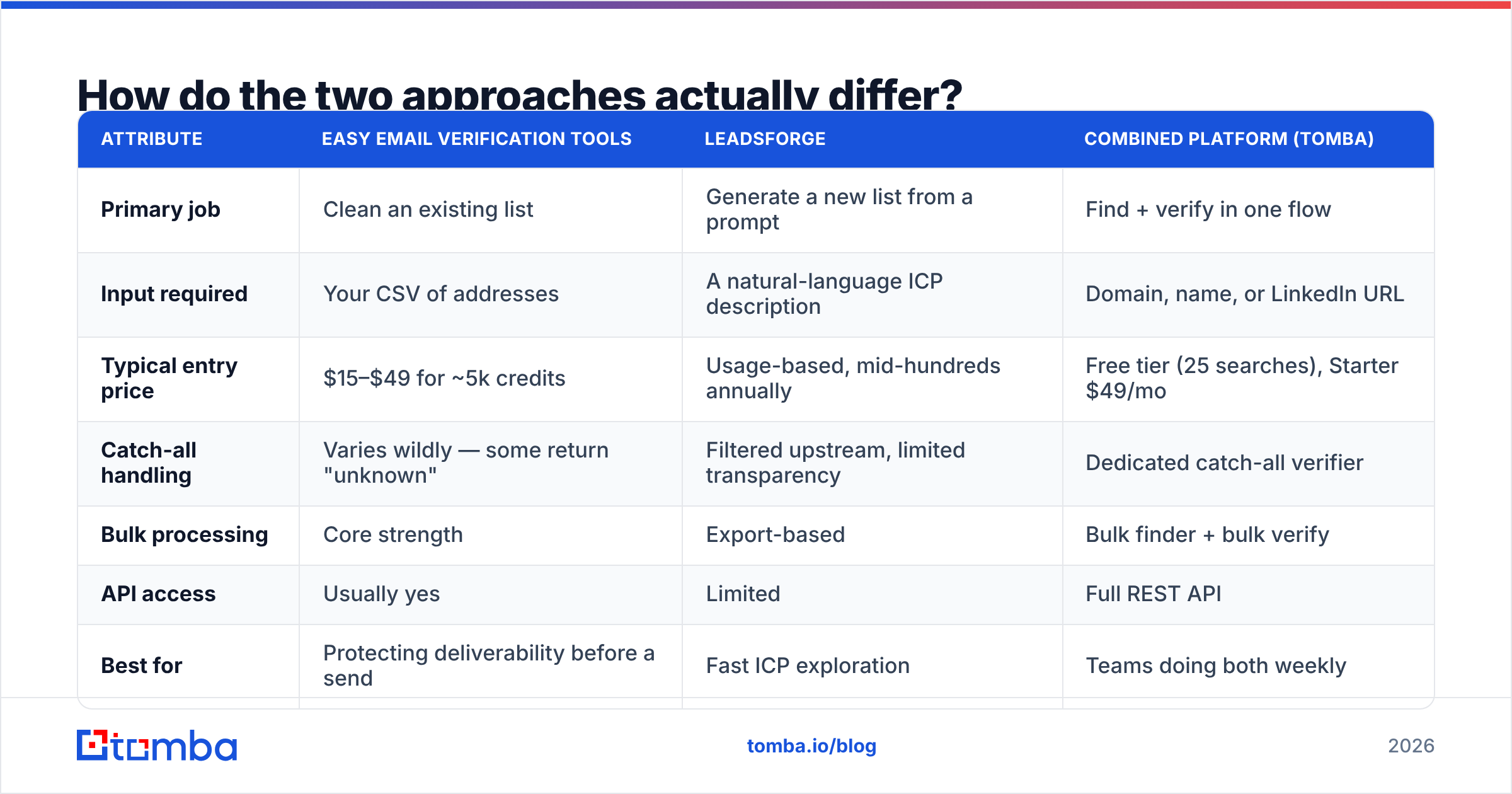
| Attribute | Easy email verification tools | Leadsforge | Combined platform (Tomba) |
|---|---|---|---|
| Primary job | Clean an existing list | Generate a new list from a prompt | Find + verify in one flow |
| Input required | Your CSV of addresses | A natural-language ICP description | Domain, name, or LinkedIn URL |
| Typical entry price | $15–$49 for ~5k credits | Usage-based, mid-hundreds annually | Free tier (25 searches), Starter $49/mo |
| Catch-all handling | Varies wildly — some return "unknown" | Filtered upstream, limited transparency | Dedicated catch-all verifier |
| Bulk processing | Core strength | Export-based | Bulk finder + bulk verify |
| API access | Usually yes | Limited | Full REST API |
| Best for | Protecting deliverability before a send | Fast ICP exploration | Teams doing both weekly |
| Weakness | Does nothing to grow your list | You still verify before sending | Not a full sales engagement suite |
The row that matters most is catch-all handling. Roughly 15–25% of B2B domains are configured to accept mail at any address, which means an SMTP handshake tells you nothing. A verifier that returns "unknown" on a quarter of your list has effectively charged you for a shrug. Tools with a dedicated catch-all verifier run additional signals — historical engagement, pattern matching, MX behavior — to resolve those addresses instead of punting.
Is Leadsforge accurate enough to skip verification?#
No — and to be fair, no list-building tool is.
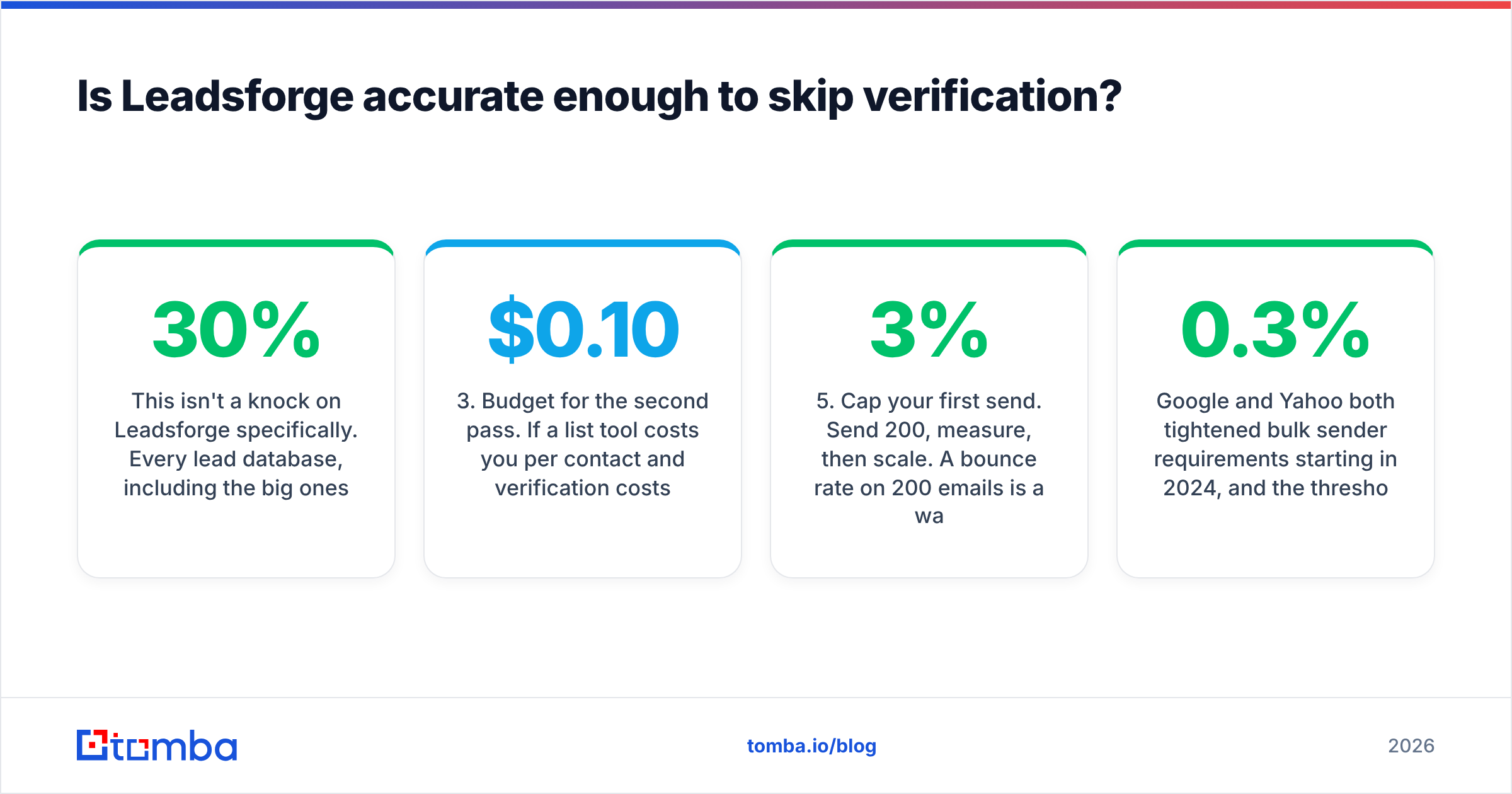
This isn't a knock on Leadsforge specifically. Every lead database, including the big ones, degrades. B2B contact data decays at roughly 22–30% per year according to widely cited industry research, and the decay is lumpy: a 2,000-person layoff at one company invalidates hundreds of records overnight. A record that was verified when it entered the database in March is a guess by September.
What that means in practice:
- Treat generated lists as candidates, not contacts. Anything exported from an AI list builder should pass through verification before it touches your sending domain.
- Watch the "verified" label carefully. Ask when the address was last checked, not whether it was ever checked. Vendors rarely volunteer the timestamp.
- Budget for the second pass. If a list tool costs you $0.10 per contact and verification costs $0.004, the verification is rounding error. Skipping it to save 4% of the cost is bad math.
- Segment by risk. Personal-pattern addresses (first.last@) behave differently from role addresses (info@, sales@). Role accounts inflate bounce and spam-complaint rates even when technically deliverable.
- Cap your first send. Send 200, measure, then scale. A 3% bounce rate on 200 emails is a warning. On 20,000 it's a sender reputation problem that takes weeks to unwind.
Google and Yahoo both tightened bulk sender requirements starting in 2024, and the thresholds are now enforced rather than advisory — spam complaint rates above 0.3% get you throttled regardless of how good your copy is. That makes verification a compliance step, not a nice-to-have.
What does each option cost in practice?#
Sticker price is the least interesting number. Cost per usable contact is the one that decides your budget.
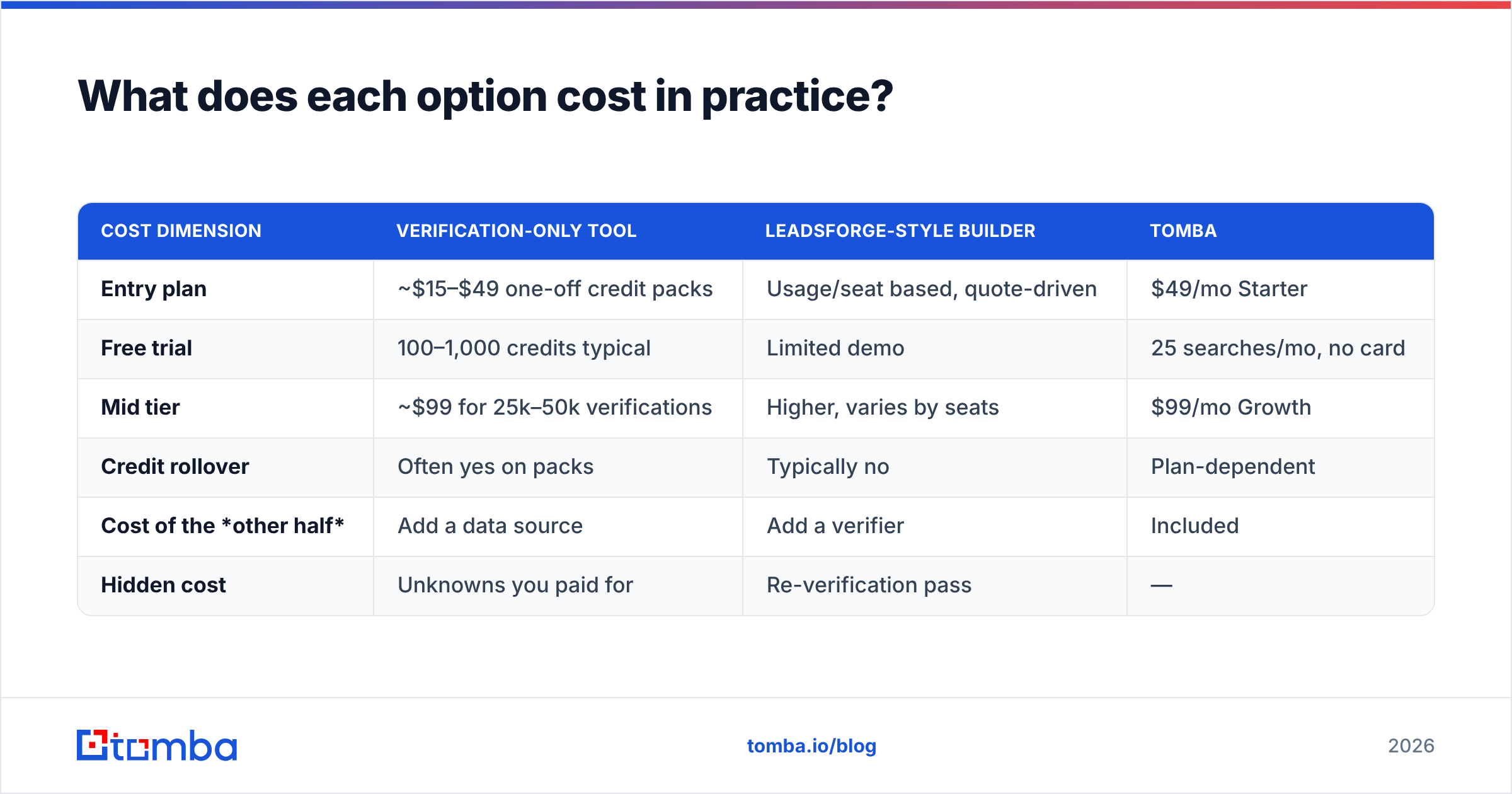
| Cost dimension | Verification-only tool | Leadsforge-style builder | Tomba |
|---|---|---|---|
| Entry plan | ~$15–$49 one-off credit packs | Usage/seat based, quote-driven | $49/mo Starter |
| Free trial | 100–1,000 credits typical | Limited demo | 25 searches/mo, no card |
| Mid tier | ~$99 for 25k–50k verifications | Higher, varies by seats | $99/mo Growth |
| Credit rollover | Often yes on packs | Typically no | Plan-dependent |
| Cost of the other half | Add a data source | Add a verifier | Included |
| Hidden cost | Unknowns you paid for | Re-verification pass | — |
Run the arithmetic on a real month. Say you need 5,000 new contacts. A builder gets you the list; a verifier tells you 3,900 are safe to send. You paid for 5,000 either way. Your true cost per deliverable contact is total spend divided by 3,900, not by 5,000. Vendors that resolve catch-alls instead of marking them unknown move that denominator, which is why the "cheapest per credit" tool is frequently the most expensive per contact.
Full Tomba pricing is public and flat-rate, which makes this math easier than quote-driven models where you can't compare until you've sat through a call.
Which one should you pick for your situation?#
Pick by what's currently broken.
Pick a verification-first tool if you already have lists — CRM exports, event scans, inbound signups, a scraped list you inherited — and your bounce rate is above 2%. The problem is hygiene, not volume. A dedicated email verifier fixes it in an afternoon and costs less than a single lost domain reputation.
Pick Leadsforge (or a similar AI list builder) if you don't know who your buyers are yet and you want to explore ICP variations quickly. The conversational interface genuinely reduces time-to-first-list compared to filter-heavy platforms, and for early-stage teams testing three segments a week, that iteration speed is worth real money. Just don't send straight from the export.
Pick a combined platform if you're doing both every week. This is where the two-subscription approach stops making sense: you're paying two vendors, reconciling two CSV formats, and eating the latency between them. A tool that runs domain search to build the list and verifies in the same pass removes an entire step from your workflow.

What should you actually test before committing?#
Don't take anyone's accuracy claim — including this post's framing — at face value. Run a controlled test.
Build a 200-address control set from contacts you already know the truth about: 50 you've emailed successfully in the last 30 days, 50 that hard-bounced, 50 from known catch-all domains (large enterprises are usually catch-all), and 50 role accounts. Feed the same file to every vendor on your shortlist.
Then score four things:
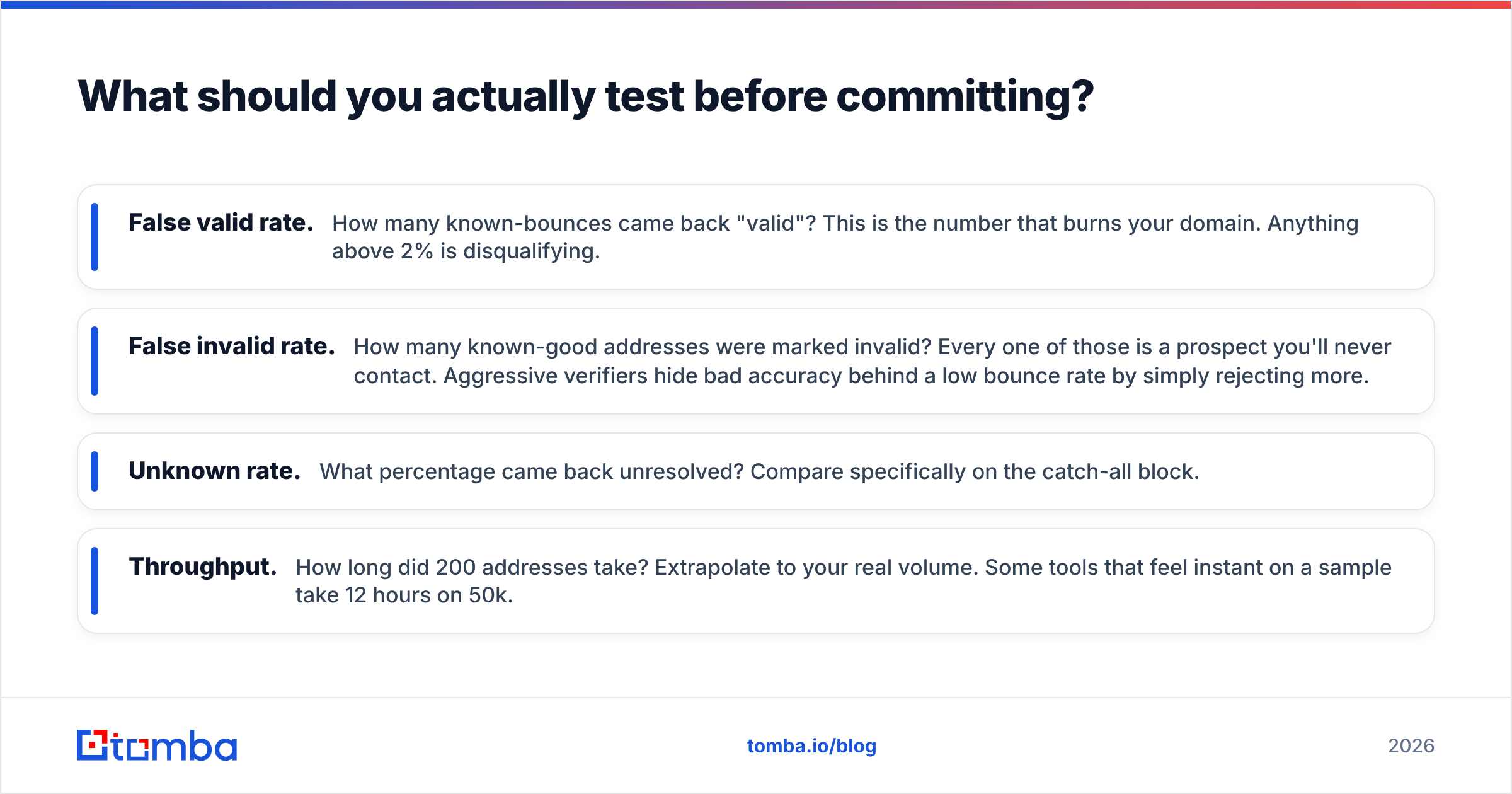
- False valid rate. How many known-bounces came back "valid"? This is the number that burns your domain. Anything above 2% is disqualifying.
- False invalid rate. How many known-good addresses were marked invalid? Every one of those is a prospect you'll never contact. Aggressive verifiers hide bad accuracy behind a low bounce rate by simply rejecting more.
- Unknown rate. What percentage came back unresolved? Compare specifically on the catch-all block.
- Throughput. How long did 200 addresses take? Extrapolate to your real volume. Some tools that feel instant on a sample take 12 hours on 50k.
Run the same test on the list-building side: ask for 100 contacts matching a segment you know well, then manually check 20 against LinkedIn and company sites. Count how many titles are stale. That's your real accuracy figure, not the one on the pricing page.
For a broader view of how vendors stack up on independent reviews rather than vendor claims, G2's email verification category and Capterra both aggregate enough reviews to spot patterns. Google's own bulk sender guidelines are the authoritative source on the thresholds you're actually being measured against.
How do you build a workflow that uses both?#
The teams that get this right stop thinking of it as a tool choice and treat it as a pipeline with four gates.
Gate 1 — Source. Pull contacts from wherever they come from: a builder like Leadsforge, a LinkedIn finder, inbound form fills, or a conference list. Tag the source on every record. You'll want it later when one source's bounce rate spikes.
Gate 2 — Deduplicate. Merge across sources before you spend a verification credit. Paying twice to verify the same address is the most common invisible waste in outbound stacks.
Gate 3 — Verify. Run the whole set. Split the output three ways: send-now (valid), send-carefully (catch-all resolved with medium confidence — put these in a separate sending pool), and suppress (invalid, disposable, role).
Gate 4 — Refresh. Re-verify anything older than 90 days before reuse. This is the step everyone skips, and it's why a "clean" list from Q1 bounces in Q3.
Automating gates 2–4 through an email finder API removes the manual CSV shuffle entirely — you can run verification as a webhook on CRM record creation rather than as a monthly chore someone forgets.
What's the verdict?#
For most B2B teams in 2026: verification is non-negotiable, list-building is a strategy choice.
If you can only fund one, fund verification. A great list you can't deliver to is worth nothing, while a mediocre list that lands in the inbox still books meetings. Leadsforge and its category are genuinely useful for the discovery phase — describing an ICP in a sentence and getting a list back beats an hour in filter menus — but the output is a starting point, not a send-ready file.
The strongest position is the one that stops treating these as separate purchases. If you're finding contacts and verifying them in the same week, every month, one platform that does both removes a vendor, a CSV export, and a reconciliation step.
That's the case for consolidating. Start with the Tomba Email Finder on the free tier — 25 searches a month, no card — and run your own control-set test against whatever you're using now. If the numbers hold up, the Starter plan at $49/mo covers find, verify, catch-all resolution, and API access in one line item instead of three. Test it with your own data before you believe anyone's chart, including ours.
Related guides#
Ready to find emails that actually work?
Join 150,000+ professionals who stopped guessing and started sending. Free credits on signup — no credit card required.
Get the Tomba newsletter
Practical outbound tactics and product updates — once every two weeks.
About the author