Easy Email Verification vs UpLead: Full 2026 Comparison
One tool cleans the list you already have. The other sells you a list. Here's how Easy Email Verification and UpLead actually compare on pricing, accuracy, and workflow fit in 2026 — plus when you need neither.
Easy Email Verification vs UpLead is the wrong fight to pick, and that is the useful part. One tool cleans a list you already own. The other sells you a list. Here is how the two differ on price, accuracy, and fit.
TL;DR
- Easy Email Verification and UpLead are not really competitors. One is a bulk list-cleaning service. The other is a B2B contact database with verification bundled in. A head-to-head only makes sense if you are deciding where the bounce problem gets solved.
- Pick a verifier (Easy Email Verification and its category peers) when you already have addresses — scraped, imported, exported from an old CRM — and just need the dead ones removed before you send.
- Pick UpLead when you have no list at all and want to build one from filters: industry, headcount, title, tech stack. Verification is applied at export time.
Two cost notes before the detail:
- The expensive mistake is paying twice: a database subscription plus a separate verifier plus an enrichment tool, all billing monthly for overlapping work.
- If your core job is "find the right people's emails and make sure they're real," a combined finder + verifier stack is usually cheaper per usable contact than either specialist alone.
What is Easy Email Verification?#
Easy Email Verification is a pure-play verifier. You bring a list, and it tells you which addresses are safe to mail. There is no discovery step, no filters, no contact database. Upload a CSV, wait, then download a scored file.
Verifiers in this class typically run the same four-stage pipeline:
- Syntax and formatting checks — malformed addresses, illegal characters, stray spaces from a bad paste.
- Domain and MX record checks — does the domain exist, and does it actually accept mail? Dead domains are the single largest bucket in most old lists.
- SMTP handshake — a mailbox-level ping that asks the receiving server whether the specific inbox exists, without delivering a message.
- Risk classification — role accounts (info@, sales@), disposable domains, spam traps, and catch-all servers that accept everything and confirm nothing.
That last bucket is where verifiers separate. Any tool can flag jhon@@acme,com. The hard part is a catch-all domain, where the server answers "yes" to every address you test. Most verifiers return "unknown" or "accept-all" and hand the decision back to you. Tools with a dedicated catch-all verifier make a probabilistic call instead, using pattern data and past send outcomes.
Pricing here is almost always credit-based and pay-as-you-go. You buy a block of credits, one credit checks one address, and they do not expire quickly. That beats a subscription when your cleaning needs are lumpy: one big list in March, then nothing until August.
What is UpLead?#
UpLead is a B2B prospecting database. You don't bring a list — you build one. Filter by industry, company size, revenue, location, job title, seniority, and tech stack. Then export the contacts with emails and, on higher tiers, direct dials.
Its headline pitch is real-time verification at export. UpLead checks the address the moment you reveal it, rather than serving a record last confirmed eighteen months ago. The company markets a 95% accuracy claim and backs it with credit refunds on bounces. That is a real structural difference from databases that sell stale records and let you eat the bounce.
The catch is the billing model. UpLead sells credits inside monthly subscriptions, and each revealed contact burns one. Published tiers have looked like this: a free trial with a handful of credits, an Essentials plan near $99/month, a Plus plan near $199/month, and a custom Professional tier. Check their pricing page before you budget, because vendors here reprice often. On lower tiers, unused credits do not roll over forever, which punishes uneven prospecting months.

Easy Email Verification vs UpLead: is this a fair comparison?#
No — and understanding why is the actual decision.
These two tools sit at different points in the same pipeline:
- Discovery — figuring out who to contact. UpLead does this. Easy Email Verification does not.
- Retrieval — getting the actual email address for a known person or company. UpLead does this from its database. A verifier does not.
- Validation — confirming an address is deliverable. Both do this; it's the verifier's entire job and one feature of UpLead's.
- Enrichment — appending firmographics, phone numbers, LinkedIn URLs. UpLead does this. A verifier does not.
- Ongoing hygiene — re-checking a CRM every quarter as people change jobs. Verifiers are built for this. Databases are not.
So the honest framing is: if you already have contacts, you need a verifier. If you don't, you need a source. Buying a database to solve a bounce-rate problem is overkill. Buying a verifier to solve an empty-pipeline problem solves nothing.
There is a third path, and it is where most teams land. One tool handles retrieval and validation in a single pass. The address gets confirmed when it is found, not in a separate batch job weeks later.
How do Easy Email Verification, UpLead, and Tomba compare?#
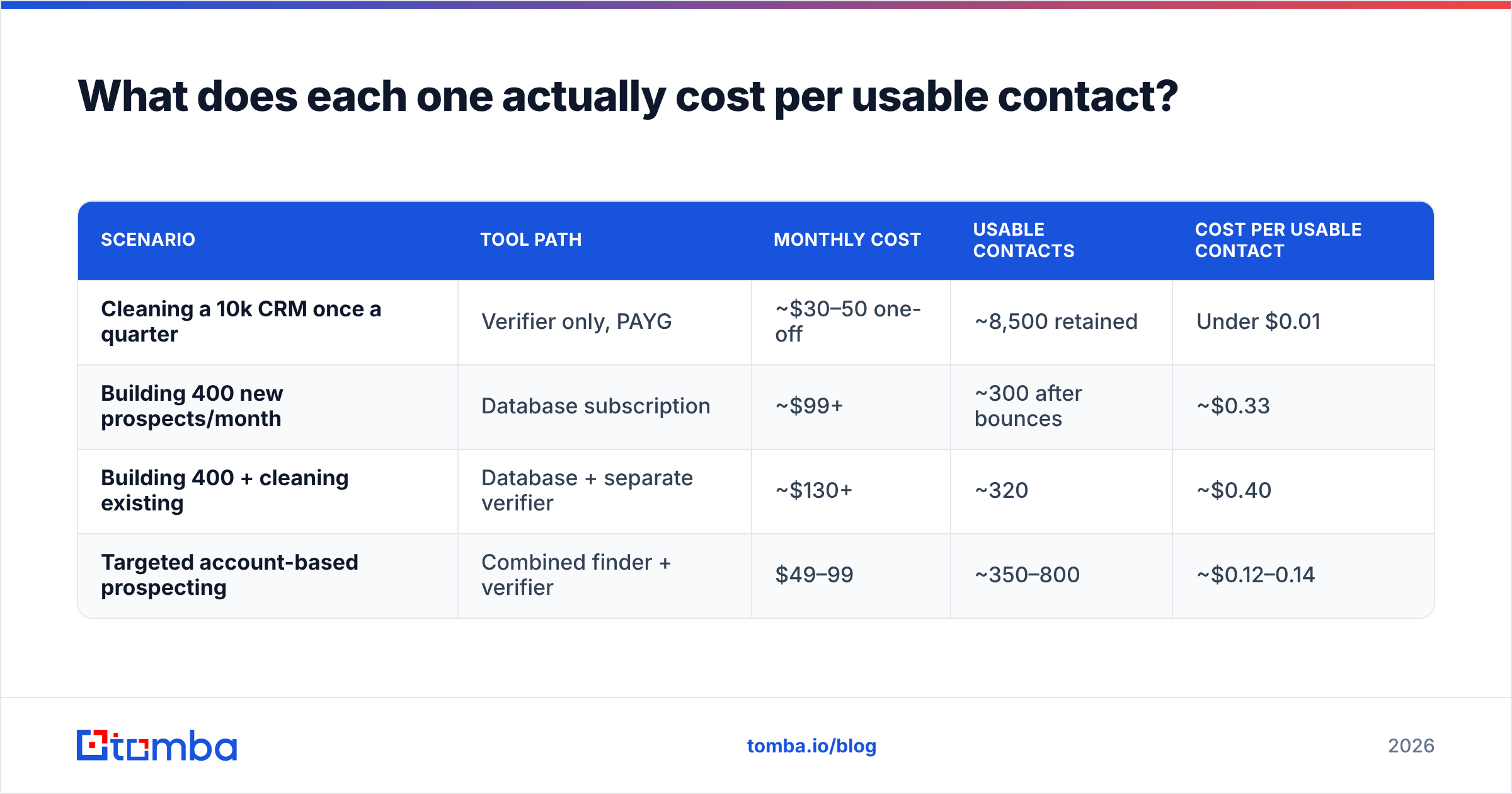
| Attribute | Easy Email Verification | UpLead | Tomba |
|---|---|---|---|
| Primary job | Clean lists you already own | Build lists from filters | Find + verify emails by person or domain |
| Contact discovery | No | Yes — 155M+ contacts, 50+ filters | Yes — domain search, name lookup, LinkedIn |
| Bulk verification | Yes, core product | At export only | Yes, standalone + bulk |
| Catch-all handling | Usually flagged "unknown" | Excluded or flagged | Dedicated catch-all verifier |
| Phone numbers | No | Yes, on higher tiers | Yes, phone finder + validator |
| Entry price | Pay-as-you-go credits | ~$99/mo Essentials | $49/mo Starter |
| Free tier | Small trial credit block | 7-day trial, ~5 credits | 25 searches/month, no card |
| API | Yes | Yes | Yes — finder, verifier, enrichment |
| Spreadsheet add-ons | Limited | CSV export, CRM push | Google Sheets, Excel, Airtable |
| Credit rollover | Typically yes (PAYG) | Limited on lower tiers | Plan-dependent, see pricing |
| Best for | Quarterly CRM hygiene | Cold list building from scratch | Targeted, account-based prospecting |
Two things jump out of that table.
First, the free tiers are not comparable. A 7-day, five-credit trial tells you almost nothing about data coverage in your niche. A recurring monthly allowance works better. Tomba's free plan gives 25 searches a month, so you can test the same accounts over several weeks and see whether coverage holds for your ICP. Test with your own target list, not the vendor's demo domains.
Second, the price floor gap is real. Say your monthly need is a few hundred targeted contacts rather than a few thousand database exports. A $99/month minimum is then a poor fit. This is the most common reason teams shop for an alternative in this category.
How accurate is each one, really?#
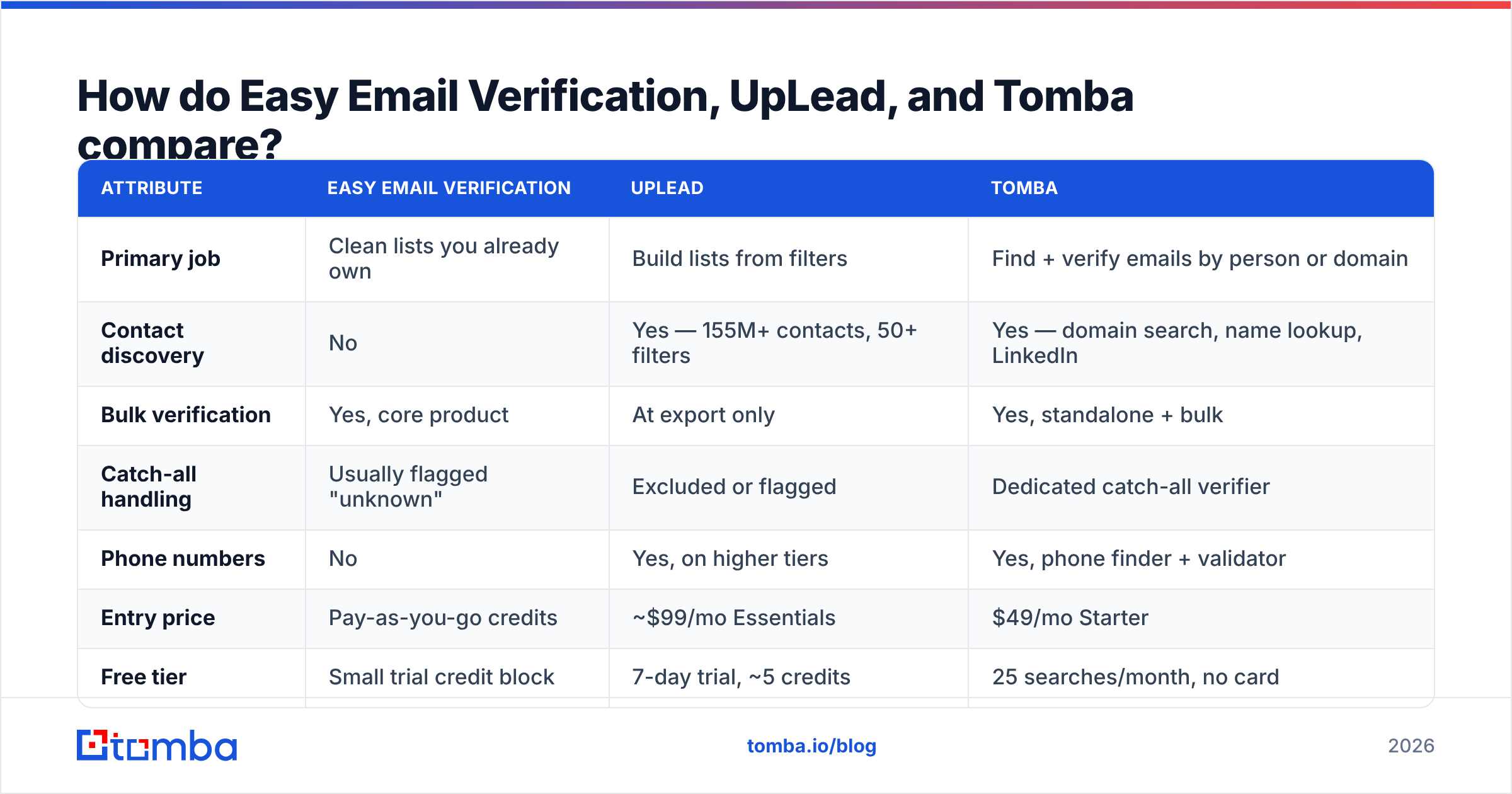
Accuracy claims in this market are close to meaningless without knowing what is being measured. "95% accurate" can mean:
- 95% of returned addresses are deliverable (a precision claim — the useful one)
- 95% of tested addresses were correctly classified (includes correctly saying "invalid")
- 95% of requested contacts returned any result at all (a coverage claim wearing a costume)
Vendors rarely specify. So run your own test, and do it the same way every time.

The 100-row test that actually settles it:
- Build a control list. Take 100 real people at real companies in your ICP. Pull them from LinkedIn, conference speaker pages, or your closed-won accounts. Skip famous brands. Fortune 500 domains are over-represented in every dataset, so they flatter every vendor.
- Run the same list through each tool. For UpLead, filter to those companies and reveal. For a verifier, you need a source of addresses first — pattern-generate them or use a finder, then verify.
- Record coverage and precision separately. Coverage is how many of the 100 returned anything. Precision is how many of those were deliverable. A tool at 40% coverage and 99% precision is a different animal from one at 90% and 80%. Only one of them keeps your domain healthy.
Then check the two things a vendor dashboard will never show you:
- Send a real, small campaign. Fifty addresses, plain text, from a warmed domain. The bounce report is ground truth. Nothing else is.
- Check catch-alls separately. Pull out every address on a catch-all domain and score those on their own. This bucket is where accuracy claims quietly go to die. It can be 20–30% of a B2B list, depending on your vertical.
If you want a fast pre-check before committing credits anywhere, a free email checker will tell you whether a single address is worth chasing. For volumes, the email verifier handles the same logic in batch.
One thing worth crediting UpLead for: refunding credits on bounced contacts is an honest commitment, and not every database does it. It aligns their incentive with yours. Read the terms though — refund policies usually cover hard bounces only, within a stated window.
What does each one actually cost per usable contact?#
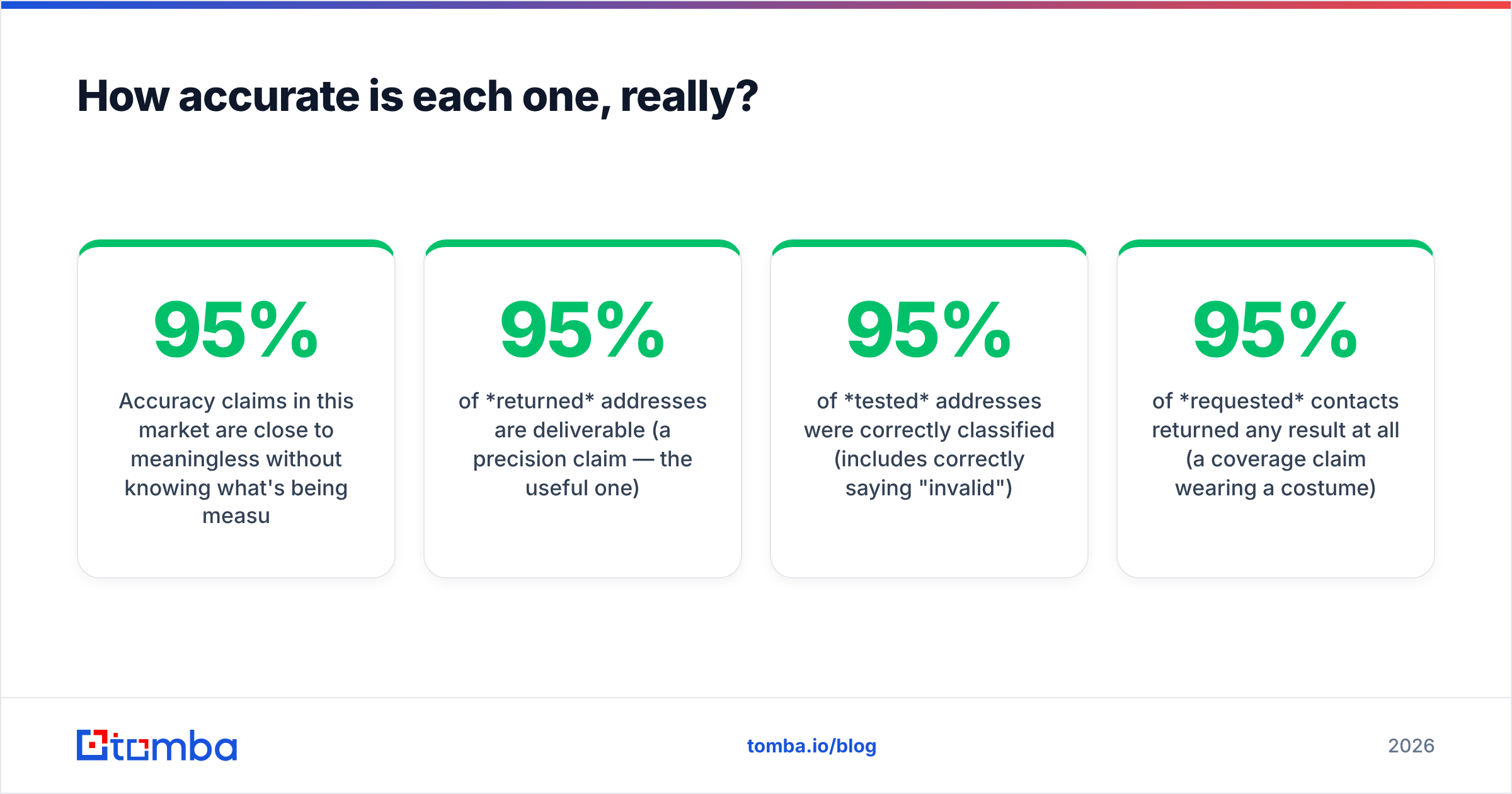
Sticker price is the wrong metric. What matters is cost per contact you can actually email.
Work it out like this: divide plan cost by (credits × coverage rate × precision rate).
| Scenario | Tool path | Monthly cost | Usable contacts | Cost per usable contact |
|---|---|---|---|---|
| Cleaning a 10k CRM once a quarter | Verifier only, PAYG | ~$30–50 one-off | ~8,500 retained | Under $0.01 |
| Building 400 new prospects/month | Database subscription | ~$99+ | ~300 after bounces | ~$0.33 |
| Building 400 + cleaning existing | Database + separate verifier | ~$130+ | ~320 | ~$0.40 |
| Targeted account-based prospecting | Combined finder + verifier | $49–99 | ~350–800 | ~$0.12–0.14 |
Numbers are illustrative. Plug in your own coverage and precision from the 100-row test. The pattern still holds: the two-vendor path is almost always the priciest per usable contact. You pay two monthly minimums for one outcome.

That is the trap worth naming. Teams start with a database. Bounce rates come in worse than promised, so they bolt on a verifier. Then the firmographics look thin, so they add an enrichment tool. Three subscriptions, one job.

Which one should you pick?#
Choose Easy Email Verification (or any solid pay-as-you-go verifier) if:
- You have lists already — from events, webinars, a legacy CRM, a partner handoff.
- Your volume is spiky. PAYG credits that don't expire beat a subscription you use twice a year.
- You are moving to a new ESP and need the list clean before import. Most platforms score you on your first sends.
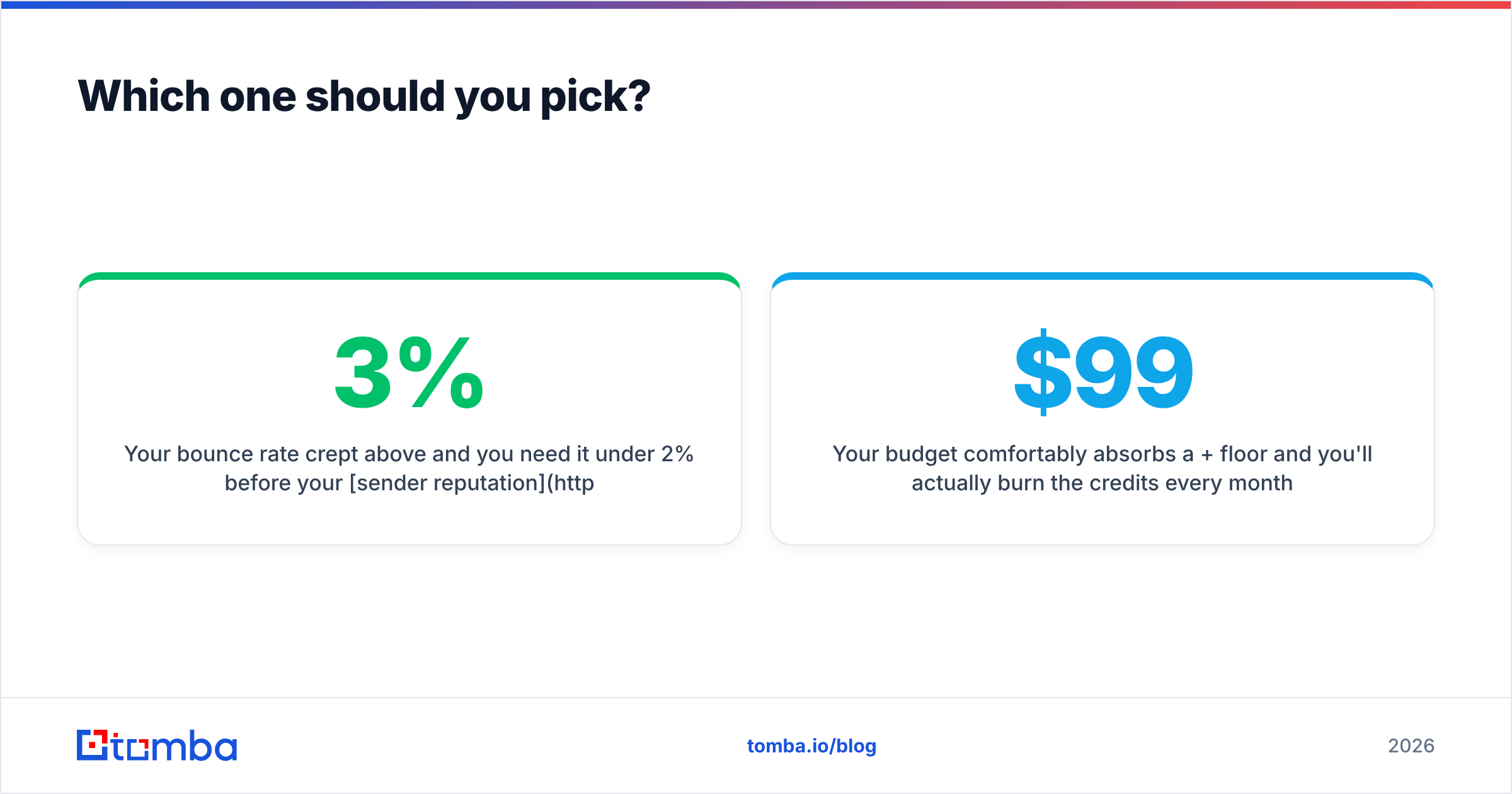
- Your bounce rate crept above 3%. Get it under 2% before your sender reputation takes lasting damage.
Choose UpLead if:
- You're starting cold with no contact data and need volume fast.
- Firmographic and technographic filtering is central to your targeting. "Companies using Shopify Plus with 50–200 employees in DACH" is a query only a database answers.
- You need phone numbers alongside emails in one export.
- Your budget absorbs a $99+/month floor, and you will actually burn the credits every month.
Choose a combined finder + verifier if:
- You know who you want to reach and need their address — the account-based motion, not the spray-and-filter one.
- You want verification to happen at retrieval time, not as a separate batch job.
- You want one line item and one API instead of three.
- You need the same data inside spreadsheets, your CRM, and a script without gluing vendors together.
For that third case, Tomba's email finder resolves an address from a name and domain. It returns a confidence score in the same call. Domain search does the reverse: feed it a company domain and get the mapped contacts with roles and patterns. Both run through the same Tomba API if you would rather build than click. And the bulk email finder handles list-scale jobs when you do have a CSV in hand.
What do reviewers say?#
Skip the vendor sites and read the categories on G2 and Capterra, where the complaint patterns are consistent across this market:
- Database tools: coverage is strong in US tech, thinner in EMEA, APAC, and non-tech verticals. Credit expiry frustrates seasonal users. Data on smaller companies goes stale fastest.
- Verifier tools: fast and cheap, but the "unknown / catch-all" bucket is a recurring complaint because it shifts the decision back to the user.
- Both: support responsiveness and refund handling drive more review sentiment than raw accuracy does.
Filter reviews by company size close to yours. A 2,000-seat enterprise and a three-person agency are judging completely different products under the same brand name. For the wider funnel view, HubSpot's sales prospecting guide is a fair, neutral primer on the process side.
How do you avoid burning credits during evaluation?#
Four rules that save real money:
- Never trial two tools on different lists. Same 100 rows, same week, same measurement. Otherwise you're comparing niches, not vendors.
- Verify before you export, not after. If a database charges a credit for a bad record, that credit is spent whether the address works or not. Refund policies help, but you have to file.
- Deduplicate first. Running the same address through a verifier twice bills twice. A remove duplicates pass before upload is free and often trims 5–15% off a merged list.
- Segment catch-alls out of your first campaign. Send to confirmed-valid addresses first and set a clean baseline. Then test the catch-all segment in small batches once your email deliverability is stable.
What's the verdict?#
Easy Email Verification vs UpLead comes down to one question: do you have a list, or do you need one? Both tools do their jobs, and neither is bad. If your list exists and it is dirty, a verifier is the cheap, correct answer. If you have no list and need one built from filters, a database is the right answer, and $99/month is a fair price for it.
But if you are reading a "vs" post at all, the real answer may be neither one alone. Most teams do not need a warehouse of 155 million contacts. They do not need a standalone batch cleaner either. They need the right email for a specific person at a specific company, confirmed before it hits the sequence, at a price that does not assume enterprise volume.
That is the gap Tomba is built for. Start on the free tier of the Tomba Email Finder: 25 searches a month, no card required. Run it against the same 100-row control list you would use to test anything else. If coverage and precision hold for your ICP, the $49/month Starter plan replaces both line items you were about to sign up for. If they do not, you have spent nothing finding out.
Related guides#
Ready to find emails that actually work?
Join 150,000+ professionals who stopped guessing and started sending. Free credits on signup — no credit card required.
Get the Tomba newsletter
Practical outbound tactics and product updates — once every two weeks.
About the author