EasyLeadz vs QuickEnrich (2026): Full Feature Comparison
EasyLeadz sells direct dials. QuickEnrich sells enrichment throughput. They solve different problems and price them very differently — here is the honest breakdown, plus where each one quietly fails.
TL;DR
- EasyLeadz (best known for its Mr. E extension) is a phone-first contact tool. Its strongest asset is direct-dial mobile numbers, especially across India and APAC. Email is a secondary output, not the headline.
- QuickEnrich is an enrichment-first product: you push records in, you get contact and company fields back. It is built around API and bulk throughput rather than one-off browser lookups.
- The two rarely compete head-on. If your reps live on the phone, EasyLeadz wins. If you are filling gaps in a CRM or a lead-capture pipeline, QuickEnrich's model fits better.
- Both use credit systems that behave differently under load. EasyLeadz charges per revealed contact; enrichment tools typically charge per successful match — and the definition of "successful" is where budgets leak.
- If email accuracy and per-domain coverage are what you actually need, a dedicated finder like Tomba is usually cheaper per verified address than either.

What are EasyLeadz and QuickEnrich?#
They are both B2B contact data vendors, but they were built to answer different questions.
EasyLeadz started as a lead-intelligence service and became known through Mr. E, its Chrome extension. You open a LinkedIn profile, click the extension, and it attempts to return a direct mobile number for that person. That single workflow — profile to phone in one click — is the product's center of gravity. Company data, email, and list building exist around it, but they are supporting acts.
QuickEnrich sits on the other side of the fence. It is an enrichment layer: you feed it partial records (an email, a domain, a name plus company) and it returns a filled-out profile — job title, company, location, social handles, and often a work email or phone. The interaction model is API-first and batch-friendly rather than click-by-click.
That distinction matters more than any feature checklist. Here is the practical framing:
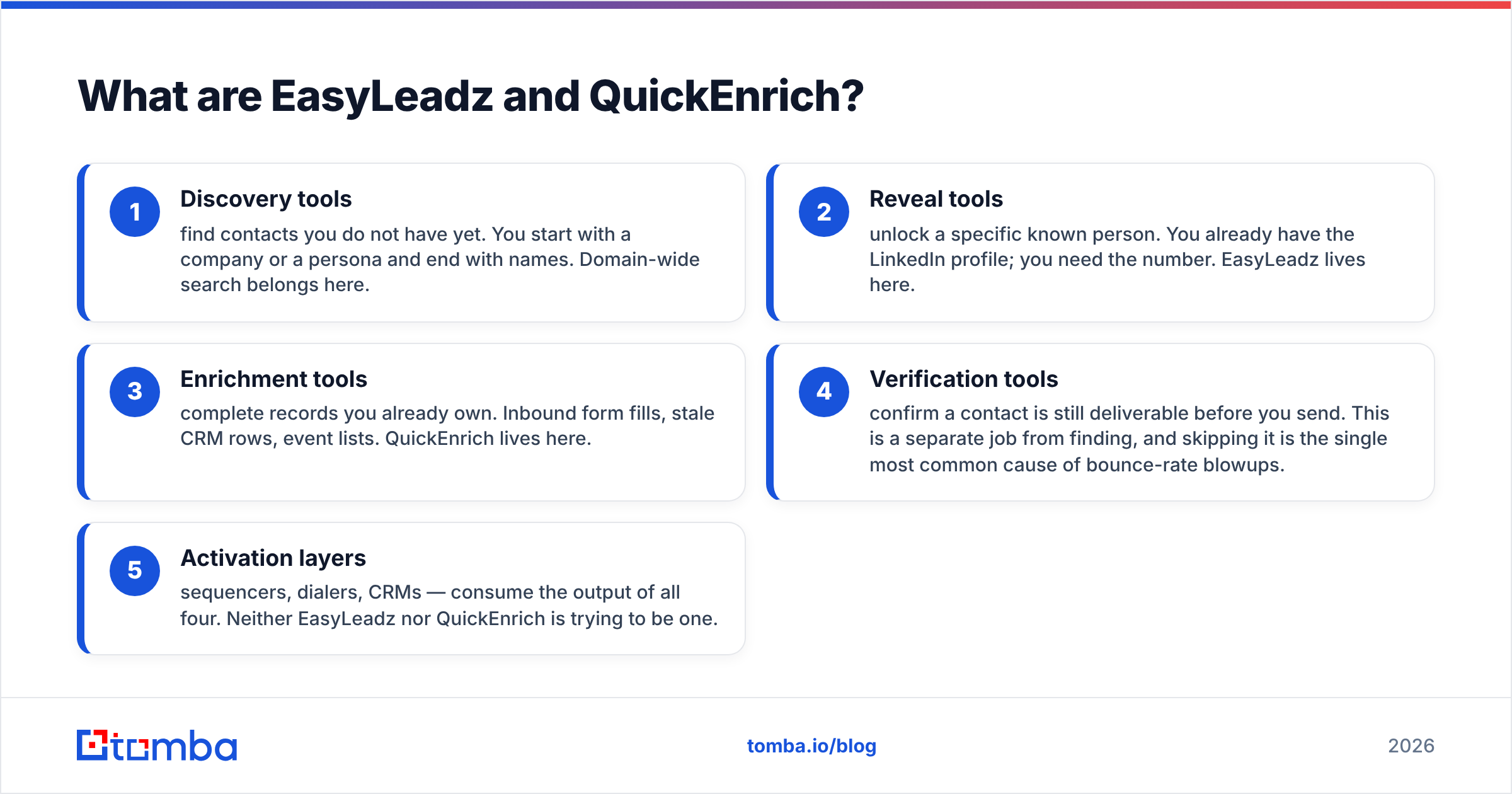
- Discovery tools find contacts you do not have yet. You start with a company or a persona and end with names. Domain-wide search belongs here.
- Reveal tools unlock a specific known person. You already have the LinkedIn profile; you need the number. EasyLeadz lives here.
- Enrichment tools complete records you already own. Inbound form fills, stale CRM rows, event lists. QuickEnrich lives here.
- Verification tools confirm a contact is still deliverable before you send. This is a separate job from finding, and skipping it is the single most common cause of bounce-rate blowups.
- Activation layers — sequencers, dialers, CRMs — consume the output of all four. Neither EasyLeadz nor QuickEnrich is trying to be one.
Most teams that "compare EasyLeadz vs QuickEnrich" are actually deciding which of those four jobs they are short on. Answer that first and the tool choice mostly resolves itself.
How do EasyLeadz and QuickEnrich compare on features and pricing?#
Public pricing for both vendors moves, and enterprise quotes are negotiated, so treat the numbers below as a shape rather than a contract. Verify current tiers on each vendor's site before you commit.
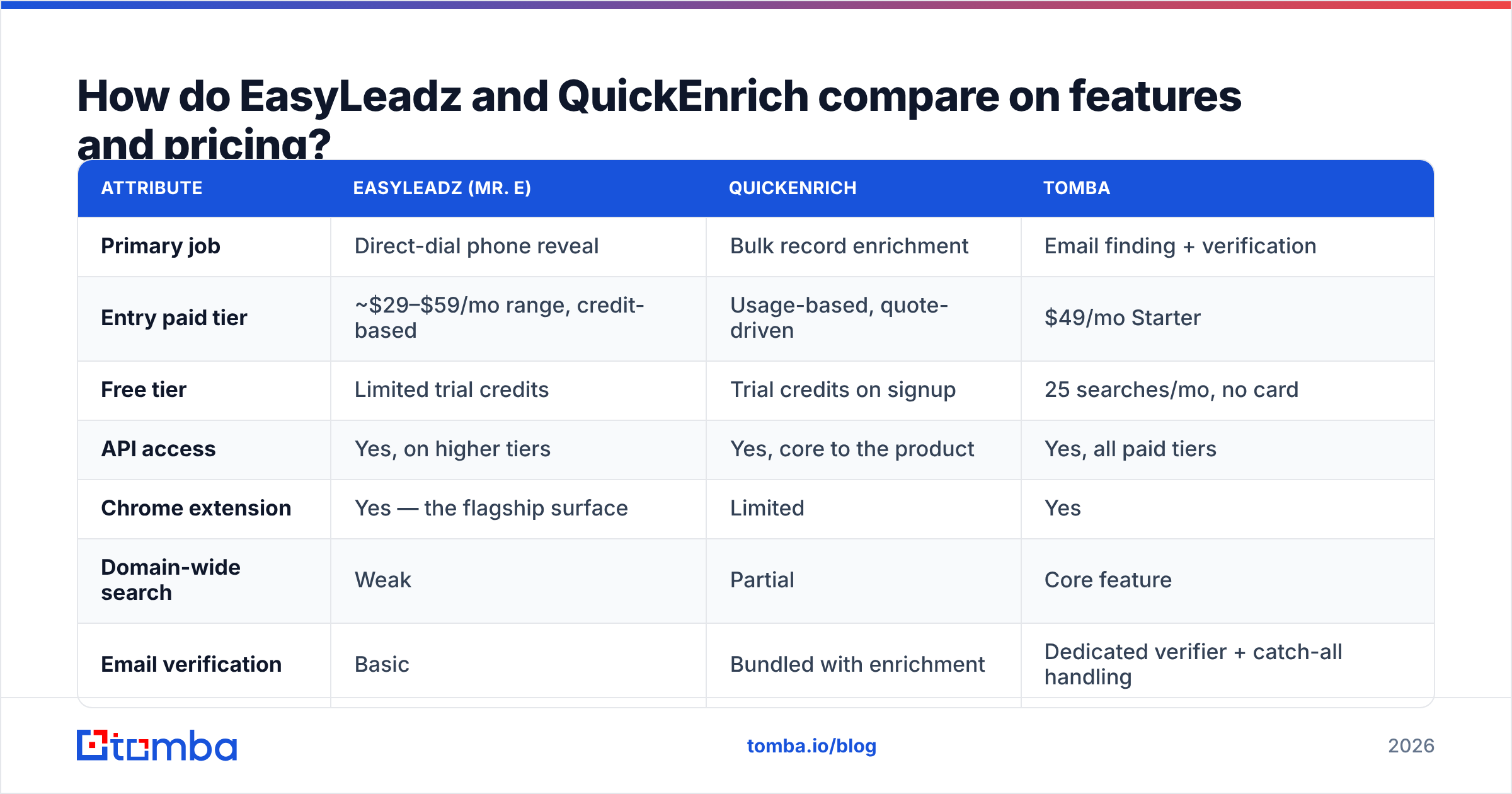
| Attribute | EasyLeadz (Mr. E) | QuickEnrich | Tomba |
|---|---|---|---|
| Primary job | Direct-dial phone reveal | Bulk record enrichment | Email finding + verification |
| Entry paid tier | ~$29–$59/mo range, credit-based | Usage-based, quote-driven | $49/mo Starter |
| Free tier | Limited trial credits | Trial credits on signup | 25 searches/mo, no card |
| API access | Yes, on higher tiers | Yes, core to the product | Yes, all paid tiers |
| Chrome extension | Yes — the flagship surface | Limited | Yes |
| Domain-wide search | Weak | Partial | Core feature |
| Email verification | Basic | Bundled with enrichment | Dedicated verifier + catch-all handling |
| Phone numbers | Strong, esp. India/APAC | Available, variable | Available via phone finder |
| Bulk CSV upload | Yes | Yes, primary workflow | Yes |
| Best for | SDRs who cold call | RevOps filling CRM gaps | Outbound email at volume |
Two things jump out.
First, the free tiers are not comparable. A trial pack of credits that expires in 7 days is a sales tool. A standing monthly free allowance is a product tier. If you are evaluating on a small budget, that difference decides whether you can actually test the data before paying.
Second, credit definitions differ. EasyLeadz charges when it reveals a contact. Enrichment platforms typically charge per successful match, but "successful" can mean "we returned any field," including a company field you already had. Ask for the exact billing trigger in writing. On a 50,000-record enrichment run, a loose definition can double your invoice.
Which one is more accurate?#
Accuracy is not one number, and any vendor quoting a single percentage is compressing three separate things: coverage (did it find anything), precision (is what it found correct), and freshness (is it still correct today).

EasyLeadz on phones. Its reputation for Indian mobile numbers is earned. Users on G2 consistently report strong hit rates on APAC contacts and noticeably thinner results for North American and Western European mid-market. If your ICP is Indian SaaS, manufacturing, or services, that regional strength is a genuine differentiator no US-centric database matches.
EasyLeadz on emails. Weaker. Email is a secondary output, and it shows in both coverage and verification depth. You will want a separate verification pass before you send anything at volume.
QuickEnrich on enrichment. Enrichment accuracy depends almost entirely on your input quality. Feed it a clean work email and match rates are high. Feed it "John Smith, Acme" with no domain and you are relying on the vendor's disambiguation logic, which is where every enrichment tool degrades. Test with your actual messiest 500 records, not the vendor's demo file.
The freshness problem nobody prices in. B2B contact data decays roughly 2–3% per month as people change jobs. A database that was 95% accurate at ingestion is materially worse a year later. This is why a snapshot benchmark is close to meaningless and why real-time verification at send time matters more than the vendor's marketing number. Run any list through an email verifier immediately before the campaign, not when you bought it.
How to run a fair test in an afternoon:
- Pull 200 contacts you can independently confirm — customers, past deals, people in your own CRM with confirmed replies.
- Strip the known fields, feed the rest to each tool.
- Score three columns separately: found, correct, still current.
- Divide your total credit spend by the count of correct and current results. That is your true cost per usable contact, and it is always higher than the sticker price per credit.
How do the credit models actually differ?#
This is where the two products diverge most and where evaluation spreadsheets usually go wrong.
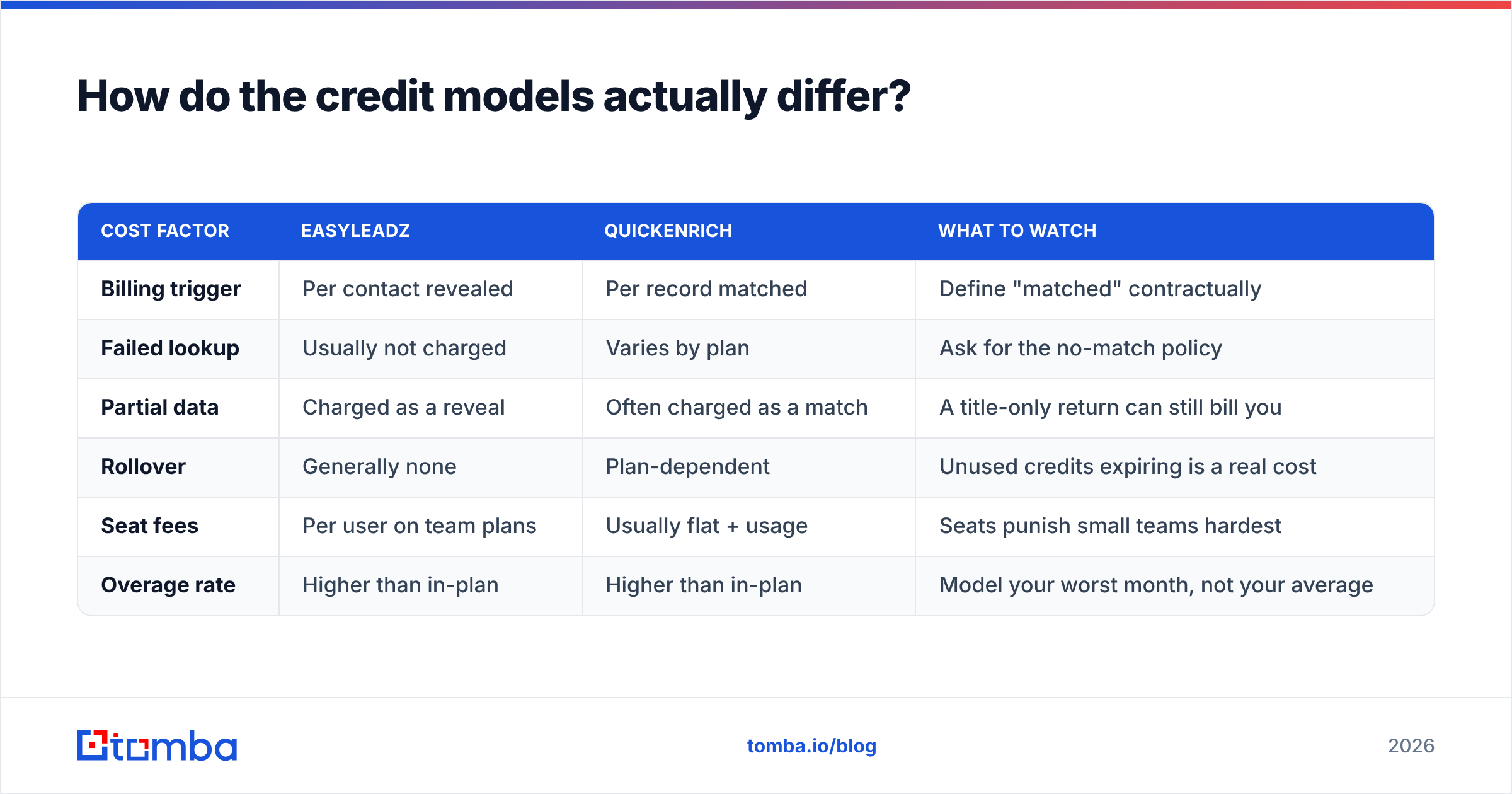
| Cost factor | EasyLeadz | QuickEnrich | What to watch |
|---|---|---|---|
| Billing trigger | Per contact revealed | Per record matched | Define "matched" contractually |
| Failed lookup | Usually not charged | Varies by plan | Ask for the no-match policy |
| Partial data | Charged as a reveal | Often charged as a match | A title-only return can still bill you |
| Rollover | Generally none | Plan-dependent | Unused credits expiring is a real cost |
| Seat fees | Per user on team plans | Usually flat + usage | Seats punish small teams hardest |
| Overage rate | Higher than in-plan | Higher than in-plan | Model your worst month, not your average |
Two structural traps:
Seat-based pricing on a five-person team. If a tool charges per seat and only two reps use it daily, you are paying for three idle licenses every month. Usage-based pricing is almost always cheaper below ten users.
Enrichment charged on partial returns. If a match that returns only a job title bills the same as one returning a verified email plus phone, your effective cost per useful record can be three or four times the headline. This is the single most common enrichment billing surprise.
Compare that with a flat, transparent structure. Tomba pricing runs Free (25 searches/mo), Starter $49/mo, Growth $99/mo, Pro $249/mo, and custom Enterprise, with no per-seat charge on standard tiers. Whether that is cheaper for you depends entirely on volume — but you can model it on a napkin, which is not true of every quote-driven vendor.
Which should you pick for your use case?#
- You run outbound calling into India or APAC. EasyLeadz, without much debate. The regional phone coverage is its moat and no generalist database replicates it. Budget for a separate email source.
- You have 40,000 CRM rows with missing fields. QuickEnrich or a comparable enrichment API. This is a batch job, not a browsing job, and paying per browser click would be absurd at that volume.
- You are building outbound email lists from scratch by company. Neither is ideal. You need domain-first discovery — give me every marketing contact at these 300 companies — which is what a domain search does natively and what reveal tools do poorly.
- You need both phones and emails on the same list. Expect to run two tools. Very few vendors are genuinely strong at both, and the ones claiming to be usually license phone data from a third party anyway.
- You are a two-person team testing product-market fit. Start on free tiers and measure real cost per usable contact before signing anything annual. Annual contracts on unvalidated data quality are how small teams burn a quarter of their tooling budget.
What do both tools miss?#
Three gaps show up in almost every evaluation, regardless of which vendor wins.
Catch-all domains. A large share of B2B domains accept mail to any address, so standard SMTP verification returns "unknown" rather than valid or invalid. Most tools either drop these contacts (you lose real prospects) or pass them through unflagged (you eat bounces). Neither behavior is good. Specialized catch-all verification applies pattern confidence and secondary signals to give you a usable risk score instead of a shrug. On enterprise-heavy lists, catch-alls can be 20–30% of your total addresses — that is not an edge case.
Deliverability context. Finding a valid address is step one. Whether your message lands in the inbox depends on your domain authentication, sending reputation, and warmup history. A perfect list on a cold domain still fails. Neither of these tools manages that side, and HubSpot's outbound research is consistent on the point: infrastructure hygiene explains more reply-rate variance than list source does.
Workflow gravity. The best data source is the one your reps actually use. A tool with slightly lower coverage that lives inside their existing workflow — spreadsheet, CRM, sequencer — will out-produce a more accurate one requiring a context switch. Check integration depth before you check accuracy claims. If the workflow is programmatic, a well-documented email finder API beats a better UI every time.
Is there a better option than either?#
Sometimes — but only if your job is genuinely email discovery rather than phone reveal or record completion.
If your motion is company-first outbound at volume, the pattern you want looks like this: identify target domains, pull every relevant contact per domain, verify before sending, then push to your sequencer. That is a discovery-plus-verification workflow, and both EasyLeadz and QuickEnrich handle it as a side capability rather than a core one.
Tomba is built specifically for that path. The email finder resolves name-plus-domain to a verified address, domain search returns full contact sets per company, bulk processing handles list-scale jobs, and verification — including catch-all handling — runs on the same platform rather than as a separate vendor relationship. Pricing is flat and public, so you can model annual cost without a sales call.
The honest limitation: Tomba is not a direct-dial phone specialist for the Indian market. If that is your primary need, EasyLeadz is genuinely better at it, and you should buy it. Tools are not religions — buy the one that solves your bottleneck.
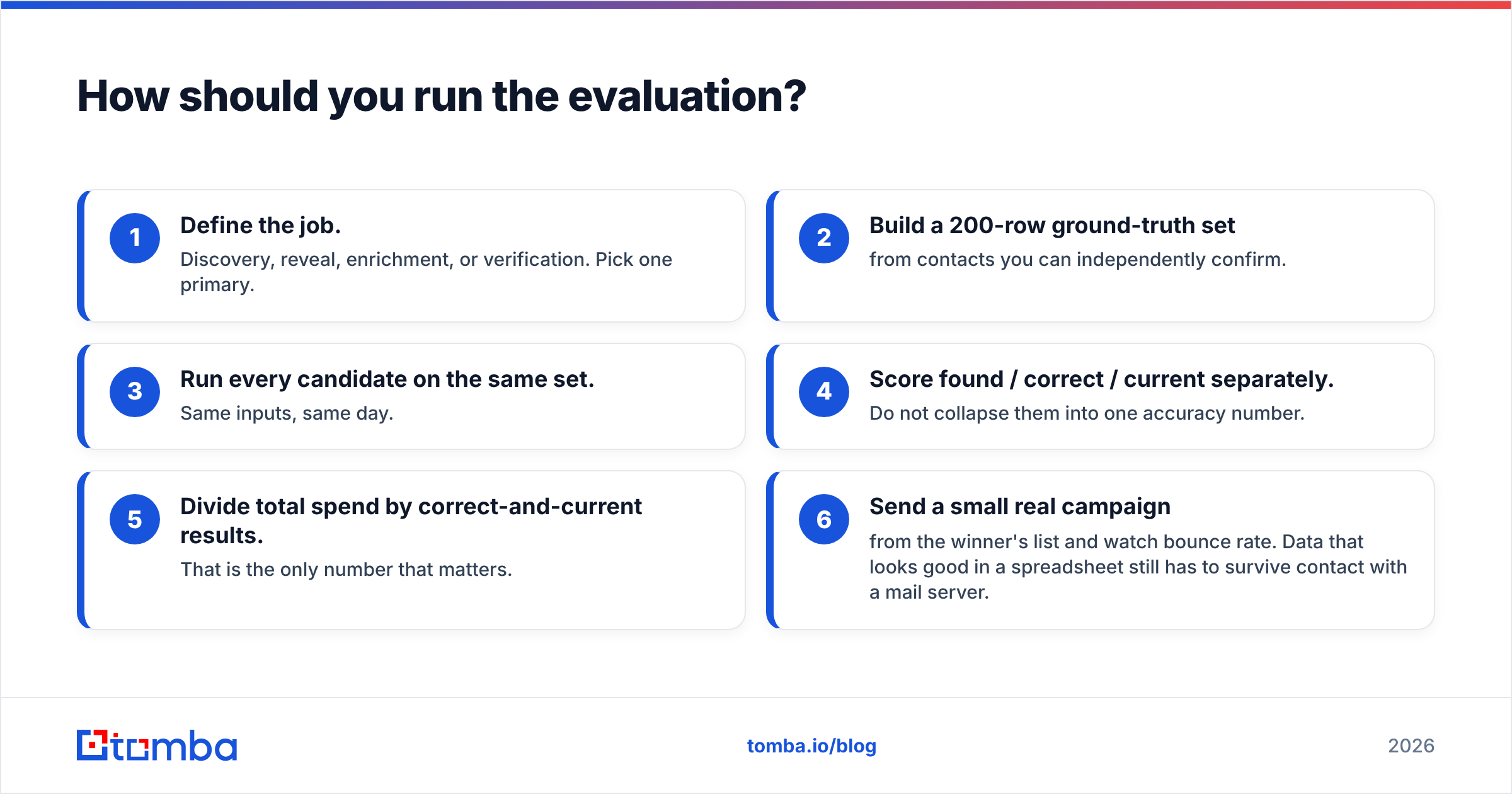
How should you run the evaluation?#
Give yourself two weeks and a rule: no annual contract until you have measured cost per usable contact on your own ICP.
- Define the job. Discovery, reveal, enrichment, or verification. Pick one primary.
- Build a 200-row ground-truth set from contacts you can independently confirm.
- Run every candidate on the same set. Same inputs, same day.
- Score found / correct / current separately. Do not collapse them into one accuracy number.
- Divide total spend by correct-and-current results. That is the only number that matters.
- Send a small real campaign from the winner's list and watch bounce rate. Data that looks good in a spreadsheet still has to survive contact with a mail server.
Teams that skip step 6 sign contracts based on match rates and discover the bounce problem in month two, after the deliverability damage is already done.
Ready to test email coverage on your own target accounts? Start with the free tier of the Tomba Email Finder — 25 searches a month, no card required — and run it against the same 200-contact ground-truth set you use for every other vendor. Compare verified hit rate and cost per usable address side by side, then pick whichever tool wins on your data rather than on someone's landing page.
Related guides#
Ready to find emails that actually work?
Join 150,000+ professionals who stopped guessing and started sending. Free credits on signup — no credit card required.
Get the Tomba newsletter
Practical outbound tactics and product updates — once every two weeks.
About the author