Effective Email Subject Lines: 2026 Data-Backed Guide
Most subject lines fail before the body gets a chance. Here's what separates effective email subject lines from the ones that get archived — length, formulas, testing method, and the phrases to retire.
TL;DR
- Effective email subject lines are short (roughly 3–7 words, 30–50 characters), specific, and written in the recipient's language — not yours.
- Curiosity beats cleverness, but relevance beats both. A subject line that names the recipient's actual situation outperforms a witty one almost every time.
- Personalization only works when it's non-obvious.
{{first_name}}is table stakes; referencing a hiring page, a funding round, or a tech stack is what moves the number. - Your subject line can't fix a bad list. If 15% of your contacts bounce, opens collapse before copy ever matters — verify first, write second.
- Test one variable at a time on 200+ recipients per arm, and judge on replies, not opens. Apple Mail Privacy Protection has made open rate a directional metric at best.
What makes an email subject line effective in 2026?#
An effective subject line does exactly one job: earn the next three seconds. It is not a summary, not a headline, and definitely not a pitch. It is the smallest possible promise that the body is worth opening.
Four properties show up in nearly every subject line that performs:
- Specificity over abstraction. "Question about your Q3 hiring" beats "Quick question." The first names a real thing in the reader's world; the second names nothing.
- Low commitment. Subject lines that imply a five-minute read get opened. Ones that imply a demo request get archived.
- Native formatting. Sentence case, no title case, no emoji, no exclamation marks. It should look like a colleague sent it, because the inbox is now trained to spot marketing formatting instantly.
- Honest framing. If the subject says "your competitor's pricing page" and the body is a generic template, you've bought one open and lost every future one.
The mistake most teams make is treating the subject line as a copywriting exercise. It's closer to a routing decision. The reader is sorting, not reading. Your job is to land in the "handle now" pile, not to be memorable.
How long should an effective subject line be?#
Shorter than you think, and shorter than your desktop client suggests.
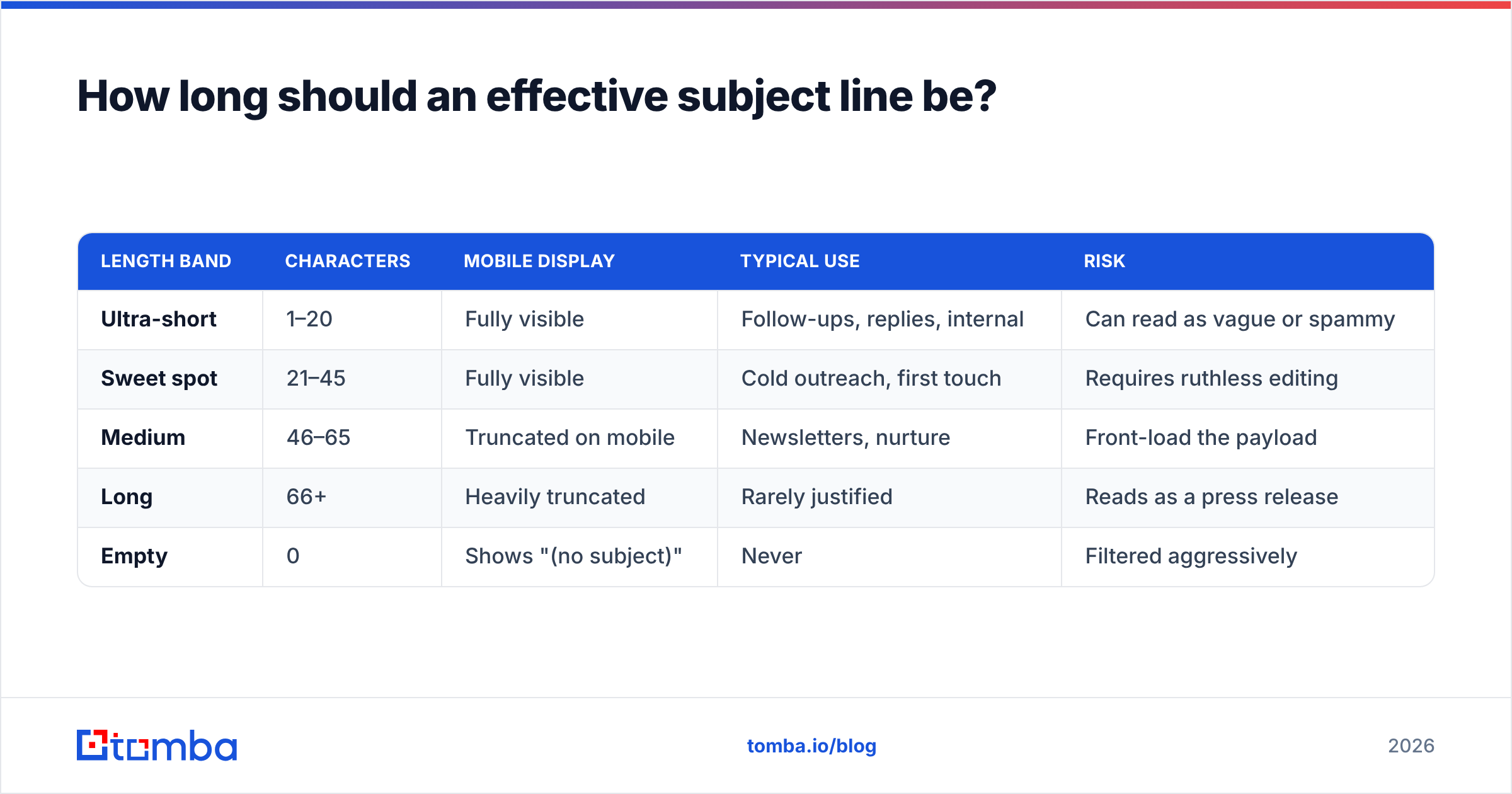
More than half of B2B email is now first triaged on mobile, where iOS Mail typically shows around 35–45 characters of the subject before truncating. Gmail's mobile app is similar. Anything past that character count is invisible during the swipe-and-delete pass, which is where most of your email dies.
| Length band | Characters | Mobile display | Typical use | Risk |
|---|---|---|---|---|
| Ultra-short | 1–20 | Fully visible | Follow-ups, replies, internal | Can read as vague or spammy |
| Sweet spot | 21–45 | Fully visible | Cold outreach, first touch | Requires ruthless editing |
| Medium | 46–65 | Truncated on mobile | Newsletters, nurture | Front-load the payload |
| Long | 66+ | Heavily truncated | Rarely justified | Reads as a press release |
| Empty | 0 | Shows "(no subject)" | Never | Filtered aggressively |
Two practical rules follow from this table:
- Front-load the meaning. Even if you run long, the first 40 characters must stand alone as a complete idea. "Notes from the Acme integration teardown — 3 findings for your team" still works truncated; "Following up on our previous conversation about the Acme integration" does not.
- Cut every word that survives deletion. If removing a word doesn't change what the reader understands, it was decoration.
You can sanity-check character counts and truncation behavior fast with a subject line tester before a send, rather than discovering the problem in your reply data a week later.
Which subject line formulas actually work?#
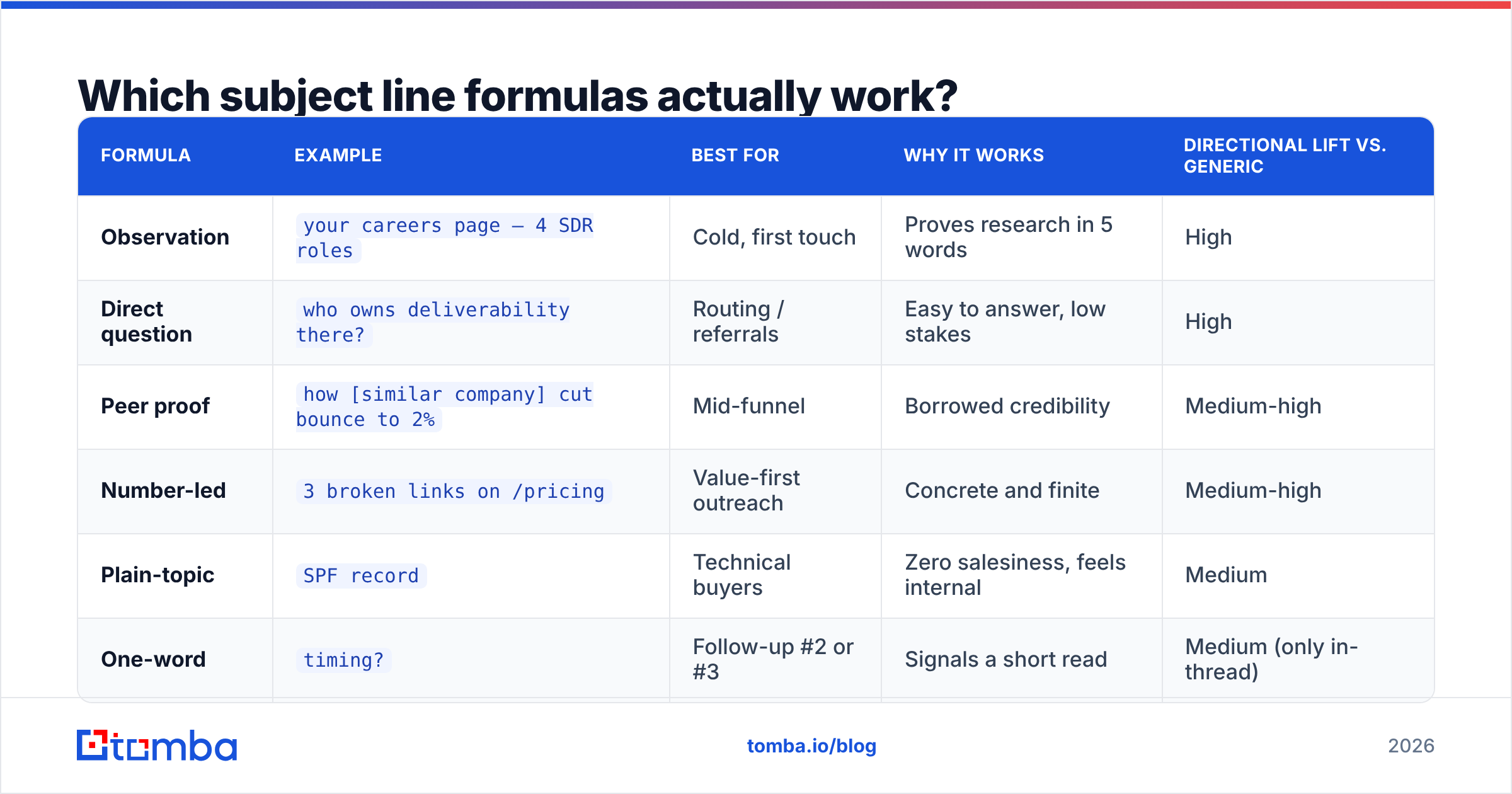
There are maybe six formulas worth keeping. Everything else is a variation. Below, "lift" is directional — relative performance observed across B2B outbound programs, not a guarantee, and it varies wildly by list quality and industry.
| Formula | Example | Best for | Why it works | Directional lift vs. generic |
|---|---|---|---|---|
| Observation | your careers page — 4 SDR roles |
Cold, first touch | Proves research in 5 words | High |
| Direct question | who owns deliverability there? |
Routing / referrals | Easy to answer, low stakes | High |
| Peer proof | how [similar company] cut bounce to 2% |
Mid-funnel | Borrowed credibility | Medium-high |
| Number-led | 3 broken links on /pricing |
Value-first outreach | Concrete and finite | Medium-high |
| Plain-topic | SPF record |
Technical buyers | Zero salesiness, feels internal | Medium |
| One-word | timing? |
Follow-up #2 or #3 | Signals a short read | Medium (only in-thread) |
Notice what's absent: no "Unlock," no "Revolutionize," no "Don't miss out." Power words trained on consumer e-commerce actively hurt B2B open and reply rates, because they mark the sender as a stranger selling something.
Also absent: the fake-reply trick. Prefixing Re: on a message that was never part of a thread gets opens and destroys trust, and modern filters increasingly flag the pattern. It's a loan against your domain reputation.
If you want a starting library rather than a blank page, work from proven cold email templates and rewrite the subject line to match your specific observation — the template's body structure is reusable; its subject line usually isn't.
Is personalization in subject lines still worth it?#
Yes — but only the kind that's hard to fake.
Personalization now splits into two tiers, and they perform very differently:
- Tier 1 (merge-field): first name, company name, city. Once a differentiator, now pure noise.
Sarah, quick questionreads exactly like a mail-merge, because it is one. Some programs see negative performance from first-name subject lines simply because the pattern is so strongly associated with automation. - Tier 2 (situational): something true about this company this month. A new job posting, a recent funding round, a page they just shipped, a tool detected on their site, a conference they sponsored.
saw the Series B — hiring plans?cannot be produced by a naive merge, and readers know it.
Tier 2 doesn't require manual research per contact. It requires structured data at the point of list building: role, seniority, company size, tech stack, hiring signals. If your enrichment layer gives you those fields, you can template Tier 2 personalization at scale — the subject line stays templated, but the variable is a real signal instead of a name.
That's the argument for pairing your sequencer with proper contact enrichment rather than a scraped CSV. The subject line is downstream of your data quality.
What kills open rates before the subject line even matters?#
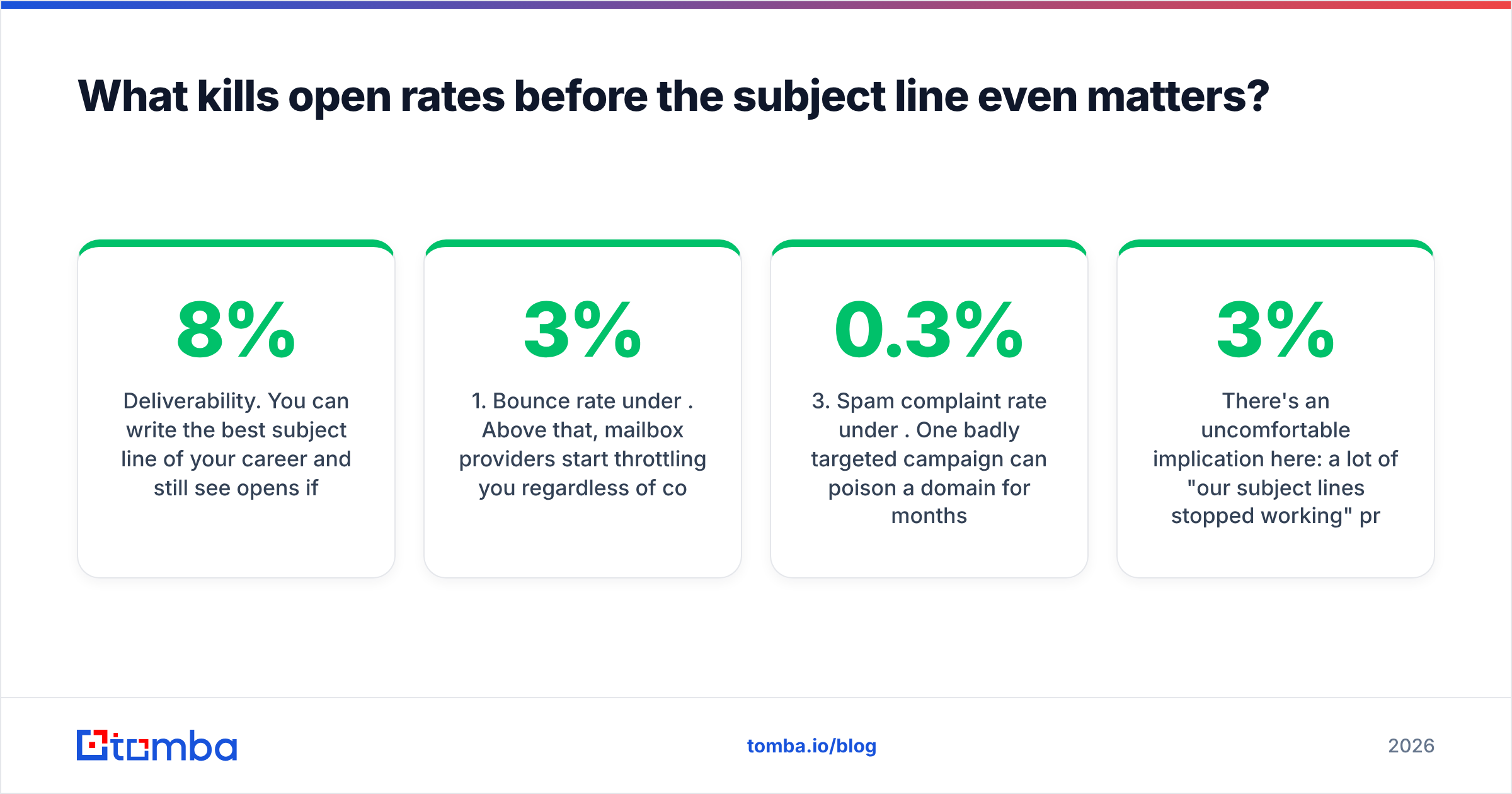
Deliverability. You can write the best subject line of your career and still see 8% opens if the message lands in Promotions, Spam, or a dead mailbox.
Run this checklist before you blame the copy:
- Bounce rate under 3%. Above that, mailbox providers start throttling you regardless of content. Clean the list with an email verifier before the first send, not after the first bounce report.
- Authentication passing. SPF, DKIM, and DMARC all aligned. Google and Yahoo's bulk-sender requirements made this non-negotiable — see Google's sender guidelines for the current thresholds.
- Spam complaint rate under 0.3%. One badly targeted campaign can poison a domain for months.
- Subject/body consistency. Filters compare the two. A curiosity-gap subject over a pure pitch body is a classic spam signature.
- No spam-trigger stacking. One "free" is fine. "Free," "guarantee," "act now," and an all-caps word in the same message is not. Run a draft through a spam checker if your inbox placement suddenly drops.
There's an uncomfortable implication here: a lot of "our subject lines stopped working" problems are actually list-decay problems. B2B contact data degrades at roughly 2–3% per month as people change jobs. The subject line didn't get worse; the list did.

How do you A/B test subject lines without fooling yourself?#
Most subject line "tests" are anecdotes with a spreadsheet attached. Here's the method that produces decisions you can trust:
- Change one variable. Length or formula or personalization — never two. If A is
your careers page — 4 SDR rolesand B isSarah, can we chat about hiring?, you've changed four things and learned nothing. - Use at least 200 recipients per arm. Below that, a 3-point difference in open rate is noise. If your list is small, run the test across several sends and pool the results.
- Randomize, don't split by segment. Assigning variant A to enterprise and B to SMB tests your segments, not your copy.
- Hold send time constant. Time-of-day effects are larger than most subject-line effects. Same window, same weekday, same sending domain.
- Judge on replies, not opens. Since Apple's Mail Privacy Protection began pre-fetching images, open rate over-reports for Apple Mail users and under-reports for image-blocked clients. Reply rate and meetings booked are the only metrics that survive this.
- Let the loser die properly. Declare the test over before you look, and don't keep the "close" loser in rotation because you liked writing it.
A useful discipline: keep a running document of every subject line you've sent, with reply rate attached. After 30 sends you'll have a house style backed by your own data instead of a blog post's. HubSpot's subject line research roundup is a decent external baseline, but your list will have its own quirks that no industry benchmark captures.
Which subject lines should you stop sending?#
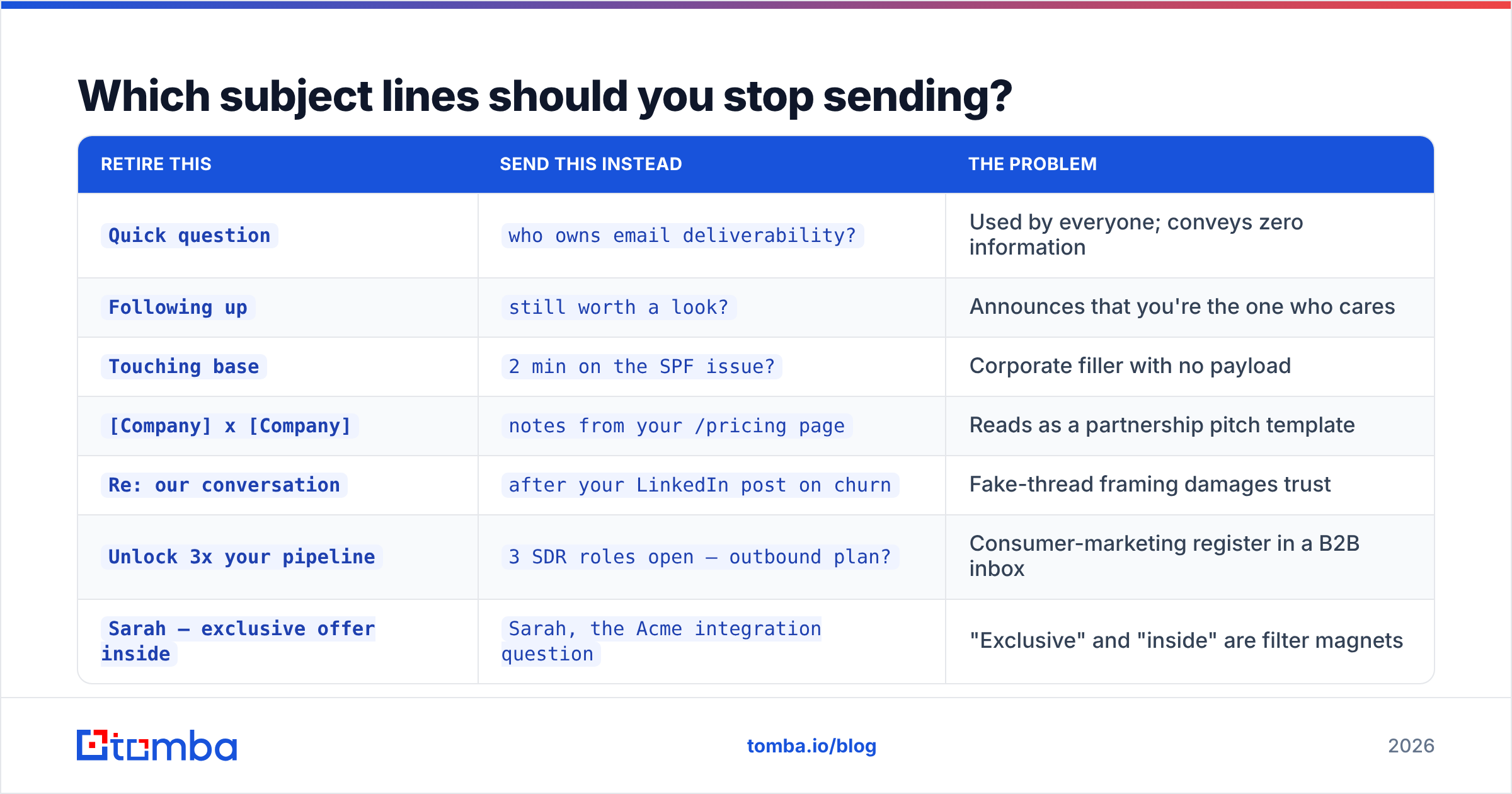
These patterns are past their expiry date. Each swap below is a straight upgrade:
| Retire this | Send this instead | The problem |
|---|---|---|
Quick question |
who owns email deliverability? |
Used by everyone; conveys zero information |
Following up |
still worth a look? |
Announces that you're the one who cares |
Touching base |
2 min on the SPF issue? |
Corporate filler with no payload |
[Company] x [Company] |
notes from your /pricing page |
Reads as a partnership pitch template |
Re: our conversation |
after your LinkedIn post on churn |
Fake-thread framing damages trust |
Unlock 3x your pipeline |
3 SDR roles open — outbound plan? |
Consumer-marketing register in a B2B inbox |
Sarah — exclusive offer inside |
Sarah, the Acme integration question |
"Exclusive" and "inside" are filter magnets |
The pattern across all seven: replace a category of message ("a follow-up," "a partnership," "an offer") with a specific fact. Categories get sorted. Facts get read.
What about subject lines for follow-ups and threads?#
Different rules. Once you're in a thread, the subject line's job changes from "earn an open" to "remind them what this is."
- Keep the thread. Replying in the same thread keeps your history visible and stops the recipient from re-evaluating you as a stranger. Don't restart with a fresh subject unless the topic genuinely changed.
- Follow-up #2 can go bare. A one-word subject in-thread (
timing?,worth revisiting?) reads as human, not automated. - Change the subject when the angle changes. If your third touch pivots from a hiring observation to a case study, start a new thread with a subject that matches the new angle. A pivot buried in a stale thread gets missed.
- Never send
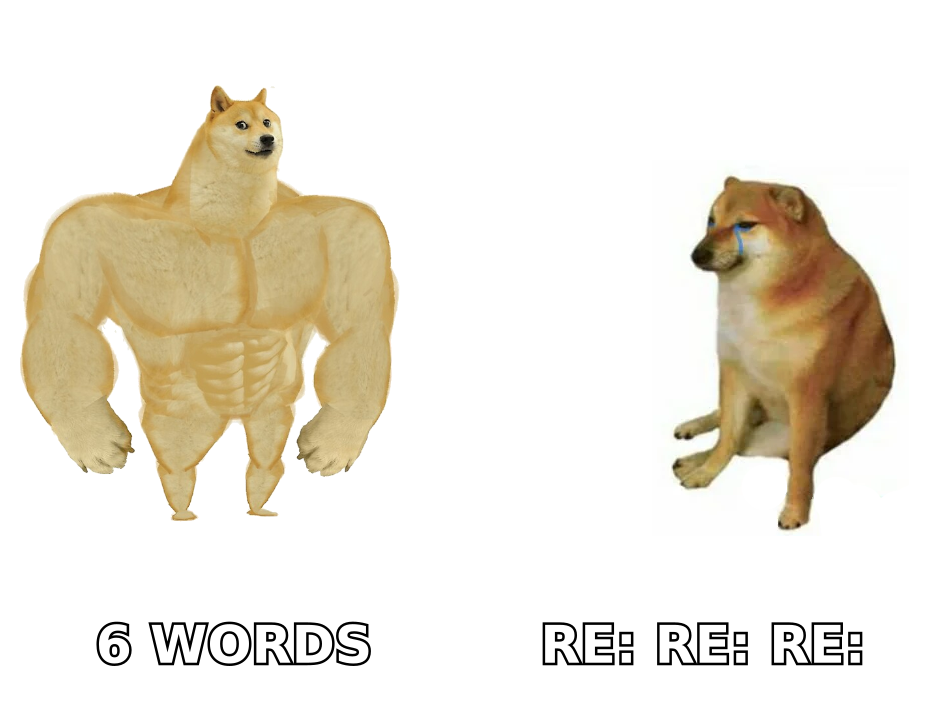
Re: Re: Re:. Three stacked prefixes signal an unattended sequence. Trim them. - Break-up emails don't need drama.
closing the loopoutperformsShould I stay or should I go?in almost every B2B test — the joke version invites a delete, the plain version occasionally gets a "sorry, bad timing, ping me in Q4," which is a real outcome.
If you're generating variants at volume and want a quick starting set to edit down, a subject line generator is fine for breaking a blank page — but treat the output as raw material. Every line still needs a real observation dropped into it, or you're back to sending categories.
How do you build a repeatable subject line process?#
Effective email subject lines are a system, not an inspiration:
- Collect signals at list-build time. Job posts, tech stack, funding, headcount changes, recent content. These become your Tier 2 variables.
- Maintain 5–7 house formulas, not fifty. Each mapped to a sequence position and a signal type.
- Verify before every send. Deliverability is the multiplier on everything else.
- Log every send with reply rate. Three months of your own data beats every benchmark article, including this one.
- Rewrite the bottom two formulas quarterly. Patterns decay as they spread. What worked in January reads as automation by July.
Do those five things and the subject line stops being the thing you agonize over at 11pm and starts being a slot you fill from a tested library.
Ready to fix the input side of the equation? The best subject line in the world can't reach a mailbox that no longer exists. Tomba's Email Finder gives you verified, deliverable professional addresses with source attribution on every result, so your open rate reflects your copy instead of your list decay. Start free with 25 searches a month, or check Tomba pricing — Starter is $49/mo, Growth $99/mo, Pro $249/mo — and pair it with the email verifier before your next campaign goes out.
Related guides#
Ready to find emails that actually work?
Join 150,000+ professionals who stopped guessing and started sending. Free credits on signup — no credit card required.
Get the Tomba newsletter
Practical outbound tactics and product updates — once every two weeks.
About the author