eGrabber vs Generect (2026): Which Lead Data Tool Wins?
eGrabber sells desktop lead-grabbing software with annual licenses. Generect sells LinkedIn-native lead data through an API. They solve the same problem in almost opposite ways — here's which one fits your team, and where both get expensive.
TL;DR — eGrabber vs Generect in short
- eGrabber is Windows desktop software (LeadGrabber Pro, eMail-Prospector) sold on yearly licenses. You install it, point it at a list or a LinkedIn search, and it adds emails and phone numbers on your own PC.
- Generect is LinkedIn-native lead data, API first. There is no app. You call lead search, company search, and enrich endpoints, then send the rows into your own stack.
- Choose eGrabber if a non-technical rep needs a point-and-click tool on Windows. It also fits teams that pay yearly, not monthly.
- Choose Generect if you have an engineer. You want LinkedIn-shaped filters in code, and you are building a data pipeline, not a one-off list.
- Neither is cheap for plain email finding. If the real job is finding emails and checking them, a dedicated email finder with a free tier and a $49/mo entry plan covers that slice for far less.
What are eGrabber and Generect?#
Both tools do the same basic job. They take a person you want to reach and give you contact details. But they were built in different decades, for different buyers. That is why eGrabber vs Generect is rarely a like-for-like choice.
eGrabber is a Santa Clara company. It has shipped desktop prospecting software since the late 1990s. LeadGrabber Pro pulls names, titles, companies, emails, and phones off web pages and search results into a local grid. eMail-Prospector only adds emails and phones to a list you already have. Picture a spreadsheet on your desktop that fills itself in. Licenses are yearly, per seat, and Windows only.
Generect is newer. It is an API-first data provider, and LinkedIn is its source of truth. You get endpoints instead of an app. Search leads by title, seniority, headcount, region, and industry. Search companies. Turn a profile URL into a work email and phone. Picture a database you query from code, with live lookups instead of a stale dump.
That one gap — app vs. API — shapes every other trade-off below.
How does eGrabber vs Generect data sourcing differ?#
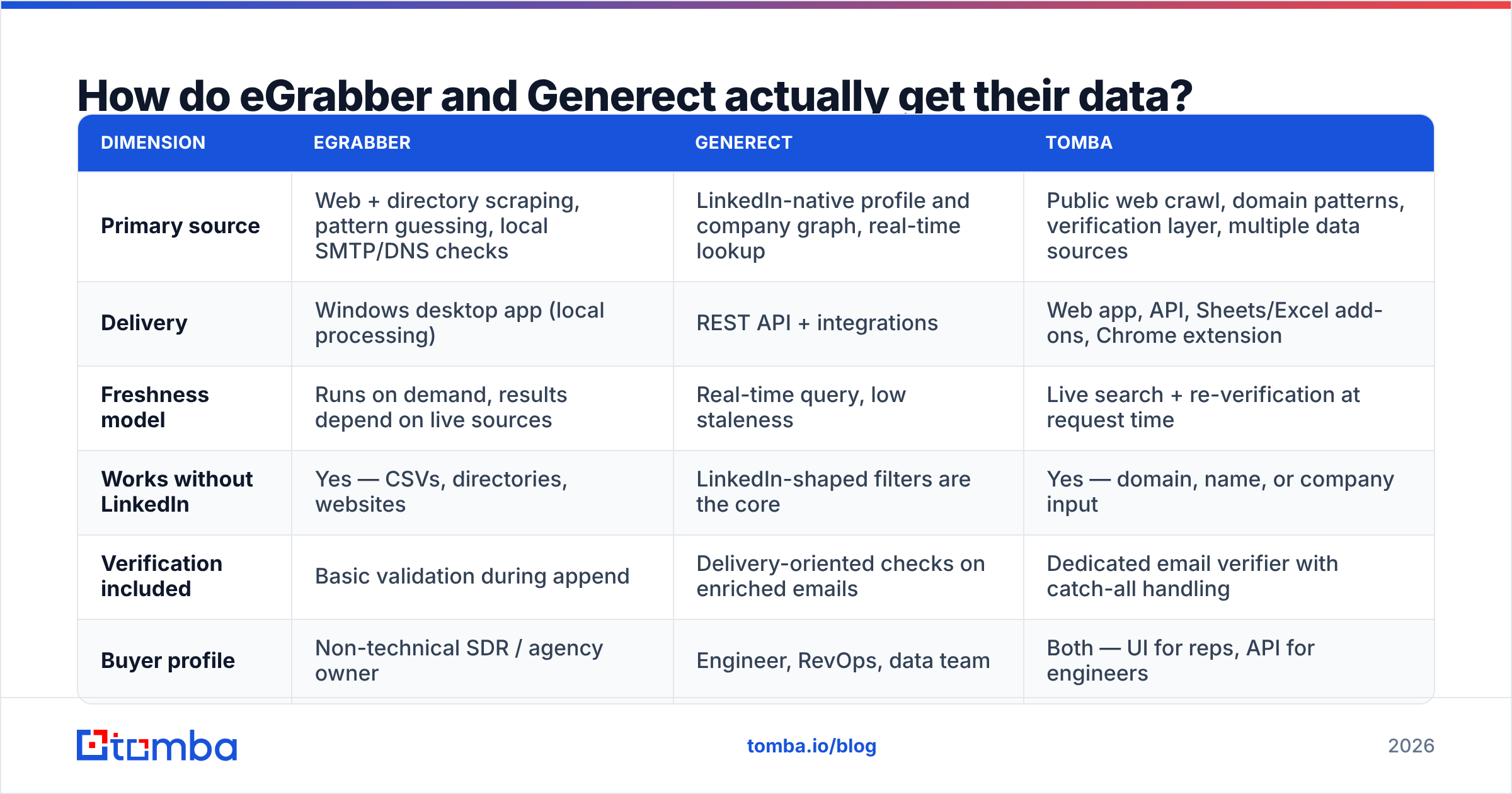
Where the data comes from is the part vendors skip. Ask about it first.
| Dimension | eGrabber | Generect | Tomba |
|---|---|---|---|
| Source | Web scraping, pattern guessing, local checks | LinkedIn profile and company graph | Web crawl plus multiple data sources |
| Delivery | Windows desktop app | REST API | Web app, API, Sheets, Excel, Chrome |
| Freshness | Live sources, on demand | Real-time query | Live search plus re-check |
| Works without LinkedIn | Yes | No, filters are LinkedIn-shaped | Yes |
| Checking included | Basic | Basic, on enriched emails | Full email verifier |
| Built for | Non-technical reps | Engineers and RevOps | Both |
Read it this way. eGrabber is a collection tool. Generect is a query tool. A specialist email finder is a find and check tool. Many teams buy one when they needed another.
Is eGrabber better than Generect for accuracy?#
Accuracy is where eGrabber vs Generect claims get loudest. Neither vendor publishes an audited outside benchmark. So treat any headline number as a sales claim until you test it yourself.
Here is what the design of each system already tells us.
eGrabber guesses patterns. When it cannot find a published address, it builds candidates like first.last@, flast@, and first@. Then it checks them. This works well at mid-market firms with simple formats. It works poorly at large firms with catch-all servers or aliases. Desktop checks also run from your own IP. Some mail servers throttle or block that IP once volume climbs.
Generect leans on the LinkedIn graph. If the person is on LinkedIn with a current employer, results are strong. If not, coverage drops fast. Think trades, local services, regions with low LinkedIn use, or anyone who deleted a profile. That is the cost of a single source.
The only number that counts is your bounce rate on your own ICP. Run 300 identical contacts through each tool. Send both sets to the same checker. Then count the misses. Anything else is a vendor slide.

One habit helps with both tools. Never trust a single vendor flag that says an address is valid. Send every export through an outside checker and a catch-all verifier first. Catch-all domains are where most verified lists quietly rot.
How do eGrabber vs Generect pricing plans compare?#
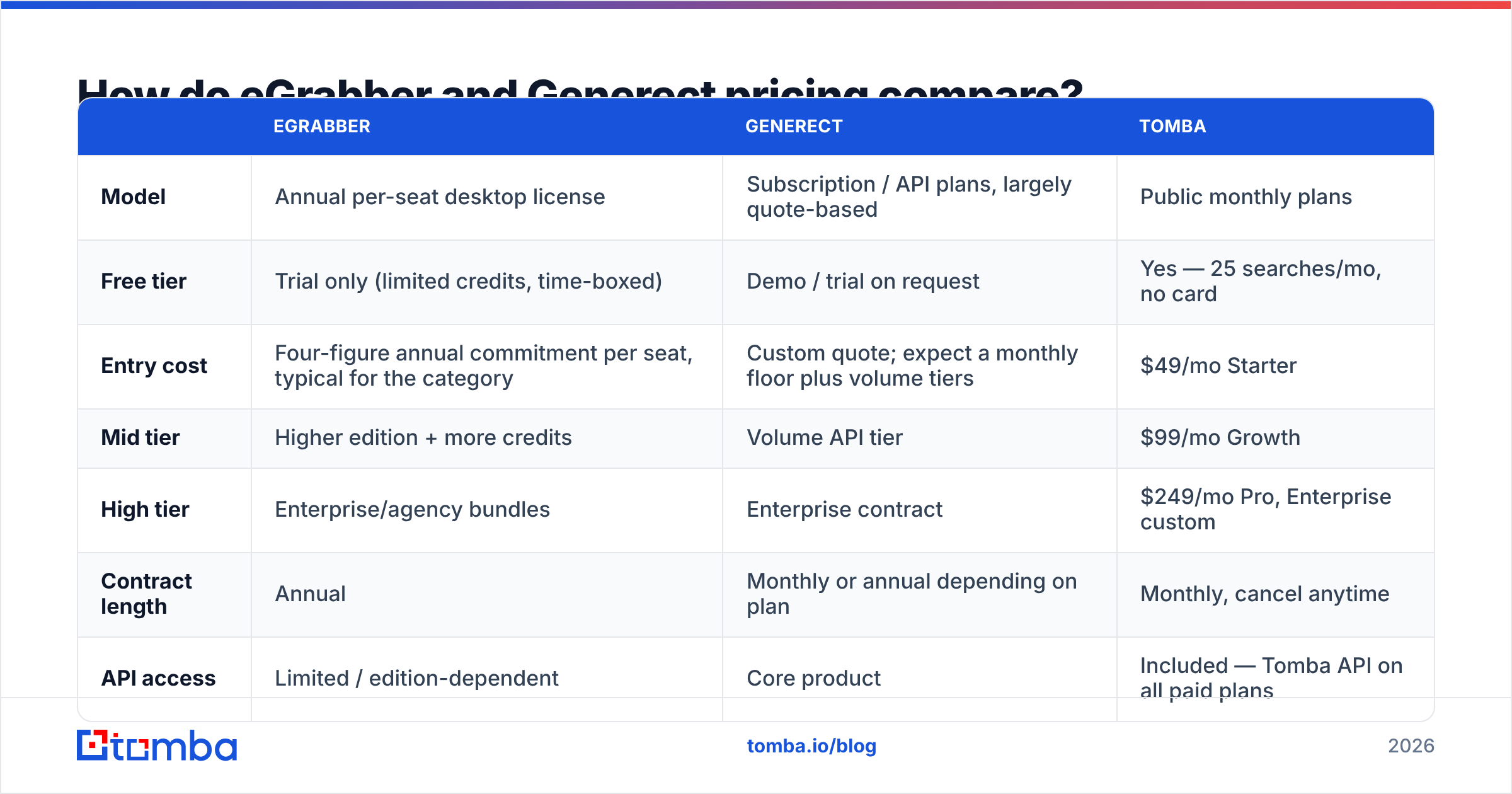
Both vendors lean on quotes. That makes side-by-side math harder than it should be. Here is the honest shape of it. Always confirm current numbers on the vendor page before you sign.
| eGrabber | Generect | Tomba | |
|---|---|---|---|
| Model | Yearly per-seat license | API plans, mostly quoted | Public monthly plans |
| Free tier | Time-boxed trial | Demo on request | Yes, 25 searches/mo |
| Entry cost | Four figures a year, per seat | Custom quote plus volume tiers | $49/mo Starter |
| Mid tier | Higher edition, more credits | Volume API tier | $99/mo Growth |
| High tier | Agency bundles | Enterprise contract | $249/mo Pro |
| Contract | Yearly | Monthly or yearly | Monthly, cancel anytime |
| API access | Edition-dependent | Core product | Tomba API on all paid plans |
| Platform | Windows only | Any | Browser, API, CLI, Sheets |
Three cost traps are worth naming.
- Per-seat yearly licenses punish small teams. eGrabber's model made sense when software shipped on discs. Three reps who need light access still means three yearly licenses.
- Quote-based API pricing punishes uneven volume. Generect is flexible, but you negotiate instead of signing up online. Scaling down mid-contract is harder than scaling up.
- Neither price covers deliverability. Bad addresses cost you sender trust, not just credits. Budget for checking on its own. See Tomba pricing for what a find-and-check layer costs.

Which one fits your workflow?#
Match the tool to the person doing the work. Here is how eGrabber vs Generect splits by team type.
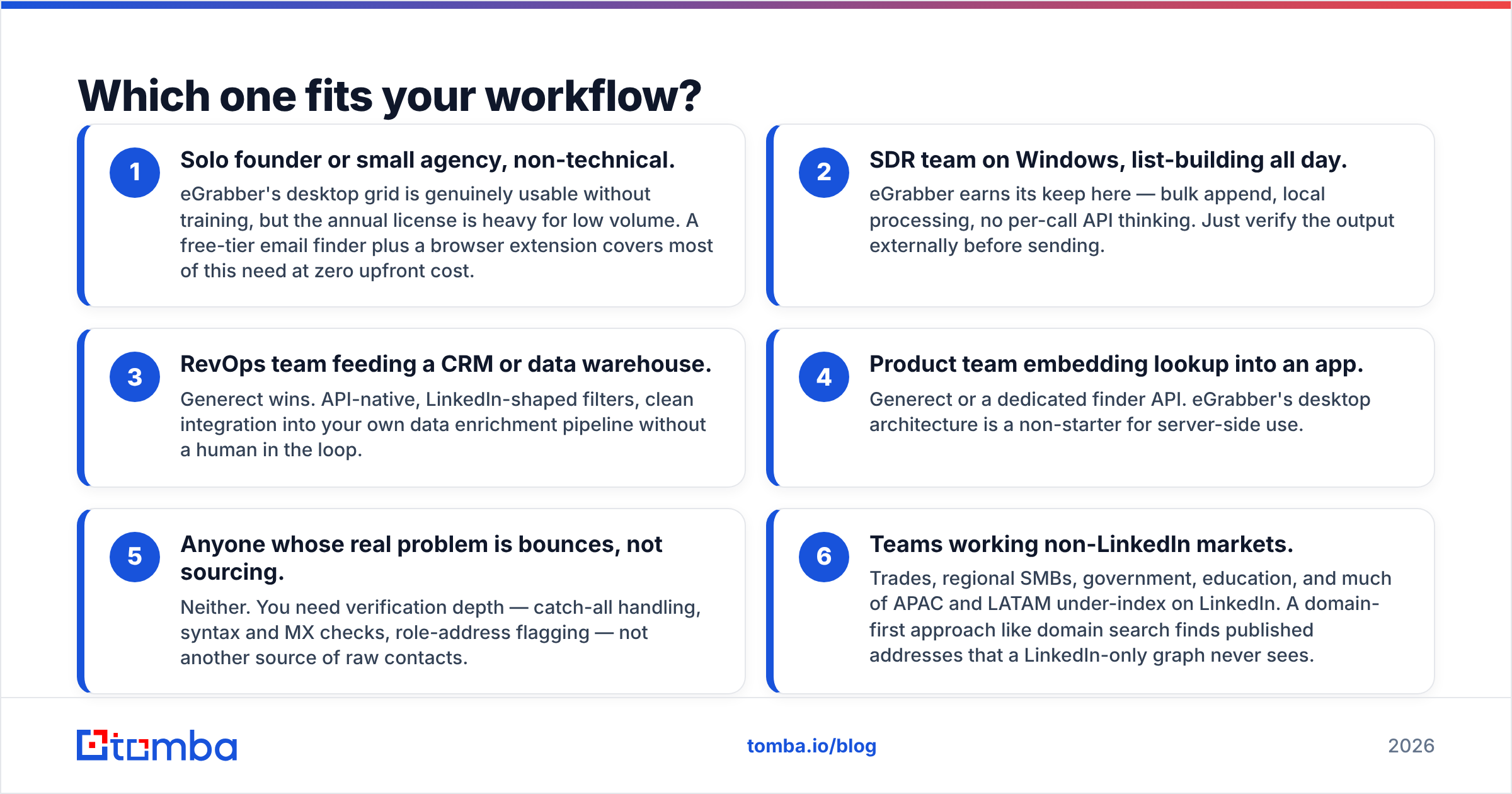
- Solo founder or small agency, non-technical. eGrabber's grid is easy to use with no training. The yearly license is heavy at low volume. A free-tier email finder plus a browser extension often covers this.
- Rep team on Windows, list-building all day. eGrabber earns its keep here. Bulk append, local work, and no API calls to think about. Check the output elsewhere before you send.
- RevOps team feeding a CRM or warehouse. Generect wins. It is API-native, with LinkedIn-shaped filters that drop into your own data enrichment flow.
- Product team adding lookup to an app. Generect or a finder API. A desktop app cannot run server-side.
- Anyone whose real problem is bounces. Neither. You need checking depth: catch-all handling, syntax and MX checks, and role-address flags.
- Teams outside LinkedIn-heavy markets. Trades, regional SMBs, government, schools, and much of APAC and LATAM sit off LinkedIn. A domain search finds published addresses a LinkedIn-only graph never sees.
What are the real limits of each?#
eGrabber limits:
- Windows only. Mac and Linux users need a VM, and most will not bother.
- Local checks run from your network. High volume from one office IP invites throttling.
- Yearly commitment, with little room to flex down.
- The UI works, but it looks old. New reps learn by screen share, not self-serve.
- Scraping LinkedIn results sits in a grey area under LinkedIn's user agreement. Let legal answer that before your reps do.
Generect limits:
- One source. If LinkedIn shifts or a profile is missing, there is no fallback.
- No interface for non-technical users. Someone has to write the integration.
- Quotes only. There is no fast self-serve start and little public benchmarking.
- Personal email and phone coverage swing by region and seniority.
What eGrabber vs Generect share: neither one is a verification company. Both hand you addresses. Neither owns what happens after you hit send. Pair either one with an outside checker and a sender reputation check before you scale volume. Reviews on G2 in both categories skew toward bounce complaints, and that is a checking gap, not a sourcing gap.
Is there a better middle option?#
Yes, if your need is narrower than a full lead database.
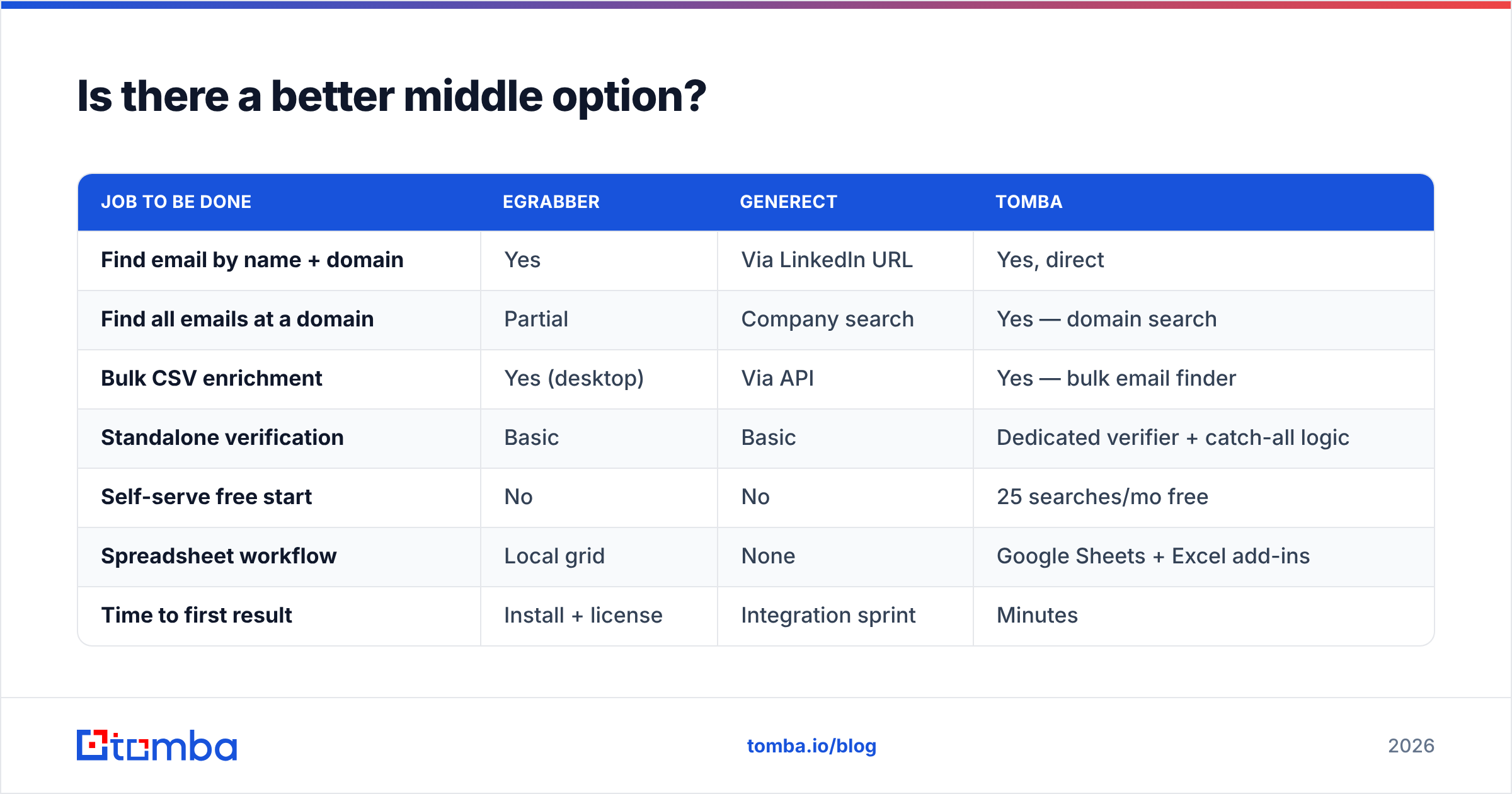
Most teams comparing eGrabber vs Generect find out mid-test that they do not need a platform. They need three things. Find an email from a name and a domain. Find every email at a company. Confirm the addresses land before sending. That is a specialist job at specialist prices.
| Job to be done | eGrabber | Generect | Tomba |
|---|---|---|---|
| Email by name and domain | Yes | Via LinkedIn URL | Yes, direct |
| All emails at a domain | Partial | Company search | Yes, domain search |
| Bulk CSV enrichment | Yes, on desktop | Via API | Bulk email finder |
| Standalone checking | Basic | Basic | Verifier plus catch-all logic |
| Self-serve free start | No | No | 25 searches/mo free |
| Spreadsheet workflow | Local grid | None | Google Sheets and Excel |
| Time to first result | Install and license | Integration sprint | Minutes |
Here is the strategic point. The sourcing layer and the checking layer should stay separate. When one vendor does both, you cannot audit the accuracy claim. The system that finds the address also grades it. Split them and you get a second opinion on every record. Swapping sourcing vendors then becomes a config change, not a migration.
How should you run an eGrabber vs Generect test?#
Do not sit through a demo. Run a test.
- Build one 300-row control list from your real ICP. Mix company sizes, use at least two regions, and include one industry that sits off LinkedIn.
- Run it through each tool with the same inputs. Record hit rate and accuracy as two separate numbers.
- Check everything with a third, neutral tool. Teams skip this step and then regret it.
- Send a small live batch. Use 50 addresses per source and measure real bounces. Checks predict, delivery proves.
- Price the whole thing. Add license, checking, and engineer hours. Generect's quote reads differently after two sprints of API work. eGrabber's reads differently once you multiply by seats.
The winner should be clear in numbers, not in feelings about the interface.
Start with the layer you can test today. Say your bottleneck is finding and confirming work emails, not building a LinkedIn pipeline. Try the Tomba Email Finder free: 25 searches a month, no card, and no yearly contract. It runs the same checking engine as the $49/mo Starter plan. Send your control list through it, then compare bounce rates side by side. That is the fastest way to settle eGrabber vs Generect with data instead of opinions.
Related guides#
Ready to find emails that actually work?
Join 150,000+ professionals who stopped guessing and started sending. Free credits on signup — no credit card required.
Get the Tomba newsletter
Practical outbound tactics and product updates — once every two weeks.
About the author