eGrabber vs Jet Leads Pro: Which Lead Tool Wins in 2026
eGrabber is a mature desktop lead-capture suite. Jet Leads Pro is a cheaper, opaque newcomer. Here is how they actually compare on data accuracy, pricing, licensing, and workflow fit — plus when neither is the right answer.
Picking between eGrabber vs Jet Leads Pro comes down to one trade-off. You either pay for a mature desktop suite, or pay far less for a tool that will not say where its data comes from. Here is the short version, then the detail.
TL;DR
- eGrabber is the older, heavier option: a Windows-desktop suite (LeadGrabber Pro, eMail-Prospector) with per-seat annual licensing, strong list-building-from-LinkedIn workflows, and a learning curve that assumes a dedicated researcher.
- Jet Leads Pro is the cheaper, lighter option — but it publishes very little verifiable information about data sources, refresh cadence, or verification method. Treat any accuracy claim you cannot test as marketing.
- On cost structure, they are not comparable: eGrabber sells annual seats measured in thousands of dollars; Jet Leads Pro sells low-ticket subscriptions or lifetime deals. Cheap per-record cost means nothing if bounce rates gut your sending domain.
- If your team lives in a CRM, a spreadsheet, or code rather than a desktop app, neither tool fits well — an API-first email finder is the cheaper and more maintainable answer.
- Run the same 100-contact test list through both before you buy anything. Vendor-reported accuracy has never once matched a real test list in our experience.
What are eGrabber and Jet Leads Pro?#
Two tools that both promise "leads," built for two completely different eras of outbound.
eGrabber is a US-based software company that has been shipping lead-capture desktop software since the late 1990s. Its flagship products are LeadGrabber Pro and eMail-Prospector. Both install on Windows. They scrape prospect lists from LinkedIn, directories, and web pages, then append business emails and phone numbers through real-time searches of public sources. You can see the product line on the eGrabber homepage and read buyer reviews on G2.
The important architectural fact: eGrabber is largely a client-side tool. The searching happens from your machine, on your IP, at your machine's pace.
Jet Leads Pro sits at the opposite end of the market — a low-cost, web-delivered lead tool built around bulk email discovery and list building. Here is the honest problem with writing a fair comparison: Jet Leads Pro does not publish the things a buyer needs. It does not say clearly where its data comes from. It does not say how often records are refreshed, whether it runs SMTP-level checks, or what happens to the lists you upload. Listings on directories like Capterra and G2 are thin.
That is not a deal-breaker on its own. Every tool starts somewhere. But it does mean you should trust your own test results, and trust the vendor's claims at close to zero.
So the real question is not "which is better." It is which failure mode you can afford: eGrabber's cost and operational drag, or Jet Leads Pro's unverifiable data provenance.
eGrabber vs Jet Leads Pro: how they compare head to head#
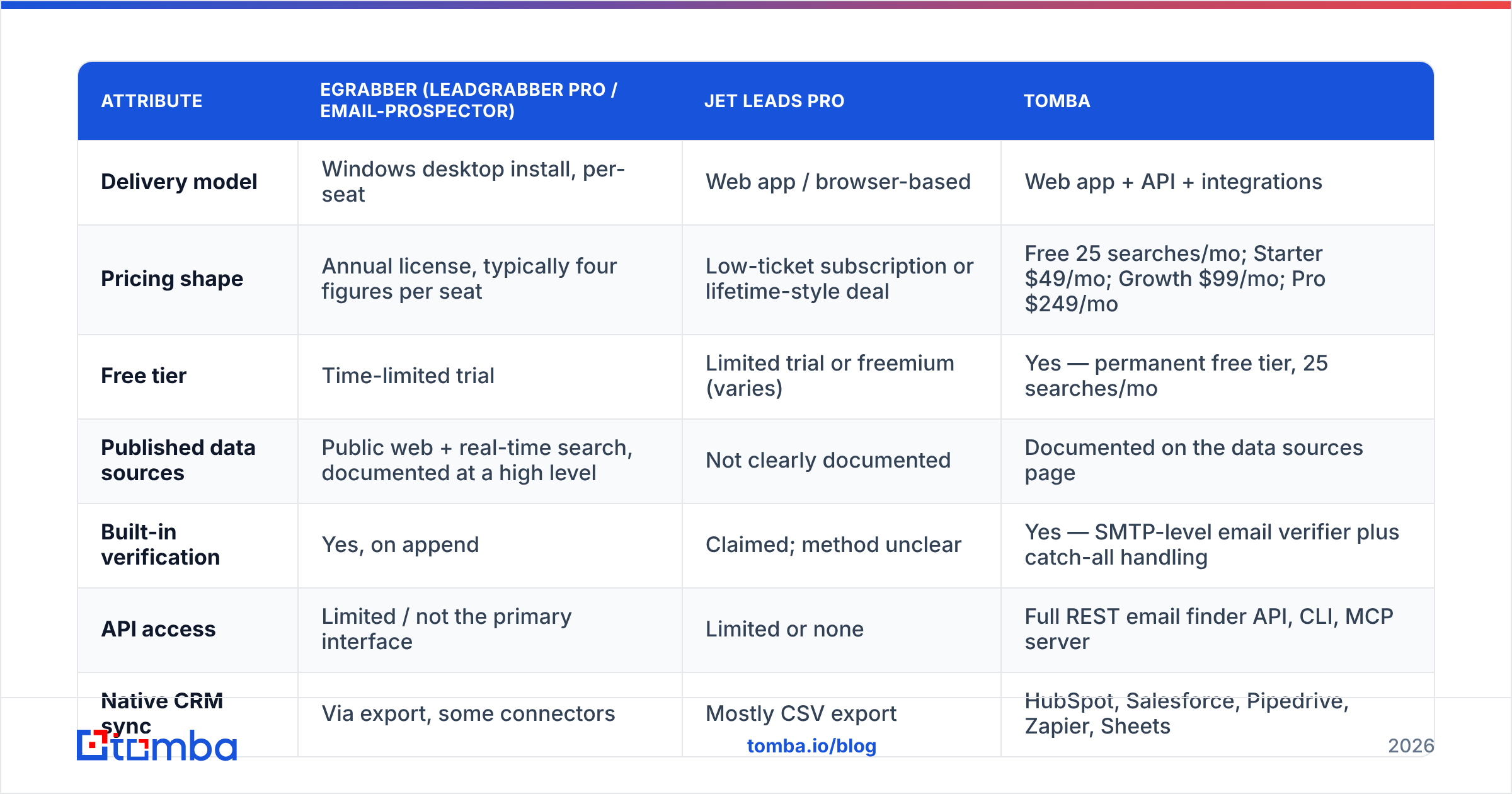
| Attribute | eGrabber (LeadGrabber Pro / eMail-Prospector) | Jet Leads Pro | Tomba |
|---|---|---|---|
| Delivery model | Windows desktop install, per-seat | Web app / browser-based | Web app + API + integrations |
| Pricing shape | Annual license, typically four figures per seat | Low-ticket subscription or lifetime-style deal | Free 25 searches/mo; Starter $49/mo; Growth $99/mo; Pro $249/mo |
| Free tier | Time-limited trial | Limited trial or freemium (varies) | Yes — permanent free tier, 25 searches/mo |
| Published data sources | Public web + real-time search, documented at a high level | Not clearly documented | Documented on the data sources page |
| Built-in verification | Yes, on append | Claimed; method unclear | Yes — SMTP-level email verifier plus catch-all handling |
| API access | Limited / not the primary interface | Limited or none | Full REST email finder API, CLI, MCP server |
| Native CRM sync | Via export, some connectors | Mostly CSV export | HubSpot, Salesforce, Pipedrive, Zapier, Sheets |
| Runs unattended | No — desktop session must stay open | Partially | Yes — server-side, scheduled or event-driven |
| Best fit | One dedicated researcher building lists manually | Solo founder on a tight budget, low volume | Teams embedding enrichment into a repeatable workflow |
Read the last three rows again, because that is where most buying mistakes happen. Teams evaluate on price-per-record, then discover six weeks in that the tool cannot be automated, cannot be shared across three SDRs, and cannot write back to the CRM without somebody babysitting a CSV.

Which one has better data accuracy?#
Neither vendor's number should decide this for you — but the mechanics of how each tool arrives at an email tell you a lot about the ceiling.
eGrabber's approach is real-time discovery. It takes a name plus a company, then searches public sources and pattern-guesses until it can confirm a deliverable address. This ages well, because the answer is computed at request time rather than pulled from a cached list. The tradeoff is speed and IP exposure. Searching from your own connection, at scale, invites rate limiting and captchas, and eGrabber users on review sites regularly cite throughput as the main frustration.
Jet Leads Pro's mechanics are, again, undocumented. When a tool will not say whether it uses SMTP verification, a static purchased database, or pattern generation with no validation at all, assume the cheapest of the three until your test proves otherwise. Pattern generation without verification is the most common cause of a 15%+ bounce rate. A bounce rate that high can damage your sender reputation. Once that happens, even your confirmed-good addresses stop landing.

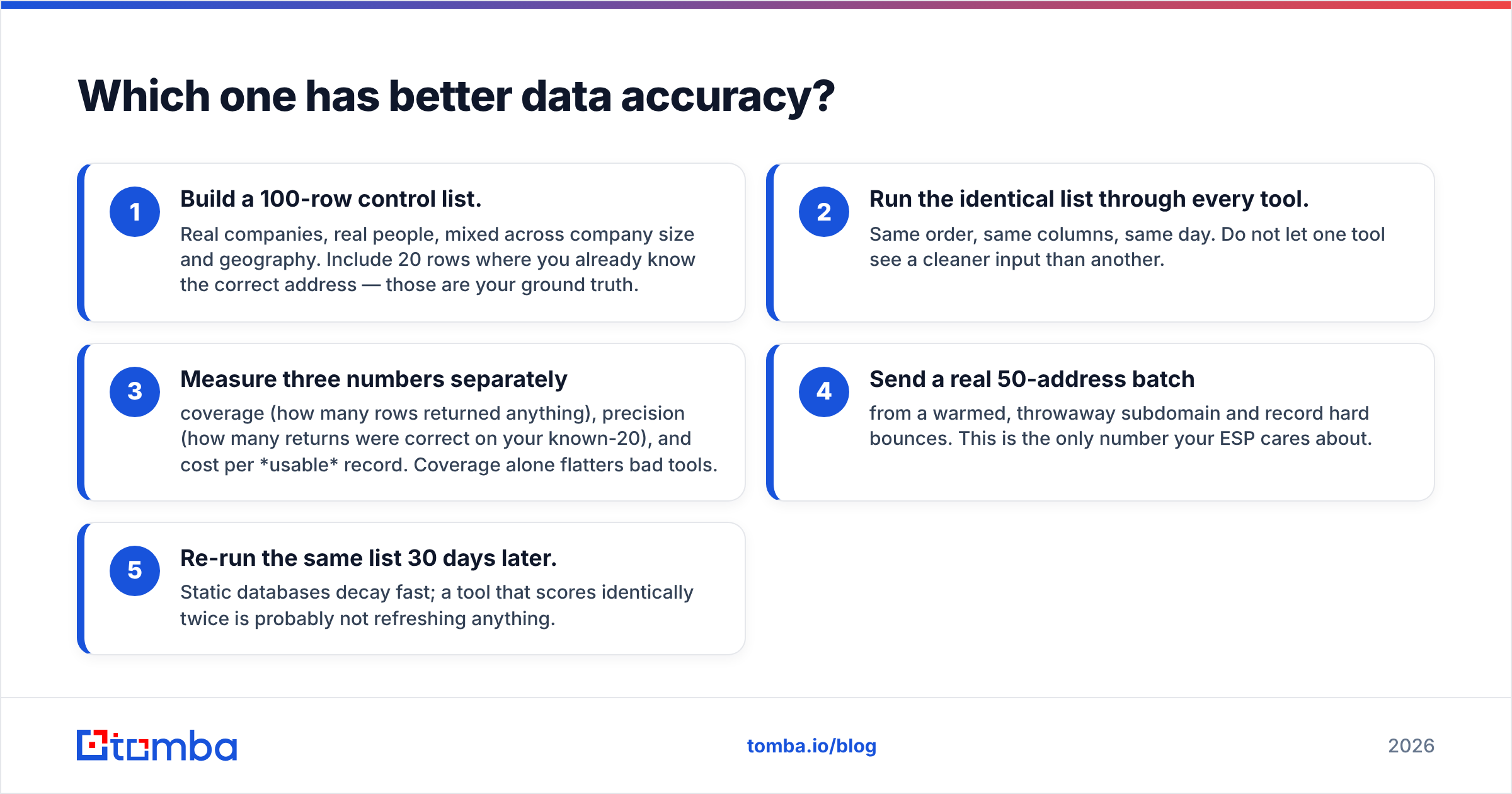
Here is the test protocol worth running before you spend a dollar:
- Build a 100-row control list. Real companies, real people, mixed across company size and geography. Include 20 rows where you already know the correct address — those are your ground truth.
- Run the identical list through every tool. Same order, same columns, same day. Do not let one tool see a cleaner input than another.
- Measure three numbers separately — coverage (how many rows returned anything), precision (how many returns were correct on your known-20), and cost per usable record. Coverage alone flatters bad tools.
- Send a real 50-address batch from a warmed, throwaway subdomain and record hard bounces. This is the only number your ESP cares about.
- Re-run the same list 30 days later. Static databases decay fast; a tool that scores identically twice is probably not refreshing anything.
That protocol takes an afternoon. It has saved teams from four-figure annual commitments more times than any review site has.
Is eGrabber worth the price in 2026?#
It can be — for exactly one profile.
eGrabber earns its keep when you have a dedicated researcher whose whole job is building targeted lists from LinkedIn searches and industry directories. It also helps when each account is worth thousands of dollars. In that setup, the per-seat annual fee is rounding error. The manual pace is fine, because volume is low and precision matters more. And the desktop UI's quirks turn into muscle memory after a week.
It stops making sense the moment any of these are true:
- You need more than one or two seats. Per-seat annual licensing scales badly compared to credit pools that a whole team draws from.
- Your team is on macOS. A Windows-only desktop tool in 2026 means virtual machines, and virtual machines mean tickets.
- You want enrichment inside an automated workflow. eGrabber is fundamentally a human-in-the-loop product. If your ideal state is "a new inbound signup gets enriched and routed before an SDR opens their laptop," a desktop app cannot deliver that.
- You already pay for a sequencer. Paying four figures for the discovery half of a stack you have half-solved elsewhere is how tool sprawl starts.
Is Jet Leads Pro a safe bet for cold outreach?#
Only with guardrails, and only after you have verified the output yourself.
The appeal is obvious — a fraction of eGrabber's cost, no install, and volume caps that look generous on the pricing page. For a solo founder sending 200 emails a month to a well-defined niche, a cheap tool plus a rigorous verification step can genuinely be the right call.
The risk is concentrated in one place: unverified data quietly destroying your domain. Cold email in 2026 runs on much tighter rails than it did three years ago. Google and Yahoo bulk-sender rules, tight spam-complaint limits, and per-domain reputation scoring all raise the stakes. One bad send week can cost you months. A tool that saves you $60 a month and costs you your primary sending domain is not cheap.
So if you go this route, layer defensively:
- Never send straight from the export. Push every list through a dedicated email verification pass and drop anything that is not a confirmed valid or a knowingly-accepted risk.
- Handle catch-alls explicitly. Catch-all domains accept everything at the SMTP layer, so they show as "valid" in weak verifiers and bounce anyway. A catch-all verifier is what separates a 2% bounce rate from a 12% one.
- Segment risky rows into a separate low-volume campaign on a subdomain you can afford to lose.
- Watch your bounce rate daily for the first two weeks, not weekly. By the time a weekly report shows a problem, the damage is priced in.
What should you use instead of either one?#
An API-first email finder, if your work looks anything like a repeatable process rather than a one-off research project.
This is the structural point that gets lost in head-to-head comparisons of two similar tools: eGrabber and Jet Leads Pro are both destination apps. You go to them, do a task, and export. Modern outbound works the other way around — the enrichment comes to the data, wherever the data already lives. A signup form fires, a webhook enriches the record, the CRM gets a complete contact, and a human never opens a lead tool at all.
That is where a platform like Tomba fits differently rather than just cheaper. The email finder works the same way whether you call it from the web app, a Google Sheets formula, the Tomba API, the CLI, or a HubSpot workflow. Domain search pulls every discoverable address at a target company in one call, instead of one name at a time.
Verification runs on the same platform as discovery, so you are not paying two vendors and reconciling two schemas. Pricing also scales with usage rather than headcount. Tomba pricing starts free at 25 searches a month, then $49/mo for Starter, $99/mo for Growth, and $249/mo for Pro — all on a shared credit pool rather than per-seat licenses.

To be fair to both tools in this comparison: if your genuine requirement is "scrape a LinkedIn Sales Navigator result set into a spreadsheet with appended phone numbers, by hand, twice a week," eGrabber does that specific job with more maturity than most alternatives. And if your requirement is "spend under $30 this month and I will verify everything myself," a budget tool is a defensible starting point. Neither of those describes a scaling sales team.
How do you decide in the next 30 minutes?#
Answer four questions honestly.
- How many people need access? More than two → per-seat desktop licensing is the wrong shape. Look at credit-pool pricing.
- Does enrichment need to run without a human? Yes → you need an API, and both tools here are the wrong category, not just the wrong vendor.
- Can you verify the vendor's data claims? If the answer is "their site says 95%" and nothing more, run the 100-row test first. Every time.
- What is a bad send week worth? If losing your main sending domain would cost more than a year of a better tool, buy accuracy, not price.
Then run the test list. Not the demo, not the sales call — the list. Coverage, precision, bounce rate, cost per usable record. The tool that wins on those four numbers is the tool you buy, whichever one has the better landing page.
The bottom line#
The eGrabber vs Jet Leads Pro choice is really a choice between two risks. eGrabber is the credible-but-heavy option for a single dedicated researcher with budget and Windows. Jet Leads Pro is the cheap-but-opaque option for low-volume senders willing to do their own verification. Neither is built for a team that wants enrichment to happen automatically, inside the systems it already uses.
If that last description sounds like you, start with the Tomba Email Finder. The free tier gives you 25 searches a month — enough to run the exact 100-row protocol above across a few sessions and see the precision numbers for yourself before you commit to anything. Verify a batch, send a real test, and let the bounce report pick the winner.
Related guides#
Ready to find emails that actually work?
Join 150,000+ professionals who stopped guessing and started sending. Free credits on signup — no credit card required.
Get the Tomba newsletter
Practical outbound tactics and product updates — once every two weeks.
About the author