eGrabber vs Kaspr (2026): Which B2B Contact Finder Wins?
One is desktop scraping software sold on annual licenses. The other is a LinkedIn extension built for phone numbers. Here's how eGrabber and Kaspr actually compare on data, pricing, and workflow in 2026.
eGrabber vs Kaspr in one line: eGrabber builds big lists on a Windows PC, and Kaspr finds mobile numbers on LinkedIn.
TL;DR
- eGrabber (LeadGrabber Pro, eMail-Prospector) is Windows desktop software sold on a yearly license. It scrapes lists from LinkedIn and the web, then adds emails and phones on your own machine.
- Kaspr is a browser extension plus a web app, now part of Cognism. It was built to surface mobile numbers while you browse LinkedIn profiles.
- They barely overlap. eGrabber builds large static lists on one PC. Kaspr hands you a dialer-ready number on the profile in front of you.
The money works differently too.
- eGrabber quotes four-figure yearly licenses. Kaspr sells monthly seats with a credit cap and a small free tier.
- Want API-first email data in your CRM, sequencer, or spreadsheet? Skip both. A dedicated email finder is cheaper and easier to move.
What are eGrabber and Kaspr, exactly?#
They solve different halves of the prospecting problem. Most "eGrabber vs Kaspr" reviews skip that fact.
eGrabber has sold contact-extraction software since the 1990s. Its main products are LeadGrabber Pro and eMail-Prospector. Both run as installed Windows apps. You point them at a LinkedIn search, a directory page, or a list of names. The software then builds a spreadsheet: name, title, company, email, phone. The append step guesses email patterns and checks them against public sources. All of it runs from your own PC. See egrabber.com for the current lineup.
Kaspr came from the other side. It started as a Chrome extension that reveals contact details on LinkedIn profiles. It leans hard on mobile numbers, and those are the numbers reps can actually dial. Cognism bought Kaspr, so its data now draws on that pool. There is also a web dashboard for lists, tasks, and light outreach. Still, the extension is what people pay for. See kaspr.io for plan details.
So the real question is not "which tool is better." It is this: do you build lists in bulk, or work profiles one at a time?
eGrabber vs Kaspr: how do they compare head-to-head?#
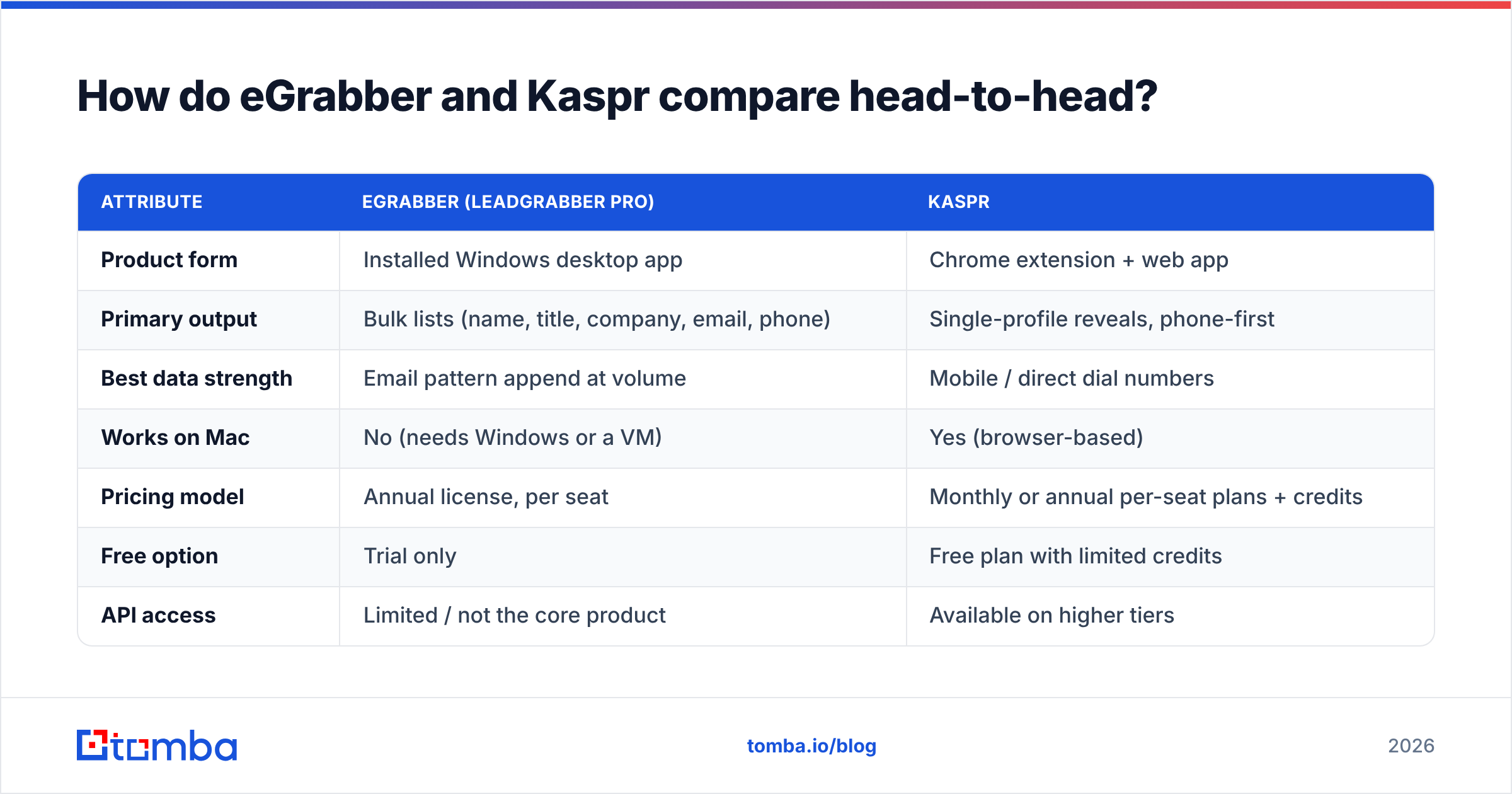
| Attribute | eGrabber (LeadGrabber Pro) | Kaspr |
|---|---|---|
| Product form | Installed Windows desktop app | Chrome extension + web app |
| Primary output | Bulk lists (name, title, company, email, phone) | Single-profile reveals, phone-first |
| Best data strength | Email pattern append at volume | Mobile / direct dial numbers |
| Works on Mac | No (needs Windows or a VM) | Yes (browser-based) |
| Pricing model | Annual license, per seat | Monthly or annual per-seat plans + credits |
| Free option | Trial only | Free plan with limited credits |
| API access | Limited / not the core product | Available on higher tiers |
| Native CRM sync | Export-driven (CSV, Excel) | HubSpot, Salesforce, Pipedrive, Lemlist |
| Learning curve | Steep — desktop UI feels dated | Shallow — install and click |
| Team collaboration | Weak (files live on one machine) | Shared lists and workspaces |
| GDPR posture | You own the scraping activity | Documented notification process |
Read that table twice before you shortlist. Row three decides it for most teams. eGrabber is an email machine. Kaspr is a phone machine.
How accurate is the data from each?#
Accuracy claims from both vendors run high. Real results run lower. That gap is normal in this category, and it is not unique to these two.

Here is what drives accuracy in each tool.
- eGrabber leans on pattern guessing. It infers formats like
first.last@company.com, then tries to confirm them. This works well at mid-size firms with steady formats. It breaks on catch-all domains, aliases, and odd local parts. So any pattern-first tool needs a real check behind it. That is why a catch-all verifier matters more than a raw hit rate. - Kaspr leans on a shared, aggregated pool. Coverage is best where its network is strong: Europe, above all France and the UK. Tech and SaaS roles do well too. Ask for a test on your exact ICP first. US mid-market manufacturing is a very different story from London SaaS.
Two more limits apply to both tools, plus one rule about freshness.
- Both fade at the extremes of seniority. C-suite contacts at big firms are guarded. New hires under six months have not reached any dataset yet.
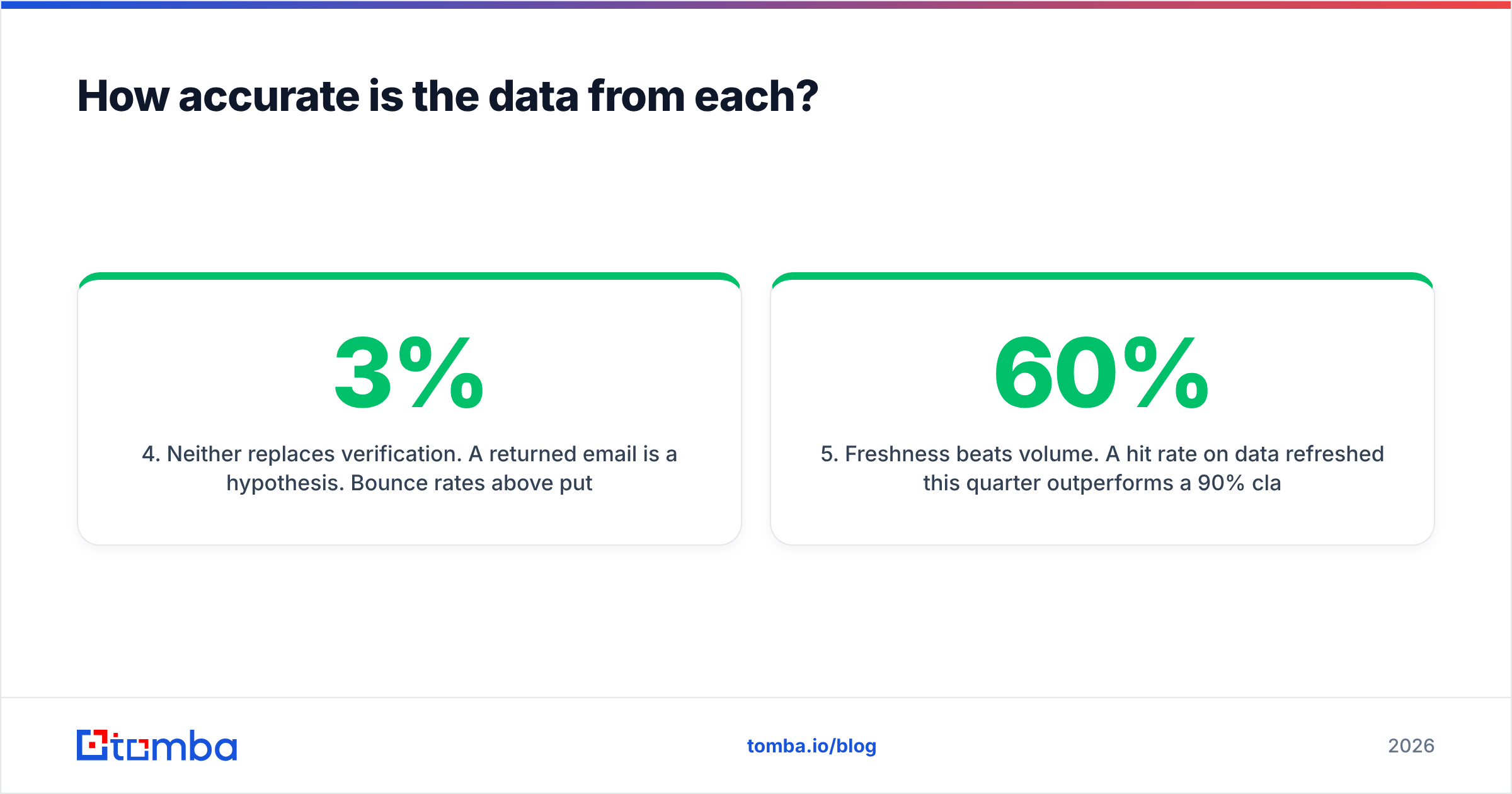
- Neither one replaces verification. A returned email is a guess. Bounce rates above 3% put your domain at risk, no matter who supplied the address. Run every list through an email verifier before it hits a sequencer.
- Fresh data beats big data. A 60% hit rate on data refreshed this quarter beats a claimed 90% on a stale dump. Bounces cost you sender reputation, not just credits.
User reviews on G2 show the same pattern for both. Scores are strong on the core job. They drop on data completeness outside the vendor's home turf. Treat each vendor's accuracy number as marketing until your own test says otherwise. The eGrabber vs Kaspr accuracy gap is smaller than either pitch deck suggests.
What does each one actually cost?#
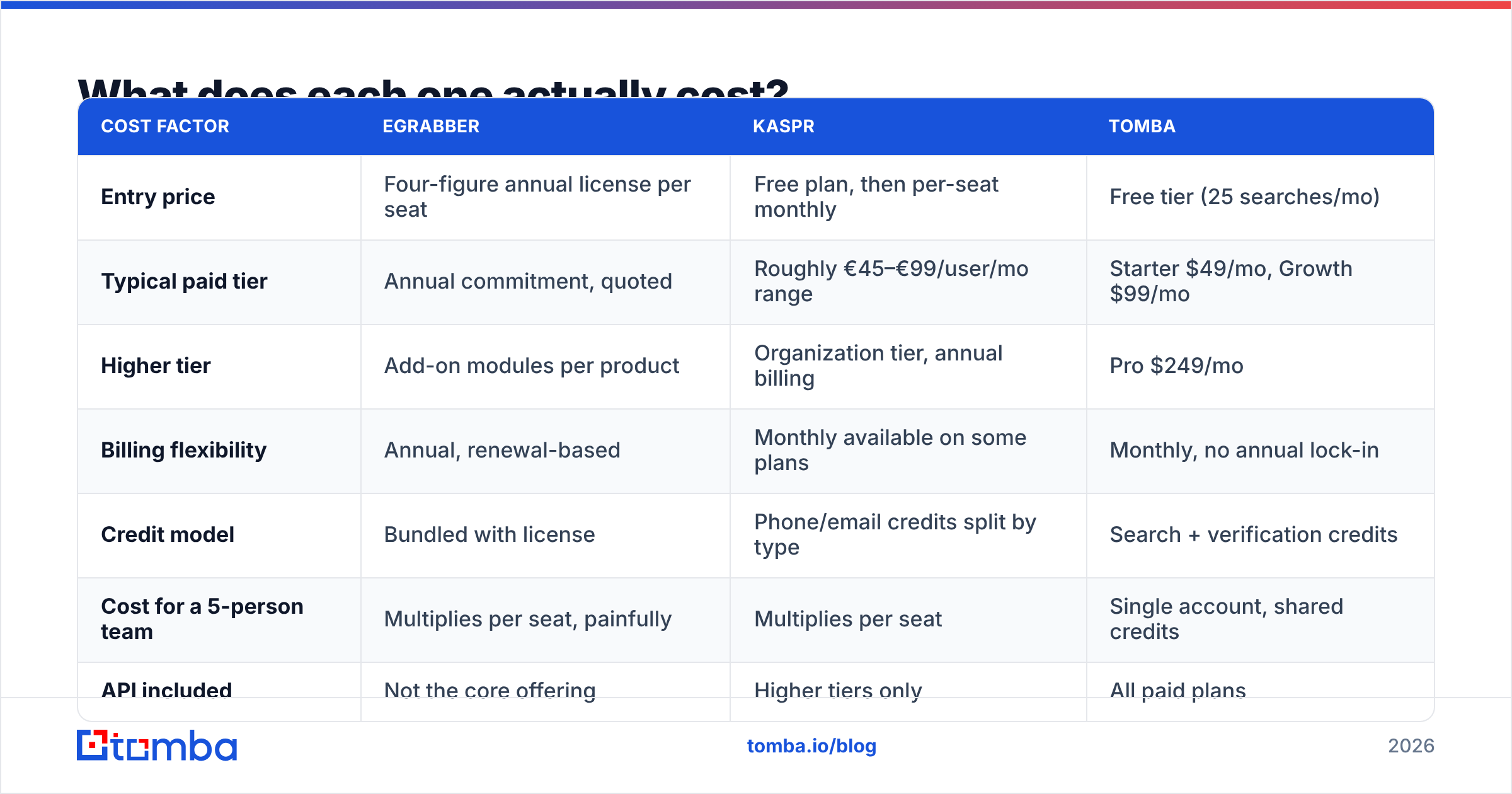
eGrabber vs Kaspr pricing is hard to compare, because the units differ. eGrabber sells you a tool. Kaspr sells you credits per seat. Check current numbers with each vendor. Both change list pricing without much notice.
| Cost factor | eGrabber | Kaspr | Tomba |
|---|---|---|---|
| Entry price | Four-figure annual license per seat | Free plan, then per-seat monthly | Free tier (25 searches/mo) |
| Typical paid tier | Annual commitment, quoted | Roughly €45–€99/user/mo range | Starter $49/mo, Growth $99/mo |
| Higher tier | Add-on modules per product | Organization tier, annual billing | Pro $249/mo |
| Billing flexibility | Annual, renewal-based | Monthly available on some plans | Monthly, no annual lock-in |
| Credit model | Bundled with license | Phone/email credits split by type | Search + verification credits |
| Cost for a 5-person team | Multiplies per seat, painfully | Multiplies per seat | Single account, shared credits |
| API included | Not the core offering | Higher tiers only | All paid plans |
Three cost traps are worth naming.
- eGrabber's yearly license is the whole spend up front. Your outbound plan may change in month four. You still own the license, and there is no soft way to downgrade.
- Kaspr splits phone and email credits. Teams that burn phone credits fast often leave email credits unused. Model your real mix before you pick a tier.
- Per-seat pricing punishes growth. Both tools charge by user. A shared-credit model keeps the data in one account and serves everyone through an API. That gets cheaper as the team grows, not pricier. It is why Tomba pricing sits per account, not per head.
eGrabber vs Kaspr: which one fits your workflow?#
Skip the feature matrix for a second. Match the tool to the way your team already works.
Pick eGrabber if:
- You are on Windows and fine with installed software.
- You build large static lists once a quarter, not daily.
- Your ICP is US mid-market with steady email formats.
- One or two people own list building for the whole team.
- You would rather pay once a year than watch monthly credit burn.
Pick Kaspr if:
- Your reps live inside LinkedIn and need a number to dial now.
- Cold calling is a real channel for you.
- Your ICP skews European.
- You need Mac support and browser-based access.
- You want a free tier to test first.
Pick an API-first email finder if:
- You want contact data in your CRM, sequencer, or sheet automatically.
- Email is your main channel and phone is secondary.
- You need one account serving many users, with no per-seat math.
- Verification has to run in the same pipeline as enrichment.
- You want to enrich from a domain, not a browser tab. That is what domain search is for.

Where do both tools fall short?#
Both sides of the eGrabber vs Kaspr matchup have real gaps. You will hit them in week two.
eGrabber's limits are structural. It is desktop-bound. That means no Mac, no shared workspace, and no clean way to trigger enrichment from an automation. The interface shows its age. Scraping LinkedIn from a desktop client also carries account risk. No vendor can cover you for that, so the risk sits with you.
Kaspr's limits are coverage and channel. Phone-first data puts email second. The extension flow does not scale past a few hundred contacts a week without a lot of clicking. A five-rep team pays five times. Credit splits between phone and email create waste. And its European edge is a North American gap.
Both share a bigger problem: neither one is a pipeline. You still need verification, dedupe, enrichment, and a path into your CRM. If you plan to stitch three tools together anyway, ask whether the finder should do the stitching. A bulk email finder that verifies in the same pass removes a manual step. And data enrichment fills the firmographic gaps both tools leave behind.
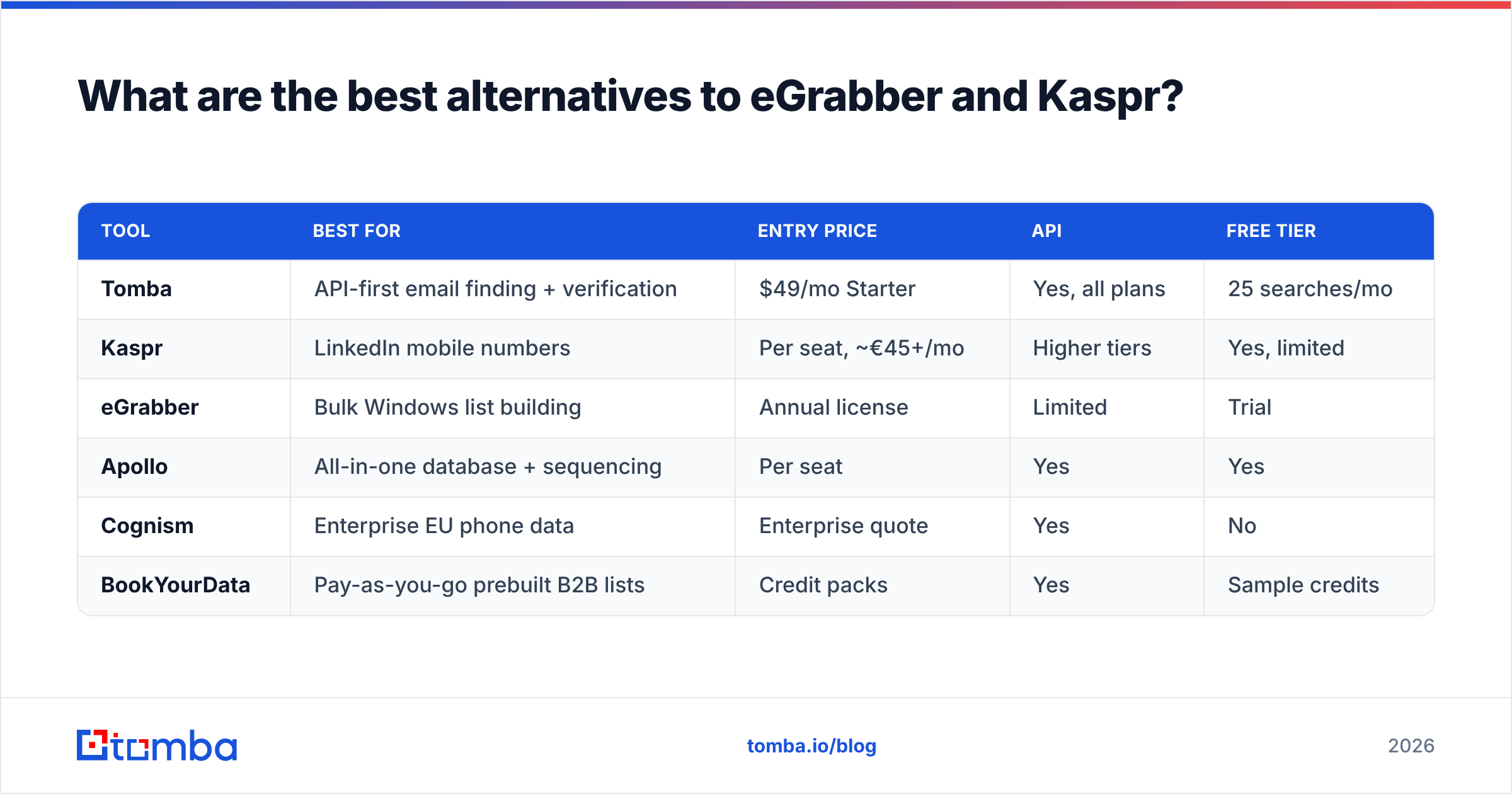
What are the best eGrabber vs Kaspr alternatives?#

| Tool | Best for | Entry price | API | Free tier |
|---|---|---|---|---|
| Tomba | API-first email finding + verification | $49/mo Starter | Yes, all plans | 25 searches/mo |
| Kaspr | LinkedIn mobile numbers | Per seat, ~€45+/mo | Higher tiers | Yes, limited |
| eGrabber | Bulk Windows list building | Annual license | Limited | Trial |
| Apollo | All-in-one database + sequencing | Per seat | Yes | Yes |
| Cognism | Enterprise EU phone data | Enterprise quote | Yes | No |
| BookYourData | Pay-as-you-go prebuilt B2B lists | Credit packs | Yes | Sample credits |
A few notes, so you are not just comparing labels.
- Apollo bundles data with sequencing. Good if you want one vendor. Heavy if you already own a sequencer. The Apollo alternative breakdown shows where the bundle helps and where it costs you.
- Cognism owns Kaspr. It is the enterprise answer to the same phone-data question. Bigger budget, wider coverage, longer sales cycle.
- BookYourData has a different shape. You buy a targeted list outright on a credit pack, with no subscription and no seats. It fits when you need one defined segment now, and the pay-as-you-go model skips the per-seat math.
- Tomba treats the finder as infrastructure. The Tomba API, Chrome extension, Google Sheets add-on, and CRM integrations all draw on one account's credits.
Need phones outside a LinkedIn tab? A standalone phone finder plus a phone validator gets you dialer-ready numbers, with no per-seat extension to buy. HubSpot's sales prospecting research also shows multi-channel sequences beating single-channel ones. That is the practical case for keeping email and phone data on the same rails.
eGrabber vs Kaspr: which should you pick in 2026?#
Verdict: Kaspr if you dial. eGrabber if you build Windows lists in bulk. Neither if email is your main channel.
Kaspr wins the head-to-head for most modern teams on workflow alone. It is browser-based and Mac-friendly. There is a free tier to test. The CRM integrations are real. And the phone data is genuinely useful for cold calls. eGrabber wins a narrower slot: a Windows list builder who wants one yearly purchase and works US mid-market accounts with steady email patterns.
Run the test that matters before you sign either contract. Take 100 real contacts from your ICP. Run them through each tool. Verify the output on your own. Then compare cost per verified, non-bouncing contact. Not cost per credit. Not the claimed hit rate. That one number reorders most shortlists, and it settles eGrabber vs Kaspr faster than any review can.
Is email your main channel? Do you want data that arrives verified and already inside your stack? Then start with the Tomba Email Finder. The free tier gives you 25 searches a month, enough to run the test above. Starter is $49/mo with full API access. Verification is part of the same pipeline, not a second vendor. Build the list once, verify it in the same pass, and let your reps talk to people instead of clicking reveal buttons.
Related guides#
Ready to find emails that actually work?
Join 150,000+ professionals who stopped guessing and started sending. Free credits on signup — no credit card required.
Get the Tomba newsletter
Practical outbound tactics and product updates — once every two weeks.
About the author