Elisiontec DialShree Pricing, Reviews, Pros and Cons (2026)
Elision never publishes a price list for DialShree, so buyers negotiate blind. Here is what the quote actually covers, what reviewers report, and where the hidden costs sit.
TL;DR
- Elision Technologies does not publish a public price list for DialShree. Every number you see online — including the ranges in this post — is a buyer-reported estimate, not an official rate card. Treat them as a negotiating anchor, not a quote.
- DialShree is licensed by concurrent agent seat, with a choice of monthly subscription, annual subscription, or one-time perpetual license plus an annual maintenance charge (AMC). The perpetual route is where the "cheap" reputation comes from — and where the long-term cost hides.
- Reviewers consistently praise two things: price-to-feature ratio versus Western contact-center suites, and hands-on support during setup. The recurring complaints are dated UI, documentation gaps, and reporting that needs custom work.
- DialShree is a strong fit for 20–300 seat outbound/BPO operations that want on-prem or hybrid control. It is a poor fit for a 5-person SaaS sales team that wants self-serve signup and a modern sequencer.
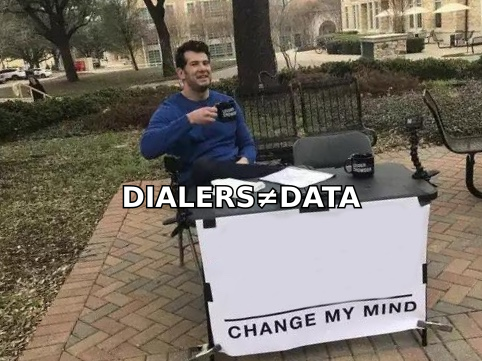
- A dialer does not fix bad contact data. Whatever platform you pick, the connect rate is decided upstream by whether the numbers and emails in your list are real.
What is Elisiontec DialShree?#
DialShree is a unified call center solution from Elision Technologies Pvt. Ltd., an Indian VoIP software company operating at elisiontec.com since roughly 2007. The product bundles what most vendors sell as three or four separate SKUs: an outbound dialer (predictive, progressive, preview, and manual modes), inbound ACD and IVR, omnichannel handling for chat/email/WhatsApp, agent and supervisor consoles, call recording, and a reporting layer — all sitting on an open-source telephony core in the Asterisk/FreeSWITCH family.
The strategic difference from Genesys, Five9, or NICE is not the feature checklist. It is the delivery model. DialShree is sold as software you can own and host, not only as a seat you rent. That single decision explains its pricing structure, its buyer profile, and most of its reviews.
Four attributes define where DialShree sits in the market:
- Deployment flexibility. On-premise, private cloud, or hybrid. If your compliance team refuses to put call recordings in a US-hosted multi-tenant cloud, this matters more than any feature.
- Concurrent-seat licensing. You pay for simultaneous agents, not named users. A 24/7 operation running three shifts of 40 agents licenses 40 seats, not 120 — a real cost difference against per-named-user vendors.
- Carrier-agnostic trunking. You bring your own SIP trunks and negotiate telco rates yourself. Cheaper at volume, but it means you own two vendor relationships instead of one.
- Custom development as a first-class option. Elision will build integrations and modules against your workflow. That is a genuine advantage for odd requirements, and a genuine risk if it becomes the answer to every gap.

How much does DialShree cost in 2026?#
Short answer: nobody outside Elision's sales team knows the list price, because there isn't a published one. DialShree pricing is quote-only. You submit requirements — seat count, dialing mode, deployment model, integrations — and receive a proposal.
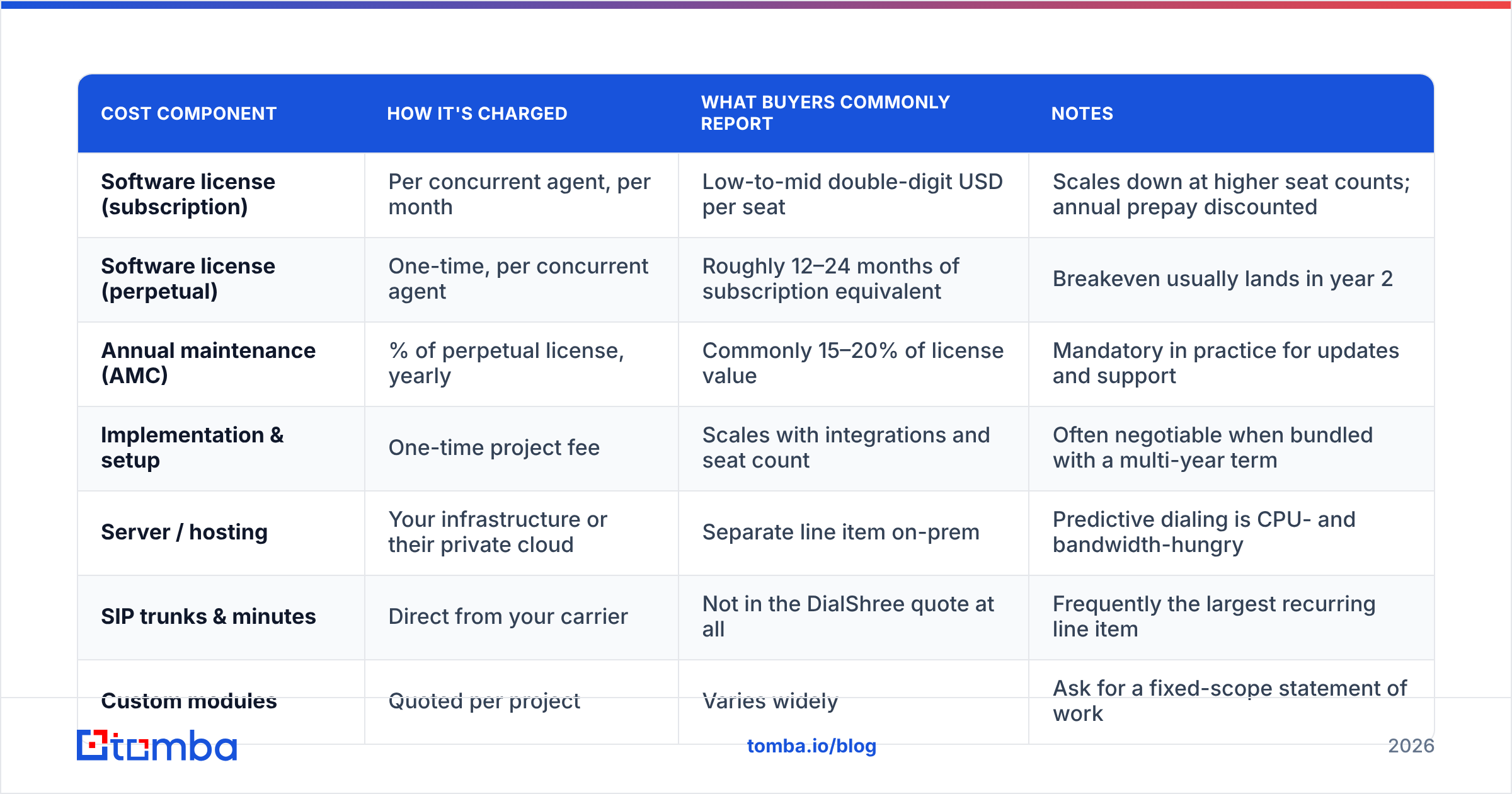
That is not unusual for contact-center software aimed at BPOs, but it does mean you should walk in with a model of the cost structure rather than a target number. Here is how quotes are typically assembled, based on how the vendor describes its licensing and how buyers on review platforms describe what they signed.
| Cost component | How it's charged | What buyers commonly report | Notes |
|---|---|---|---|
| Software license (subscription) | Per concurrent agent, per month | Low-to-mid double-digit USD per seat | Scales down at higher seat counts; annual prepay discounted |
| Software license (perpetual) | One-time, per concurrent agent | Roughly 12–24 months of subscription equivalent | Breakeven usually lands in year 2 |
| Annual maintenance (AMC) | % of perpetual license, yearly | Commonly 15–20% of license value | Mandatory in practice for updates and support |
| Implementation & setup | One-time project fee | Scales with integrations and seat count | Often negotiable when bundled with a multi-year term |
| Server / hosting | Your infrastructure or their private cloud | Separate line item on-prem | Predictive dialing is CPU- and bandwidth-hungry |
| SIP trunks & minutes | Direct from your carrier | Not in the DialShree quote at all | Frequently the largest recurring line item |
| Custom modules | Quoted per project | Varies widely | Ask for a fixed-scope statement of work |
The important structural point: the license fee is often not the biggest number on the total-cost sheet. For a high-volume outbound floor, telco minutes and server capacity routinely exceed software cost. Vendors with all-in per-agent pricing hide that; DialShree exposes it. Exposure is not the same as expense — but it does mean an apples-to-apples comparison requires you to add your own carrier bill to the DialShree column before judging it cheap.
Two questions to force into the first sales call:
- Is the AMC percentage fixed for the contract term, or indexed? An AMC that floats upward turns a perpetual license into a subscription with extra steps.
- What exactly triggers a new license purchase? Adding seats mid-term, adding a second dialing mode, and adding a channel (WhatsApp, chat) are three different questions with three different answers.
What do DialShree reviews actually say?#
Aggregate sentiment across G2, Capterra, and the India-heavy review platforms is positive but narrow — the review volume is modest compared to enterprise incumbents, so read individual reviews rather than the star average. A handful of themes repeat consistently enough to be treated as signal.
What reviewers praise:
- Value versus Western suites. The single most common phrase pattern is some version of "comparable functionality at a fraction of the cost." This is the product's core reputation and it appears to be earned.
- Responsive, hands-on support. Multiple reviewers describe direct access to engineers during deployment rather than a ticket queue. Smaller vendor, shorter escalation path.
- Willingness to customise. Requests that a large vendor would file as a roadmap item get built. Buyers with unusual compliance or CRM requirements rate this highly.
- Dialer stability at volume. Predictive dialing performance and call quality get positive marks once tuning is complete.
What reviewers criticise:
- Interface feels dated. The agent and admin consoles are functional rather than modern. Teams coming from a polished SaaS UI notice immediately.
- Reporting requires work. Standard reports cover the basics; anything bespoke tends to become a customisation request.
- Documentation and self-service gaps. Fewer public docs, tutorials, and community threads than mainstream platforms, which increases dependence on vendor support.
- Onboarding is a project, not a signup. There is no free trial you can self-provision at 11pm. Expect a demo, a scoping call, and a deployment timeline.
- Time-zone friction. Some non-Asia buyers mention support-hours overlap as an irritant, though most say responsiveness compensates.
Note the pattern: the complaints are almost entirely about polish and self-service, not about whether the software works. That is the correct expectation to set internally before a pilot.
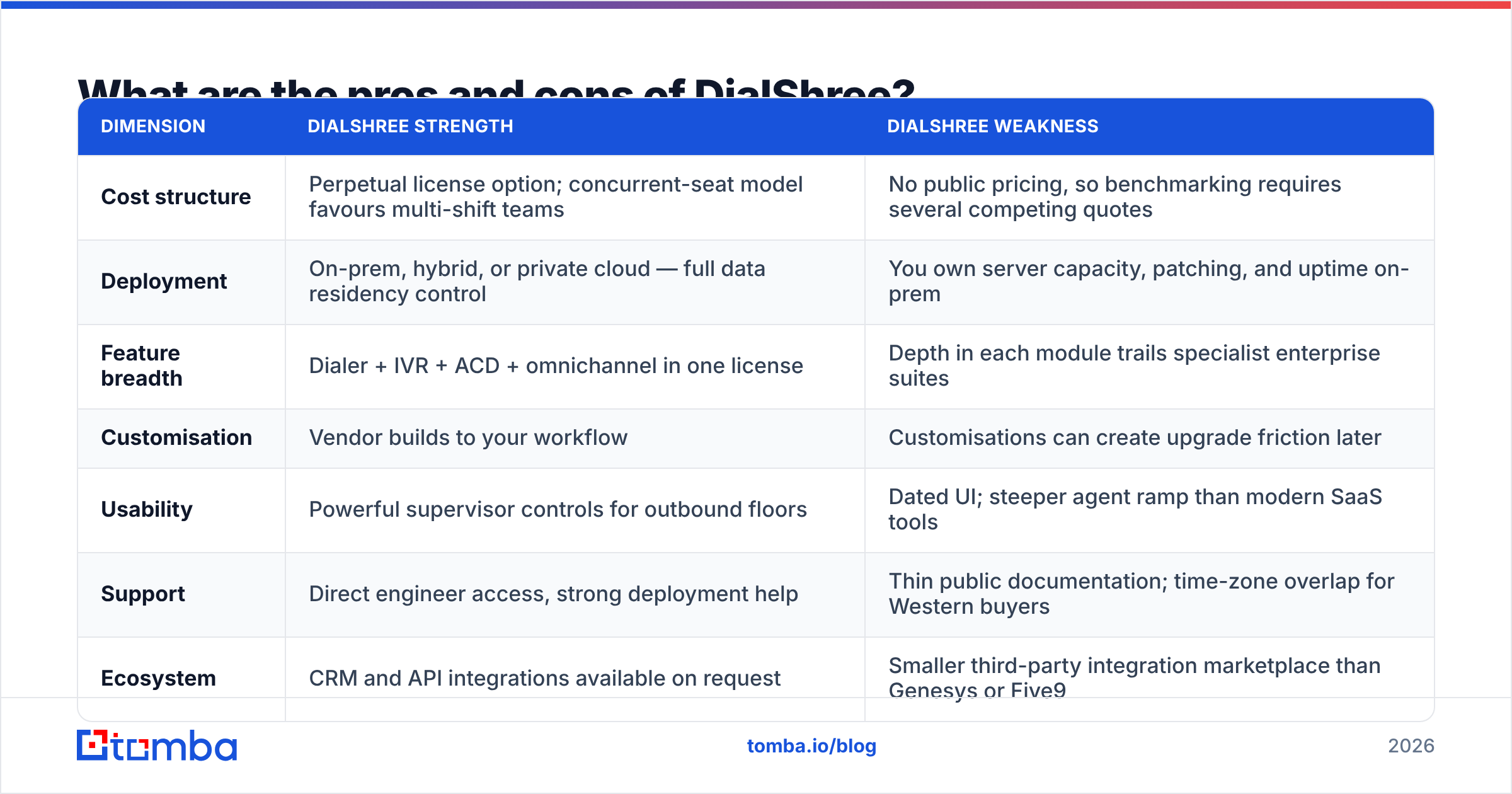
What are the pros and cons of DialShree?#
| Dimension | DialShree strength | DialShree weakness |
|---|---|---|
| Cost structure | Perpetual license option; concurrent-seat model favours multi-shift teams | No public pricing, so benchmarking requires several competing quotes |
| Deployment | On-prem, hybrid, or private cloud — full data residency control | You own server capacity, patching, and uptime on-prem |
| Feature breadth | Dialer + IVR + ACD + omnichannel in one license | Depth in each module trails specialist enterprise suites |
| Customisation | Vendor builds to your workflow | Customisations can create upgrade friction later |
| Usability | Powerful supervisor controls for outbound floors | Dated UI; steeper agent ramp than modern SaaS tools |
| Support | Direct engineer access, strong deployment help | Thin public documentation; time-zone overlap for Western buyers |
| Ecosystem | CRM and API integrations available on request | Smaller third-party integration marketplace than Genesys or Five9 |
| Buying experience | Consultative, requirements-driven | Slow if you want to test the product this week |
How does DialShree compare to other contact center platforms?#
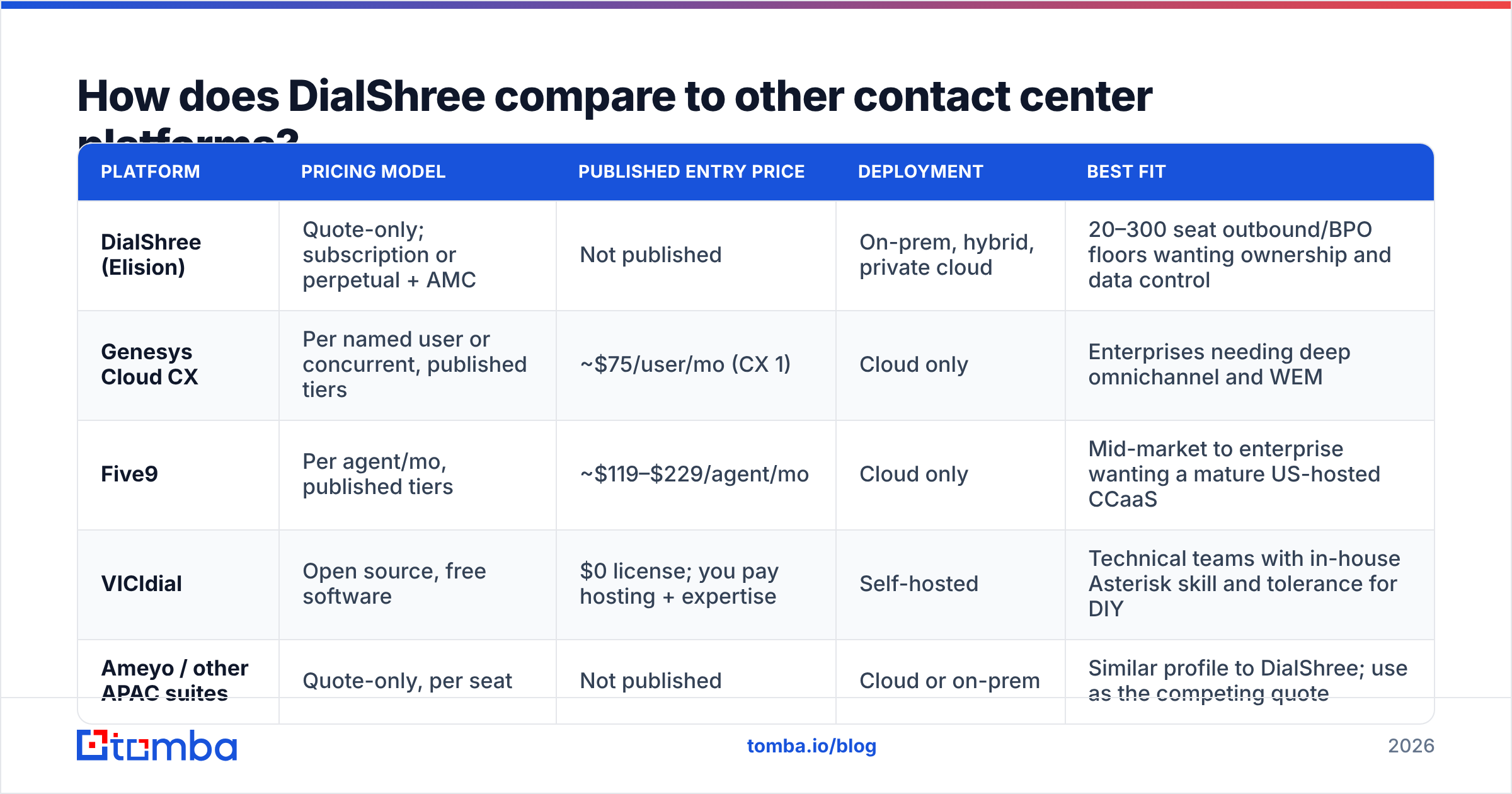
The honest comparison is not "which is best" but "which cost model matches your operation." Published competitor prices below are list rates from vendor sites and move frequently — verify before you build a business case.
| Platform | Pricing model | Published entry price | Deployment | Best fit |
|---|---|---|---|---|
| DialShree (Elision) | Quote-only; subscription or perpetual + AMC | Not published | On-prem, hybrid, private cloud | 20–300 seat outbound/BPO floors wanting ownership and data control |
| Genesys Cloud CX | Per named user or concurrent, published tiers | ~$75/user/mo (CX 1) | Cloud only | Enterprises needing deep omnichannel and WEM |
| Five9 | Per agent/mo, published tiers | ~$119–$229/agent/mo | Cloud only | Mid-market to enterprise wanting a mature US-hosted CCaaS |
| VICIdial | Open source, free software | $0 license; you pay hosting + expertise | Self-hosted | Technical teams with in-house Asterisk skill and tolerance for DIY |
| Ameyo / other APAC suites | Quote-only, per seat | Not published | Cloud or on-prem | Similar profile to DialShree; use as the competing quote |
Read that table as three lanes. CCaaS incumbents sell predictability and ecosystem at a premium per seat. Open source sells zero license cost and charges you in engineering time. DialShree and its APAC peers sit in the middle: licensed commercial software with an ownership option and a price that requires a conversation.
The practical procurement move is to get quotes from DialShree and at least one direct peer, then price the same seat count on a published-rate cloud vendor. If the delta is under about 30% on three-year total cost, the published-price cloud vendor usually wins on operational simplicity. If the delta is large — which it often is at higher seat counts — the ownership model starts to justify its overhead.
Who should buy DialShree, and who should skip it?#
Buy it if:
- You run outbound volume at scale — collections, telesales, lead qualification, BPO campaigns for clients — where predictive dialing efficiency directly drives revenue.
- Data residency or on-prem hosting is non-negotiable for regulatory or client-contract reasons.
- You operate multiple shifts and can exploit concurrent-seat licensing.
- You have, or can hire, someone who is comfortable with Linux and SIP. On-prem without that person is how deployments go badly.
- Your requirements include something odd enough that mainstream vendors say "roadmap."
Skip it if:
- You're a small B2B sales team (under ~10 reps) who wants signup-today software, native CRM sync, and a modern sequencer. A cloud sales-engagement tool fits better.
- Nobody owns infrastructure internally and you don't want to pay for private cloud management.
- You need a large third-party integration marketplace out of the box.
- Your buying process cannot tolerate quote-only procurement. That's a legitimate constraint, not a flaw in you.
What hidden costs should you budget for?#
Five line items that reliably surprise first-time buyers of on-prem or hybrid dialer software:
- Telco minutes and DID rental. Not in the software quote. At scale this is frequently the largest recurring cost, and it is entirely on you to negotiate.
- Server headroom for predictive mode. Predictive dialing at a 3:1 ratio places far more load than the same seat count doing manual dials. Undersize the box and call quality degrades before anything alerts you.
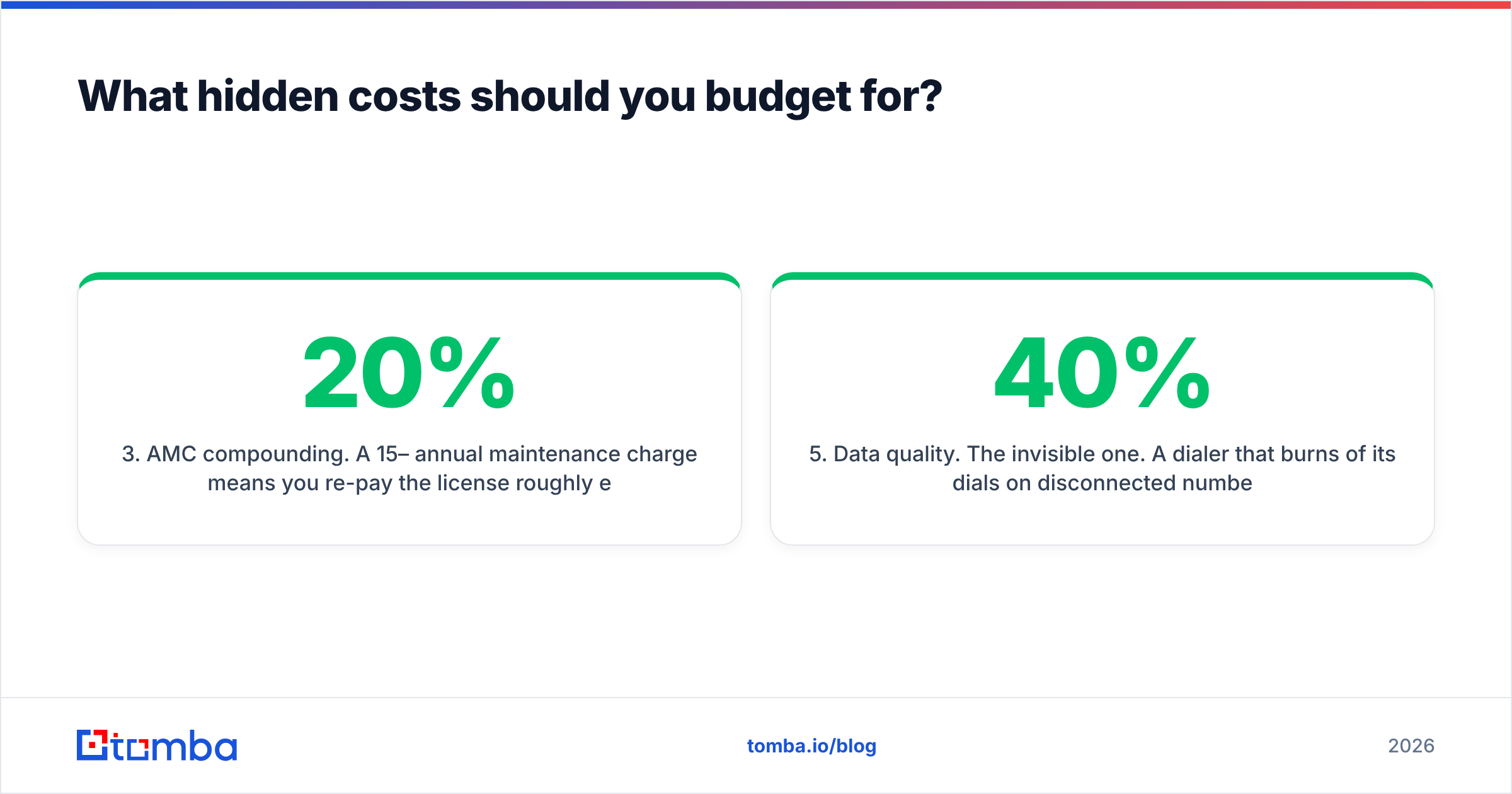
- AMC compounding. A 15–20% annual maintenance charge means you re-pay the license roughly every five to seven years. Model the seven-year cost, not the three-year cost.
- Customisation debt. Each bespoke module is something that must be re-tested at every upgrade. Ask explicitly who pays for that re-testing.
- Data quality. The invisible one. A dialer that burns 40% of its dials on disconnected numbers is a dialer running at 60% of the capacity you licensed. That waste is charged to you twice — in minutes and in idle agent time.
That last point deserves its own section, because it is the cost buyers most often fail to model.
Does a dialer fix your contact data problem?#
No — and this is the most expensive misunderstanding in outbound tooling. A predictive dialer optimises how fast you attempt contacts. It has no opinion on whether those contacts exist.
Run the arithmetic on a 50-seat floor. If 30% of your numbers are dead, you are paying for 15 seats' worth of licensed capacity, telco minutes, and agent salary to dial nothing. No dialer tuning recovers that. It has to be fixed upstream, in the list.
Which means your contact-data layer is a peer investment to your dialer, not an afterthought:
- Validate numbers before they enter a campaign. A phone validator pass on the list removes disconnected and invalid lines before they consume dialer capacity.
- Fill the gaps rather than dropping the record. When a lead has a company and a name but no direct line, a phone finder lookup often recovers a usable B2B number instead of writing the account off.
- Give reps a second channel. Cold calling and email compound; run them together. Verified addresses from an email verifier keep bounce rates low and protect your sender reputation while the dialer works the same accounts.
- Enrich before you route. Data enrichment — title, seniority, company size — is what lets you assign the right list to the right skill group instead of dialing indiscriminately.
Sequence it in that order and the dialer you buy performs at closer to the capacity you licensed. Skip it and you will spend the next two quarters tuning pacing ratios to solve a data problem.
What's the verdict on DialShree pricing?#
DialShree is credible software with an unhelpful buying experience. The product does what it claims, the value-per-feature reputation appears earned, and the on-prem option solves a real compliance problem that pure-cloud vendors cannot. The friction is entirely commercial: quote-only pricing means you cannot evaluate it without engaging sales, and the total-cost picture only becomes clear once you've added your own carrier and server costs to the proposal.
Practical approach: get three quotes — DialShree, one direct APAC peer, one published-price cloud CCaaS — normalise all three onto a three-year and seven-year total including telco and infrastructure, and let the delta decide. Ask specifically about AMC escalation, seat-addition triggers, and who pays to re-test customisations at upgrade. If the answers are clean and the delta is meaningful, DialShree earns its place on the shortlist for a mid-size outbound operation.
Then fix the input side. Before your next campaign loads, run the list through validation and enrichment so the seats you licensed are actually dialing real people. Tomba Email Finder finds verified business email addresses by domain, name, or company, and sits alongside phone lookup, verification, and enrichment in one API — so your outbound stack starts with contacts that exist. The free tier covers 25 searches a month to test accuracy on your own accounts; paid plans start at $49/mo on Tomba pricing, which is a rounding error next to the minutes a bad list burns.
Related guides#
Ready to find emails that actually work?
Join 150,000+ professionals who stopped guessing and started sending. Free credits on signup — no credit card required.
Get the Tomba newsletter
Practical outbound tactics and product updates — once every two weeks.
About the author