Email Address Capture: The 2026 Guide to Building a Clean List
Most teams blame their copy when signups stall. The real problem is email address capture: the offer, the form, the consent record, and whether the addresses you collect are even deliverable.
TL;DR
- Email address capture is not one tactic. It is two separate systems: inbound (visitors hand you an address) and outbound (you find and verify a business address yourself). Most teams run one and wonder why pipeline is thin.
- Field count is the single biggest lever on inbound conversion. Every extra field you add costs you signups, so capture the address first and enrich the rest afterward.
- Exit-intent overlays, content upgrades, and in-product prompts consistently outperform static sidebar boxes, because they are tied to intent rather than to page furniture.
- Uncaptured intent is the bigger leak: 95%+ of B2B traffic never fills anything in. Visitor identification plus an email finder recovers accounts a form never will.
- Whatever you capture, verify it before it hits your sending domain. A 5% invalid rate is enough to drag your inbox placement down for months.
What is email address capture, and why does it keep failing?#
Email address capture is the process of collecting a valid, permissioned email address for a person you want to talk to — and being able to prove where it came from.
Think of it like a leaky bucket under a dripping tap. Most teams spend all their energy trying to make the tap drip faster (more traffic, more ads) while ignoring the holes in the bucket: a five-field form nobody wants to fill, an offer that promises nothing specific, a signup flow that never confirms the address, and a list that quietly rots at 2-3% per month as people change jobs.
There are only three ways an email address ends up in your CRM:
- The person gives it to you. A form, a checkout, a webinar registration, a product signup. Highest intent, lowest volume.
- You find it. You know the company and the role, and you look up the business address through a data provider or an email finder. Highest volume, requires verification and legitimate-interest justification.
- Someone sells it to you. A purchased list. Cheapest per row, most expensive in reputation damage, and in most regions the consent does not transfer to you.
Options 1 and 2 are complementary systems, not competitors. Option 3 is where deliverability goes to die.
Which email address capture methods actually work in 2026?#
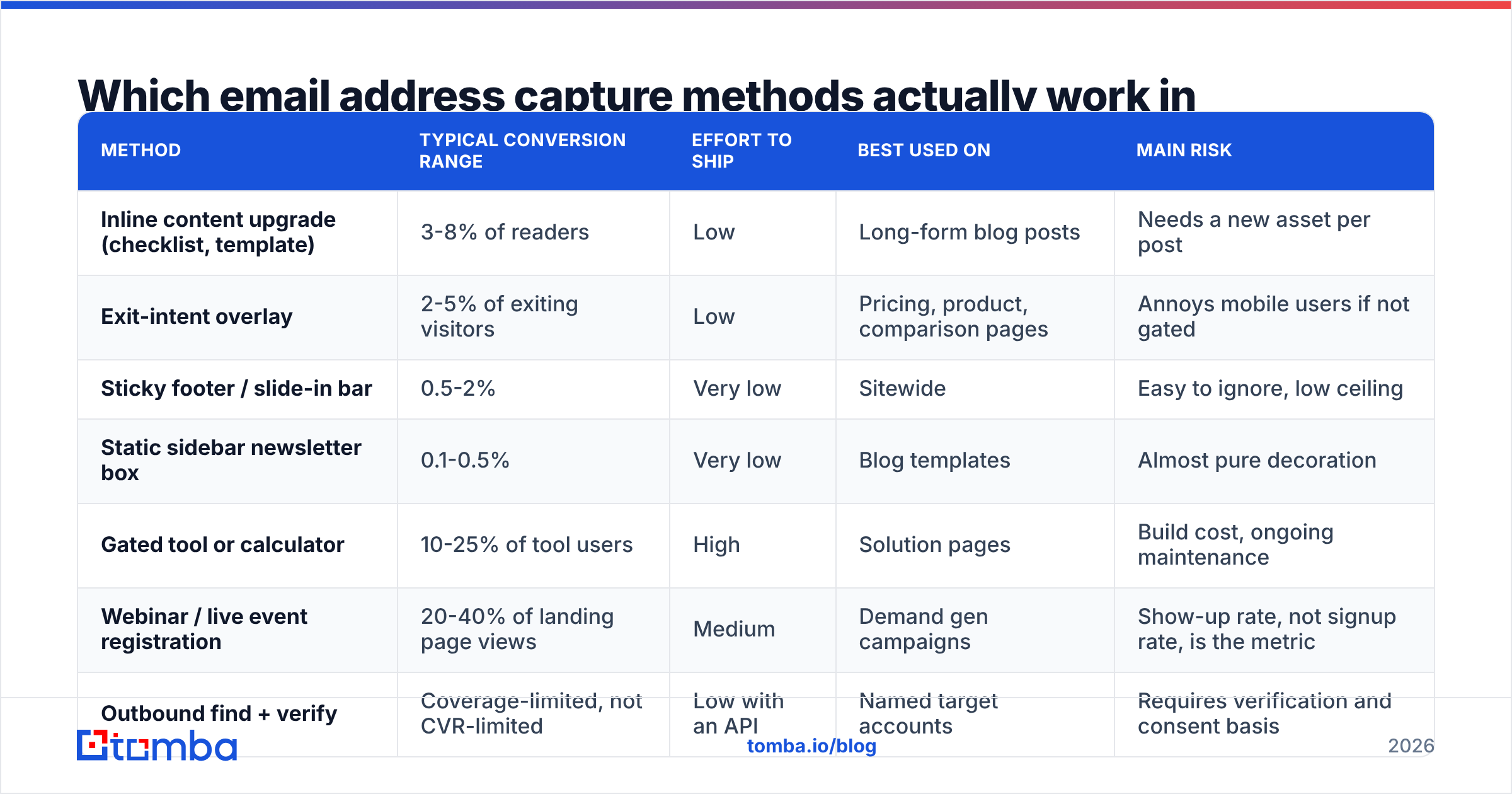
The honest answer is that placement and intent matter more than the widget you use. A well-timed exit-intent overlay on a high-intent pricing page beats a beautiful footer form on a blog post about industry trends every single time.
Here is how the common methods stack up in practice:
| Method | Typical conversion range | Effort to ship | Best used on | Main risk |
|---|---|---|---|---|
| Inline content upgrade (checklist, template) | 3-8% of readers | Low | Long-form blog posts | Needs a new asset per post |
| Exit-intent overlay | 2-5% of exiting visitors | Low | Pricing, product, comparison pages | Annoys mobile users if not gated |
| Sticky footer / slide-in bar | 0.5-2% | Very low | Sitewide | Easy to ignore, low ceiling |
| Static sidebar newsletter box | 0.1-0.5% | Very low | Blog templates | Almost pure decoration |
| Gated tool or calculator | 10-25% of tool users | High | Solution pages | Build cost, ongoing maintenance |
| Webinar / live event registration | 20-40% of landing page views | Medium | Demand gen campaigns | Show-up rate, not signup rate, is the metric |
| Outbound find + verify | Coverage-limited, not CVR-limited | Low with an API | Named target accounts | Requires verification and consent basis |
Two patterns show up in almost every audit. First, the highest-converting inbound asset is usually the one that solves the exact problem the page describes — a pricing calculator on a pricing page, a template on a how-to post. Second, the lowest-converting asset is almost always a generic "subscribe to our newsletter" box, because it asks for something and offers nothing specific in return.
HubSpot's own forms research and product guidance has pushed the same conclusion for years: reduce friction, match the offer to the page, and defer everything you can to a later step.

How many fields should your capture form have?#
One, in most cases. Two if you genuinely need a first name for personalization.
Every field you add is a small tax on conversion. The mechanism is not mysterious — each field is a decision, and decisions leak. Teams that go from six fields to two routinely report conversion lifts in the 30-60% range on the same traffic.
The way out of the tradeoff is progressive capture:
- Step one: address only. One field, one button, one clear promise of what arrives next.
- Step two: automatic enrichment. Resolve company, size, industry, role, and tech stack from the domain using data enrichment rather than asking.
- Step three: ask in-product or in-email. Once someone has replied or logged in, asking for team size costs you nothing.
- Step four: score and route. Now you have enough attributes to decide whether this is a marketing qualified lead or a newsletter reader.
- Step five: never re-ask. If a returning visitor is cookied, pre-fill. Asking twice reads as incompetence.
The rule of thumb: if a field's value can be derived from the domain, do not ask for it. @stripe.com already tells you the company, the industry, the approximate headcount, and the funding stage.
Is inbound or outbound capture the better place to start?#
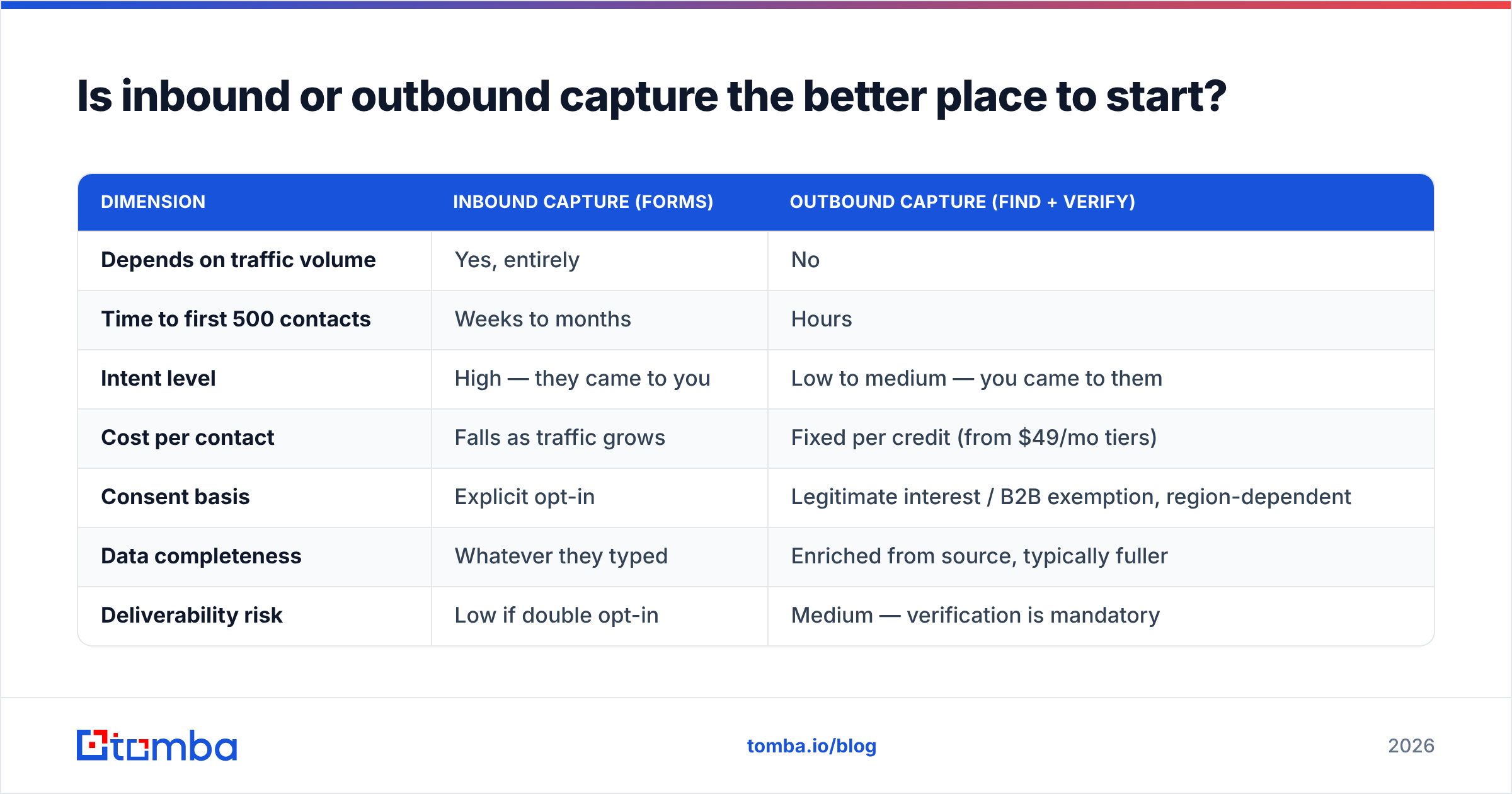
It depends entirely on how much qualified traffic you already have. Below roughly 5,000 relevant monthly visitors, inbound capture optimization is rearranging deck chairs — a 2% lift on 3,000 visits is 60 extra signups a year. Outbound capture has no traffic dependency at all.
| Dimension | Inbound capture (forms) | Outbound capture (find + verify) |
|---|---|---|
| Depends on traffic volume | Yes, entirely | No |
| Time to first 500 contacts | Weeks to months | Hours |
| Intent level | High — they came to you | Low to medium — you came to them |
| Cost per contact | Falls as traffic grows | Fixed per credit (from $49/mo tiers) |
| Consent basis | Explicit opt-in | Legitimate interest / B2B exemption, region-dependent |
| Data completeness | Whatever they typed | Enriched from source, typically fuller |
| Deliverability risk | Low if double opt-in | Medium — verification is mandatory |
| Scales to named accounts | Poorly | Precisely |
The mature answer is to run both and connect them. Inbound tells you who is already interested; outbound lets you reach the other eleven people on the buying committee at that same account. When a @acme.com address hits your form, a domain search on acme.com turns one signup into a mapped account with the VP of Operations and the Head of Finance attached.
What about the 95% of visitors who never fill anything in?#
This is the largest single pool of capturable intent in most B2B funnels, and almost nobody works it.
The typical B2B site converts 1-3% of visitors into any kind of identified contact. The rest browse pricing, read a comparison page, sit on the integrations page for four minutes, and leave with no trace beyond an analytics row. That is not disinterest — it is a research phase that your forms are simply not designed to catch.
Two mechanisms recover part of it:
- Visitor identification. Reverse-resolve the company from firmographic IP data so you at least know that someone at Acme read your pricing page three times this week. Tools like website visitor reveal surface the account even when the individual stays anonymous.
- Role-based lookup on the revealed account. Company-level intent plus a title filter gives you a named person and a verified business address, which is a far warmer starting point than a cold list. This is where an email finder API earns its keep inside an automated workflow.
Be honest about the limits. IP-to-company matching is probabilistic — coverage is decent for mid-market and enterprise on corporate networks, and poor for remote workers on residential connections. Treat it as a prioritization signal, not a truth source.
Do you still need double opt-in and consent records?#
Yes for marketing sends to individuals, and yes for anything touching EU, UK, or Canadian recipients. Double opt-in costs you 15-30% of raw signups and returns that many times over in placement, because it filters typos, bots, and throwaway addresses before they ever count against you.
What you should be storing for every captured address:
- Timestamp and source URL — which page and which asset produced it.
- Consent text shown — the exact wording, versioned. "We saw the checkbox" is not a record.
- IP and user agent at the moment of submission.
- Confirmation event — when the double opt-in link was clicked, if applicable.
- Legal basis — explicit consent, or documented legitimate interest for B2B outbound.
For outbound B2B capture in the US, CAN-SPAM does not require prior consent, but it does require accurate headers, a working physical address, and honored unsubscribes. That is a lower bar than GDPR, not the absence of one. If you sell into Europe, build for the stricter regime and use it everywhere — running two consent systems is how compliance gaps happen.
How do you stop a captured list from rotting?#
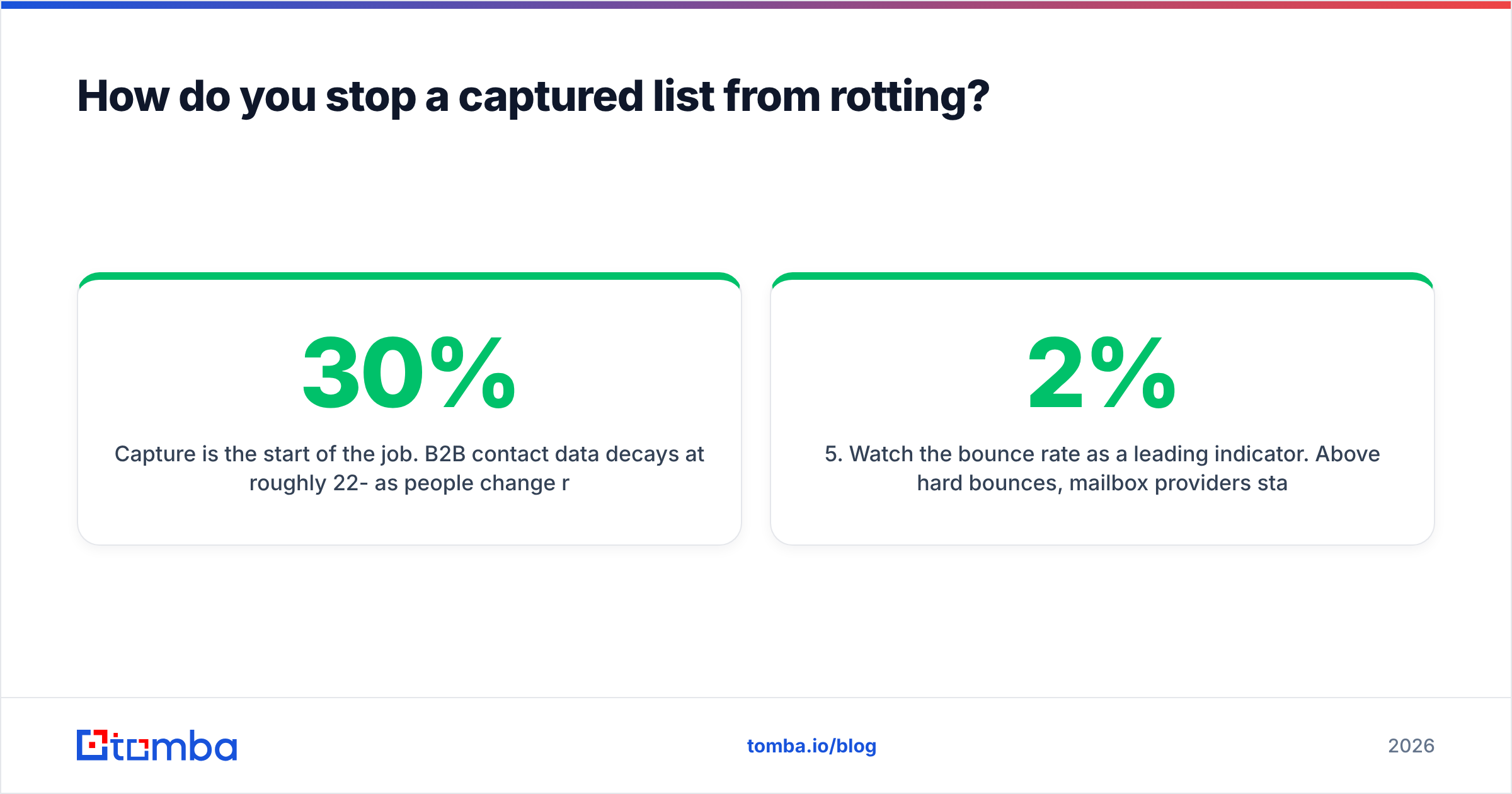
Capture is the start of the job. B2B contact data decays at roughly 22-30% per year as people change roles, companies get acquired, and domains consolidate. A list you captured cleanly in January is measurably worse by December whether you touch it or not.
The maintenance loop that works:
- Verify at the point of capture. A real-time API call on form submit rejects typos (
gmial.com), disposables, and dead mailboxes before they enter your database. This is cheaper than any cleanup later. - Re-verify before every large send. Run the segment through bulk verify if it has been idle more than 60-90 days.
- Handle catch-all domains explicitly. A catch-all accepts everything, so standard SMTP checks return "valid" for addresses that do not exist. A catch-all verifier uses pattern and source evidence instead of relying on the server's answer.
- Sunset the unengaged. Anyone with zero opens across 90 days and six sends is dragging your sender reputation down. Move them to a re-permission sequence, then remove them.
- Watch the bounce rate as a leading indicator. Above 2% hard bounces, mailbox providers start throttling. Above 5%, you are in reputation-repair territory.
If you just want to sanity-check a handful of addresses without wiring anything up, a free email checker covers the one-off case.
What does an email address capture stack cost?#
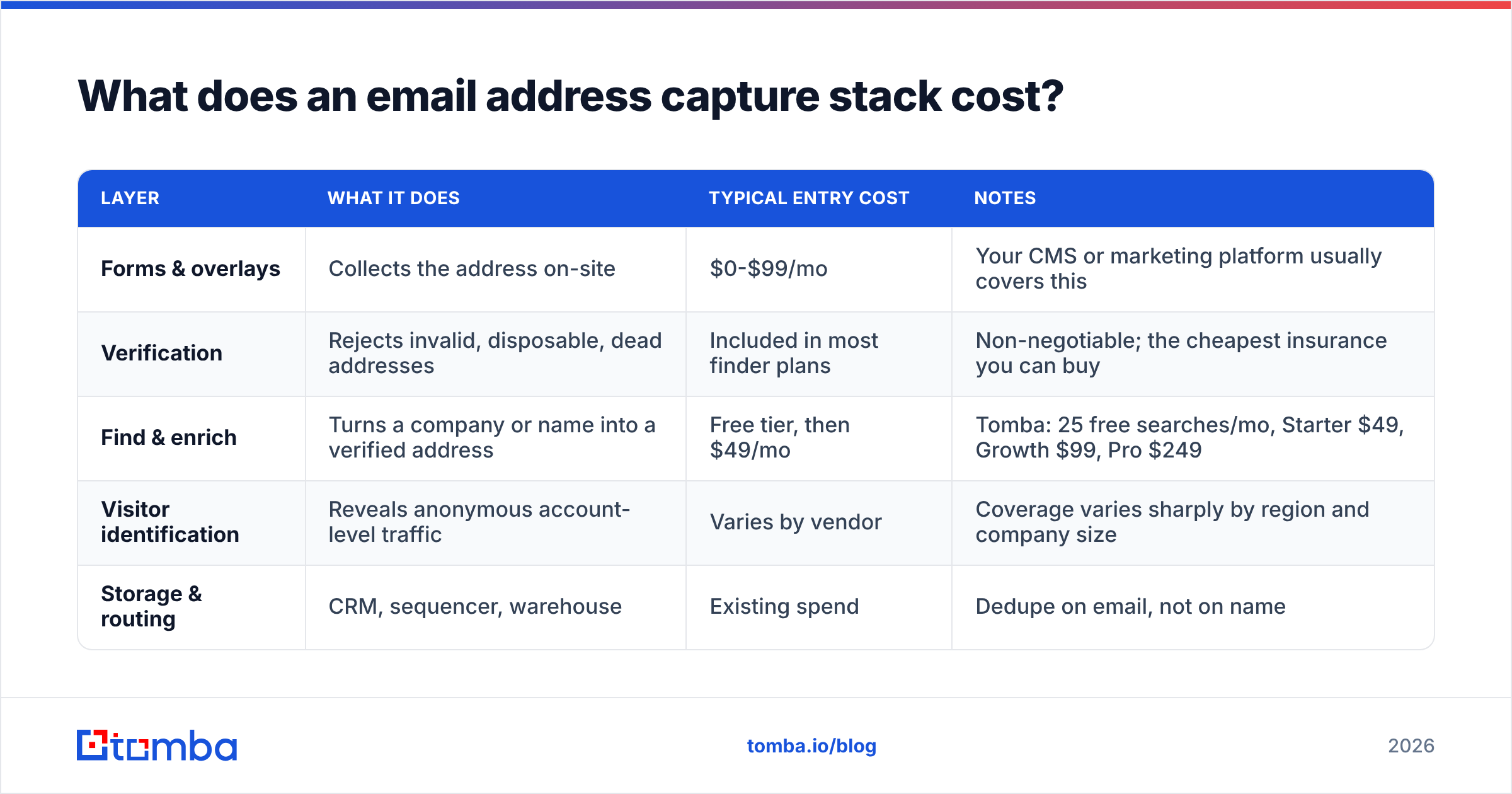
You need four capabilities: a form/overlay layer, a verification layer, a finding/enrichment layer, and somewhere to put the results. Many teams over-buy on the first and under-buy on the second.
| Layer | What it does | Typical entry cost | Notes |
|---|---|---|---|
| Forms & overlays | Collects the address on-site | $0-$99/mo | Your CMS or marketing platform usually covers this |
| Verification | Rejects invalid, disposable, dead addresses | Included in most finder plans | Non-negotiable; the cheapest insurance you can buy |
| Find & enrich | Turns a company or name into a verified address | Free tier, then $49/mo | Tomba: 25 free searches/mo, Starter $49, Growth $99, Pro $249 |
| Visitor identification | Reveals anonymous account-level traffic | Varies by vendor | Coverage varies sharply by region and company size |
| Storage & routing | CRM, sequencer, warehouse | Existing spend | Dedupe on email, not on name |
Compare that against a per-contact list purchase. A 10,000-row list at $0.10 per row looks like $1,000 well spent until you discover the 18% bounce rate, the shared consent basis, and the three months of throttled placement that follow. Vendors that sell verified, compliant B2B data — BookYourData among them — are a legitimate option when you need volume fast and want documented sourcing rather than a scraped CSV from a marketplace. The distinction is provenance, not price.
Full Tomba pricing sits alongside the free tier, which is genuinely enough to test whether your target accounts are even findable before you commit budget. If you want peer-reviewed comparisons of any tool in this category, G2's lead intelligence category is the least biased public source available.
What are the five mistakes that quietly kill capture rates?#
- Asking for a phone number on a newsletter form. It signals "a sales rep will call you," and conversion falls off a cliff. Capture the address, and use a phone finder later for accounts that actually qualify.
- One generic offer sitewide. The same "join 10,000 subscribers" box on a pricing page and a technical tutorial is optimized for neither.
- No verification at submit. You accept
john@compnay.com, send to it for six weeks, and blame your subject lines for the flat response rate. - Treating capture as a marketing-only metric. If the address never reaches the sequencer with its source and consent attached, sales writes cold copy to a warm lead.
- Never measuring capture rate by page. Sitewide conversion rate is an average that hides both your best asset and your worst one. Segment it or you are optimizing blind.
Where should you start this week?#
Pick the constraint you actually have. If you have traffic and no signups, cut your main form to one field, add one page-matched offer to your three highest-intent pages, and turn on verification at submit. If you have neither traffic nor signups, stop optimizing forms and start building a target account list, because no amount of overlay copy will fix a 400-visit month.
Either way, the address is only worth what its deliverability says it is. Start with the Tomba Email Finder — the free tier gives you 25 searches a month to check whether your target accounts and roles are findable at all, and every result comes back with a verification status attached, so nothing enters your list unchecked. When it works, wire the same lookup into your form flow through the API and let every captured domain do double duty.
Related guides#
Ready to find emails that actually work?
Join 150,000+ professionals who stopped guessing and started sending. Free credits on signup — no credit card required.
Get the Tomba newsletter
Practical outbound tactics and product updates — once every two weeks.
About the author