Email Address Checker: How to Verify Any Email in 2026
An email address checker is only as good as the checks it runs. Here is how syntax, MX, SMTP, and catch-all logic actually work, what accuracy claims hide, and how the main tools compare in 2026.
TL;DR
- An email address checker validates whether an address exists and can receive mail — it does not tell you whether the person wants your email.
- Real verification runs four layers: syntax, domain/MX, mailbox (SMTP), and risk scoring. Tools that stop at layer two are glorified regex.
- Catch-all domains are where most checkers quietly fail. Roughly 15-20% of B2B domains accept everything, so a plain "valid" verdict there is meaningless.
- Vendor accuracy claims of "99%" are measured on their own test lists. Bring your own 500-address sample and measure bounce rate instead.
- Best fit depends on volume: standalone verifiers win on pure bulk cleaning, while a combined finder-plus-verifier like Tomba wins when you are sourcing and validating in the same workflow.
What is an email address checker?#
An email address checker is a tool that takes an address like jane.doe@acme.com and answers one question: will mail sent here be accepted, or will it bounce?
Think of it like a courier calling the building's front desk before driving across town. The courier confirms the street exists, the building exists, and there is someone at that unit number — without actually delivering the parcel. A good checker does the same thing over SMTP: it opens a conversation with the receiving mail server, asks about the mailbox, then hangs up before sending anything.
That distinction matters because it defines the limits of the category. A checker tells you the mailbox is real. It cannot tell you the person is still employed there, still reads that inbox, or will not mark you as spam. Those are separate problems solved by data enrichment and better targeting.
Terminology also gets muddled. "Email address checker", "email validator", and "email verifier" all describe the same function. An email finder is the opposite direction — you supply a name and a domain, and it returns the likely address. Most teams need both, which is why they increasingly buy them together.
How does an email address checker actually work?#
Verification is not one test. It is a stack, and each layer eliminates a different failure mode:
- Syntax validation. Checks the address against RFC 5322 rules — one
@, no illegal characters, valid local-part length, sane TLD. This catches typos likejane.doe@acme..comand costs nothing. It is also where the cheapest "free checkers" stop. - Domain and DNS resolution. Confirms the domain resolves and is registered. Dead domains from a two-year-old list get filtered here, along with typo-squats like
gmial.com. - MX record lookup. Checks whether the domain publishes mail exchange records — i.e. whether it accepts email at all. Plenty of company websites do not; parked domains and brochure sites are common false positives without this step.
- SMTP handshake (mailbox-level ping). The verifier connects to the MX host, issues
HELO,MAIL FROM, andRCPT TO, reads the response code, then aborts. A250suggests the mailbox exists; a550means it does not. This is the layer that separates real verification from DNS trivia. - Role, disposable, and trap filtering. Flags
info@,sales@,noreply@role accounts, 10-minute disposable domains, and known spam traps. Role accounts are not invalid — they just convert badly and inflate complaint rates. - Risk scoring for ambiguous cases. When SMTP gives an inconclusive answer (greylisting, catch-all, rate limiting), the tool falls back on pattern data, historical engagement signals, and confidence scores. How well a vendor handles this layer is the single biggest quality differentiator.
Note that some large providers — Google Workspace and Microsoft 365 in particular — have progressively tightened responses to RCPT TO probes. That is why identical addresses can return different verdicts across tools, and why any vendor claiming universal certainty is overselling.

What do the results actually mean?#
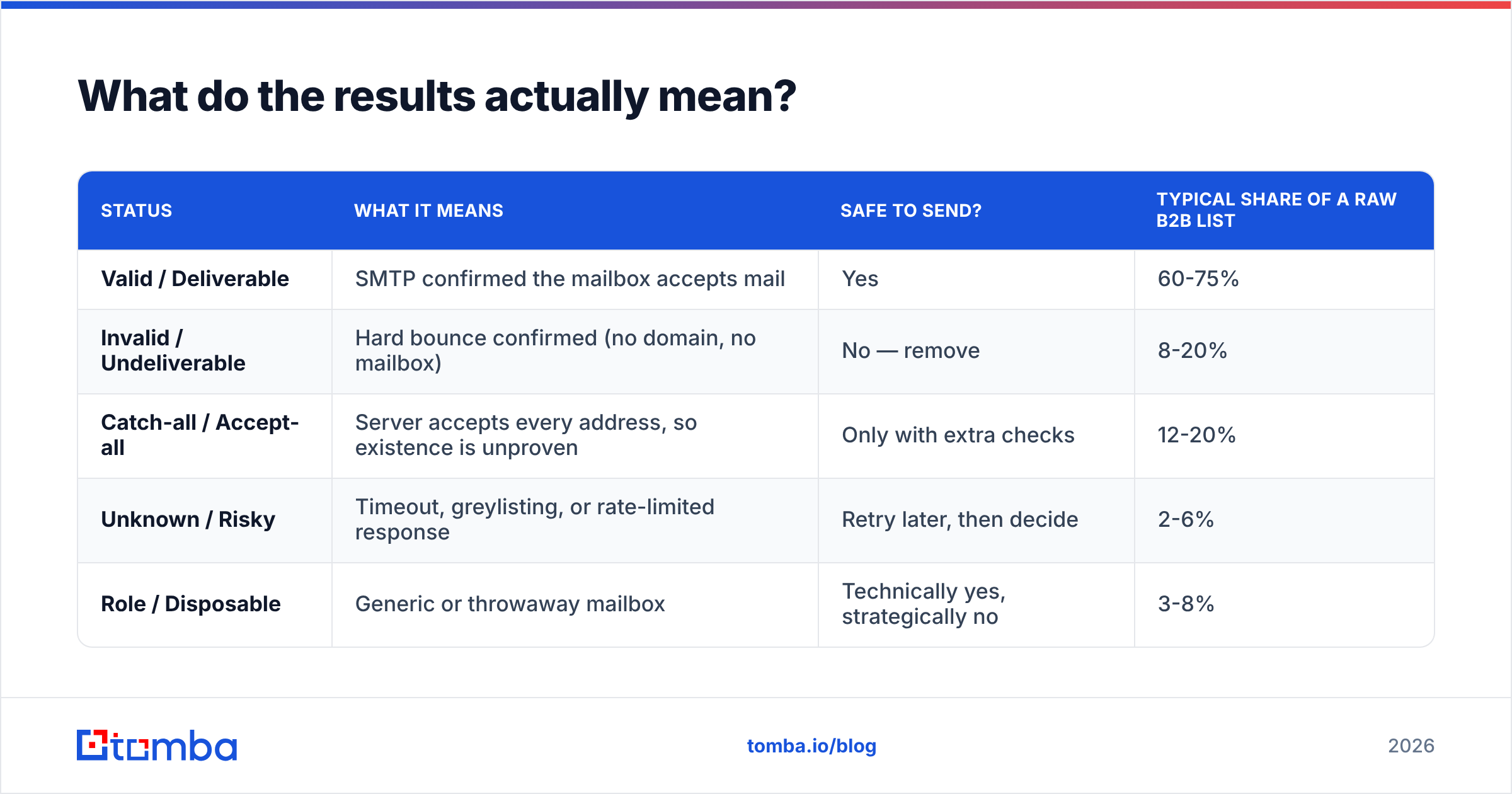
Every vendor uses slightly different labels for the same four or five outcomes. Here is the translation table:
| Status | What it means | Safe to send? | Typical share of a raw B2B list |
|---|---|---|---|
| Valid / Deliverable | SMTP confirmed the mailbox accepts mail | Yes | 60-75% |
| Invalid / Undeliverable | Hard bounce confirmed (no domain, no mailbox) | No — remove | 8-20% |
| Catch-all / Accept-all | Server accepts every address, so existence is unproven | Only with extra checks | 12-20% |
| Unknown / Risky | Timeout, greylisting, or rate-limited response | Retry later, then decide | 2-6% |
| Role / Disposable | Generic or throwaway mailbox | Technically yes, strategically no | 3-8% |
The practical rule: send to Valid, delete Invalid, treat Catch-all as a separate segment, and re-run Unknown after 24-48 hours before deciding. Teams that lump Catch-all in with Valid are the ones who post 10%+ bounce rates and then wonder why their sender reputation collapsed.
How accurate is an email address checker really?#
Treat published accuracy figures as marketing until you reproduce them.
Every vendor benchmarks on a list it controls, usually weighted toward Gmail and large corporate domains where SMTP responses are clean. Your list is not that list. If you sell to 30-person agencies on Google Workspace with catch-all enabled, published numbers tell you almost nothing.

Run your own test instead. It takes an afternoon:
- Build a 500-address sample drawn from your actual ICP, not a scraped mega-list.
- Include 50 known-good addresses (colleagues, customers, your own aliases) as positive controls.
- Include 50 known-bad addresses — deliberate typos and departed-employee addresses — as negative controls.
- Run the same file through 2-3 tools on free credits or a trial.
- Send a small real campaign to the addresses each tool marked valid and record the actual bounce rate.
Two numbers matter: false-positive rate (marked valid, actually bounced — expensive) and over-rejection rate (marked invalid, actually fine — silently shrinks your pipeline). Most teams only measure the first and never learn how many good leads a conservative tool threw away.
For a broader read on how buyers score these tools, the G2 email verification category is a reasonable sanity check on where the review consensus sits, though it skews toward companies with active review programs.
Which email address checker should you use in 2026?#
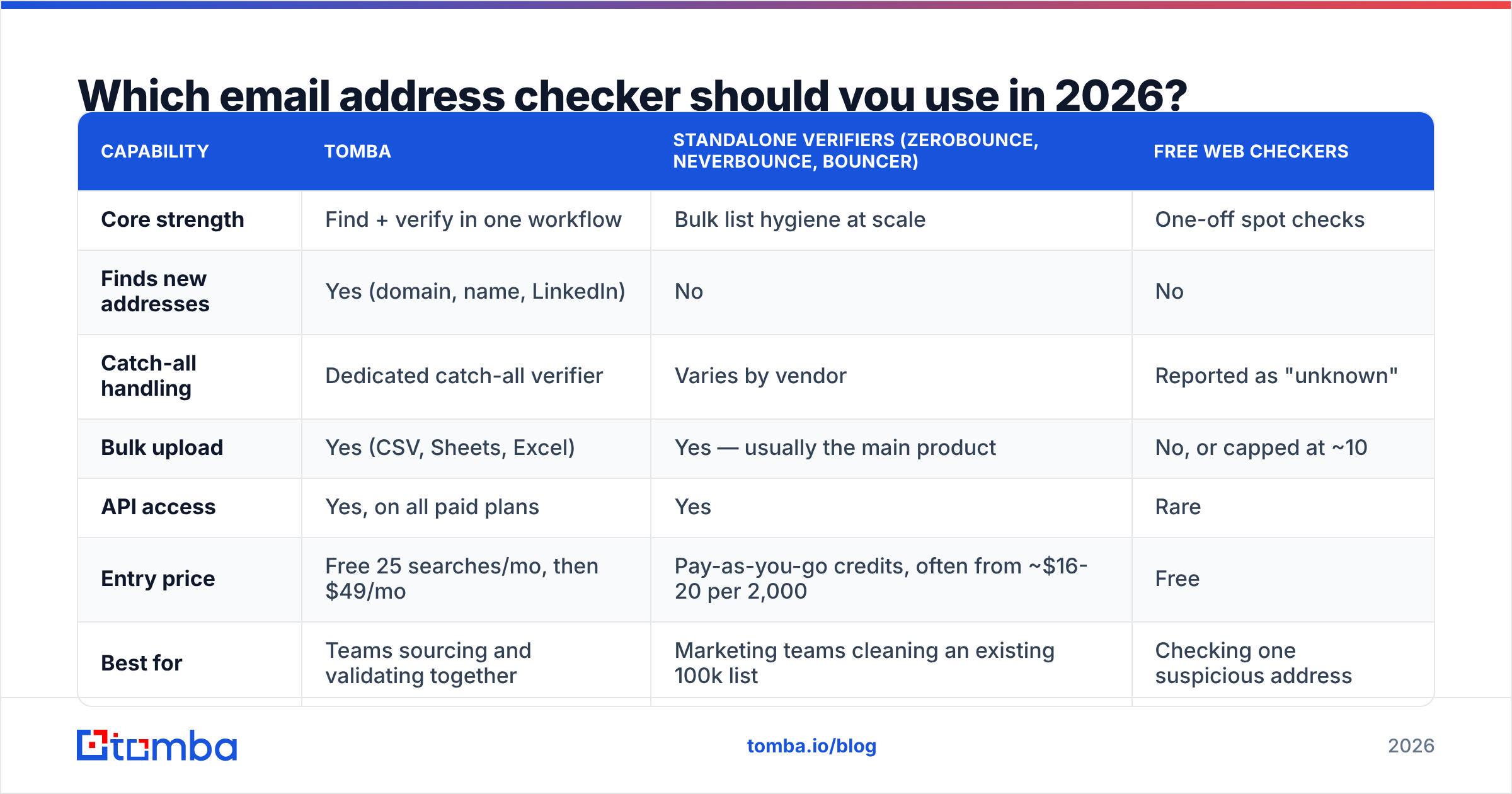
The market splits into three groups: pure verifiers, finder-plus-verifier platforms, and free single-address checkers. They are not interchangeable.

| Capability | Tomba | Standalone verifiers (ZeroBounce, NeverBounce, Bouncer) | Free web checkers |
|---|---|---|---|
| Core strength | Find + verify in one workflow | Bulk list hygiene at scale | One-off spot checks |
| Finds new addresses | Yes (domain, name, LinkedIn) | No | No |
| Catch-all handling | Dedicated catch-all verifier | Varies by vendor | Reported as "unknown" |
| Bulk upload | Yes (CSV, Sheets, Excel) | Yes — usually the main product | No, or capped at ~10 |
| API access | Yes, on all paid plans | Yes | Rare |
| Entry price | Free 25 searches/mo, then $49/mo | Pay-as-you-go credits, often from ~$16-20 per 2,000 | Free |
| Best for | Teams sourcing and validating together | Marketing teams cleaning an existing 100k list | Checking one suspicious address |
Read that table as a routing decision, not a ranking. If you already have a large list and no need to source new contacts, a dedicated verifier is the cleaner purchase — that is genuinely what they are built for, and their reporting on list decay is usually deeper. Vendors publish their own current rates, and ZeroBounce is the usual reference point for pay-as-you-go pricing.
If your bottleneck is the opposite — you have target companies but not contacts — then buying a verifier alone leaves the harder half of the job undone. That is where a combined platform pays off: domain search returns the addresses, verification runs inline, and nothing gets exported to a second tool and back.
How much should you pay per verification?#
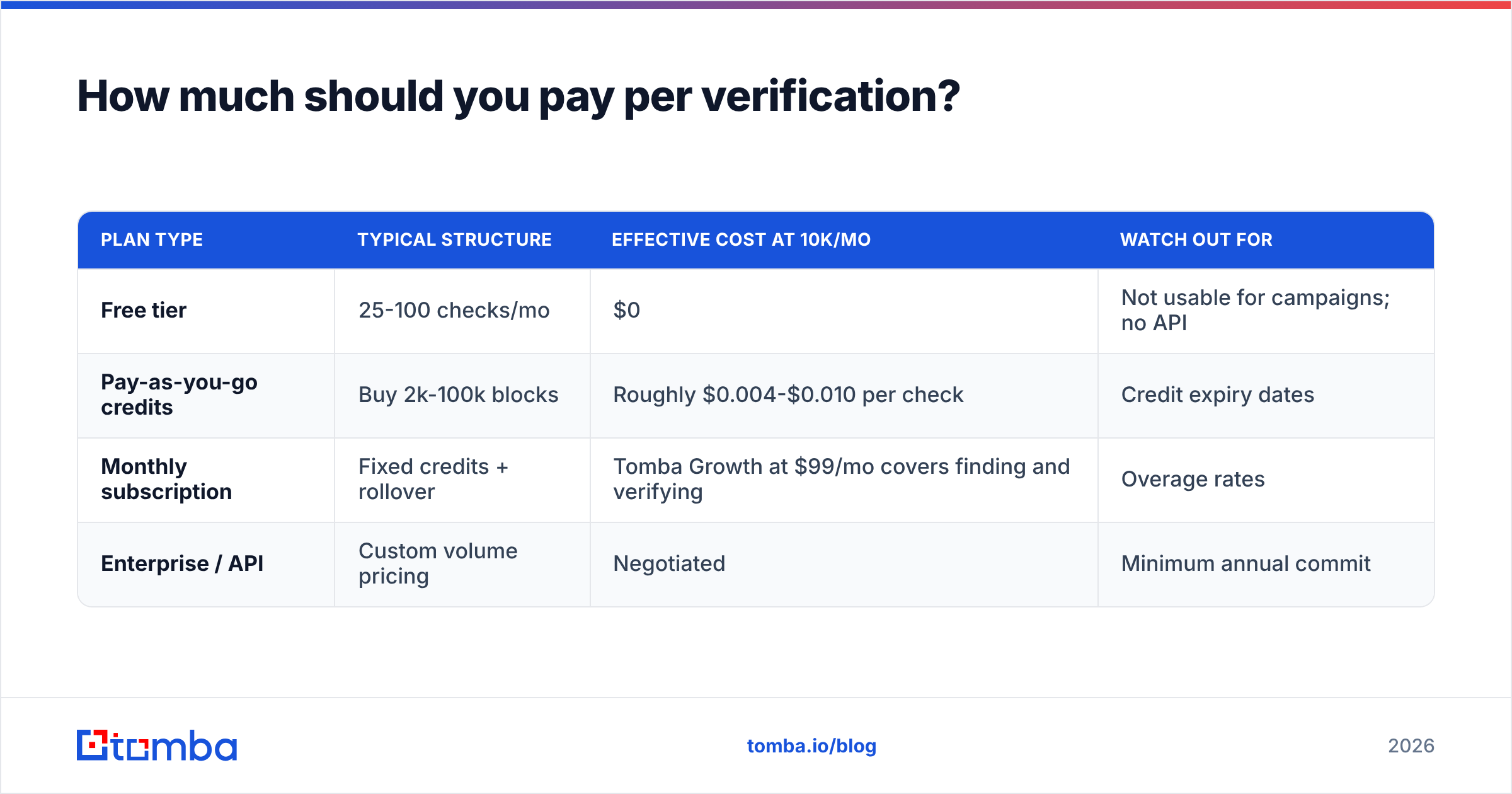
Pricing models differ enough that headline numbers mislead. Credit packs look cheap until you factor in expiry; subscriptions look expensive until you divide by monthly volume.
| Plan type | Typical structure | Effective cost at 10k/mo | Watch out for |
|---|---|---|---|
| Free tier | 25-100 checks/mo | $0 | Not usable for campaigns; no API |
| Pay-as-you-go credits | Buy 2k-100k blocks | Roughly $0.004-$0.010 per check | Credit expiry dates |
| Monthly subscription | Fixed credits + rollover | Tomba Growth at $99/mo covers finding and verifying | Overage rates |
| Enterprise / API | Custom volume pricing | Negotiated | Minimum annual commit |
Full Tomba pricing runs Free (25 searches/mo), Starter $49/mo, Growth $99/mo, Pro $249/mo, and custom Enterprise. The comparison worth making is not price-per-credit but cost-per-booked-meeting. A tool that costs 30% more but returns 15% more verified, reachable contacts is cheaper on the only metric that pays salaries.

What do you do about catch-all domains?#
Catch-all is the hardest problem in verification and the place where "which tool is best" actually gets decided.
A catch-all server accepts mail addressed to anything at the domain — jane@acme.com, asdfgh@acme.com, all of it gets a 250. So SMTP probing proves nothing. Many teams respond by deleting every catch-all contact, which on a typical B2B list means throwing away 12-20% of their addressable market, often including the best-fit mid-market accounts.
Better approach, in order:
- Segment, do not delete. Move catch-all addresses to their own list with a separate sending schedule and tighter volume caps.
- Verify the pattern, not the mailbox. If eight confirmed addresses at that domain follow
first.last@, a ninthfirst.last@is high-confidence even without SMTP proof. A catch-all verifier automates exactly this inference. - Cross-reference a second signal. A matching LinkedIn profile, a byline on the company blog, or a conference speaker page all raise confidence.
- Send to catch-all from a secondary domain. Keep your primary domain's reputation insulated while you test.
- Cap the batch. Send 50, measure, then scale. Do not push 3,000 unproven addresses through a warm domain and hope.
For deeper background on the underlying standard behaviour, the email address specification on Wikipedia is a useful primer on what is legal versus what is deliverable — they are not the same set.
Where does verification fit in your outbound workflow?#
Verification is a checkpoint, not a stage. It should run at three moments:
At capture. Validate syntax and MX in real time on your signup and demo-request forms. This is a single API call and it stops a meaningful share of junk data at the door — typos, disposables, and bots. Use the email verification API rather than a client-side regex, which only catches formatting errors.
At import. Every purchased list, conference scan, and scraped export gets a full bulk pass before it touches your CRM. Verify first, import second. Once bad data is in the CRM it propagates into reports, lead scores, and routing rules, and cleaning it later costs far more than the credits would have.
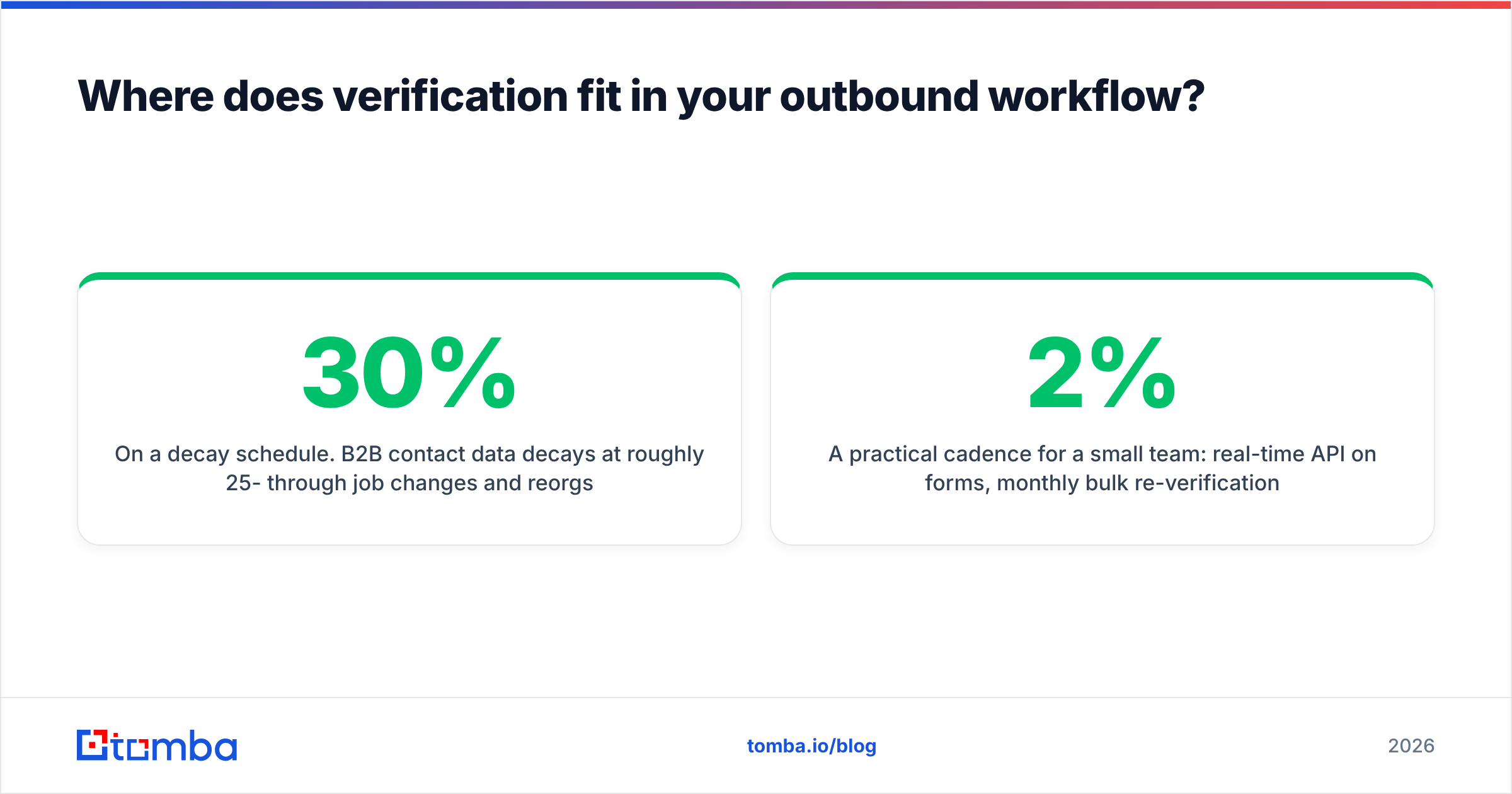
On a decay schedule. B2B contact data decays at roughly 25-30% per year through job changes and reorgs alone. Re-verify any segment older than 90 days before you mail it. Dormant lists are the most common source of sudden bounce spikes, because nothing looks wrong until the send goes out.
A practical cadence for a small team: real-time API on forms, monthly bulk re-verification of anything you plan to mail, and a full-database sweep each quarter. Then keep an eye on email deliverability metrics — bounce rate under 2%, complaint rate under 0.1% — as your feedback loop that the process is working.
Is a free email address checker good enough?#
For one address, yes. For a campaign, no — and the reason is structural, not stingy.
Free single-address tools do syntax plus MX and call it a day. They typically skip the SMTP handshake entirely, because doing that at scale from a shared IP gets the IP blocked. So a free tool that returns "valid" is often saying "this domain can receive email", which is a much weaker claim than "this mailbox exists".
Use free tools when you are checking a single address from a business card, sanity-checking a format before a manual send, or spot-testing a vendor's accuracy before you buy. A free email checker is exactly right for those jobs.
Move to paid the moment any of these are true: you send more than a few hundred emails a month, you need results in your CRM automatically, you deal with catch-all domains regularly, or your bounce rate has crossed 3%. At that point the credits cost less than one damaged sender reputation.
Which tool should you actually start with?#
Start with the shape of your problem, not the tool list.
If you have a big list and no sourcing need, buy a bulk verifier and be done. If you are building outbound from a target-account list — you know the companies, you need the people, and you need the addresses to be real — then the finder and the checker should be the same system. Exporting between two vendors adds cost, latency, and a reconciliation step nobody maintains.
That is the case Tomba Email Finder is built for: search by domain or name, get verified addresses back with confidence scores, handle catch-all domains with pattern inference instead of guesswork, and push straight into your CRM through the API or a native integration. The free tier gives you 25 searches a month to test it against your own ICP — which, per the accuracy section above, is the only benchmark that should decide your purchase.
Related guides#
Ready to find emails that actually work?
Join 150,000+ professionals who stopped guessing and started sending. Free credits on signup — no credit card required.
Get the Tomba newsletter
Practical outbound tactics and product updates — once every two weeks.
About the author