Email Address Checker Spam: How to Stop Traps in 2026
Most spam problems start in your list, not your copy. Here is what an email address checker can actually catch, what it cannot, and how to clean a list without deleting good buyers.
TL;DR
- "Email address checker spam" covers two different jobs: checking whether an address is deliverable, and checking whether sending to it will get you flagged as spam. Most tools only do the first well.
- The addresses that hurt you most are not fake ones. They are recycled spam traps, role accounts, and typo domains that accept mail and then quietly tank your sender reputation.
- No verifier can promise to detect every spam trap. Anyone claiming 100% trap detection is selling you a story. What good tools do is remove the conditions traps live in: stale data, unengaged addresses, and unverified imports.
- A three-layer check (syntax and MX, SMTP mailbox probe, risk classification) removes 90%+ of the damage before your first send.
- Cleaning once is a patch. Verifying at capture, before every send, and quarterly is the actual fix.
What does "email address checker spam" actually mean?#
Two searches hide behind that phrase, and they need different answers.
The first is defensive: will emailing this address trigger spam filters or a blocklist? That is a deliverability question. You are trying to find spam traps, honeypots, complainers, and dead mailboxes before you send.
The second is inbound: is this address itself spam? That is a fraud and signup-hygiene question. You are trying to stop disposable addresses and bot registrations from filling your CRM.
The same tooling touches both, but the stakes are different. Sending to 400 spam traps can get your domain listed at Spamhaus and cut inbox placement across every campaign you run. Letting 400 disposable addresses into your database mostly wastes credits and skews your metrics. Fix the first one first.
For the rest of this guide, "checker" means an email verification service that inspects an address before you send to it.
Why do bad addresses turn into spam complaints?#
Mailbox providers do not read your subject line and decide you are a spammer. They watch behavior, and bad list data produces exactly the behavior profile of a spammer.
Here is the chain reaction:
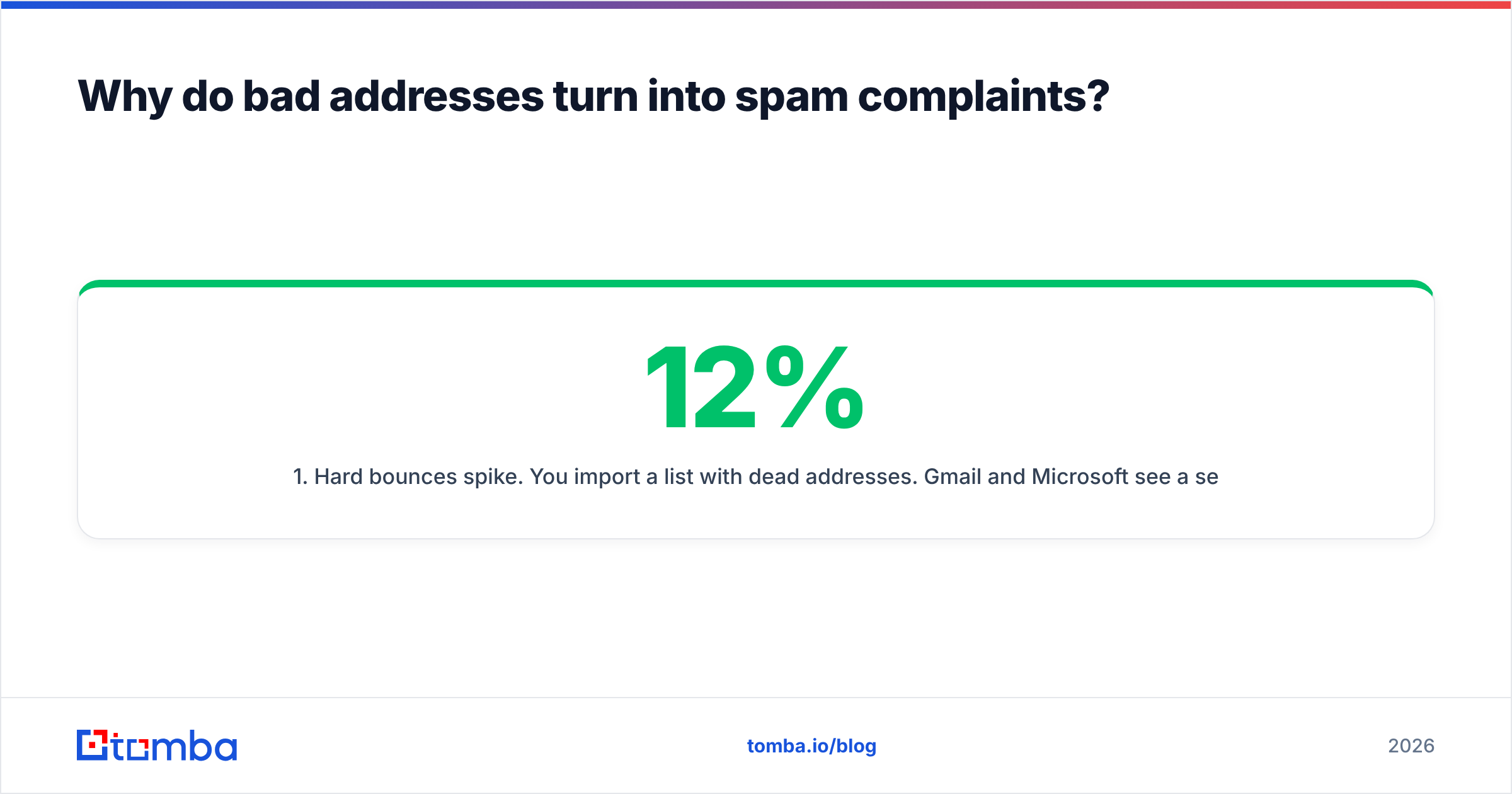
- Hard bounces spike. You import a list with 12% dead addresses. Gmail and Microsoft see a sender whose mail is largely undeliverable. Legitimate senders bounce at 1-2%. Anything over 4% reads as a purchased list.
- Engagement collapses. Dead addresses never open, never click, never reply. Your engagement rate drops below the threshold providers use to route mail to the Promotions tab, then to spam.
- Traps fire. A recycled trap is a real address that went dormant and was reactivated by the provider as a monitor. It does not bounce. It records that you mailed a dead address, which means you are not cleaning your list.
- Blocklists follow. Enough trap hits and your sending IP or domain lands on a public blocklist. Now even your invoices and password resets are at risk.
- Recovery takes weeks. Delisting is possible. Rebuilding sender reputation after a serious hit takes 30 to 90 days of careful, low-volume sending.
The uncomfortable part: steps 1 through 3 are entirely preventable with a checker that costs less than one lost deal.

What does an email address checker actually check?#
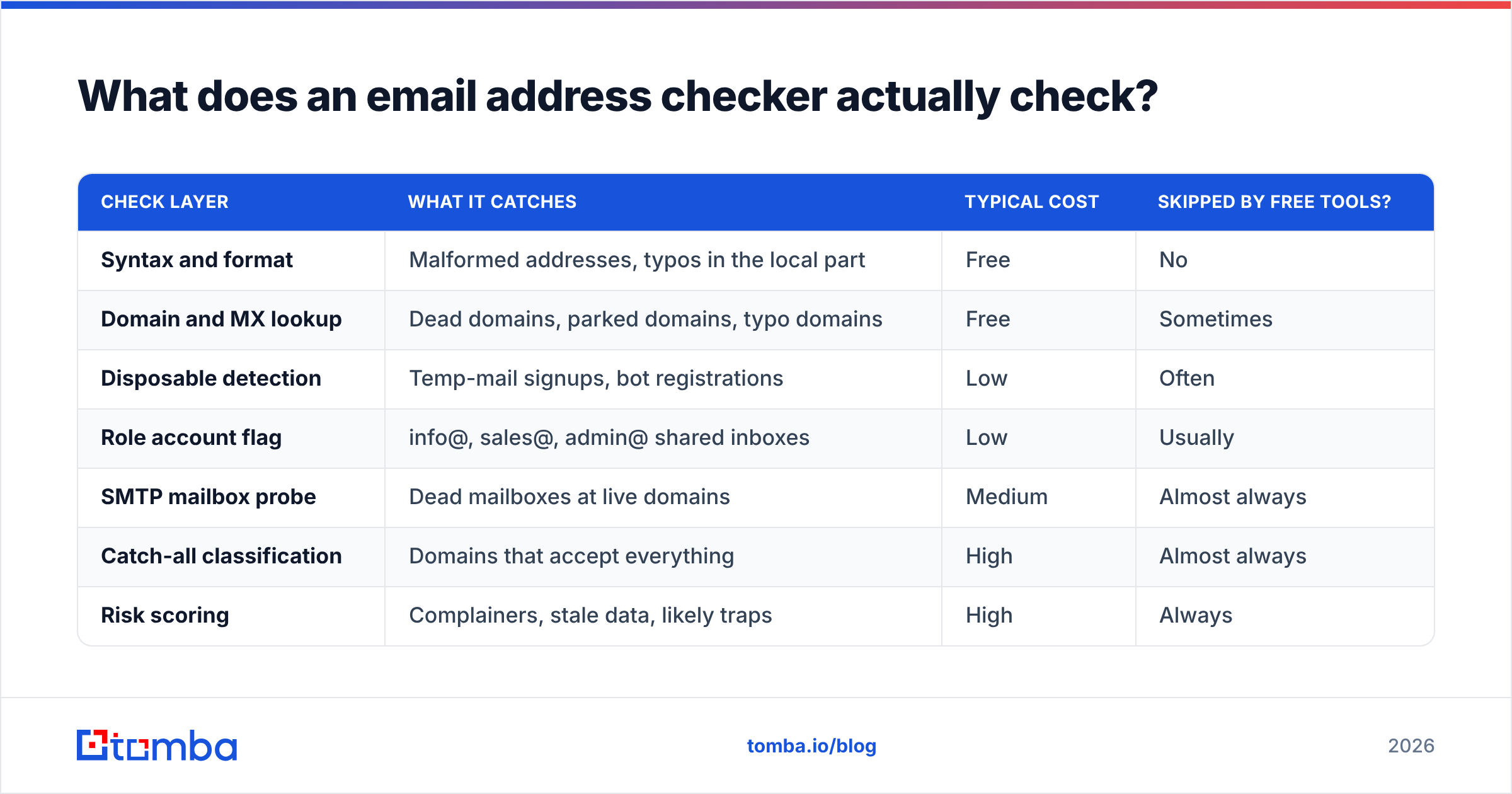
Not all checks carry the same weight. A free tool that only validates syntax will happily approve ceo@microsotf.com. Here is what a full verification stack inspects, in order of cost and value:
- Syntax and format. Does the address follow RFC rules? Catches
john@@acme, trailing spaces, and unicode lookalikes. Cheap, instant, and catches maybe 3% of list rot. - Domain and MX records. Does the domain resolve and does it publish mail exchange records? Kills parked domains, expired companies, and typo domains that never existed. This is where most typo-squatting gets caught.
- Disposable and temporary detection. Flags Mailinator, Guerrilla Mail, and the thousands of throwaway domains that rotate weekly. Critical for signup forms, less relevant for outbound B2B.
- Role and group account detection.
info@,sales@,support@,noreply@. These are not people. They route to shared inboxes where cold mail gets marked as spam by whoever is on rota that morning. Some marketers still mail them; the complaint rate says do not. - SMTP mailbox verification. The verifier opens a conversation with the receiving mail server and asks whether the specific mailbox exists, without delivering a message. This is the single most valuable check and the one cheap tools skip.
- Catch-all and accept-all handling. Some domains accept mail to every address, so SMTP returns "yes" for nonsense. A serious tool tells you the domain is catch-all rather than pretending the address is confirmed.
That last one is where most tools quietly fail. If a verifier reports 98% valid on a list full of catch-all domains, it is counting guesses as confirmations. A dedicated catch-all verifier applies pattern analysis and secondary signals instead of shrugging.
| Check layer | What it catches | Typical cost | Skipped by free tools? |
|---|---|---|---|
| Syntax and format | Malformed addresses, typos in the local part | Free | No |
| Domain and MX lookup | Dead domains, parked domains, typo domains | Free | Sometimes |
| Disposable detection | Temp-mail signups, bot registrations | Low | Often |
| Role account flag | info@, sales@, admin@ shared inboxes | Low | Usually |
| SMTP mailbox probe | Dead mailboxes at live domains | Medium | Almost always |
| Catch-all classification | Domains that accept everything | High | Almost always |
| Risk scoring | Complainers, stale data, likely traps | High | Always |
Can any email address checker detect spam traps?#
Partly, and you should be suspicious of any vendor that says otherwise.
There are two kinds of trap, and they behave very differently. A pristine trap is an address that was never owned by a human. It gets seeded on web pages so scrapers pick it up. It has no history, no signup record, and it looks completely normal. No verifier can tell it apart from a real mailbox by inspecting it, because there is nothing to inspect. It accepts mail perfectly.
A recycled trap is a real address that a provider abandoned, let bounce for months, then reactivated as a monitor. This one leaves fingerprints. It went dark. It stopped engaging. Some providers return distinctive SMTP responses during the dormancy window. A verifier with good historical data and engagement signals can flag a meaningful share of these as risky.
The honest summary, and it matches what the spamtrap literature describes: detection is probabilistic, prevention is deterministic. You cannot reliably identify pristine traps, so you avoid acquiring them. That means no scraped lists, no purchased CSVs from unknown sources, no "we found 40,000 emails in your niche" offers.
Where a checker helps enormously is in the surrounding hygiene:
- It removes the dead addresses that make providers scrutinize you in the first place.
- It flags addresses that have been dormant across its network, which correlates with recycled traps.
- It stops you from mailing role accounts, which is where a lot of manual complaints originate.
- It gives you a bounce rate low enough that one unlucky trap hit does not compound.
Which type of email address checker fits your workflow?#
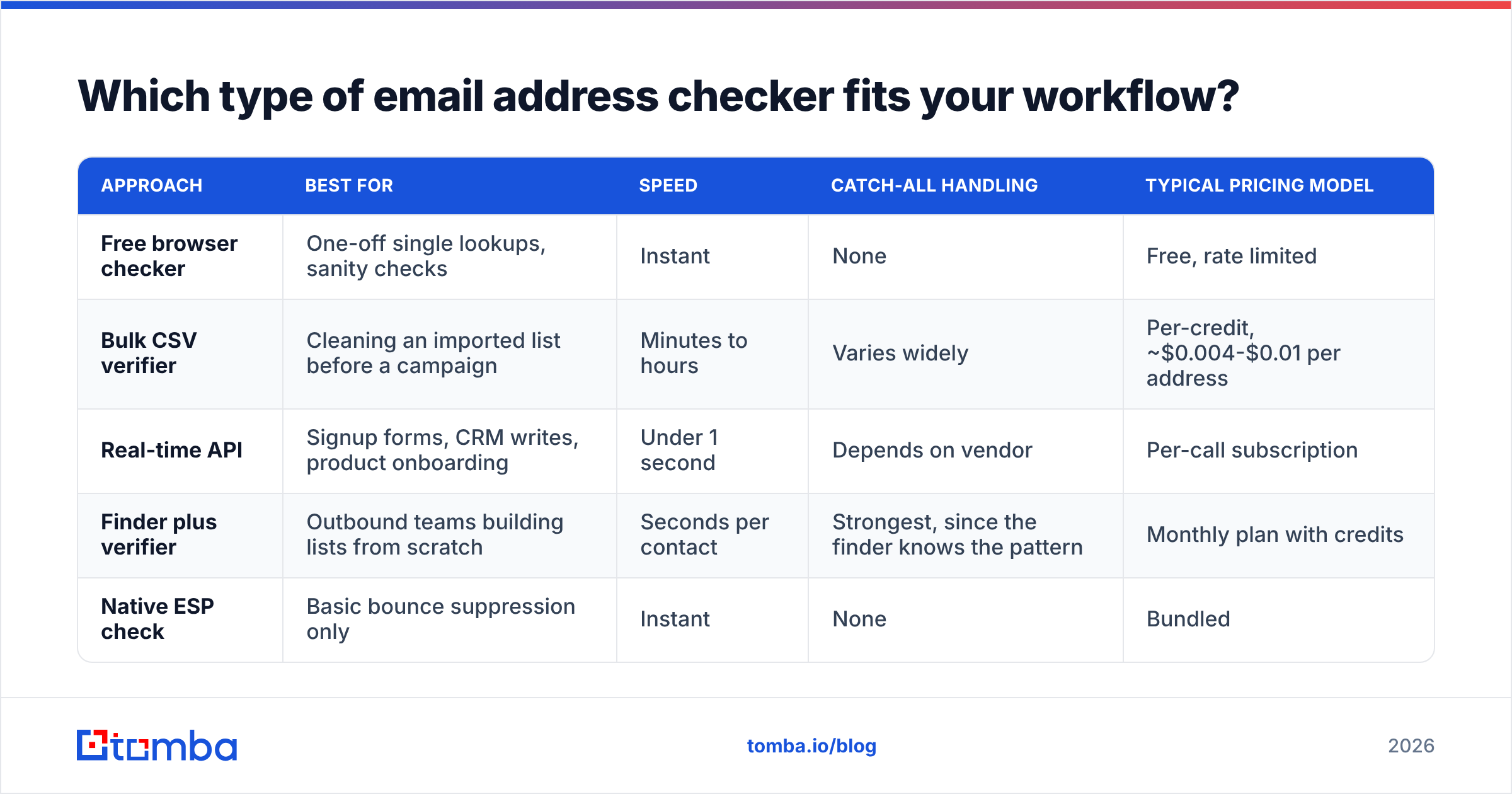
The market splits into four shapes. Pick by where the addresses enter your system, not by feature count.
| Approach | Best for | Speed | Catch-all handling | Typical pricing model |
|---|---|---|---|---|
| Free browser checker | One-off single lookups, sanity checks | Instant | None | Free, rate limited |
| Bulk CSV verifier | Cleaning an imported list before a campaign | Minutes to hours | Varies widely | Per-credit, ~$0.004-$0.01 per address |
| Real-time API | Signup forms, CRM writes, product onboarding | Under 1 second | Depends on vendor | Per-call subscription |
| Finder plus verifier | Outbound teams building lists from scratch | Seconds per contact | Strongest, since the finder knows the pattern | Monthly plan with credits |
| Native ESP check | Basic bounce suppression only | Instant | None | Bundled |
A note on that fourth row. When your tooling both finds the address and verifies it, the verification is better informed. It already knows the company's email pattern, how many contacts it has confirmed at that domain, and how recently. That context is exactly what a standalone verifier lacks when you hand it a bare address from a spreadsheet.
Tomba sits in that fourth category. The email verifier runs the full stack including SMTP and catch-all classification, and it shares data with the finder. Pricing runs Free (25 searches/mo), Starter $49/mo, Growth $99/mo, Pro $249/mo, and Enterprise on request, so the cost of verifying a 5,000-row list is meaningfully less than one deal lost to a blocklisting. Full Tomba pricing is public if you want to run the math against your volume.
If you just need to test one address right now without signing up, the free email checker handles single lookups. For anything over a few hundred rows, use bulk verify instead of pasting addresses one at a time.

How do you clean a list without deleting good buyers?#
The failure mode nobody warns you about: over-cleaning. Aggressive filters strip out valid contacts at real companies because the domain is catch-all or the mailbox is behind a greylisting server. You end up paying to shrink your own pipeline.
Use a tiered response instead of a binary delete:
- Valid, deliverable, personal mailbox. Send normally. This is your core segment.
- Valid but role account. Move to a separate list. Mail only for account-level notices, never cold outreach.
- Catch-all or accept-all. Do not delete. Segment. Send to these in smaller batches, after your main sends, once your reputation for the day is established. Watch bounce rate closely. If a catch-all domain bounces, suppress the whole domain.
- Unknown or greylisted. Retry verification in 24-48 hours. Greylisting is a spam defense that temporarily defers unknown senders; a second check often resolves it cleanly.
- Invalid, hard bounce, disposable. Delete. Not suppress, delete. These have no future value and they cost you credits on every re-verification.
- Dormant more than 12 months with zero engagement. Suppress, regardless of what the verifier says. This is the recycled-trap risk pool. If they were valuable, run a single re-permission campaign from a separate subdomain and only keep the responders.
Steps 3 and 6 are the ones teams skip, and they are the two that separate a clean list from a clean-looking list.
What accuracy rate should you expect from a checker?#
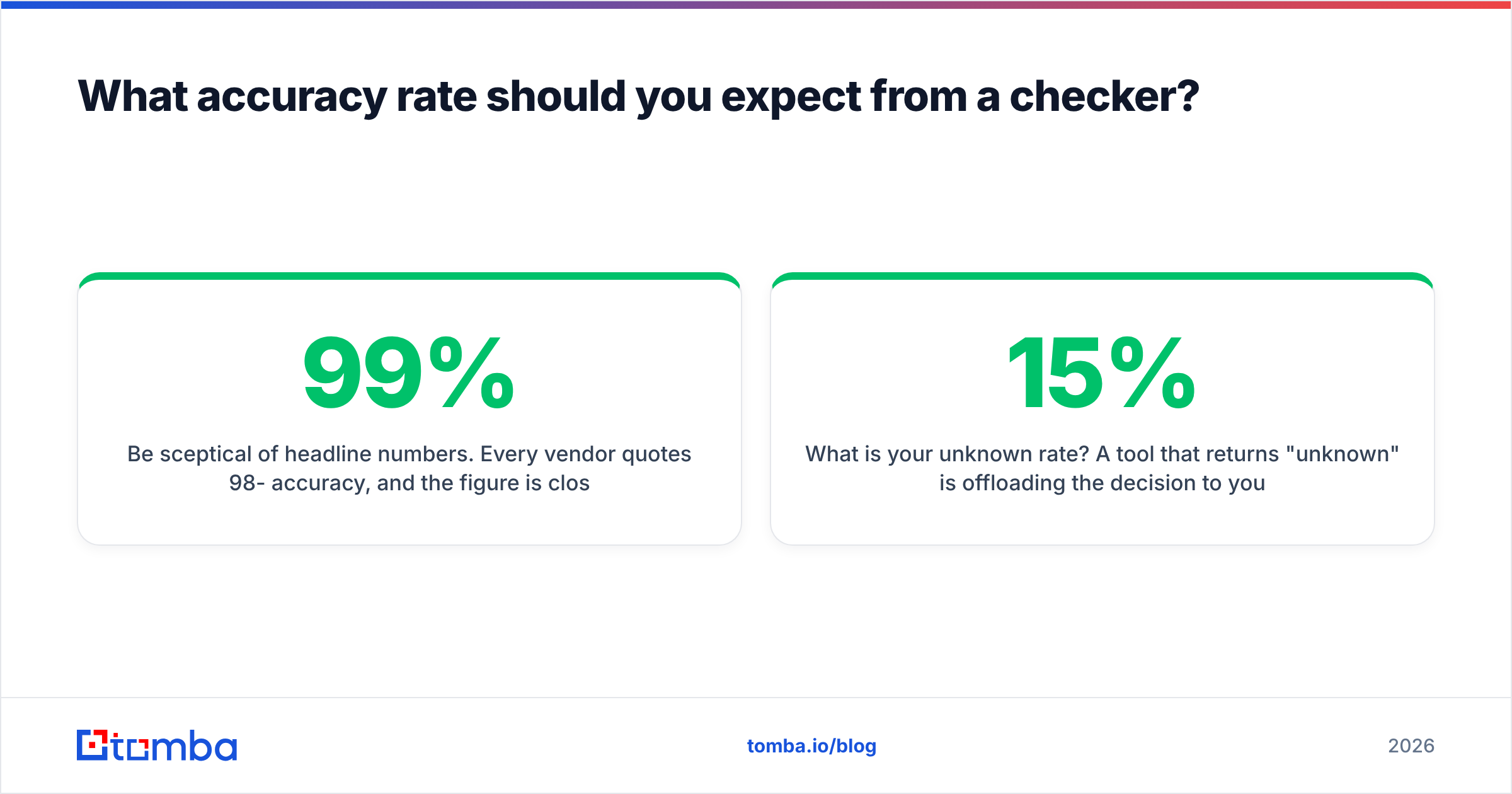
Be sceptical of headline numbers. Every vendor quotes 98-99% accuracy, and the figure is close to meaningless without knowing the test set. Accuracy on a list of Gmail addresses is trivially high. Accuracy on a list of enterprise domains behind Microsoft 365 with catch-all enabled is where tools separate.
Better questions to ask a vendor:
- What is your unknown rate? A tool that returns 15% "unknown" is offloading the decision to you. Under 5% is good.
- How do you classify catch-all domains? If the answer is "we mark them valid," walk away.
- Do you re-verify from multiple IPs? Single-IP verifiers get greylisted and rate limited, producing false negatives.
- Where does the underlying data come from? Provenance matters for both accuracy and compliance. Tomba publishes its data sources rather than treating them as a trade secret.
Run your own test before committing. Take 200 addresses you already know the answer to, half confirmed good from replies you have received, half confirmed dead from bounces. Feed them through the trial tier of two or three tools. Compare. It takes an hour and it beats every G2 review, though the email verification category on G2 is a reasonable place to build your shortlist first.
How do you stop spam problems from coming back?#
Verification is not an event. A B2B list decays at roughly 22-30% per year because people change jobs, companies get acquired, and domains get retired. Clean once and you are back to a 15% bad-data rate within eight months.
Build these three checkpoints instead:
- At capture. Every form submission, every CRM import, every list purchase hits the verification API before it is written to your database. Bad data never enters. This is the highest-leverage checkpoint by a wide margin.
- Before each send. Re-verify any segment that has not been mailed in 90 days. It costs cents per contact and it is the difference between a 0.4% bounce rate and a 6% one.
- Quarterly full sweep. Run the whole database through bulk verification once a quarter. Suppress the newly-dead, delete the confirmed-invalid, and look at which domains are decaying fastest, since that tells you something about your market too.
Pair that with the basics on the sending side: SPF, DKIM, DMARC, and volume ramping that respects the bulk sender requirements Gmail and Yahoo now enforce. List hygiene and authentication are two halves of the same problem, and email deliverability breaks if either one is missing.
Where should you start?#
If you have a list sitting in a spreadsheet right now and a campaign scheduled, do this in order: bulk verify the file, segment by the six tiers above, suppress anything dormant past a year, and send to the confirmed-valid personal mailboxes first. Watch the bounce rate on the first 500. If it is under 2%, release the rest.
If you are building the list rather than cleaning one, verify at the source instead. Finding and confirming in one step avoids the entire cleanup cycle. The Tomba Email Finder returns addresses with a confidence score and verification status attached, so what lands in your CRM is already checked. Start on the free tier with 25 searches, test it against contacts you can independently confirm, and scale to a paid plan only once the accuracy holds up on your own data.
Related guides#
Ready to find emails that actually work?
Join 150,000+ professionals who stopped guessing and started sending. Free credits on signup — no credit card required.
Get the Tomba newsletter
Practical outbound tactics and product updates — once every two weeks.
About the author