Email Address Extractor: How to Extract Emails at Scale in 2026
Browser extractors, regex scripts, and API-based finders all promise clean B2B emails. Here's how each method actually performs on accuracy, cost, and legal risk in 2026 — and when to use which.
TL;DR
- An email address extractor pulls email strings out of a source you already have — a web page, a PDF, a CSV, a block of pasted text. An email finder predicts and verifies addresses that were never published anywhere. Confusing the two is why most lists bounce.
- Pure scrapers hit 40–70% deliverability on B2B pages because they harvest
info@,support@, and abandoned aliases. Finder-plus-verifier pipelines land in the mid-90s. - The cheapest workflow that actually works: extract → dedupe → verify → enrich. Skipping verification costs you more in domain reputation than the credits would have.
- Free browser extensions are fine for one-off page grabs. Anything above ~500 contacts a month needs an API or a bulk uploader, or you will spend more hours than the tool costs.
- Extraction is legal in most jurisdictions when you scrape publicly posted business data, but GDPR/CAN-SPAM still govern what you send. Extraction rules and outreach rules are separate problems.
What is an email address extractor?#
An email address extractor is a tool that scans a body of content and returns every string matching the shape of an email address — local-part@domain.tld. That's it. It doesn't guess, it doesn't invent, it reads what's already there.
Think of it like a metal detector on a beach. It only beeps over metal that someone already dropped. If the contact you want never posted their address publicly, the detector stays silent no matter how long you sweep.
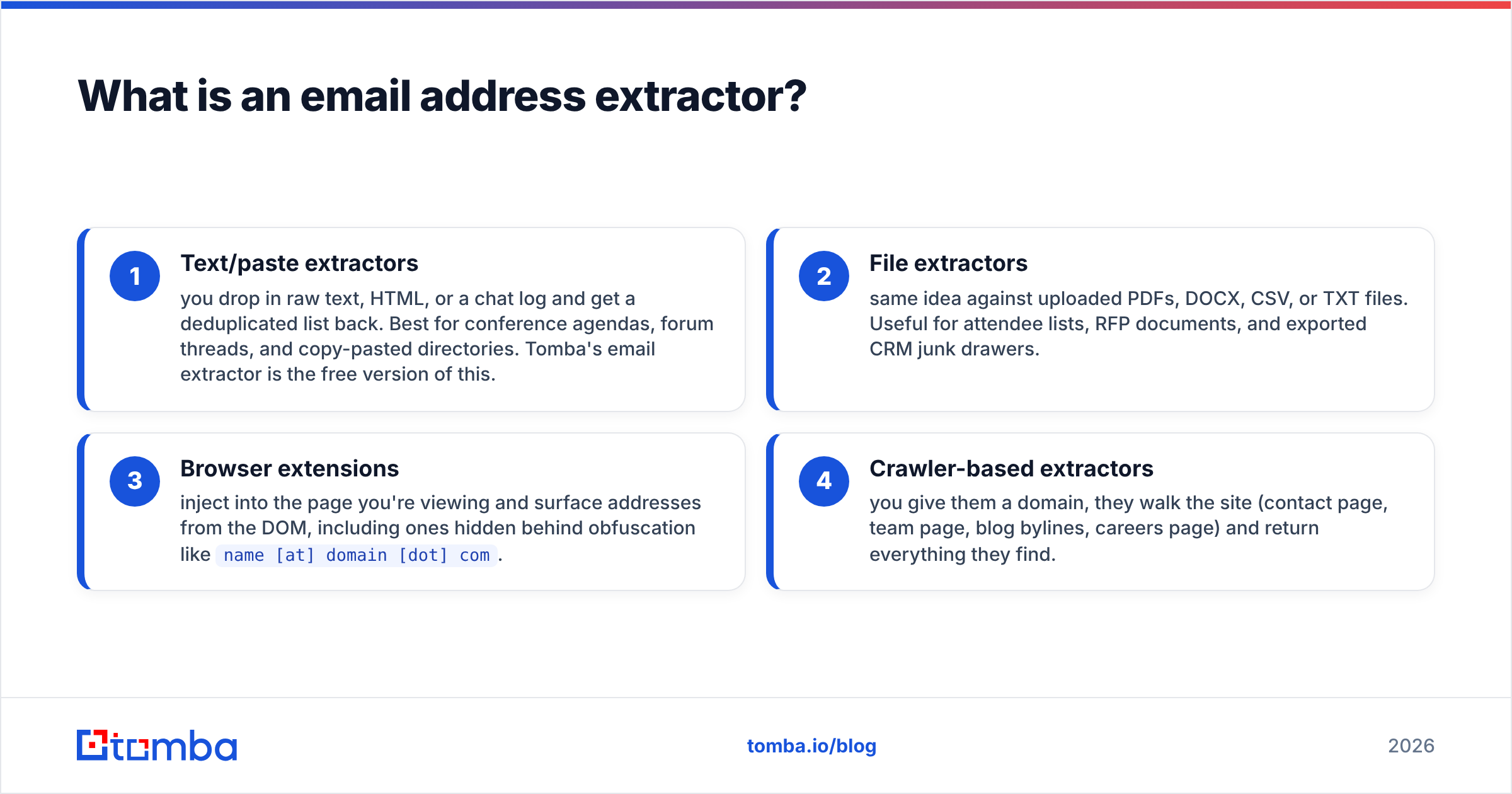
Extractors come in four common shapes:
- Text/paste extractors — you drop in raw text, HTML, or a chat log and get a deduplicated list back. Best for conference agendas, forum threads, and copy-pasted directories. Tomba's email extractor is the free version of this.
- File extractors — same idea against uploaded PDFs, DOCX, CSV, or TXT files. Useful for attendee lists, RFP documents, and exported CRM junk drawers.
- Browser extensions — inject into the page you're viewing and surface addresses from the DOM, including ones hidden behind obfuscation like
name [at] domain [dot] com. - Crawler-based extractors — you give them a domain, they walk the site (contact page, team page, blog bylines, careers page) and return everything they find.
Each one answers the same question: what addresses are already sitting in this content? None of them answers the question most sales teams actually have: what is the email address of this specific person at this specific company?
Is an email address extractor the same as an email finder?#
No, and this distinction decides whether your campaign works.
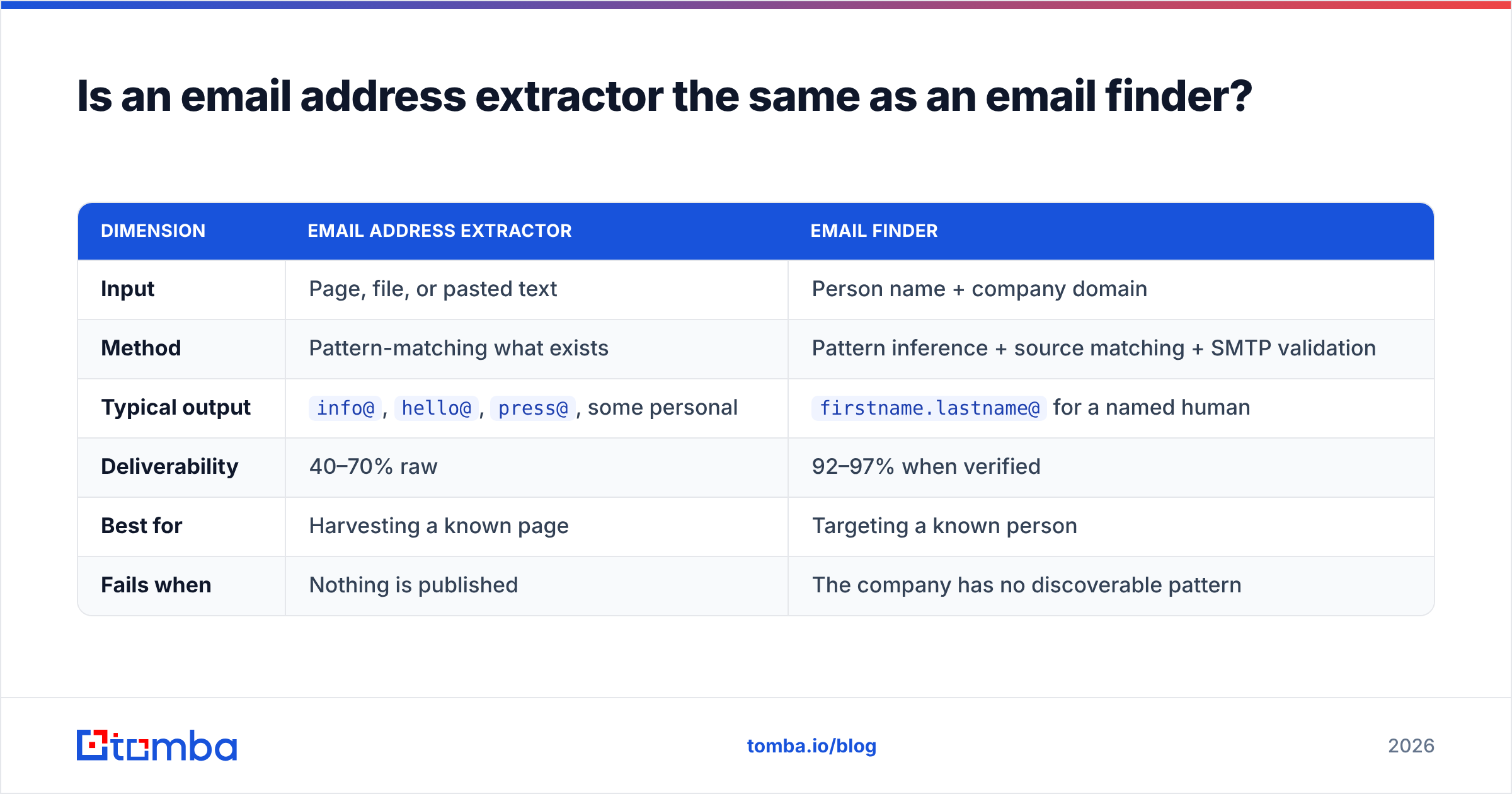
| Dimension | Email address extractor | Email finder |
|---|---|---|
| Input | Page, file, or pasted text | Person name + company domain |
| Method | Pattern-matching what exists | Pattern inference + source matching + SMTP validation |
| Typical output | info@, hello@, press@, some personal |
firstname.lastname@ for a named human |
| Deliverability | 40–70% raw | 92–97% when verified |
| Best for | Harvesting a known page | Targeting a known person |
| Fails when | Nothing is published | The company has no discoverable pattern |
Extractors are recall machines: they grab everything. Finders are precision machines: they answer one question at a time and tell you how confident they are.
The practical consequence is role quality. A page-crawl on a 200-person SaaS company usually returns four addresses, three of them generic inboxes routed to a shared queue nobody owns. A domain search against the same company returns the individual addresses attached to job titles, sorted by department, with a confidence score per row. Same domain, very different pipeline value.
How accurate are email extractors in practice?#
Accuracy for extraction is a strange metric, because a scraper is technically 100% accurate — it returns exactly what was on the page. The problem is that what's on the page is often dead.
Three failure modes eat most of the list:
- Stale addresses. Team pages go un-updated for years. B2B email data decays roughly 22–30% annually as people change jobs, so a contact page last touched in 2023 is already a third wrong.
- Role accounts.
info@,sales@,careers@inflate your count and deflate your reply rate. Some ESPs treat heavy role-account sending as a spam signal on its own. - Honeypots and traps. Some sites seed invisible addresses specifically to catch scrapers. Mail one and you can land on a blacklist without ever hearing about it.
This is why raw extraction output should never touch a sending tool directly. Run it through an email verifier first: MX record check, syntax check, disposable-domain check, SMTP handshake, and a catch-all determination. A 1,000-row scrape typically drops to 600–700 usable rows, and those 300–400 removals are the ones that would have wrecked your bounce rate.

The gap in that chart is the difference between tools that stop at pattern-matching and tools that validate every result before returning it. If a vendor won't publish a bounce rate or expose a per-result confidence score in the API response, assume it's the former.
Which email address extractor should you use in 2026?#
Match the tool to the job. Nobody needs an enterprise API to grab six addresses off a conference page, and nobody should be running a 40,000-contact quarter through a browser extension.
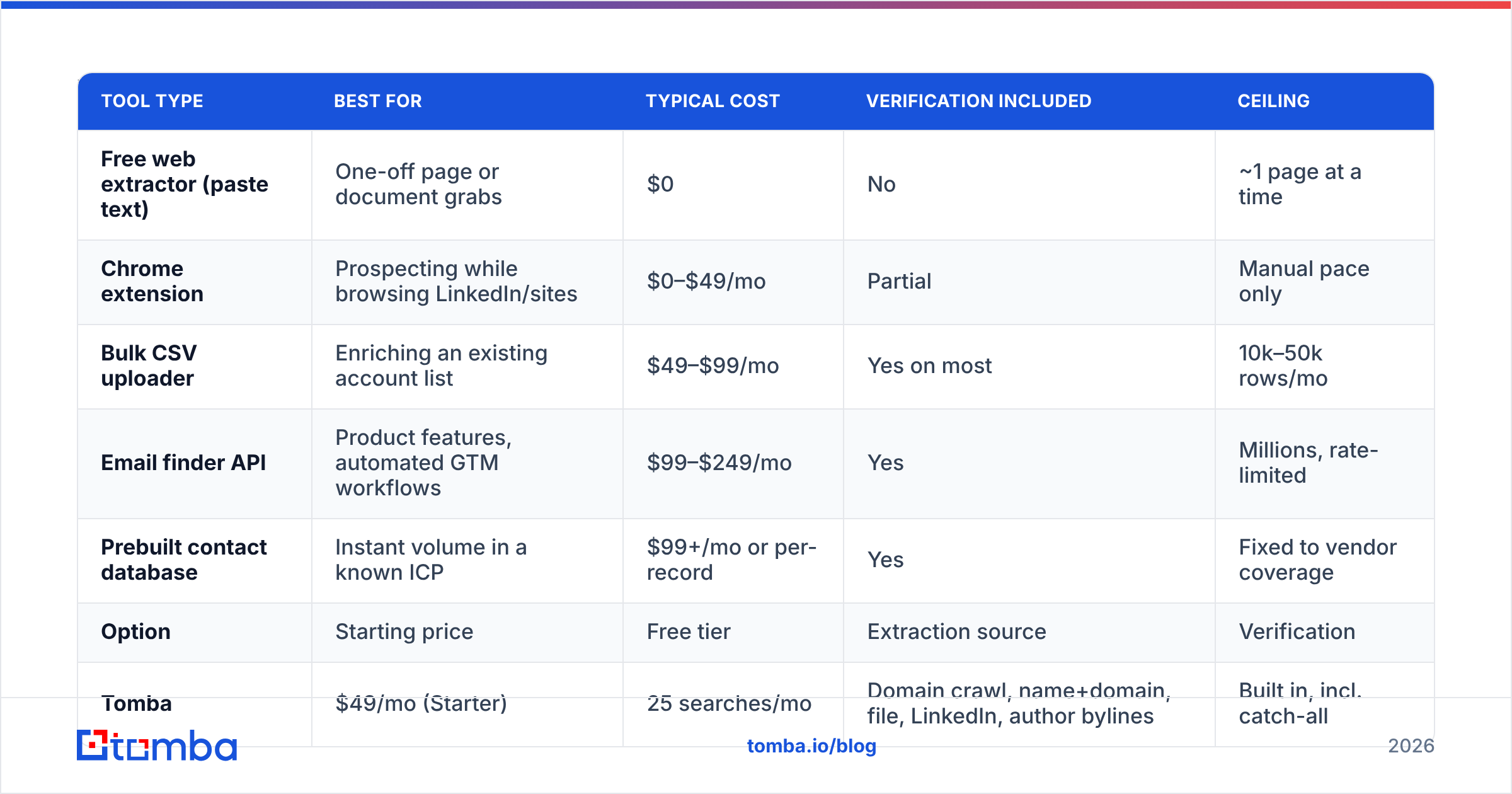
| Tool type | Best for | Typical cost | Verification included | Ceiling |
|---|---|---|---|---|
| Free web extractor (paste text) | One-off page or document grabs | $0 | No | ~1 page at a time |
| Chrome extension | Prospecting while browsing LinkedIn/sites | $0–$49/mo | Partial | Manual pace only |
| Bulk CSV uploader | Enriching an existing account list | $49–$99/mo | Yes on most | 10k–50k rows/mo |
| Email finder API | Product features, automated GTM workflows | $99–$249/mo | Yes | Millions, rate-limited |
| Prebuilt contact database | Instant volume in a known ICP | $99+/mo or per-record | Yes | Fixed to vendor coverage |
A concrete read on the main options:
| Option | Starting price | Free tier | Extraction source | Verification | Notable limit |
|---|---|---|---|---|---|
| Tomba | $49/mo (Starter) | 25 searches/mo | Domain crawl, name+domain, file, LinkedIn, author bylines | Built in, incl. catch-all | Credits are shared across finder + verifier |
| Hunter | $49/mo | 25/mo | Domain crawl, name+domain | Built in | Thinner non-US coverage |
| Apollo | $59/user/mo | 100 credits/mo | Database-first | Built in | Per-seat pricing scales badly for teams |
| Skrapp | $49/mo | 100/mo | LinkedIn-focused | Basic | Weak outside LinkedIn |
| BookYourData | Pay-as-you-go | Sample list | Curated prebuilt database | Verified at delivery | Best when your ICP matches their coverage, not for arbitrary domains |
| Regex script (DIY) | $0 + dev time | n/a | Whatever you crawl | None | You own the maintenance and the blocks |

Two notes on reading any comparison, including this one. First, credit definitions differ — some vendors charge for a search that returns nothing, some don't. Second, "verified" is not a standard. Ask whether it includes a live SMTP check or just syntax and MX. Third-party review corpora like G2's lead intelligence category are useful mainly for spotting the complaints that repeat across dozens of reviews, which is usually billing behavior rather than data quality.
How do you build an extraction workflow that doesn't bounce?#
Four stages, in order. Skipping any of them shifts cost downstream.
- Source deliberately. Decide the input before the tool. Conference attendee PDF? Use a file extractor. List of 400 target domains? Use domain search. Names from a LinkedIn saved search? Use a finder keyed on name + domain. Random crawl of "companies in fintech"? That's not sourcing, that's hoping.
- Extract with the right granularity. Domain-level crawls give you coverage; person-level lookups give you precision. Most teams need both — crawl to discover who exists, then look up the specific decision-maker by name.
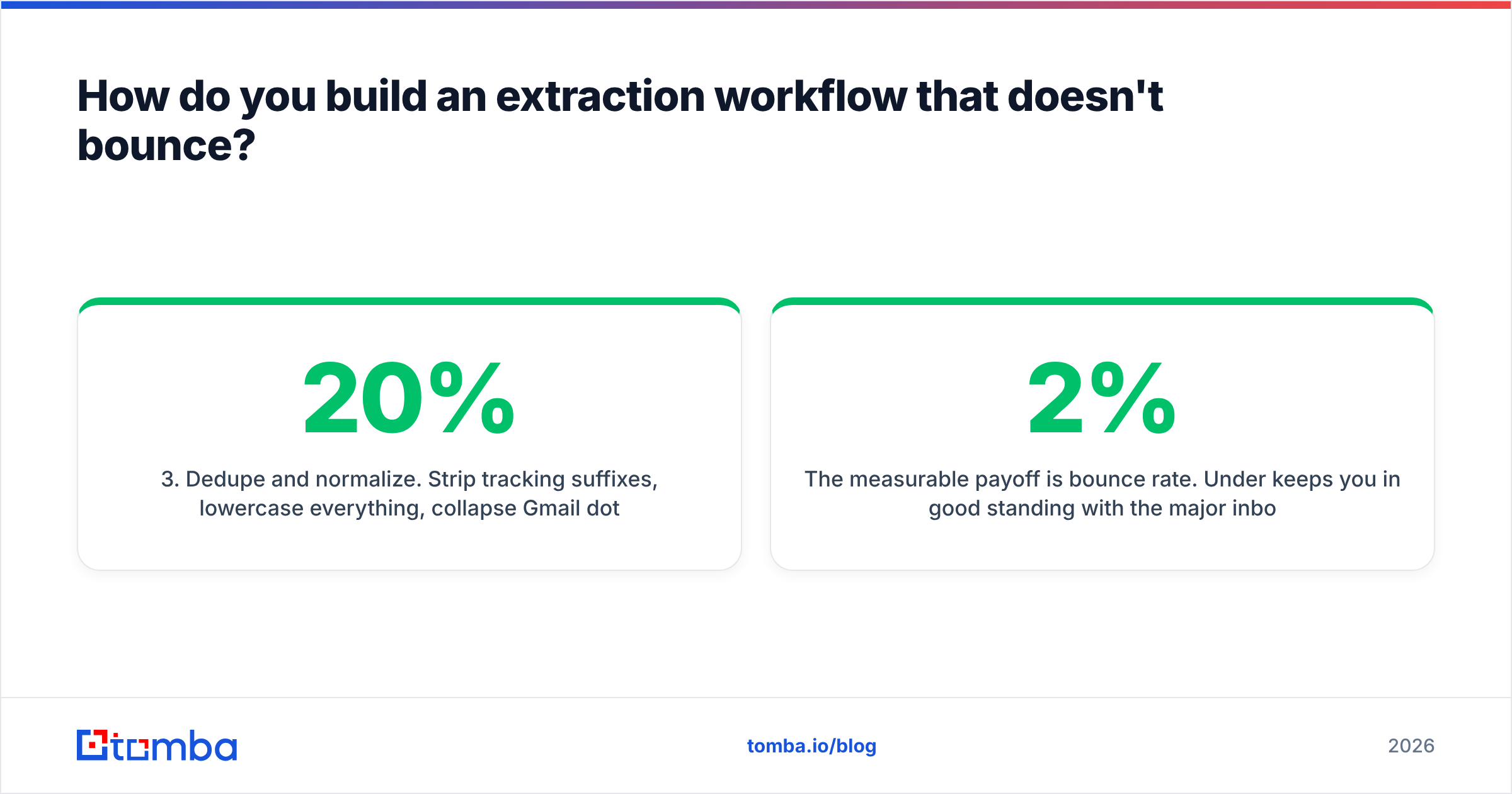
- Dedupe and normalize. Strip tracking suffixes, lowercase everything, collapse Gmail dot-aliases, remove role accounts you won't mail. This is boring and it removes 10–20% of a typical list before you spend a single verification credit.
- Verify, then segment by confidence. Send to
validfirst. Holdcatch-allfor a separate, smaller, lower-risk sequence. Deleteinvalidand never re-import it. A bulk email finder run handles steps 2–4 in one upload for list work.

The measurable payoff is bounce rate. Under 2% keeps you in good standing with the major inbox providers. Raw extractor output routinely runs 15–30%. Verification is the single cheapest intervention between those two numbers — cheaper than warmup tooling, cheaper than rewriting your copy, and far cheaper than rebuilding a burned sending domain. HubSpot's sales blog has years of data showing the same pattern: list hygiene beats copy optimization on early-stage outbound metrics.
Is extracting email addresses legal?#
Extraction and outreach are governed separately, and conflating them causes both paranoia and recklessness.
Extraction. Collecting publicly posted business contact information is generally lawful in the US and most of the EU. What creates liability is how you collect it — bypassing authentication, ignoring robots.txt at scale, violating a site's terms of service, or hammering infrastructure. Reputable vendors crawl public pages and honor removal requests.
Storage. Under GDPR, a business email tied to a named person is personal data. You need a lawful basis (usually legitimate interest for B2B), a documented retention period, and a working deletion path. Keeping a scraped list in a spreadsheet forever with no deletion process is the actual violation most teams commit.
Sending. CAN-SPAM requires accurate headers, a physical address, and a working unsubscribe. GDPR's legitimate-interest basis for B2B outreach expects relevance — you should be able to explain why this specific person at this specific company would reasonably expect to hear from you. "I scraped 50,000 addresses in one industry" is not that explanation.
Practical rule: extract public business data, store it with a retention policy, mail only people whose role plausibly connects to what you sell, and honor opt-outs within days rather than weeks.
When is a free email extractor good enough?#
More often than vendors admit. Use the free path when:
- You need fewer than ~25 contacts this month.
- The addresses are genuinely published — agency contact pages, academic directories, press pages.
- You're extracting from a document you already own (attendee lists, RFPs, event exports).
- You're validating whether a workflow is worth automating before you pay for it.
Upgrade when any of these becomes true: you're doing it more than twice a week, you need per-result confidence scores, you need the data inside a CRM or product without copy-paste, or you need catch-all resolution. At that point the cost isn't the subscription, it's your hours. Two hours a week of manual extraction at any reasonable loaded rate exceeds a $49/mo plan by a wide margin — full Tomba pricing starts there with the free tier at 25 searches a month if you want to measure your own volume first.
What should you actually do next?#
Start with the input you already have, not the tool you saw in an ad. If you're holding a list of target companies, run domain search and filter by department. If you're holding names, run a finder keyed on name plus domain. If you're holding a document, run it through a file extractor and verify the output. In all three cases, verification is not optional — it's the step that converts a list into a campaign.
If you want one tool that covers the whole chain — crawl a domain, find a named person's address, verify it, resolve catch-alls, and push it into your CRM or product via API — start with the Tomba Email Finder. The free tier gives you 25 searches a month to test accuracy against domains you already know the answers for, which is the only benchmark that matters. Run it on ten companies where you already have verified contacts, count the hits, and decide from there.
Related guides#
// get started
Find, verify and enrich your first contacts today
Start on the free plan with 25 searches a month, then scale when your team is ready.
Free plan · No credit card required · GDPR & CCPA
// about the author