Email Address Format: Rules, Examples & Validation Guide
What actually makes an email address valid? The real RFC rules, the 12 company naming patterns you'll meet in B2B prospecting, and how to validate without guessing.
TL;DR
- An email address is
local-part@domain. The domain half is strictly defined; the local part allows far more characters than most developers assume — including+,', and even quoted spaces. - The 254-character total limit and 64-character local-part limit are the two hard caps you should actually enforce. Almost every other "rule" in a copy-pasted regex is wrong.
- Syntax validity has nothing to do with deliverability.
nobody@microsoft.comis perfectly formatted and completely undeliverable. - In B2B prospecting, roughly 12 naming patterns cover the overwhelming majority of company mailboxes —
first.last@alone dominates mid-market and enterprise. - Pattern-guessing plus SMTP verification beats permutation-spraying. Use a domain search to learn a company's real pattern before you generate anything.
Getting email address format wrong costs you two different ways. In your signup form, an over-strict regex silently rejects real customers. In your outbound motion, a bad guess burns your sender reputation one bounce at a time. This guide covers both: the actual specification rules, the naming patterns companies use in practice, and how to tell a valid string from a real mailbox.
What is an email address format?#
An email address has exactly two parts separated by a single @ symbol:
john.smith@example.com
└────┬────┘ └────┬────┘
 local part    domain
The local part identifies the mailbox. The domain identifies the mail server responsible for it. The @ is the only unescaped one allowed — that's why first@last@example.com is invalid but "first@last"@example.com technically is not.
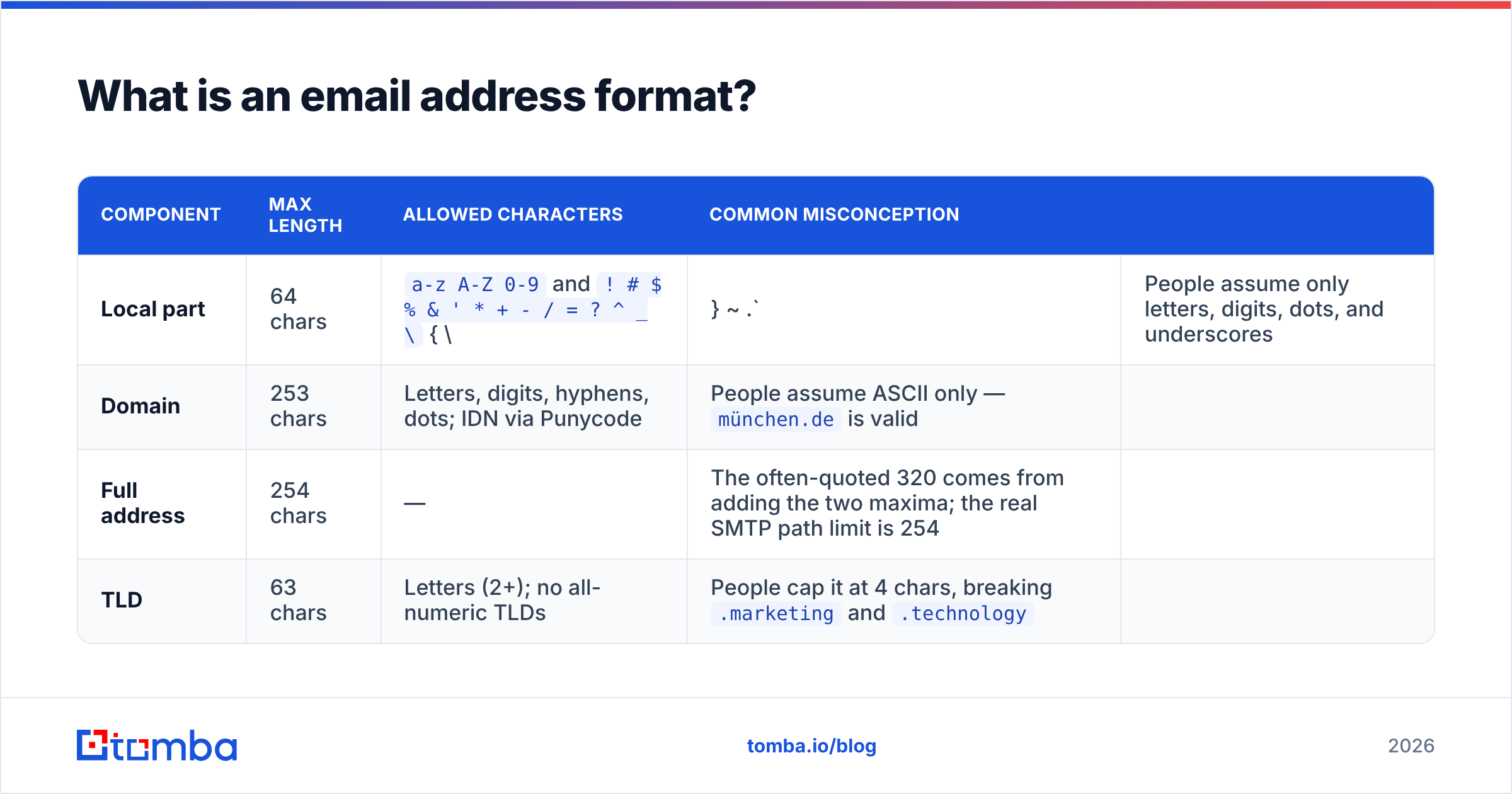
Here's what each half actually permits, per RFC 5321 and RFC 5322:
| Component | Max length | Allowed characters | Common misconception | |
|---|---|---|---|---|
| Local part | 64 chars | a-z A-Z 0-9 and ! # $ % & ' * + - / = ? ^ _ \ { \ |
} ~ .` | People assume only letters, digits, dots, and underscores |
| Domain | 253 chars | Letters, digits, hyphens, dots; IDN via Punycode | People assume ASCII only — münchen.de is valid |
|
| Full address | 254 chars | — | The often-quoted 320 comes from adding the two maxima; the real SMTP path limit is 254 | |
| TLD | 63 chars | Letters (2+); no all-numeric TLDs | People cap it at 4 chars, breaking .marketing and .technology |
Two structural rules bite most often in validation code:
- A dot cannot lead, trail, or double up in the local part.
.bob@x.com,bob.@x.com, andbo..b@x.comare all invalid unquoted. - Hyphens cannot lead or trail a domain label.
-example.comfails;ex-ample.comis fine.

Wait — that's the wrong image reference. Here's the meme:
Which email address formats are valid but look wrong?#
These all pass spec and all get rejected by naive validators. If your form breaks on any of them, you are losing signups:
user+tag@gmail.com— sub-addressing. Gmail, Fastmail, and iCloud all support it. Blocking+is the single most common validation bug on the web, and it disproportionately hits technical users who tag their signups.o'brien@example.com— apostrophes are legal in local parts and common in Irish surnames. Your regex should not discriminate against the O'Sullivans.admin@localhost— no TLD, still valid in the spec. Reject it for public forms anyway; accept it in internal tooling.用户@例子.广告— internationalized addresses (RFC 6531/SMTPUTF8). Rare in B2B but growing."very unusual"@example.com— quoted local parts permit spaces and most special characters. Legal, essentially never used, and safe to reject in production.x@[192.168.1.1]— IP-literal domains. Valid syntax, almost always a red flag on a signup form.
The practical takeaway: write your validator to be permissive on syntax and strict on verification. A single @, non-empty halves, no leading/trailing dots, length caps, then hand the address to a real email verifier for the question that matters — does this mailbox exist?
Is a valid email address format the same as a deliverable address?#
No, and conflating the two is the expensive mistake.
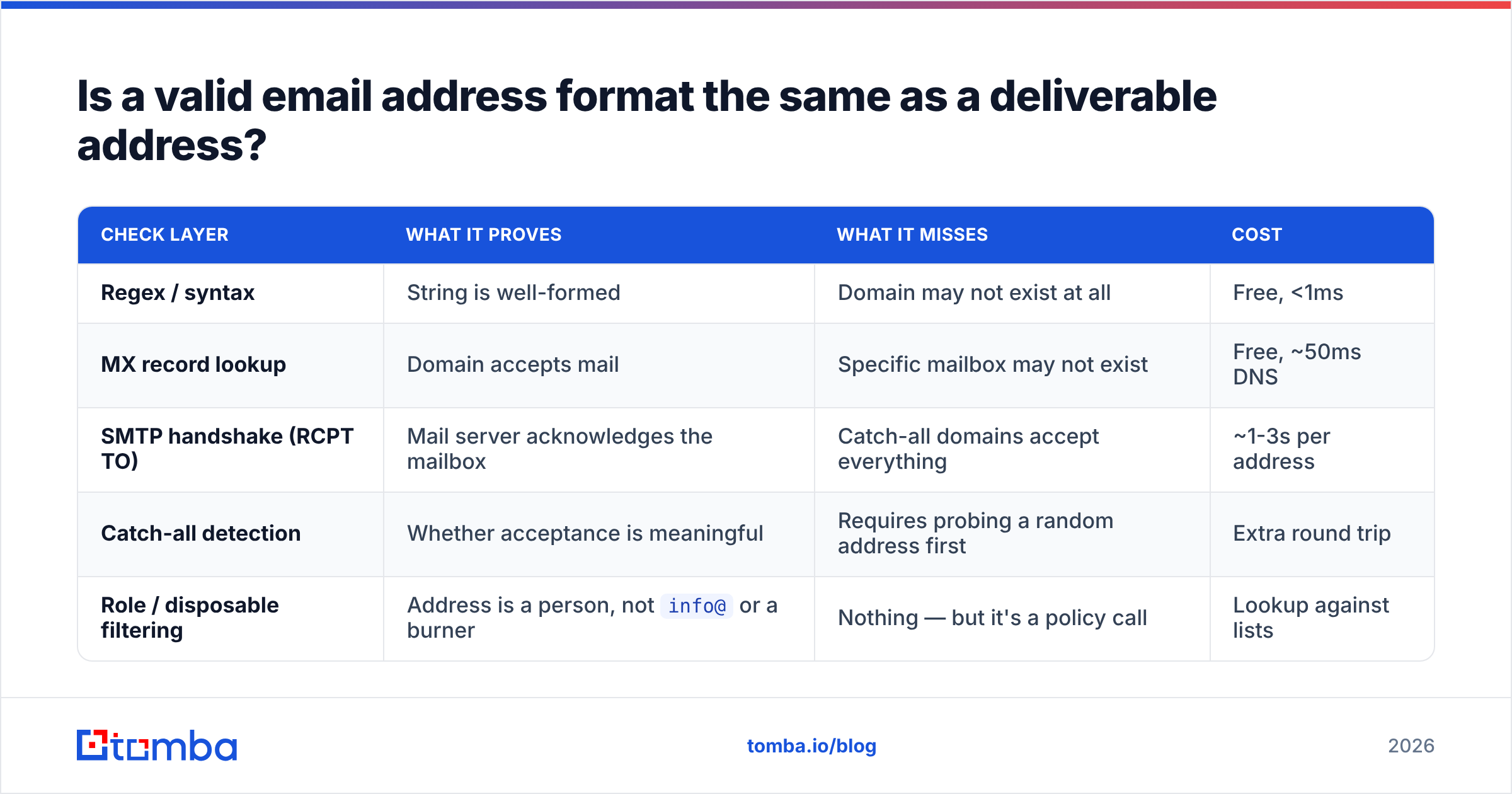
Syntax checking is free and instant. It tells you whether a string could be an address. Deliverability requires network calls and tells you whether mail will arrive. Between those two states sit four failure modes that no regex can see:
| Check layer | What it proves | What it misses | Cost |
|---|---|---|---|
| Regex / syntax | String is well-formed | Domain may not exist at all | Free, <1ms |
| MX record lookup | Domain accepts mail | Specific mailbox may not exist | Free, ~50ms DNS |
| SMTP handshake (RCPT TO) | Mail server acknowledges the mailbox | Catch-all domains accept everything | ~1-3s per address |
| Catch-all detection | Whether acceptance is meaningful | Requires probing a random address first | Extra round trip |
| Role / disposable filtering | Address is a person, not info@ or a burner |
Nothing — but it's a policy call | Lookup against lists |
That fourth row is where most verification tools quietly fail. A catch-all domain returns "250 OK" for asdkjh@company.com just as readily as for the CEO's real address. If your tool reports both as valid, you have no signal. Tomba runs a dedicated catch-all verifier precisely because a binary valid/invalid answer is misleading on those domains — you need a confidence score instead.
For B2B lists, one more layer matters: role accounts. sales@, info@, support@, and hello@ are syntactically flawless and deliverable, but they land in shared inboxes with terrible reply rates. Filter them out of cold outreach lists and route them to a different playbook entirely.
What email address formats do companies actually use?#
This is the prospecting question. Once you know a company's naming convention, you can construct an address for anyone on the team.
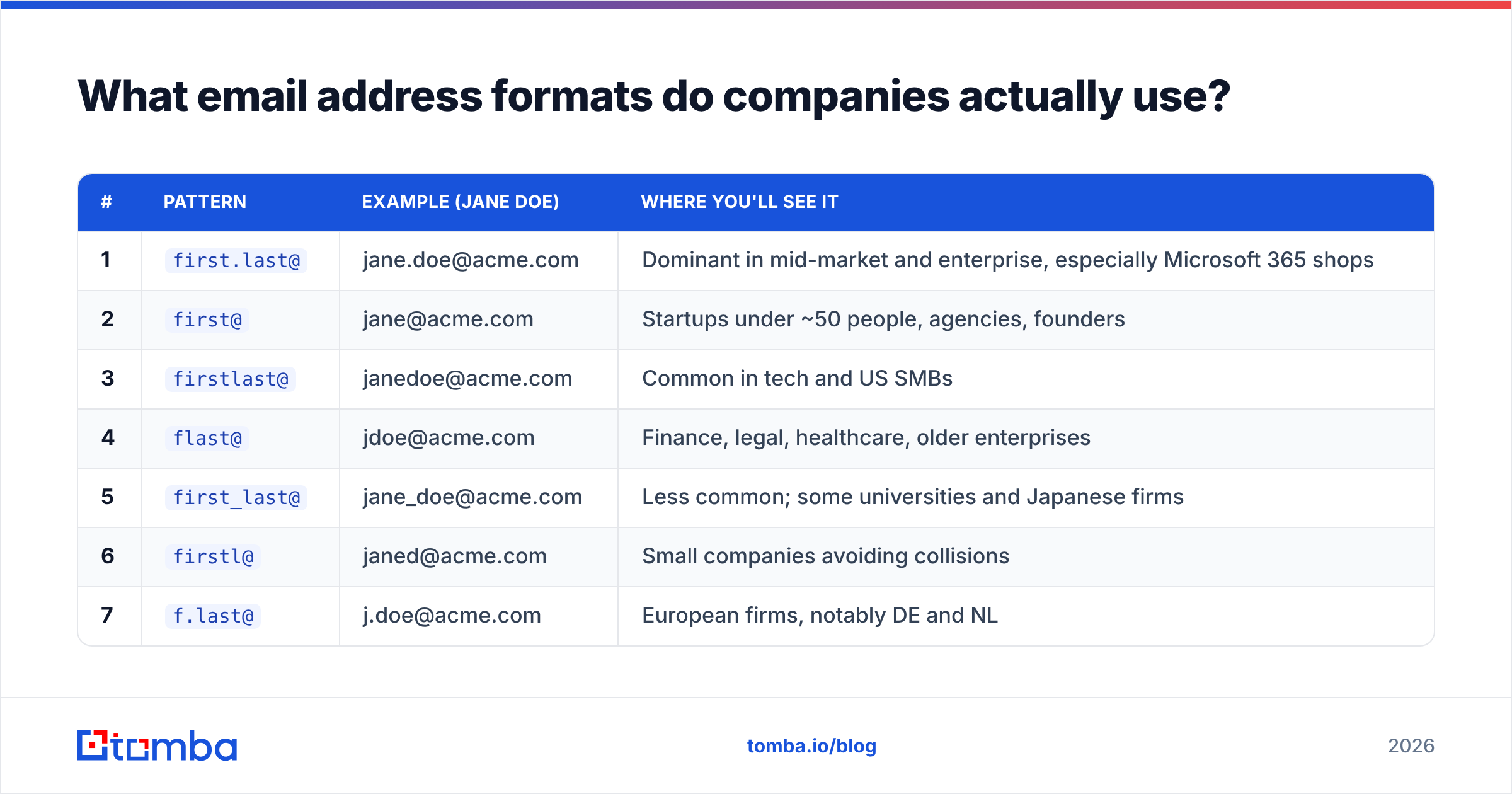
Across B2B domains, these patterns cover nearly everything:
| # | Pattern | Example (Jane Doe) | Where you'll see it |
|---|---|---|---|
| 1 | first.last@ |
jane.doe@acme.com | Dominant in mid-market and enterprise, especially Microsoft 365 shops |
| 2 | first@ |
jane@acme.com | Startups under ~50 people, agencies, founders |
| 3 | firstlast@ |
janedoe@acme.com | Common in tech and US SMBs |
| 4 | flast@ |
jdoe@acme.com | Finance, legal, healthcare, older enterprises |
| 5 | first_last@ |
jane_doe@acme.com | Less common; some universities and Japanese firms |
| 6 | firstl@ |
janed@acme.com | Small companies avoiding collisions |
| 7 | f.last@ |
j.doe@acme.com | European firms, notably DE and NL |
| 8 | last.first@ |
doe.jane@acme.com | Academia, some government bodies |
| 9 | lastf@ |
doej@acme.com | Legacy systems, manufacturing |
| 10 | first-last@ |
jane-doe@acme.com | Occasional; agencies and nonprofits |
| 11 | firstlast + digit@ |
janedoe2@acme.com | Large orgs resolving name collisions |
| 12 | first.middle.last@ |
jane.a.doe@acme.com | Consulting, big four, law firms |
Three complications you'll hit in the field:
Subdomains and multiple domains. A company may use @acme.com for sales and @mail.acme.com or a legacy @acmecorp.com for engineering. Post-acquisition, both the old and new domains often route. Check the actual pattern per domain, not per company.
Accented and hyphenated names. José Muñoz may be jose.munoz@, jose.munoz@ with diacritics stripped, or j.munoz@. Most mail systems strip diacritics; a minority preserve them. Mary-Kate Olsen may become marykate.olsen@ or mary-kate.olsen@.
Collisions. Two Jane Does at a 5,000-person company means one of them is jane.doe2@ or jane.a.doe@. Pattern inference alone won't tell you which — verification will.
How do you find the right email format for a specific domain?#
Four approaches, ranked by cost and accuracy.
1. Pattern lookup (best first move). Query a database that already knows the domain's convention. Tomba's domain search returns the detected pattern alongside known addresses at that company, so you infer once and apply it to every contact on that domain. Verifying one address to confirm the pattern, then generating the rest, is far cheaper than verifying twelve guesses per person.
2. Permutation plus verification. Generate the candidates with an email permutator, then verify each. It works, but it's expensive — twelve SMTP probes per contact — and on catch-all domains it returns twelve "valid" results, which is worse than useless. Use it only as a fallback when no pattern is known.
3. Observation from public sources. Press releases, PDF footers, support-ticket signatures, and mailto: links on team pages expose real addresses. Article bylines are a good source too — an author finder resolves a blog post URL to the writer's address, which simultaneously reveals the company pattern.
4. Never do this: spray unverified permutations. Sending to twelve guesses to see which bounces is a reputation-destroying strategy. Mailbox providers weight hard-bounce rate heavily; sustained rates above roughly 2% trigger throttling and filtering. Google's sender guidelines are explicit that invalid-recipient volume damages your standing. One campaign of sprayed guesses can cost you months of inbox placement.

Accuracy differences between tools come down almost entirely to two things: how large and how recently refreshed the pattern corpus is, and whether the verification layer distinguishes catch-all from confirmed. Tools that skip the second step post impressive-looking valid rates and disappointing bounce rates. Tomba publishes its data sources so you can judge the first.
Which tools handle email format validation and discovery?#
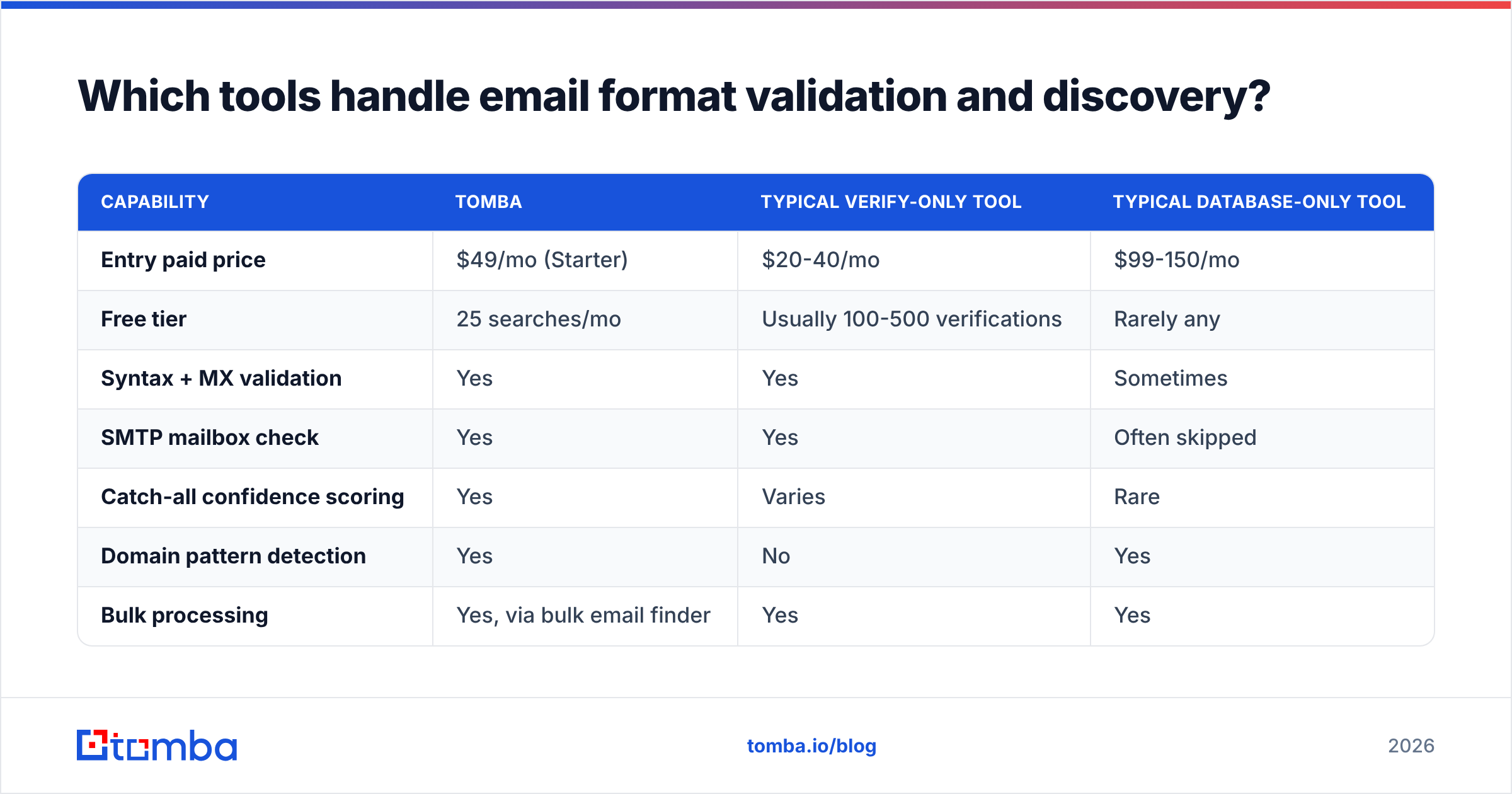
Different jobs need different tools. Format validation in a signup form is not the same problem as finding a prospect's address, and paying for the wrong one is common.

| Capability | Tomba | Typical verify-only tool | Typical database-only tool |
|---|---|---|---|
| Entry paid price | $49/mo (Starter) | $20-40/mo | $99-150/mo |
| Free tier | 25 searches/mo | Usually 100-500 verifications | Rarely any |
| Syntax + MX validation | Yes | Yes | Sometimes |
| SMTP mailbox check | Yes | Yes | Often skipped |
| Catch-all confidence scoring | Yes | Varies | Rare |
| Domain pattern detection | Yes | No | Yes |
| Bulk processing | Yes, via bulk email finder | Yes | Yes |
| API access on entry plan | Yes | Usually | Enterprise only |
| Phone numbers | Yes | No | Sometimes |
A few notes on choosing:
- If you only need to clean an existing list, a verify-only tool at $20-40/mo is genuinely sufficient. Don't over-buy.
- If you need addresses you don't have, you need pattern detection plus verification in one place, or you'll pay twice and reconcile by hand.
- If you need geography-specific or industry-specific coverage, evaluate on your actual ICP. BookYourData, for instance, is strong on pre-verified list building where you want to buy contacts by filter rather than look them up one by one — a different workflow from lookup-first tools, and a reasonable choice when your motion is list-driven.
- Check independent reviews on G2 before committing. Vendor-reported accuracy figures are measured on vendor-chosen samples.
The full Tomba pricing ladder runs Free (25 searches), Starter $49/mo, Growth $99/mo, Pro $249/mo, and Enterprise custom — sized so you can validate the workflow on the free tier before committing budget.
How should you validate email format in code?#
Keep the regex simple and let the network do the real work. A pragmatic validator:
1. Exactly one @ (outside quotes)
2. Local part: 1-64 chars, no leading/trailing/double dot
3. Domain: 1-253 chars, valid labels, at least one dot for public forms
4. Total length ≤ 254
5. → DNS MX lookup
6. → SMTP RCPT TO probe
7. → catch-all detection and confidence score
8. → role/disposable classification
Steps 1-4 run client-side in microseconds. Steps 5-8 need a service — the email verification API handles them in one call, which is the sane build-versus-buy line. Running your own SMTP prober means managing IP reputation, greylisting, rate limits, and per-provider quirks, and getting IP-blocked by the very domains you're checking.
Two operational rules regardless of tooling:
Validate at capture, re-verify before send. Addresses decay at roughly 22-30% annually as people change jobs. A list verified eighteen months ago is not a verified list. Re-run before any significant campaign.
Never hard-fail a user on a soft signal. If verification is ambiguous — catch-all, greylisted, timeout — accept the address and flag it for a confirmation email. Blocking a real customer over an inconclusive SMTP response is a worse outcome than one soft bounce. HubSpot's own email deliverability documentation makes the same distinction between hard and soft failures.
What are the most common email format mistakes?#
- Rejecting
+in the local part. Legal, widely used, and blocking it costs you real signups from exactly the users most likely to convert. - Capping the TLD at four characters.
.marketing,.technology, and.internationalall exist and all get rejected by 2010-era regexes. - Treating syntax validity as deliverability. A perfectly formatted address on a dead domain still bounces.
- Reporting catch-all domains as verified. Inflates your "valid" count and your bounce rate simultaneously.
- Guessing without a pattern. Twelve permutations per contact is twelve times the cost and, on catch-alls, zero times the signal.
- Never re-verifying. Job changes make last year's clean list this year's bounce problem.
- Lowercasing the local part silently. The spec says local parts are case-sensitive. In practice every major provider treats them case-insensitively, so normalizing is safe — but know you're making a pragmatic choice, not following the standard.
Get the format right before you send#
Email address format is two problems wearing one name. The syntax problem is solved by being permissive, enforcing the two real length caps, and not blocking characters the spec allows. The prospecting problem is solved by learning each domain's naming pattern once, generating from it, and verifying before you send.
Start with the Tomba Email Finder — enter a name and a domain and it returns the address with a confidence score, pattern detection, and SMTP verification already applied, so you skip permutation guesswork entirely. The free tier covers 25 searches a month, which is enough to test it against contacts whose addresses you already know and see whether the accuracy holds on your own ICP before you pay for anything.
Related guides#
Ready to find emails that actually work?
Join 150,000+ professionals who stopped guessing and started sending. Free credits on signup — no credit card required.
Get the Tomba newsletter
Practical outbound tactics and product updates — once every two weeks.
About the author