Email Address Format With Name: 12 Patterns and How to Find Them
Most B2B email addresses are built from a person's name using one of about a dozen patterns. Here's every pattern, how common each one is, and how to confirm which one a company uses before you send.
TL;DR
- Roughly 70–80% of corporate mailboxes follow one of four name patterns:
first.last@,first@,flast@, orfirstlast@. The remaining fifth is where bounces come from. - The format is a company-level decision, not a per-person one — find it once for a domain and it usually holds for every employee hired since the directory was set up.
- Names with accents, hyphens, apostrophes, particles ("van der"), and two surnames break naive permutation. Every mail system strips them differently.
- Guessing 8 permutations and blasting all of them is the fastest way to wreck your sender reputation. Generate candidates, then verify one.
- A pattern lookup plus SMTP-level verification gets you a single deliverable address in seconds; permutators alone only give you a list of maybes.
What is an email address format with name?#
An email address format with name is the rule a company uses to turn an employee's real name into the left side of their email address. The address has two halves split by the @: the local-part (the mailbox) and the domain (the company). The domain is fixed. The local-part is generated from the name by a template.
Think of it like a company's parking-space numbering scheme. Nobody picks their own slot number at random — facilities decided the numbering rule once, and every new hire slots into it. Email works the same way: an IT admin configured "firstname.lastname" in Google Workspace or Microsoft 365 on day one, and 400 hires later the rule still runs.
That single fact is what makes name-based email finding possible at all. You don't need to discover 400 addresses. You need to discover one pattern and one confirmed exception list.
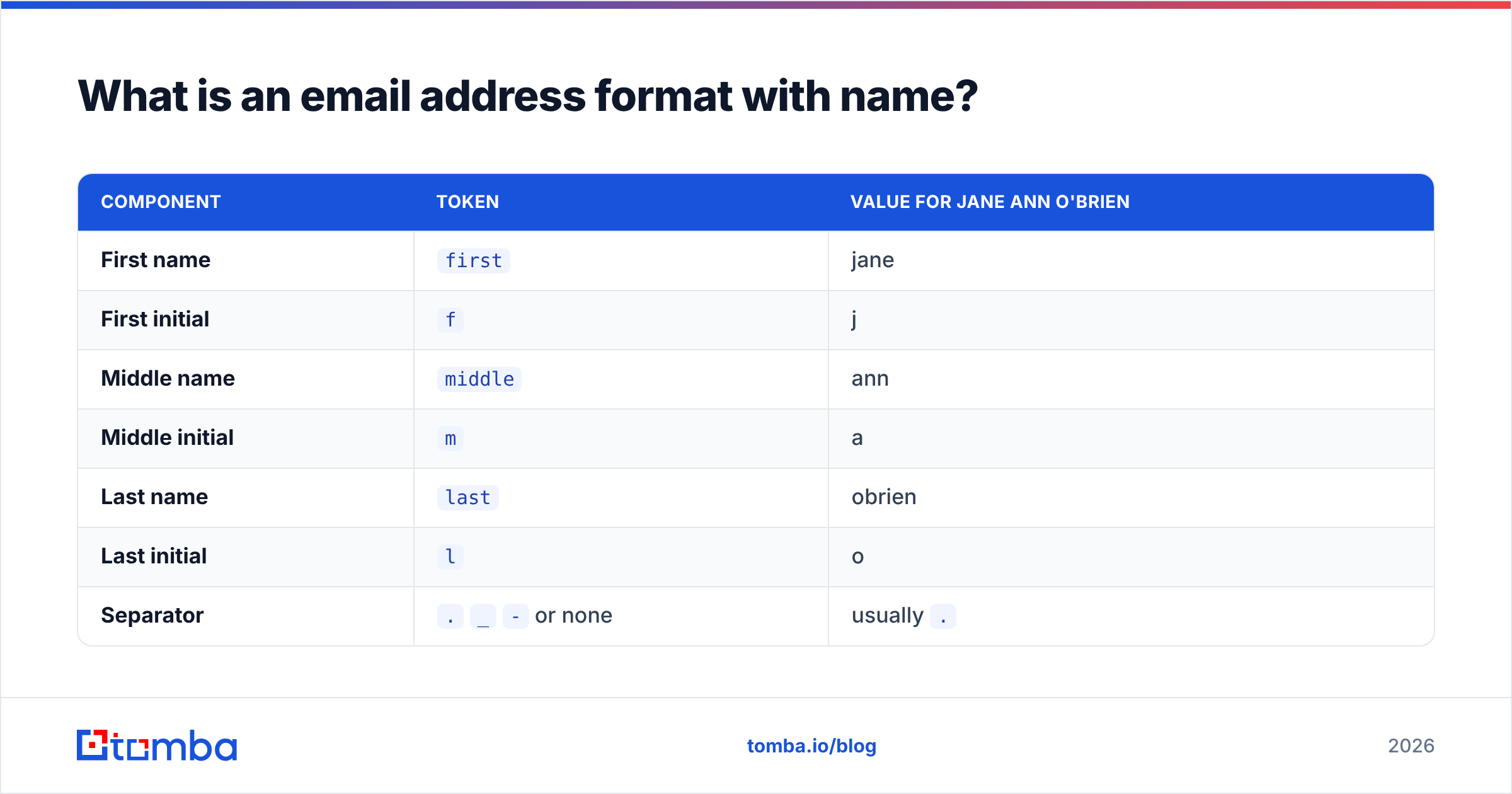
Here are the building blocks every pattern is assembled from, using Jane Ann O'Brien at acme.com:
| Component | Token | Value for Jane Ann O'Brien |
|---|---|---|
| First name | first |
jane |
| First initial | f |
j |
| Middle name | middle |
ann |
| Middle initial | m |
a |
| Last name | last |
obrien |
| Last initial | l |
o |
| Separator | . _ - or none |
usually . |
| Domain | domain |
acme.com |
Every real-world format is just those tokens in a different order with a different separator. Which is why the problem is finite — and solvable.
Which name-based email formats are most common?#
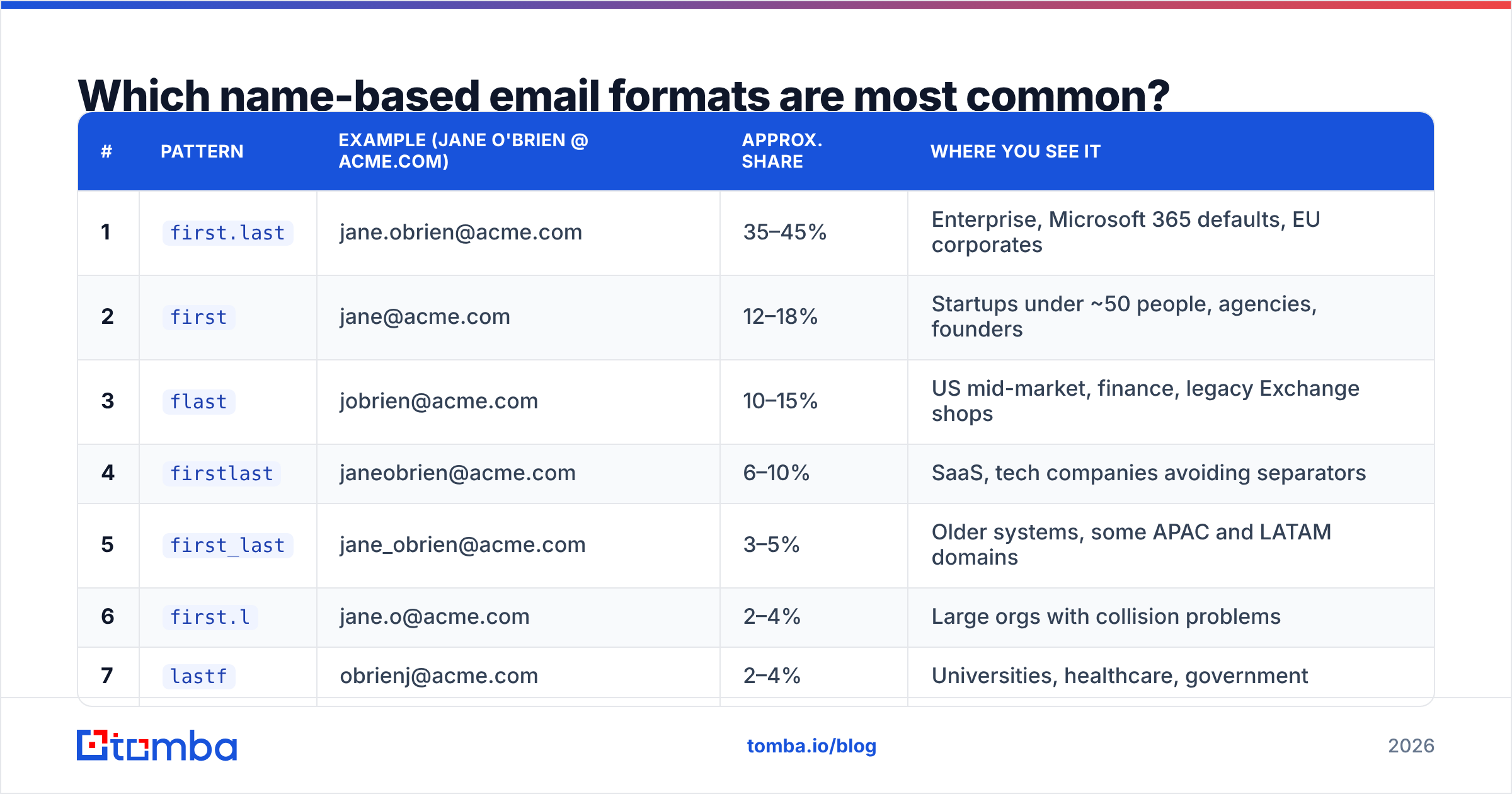
Below are the twelve patterns that account for nearly all B2B mailboxes. The share column is an approximate range based on the distribution you see across public B2B domains — treat it as a prior for ranking your guesses, not a precise statistic. Your own vertical will skew it (US enterprise leans first.last; startups and agencies lean first).
| # | Pattern | Example (Jane O'Brien @ acme.com) | Approx. share | Where you see it |
|---|---|---|---|---|
| 1 | first.last |
jane.obrien@acme.com | 35–45% | Enterprise, Microsoft 365 defaults, EU corporates |
| 2 | first |
jane@acme.com | 12–18% | Startups under ~50 people, agencies, founders |
| 3 | flast |
jobrien@acme.com | 10–15% | US mid-market, finance, legacy Exchange shops |
| 4 | firstlast |
janeobrien@acme.com | 6–10% | SaaS, tech companies avoiding separators |
| 5 | first_last |
jane_obrien@acme.com | 3–5% | Older systems, some APAC and LATAM domains |
| 6 | first.l |
jane.o@acme.com | 2–4% | Large orgs with collision problems |
| 7 | lastf |
obrienj@acme.com | 2–4% | Universities, healthcare, government |
| 8 | last.first |
obrien.jane@acme.com | 1–3% | Japanese and German corporates, academia |
| 9 | f.last |
j.obrien@acme.com | 1–3% | French, Belgian, Dutch companies |
| 10 | last |
obrien@acme.com | 1–2% | Small firms, law practices |
| 11 | first-last |
jane-obrien@acme.com | <1% | Rare, mostly self-hosted domains |
| 12 | fmlast |
jaobrien@acme.com | <1% | Banks, insurers, orgs with heavy name collisions |
Two things this table should change about how you work:
Order your guesses by prior probability, not alphabetically. If you're going to test candidates, test first.last before fmlast. Most tools generate permutations in an arbitrary order, which means your first send is often your worst guess.
Never assume the pattern from the country alone. Nationality shifts the odds — it does not decide them. A Paris-based subsidiary of a US parent company will usually inherit the parent's first.last, not the local f.last convention.
How do you handle names that break the pattern?#
This is where most email guessing quietly fails. The template is right; the name normalization is wrong. Five rules cover almost everything:
- Diacritics get folded to ASCII, almost always. José becomes
jose, Müller becomesmuller, Łukasz becomeslukasz. German is the exception worth knowing: some systems transliterateü → ue, so Müller can bemueller. Test both. - Apostrophes and spaces get deleted, not replaced. O'Brien becomes
obrien. De La Cruz becomesdelacruz. Van der Berg becomesvandenbergorvanderberg— check the person's own LinkedIn spelling, because directories inherit whatever the HR system stored. - Hyphenated surnames go one of three ways. Smith-Jones becomes
smithjones,smith-jones, or justsmith. Some HR systems truncate at the hyphen. This is the single most error-prone case in name-based finding. - Two surnames (Hispanic and Portuguese naming) usually collapse to the first. Jane Ramírez Gómez is normally
jane.ramirez, notjane.ramirezgomez. But Brazilian companies often use the last surname. - Nicknames beat legal names more often than you'd expect. If someone signs emails "Mike" and their LinkedIn URL is
/in/mikeobrien, the mailbox is probablymike.obrien, even if payroll says Michael. Always generate both, and prefer the self-reported form.
Length truncation is the sixth rule nobody documents: some legacy systems cap the local-part at 8, 12, or 20 characters. Konstantinos Papadopoulos might be kpapadop@. If a long name bounces on every sensible pattern, try a truncated version before giving up.
What does the standard actually allow in the local-part?#
Wider than any company uses. Under RFC 5322 the local-part permits letters, digits, and a set of specials including !#$%&'*+-/=?^_\{|}~`, plus dots that are neither leading, trailing, nor consecutive. Quoted local-parts can legally contain spaces. The full email address specification is genuinely permissive.
None of that matters for prospecting, and it matters a lot for validation. Two practical consequences:
- Your validation regex is probably too strict. If you reject
+you break every Gmail-style tag address. If you reject apostrophes you reject legitimateo'brien@mailboxes that some systems do preserve. - Case is preserved on paper, ignored in practice. The standard says the local-part is case-sensitive; effectively every real mail provider treats it as case-insensitive. Normalize to lowercase in your CRM so
Jane.OBrien@andjane.obrien@don't become two records.
If you want a quick sanity check on a single address before it enters your database, run it through a free email checker rather than hand-rolling a regex.
Should you guess the format or verify it?#
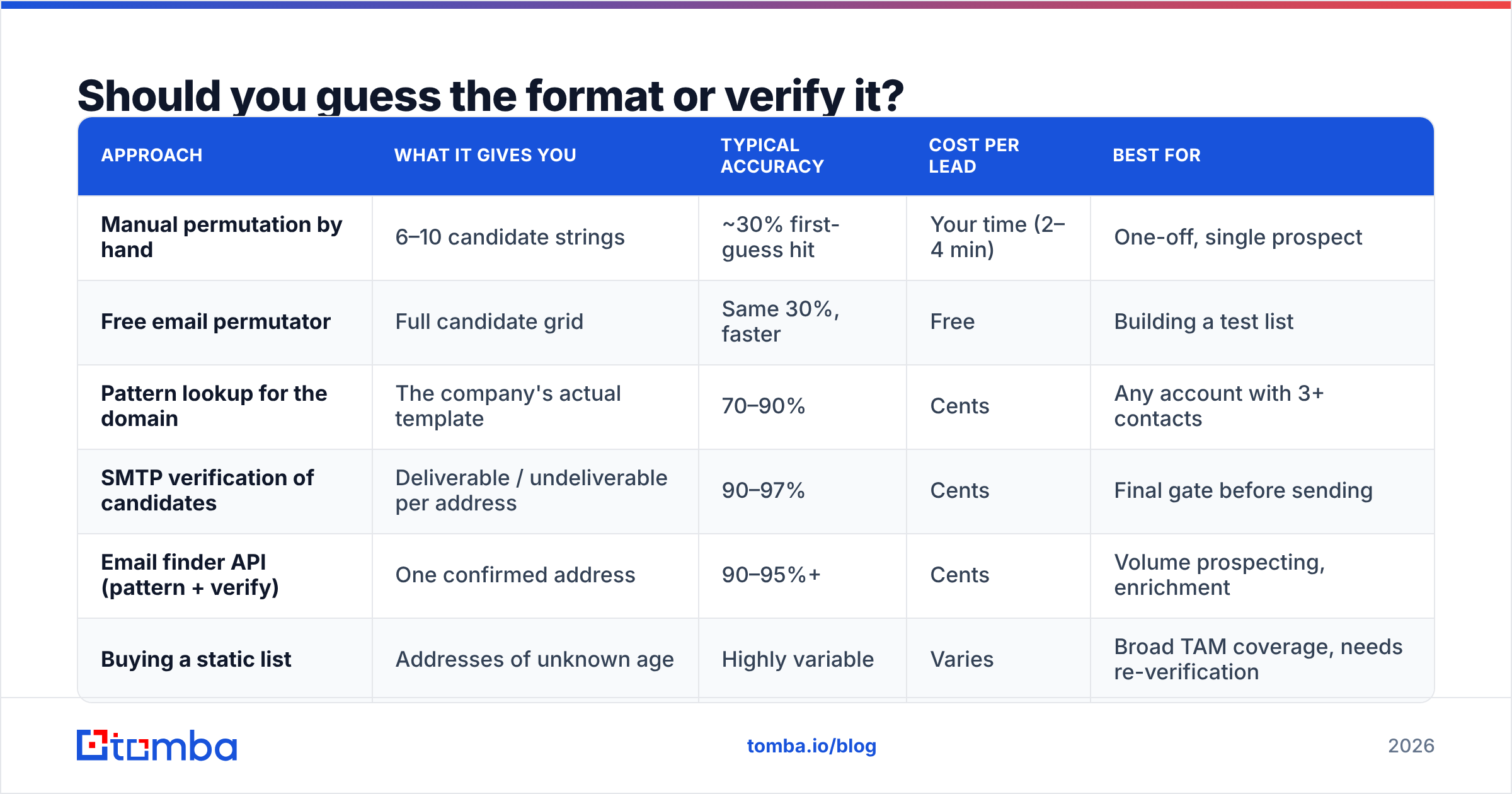
Guessing generates candidates. Verification tells you which candidate exists. Those are different jobs, and conflating them is what produces 15% bounce rates. Here's how the available approaches actually compare:
| Approach | What it gives you | Typical accuracy | Cost per lead | Best for |
|---|---|---|---|---|
| Manual permutation by hand | 6–10 candidate strings | ~30% first-guess hit | Your time (2–4 min) | One-off, single prospect |
| Free email permutator | Full candidate grid | Same 30%, faster | Free | Building a test list |
| Pattern lookup for the domain | The company's actual template | 70–90% | Cents | Any account with 3+ contacts |
| SMTP verification of candidates | Deliverable / undeliverable per address | 90–97% | Cents | Final gate before sending |
| Email finder API (pattern + verify) | One confirmed address | 90–95%+ | Cents | Volume prospecting, enrichment |
| Buying a static list | Addresses of unknown age | Highly variable | Varies | Broad TAM coverage, needs re-verification |
The honest read: pattern discovery plus verification is the only combination that both scales and stays clean. Permutators are useful and free, but a permutator alone hands you eight addresses and no opinion about which is real. If you send to all eight, seven bounce, and your domain reputation absorbs the damage. Providers read a 7-in-8 unknown-user rate as a spam signal, not as diligence.
Note also the catch-all problem. If a domain accepts mail for every address, SMTP verification returns "valid" for asdfgh@acme.com too. That's when you need a catch-all verifier that scores likelihood from additional signals instead of trusting the accept response.

How do you confirm a company's format in under two minutes?#
A repeatable sequence beats intuition. Run these in order and stop as soon as you get a confirmation:
- Find one known-good address at the domain. Press pages,
careers@, support signatures, GitHub commit history, PDF metadata, conference speaker bios, and SEC filings all leak real addresses. One confirmed address reveals the template for everyone. - Reverse the template from that address. If you find
d.chen@acme.comfor Daniel Chen, the pattern isf.last— pattern 9, which you'd otherwise have tested ninth. - Run a domain-level lookup. A domain search returns known addresses at the company along with the dominant pattern and a confidence score. This is the fastest path when nothing is publicly visible.
- Generate the top two candidates only. Apply the discovered pattern plus one fallback. Not eight.
- Verify before sending. Push both through an email verifier and keep only the deliverable one. If both come back accept-all, treat the address as unconfirmed and route the contact to LinkedIn or phone instead.
- Log the pattern on the account record, not the contact record. Next time someone works this account, the format is already known. Most teams re-solve the same domain a dozen times because nobody wrote it down.
Step six is the compounding one. A pattern library across your ICP turns finding into lookups. Teams that maintain it see their per-contact enrichment cost fall as territory coverage grows, which is the opposite of how list buying behaves.
What about aliases, role accounts, and display names?#
Three adjacent things get confused with the format itself:
Display names are not part of the address. "Jane O'Brien" <jane.obrien@acme.com> — the quoted part is metadata attached to the message, not the mailbox. It's freely editable, which is exactly why display-name spoofing works and why you should never treat a friendly name as identity proof.
Aliases mean multiple valid addresses for one human. Jane may receive at jane.obrien@, jobrien@, and jane@. All deliver. Your verifier will validate all three. Pick the one matching the domain's dominant pattern, because that's the one she actually sends from — and replies from a matching address thread properly in her client.
Role accounts follow no name pattern at all. info@, sales@, hello@, careers@, noreply@. These are shared inboxes. They verify clean and they convert terribly in outbound because no individual owns them. If your list is 30% role accounts, your deliverability metrics will look fine while your reply rate stays flat. Filter them out explicitly; most enrichment stacks and the tooling reviewed across lead intelligence categories on G2 flag them, but not all remove them by default.
Which format choices affect deliverability and privacy?#
If you're the one setting the format for your own company, two trade-offs matter.
Predictability is a feature and a liability. first.last@ is what customers guess correctly on the first try, which reduces friction for inbound mail. It also means every scraper and every attacker can enumerate your staff from a LinkedIn list. Companies with high phishing exposure sometimes adopt flast@ or first.l@ specifically to reduce enumeration, then publish role addresses for anything customer-facing.
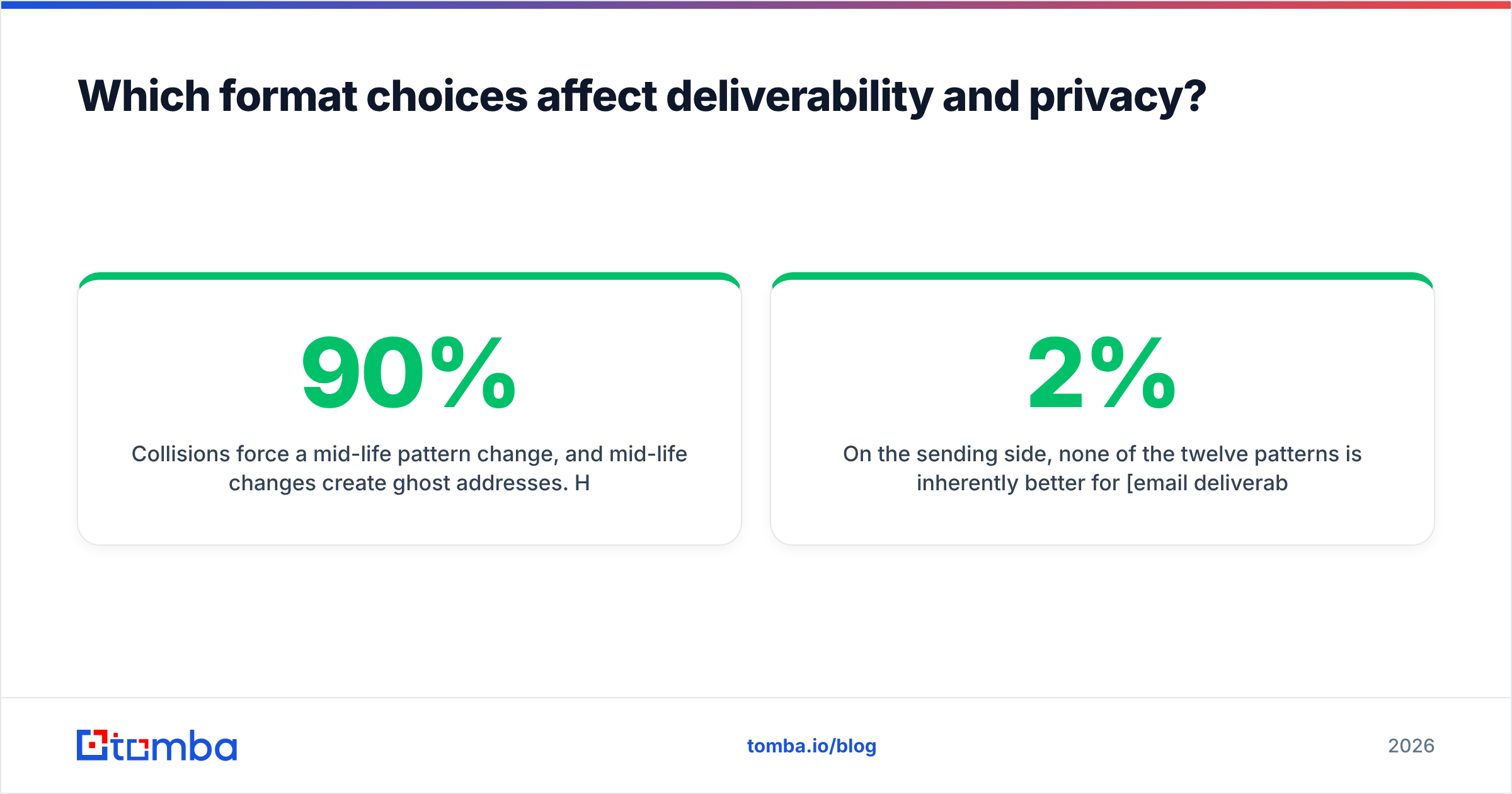
Collisions force a mid-life pattern change, and mid-life changes create ghost addresses. Hire a second Jane O'Brien and someone becomes jane.obrien2@ or jane.o@. Once a directory contains two generations of patterns, your own inference breaks — and so does everyone else's. This is why a pattern with 90% confidence still needs per-address verification: the 10% is usually collision handling and post-acquisition mailbox migrations.
On the sending side, none of the twelve patterns is inherently better for email deliverability. What hurts deliverability is sending to addresses you never confirmed. Unknown-user bounces above roughly 2% start affecting inbox placement; above 5% you're actively training filters against your domain. The pattern doesn't cause that. Unverified guessing does.
What should you actually do next?#
Work the order of operations, not the pattern list. Find one real address at the domain, reverse the template, generate two candidates instead of eight, verify, and store the pattern at the account level so you never solve the same domain twice. That sequence turns email address format guessing from a coin flip into a lookup with a confidence score attached.
When you'd rather skip the reverse-engineering entirely, Tomba Email Finder does all five steps in one call: it resolves the domain's dominant name pattern, applies the right normalization for accents and compound surnames, verifies the result at the SMTP layer, and returns a single address with a confidence score and the sources behind it. The free tier covers 25 searches a month so you can benchmark it against your current hit rate before paying anything; Tomba pricing starts at $49/mo for Starter and $99/mo for Growth when you're ready for volume, with an API and bulk workflows on every paid plan.
Test it on ten domains you already have confirmed addresses for. If it reproduces your known-good answers, trust it on the ones you don't.
Related guides#
Ready to find emails that actually work?
Join 150,000+ professionals who stopped guessing and started sending. Free credits on signup — no credit card required.
Get the Tomba newsletter
Practical outbound tactics and product updates — once every two weeks.
About the author