Email Address Formats: The Complete B2B Guide for 2026
Eight patterns cover almost every corporate inbox. Here's how to identify a company's email address format in seconds, and why brute-force guessing quietly wrecks your sender reputation.
TL;DR
- Roughly eight patterns account for the overwhelming majority of corporate email address formats —
first.last@,first@,flast@,firstl@,first_last@,lastf@,f.last@, andfirstlast@. - One company can run two or three formats at once: legacy staff on
flast@, new hires onfirst.last@, executives on aliases. - Guessing formats by sending test emails is the single fastest way to burn a sending domain. Every bounce is a permanent mark against your sender reputation.
- The correct order is: detect the pattern from known-good addresses → generate candidates → verify at SMTP level → only then send.
- Catch-all domains break pattern logic entirely, because every candidate looks valid. Treat them as a separate workflow, not a win.
What are email address formats?#
An email address format is the naming convention a company uses to turn a human name into a mailbox. Think of it like a building's apartment numbering system: once you know that the third floor uses 301, 302, 303, you can find anyone's door without knocking on all of them. The convention is set once by whoever configured the mail tenant — usually Google Workspace or Microsoft 365 — and then applied automatically to every new hire.
Structurally, every address is local-part@domain. The domain half is public and trivial to find. The local part is where the pattern lives, and it is constrained by the rules described in the email address specification: case-insensitive in practice, dots and underscores allowed, no spaces, and a practical length limit of 64 characters.
What matters commercially is that formats are organizational, not personal. Sarah Chen at a company using f.last@ will be s.chen@company.com whether she likes it or not. That predictability is what makes prospecting possible at all — and also what makes lazy prospecting so easy to spot.
Which email address formats do companies actually use?#
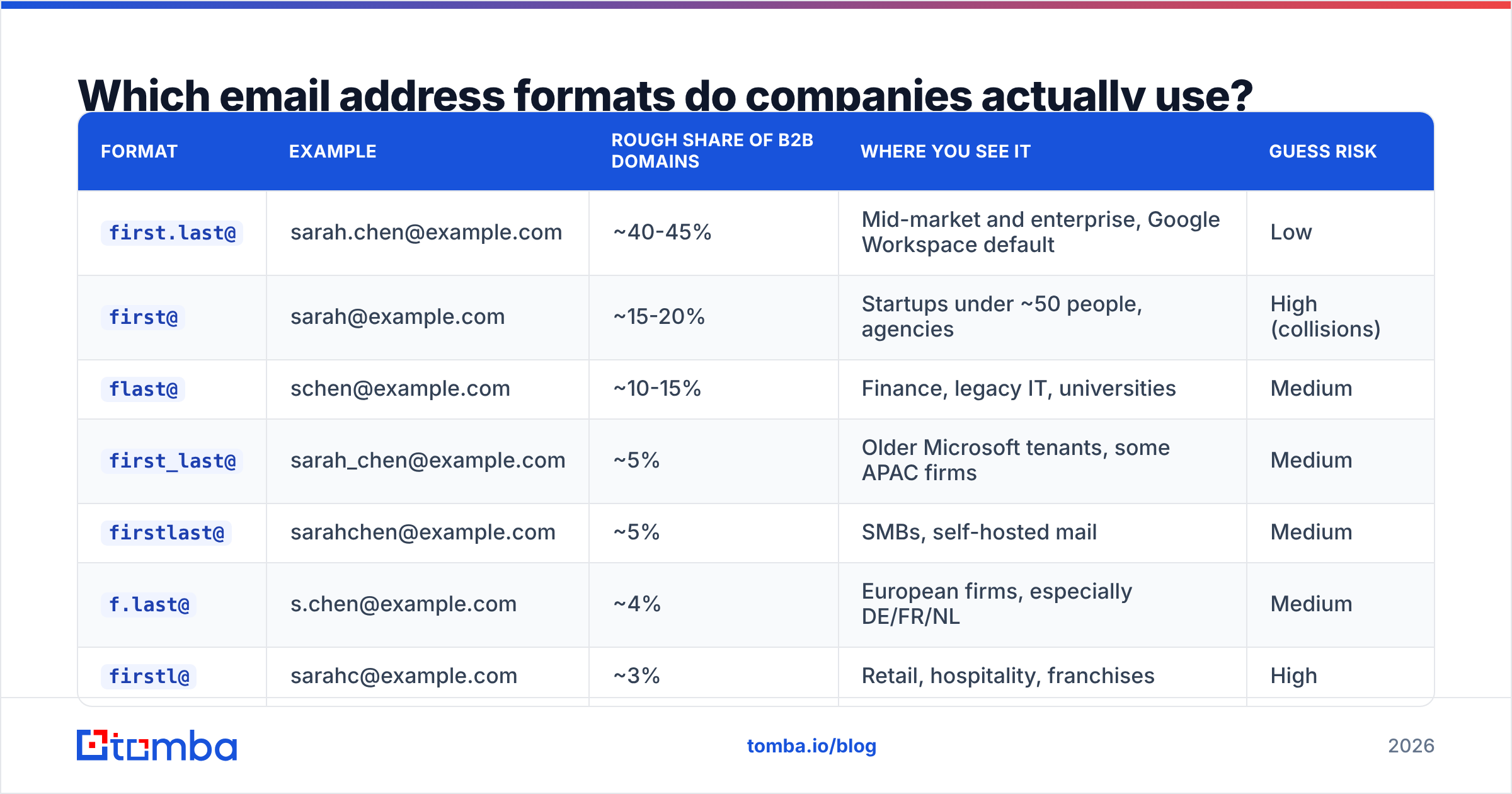
Here are the patterns that show up over and over in B2B data, using Sarah Chen at example.com as the test name. Share figures are directional — they shift by company size, region, and mail platform — but the ordering is stable across large samples.
| Format | Example | Rough share of B2B domains | Where you see it | Guess risk |
|---|---|---|---|---|
first.last@ |
sarah.chen@example.com | ~40-45% | Mid-market and enterprise, Google Workspace default | Low |
first@ |
sarah@example.com | ~15-20% | Startups under ~50 people, agencies | High (collisions) |
flast@ |
schen@example.com | ~10-15% | Finance, legacy IT, universities | Medium |
first_last@ |
sarah_chen@example.com | ~5% | Older Microsoft tenants, some APAC firms | Medium |
firstlast@ |
sarahchen@example.com | ~5% | SMBs, self-hosted mail | Medium |
f.last@ |
s.chen@example.com | ~4% | European firms, especially DE/FR/NL | Medium |
firstl@ |
sarahc@example.com | ~3% | Retail, hospitality, franchises | High |
lastf@ / last.first@ |
chens@ / chen.sarah@example.com | ~2-3% | Japan, Korea, some legal firms | High |
Two things to take from this table. First, if you had to bet blind on a single pattern, first.last@ wins — but you would still be wrong more than half the time. Second, the long tail is not noise. If your total addressable market is 4,000 accounts, the bottom four rows represent several hundred companies you would simply never reach by assuming the top pattern.
How do you identify a company's email format?#
Work from evidence, not intuition. These five methods are ordered by reliability, and you should stop as soon as one gives you a confirmed hit.
- Find one known-good address and reverse-engineer it. A single verified address on the domain tells you the pattern for the whole company. Press pages,
mailto:links in site footers, PDF whitepapers, conference speaker bios, GitHub commit histories, and WHOIS records are the usual sources. This is the highest-confidence method because it uses the company's own output as the source of truth. - Query a pattern database. Tools that have already indexed millions of domains can return the dominant format instantly along with a confidence figure. A free company email pattern check does exactly this: enter the domain, get the format plus how many addresses that inference is based on. Sample size matters more than the pattern itself — a format derived from 300 known mailboxes is worth far more than one derived from two.
- Run a domain search. Instead of asking "what is the pattern," ask "who works here and what are their addresses." A domain search returns the actual mailboxes on a domain with roles and departments, which sidesteps pattern inference altogether for anyone already in the index.
- Check the mail provider for structural hints. An MX lookup showing
google.comMX records suggests a Workspace tenant, wherefirst.last@andfirst@dominate and dots are ignored by the receiving server.outlook.com/protection.outlook.comMX records point to Microsoft 365, wherefirst.last@is also standard butflast@legacy holdovers are far more common. - Generate and verify the remaining candidates. When nothing above resolves it, build the candidate set with an email permutator and run each one through SMTP verification. This is the fallback, not the starting point — and it must be verification, never a test send.
The order matters because each step down costs more and returns less. Reversing one known address takes 30 seconds. Permutating and verifying eight candidates costs eight credits and still leaves ambiguity on catch-all domains.
Why does guessing email formats fail at scale?#
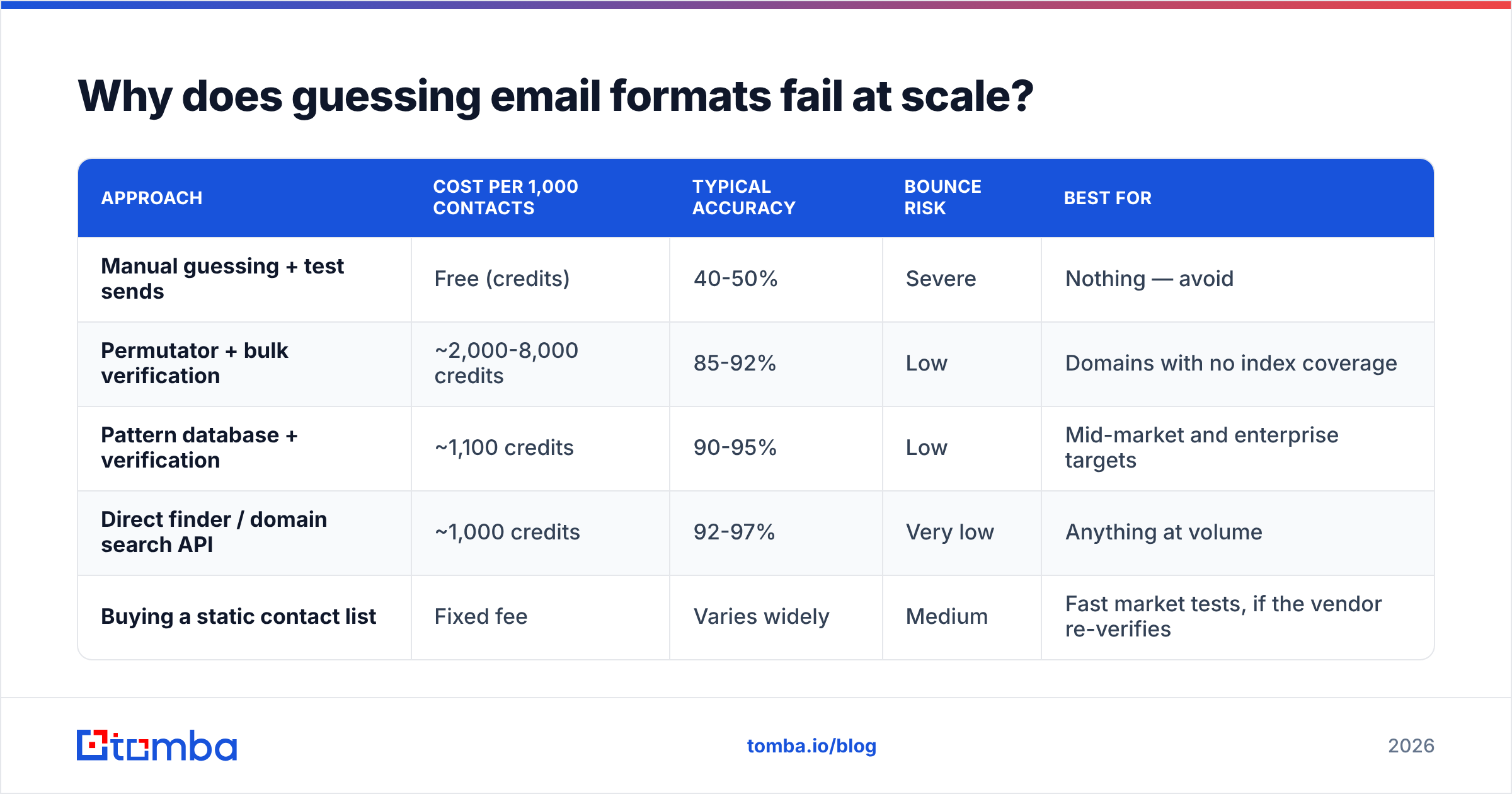
Because bounces are cumulative and permanent in effect. Mailbox providers track the ratio of accepted to rejected recipients per sending domain and IP. Push hard-bounce rates above roughly 2% and you are no longer being filtered — you are being throttled and eventually blocked. Sustained bounce rates in the 5-10% range are how new domains get retired in month one.
Do the arithmetic on brute force. Say you have 1,000 target contacts and you guess first.last@ for all of them. If that pattern is right 45% of the time, you have just sent 550 emails to nonexistent mailboxes. Even spread across several sending accounts, that is a bounce rate no warmup schedule survives. The 450 real people you did reach are now being delivered to a domain with a damaged reputation — meaning many of them never saw the message either.
There is a second, quieter cost. Some invalid addresses do not bounce; they land in spam traps or on aliases monitored by security teams. Those are worse than bounces because they generate complaints and blocklist entries rather than a clean rejection. Running an email verifier before send is the cheapest insurance in outbound — the credit cost of verification is always lower than the cost of rehabilitating a domain.
| Approach | Cost per 1,000 contacts | Typical accuracy | Bounce risk | Best for |
|---|---|---|---|---|
| Manual guessing + test sends | Free (credits) | 40-50% | Severe | Nothing — avoid |
| Permutator + bulk verification | ~2,000-8,000 credits | 85-92% | Low | Domains with no index coverage |
| Pattern database + verification | ~1,100 credits | 90-95% | Low | Mid-market and enterprise targets |
| Direct finder / domain search API | ~1,000 credits | 92-97% | Very low | Anything at volume |
| Buying a static contact list | Fixed fee | Varies widely | Medium | Fast market tests, if the vendor re-verifies |
On that last row: reputable list vendors do exist. BookYourData is a solid example of the category — it sells pre-verified B2B contacts with a bounce guarantee, which is a genuinely different purchase from live lookup. The trade-off is freshness versus convenience. A static list is a snapshot; job changes erode it at roughly 2-3% per month. Live lookup via an email finder API resolves the address at the moment you need it. Plenty of teams run both: purchased lists for broad market coverage, live lookup for named accounts and re-verification.
What happens when a company runs multiple formats?#
This is the case most guides skip, and it is extremely common in any organization over about 200 people.
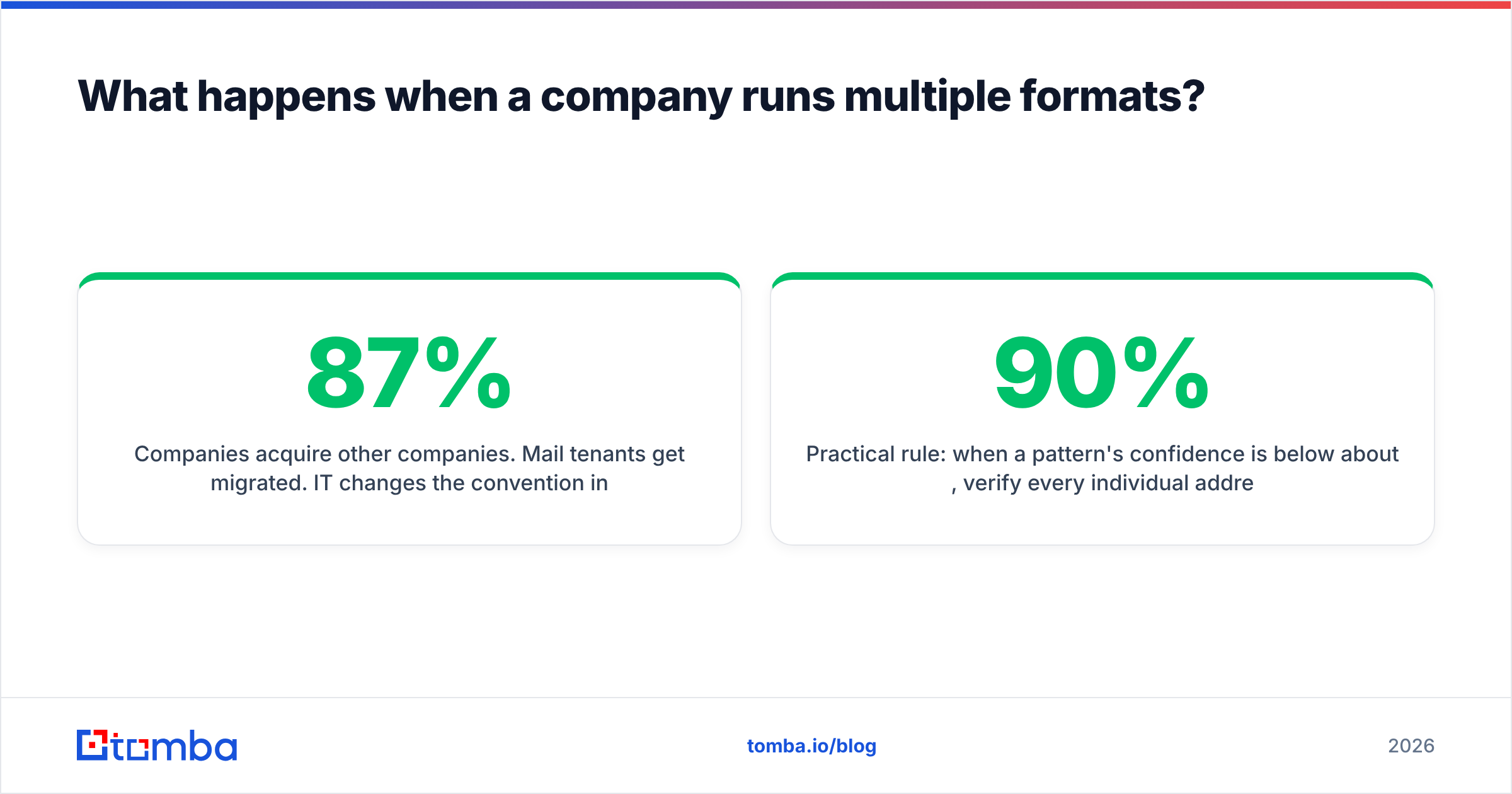
Companies acquire other companies. Mail tenants get migrated. IT changes the convention in 2019 but grandfathers existing staff. The result is a domain where the CFO is jsmith@, the new SDR is jordan.smith@, and both work. A pattern tool reporting "87% first.last@" is telling you something true and incomplete: 13% of that company uses something else, and those people skew senior, because they have been there longest.
Practical rule: when a pattern's confidence is below about 90%, verify every individual address rather than trusting the dominant format. When it is above 95%, spot-check one in ten. The cost difference is small and the reputational difference is not.
Aliases add a third layer. Many companies route info@, sales@, support@, and careers@ to shared inboxes. These validate perfectly and are worthless for personalized outreach — worse than worthless, because a pitch sent to a shared inbox often gets reported rather than ignored. Filter role-based addresses out of any list before it reaches your sequencer.

How do catch-all domains break format detection?#
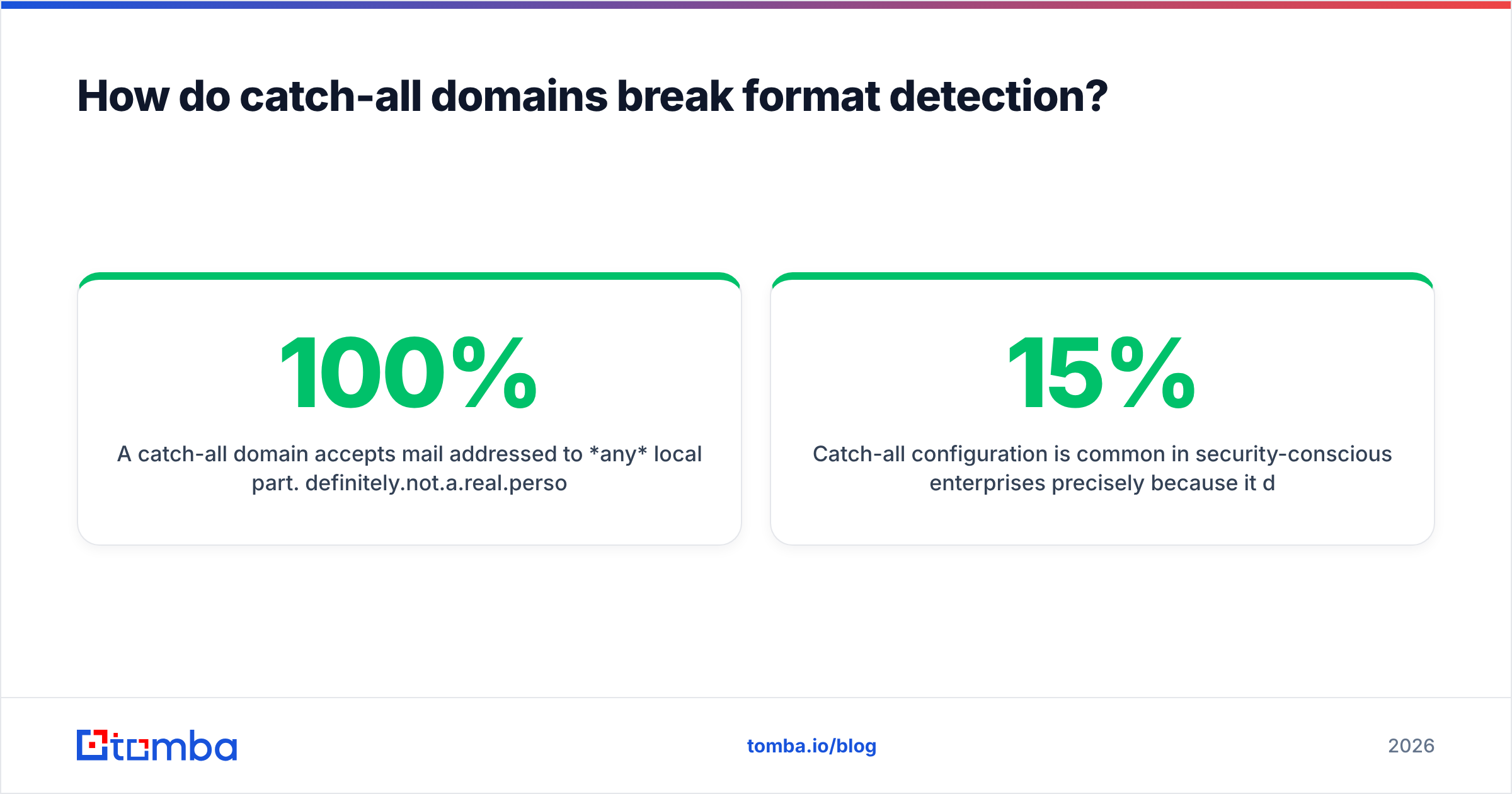
A catch-all domain accepts mail addressed to any local part. definitely.not.a.real.person@company.com returns a clean SMTP acceptance. That means standard verification tells you nothing, and pattern guessing produces 100% "valid" results that are mostly fiction.
Catch-all configuration is common in security-conscious enterprises precisely because it defeats mailbox enumeration. Estimates put somewhere between 15% and 25% of B2B domains in this category, with the share rising as company size increases.
Three ways to handle it:
- Use pattern confidence as the deciding signal. If a domain is catch-all but the pattern database shows 400 known addresses all following
first.last@, that inference is strong even though verification is uninformative. - Run a specialized check. A catch-all verifier uses secondary signals — historical engagement, provider-level behavior, cross-source corroboration — to grade catch-all addresses instead of returning a useless "accepted."
- Cap your exposure. Send to one address per catch-all domain first. If it engages, the pattern is confirmed and you can expand. If it hard-bounces later or triggers a complaint, you lost one send rather than forty.
Do international formats change the rules?#
Yes, in ways that break naive parsers.
German and Dutch companies use f.last@ and umlaut transliteration far more than the global average — müller becomes mueller roughly as often as it becomes muller, and both may be provisioned. French firms lean first.last@ but with hyphenated compound first names intact (jean-pierre.dubois@). Japanese and Korean companies frequently invert to last.first@ or lastf@, matching local name order. Spanish and Latin American contacts often carry two surnames, and the format may use the paternal one, both hyphenated, or both concatenated.
Practical guidance: never strip diacritics with a single rule and assume you are done. Generate both the transliterated and the simplified variant, and verify both. And when a contact's name has more than two components, the pattern derived from a two-part-name colleague may not extend cleanly — those are exactly the records worth checking individually.
What does a reliable workflow look like?#
Five steps, in this order, every time.
- Resolve the domain first. Company name to primary domain, not the marketing microsite or the regional variant. Getting this wrong invalidates everything downstream.
- Detect the pattern with a sample size you can see. Confidence without a denominator is marketing copy. Look for the count of known addresses behind the inference.
- Generate candidates only for names the index misses. If a direct lookup returns the address, skip permutation entirely — it is slower and less accurate.
- Verify at SMTP level, then segment. Valid, invalid, catch-all, and role-based are four different buckets with four different treatments. Do not collapse them into "good enough."
- Re-verify on a cadence. B2B contact data decays roughly 25-30% annually as people change jobs. A list verified in January is materially worse by July. Bulk re-verification through bulk email finder jobs is cheap compared to the bounces it prevents.
If you are choosing tooling for this, the questions that actually differentiate vendors are narrow: does it report pattern confidence with a sample size, does it distinguish catch-all from valid, does it flag role-based addresses, and what does it charge for a failed lookup. Independent review sites like G2's lead intelligence category are useful for narrowing the field, and most outbound teams eventually settle on the combination of a finder plus a verifier rather than a single all-in-one. For broader context on how format accuracy feeds into sequence performance, HubSpot's sales blog has consistently good benchmark data on bounce and reply rates.
Ready to stop guessing?#
Email address formats are solvable — they are just not solvable by intuition. Eight patterns, multiple simultaneous conventions per company, catch-all domains, and international naming order together mean that any workflow built on "assume first.last@ and see what bounces" is spending sender reputation to save credits.
Tomba's Email Finder resolves the address directly from a name and domain, returns the detected pattern with the number of sources behind it, and flags catch-all and role-based results instead of quietly passing them through. The free tier gives you 25 searches a month to test it against domains you already know the answer for — which is exactly how you should evaluate any data vendor. Paid plans start at $49/month for Starter, with Growth at $99/month and Pro at $249/month; full Tomba pricing is public. Run your ten hardest domains through it and compare against your current method before you commit to anything.
Related guides#
Ready to find emails that actually work?
Join 150,000+ professionals who stopped guessing and started sending. Free credits on signup — no credit card required.
Get the Tomba newsletter
Practical outbound tactics and product updates — once every two weeks.
About the author