Email Address Invalid: Why It Happens and How to Fix It in 2026
An "email address invalid" error rarely means the person doesn't exist. Here are the seven real causes, how verifiers actually decide, and how to recover addresses instead of deleting them.
TL;DR
- "Email address invalid" is a verdict from one of four different layers — syntax, DNS, mailbox, or policy — and each layer has a different fix.
- Most tools collapse "invalid," "unknown," and "risky" into one red label. That's why you delete addresses that would have delivered fine.
- Permanent failures (5xx) mean remove. Temporary failures (4xx) and catch-all "unknown" results mean retry or route differently — never purge.
- Roughly 20–30% of B2B contact data decays every year, so an address that verified clean in January can be genuinely invalid by June.
- Verify at capture, re-verify in bulk before every campaign, and keep hard bounces under 2% to stay inside Gmail and Outlook sender thresholds.
What does "email address invalid" actually mean?#
It means something in the delivery chain refused to confirm that a mailbox exists at that address — and that "something" could be four very different systems.
Think of an email address like a street address on a parcel. The label can be malformed (john@@acme). The street can be missing from the map (the domain has no mail servers). The street can exist but the apartment number doesn't (no mailbox for john). Or the building can have a doorman who refuses to say who lives there (a catch-all server, or a provider blocking verification probes). All four come back to you as "invalid," and only two of them actually mean the person is unreachable.
The formal rules for what makes an address structurally legal live in RFC 5322 and are summarized well on Wikipedia's email address page. Those rules are far more permissive than most validators assume — "very.unusual.@.unusual.com"@example.com is technically legal, and plus-addressing (sara+leads@acme.com) is legal everywhere. Plenty of forms reject valid addresses because a developer wrote a regex from memory.
So before you trust any red flag, you need to know which layer produced it.
Why do valid-looking email addresses come back invalid?#
Here are the seven causes that account for almost every case you'll see in a B2B list:
- Typos and transcription errors —
gmial.com,@acme.con, a trailing space, a copy-pasted zero-width character from a PDF. This is the single largest bucket in manually built lists. - The mailbox was deprovisioned — the person left the company. IT deleted the account instead of forwarding it, and the server now returns "user unknown."
- The domain changed or died — acquisitions rename mail domains (
oldco.com→newco.com), and startups let domains lapse. No MX record, no delivery. - Guessed patterns that don't match reality — you assumed
first.last@, but the company usesfirstinitiallast@. The person exists; your permutation doesn't. A company email pattern check solves this in seconds. - Catch-all and greylisting servers — the server accepts everything (or defers everything) so no verifier can confirm a specific mailbox. Result: "unknown," which most tools display as invalid.
- Role and distribution addresses —
info@,sales@,noreply@. Often technically deliverable but rejected by validators, and often filtered aggressively on the receiving end. - Disposable and blocked addresses — 10-minute mail domains, spam traps, and addresses on suppression lists. Deliverable in the SMTP sense, damaging to your sender reputation in practice.
Notice how only causes 2 and 3 are unambiguously terminal. Everything else is recoverable with the right step.
How do email verification tools decide an address is invalid?#
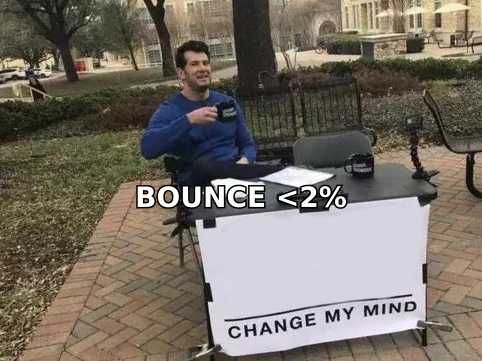
Every serious verifier runs the same ladder, in this order, stopping at the first failure. Understanding the ladder tells you exactly how much to trust a red result.
- Syntax check — Is the string legal? Cheap, instant, no network call. Catches
@@, missing TLDs, illegal characters. A failure here is definitive. - Domain and MX lookup — Does the domain resolve, and does it publish mail exchanger records? If there's no MX, nothing can be delivered. Also definitive.
- SMTP handshake (mailbox probe) — The verifier opens a connection to the receiving server and asks about the recipient without sending a message. The server's reply code is the verdict. This is where nuance lives.
- Catch-all detection — The verifier probes a deliberately fake mailbox on the same domain. If the server accepts
x8f2q9z@acme.com, it accepts everything, and the specific address can't be confirmed. Use a catch-all verifier to score these rather than discard them. - Risk and policy scoring — Role account? Disposable domain? Known spam trap? Historic complaint patterns? This layer is judgment, not fact, and vendors disagree wildly here.
The practical takeaway: a failure at layers 1–2 is arithmetic. A failure at layers 3–5 is inference. Vendors that report a single binary "valid/invalid" flag are hiding which layer spoke.
Which invalid-email errors are permanent and which are temporary?#
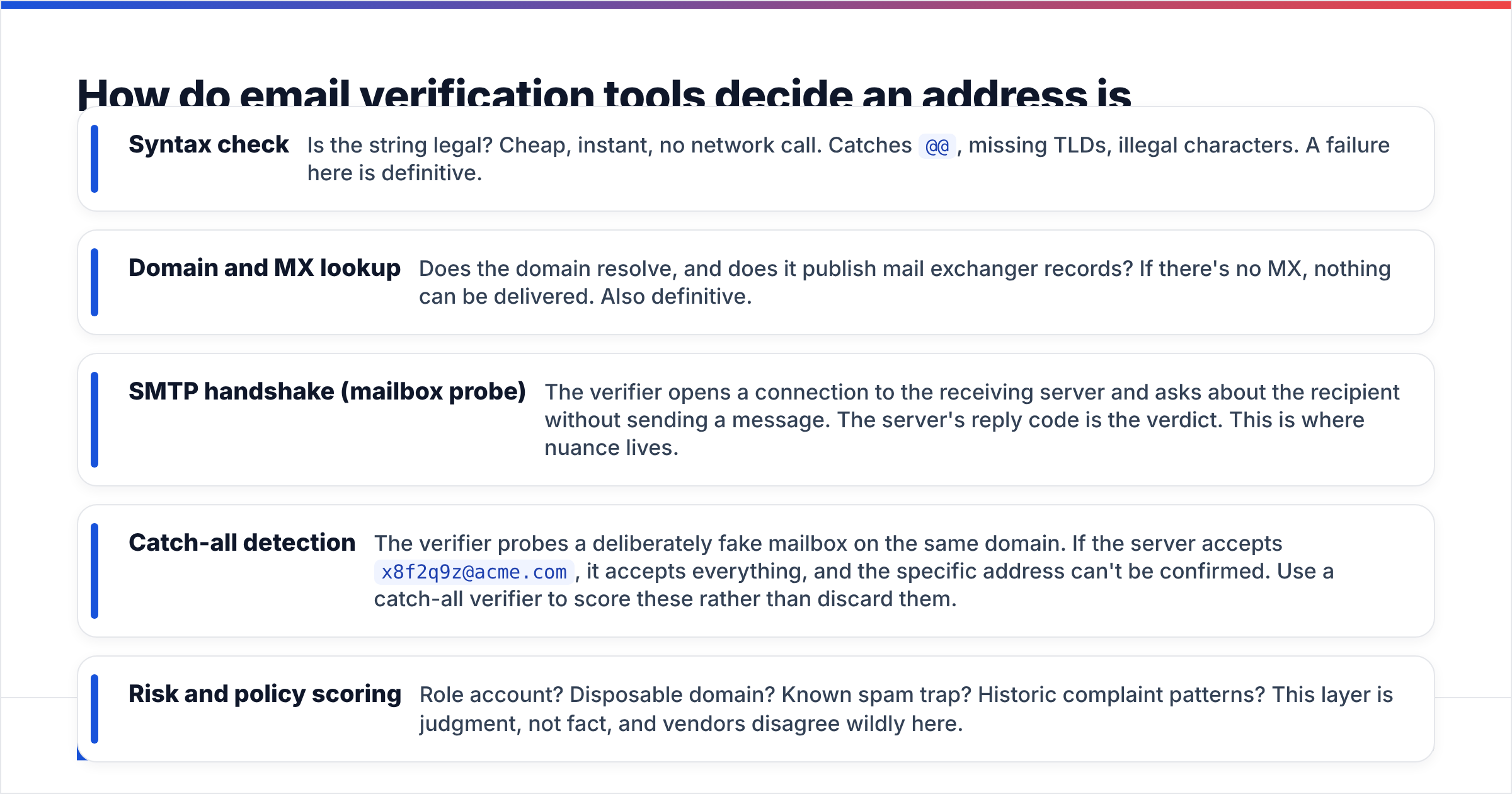
The SMTP reply code is the most useful signal you have, and almost nobody looks at it. A 5xx code is a hard bounce: permanent, delete the address. A 4xx code is a soft bounce: temporary, retry later. Treating them the same is how clean lists get shredded.
| Signal | Typical code | What it really means | Correct action |
|---|---|---|---|
| Invalid syntax | n/a (pre-send) | Malformed string | Fix the typo or drop |
| No MX record | 550 / DNS NXDOMAIN | Domain can't receive mail | Delete, look up new domain |
| User unknown | 550 5.1.1 | Mailbox deprovisioned | Delete, find the replacement contact |
| Mailbox full | 452 4.2.2 | Real person, full inbox | Retry in 3–7 days |
| Greylisted / deferred | 450 4.7.1 | Server throttling probes | Re-verify in 24h |
| Blocked for reputation | 554 5.7.1 | Your IP or domain is flagged | Fix authentication, not the list |
| Catch-all accepted | 250 (unreliable) | Unconfirmable mailbox | Score, segment, send cautiously |
That last row deserves emphasis. A catch-all "250 OK" is not a validation — it's a shrug. Roughly one in five B2B domains runs catch-all, weighted toward larger enterprises, so purging them means deleting your best accounts. Segment them into a separate, slower-sending list instead.
The reputation row matters too. If a spike of "invalid" results appears overnight across domains that used to work, the problem is almost certainly you, not them. Check your SPF record, DKIM, and DMARC alignment against Google's bulk sender guidelines before touching your list.
How do email verification tools compare on invalid-address detection?#
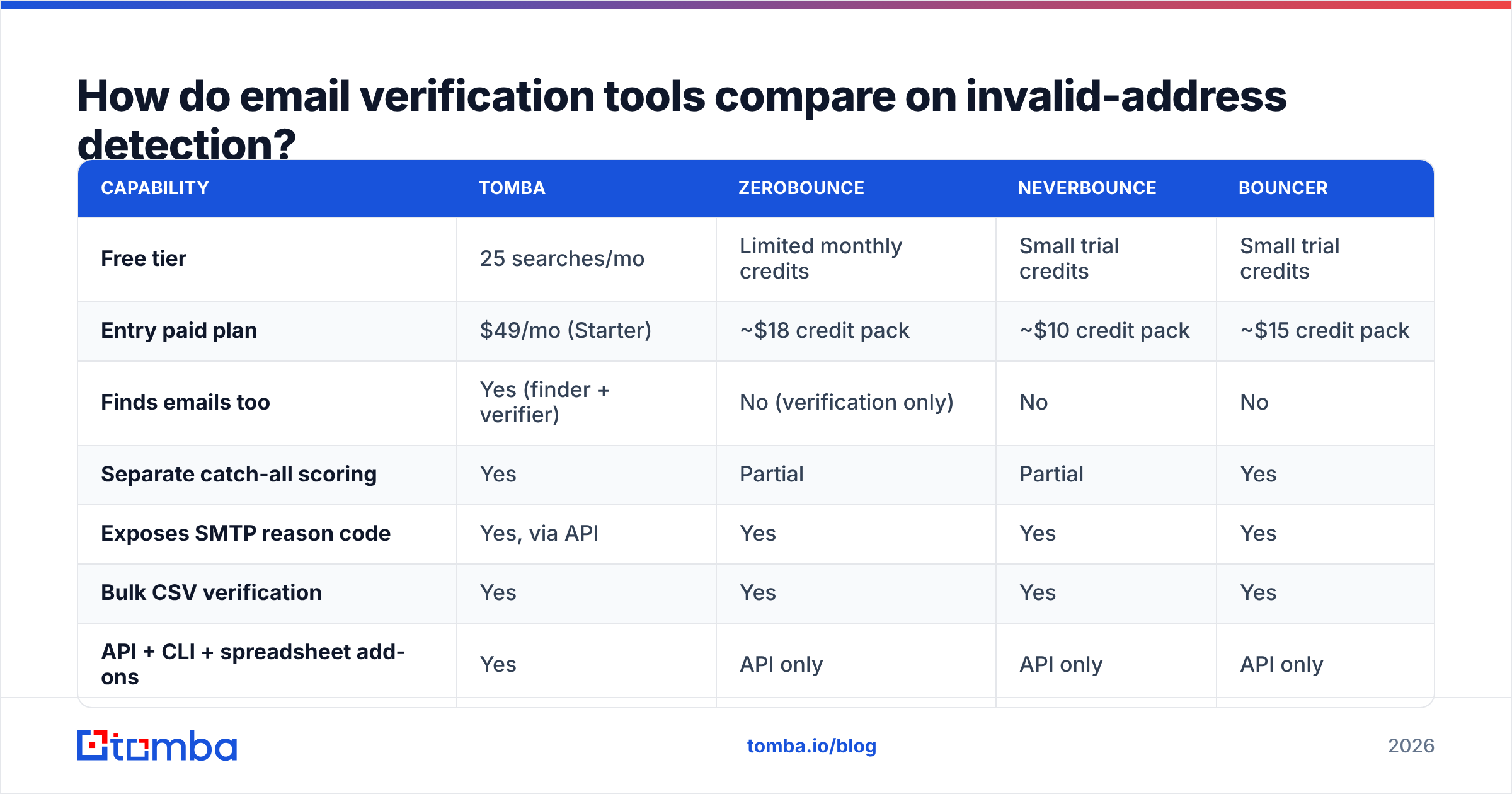
Vendor accuracy claims are self-reported and largely unfalsifiable, so compare on mechanics instead: does the tool expose the reason code, does it handle catch-all separately, and does it charge you for unknowns? Listed prices below are entry-level list prices at the time of writing — verify on each vendor's own page, since credit packs change often.
| Capability | Tomba | ZeroBounce | NeverBounce | Bouncer |
|---|---|---|---|---|
| Free tier | 25 searches/mo | Limited monthly credits | Small trial credits | Small trial credits |
| Entry paid plan | $49/mo (Starter) | ~$18 credit pack | ~$10 credit pack | ~$15 credit pack |
| Finds emails too | Yes (finder + verifier) | No (verification only) | No | No |
| Separate catch-all scoring | Yes | Partial | Partial | Yes |
| Exposes SMTP reason code | Yes, via API | Yes | Yes | Yes |
| Bulk CSV verification | Yes | Yes | Yes | Yes |
| API + CLI + spreadsheet add-ons | Yes | API only | API only | API only |
The structural difference worth noting: pure verifiers can only tell you an address is dead. A combined finder-plus-verifier can tell you it's dead and return the working address for the same role at the same company in one call. If a third of your list turns over annually, that second step is where the time goes. Independent user reviews across the category are aggregated on G2's email verification listings if you want unfiltered feedback rather than vendor copy.
If you'd rather test one address before committing to anything, a free email checker runs the syntax and MX layers without an account. For list-level work, bulk verify is the right entry point, and Tomba pricing starts at $49/mo for Starter with a free tier for evaluation.
How do you fix an invalid email address instead of deleting it?#
Deleting is the lazy default. Recovery is usually faster than re-sourcing the lead from scratch. Work this sequence:
1. Normalize before you judge. Strip whitespace, lowercase the domain, remove invisible characters, and fix the obvious top-five typos (gmial, gmai, hotmial, yaho, .con). A surprising share of "invalid" rows are clean data with a keyboard slip.
2. Check whether the domain moved. Search the company name, not the old domain. If oldco.com now redirects to newco.io, run a domain search on the new domain and pull every published mailbox pattern at once.
3. Re-derive the pattern. If two known-good colleagues use f.last@, your first.last@ guess was the problem. Confirm the format, then regenerate.
4. Search by person, not by string. When the mailbox is genuinely gone, the human usually isn't — they moved companies. A LinkedIn finder or reverse email lookup reconnects the person to their current employer and current address.
5. Route catch-all and unknown results separately. Send them from a secondary domain, in smaller batches, with your best-performing copy. Watch the bounce rate on that segment specifically. If it holds under 3%, promote the segment; if it spikes, suppress it.
6. Escalate to phone for high-value accounts. For a named target where email verification keeps returning unknown, a phone finder lookup is often the cheaper path than another week of guessing formats.
How do you stop collecting invalid emails in the first place?#
Prevention is roughly ten times cheaper than cleanup, and it's mostly plumbing.
Validate at the point of capture. Run syntax plus MX checks inline on every form submission — the email verification API does this in a single request, and you catch the typo while the user is still on the page and able to fix it. Add a confirmation step for anything that will receive recurring mail; double opt-in kills fake and mistyped addresses before they enter your database.
Then treat verification as recurring maintenance, not a one-time cleanse. B2B data decay runs about 2–3% per month across job changes, layoffs, and domain migrations, which compounds to roughly a quarter of your list annually. Set a standing job: re-verify anything untouched for 90 days, and always re-verify the full send list within 48 hours of a campaign launch. Feed the results back into your CRM so reps stop calling dead rows — the HubSpot integration and Salesforce integration both handle this write-back automatically.
Finally, stop buying unverified volume. Whether you source from a self-serve provider, a curated vendor like BookYourData, or your own scraping, the number that matters is verified-and-recent, not total records. A 2,000-contact list verified last week outperforms a 50,000-contact list verified last year, every time.
What bounce rate is acceptable in 2026?#
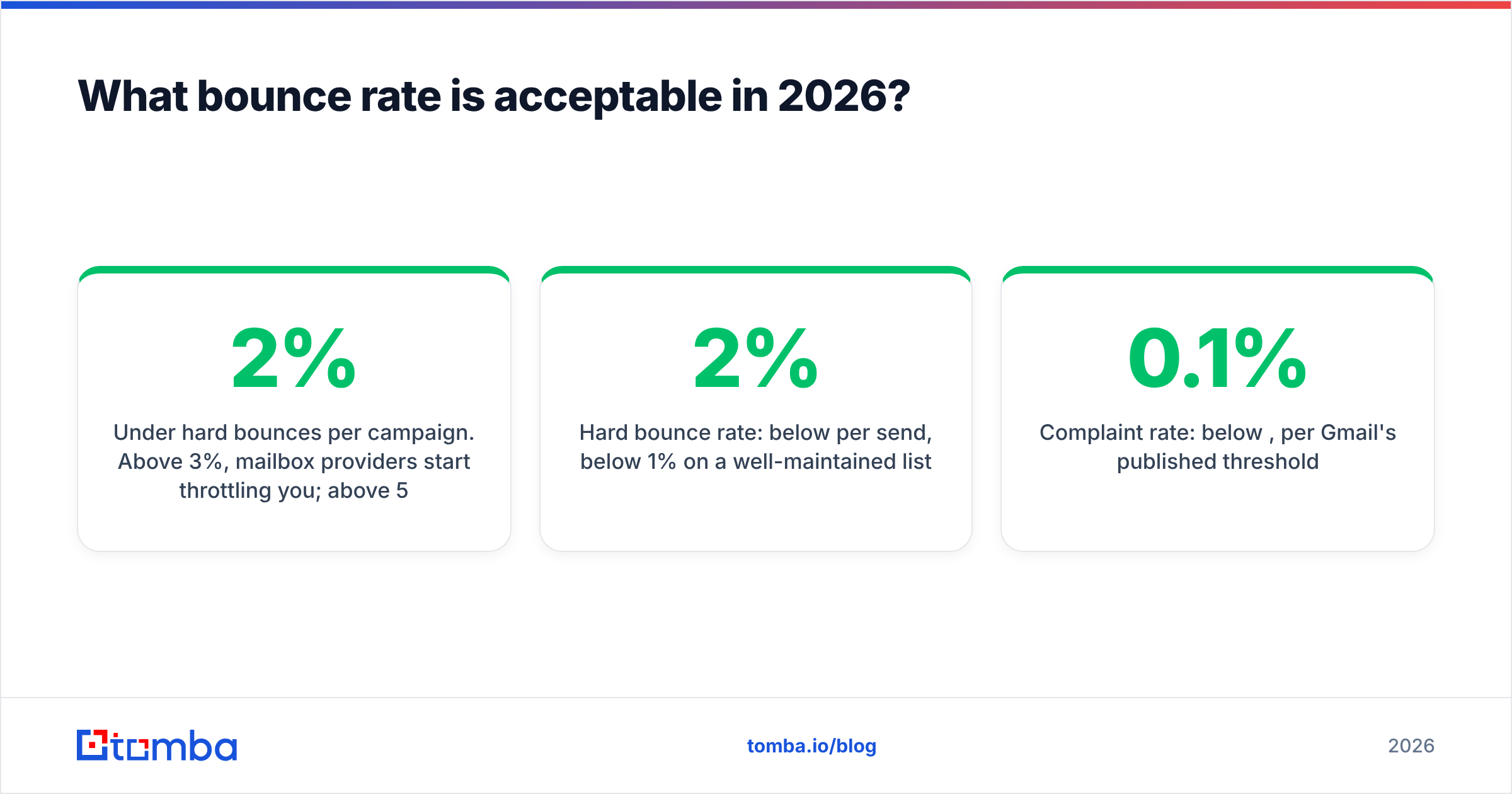
Under 2% hard bounces per campaign. Above 3%, mailbox providers start throttling you; above 5%, most email service providers will pause or suspend the account outright.
That threshold has tightened. Gmail and Yahoo's 2024 sender requirements formalized authentication and complaint-rate expectations, and enforcement has only gotten stricter since. Your bounce rate is now read as a proxy for consent: high bounces suggest you're mailing a list you didn't build, which is exactly the pattern filters are tuned to punish. Bad list hygiene doesn't just waste sends — it drags down email deliverability for the addresses that are valid.
Practical targets to hold yourself to:
- Hard bounce rate: below 2% per send, below 1% on a well-maintained list
- Unknown/catch-all share: track it, but exclude it from bounce math — segment separately
- Complaint rate: below 0.1%, per Gmail's published threshold
- Verification recency: no address older than 90 days in an active sequence
- Authentication: SPF, DKIM, and DMARC all passing before you blame the list
Run those five numbers before every campaign and "email address invalid" stops being a mystery and becomes a routine line item you fix in twenty minutes.
Ready to stop guessing at addresses?#
Most invalid-email problems are really sourcing problems: you're validating guesses instead of retrieving confirmed addresses. Start with the Tomba Email Finder to pull verified professional addresses by name and domain, then run the same list through the email verifier before you send. The free tier covers 25 searches a month so you can measure the bounce-rate difference on your own data before paying anything — and if the numbers hold up, Starter is $49/mo.
Related guides#
Ready to find emails that actually work?
Join 150,000+ professionals who stopped guessing and started sending. Free credits on signup — no credit card required.
Get the Tomba newsletter
Practical outbound tactics and product updates — once every two weeks.
About the author