Email Address Lookup by Name: How to Find Anyone's Email
You have a first name, a last name, and a company. That is enough to find a working inbox about 80% of the time — if you use the right method and verify before you send.
TL;DR
- An email address lookup by name works by combining three inputs — first name, last name, and a company domain — against a known email pattern, then confirming the result at the mail server level.
- Pattern guessing alone gets you roughly 40–60% accuracy. Pattern guessing plus SMTP verification pushes you into the 85–95% range on standard domains.
- The hard cases are catch-all domains, generic surnames at large enterprises, and people who use a nickname internally ("Bob" not "Robert").
- Free permutators are fine for one-off lookups. For anything above ~50 contacts a month, an API-backed finder with a built-in verifier is cheaper than the bounces.
- Never send to an unverified guess. One bad list can cost you more sender reputation than the deal was worth.
What is an email address lookup by name?#
An email address lookup by name is the process of resolving a person's professional inbox from their name plus an identifying signal — usually the company they work at or its domain. You start with "Maria Chen, Head of RevOps at Acme" and you end with m.chen@acme.com.
The mental model that helps: think of a company's email system like an apartment building. Every unit follows the same numbering scheme — floor number, then unit letter. Once you know the scheme for one apartment, you can find any resident's door as long as you know their name. Companies are the same. Roughly 95% of organizations use a single, consistent email pattern across the entire org. Find the pattern once, and you can address anyone inside it.
Technically, a lookup runs three stages:
- Domain resolution — map the company name to its actual mail domain (
acme.com, notacme-group-holdings.net). - Pattern inference — determine which of the ~12 common formats the company uses, from already-known addresses on that domain.
- Candidate verification — generate the candidate address and confirm the mailbox exists before it ever reaches a send queue.
Skip stage three and you are not doing a lookup. You are gambling with your domain reputation.
Why is finding an email by name harder than it looks?#
Because names are messy and mail servers are defensive.
The naive assumption is that firstname.lastname@company.com covers most of the world. It does not. Here is what actually breaks:
- Nicknames and legal names diverge. LinkedIn says "Kate Morrison." Payroll says "Katherine." The mailbox is
kmorrison@, but a permutator that only received "Kate" will never produce it. - Non-ASCII and compound surnames. "José García-López" can be
jgarcia@,jgarcialopez@,jose.garcia@, or the accent-strippedgarcia.lopez@. Four plausible candidates, one real inbox. - Collision handling. Two John Smiths at a 4,000-person company means one of them is
jsmith2@orjohn.smith2@. The pattern is intact; the individual is not derivable from it. - Subdomains and acquisition debt. The parent brand sends from
@acme.com, but the team you're targeting came in via acquisition and still receives at@oldstartup.io. - Catch-all configuration. The server accepts mail for every address on the domain, valid or not. Verification returns "accepted" for
asdkjh@company.com, which means it tells you nothing.
That last one is the single biggest source of false confidence in this category. Roughly 15–20% of B2B domains are catch-all configured, and most cheap verifiers quietly label them "valid."

How do lookup tools actually find the address?#
A good finder is not guessing — it is running a layered search where each layer catches what the previous one missed:
- Crawled web index. Public pages — team pages, press releases, conference speaker bios, GitHub commits, WHOIS records, PDF footers — contain millions of real, already-published addresses. This is ground truth, not inference.
- Pattern extraction from known addresses. Once the index holds three or four confirmed addresses at
acme.com, the pattern is statistically obvious. That inferred pattern then applies to every other employee. - Permutation and scoring. For names the index has never seen, the tool generates candidates in likelihood order based on the inferred pattern and the name's structure.
- MX and SMTP-level checks. The tool opens a conversation with the receiving mail server and asks whether the mailbox exists, without delivering a message. The mechanics are standard SMTP —
MAIL FROM,RCPT TO, read the response code, disconnect. - Confidence scoring. The output is not "yes/no" — it is a score. A crawled address confirmed by SMTP scores near 99. A permutated address on a catch-all domain scores 50 and should be treated as unverified.
That layering is why a purpose-built email finder outperforms a free permutator by a wide margin. The permutator only ever does step 3.
Which lookup method should you use?#
The right method depends on volume and how much a wrong address costs you.
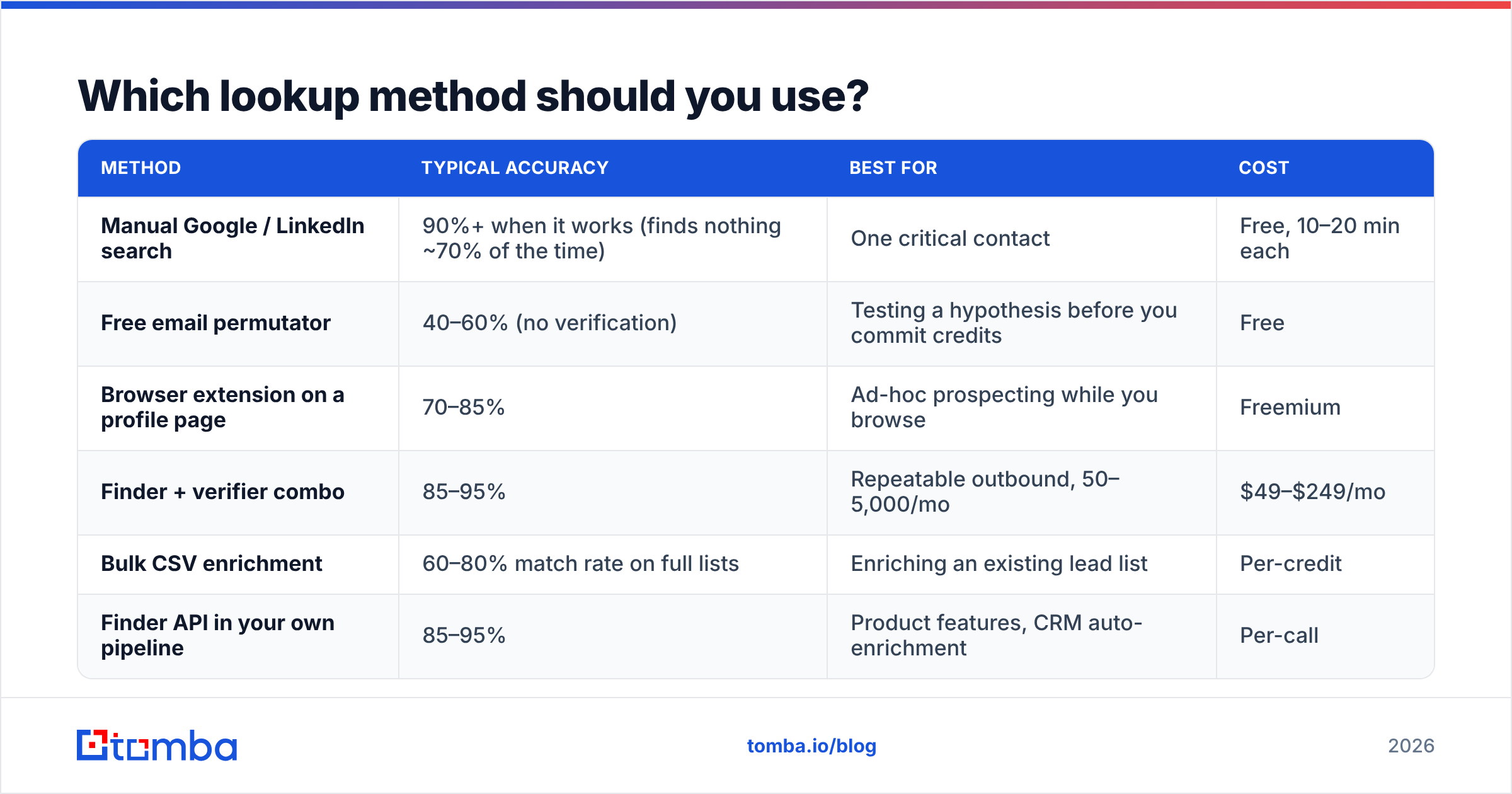
| Method | Typical accuracy | Best for | Cost |
|---|---|---|---|
| Manual Google / LinkedIn search | 90%+ when it works (finds nothing ~70% of the time) | One critical contact | Free, 10–20 min each |
| Free email permutator | 40–60% (no verification) | Testing a hypothesis before you commit credits | Free |
| Browser extension on a profile page | 70–85% | Ad-hoc prospecting while you browse | Freemium |
| Finder + verifier combo | 85–95% | Repeatable outbound, 50–5,000/mo | $49–$249/mo |
| Bulk CSV enrichment | 60–80% match rate on full lists | Enriching an existing lead list | Per-credit |
| Finder API in your own pipeline | 85–95% | Product features, CRM auto-enrichment | Per-call |
The pattern to notice: verification is what separates the 60% tier from the 90% tier. Not the size of the database.
If you want to sanity-check a pattern by hand before spending anything, the free email permutator generates every plausible format for a given name and domain in one click. It will not tell you which one is real — that is the verifier's job — but it is a useful first move on an unfamiliar domain.
How accurate is email address lookup by name in 2026?#
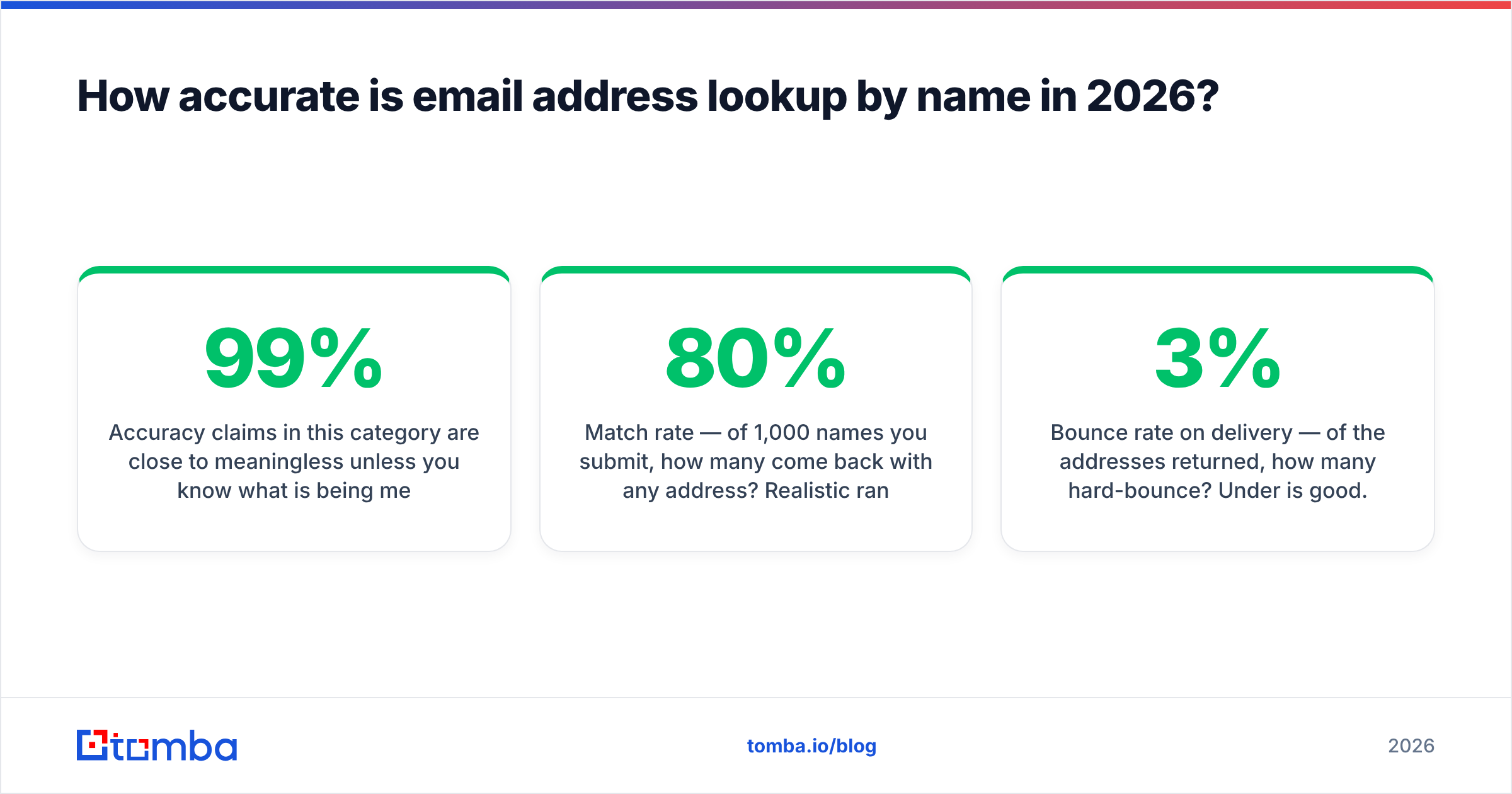
Accuracy claims in this category are close to meaningless unless you know what is being measured. A vendor advertising "99% accuracy" is usually reporting verification precision on addresses it already had — not coverage, which is the percentage of your input list it can resolve at all.
The two numbers that matter:
- Match rate — of 1,000 names you submit, how many come back with any address? Realistic range: 55–80%, heavily dependent on region and company size. SMB and non-US contacts drag this down.
- Bounce rate on delivery — of the addresses returned, how many hard-bounce? Under 3% is good. Under 2% is excellent. Above 5% and your verifier is passing catch-alls as valid.

Test this yourself rather than trusting a marketing page. Take 100 contacts where you already know the correct address — pull them from closed-won deals in your CRM — strip the emails, and run the names back through each tool. The tool that returns the most correct addresses on your own ICP is the right tool for you, regardless of who wins a generic benchmark.
Which tools handle name-based lookup best?#
The market splits into three groups: dedicated finders, all-in-one sales platforms with a finder bolted on, and prebuilt list vendors where you skip the lookup entirely.
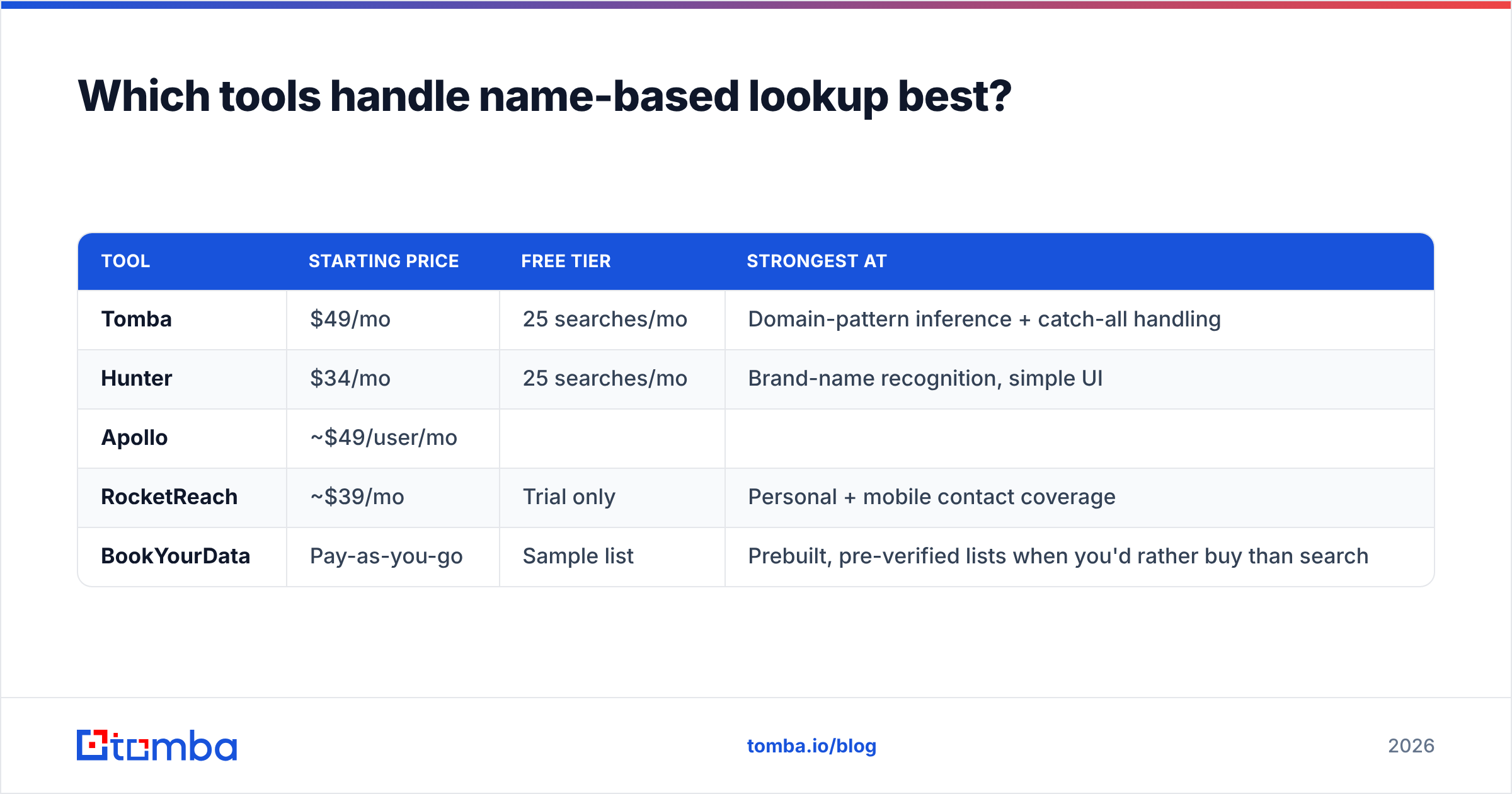
| Tool | Starting price | Free tier | Strongest at |
|---|---|---|---|
| Tomba | $49/mo | 25 searches/mo | Domain-pattern inference + catch-all handling |
| Hunter | $34/mo | 25 searches/mo | Brand-name recognition, simple UI |
| Apollo | ~$49/user/mo | ||
| Limited credits | Bundled database + sequencing | ||
| RocketReach | ~$39/mo | Trial only | Personal + mobile contact coverage |
| --- | --- | --- | --- |
| BookYourData | Pay-as-you-go | Sample list | Prebuilt, pre-verified lists when you'd rather buy than search |

A note on the last row: if your motion is "give me 5,000 verified marketing directors in DACH," a list vendor like BookYourData is a legitimately better fit than any lookup tool. Name-based lookup is for when you already know who you want. List purchase is for when you know what type of person you want. Different jobs — don't force one tool to do both.
For everything in between, check the current Tomba pricing tiers against your monthly contact volume. The Free tier at 25 searches/mo is enough to run the CRM back-test described above before you commit to anything.
Cross-reference vendor claims against real reviews on G2 rather than the vendors' own comparison pages — including this one. Everyone's comparison page has them winning.
How do you run a lookup step by step?#
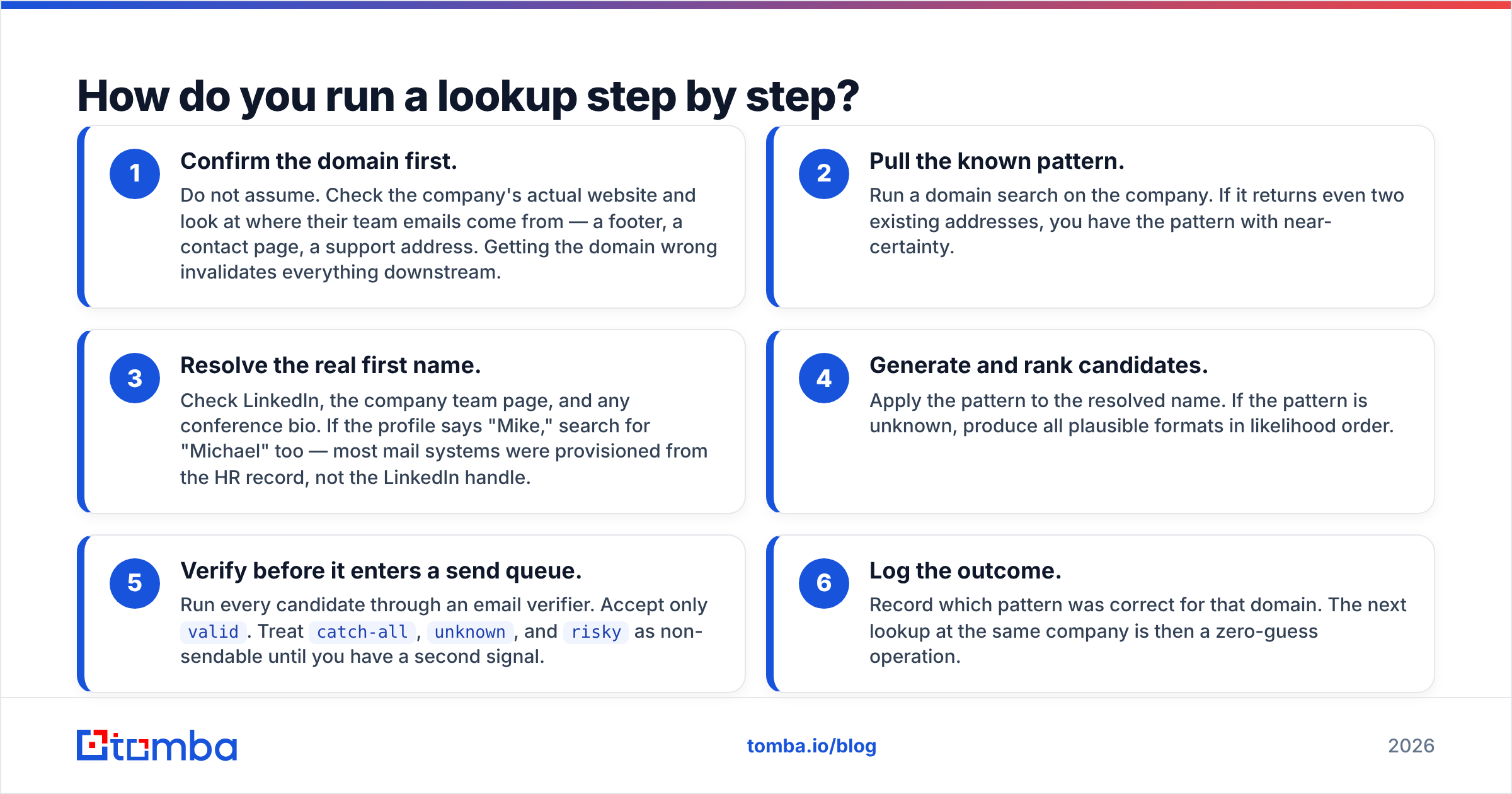
Here is the workflow that produces the lowest bounce rate, in order:
- Confirm the domain first. Do not assume. Check the company's actual website and look at where their team emails come from — a footer, a contact page, a support address. Getting the domain wrong invalidates everything downstream.
- Pull the known pattern. Run a domain search on the company. If it returns even two existing addresses, you have the pattern with near-certainty.
- Resolve the real first name. Check LinkedIn, the company team page, and any conference bio. If the profile says "Mike," search for "Michael" too — most mail systems were provisioned from the HR record, not the LinkedIn handle.
- Generate and rank candidates. Apply the pattern to the resolved name. If the pattern is unknown, produce all plausible formats in likelihood order.
- Verify before it enters a send queue. Run every candidate through an email verifier. Accept only
valid. Treatcatch-all,unknown, andriskyas non-sendable until you have a second signal. - Log the outcome. Record which pattern was correct for that domain. The next lookup at the same company is then a zero-guess operation.

For lists rather than individuals, the same six steps apply — just batch them. Upload a CSV of names and domains to a bulk email finder, let it run pattern inference across the whole file, and export only the rows above your confidence threshold. Discard the rest. A 600-contact verified list outperforms a 1,000-contact list with 400 unknowns, every single time.
What do you do with a catch-all domain?#
You slow down. Catch-all domains accept mail to any local part, so standard SMTP verification returns a green light for addresses that do not exist. The mail is accepted at the gateway and silently dropped — or worse, routed to a spam trap — after the handshake.
Three ways to handle it:
- Use a dedicated catch-all check. A catch-all verifier runs additional heuristics beyond the SMTP handshake to estimate whether the specific mailbox is real, rather than just whether the domain accepts everything.
- Cross-confirm from a second source. If the address also appears in a crawled public source — a GitHub commit, a conference program, a press release — that is independent evidence the mailbox exists.
- Isolate the sends. Put catch-all contacts on a separate sending domain or a separate warmed inbox. If the bounce rate spikes, the damage is contained and your primary domain stays clean.
What you should not do is dump catch-alls into the same campaign as verified addresses. That is how a 2% bounce rate becomes a 9% bounce rate and how your sender reputation starts costing you deliverability on the contacts you did verify.
Is email address lookup by name legal?#
In most jurisdictions, finding a business email address for a legitimate B2B purpose is lawful — but the rules govern what you do next, not the lookup itself.
The practical framing:
- GDPR (EU/UK): business contact data can be processed under legitimate interest, but you need a documented basis, a clear opt-out in every message, and you must honor deletion requests. Personal addresses (
@gmail.com) carry meaningfully more risk than role-based business addresses. - CAN-SPAM (US): no opt-in requirement for the first commercial email, but accurate headers, a real physical address, and a functioning unsubscribe are mandatory.
- CASL (Canada): the strictest of the three — implied or express consent is generally required before commercial email.
Two operational rules that keep you safe regardless of jurisdiction: only look up addresses at organizations where you have a plausible business reason to make contact, and honor every opt-out immediately and permanently. Guidance from mainstream vendors like HubSpot on permission-based outreach is a reasonable baseline if you need something to point your legal team at.
What separates a good lookup workflow from a bad one?#
Bad workflows optimize for volume of addresses found. Good workflows optimize for the number of delivered, relevant messages sent. Those diverge fast.
The concrete markers of a good one:
- Verification is non-optional and automated — not a step someone remembers to do on Fridays.
- Confidence scores are respected — anything below your threshold gets routed to manual research or dropped, not sent anyway.
- Patterns are cached per domain — you should never re-derive
acme.com's format twice. - Lookups happen close to send time — an address verified nine months ago is a guess again. B2B contact data decays at roughly 2–3% per month as people change jobs.
- The whole thing runs through an API or integration — manual CSV shuffling is where data quality goes to die. Wiring the Tomba API into your CRM means enrichment happens on record creation, not in a quarterly cleanup sprint.
Ready to stop guessing? Start with the Tomba Email Finder — drop in a name and a domain, get a verified address with a confidence score and the source it came from. The free tier includes 25 searches a month, which is enough to back-test it against contacts you already have before you spend a cent. Run that test, compare the hit rate to whatever you use today, and let the numbers decide.
Related guides#
Ready to find emails that actually work?
Join 150,000+ professionals who stopped guessing and started sending. Free credits on signup — no credit card required.
Get the Tomba newsletter
Practical outbound tactics and product updates — once every two weeks.
About the author