Email Address Search Tool: How to Find Any Work Email
Most email address search tools quote 95%+ accuracy and deliver far less on real lists. Here's how the lookup actually works, what the credit math costs, and which tool fits which job.
TL;DR
- An email address search tool takes a name plus a company domain and returns the most probable work email, then scores how confident it is. The good ones tell you why they are confident.
- Vendor-quoted accuracy (95–99%) is measured on easy, well-indexed domains. On a real mixed list — SMBs, non-US domains, catch-all servers — expect 70–88% usable.
- The number that matters is cost per verified, non-bouncing email, not cost per credit. A cheap tool that returns 55% garbage is more expensive than a $99/mo tool that returns 90% clean.
- Catch-all domains are where tools quietly diverge. Roughly 15–25% of B2B domains accept everything at the SMTP layer, so "valid" means nothing without a dedicated catch-all check.
- Pick by job: single-prospect lookups → browser extension. Whole-company mapping → domain search. 10k rows → bulk upload or API.
What is an email address search tool?#
An email address search tool is software that resolves a person plus a company into a deliverable email address. You give it something you already know — a full name and a domain, a LinkedIn URL, a company website, or an article byline — and it returns an address with a confidence score.
It is not a database lookup in the naive sense. Very few of these addresses were ever published as "Jane Doe = jane.doe@acme.com" in one place. The tool assembles the answer from fragments: a pattern learned from other Acme employees, a mention in a git commit, a press release footer, a WHOIS record, a support signature scraped from a forum. Then it tests the candidate against the receiving mail server before handing it to you.
Think of it like a locksmith reading a keyhole. The locksmith has never seen your specific key, but they have cut thousands for that lock model, so they can shape a blank that turns. The email tool has never seen this specific address, but it has seen 400 other @acme.com addresses, so it knows Acme uses first.last and it knows the mail server will confirm or reject the guess.
That distinction matters for your expectations. Pattern inference plus verification is powerful and cheap. It is also fundamentally probabilistic, which is why every serious vendor ships a confidence score and why anyone quoting a flat "99% accurate" across all domains is describing a marketing number rather than your list.
How does an email address search tool actually find an address?#
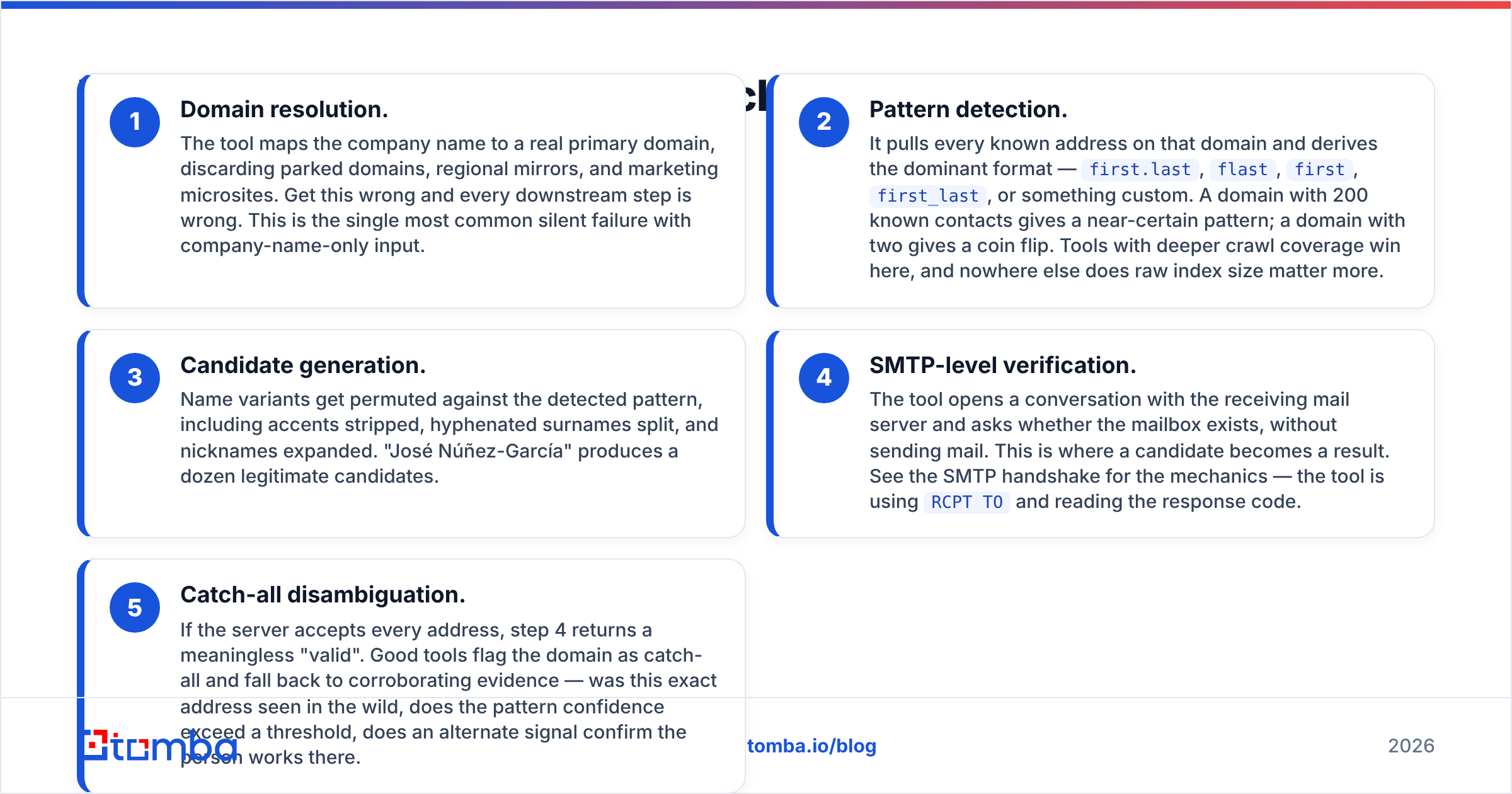
Five stages, in order. Understanding them tells you exactly which tool will fail on which list.
- Domain resolution. The tool maps the company name to a real primary domain, discarding parked domains, regional mirrors, and marketing microsites. Get this wrong and every downstream step is wrong. This is the single most common silent failure with company-name-only input.
- Pattern detection. It pulls every known address on that domain and derives the dominant format —
first.last,flast,first,first_last, or something custom. A domain with 200 known contacts gives a near-certain pattern; a domain with two gives a coin flip. Tools with deeper crawl coverage win here, and nowhere else does raw index size matter more. - Candidate generation. Name variants get permuted against the detected pattern, including accents stripped, hyphenated surnames split, and nicknames expanded. "José Núñez-García" produces a dozen legitimate candidates.
- SMTP-level verification. The tool opens a conversation with the receiving mail server and asks whether the mailbox exists, without sending mail. This is where a candidate becomes a result. See the SMTP handshake for the mechanics — the tool is using
RCPT TOand reading the response code. - Catch-all disambiguation. If the server accepts every address, step 4 returns a meaningless "valid". Good tools flag the domain as catch-all and fall back to corroborating evidence — was this exact address seen in the wild, does the pattern confidence exceed a threshold, does an alternate signal confirm the person works there.
Steps 4 and 5 are where products separate. Plenty of cheap tools stop at step 3, dress the pattern guess up as a result, and let your sending domain absorb the bounces.
How accurate are email address search tools in 2026?#
Accuracy claims are almost never comparable, because vendors choose the test set. Run the same 500-contact list through several tools and the spread is wide — not because one vendor is lying, but because each optimises for a different slice of the market.

Three variables explain most of the variance you will see:
Company size skew. Tools built on large-enterprise data crush the Fortune 5000 and collapse on 40-person agencies. If your ICP is SMB, benchmark on SMB or the number is fiction.
Geography. US and UK coverage is a solved problem. DACH, Nordics, Japan, and LATAM are not. Non-Latin character handling and country-specific TLD coverage vary enormously.
Catch-all handling. This is the big one. A tool that returns catch-all guesses as "valid" will show a beautiful hit rate and a horrifying bounce rate. A tool that returns them as "accept-all, unverified" looks worse on paper and protects you. Always check the label taxonomy before comparing hit rates, and route accept-all domains through a dedicated catch-all verifier rather than trusting a binary valid/invalid flag.
Two honest benchmarks to run yourself, both free:
- Take 100 contacts you already have confirmed addresses for. Feed name + domain to each tool. Measure exact-match rate. This is ground truth, not a vendor claim.
- Take 200 fresh contacts, enrich, then verify through a separate email verifier. Any tool whose output your independent verifier rejects at above 8–10% is shipping you pattern guesses.
Which email address search tool should you choose?#
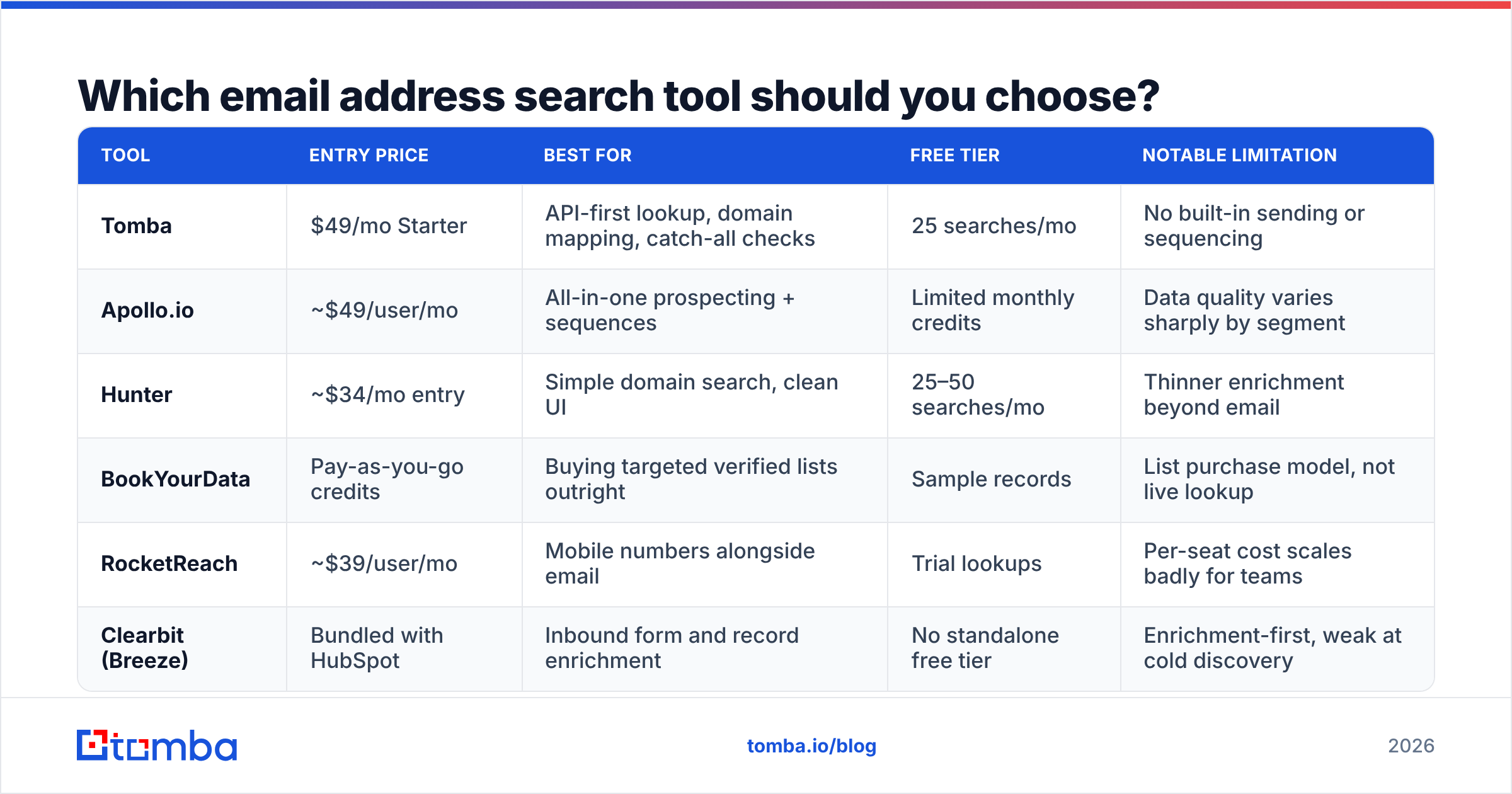
The market splits into three groups that are genuinely different products, not competing versions of the same thing: dedicated finders (accuracy and API-first), all-in-one sales platforms (finder bundled with sequencing and dialers), and static database vendors (you buy a list, not a lookup).

| Tool | Entry price | Best for | Free tier | Notable limitation |
|---|---|---|---|---|
| Tomba | $49/mo Starter | API-first lookup, domain mapping, catch-all checks | 25 searches/mo | No built-in sending or sequencing |
| Apollo.io | ~$49/user/mo | All-in-one prospecting + sequences | Limited monthly credits | Data quality varies sharply by segment |
| Hunter | ~$34/mo entry | Simple domain search, clean UI | 25–50 searches/mo | Thinner enrichment beyond email |
| BookYourData | Pay-as-you-go credits | Buying targeted verified lists outright | Sample records | List purchase model, not live lookup |
| RocketReach | ~$39/user/mo | Mobile numbers alongside email | Trial lookups | Per-seat cost scales badly for teams |
| Clearbit (Breeze) | Bundled with HubSpot | Inbound form and record enrichment | No standalone free tier | Enrichment-first, weak at cold discovery |
Read that table as a fit matrix, not a ranking. Concretely:
If you need a lookup engine inside your own stack, a dedicated finder with a real API is the only sane pick. You want per-request confidence scores, a documented rate limit, and predictable credit accounting. The Tomba API sits here, as does Hunter's; Apollo's API is serviceable but priced and rate-limited around its platform, not around you.
If your team has no outbound stack at all, an all-in-one like Apollo is a reasonable single purchase — you get finding, sequencing, and a dialer for one bill. You will pay for that convenience in data quality on long-tail accounts, and you will be locked into their sending infrastructure.
If you want a targeted list handed to you today, a database vendor is the faster path. BookYourData is a solid example of the model done well: you filter by industry, title, and geography, see the record count before paying, and buy verified rows without a subscription. That is a genuinely different purchase from a live lookup API, and for one-off campaigns into a well-defined segment it is often the pragmatic choice.
If you are enriching inbound rather than sourcing outbound, Clearbit-style enrichment inside your CRM beats a finder. Different job entirely — you already have the email, you need the firmographics.
Cross-check whatever you shortlist against current G2 reviews for the segment you actually sell into. Category-level scores hide the SMB-versus-enterprise gap that will decide your hit rate.
What about free email address search tools?#
Free tiers are for evaluation, and they are genuinely useful for that. Most vendors give 25–50 lookups a month, which is exactly enough to run the 100-contact ground-truth test described above across two or three tools.
What free tiers are not: an outbound motion. At 25 searches a month you cannot build a pipeline, and the workarounds are worse than paying. Rotating throwaway accounts gets you rate-limited and eventually banned. Scraping LinkedIn directly violates the terms and risks your personal account, which is a real cost most people underprice.
There are free utilities that are honestly free and worth bookmarking, because they solve narrow problems that do not need a paid credit:
- An email permutator generates every plausible format for a name and domain. Zero cost, zero verification — useful when you have one high-value target and will confirm manually.
- A free email checker validates syntax and MX records on a single address before you send.
- A company email pattern lookup tells you the dominant format for a domain, which is often the only thing you actually needed.

The trap is treating permutator output as findings. Six candidate addresses for one person means five will bounce if you email them all, and a 40%+ bounce rate on a fresh domain is how you get your sending reputation destroyed in under a week. Permute, then verify — never permute and send.
How do you use an email address search tool without burning your domain?#
Finding addresses is the easy half. Protecting your ability to reach them is the half that gets skipped.
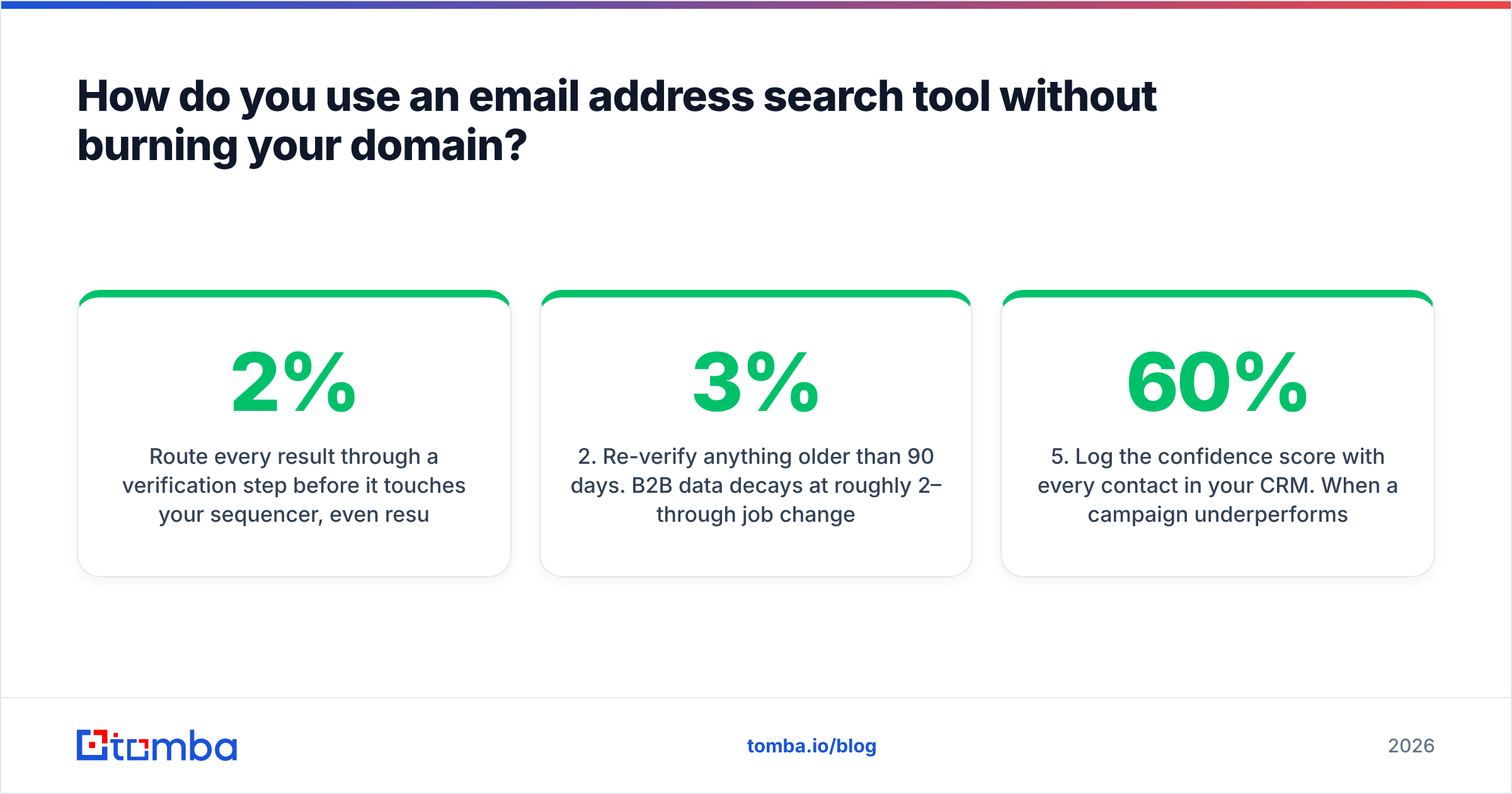
Route every result through a verification step before it touches your sequencer, even results from a tool you trust. Keep your bounce rate under 2% and treat 3% as a fire alarm. Mailbox providers read bounces as a proxy for list hygiene, and hygiene is a proxy for whether you are a spammer.
Then apply these rules mechanically:
- Never send to accept-all domains from your primary sending domain until a catch-all check clears them. Segment them into a separate, slower campaign on a secondary domain.
- Re-verify anything older than 90 days. B2B data decays at roughly 2–3% per month through job changes alone. A list you built in January is meaningfully wrong by April.
- Cap daily volume per mailbox — 30–50 cold sends per inbox, ramped over two to three weeks, regardless of how many addresses you found.
- Suppress role addresses (info@, sales@, support@) from cold outbound. They convert badly and they are disproportionately spam-trap adjacent.
- Log the confidence score with every contact in your CRM. When a campaign underperforms you need to know whether the problem was the copy or a batch of 60%-confidence guesses.
For bulk work, do the enrichment and verification in one pass rather than two. A bulk email finder that accepts a CSV and returns addresses with verification status attached removes the step where someone forgets to verify. If you are mapping whole organisations rather than named individuals, domain search is the better primitive — pull every known address on the domain, then filter by department and seniority.
What does an email address search tool cost at real volume?#
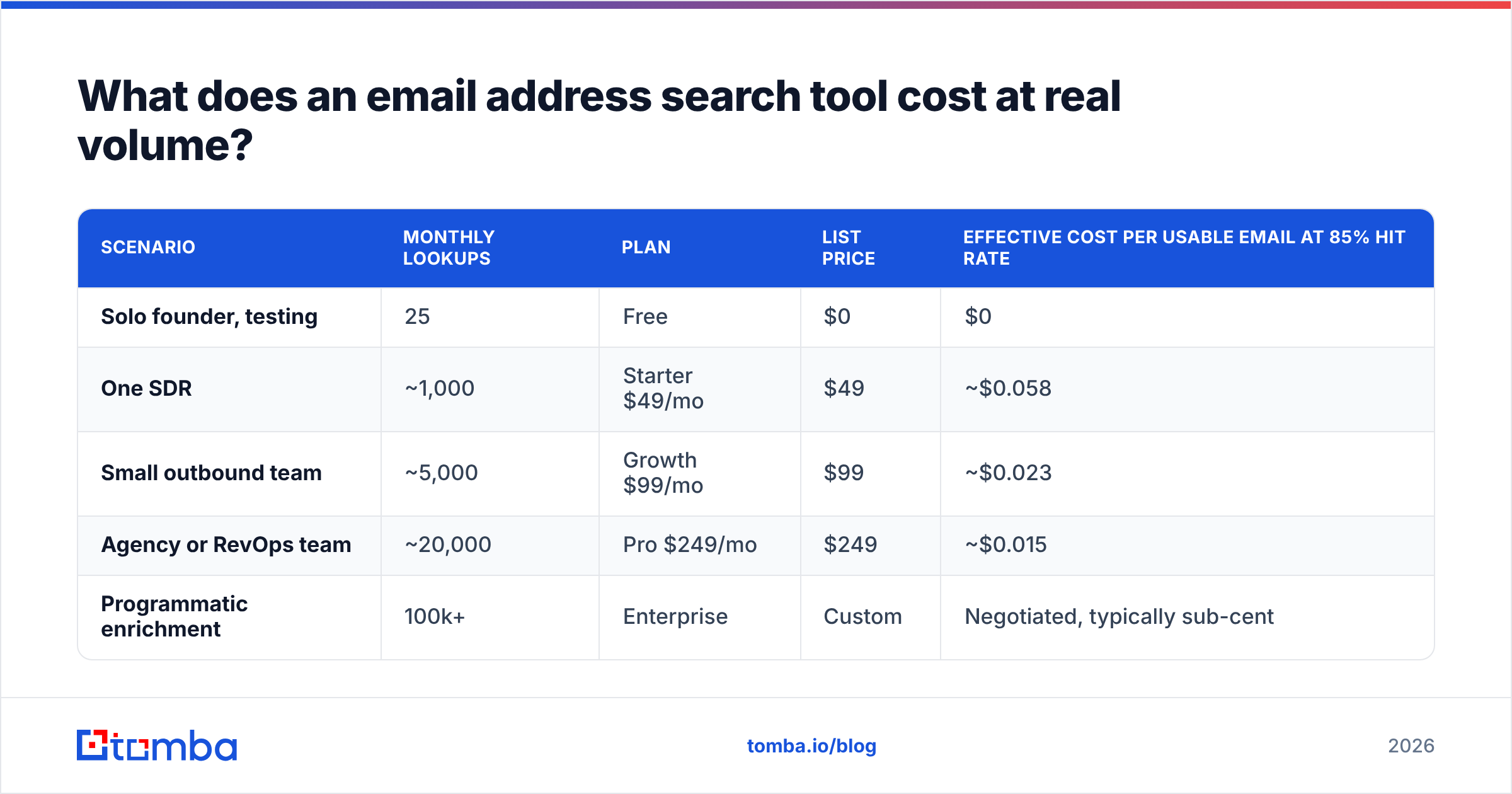
Credit pricing obscures the only number that matters. Model cost per usable email instead — that is credits spent divided by addresses that survive verification and land in an inbox.
| Scenario | Monthly lookups | Plan | List price | Effective cost per usable email at 85% hit rate |
|---|---|---|---|---|
| Solo founder, testing | 25 | Free | $0 | $0 |
| One SDR | ~1,000 | Starter $49/mo | $49 | ~$0.058 |
| Small outbound team | ~5,000 | Growth $99/mo | $99 | ~$0.023 |
| Agency or RevOps team | ~20,000 | Pro $249/mo | $249 | ~$0.015 |
| Programmatic enrichment | 100k+ | Enterprise | Custom | Negotiated, typically sub-cent |
Two things to check on any vendor's pricing page before you commit, because they swing the real bill more than the headline number:
Are failed lookups charged? Some vendors bill a credit whether or not they return an address. On a hard list that is a 30–40% surcharge you did not budget for.
Are seats separate from credits? Per-user pricing on a tool that three people touch occasionally is pure waste. Credit-pool pricing with unlimited seats is almost always cheaper for teams above two people. Compare the specifics on the Tomba pricing page against whatever else you are evaluating — the structure differs more than the sticker price.
One more line item people forget: the cost of a bad address is not zero. Every bounce is a small debit against your sender reputation, and reputation damage is expensive to repair and slow to notice. A tool that is 20% cheaper per credit and 25% worse on accuracy is not cheaper.
Start with the lookup, then build outward#
Pick the narrow tool first. Get a finder whose confidence scores you trust, whose catch-all labels are honest, and whose API you can call from wherever your data already lives. Sequencing, dialers, and CRM sync are all replaceable later; a foundation of 40% guessed addresses is not.
The Tomba Email Finder is built for exactly that role — name-plus-domain lookup with a confidence score and sources attached to every result, verification in the same call, and a free tier of 25 searches so you can run the ground-truth test on your own list before paying anyone. Start there, measure your own hit rate on your own ICP, and let the number decide.
Related guides#
Ready to find emails that actually work?
Join 150,000+ professionals who stopped guessing and started sending. Free credits on signup — no credit card required.
Get the Tomba newsletter
Practical outbound tactics and product updates — once every two weeks.
About the author