Email Address Validation Checker: How It Works in 2026
Most bounce problems are validation problems. Here's what an email address validation checker actually tests, where free tools stop being useful, and how the main vendors compare on accuracy, catch-all handling, and price.
TL;DR
- An email address validation checker runs a stack of tests — syntax, domain, MX records, mailbox existence — and returns a deliverability verdict before you hit send.
- Free browser checkers stop at syntax and MX. That catches typos and dead domains, not the 60% of bad addresses that are well-formed but unmailable.
- Catch-all domains are where vendors separate. Roughly 15-20% of B2B domains accept everything at the SMTP layer, so a plain "valid" verdict there is meaningless without probabilistic scoring.
- Paid checkers cluster around $0.0004–$0.008 per verification. Tomba starts at $49/mo, ZeroBounce and NeverBounce sell credit packs, BookYourData bundles verification into the data itself.
- Verify at two moments: on capture (real time, API) and before every send (bulk). Doing it once a quarter is how lists rot.
What is an email address validation checker?#
An email address validation checker is a tool that tests whether an email address can actually receive mail — without sending mail to it.
Think of it like a locksmith checking a key against a lock without opening the door. The key can be the wrong shape (bad syntax), fit a building that was demolished (dead domain), or fit a building that exists but a suite that was never rented (no mailbox). A validation checker walks those layers in order and stops as soon as it finds a reason the address will bounce.
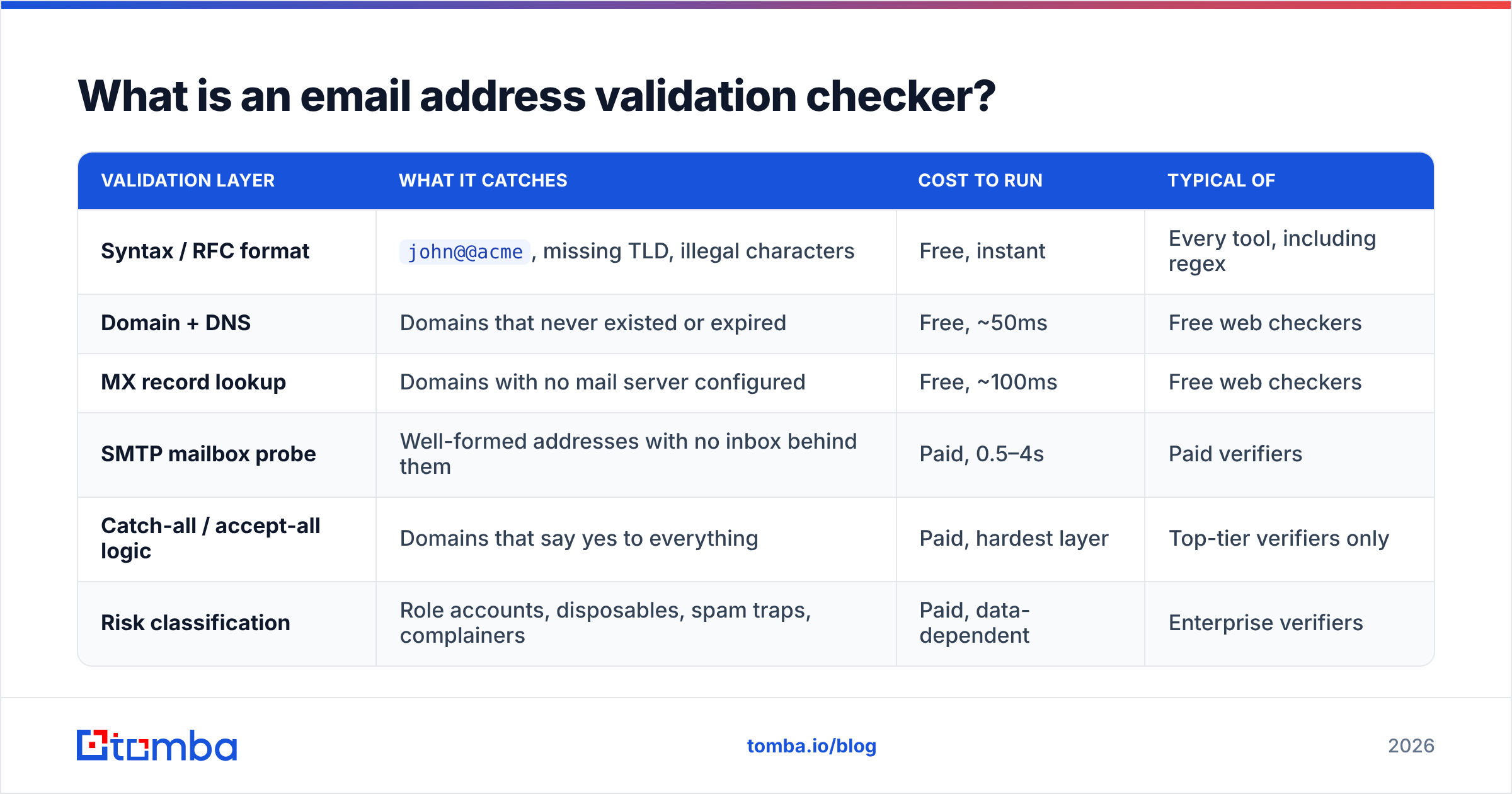
That layered structure matters, because "validation" gets used to mean four very different things depending on which layer the vendor bothers to run:
| Validation layer | What it catches | Cost to run | Typical of |
|---|---|---|---|
| Syntax / RFC format | john@@acme, missing TLD, illegal characters |
Free, instant | Every tool, including regex |
| Domain + DNS | Domains that never existed or expired | Free, ~50ms | Free web checkers |
| MX record lookup | Domains with no mail server configured | Free, ~100ms | Free web checkers |
| SMTP mailbox probe | Well-formed addresses with no inbox behind them | Paid, 0.5–4s | Paid verifiers |
| Catch-all / accept-all logic | Domains that say yes to everything | Paid, hardest layer | Top-tier verifiers only |
| Risk classification | Role accounts, disposables, spam traps, complainers | Paid, data-dependent | Enterprise verifiers |
The first three layers are commodity. Any developer can implement them in an afternoon, which is why every free tool offers them. The bottom three are the product.
What does a validation checker actually check, step by step?#
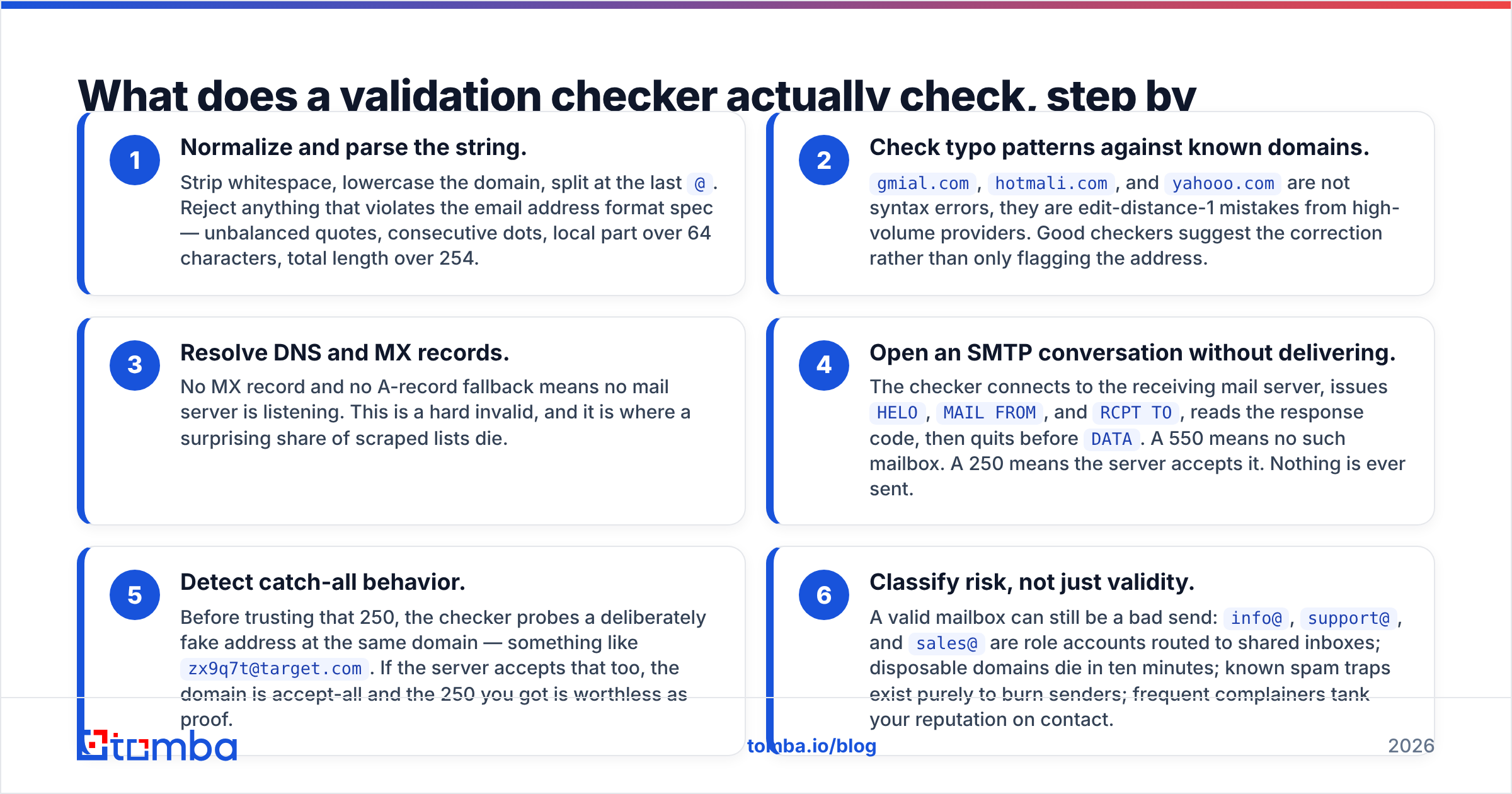
Here is the sequence a serious checker runs, in the order it runs it. Each step is a cheaper filter protecting a more expensive one.
- Normalize and parse the string. Strip whitespace, lowercase the domain, split at the last
@. Reject anything that violates the email address format spec — unbalanced quotes, consecutive dots, local part over 64 characters, total length over 254. - Check typo patterns against known domains.
gmial.com,hotmali.com, andyahooo.comare not syntax errors, they are edit-distance-1 mistakes from high-volume providers. Good checkers suggest the correction rather than only flagging the address. - Resolve DNS and MX records. No MX record and no A-record fallback means no mail server is listening. This is a hard invalid, and it is where a surprising share of scraped lists die.
- Open an SMTP conversation without delivering. The checker connects to the receiving mail server, issues
HELO,MAIL FROM, andRCPT TO, reads the response code, then quits beforeDATA. A 550 means no such mailbox. A 250 means the server accepts it. Nothing is ever sent. - Detect catch-all behavior. Before trusting that 250, the checker probes a deliberately fake address at the same domain — something like
zx9q7t@target.com. If the server accepts that too, the domain is accept-all and the 250 you got is worthless as proof. - Classify risk, not just validity. A valid mailbox can still be a bad send:
info@,support@, andsales@are role accounts routed to shared inboxes; disposable domains die in ten minutes; known spam traps exist purely to burn senders; frequent complainers tank your reputation on contact.
Steps 1-4 answer "does this exist." Steps 5-6 answer "should I send to it." Vendors that only do the first half will happily hand you a 98% "valid" list that bounces at 9%.

How accurate are email address validation checkers in 2026?#
Accuracy claims in this category are close to useless as published, because vendors measure different things on different lists.
The number that gets marketed is usually bounce-rate reduction on a clean list — start with mostly-good addresses, remove the obvious dead ones, report a low residual bounce rate. Anyone can win that test. The numbers that actually predict your results are:
- False-valid rate. Addresses marked valid that bounce anyway. This is the expensive error: it costs you deliverability, not just a credit.
- False-invalid rate. Real, working mailboxes marked invalid or risky. This one is invisible in your bounce report and silently deletes pipeline. Aggressive verifiers hide poor SMTP handling behind this — mark everything ambiguous as invalid, and your bounce rate looks fantastic while you throw away 12% of your buyers.
- Unknown rate. The share the checker refuses to judge. A tool that returns 20% "unknown" has offloaded the decision back to you.
- Catch-all resolution rate. Of the accept-all domains in your list, how many did the tool score with a confidence estimate rather than shrug?

Run your own test before committing. Take 300 addresses you already have ground truth on — 100 you have had replies from, 100 that hard-bounced in the last 90 days, 100 from catch-all domains — and push the same file through two or three vendors' free tiers. Score each on all four metrics above. The spread between vendors on the catch-all bucket is routinely 30+ percentage points, and no marketing page will tell you that.
Suggested visual: side-by-side verification result screens from two vendors showing the same catch-all domain scored differently.
Which email address validation checker should you use?#
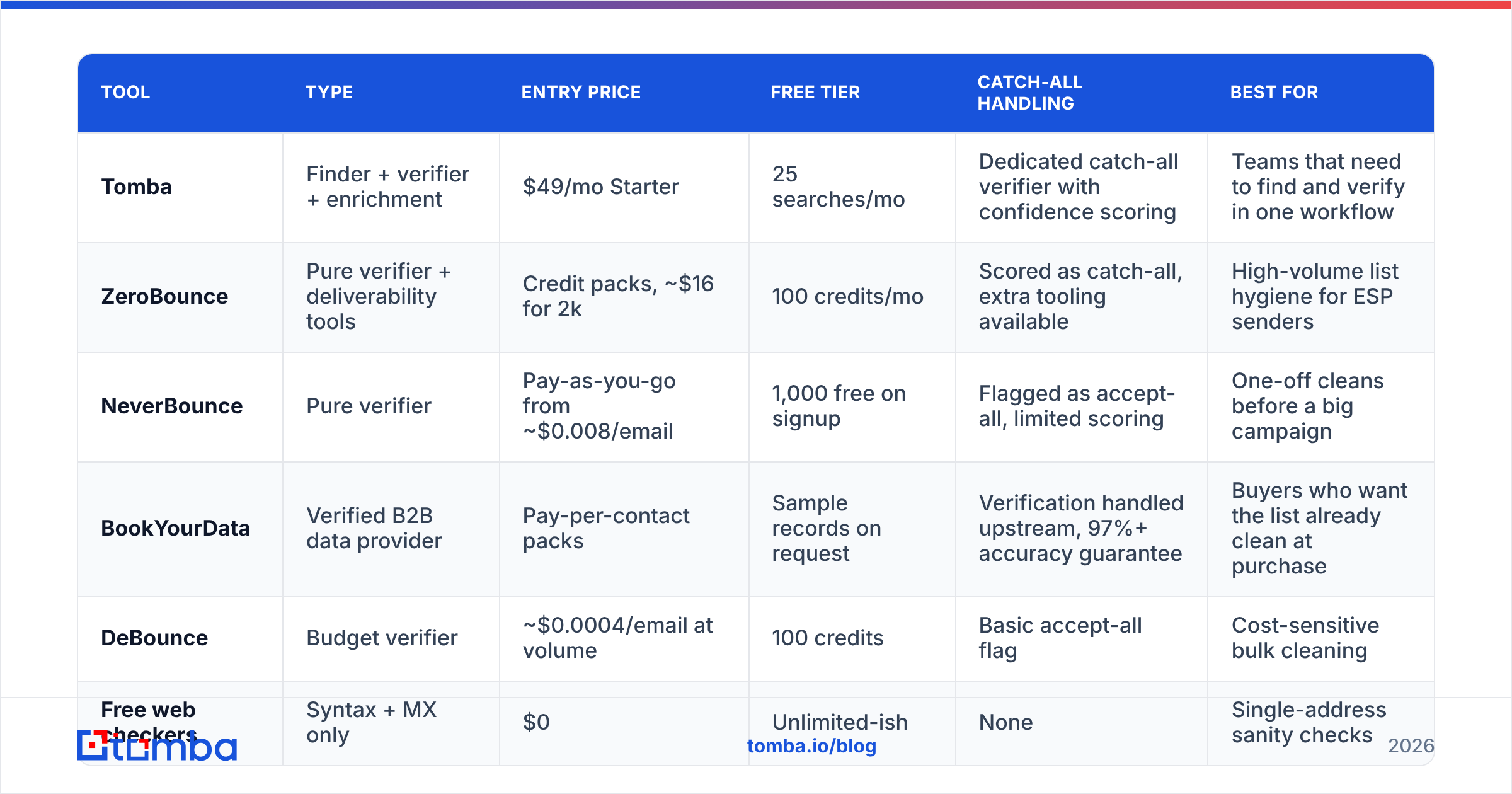
There is no single winner, because the tools optimize for different jobs. A pure verifier cleans lists you already have. A finder-plus-verifier builds the list and cleans it in one pass. A data provider sells addresses that are pre-verified so you never run a separate step.
| Tool | Type | Entry price | Free tier | Catch-all handling | Best for |
|---|---|---|---|---|---|
| Tomba | Finder + verifier + enrichment | $49/mo Starter | 25 searches/mo | Dedicated catch-all verifier with confidence scoring | Teams that need to find and verify in one workflow |
| ZeroBounce | Pure verifier + deliverability tools | Credit packs, ~$16 for 2k | 100 credits/mo | Scored as catch-all, extra tooling available | High-volume list hygiene for ESP senders |
| NeverBounce | Pure verifier | Pay-as-you-go from ~$0.008/email | 1,000 free on signup | Flagged as accept-all, limited scoring | One-off cleans before a big campaign |
| BookYourData | Verified B2B data provider | Pay-per-contact packs | Sample records on request | Verification handled upstream, 97%+ accuracy guarantee | Buyers who want the list already clean at purchase |
| DeBounce | Budget verifier | ~$0.0004/email at volume | 100 credits | Basic accept-all flag | Cost-sensitive bulk cleaning |
| Free web checkers | Syntax + MX only | $0 | Unlimited-ish | None | Single-address sanity checks |

Two notes on reading that table honestly.
First, per-email pricing is not comparable across types. A pure verifier charges you for every row including the invalid ones. A finder-verifier charges for a found-and-verified contact, which is a different unit of work. And a provider like BookYourData folds verification cost into the record price, which is genuinely simpler if you are buying lists rather than building them — you skip the whole cleaning step and the accuracy guarantee sits with the vendor.
Second, credits expire. Check the terms before buying a large pack; several verifiers void unused credits at 12 months, which turns a "cheap at volume" tier into an expensive one if your send volume is seasonal. Compare against Tomba pricing on a monthly-usage basis rather than headline cost per email.
For ongoing work rather than a one-time clean, an email verifier with an API matters more than the sticker price, because manual CSV round-trips are what kill the habit.
Free vs paid: when is a free email checker enough?#
Free is enough in exactly three situations:
- You have one address and a quick question. Someone gave you a business card, you want to know if the domain is real. A free email checker answers that in two seconds.
- You are validating a form field client-side. You need syntax plus MX to stop typos at signup. You do not need SMTP for that, and you should not block signup on a slow SMTP probe anyway.
- You are testing a vendor. Free tiers exist to be benchmarked. Use them for that.
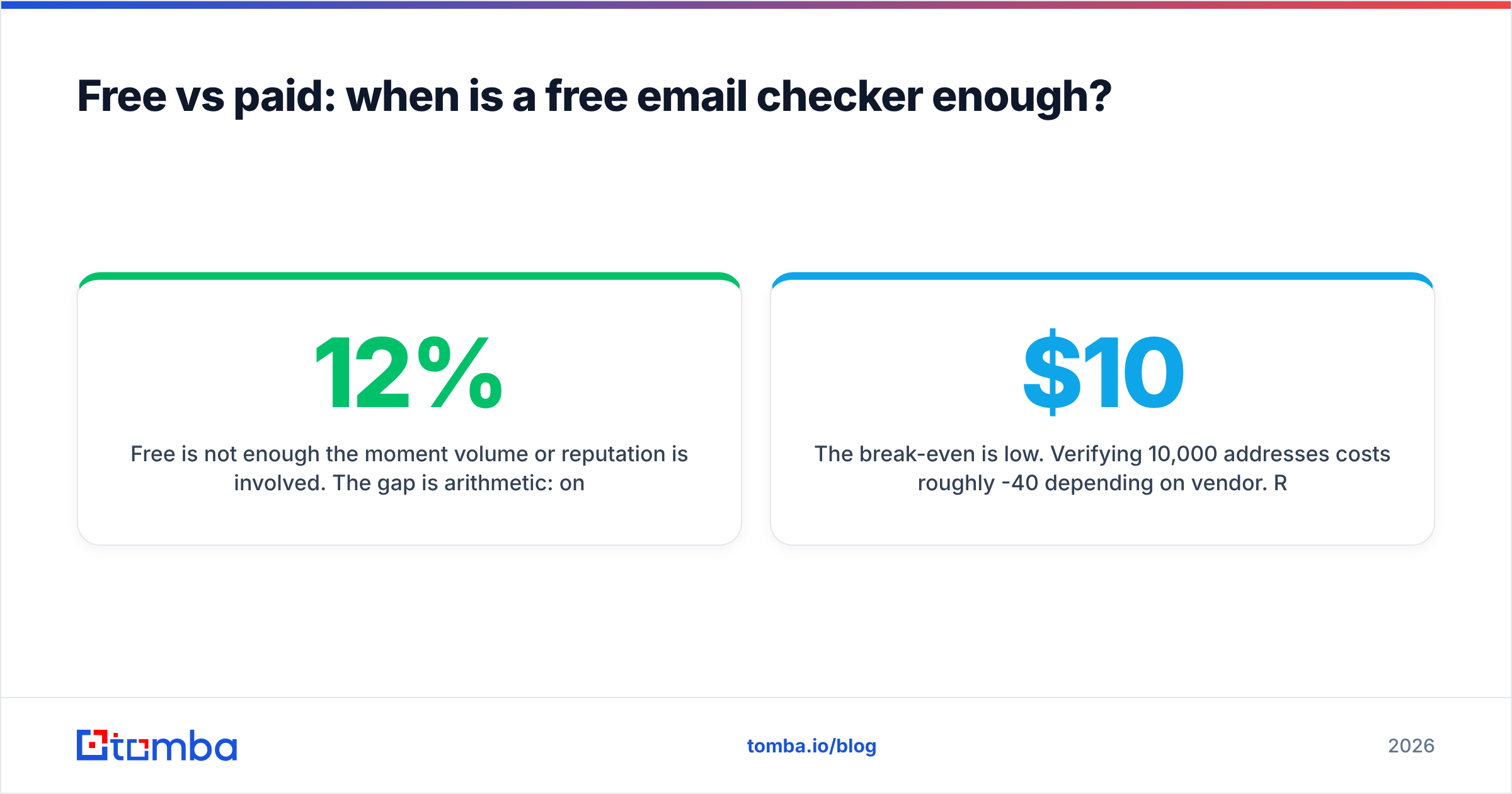
Free is not enough the moment volume or reputation is involved. The gap is arithmetic: on a typical scraped B2B list, syntax and MX checks remove 8-12% of rows, and SMTP-level checks remove another 15-25%. If you clean with a free tool and send, you are sending to that second bucket. At a 20% bounce rate, most sending platforms will throttle or suspend the account, and mailbox providers start filtering the domain — which is the actual cost, and it does not show up on the invoice.

The break-even is low. Verifying 10,000 addresses costs roughly $10-40 depending on vendor. Recovering a burned sending domain costs weeks.
Why do catch-all domains break email validation?#
Because a catch-all domain answers "yes" to every address, so the SMTP test that works everywhere else returns no information.
Picture a mailroom that accepts any envelope addressed to the building and sorts it later. Asking the front desk "does Sarah work here?" gets you a yes regardless. That is a catch-all server, and it is common in B2B — Microsoft 365 tenants with a wildcard rule, agencies that route everything to a shared inbox, companies that configured it years ago and forgot.
Vendors handle this three ways:
- Return "unknown" and move on. Honest, useless. You still have to decide.
- Mark all catch-alls valid. Optimistic. Inflates your valid count and your bounce rate together.
- Score them probabilistically. Combine the SMTP result with pattern evidence: does the address match the company's dominant format, does the person appear in other verified sources, has this exact address been observed in the wild, how does the domain's historical bounce behavior look? That produces a confidence number you can threshold on.
Only the third approach is actually a product. If catch-all domains make up a meaningful share of your target market — and in enterprise software, agencies, and professional services they do — this single capability should drive your vendor choice. A catch-all verifier that returns graded confidence lets you send to the 85%+ bucket and hold the rest, instead of discarding every accept-all domain in your ICP.
Suggested visual: an SMTP transcript screenshot showing a 250 response for a randomly generated address at a catch-all domain.
How do you validate emails at scale without wrecking deliverability?#
Validation is a workflow, not a button. The version that holds up:
Verify at capture. Wire the validation API into your form, your chat widget, your CRM's create-contact hook. Real-time verification at the point of entry is the only way to keep a database clean rather than periodically un-rotting it. Syntax and MX synchronously, SMTP asynchronously so you never block a submit.
Verify before every send. Not quarterly. B2B email decays 22-30% a year through job changes alone, and the decay is concentrated in exactly the senior titles you are targeting. Run the segment through bulk verify as a pre-send step in the campaign checklist.
Suppress by category, not by one score. Hard invalids get deleted. Role accounts go to a separate, lower-volume track — info@ is a bad cold target but a fine support contact. Disposables and spam traps get permanently suppressed. Catch-alls above your confidence threshold get sent to; below it, they wait for enrichment.
Warm up separately. Validation prevents bounces. It does not build sender reputation, fix SPF and DKIM, or make cold volume safe on a fresh domain. Those are separate problems, and no verifier solves them — treat vendors that imply otherwise with suspicion. G2's verification category is a reasonable place to sanity-check what each tool actually claims to do versus what its landing page implies.
Log every verdict with a timestamp. Six months from now you will want to know which vendor said what, and when, to audit your own false-invalid rate. Store the status string, the confidence score, and the check date on the contact record.
Watch the response codes yourself. Your ESP's bounce log is the ground truth for whether your verifier is any good. If hard bounces exceed 2% on a verified list, the verifier is failing, not the list.
One more discipline: keep verification and finding in the same system where you can. Every export-clean-reimport cycle loses data, introduces duplicates, and adds a step people skip under deadline. Whether you standardize on a verifier with a finder attached or a data provider that ships pre-verified records, the goal is the same — no manual CSV in the loop.
What should you do next?#
Start with a benchmark, not a purchase. Pull 300 addresses with known outcomes, run them through two or three free tiers, and score false-valid, false-invalid, unknown, and catch-all resolution. The winner on your data is the right tool, regardless of who ranks first on review sites.
If you are also building the lists — not just cleaning them — the Tomba Email Finder puts discovery, verification, and catch-all confidence scoring in one place, so addresses arrive already checked instead of queuing for a separate cleaning pass. The free tier covers 25 searches a month, enough to run the benchmark above before you commit a dollar, and pricing starts at $49/mo when you are ready to scale it into a real workflow.
Related guides#
Ready to find emails that actually work?
Join 150,000+ professionals who stopped guessing and started sending. Free credits on signup — no credit card required.
Get the Tomba newsletter
Practical outbound tactics and product updates — once every two weeks.
About the author