Email Address Verification in 2026: The Complete Guide
Bounce rates above 3% now trigger inbox filtering, not just a wasted send. Here is exactly how email address verification works, what each check actually proves, and where every provider quietly fails.
TL;DR
- Email address verification is a stack of five independent checks — syntax, domain, MX, mailbox, and risk scoring. Most "verified" labels only prove the first three passed.
- Keep hard bounces under 2%. Google and Microsoft treat repeated invalid recipients as a spam signal, so a dirty list damages your sender reputation for months after you clean it.
- Catch-all domains are where verifiers diverge most. Roughly 15-20% of B2B domains accept every address, and honest tools mark them "risky" instead of guessing.
- SMTP-only verification is decaying. Microsoft 365 no longer reliably rejects unknown recipients at RCPT TO, so pattern data and historical activity now matter more than the handshake.
- Verify at the point of capture, re-verify anything older than 90 days, and never bulk-blast a list you bought without running it through a verifier first.
What is email address verification?#
Email address verification is the process of confirming that a mailbox actually exists and can receive mail — before you send to it. Think of it like a courier checking an address against the postal database and then knocking on the door to confirm someone lives there, rather than dropping the package and hoping.
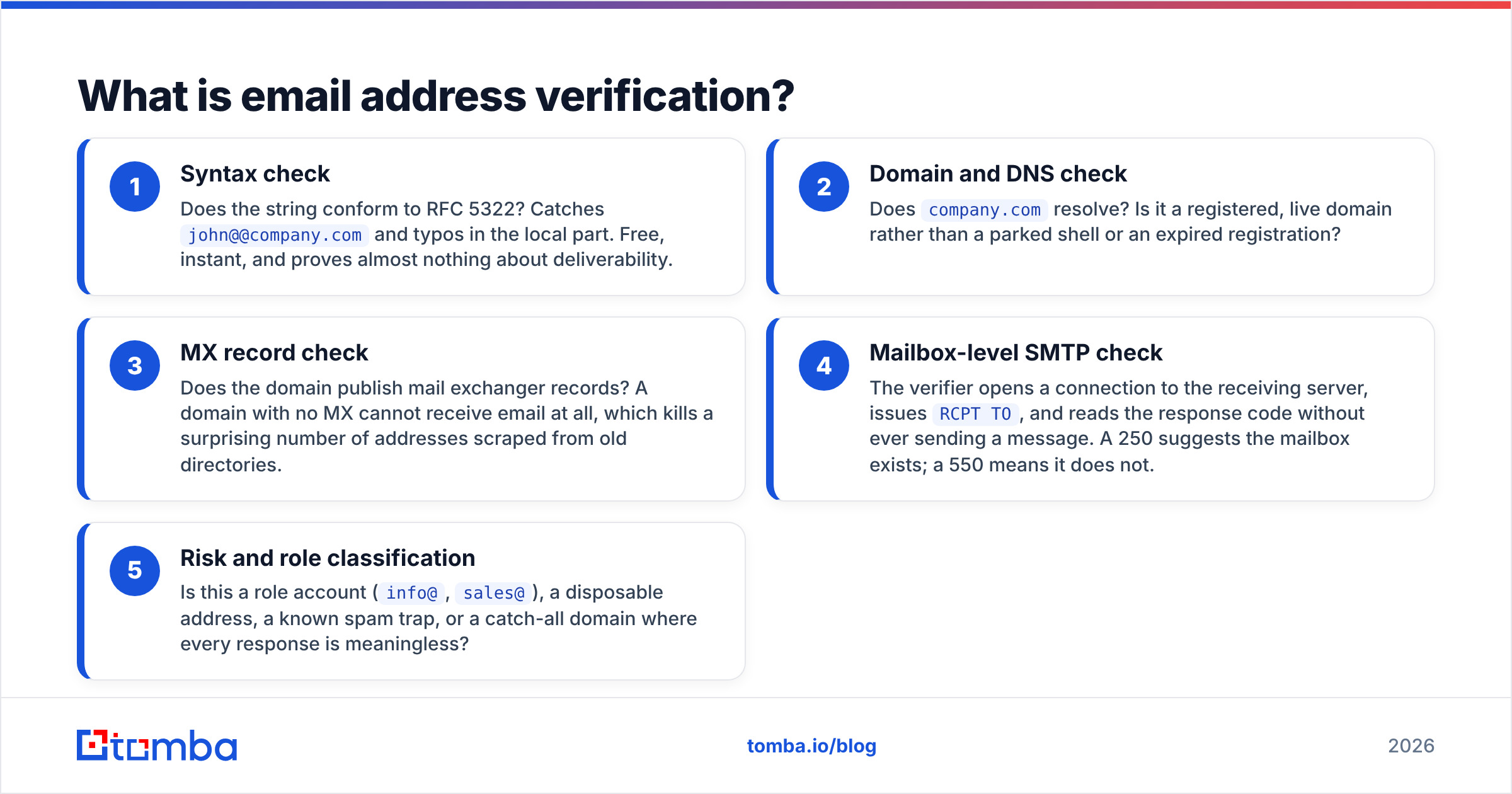
The confusion in this category comes from vendors using one word for five different operations. When a tool says "verified," ask which layers it actually ran:
- Syntax check — Does the string conform to RFC 5322? Catches
john@@company.comand typos in the local part. Free, instant, and proves almost nothing about deliverability. - Domain and DNS check — Does
company.comresolve? Is it a registered, live domain rather than a parked shell or an expired registration? - MX record check — Does the domain publish mail exchanger records? A domain with no MX cannot receive email at all, which kills a surprising number of addresses scraped from old directories.
- Mailbox-level SMTP check — The verifier opens a connection to the receiving server, issues
RCPT TO, and reads the response code without ever sending a message. A 250 suggests the mailbox exists; a 550 means it does not. - Risk and role classification — Is this a role account (
info@,sales@), a disposable address, a known spam trap, or a catch-all domain where every response is meaningless?
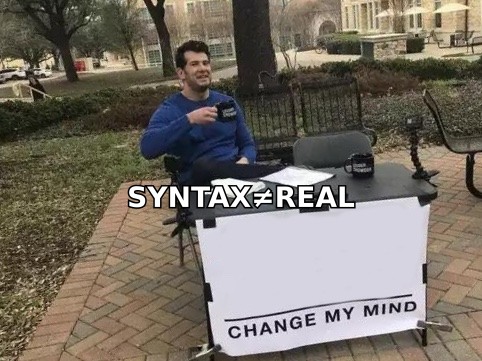
A cheap verifier runs steps 1-3, reports 95% "valid," and hands you a list that bounces at 12%. A serious one runs all five and tells you honestly when it cannot determine an answer.
Why does verification matter more in 2026 than it did three years ago?#
Because mailbox providers changed the rules and never published the thresholds.
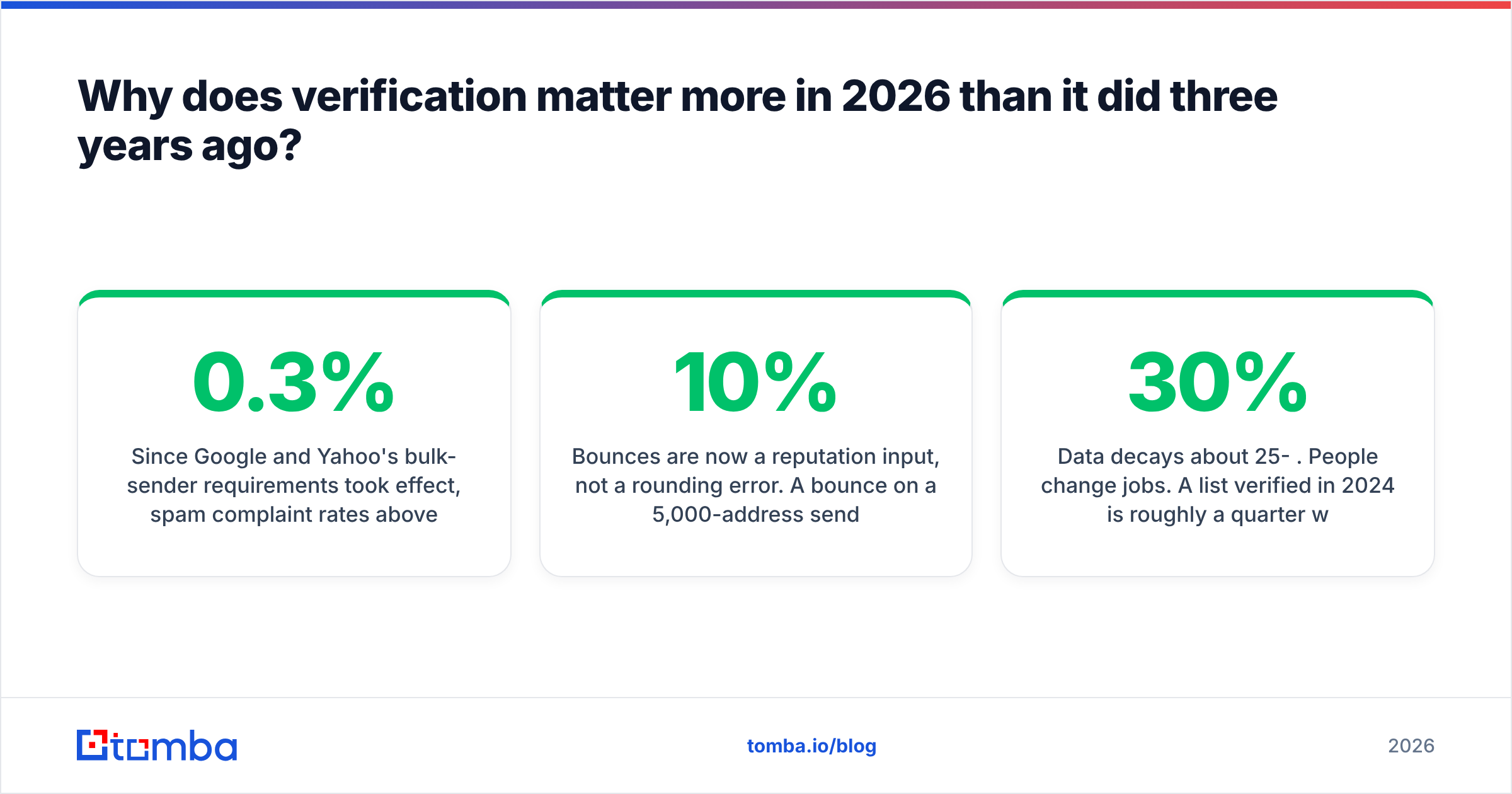
Since Google and Yahoo's bulk-sender requirements took effect, spam complaint rates above 0.3% and elevated invalid-recipient rates move you from the inbox to the spam folder — and the penalty outlasts the campaign that caused it. Google's own sender guidelines are explicit that repeatedly mailing nonexistent addresses signals list-buying behavior.
What changed practically:
- Bounces are now a reputation input, not a rounding error. A 10% bounce on a 5,000-address send tells the receiving filter you don't know who your recipients are.
- Domain warmup is undone by dirty lists. You can spend six weeks on email deliverability work and reset your sender reputation with one unverified import.
- Cold outreach platforms enforce it themselves. Most sequencing tools now suspend accounts that cross a bounce threshold, so verification stopped being optional hygiene and became a platform requirement.
- Data decays about 25-30% per year. People change jobs. A list verified in 2024 is roughly a quarter wrong today, regardless of how good the original source was.
The economics are simple. A verification credit costs a fraction of a cent. A blocked sending domain costs you a quarter of pipeline.
How do the main verification methods compare?#
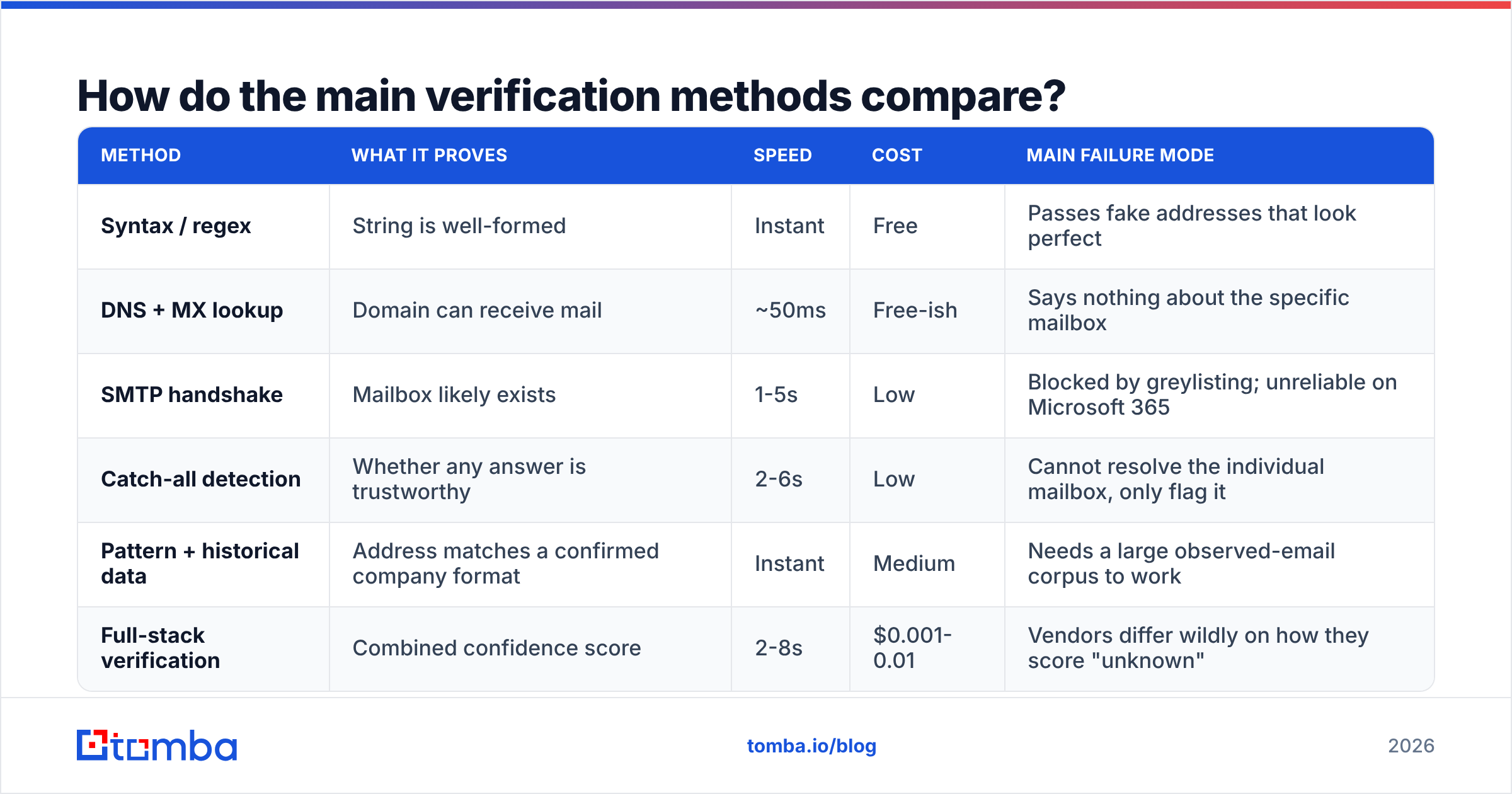
Each method answers a different question, and the failure modes are what separate them. Here is what you actually get from each layer:
| Method | What it proves | Speed | Cost | Main failure mode |
|---|---|---|---|---|
| Syntax / regex | String is well-formed | Instant | Free | Passes fake addresses that look perfect |
| DNS + MX lookup | Domain can receive mail | ~50ms | Free-ish | Says nothing about the specific mailbox |
| SMTP handshake | Mailbox likely exists | 1-5s | Low | Blocked by greylisting; unreliable on Microsoft 365 |
| Catch-all detection | Whether any answer is trustworthy | 2-6s | Low | Cannot resolve the individual mailbox, only flag it |
| Pattern + historical data | Address matches a confirmed company format | Instant | Medium | Needs a large observed-email corpus to work |
| Full-stack verification | Combined confidence score | 2-8s | $0.001-0.01 | Vendors differ wildly on how they score "unknown" |
The honest read: no single method is sufficient. SMTP alone has degraded because Microsoft 365 tenants frequently return 250 for every recipient during the handshake and reject later, which means an SMTP-only verifier reports false positives on a large share of the corporate world. That is exactly why pattern intelligence — knowing that acme.com uses first.last@ and that this specific address has been observed in the wild — has become the tiebreaker.

What do the status codes actually mean?#
Every verifier returns its own vocabulary, which makes cross-tool comparison miserable. Translate everything into these four buckets before you make a send decision:
- Valid / deliverable — Mailbox confirmed at the server level. Send freely. Typically 60-75% of a decent B2B list.
- Invalid / undeliverable — Hard rejection, no MX, or dead domain. Delete, don't retry. Suppress permanently so it never re-enters via a CSV import.
- Risky / accept-all — The domain accepts everything, so existence is unproven. This is the bucket that decides your bounce rate. Send only from a separate warmed domain, in small batches, and watch the response.
- Unknown — Timeout, greylisting, or rate-limited by the receiver. Re-queue in 24-48 hours; roughly half will resolve cleanly on the second pass.
A vendor that reports zero "unknown" results is not more accurate. It is guessing and calling the guess a verdict. If you are comparing providers, seed a test list with 50 addresses you personally control — including two you deliberately deleted — and check whether the tool catches the deletions. That is a ground-truth test no marketing page can survive.
Which email verification tools hold up under a real list?#
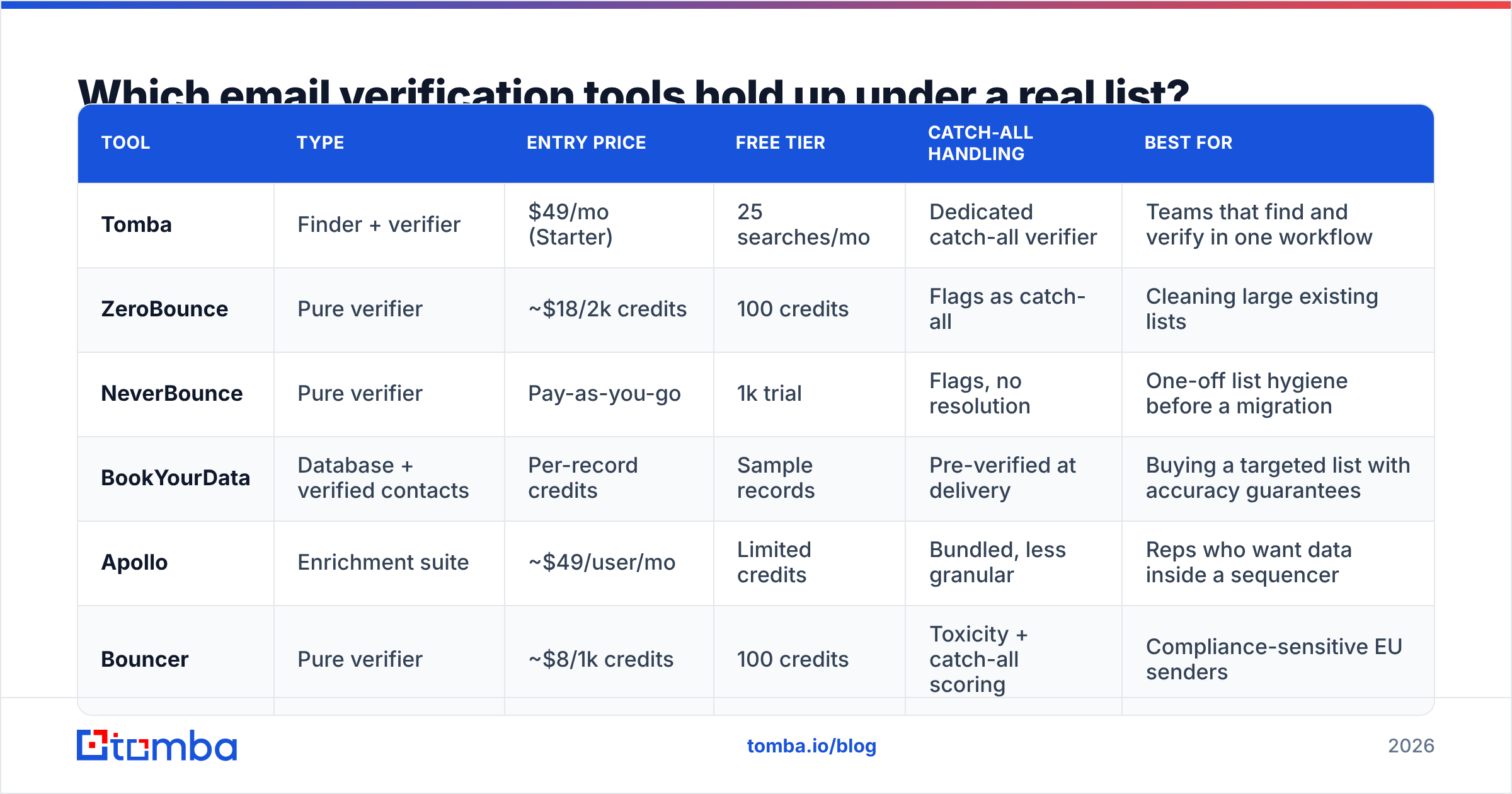
The market splits into three camps: pure verifiers, finder-plus-verifier platforms, and enrichment suites that bundle verification as a feature. Your choice depends on whether you already have addresses or still need to find them.
| Tool | Type | Entry price | Free tier | Catch-all handling | Best for |
|---|---|---|---|---|---|
| Tomba | Finder + verifier | $49/mo (Starter) | 25 searches/mo | Dedicated catch-all verifier | Teams that find and verify in one workflow |
| ZeroBounce | Pure verifier | ~$18/2k credits | 100 credits | Flags as catch-all | Cleaning large existing lists |
| NeverBounce | Pure verifier | Pay-as-you-go | 1k trial | Flags, no resolution | One-off list hygiene before a migration |
| BookYourData | Database + verified contacts | Per-record credits | Sample records | Pre-verified at delivery | Buying a targeted list with accuracy guarantees |
| Apollo | Enrichment suite | ~$49/user/mo | Limited credits | Bundled, less granular | Reps who want data inside a sequencer |
| Bouncer | Pure verifier | ~$8/1k credits | 100 credits | Toxicity + catch-all scoring | Compliance-sensitive EU senders |
Two notes on reading that table. First, per-credit pricing looks cheaper than per-seat pricing until you run volume — a $0.008 credit on 200,000 records is $1,600, which buys a year of most platform plans. Second, "verified at delivery" from a database vendor like BookYourData is genuinely useful for cold list acquisition, but records age from the moment they are delivered, so re-verify before the second campaign regardless of the guarantee.
If you want to sanity-check any vendor's claims independently, G2's email verification category has volume-weighted review data that tends to expose accuracy complaints faster than vendor benchmarks do.

How should you handle catch-all domains?#
Treat them as a separate campaign, not a separate row in a spreadsheet.
A catch-all (accept-all) domain is configured to accept mail for every address at that domain, valid or not. Any SMTP probe returns 250, so the handshake tells you nothing. This affects a large minority of B2B domains, and it is heavily concentrated in exactly the companies you want to reach — mid-market and enterprise organizations running Microsoft 365 with a wildcard rule.
Three workable approaches, in order of reliability:
- Pattern confirmation. If you know the company's format and have seen the exact address in a public source, confidence rises sharply even without an SMTP verdict. A catch-all verifier that combines pattern data with observed-email history is the closest thing to resolution available.
- Segmented sending. Route catch-alls to a dedicated subdomain with its own warmed reputation. If the batch bounces at 20%, the damage is contained and your primary domain stays clean.
- Channel switch. For high-value accounts on catch-all domains, skip the guess. Use a phone finder or LinkedIn instead of burning a send on an address you cannot confirm.
What does not work: mass-sending to catch-alls from your primary domain because the verifier "didn't say invalid." Absence of rejection is not confirmation.
Where should verification sit in your workflow?#
Verification is not a one-time cleanup. Build it into four moments:
- At capture. Validate web-form submissions in real time via an email verification API so typos never enter the database. This is the highest-ROI placement by a wide margin — one API call prevents a permanently wrong record.
- At enrichment. When you find a new address, verify it in the same operation. Finding and verifying as separate manual steps is where most teams leak accuracy.
- Before every send. Re-verify any segment untouched for 90+ days. Use a bulk verify run rather than trickling through the UI.
- After every send. Feed hard bounces straight into a permanent suppression list. Skipping this step means the same dead address bounces again next quarter.
For teams running lists in spreadsheets, a Google Sheets add-on or the Tomba Chrome extension keeps verification inside the tool people already use — which matters more for adoption than raw accuracy does.
What are the most common verification mistakes?#
- Trusting a single confidence score without reading the sub-checks. A "92% confidence" on a catch-all domain is a probability estimate dressed as a fact.
- Deleting the risky bucket entirely. Many risky addresses are perfectly deliverable. Segment them, don't discard them — you're throwing away real pipeline.
- Verifying once and never again. Job changes make this a subscription problem, not a project.
- Ignoring role accounts.
info@addresses often verify as valid and still tank your engagement metrics, which is what filtering actually measures now. - Assuming verification fixes deliverability. It removes one failure mode. Authentication still matters — check your SPF record, DKIM, and DMARC alignment separately. Microsoft documents its own sender requirements independently of list quality.
- Buying a list and sending immediately. Even reputable providers deliver records that age. Verify on arrival, always.
Is paid verification worth it versus free tools?#
For anything past a few hundred addresses, yes — but not for the reason vendors usually give.
Free checkers are genuinely fine for one-off lookups. A free email checker will tell you whether a single address has valid syntax and a live MX record, and that answers most ad-hoc questions. What free tools cannot do is catch-all detection at scale, spam-trap identification, or the historical-observation data that resolves ambiguous cases.
The break-even math: if verification costs you $0.005 per address and prevents a 6-point bounce improvement on a 10,000-address campaign, you have protected 600 sends and — more importantly — avoided the reputation hit that would have suppressed the next three campaigns. The credit cost is $50. The alternative is rebuilding domain reputation over six to eight weeks.
Where free genuinely wins: validating your own opt-in list from a reputable source, where you already know the addresses are real and just want a syntax pass.
Getting started#
Verification is the least glamorous part of outbound and the one with the highest floor-raising effect. Clean data does not make a bad message work, but dirty data guarantees a good message never arrives.
If you are finding addresses and verifying them as two disconnected steps, collapse them. The Tomba Email Finder returns addresses with confidence scoring and source attribution in the same call, then hands off to the email verifier and catch-all checks before anything reaches your sequencer. The free tier covers 25 searches a month if you want to test it against a list where you already know the answers — which is exactly how you should evaluate any vendor in this category. Full Tomba pricing starts at $49/mo for Starter when you outgrow it.
Run the ground-truth test. Seed 50 addresses you control, include a few you deleted, and see which tool tells you the truth.
Related guides#
Ready to find emails that actually work?
Join 150,000+ professionals who stopped guessing and started sending. Free credits on signup — no credit card required.
Get the Tomba newsletter
Practical outbound tactics and product updates — once every two weeks.
About the author