Email Address Verification Free: The 2026 Honest Guide
Free email verification tools can catch most dead addresses, but the free tier is where vendors hide the interesting limits. Here's what free actually checks, which tools give real credits, and the point where paying costs less than bouncing.
TL;DR
- Free email address verification is real, but it is metered. Most vendors give you 25–1,000 checks per month or a one-time trial pack, then the meter starts.
- A free checker will reliably catch syntax errors, dead domains, and disposable addresses. It gets shakier on catch-all domains, role accounts, and freshly deactivated mailboxes.
- Single-check web tools are free forever and fine for one-off lookups. Bulk CSV verification and API access are where free tiers stop.
- The break-even is simple math: if bouncing 200 addresses costs you a domain reputation hit and a paused sequence, a $49/mo plan is cheaper than free.
- Use free tiers to audit accuracy across two or three vendors on the same 50-address sample before you commit to anyone.
What does "email address verification free" actually get you?#
It gets you a syntax check, a DNS/MX lookup, a disposable-domain check, and — on most decent tools — an SMTP probe. What it usually does not get you is volume, API keys, or catch-all resolution.
Think of it like a free credit check. The free version tells you whether the account exists and whether the bank is still in business. It does not tell you the balance. Free email verification works the same way: it confirms the mailbox is plausibly live at the moment you asked, not that the person still reads it.
Three distinct things get lumped under "free":
- Free single-lookup web tools. Paste one address, get a verdict. Unlimited or near-unlimited. Good for checking one prospect before a high-stakes send.
- Free tiers on paid platforms. A monthly credit allowance (typically 25–100) that renews. This is the useful one because you get the same engine paying customers get.
- One-time free trials. A larger pack (often 100–1,000 credits) that never renews. Good for a single list cleanup, useless as an ongoing workflow.
Confusing these is how people end up mid-campaign with a locked account and a half-verified list.
How does email verification actually work under the hood?#
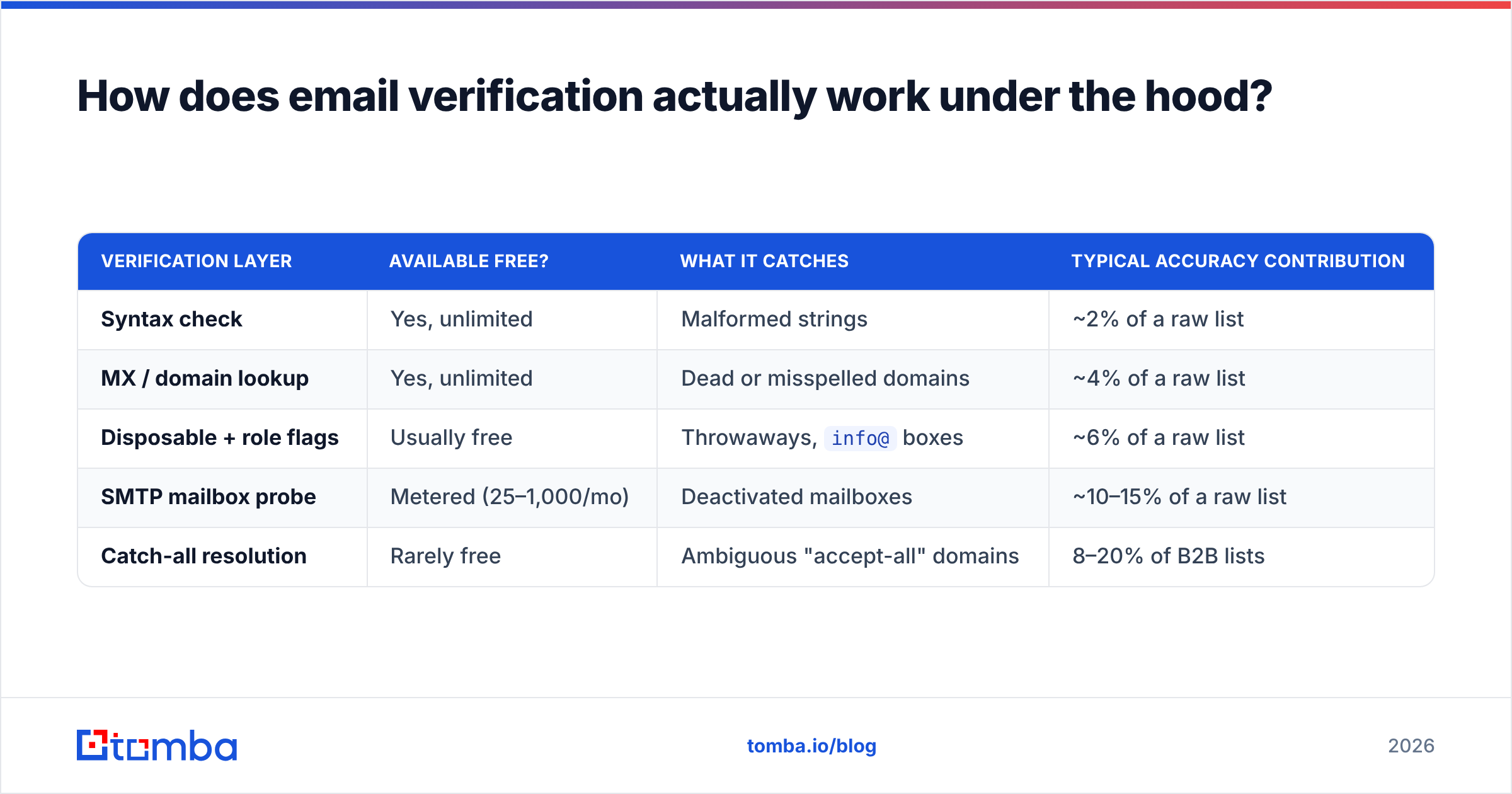
Five layers run in sequence, and each one is cheaper and less conclusive than the next.
- Syntax validation — Does the string conform to the RFC format for an email address? Catches
john@@acmeand trailing spaces. Free everywhere, filters maybe 2% of a typical list. - Domain and MX record check — Does
acme.comresolve, and does it publish mail exchanger records? Kills dead companies and typo'd domains. Also free everywhere, filters another 3–5%. - Disposable and role detection — Flags
mailinator.comthrowaways andinfo@,sales@,admin@role accounts. Role addresses are deliverable but they inflate complaint rates, so most senders exclude them. - SMTP handshake — The verifier opens a conversation with the receiving mail server and asks whether that specific mailbox exists, without sending a message. This is the layer that actually earns the name "verification," and it is the layer free tools ration.
- Catch-all handling — Some domains accept mail to every address, valid or not. A basic SMTP probe returns "accepted" for
asdfgh@domain.com, which is worthless. Resolving these needs pattern intelligence and historical data, which is a paid-tier feature almost everywhere.
| Verification layer | Available free? | What it catches | Typical accuracy contribution |
|---|---|---|---|
| Syntax check | Yes, unlimited | Malformed strings | ~2% of a raw list |
| MX / domain lookup | Yes, unlimited | Dead or misspelled domains | ~4% of a raw list |
| Disposable + role flags | Usually free | Throwaways, info@ boxes |
~6% of a raw list |
| SMTP mailbox probe | Metered (25–1,000/mo) | Deactivated mailboxes | ~10–15% of a raw list |
| Catch-all resolution | Rarely free | Ambiguous "accept-all" domains | 8–20% of B2B lists |
Which free email verification tools are worth using in 2026?#
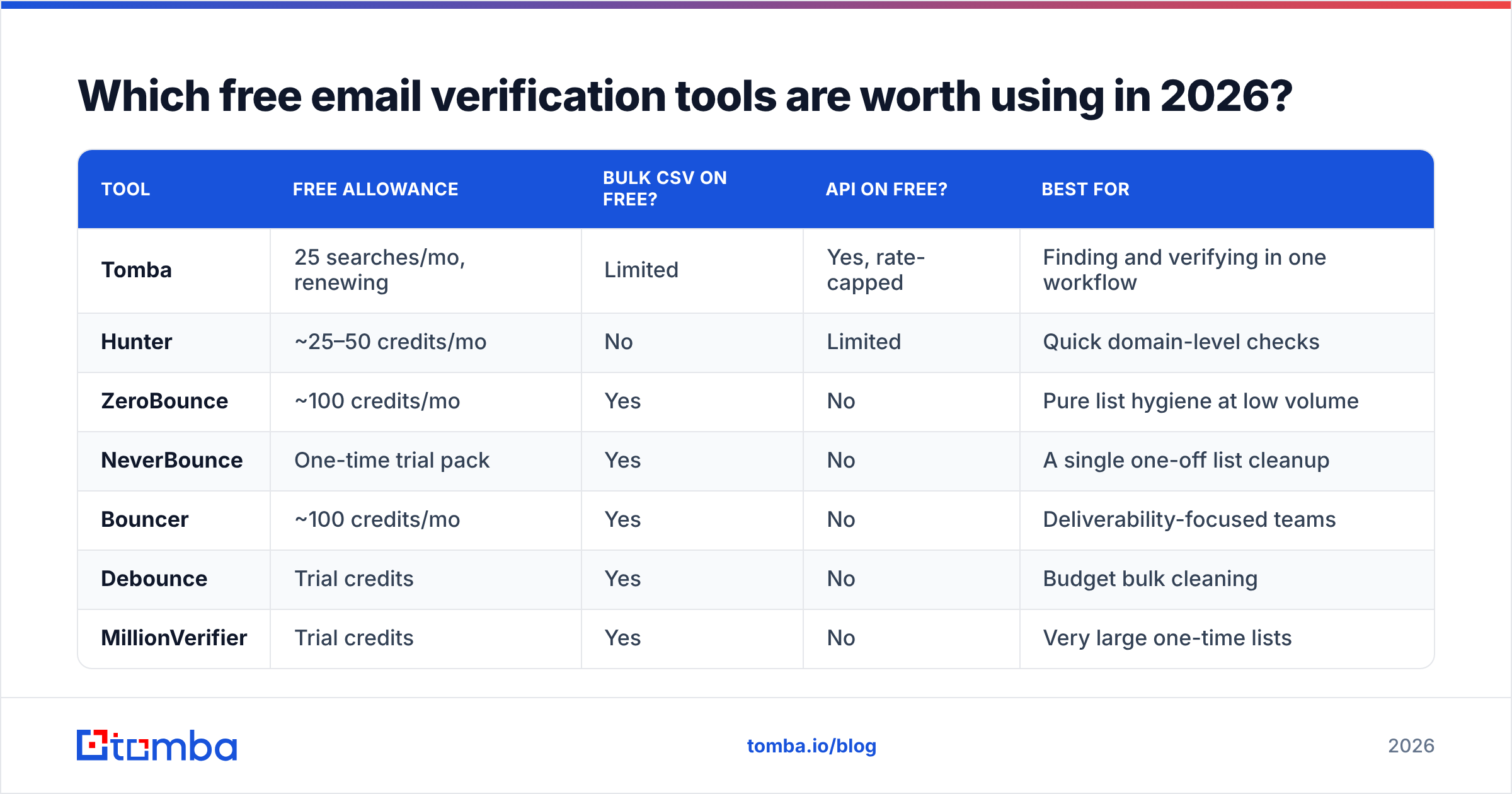
Free allowances change quarterly, so treat the numbers below as a starting shape rather than a contract — check the vendor's current pricing page before you plan a workflow around it.
| Tool | Free allowance | Bulk CSV on free? | API on free? | Best for |
|---|---|---|---|---|
| Tomba | 25 searches/mo, renewing | Limited | Yes, rate-capped | Finding and verifying in one workflow |
| Hunter | ~25–50 credits/mo | No | Limited | Quick domain-level checks |
| ZeroBounce | ~100 credits/mo | Yes | No | Pure list hygiene at low volume |
| NeverBounce | One-time trial pack | Yes | No | A single one-off list cleanup |
| Bouncer | ~100 credits/mo | Yes | No | Deliverability-focused teams |
| Debounce | Trial credits | Yes | No | Budget bulk cleaning |
| MillionVerifier | Trial credits | Yes | No | Very large one-time lists |
The pattern is consistent: verification-only vendors give you more free credits, and finder-plus-verifier platforms give you fewer credits but a workflow that starts earlier in the funnel. If your list already exists, take the credits. If you are still building the list, the combined tool saves you a step and a second subscription.
For a genuinely unlimited single-address check with no signup, a free email checker handles the one-at-a-time case, and Tomba's email verifier covers the metered SMTP-level work on the free tier.
How accurate is free email verification, really?#
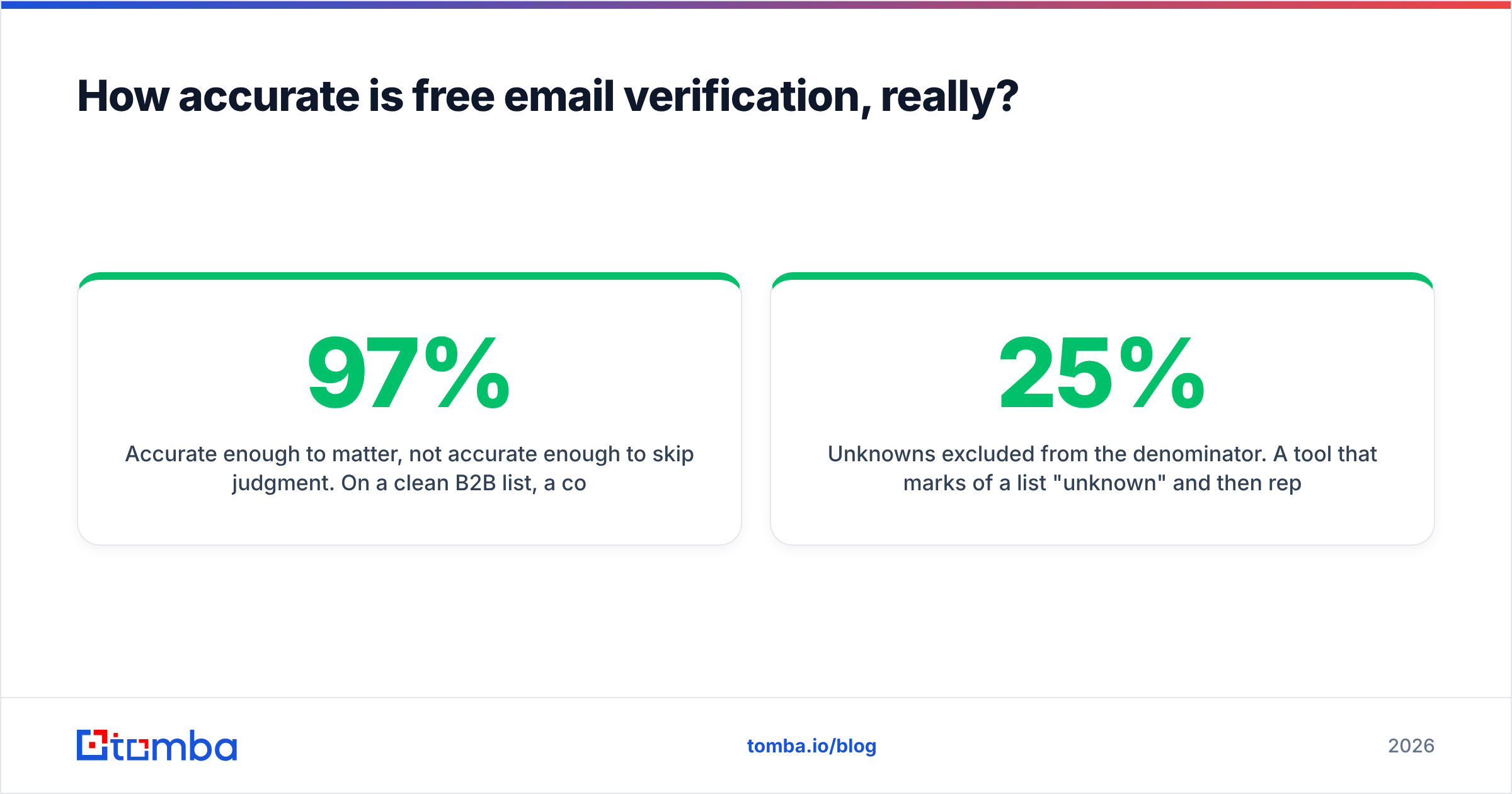
Accurate enough to matter, not accurate enough to skip judgment. On a clean B2B list, a competent free-tier verifier will land in the 92–97% range on deliverable/undeliverable calls. On a scraped list full of catch-all domains and 18-month-old data, real-world accuracy drops toward 80% because a large share of results come back "unknown" or "accept-all" — and how a vendor counts those is exactly where published accuracy numbers diverge.

Two things distort vendor accuracy claims:
- Unknowns excluded from the denominator. A tool that marks 25% of a list "unknown" and then reports 99% accuracy on the remaining 75% is technically honest and practically useless. Ask what the unknown rate was.
- Test-list bias. Accuracy on a list of Fortune 500 addresses is not accuracy on a list of 40-person startups running Google Workspace with catch-all enabled.
Run your own test. Take 50 addresses you know the true status of — from your CRM, your last campaign's bounce log, your own team — and push them through two or three free tiers. Ten minutes of work beats every comparison chart on the internet, including this one.
What are the hidden limits of the free tiers?#
The credit count is the number vendors advertise. These are the ones that actually bite:
- No API access. Nearly every free tier locks the API or rate-limits it to the point of uselessness. If your plan is to verify at form-submit time or inside an enrichment pipeline, free ends immediately. Tomba is one of the exceptions that exposes a capped email verification API on free.
- No bulk uploads. Some free plans are single-address only through the web UI. Verifying 400 addresses one paste at a time is not a workflow.
- Rolling vs. renewing credits. A one-time 1,000-credit trial looks generous next to 25/month until month two.
- Catch-all results counted as credits. You spend a credit and get "unknown" back. On a list where 20% of domains are catch-all, that's a fifth of your allowance producing no decision.
- Data retention and export limits. A few free tiers restrict CSV export of results, which means you can see the verdicts but can't act on them at scale.
- No dedicated support. Fine until an entire domain returns false negatives and you need someone to look at it.
When does paying beat free?#
Do the bounce math rather than the credit math.
A cold campaign to 5,000 addresses with an 8% bounce rate produces 400 hard bounces. Major inbox providers treat sustained bounce rates above roughly 2–3% as a spam signal — Google's bulk sender guidelines are explicit that senders should keep complaint and bounce signals low. Cross that line and you're not just losing 400 sends, you're throttling the other 4,600 and putting a warmed domain at risk.
Verifying those 5,000 addresses costs roughly $10–40 depending on the vendor. Recovering a burned sending domain costs weeks.
The practical thresholds:
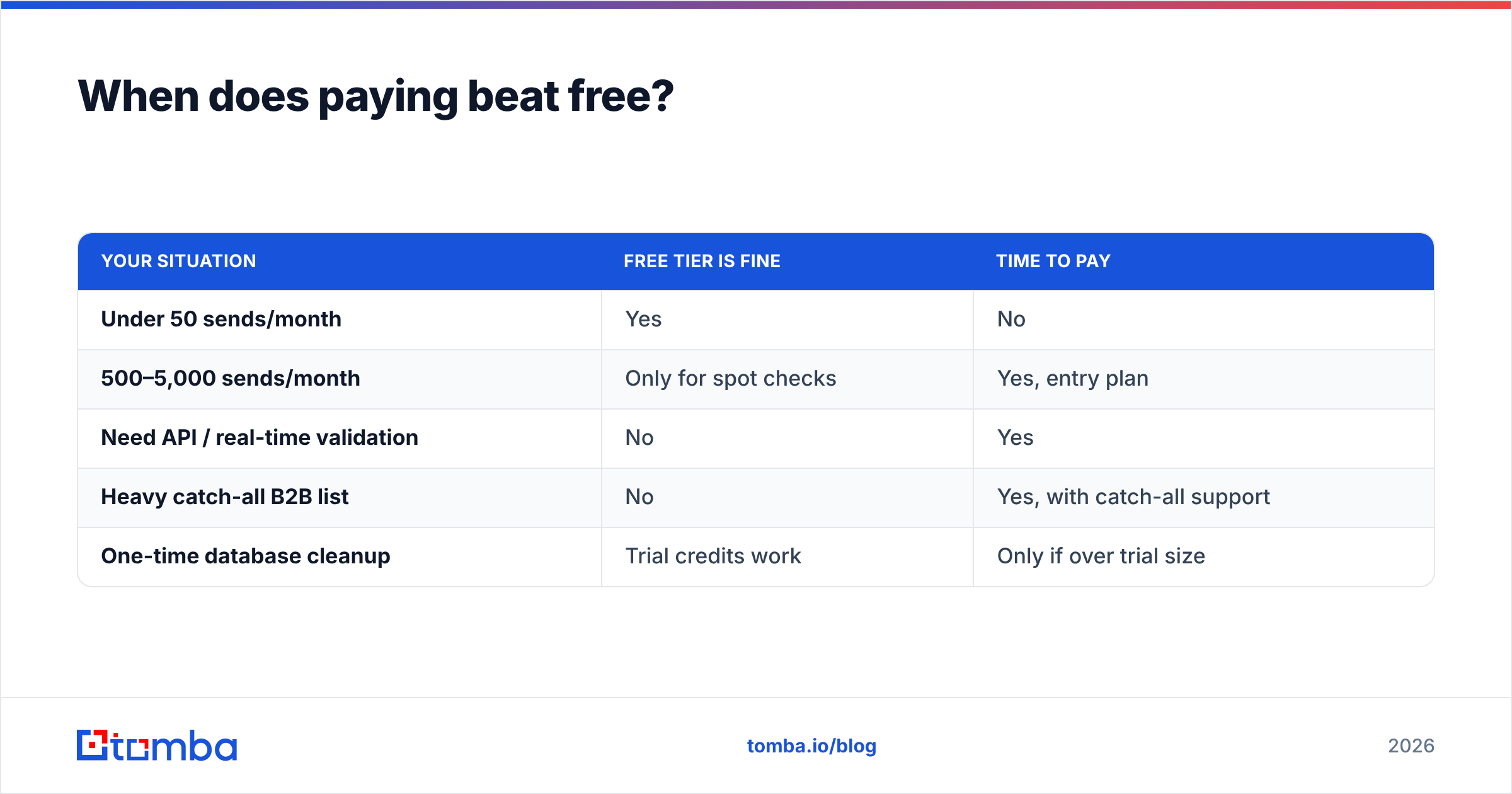
| Your situation | Free tier is fine | Time to pay |
|---|---|---|
| Under 50 sends/month | Yes | No |
| 500–5,000 sends/month | Only for spot checks | Yes, entry plan |
| Need API / real-time validation | No | Yes |
| Heavy catch-all B2B list | No | Yes, with catch-all support |
| One-time database cleanup | Trial credits work | Only if over trial size |
At Tomba, that entry point is $49/mo for Starter, with Growth at $99/mo and Pro at $249/mo; the full breakdown sits on the Tomba pricing page. The relevant comparison isn't $49 against $0 — it's $49 against the cost of a paused sequence.

How do you verify emails free without any tool at all?#
Three manual methods, in ascending order of effort:
- Send a plain-text test from a throwaway domain. Crude, effective, and it burns a throwaway domain rather than your real one. Never do this from your production sending domain.
- Check the MX record by hand.
dig MX acme.comor any web DNS lookup tells you whether the domain accepts mail at all. Free, instant, and it clears the obvious dead weight. - Cross-reference the pattern. If you know
first.last@acme.comworks for three people at the company, a fourth address in the same format is probably live. This is what a company email pattern checker automates, and it's the only free method that gets you anywhere on catch-all domains.
None of these scale past a few dozen addresses. They're for the case where you have one important prospect and no credits left this month.
What about catch-all domains, the thing free tools can't solve?#
Catch-all domains accept mail addressed to anything at that domain, so an SMTP probe returns "valid" for an address that doesn't exist. They're common in B2B — small companies enable them so nothing gets lost, and the side effect is that verification goes blind.
Free tiers mark these "unknown" or "accept-all" and stop there. Paid resolution combines pattern data, historical send outcomes, and secondary signals to produce a confidence score instead of a shrug. If your target market skews toward companies under 200 people, expect 15–25% of your list to hit this wall, and budget for a catch-all verifier accordingly.
A related option worth knowing: if you'd rather skip verification entirely on some segments, pre-verified B2B databases like BookYourData sell contacts that arrive already checked, which shifts the cost from verification credits to per-record price. For teams building lists from scratch every month, that trade sometimes comes out ahead. Independent review aggregates like G2's email verification category are a reasonable place to sanity-check any vendor's claims against actual user reports before you buy either way.
What's the right workflow for most teams?#
- Build the list with a finder, not a scraper. Addresses sourced from a maintained database start at a higher base validity than anything pulled off a web page.
- Verify at import, not at send. Catching a dead address the day you add it is free-tier-sized work. Catching 400 at send time is not.
- Re-verify anything older than 90 days. B2B email decays at roughly 2–3% per month through job changes alone.
- Segment by confidence. Send to "valid" first, hold "unknown" for a lower-volume secondary sequence, drop "invalid" entirely.
- Track your own bounce rate as the real accuracy metric. Vendor accuracy claims are marketing. Your bounce log is data.
Run that loop and free verification covers a surprising amount of ground — right up until volume, API needs, or catch-all density makes it stop.
Start free, then decide with your own numbers#
The honest answer on free email address verification: it works, it's genuinely useful under a few hundred checks a month, and every vendor designs the free tier to expire exactly where your workflow gets serious. That's not a scam, it's a business model — and knowing where the edge sits means you can plan around it instead of discovering it mid-campaign.
If you want to find addresses and verify them in the same place rather than stitching two subscriptions together, start with the Tomba Email Finder free tier: 25 searches a month, no card, and the same engine paid plans run on. Test it against your own known-good list, check the bounce rate on your next 200 sends, and let that number decide whether you ever need to upgrade.
Related guides#
Ready to find emails that actually work?
Join 150,000+ professionals who stopped guessing and started sending. Free credits on signup — no credit card required.
Get the Tomba newsletter
Practical outbound tactics and product updates — once every two weeks.
About the author