Email Addresses Search: How to Find Any Work Email in 2026
Most email addresses search methods are guesswork dressed up as workflow. Here is how professional finders actually resolve a name and a domain into a valid inbox — and which tools hold up in 2026.
TL;DR
- An email addresses search is a two-step job: resolve the most likely address for a person at a domain, then prove that address accepts mail. Skipping step two is what produces 12% bounce rates.
- Pattern guessing (
first.last@) works on maybe 60-70% of small-company domains and much worse on enterprises with legacy or randomized formats. - Tool accuracy varies more by segment than by vendor. A finder that hits 95% on US SaaS can drop to 55% on EU manufacturing.
- Free tools are fine for one-off lookups. The moment you need volume, CRM sync, or an SLA on accuracy, paid credits are cheaper than the deliverability damage.
- Always verify before sending, treat catch-all domains as a separate risk tier, and log every not-found so you stop paying to search the same dead contact twice.
What is an email addresses search?#
An email addresses search is the process of turning partial identity data — a name, a company, a LinkedIn profile, a website — into a specific, deliverable mailbox. It is not the same as buying a list, and it is not the same as scraping.
Four distinct jobs hide under the same phrase, and confusing them is the single most common reason people get bad results:
- Person-to-email — you know who you want (Jane Okafor, VP Finance at Acme) and need her address. This is the classic email finder use case and the highest-intent search type.
- Domain-to-emails — you know the company but not the person. A domain search returns every published address on that domain plus the dominant format, which you then filter by role or seniority.
- Reverse lookup — you have an address and need the human behind it. Useful for enriching form fills, deduping a CRM, or checking whether
k.tanaka@is a real employee or a shared alias. - Verification — you have candidate addresses and need to know which ones will actually land. This is a separate technical operation involving MX records, SMTP handshakes, and historical bounce data.
Most people run job 1 or 2, skip job 4, and then blame their cold email platform when their email deliverability collapses. The mechanics of the address itself — local part, @, domain, RFC constraints — are well documented if you want the underlying spec on how email addresses are structured.

Why do most email addresses searches fail?#
Because they rely on a single signal. Here is what actually breaks, in rough order of how often it bites:
Format drift inside one company. Acme acquires three companies over eight years. Legacy staff are jdoe@, post-2019 hires are jane.doe@, and the sales team got jane@ because someone in IT liked short handles. A "dominant pattern" is a statistical claim about a domain, not a rule about a person.
Aliases and distribution lists. sales@, info@, careers@ are almost always published, almost always harvested, and almost never worth emailing. They inflate a tool's "found" count while lowering your reply rate.
Catch-all domains. Roughly one in five business domains accepts mail at every possible address, so an SMTP check returns "valid" for asdfgh@company.com. Any tool that reports high confidence on a catch-all without saying so is misleading you. A dedicated catch-all verifier uses pattern history and third-party signals instead of relying on the SMTP response, because the SMTP response carries no information there.
Stale data. B2B contact data decays somewhere around 22-30% per year through job changes alone. A database refreshed quarterly is not the same product as one refreshed weekly, even if both claim the same accuracy number.
Over-verification. Hammering a mail server with SMTP probes from one IP gets that IP throttled or blocked, which degrades the results for every subsequent search. Serious providers distribute and rate-limit these checks; cheap ones do not.
How do email finder tools actually resolve an address?#
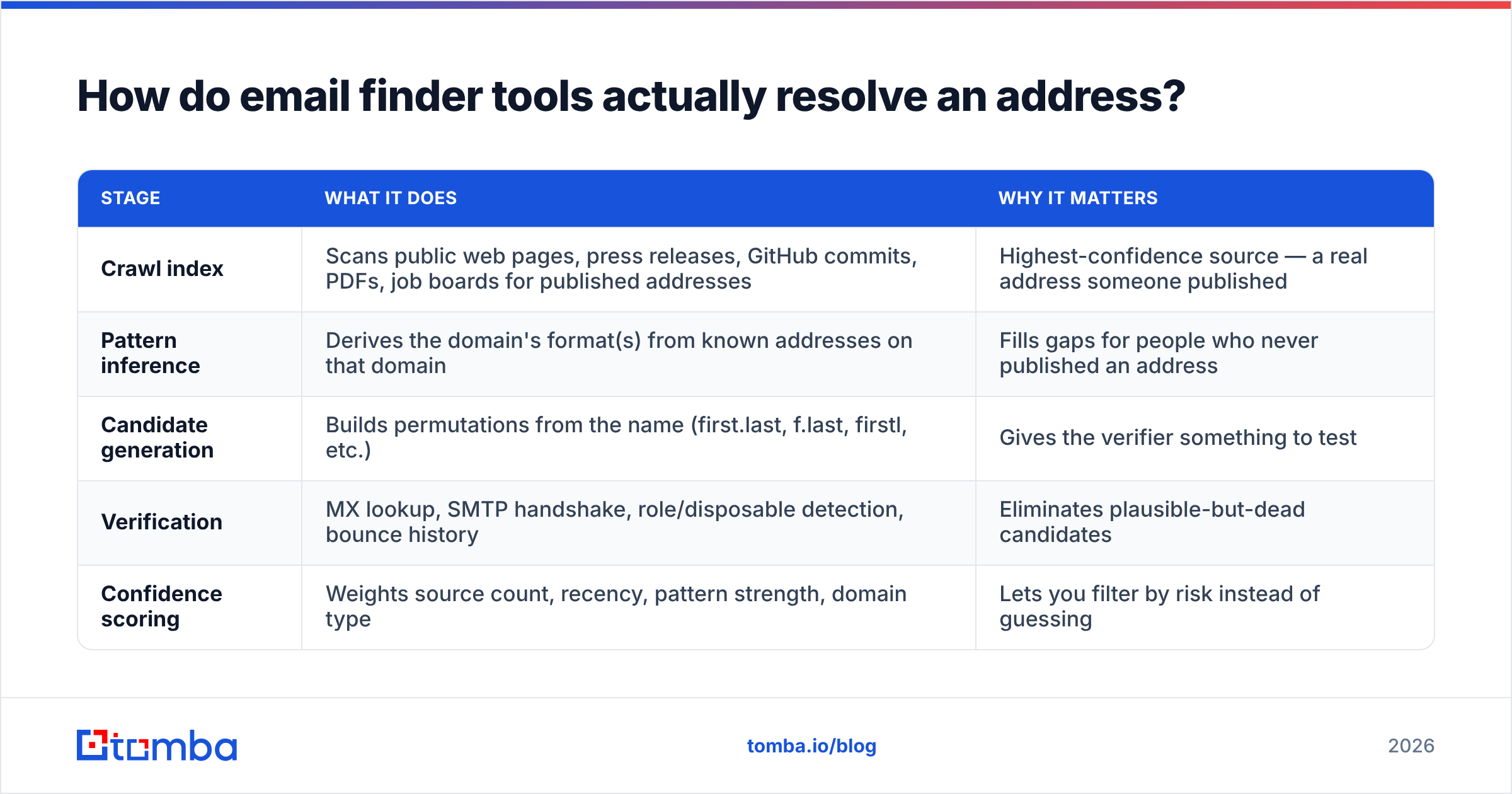
Good tools stack independent evidence and only return a result when enough sources agree. The typical pipeline:
| Stage | What it does | Why it matters |
|---|---|---|
| Crawl index | Scans public web pages, press releases, GitHub commits, PDFs, job boards for published addresses | Highest-confidence source — a real address someone published |
| Pattern inference | Derives the domain's format(s) from known addresses on that domain | Fills gaps for people who never published an address |
| Candidate generation | Builds permutations from the name (first.last, f.last, firstl, etc.) | Gives the verifier something to test |
| Verification | MX lookup, SMTP handshake, role/disposable detection, bounce history | Eliminates plausible-but-dead candidates |
| Confidence scoring | Weights source count, recency, pattern strength, domain type | Lets you filter by risk instead of guessing |
The confidence score is the part most buyers ignore and the part that determines your bounce rate. A finder that returns 90% of your list at 50% confidence is worse than one that returns 65% at 95% confidence, because you can send the second batch immediately and route the first to LinkedIn or phone instead.

Two caveats on any accuracy chart, including that one. First, accuracy is measured against a test list, and test lists have a bias — US-heavy, tech-heavy, mid-market. Your ICP is probably different. Second, "accuracy" and "coverage" trade off: a tool can look accurate by refusing to answer hard queries. Always read the pair together, and ideally run your own 100-contact bake-off before committing budget. The G2 lead intelligence category is a reasonable place to sanity-check vendor claims against reviewer volume.
Which email addresses search tools are worth it in 2026?#
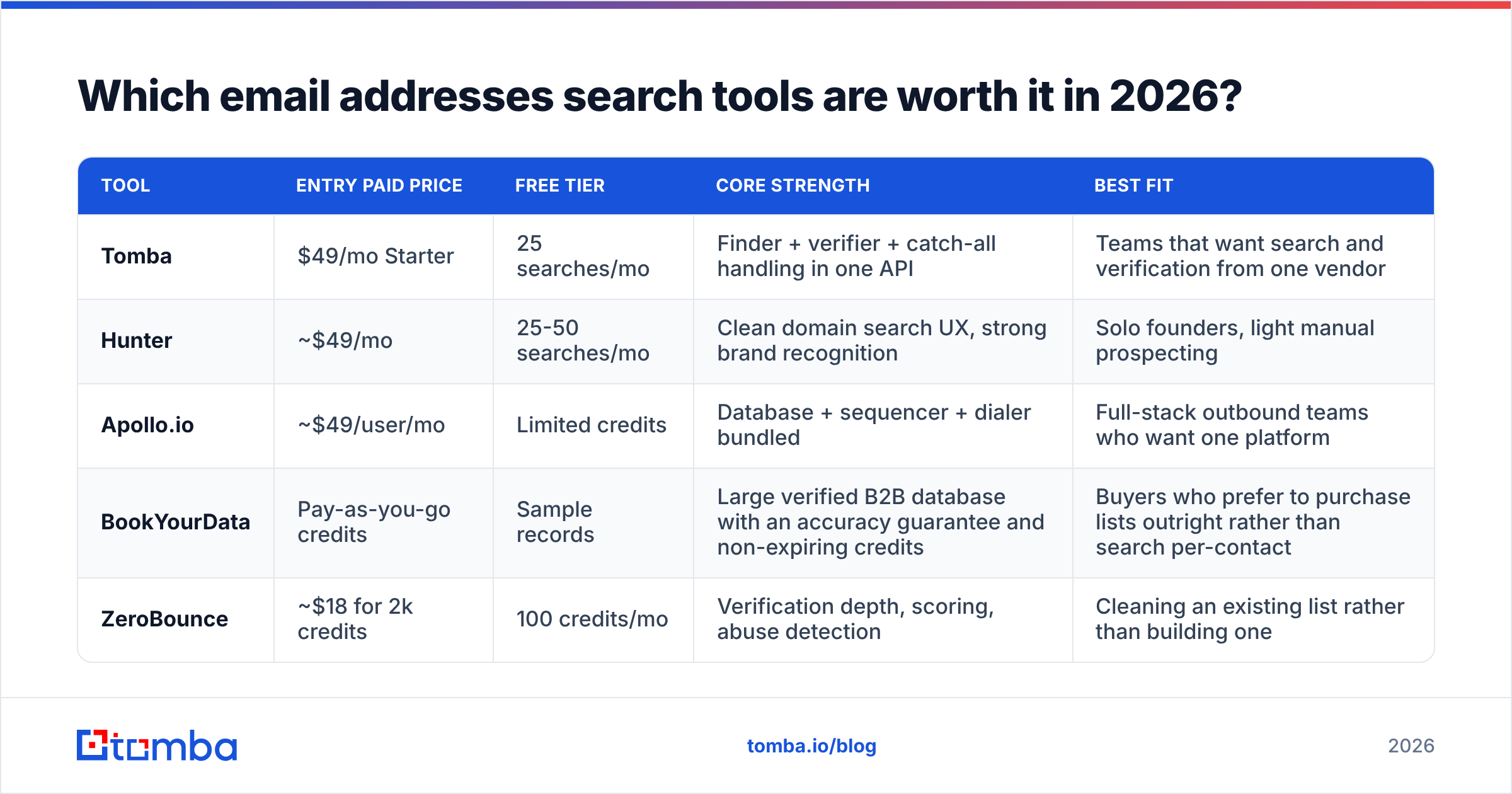
Prices below are list prices for the entry paid tier at the time of writing and change often — check each vendor before you buy.
| Tool | Entry paid price | Free tier | Core strength | Best fit |
|---|---|---|---|---|
| Tomba | $49/mo Starter | 25 searches/mo | Finder + verifier + catch-all handling in one API | Teams that want search and verification from one vendor |
| Hunter | ~$49/mo | 25-50 searches/mo | Clean domain search UX, strong brand recognition | Solo founders, light manual prospecting |
| Apollo.io | ~$49/user/mo | Limited credits | Database + sequencer + dialer bundled | Full-stack outbound teams who want one platform |
| BookYourData | Pay-as-you-go credits | Sample records | Large verified B2B database with an accuracy guarantee and non-expiring credits | Buyers who prefer to purchase lists outright rather than search per-contact |
| ZeroBounce | ~$18 for 2k credits | 100 credits/mo | Verification depth, scoring, abuse detection | Cleaning an existing list rather than building one |

Read that table by job, not by score. If your problem is "I have 40,000 rows in HubSpot and no idea which are alive," a verifier beats a finder. If your problem is "I have 300 target accounts and no contacts," a finder beats a verifier. If your problem is "I need 10,000 contacts in a defined segment by Friday," a curated database purchase — BookYourData is a solid option here, with credits that don't expire — is usually faster than running 10,000 individual searches.
Tomba's positioning is the middle path: per-search finding plus native verification, with the same credit pool covering email verification, catch-all checks, and enrichment. That matters operationally more than it sounds, because two-vendor stacks mean two credit balances, two rate limits, and a reconciliation problem when the finder says valid and the verifier says risky.

How do you run a bulk email addresses search without wrecking your domain?#
Volume changes the rules. A single lookup is harmless; 5,000 lookups feeding straight into a sequence is how new domains get burned in week one.
- Normalize the input first. Strip titles, fix casing, split full names into first/last, resolve company names to real domains. Garbage in, guessed-out. A bulk email finder will happily process 5,000 malformed rows and charge you for all of them.
- Search, then verify as a separate pass. Do not trust a single combined "found and valid" flag. Run verification independently so you can see the disagreement rate — if 15% of found addresses fail verification, your input data has a quality problem upstream.
- Tier the output. Valid + high confidence → send now. Catch-all → send only with a warmed domain and a tight volume cap. Risky/unknown → route to LinkedIn, phone, or ads. Invalid → discard, and record the miss.
- Cap daily volume per sending identity. Verified list or not, ramping a new mailbox past ~30-50 cold sends a day early on is asking for filtering. Your sender reputation is the asset; the list is just fuel.
- Re-verify anything older than 60-90 days. Job changes do not announce themselves. Re-verification is cheap; a bounce against a domain you spent six months warming is not.
- Log not-founds with a timestamp. Otherwise your next campaign pays to search the same 800 unreachable contacts again.
For anything recurring, do this through an API rather than CSV round-trips. The email finder API pattern — search on record creation, verify on a schedule, write confidence back to the CRM field — removes the human step where most data quality dies. HubSpot's own data management documentation is a useful reference for how to structure those writebacks without creating duplicate contact chaos.
Is a free email addresses search good enough?#
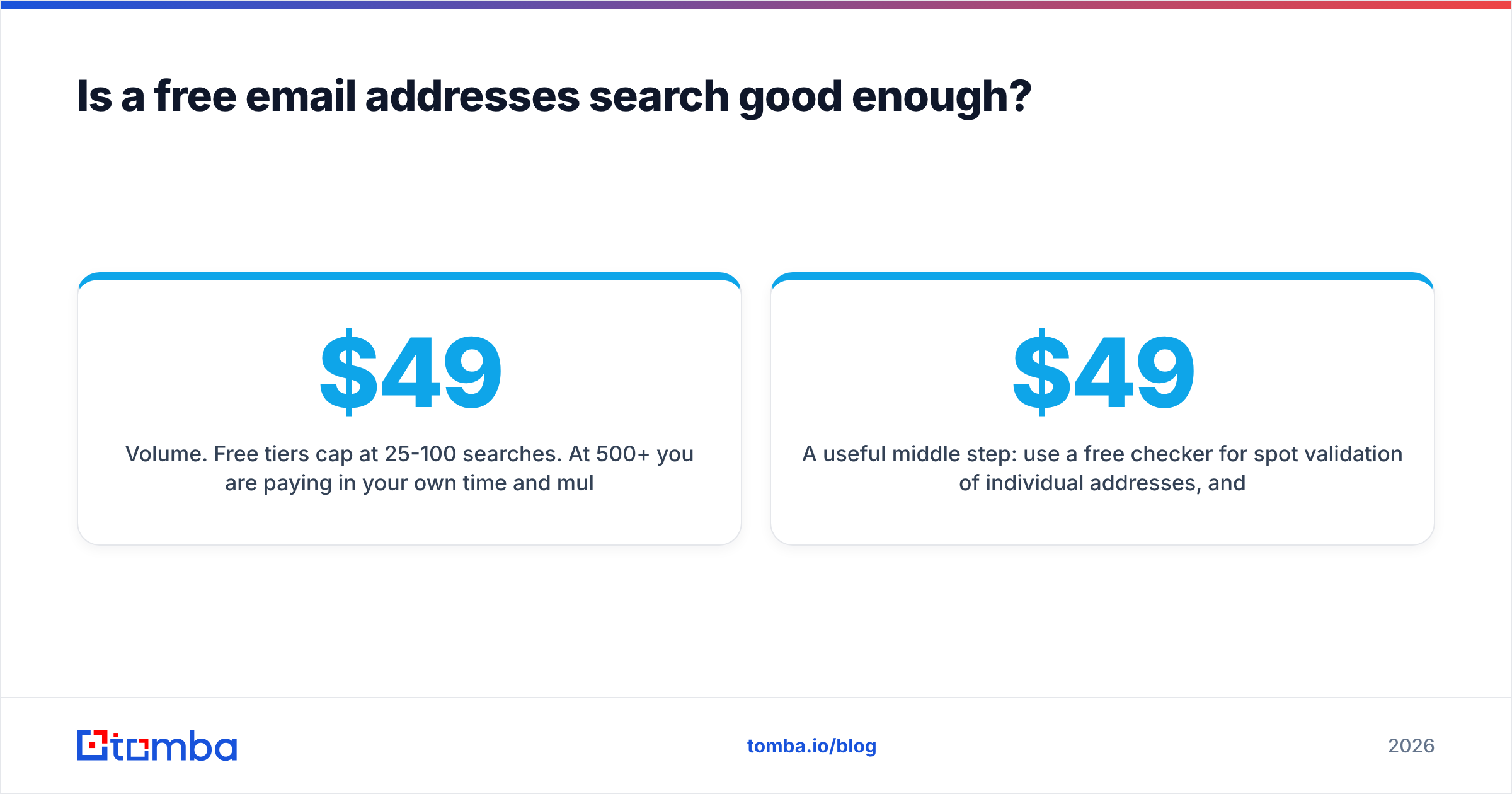
For under ~25 lookups a month, yes. Free tiers exist because vendors know that occasional users convert eventually, and 25 searches covers a founder emailing a handful of investors or a recruiter chasing one candidate.
Free stops working at three specific thresholds:
- Volume. Free tiers cap at 25-100 searches. At 500+/month you are paying in your own time and multiple accounts, which costs more than $49.
- Verification depth. Free tools usually do syntax and MX checks only. They do not detect catch-all, disposable, or role addresses reliably, which are exactly the three categories that hurt you.
- Auditability. When a campaign underperforms, you need to know whether the list or the copy failed. Without confidence scores and verification logs, you are debugging blind.
A useful middle step: use a free checker for spot validation of individual addresses, and reserve paid credits for anything that will actually receive a send. Tomba's free tier includes 25 searches a month, with Starter at $49/mo, Growth at $99/mo, and Pro at $249/mo — see Tomba pricing for the current credit allocations per plan.
What should you measure to know your search is working?#
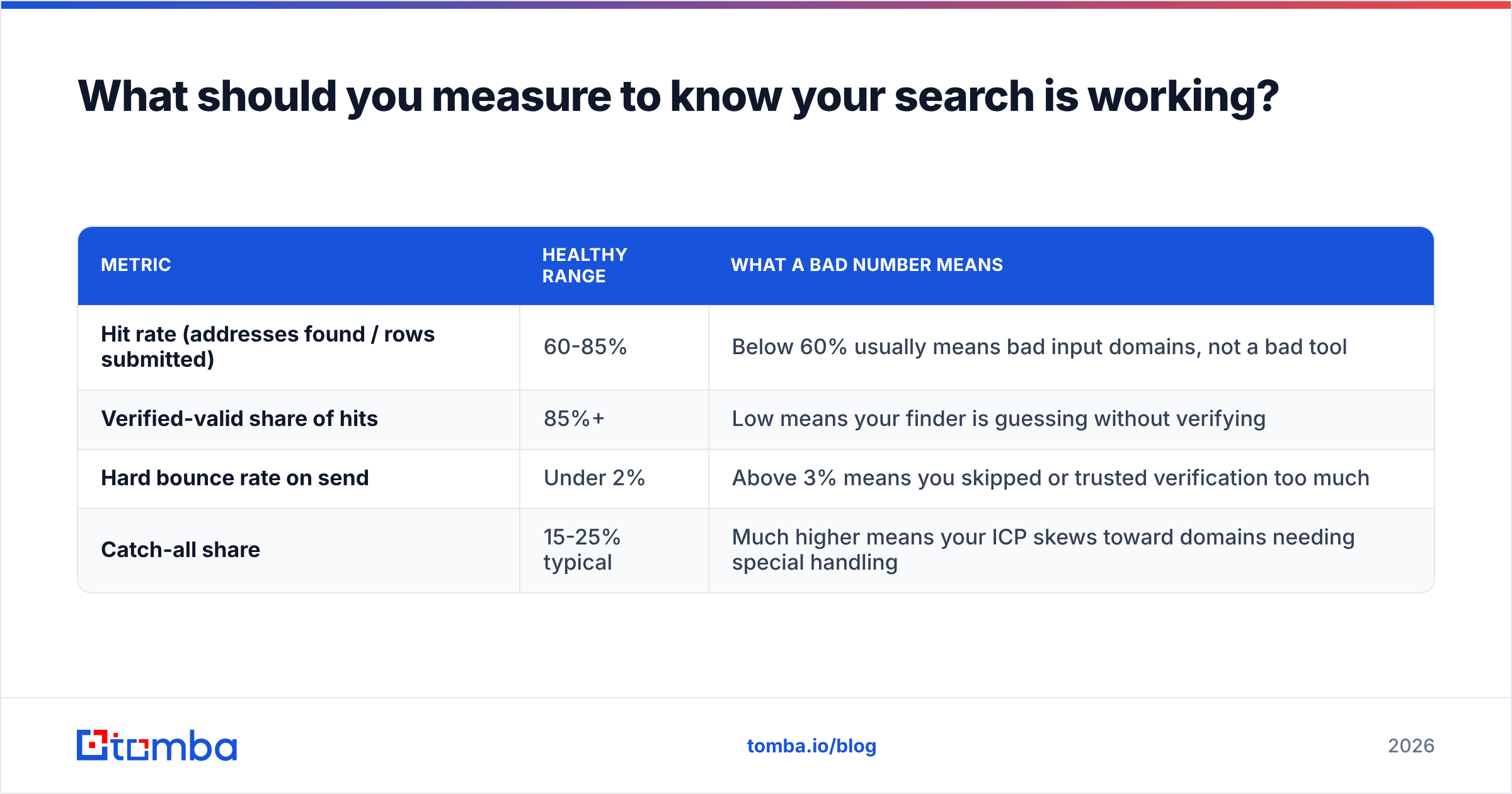
Four numbers, tracked per batch:
| Metric | Healthy range | What a bad number means |
|---|---|---|
| Hit rate (addresses found / rows submitted) | 60-85% | Below 60% usually means bad input domains, not a bad tool |
| Verified-valid share of hits | 85%+ | Low means your finder is guessing without verifying |
| Hard bounce rate on send | Under 2% | Above 3% means you skipped or trusted verification too much |
| Catch-all share | 15-25% typical | Much higher means your ICP skews toward domains needing special handling |
Track these by segment, not in aggregate. A 70% blended hit rate can hide 92% on US software and 41% on German industrials — and only the segmented view tells you where to switch tactics to phone or LinkedIn instead of throwing more credits at a wall.
Where should you start?#
Pick one ICP segment, take 100 real target contacts, and run them through two tools plus an independent verifier. Compare hit rate, verified-valid share, and cost per usable address — not cost per credit. That test takes an afternoon and will save you a quarter of guessing.
If you want the finder and the verification in the same place so those numbers actually reconcile, start with Tomba Email Finder. The free tier gives you 25 searches a month — enough to run the bake-off above before you spend anything, and enough to see whether the confidence scores hold up against your own segment rather than someone else's benchmark list.
Related guides#
Ready to find emails that actually work?
Join 150,000+ professionals who stopped guessing and started sending. Free credits on signup — no credit card required.
Get the Tomba newsletter
Practical outbound tactics and product updates — once every two weeks.
About the author