Email Appointment Confirmation: Templates That Cut No-Shows
No-shows cost more than bad leads. Here's how to write an email appointment confirmation that gets read, gets calendared, and gets the prospect to actually show up — with templates and timing data.
An email appointment confirmation is the short note you send the moment a meeting is booked. It costs nothing to send. It is still the cheapest way to cut no-shows. Below: what to include, when to send it, and nine templates you can copy.
TL;DR
- An email appointment confirmation restates who, when, where, and why. Send it the moment the meeting is booked.
- Send it within 5 minutes. Then remind at 24 hours and 1 hour. Three touches beat one.
- Include a calendar file (.ics), the time zone, the join link, and a one-line agenda. The rest is optional.
- A confirmation only helps if it lands. A bad address turns into a fake no-show, so verify the address first.
- Nine copy-paste templates cover discovery calls, demos, reschedules, no-show recovery, and office visits.
What Is an Email Appointment Confirmation?#
An email appointment confirmation is a short, transactional email. It confirms a booked meeting and puts the details in writing. Think of it as the receipt for a promise. The receipt is not the thing you bought. But without it, neither side can prove what was agreed.
It lives in two worlds. It is transactional, so the reader expects it and consent rules for marketing mail treat it differently. It also does sales work. It sets the agenda and makes the meeting easy to keep.
Six things separate a confirmation that works from one that gets skimmed:
- Timing — send it within 5 minutes of the booking, while intent is still warm.
- Calendar payload — attach an .ics file or add a one-click Google Calendar link. A meeting that is not on a calendar is not a meeting.
- Time zone clarity — write “Thursday, Aug 6 at 2:00 PM ET (11:00 AM PT).” Never write “2 PM” on its own.
- A one-line agenda — “15 minutes: your outbound stack, then whether our data covers your buyers.” It shows the slot is worth keeping.
- A visible reschedule link — it feels risky. It is not. An easy move beats a silent no-show.
- A named human sender — use a real mailbox, not
noreply@. Replies are signal, and you want them.
Why Does an Email Appointment Confirmation Cut No-Shows?#
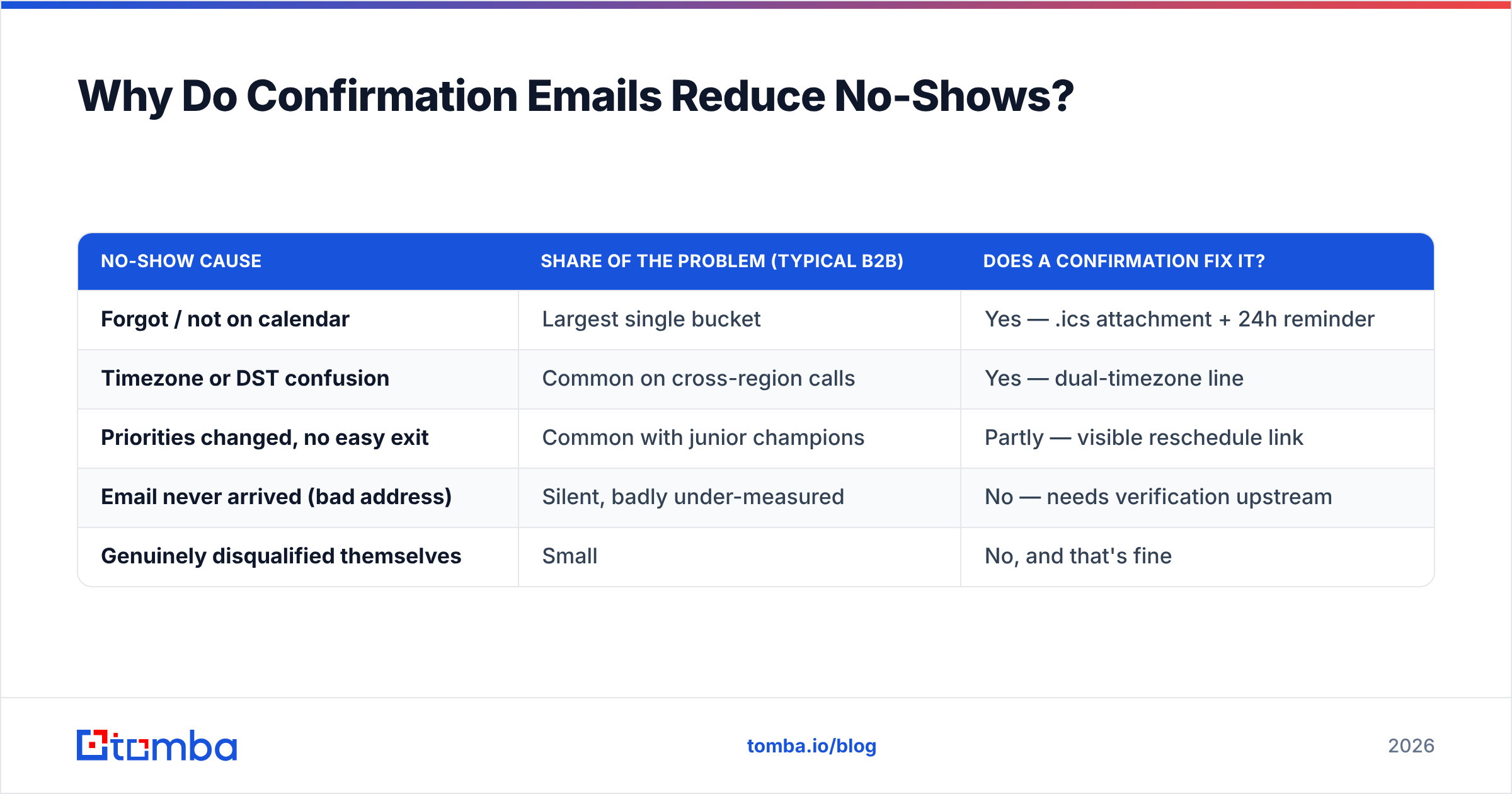
A no-show is rarely a rejection. It is usually one of four failures. A confirmation fixes three of them.
| No-show cause | Share of the problem (typical B2B) | Does a confirmation fix it? |
|---|---|---|
| Forgot / not on calendar | Largest single bucket | Yes — .ics attachment + 24h reminder |
| Timezone or DST confusion | Common on cross-region calls | Yes — dual-timezone line |
| Priorities changed, no easy exit | Common with junior champions | Partly — visible reschedule link |
| Email never arrived (bad address) | Silent, badly under-measured | No — needs verification upstream |
| Genuinely disqualified themselves | Small | No, and that's fine |
That fourth row is the one teams miss. Maybe the meeting came from a form, a chat widget, or a rep typing an address off a LinkedIn profile. Then there is a real chance the email appointment confirmation bounced. Or it landed in a shared inbox nobody watches. Your dashboard logs a no-show. Reality logged a bad address. Run every address through an email verifier before the sequence starts, and that hidden bucket becomes a fixable one.
Sender reputation is the other fix. Confirmations are your best emails. High open rates. Lots of replies. Almost no spam complaints. If a weak domain setup gets them filtered, you lose that edge. Check your SPF record and watch your sender reputation before you blame the copy.
[Screenshot placeholder: Google Postmaster Tools domain reputation graph showing "High" reputation across a 30-day window]
What Should Every Email Appointment Confirmation Include?#
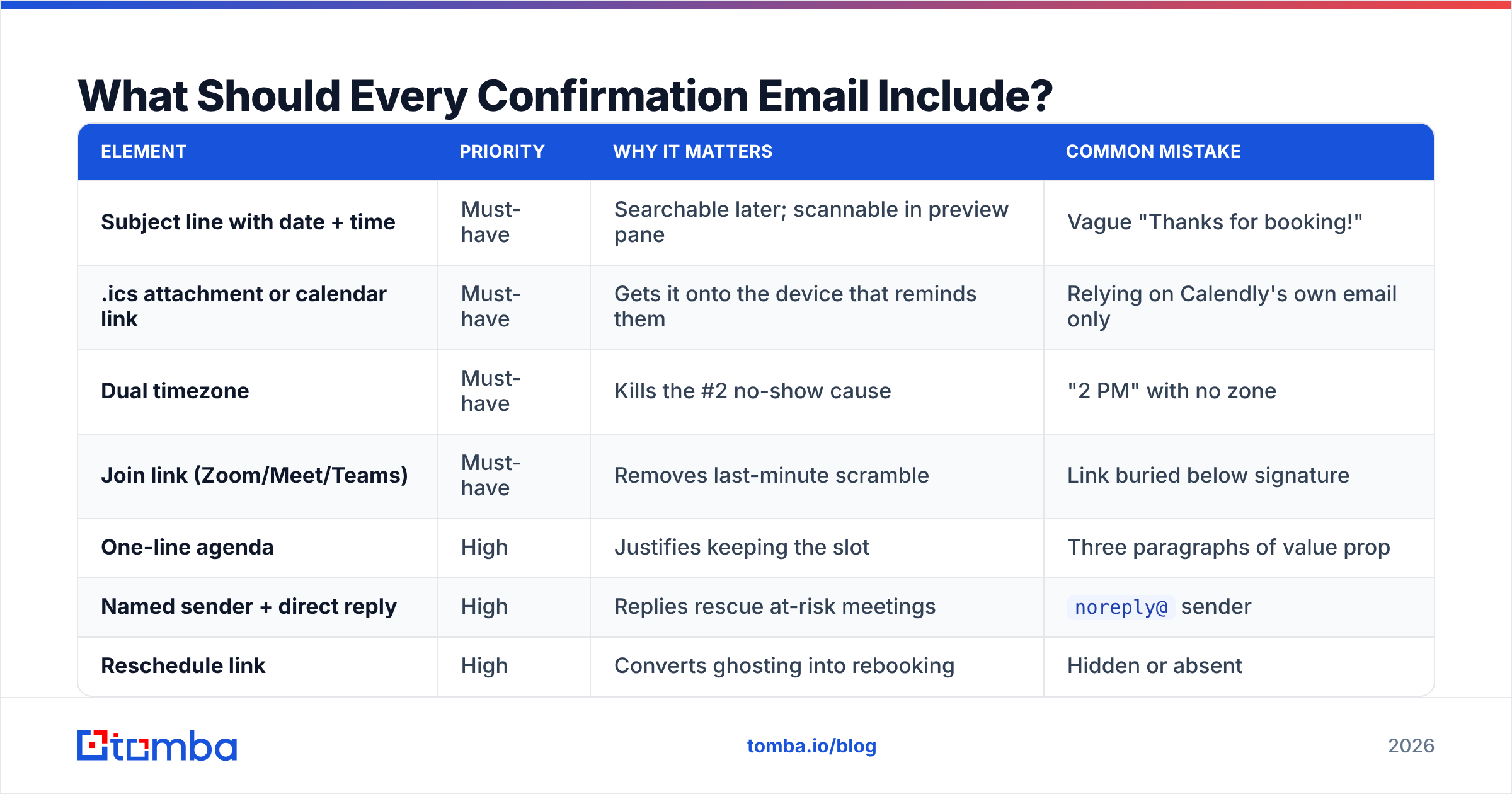
Here is the field checklist. It is ranked by what changes attendance, not by what looks polished.
| Element | Priority | Why it matters | Common mistake |
|---|---|---|---|
| Subject line with date + time | Must-have | Searchable later; scannable in preview pane | Vague "Thanks for booking!" |
| .ics attachment or calendar link | Must-have | Gets it onto the device that reminds them | Relying on Calendly's own email only |
| Dual timezone | Must-have | Kills the #2 no-show cause | "2 PM" with no zone |
| Join link (Zoom/Meet/Teams) | Must-have | Removes last-minute scramble | Link buried below signature |
| One-line agenda | High | Justifies keeping the slot | Three paragraphs of value prop |
| Named sender + direct reply | High | Replies rescue at-risk meetings | noreply@ sender |
| Reschedule link | High | Converts ghosting into rebooking | Hidden or absent |
| Duration | Medium | Sets expectation, reduces "I only have 10 min" | Omitted entirely |
| Attendee list | Medium | Buyer knows who to loop in | Surprise second rep on the call |
| Prep ask (1 question max) | Medium | Warms the discovery | Homework assignment |
| Company boilerplate | Low | Marginal trust signal | Half the email body |
| Marketing footer / CTA banner | Skip | Makes a transactional email look promotional | Newsletter signup block |
Keep the body under 120 words. A confirmation is a reference card, not a pitch. Buyers read it twice: once when it lands, and once a minute before the call.
What Are the Best Email Appointment Confirmation Templates?#
Nine templates. Swap the bracketed fields and keep the shape. Every email appointment confirmation here is short on purpose.
1. Discovery call confirmation (immediate)
Subject: Confirmed: [Your Company] × [Their Company] — Thu Aug 6, 2:00 PM ET
Hi [First name],
You're on my calendar for Thursday, August 6 at 2:00 PM ET (11:00 AM PT), 25 minutes.
Join link: [URL]
Calendar invite is attached.
Plan: I'll ask how [their team] sources contact data today, then show whether our coverage fits [their ICP]. No slides.
Need a different time? [Reschedule link]
— [Your name], [direct phone]
2. Demo confirmation (immediate)
Subject: Demo confirmed — Wed Aug 12, 10:00 AM BST (30 min)
Hi [First name],
Confirming our demo: Wednesday, August 12, 10:00 AM BST (5:00 AM ET), 30 minutes. Invite attached, join link inside.
One question so I don't waste your time: which of these matters most to you — coverage in [region], verification accuracy, or API throughput? Reply with one word.
[Reschedule link]
3. 24-hour reminder
Subject: Tomorrow 2:00 PM ET — [Your Company] call
Hi [First name] — quick reminder we're speaking tomorrow at 2:00 PM ET. Join link: [URL].
If tomorrow no longer works, [reschedule here] — genuinely fine, I'd rather move it than lose it.
4. One-hour reminder (short)
Subject: Starting in 1 hour
[First name] — we're on in an hour. [Join link]. See you there.
5. Reschedule confirmation
Subject: Moved: now Tue Aug 18, 3:00 PM ET
Hi [First name], updated as requested — Tuesday, August 18, 3:00 PM ET (12:00 PM PT). New invite attached; please delete the old one so you don't get a phantom reminder.
6. No-show recovery (send within 20 minutes)
Subject: Missed you — want to grab another slot?
Hi [First name], I was on the line at 2:00 and figured something came up. No problem at all.
Here's my calendar if you'd still like to talk: [link]. If the timing isn't right this quarter, just say “not now” and I'll stop chasing.
7. In-person / office visit
Subject: Confirmed: Fri Aug 21, 9:30 AM — [Office address]
Hi [First name], confirming Friday, August 21 at 9:30 AM at [full address, floor, suite].
Ask reception for [name]. Parking: [detail]. My mobile if you're delayed: [number].
8. Multi-stakeholder confirmation
Subject: Confirmed Thu 11:00 AM ET — [Name], [Name], [Name] attending
Hi all — confirming Thursday at 11:00 AM ET, 45 minutes. Attending from our side: [name, role] and [name, role].
Agenda: 10 min current state, 20 min walkthrough, 15 min pricing and next steps. Anything you'd add, reply and I'll adjust.
9. Inbound-lead confirmation (form submission)
Subject: Booked — Mon Aug 24, 4:00 PM CET
Hi [First name], thanks for booking through the site. Monday, August 24, 4:00 PM CET, 20 minutes, [join link], invite attached.
I had a look at [their domain] beforehand so we can skip the basics.
Want more starting points? The cold email templates library covers the outreach that earns the booking. Writing subject lines at volume? Run them through a subject line tester first.
How Should You Automate Email Appointment Confirmation Sequences?#
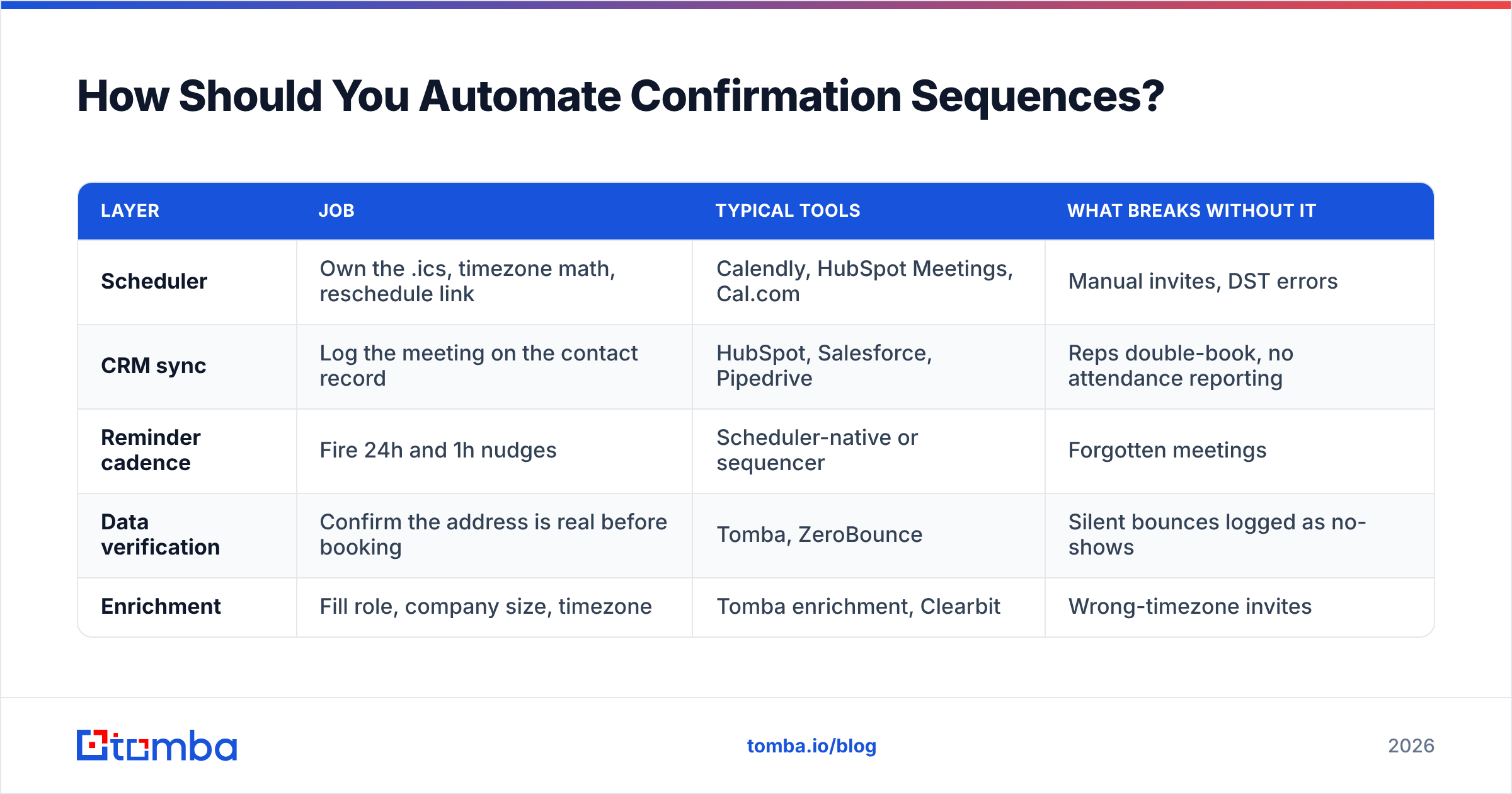
Never send the confirmation by hand. The right stack is boring on purpose. A scheduler owns the calendar event. A CRM owns the record. A verifier owns data quality.
| Layer | Job | Typical tools | What breaks without it |
|---|---|---|---|
| Scheduler | Own the .ics, timezone math, reschedule link | Calendly, HubSpot Meetings, Cal.com | Manual invites, DST errors |
| CRM sync | Log the meeting on the contact record | HubSpot, Salesforce, Pipedrive | Reps double-book, no attendance reporting |
| Reminder cadence | Fire 24h and 1h nudges | Scheduler-native or sequencer | Forgotten meetings |
| Data verification | Confirm the address is real before booking | Tomba, ZeroBounce | Silent bounces logged as no-shows |
| Enrichment | Fill role, company size, timezone | Tomba enrichment, Clearbit | Wrong-timezone invites |
Two rules are worth enforcing.
Send reminders in the same thread. Reply to your own confirmation instead of starting a new message. The thread keeps the context, and Gmail groups it. The buyer sees one conversation, not four unread emails.
Stop the cadence on reply. If the prospect answers, the 24-hour reminder should not fire anyway. Almost every sequencer can do this. A lot of teams leave it off.
Tomba's HubSpot integration pushes verified contacts into the record the meeting is booked against. The scheduler and the CRM then agree on the address. Prefer to build it yourself? The Tomba API exposes finder and verifier endpoints. Call them from the same webhook that fires on booking.
[Screenshot placeholder: Calendly workflow editor showing a three-step reminder sequence — immediate confirmation, 24h, 1h]
How Do Confirmation Tools Compare on Data Quality?#
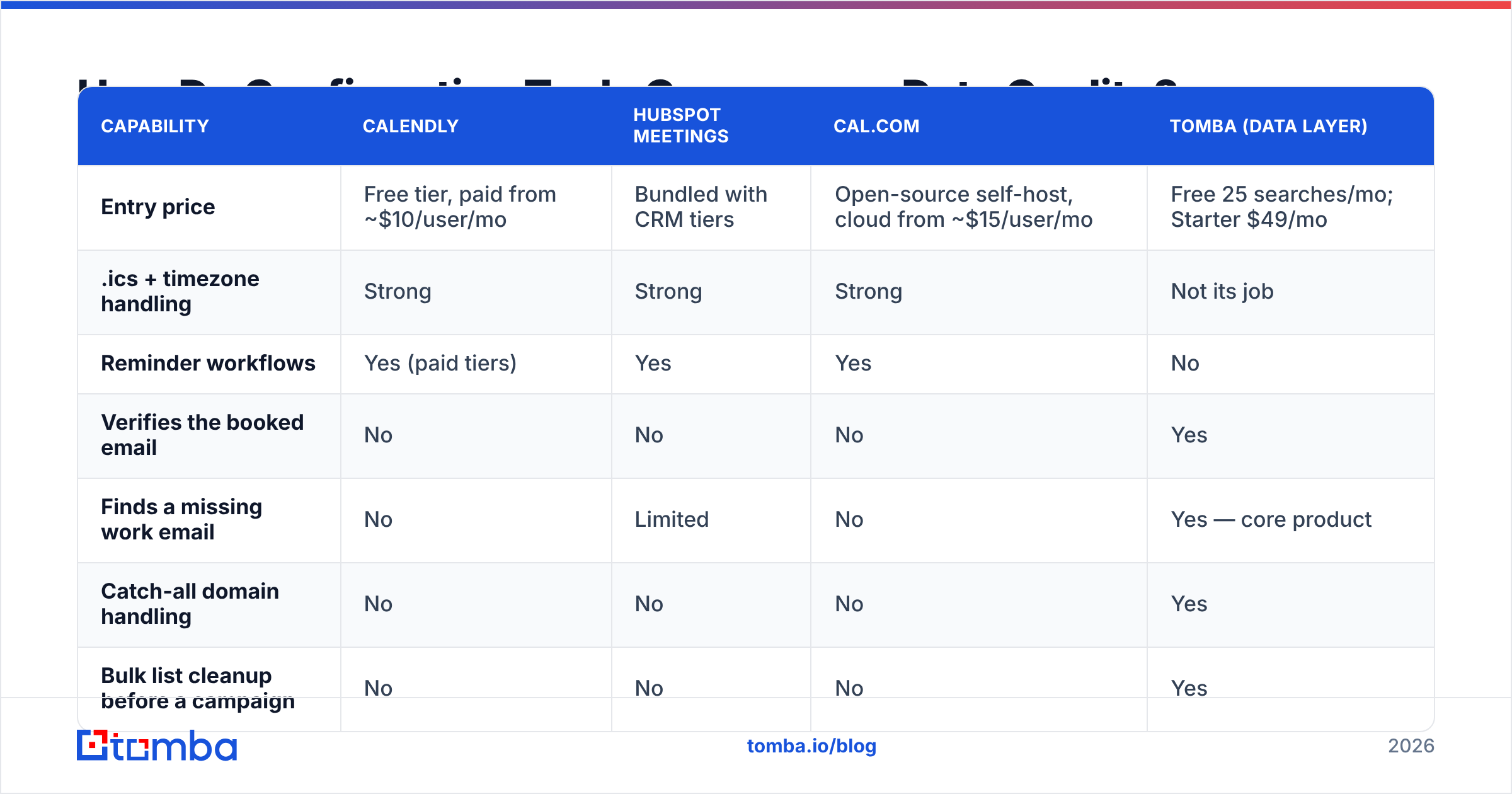
Schedulers handle calendars well and contact data badly. That gap matters. The address the scheduler collects is the address every reminder goes to.
| Capability | Calendly | HubSpot Meetings | Cal.com | Tomba (data layer) |
|---|---|---|---|---|
| Entry price | Free tier, paid from ~$10/user/mo | Bundled with CRM tiers | Open-source self-host, cloud from ~$15/user/mo | Free 25 searches/mo; Starter $49/mo |
| .ics + timezone handling | Strong | Strong | Strong | Not its job |
| Reminder workflows | Yes (paid tiers) | Yes | Yes | No |
| Verifies the booked email | No | No | No | Yes |
| Finds a missing work email | No | Limited | No | Yes — core product |
| Catch-all domain handling | No | No | No | Yes |
| Bulk list cleanup before a campaign | No | No | No | Yes |
| API for booking-time verification | Limited | Yes | Yes | Yes |
Read that table as complementary, not competitive. You need a scheduler. You also need the address to be real. If your meetings come from lists, events, or typo-prone forms, run them through bulk verify before the first email appointment confirmation goes out. Buying lists from a vendor like BookYourData? Verify at import time too. Every vendor's data decays, so a fresh check is basic hygiene.
User reviews in G2's meeting-scheduling category rank reminder reliability above feature depth. Attendance data says the same thing: cadence beats polish.
What Mistakes Kill Email Appointment Confirmation Performance?#
- No calendar file. The most common and most costly miss. Without it, you are betting on memory.
- Marketing dressing. Logos, banners, and a newsletter CTA make a transactional email look promotional. That invites the Promotions tab, or worse, the spam folder. Plain text wins here.
- One time zone. DST makes it worse. Spell out both zones and the date, every time.
noreply@senders. You throw away the reply channel that saves at-risk meetings.
Three more traps, and more reminders is not the fix:
- Reminder spam. Four nudges for a 20-minute call reads as desperate. Immediate, 24h, and 1h is the ceiling.
- Ignoring bounces. A bounced confirmation should create a rep task, not silence. Wire the bounce webhook to a domain search on the company domain.
- No agenda. A meeting with no stated purpose is the first thing a busy buyer deletes.
Frequently Asked Questions#
How soon should an email appointment confirmation go out? Within 5 minutes of the booking, and automated. A manual note sent hours later misses the intent window and looks sloppy.
Do confirmation emails need an unsubscribe link? A purely transactional confirmation usually sits outside marketing consent rules. Add promotional content and you have changed what the message is. Keep it clean and the question stays easy. Check the details with your own counsel.
Should reminders be email, SMS, or both? Email carries the record and the links. SMS suits the 1-hour nudge on high-value meetings, where you have consent for the number. A phone validator step keeps SMS from failing quietly.
What is a realistic no-show rate? It swings by lead source. Inbound demo requests behave nothing like cold-booked meetings. Track your own rate by source. Then measure whether the 24-hour reminder moves it. That is the only comparison that means much.
Does the subject line matter for a confirmation? Yes, mostly for search. Put the date and time in it. The buyer can then find the thread 30 seconds before the call.
Where Should You Start?#
Fix the plumbing in this order. Get an .ics into every email appointment confirmation. Add the 24-hour and 1-hour reminders. Spell out both time zones. Then verify the addresses feeding all of it. The first three take an afternoon in your scheduler settings. The fourth is the one most teams skip, and it quietly caps everything else.
Do your booked meetings come from prospecting? Then the address problem starts before the calendar. Tomba Email Finder finds verified work emails by name and domain, so your email appointment confirmation lands in a monitored inbox instead of a typo. Start free at 25 searches a month. Or see Tomba pricing — Starter is $49/mo — when you run it across a whole pipeline.
Related guides#
Ready to find emails that actually work?
Join 150,000+ professionals who stopped guessing and started sending. Free credits on signup — no credit card required.
Get the Tomba newsletter
Practical outbound tactics and product updates — once every two weeks.
About the author