Email to Arrange a Meeting: Templates That Get Replies
Meeting-request emails fail for boring reasons: no context, vague asks, and too many scheduling options. Here are the templates, timing rules, and follow-up cadence that actually book calls in 2026.
TL;DR
- A meeting-request email has exactly one job: make saying yes cheaper than saying no. Everything else — pleasantries, company background, feature lists — reduces reply rate.
- Two concrete time slots beat "let me know what works for you" in nearly every internal test we've seen reported. A booking link works, but only after the recipient has already agreed in principle.
- Subject lines that name the outcome ("15 min on your Q3 pipeline data") outperform subject lines that name the format ("Meeting request").
- Follow up 3-4 times over 12-14 days, changing the angle each time. Roughly half of booked meetings come from a message after the first one.
- None of it matters if the address is wrong. Verify before you send — a bounced meeting request is a damaged sender reputation, not a lost lead.
What makes an email to arrange a meeting actually work?#
You are asking a stranger, or a semi-stranger, to give you a block of their calendar. That is a real cost to them: 15-30 minutes they can't get back, plus the context-switching tax on either side of it. Your email has to make that trade look obviously worth it in the four seconds they spend deciding.
Think of it like asking someone on the street for directions. You don't open with your life story. You say where you're trying to go, ask one specific question, and make it easy to answer in one sentence. Most bad meeting emails are the equivalent of walking up and delivering a monologue about your travel history before asking anything at all.
The structural anatomy that consistently works:
- A subject line that names the outcome, not the format. "Meeting request" describes what you want. "15 min on cutting your SDR ramp time" describes what they get.
- One line of context that proves you did homework. A trigger event, a mutual connection, a specific detail from their site or a recent announcement. This is the trust deposit.
- One sentence on why you specifically. Not a paragraph. Not a feature list. A single credible reason you're worth 15 minutes.
- A single, concrete ask. One meeting, one length, two proposed slots. Not "would you be open to exploring a conversation."
- A low-friction exit. "If this isn't a priority, just reply 'not now' and I'll stop." Counterintuitively, this raises reply rates because it makes replying feel safe.
- A signature that looks like a real human works there. Name, title, company, one link. Skip the banner images and the four social icons — they hurt deliverability and look like a mailing list.
Notice what's missing: no "I hope this email finds you well," no "I wanted to reach out," no three-paragraph company introduction. Every one of those lines pushes your actual ask further down the screen, which is the only thing that determines whether it gets read on a phone.
How long should a meeting request email be?#
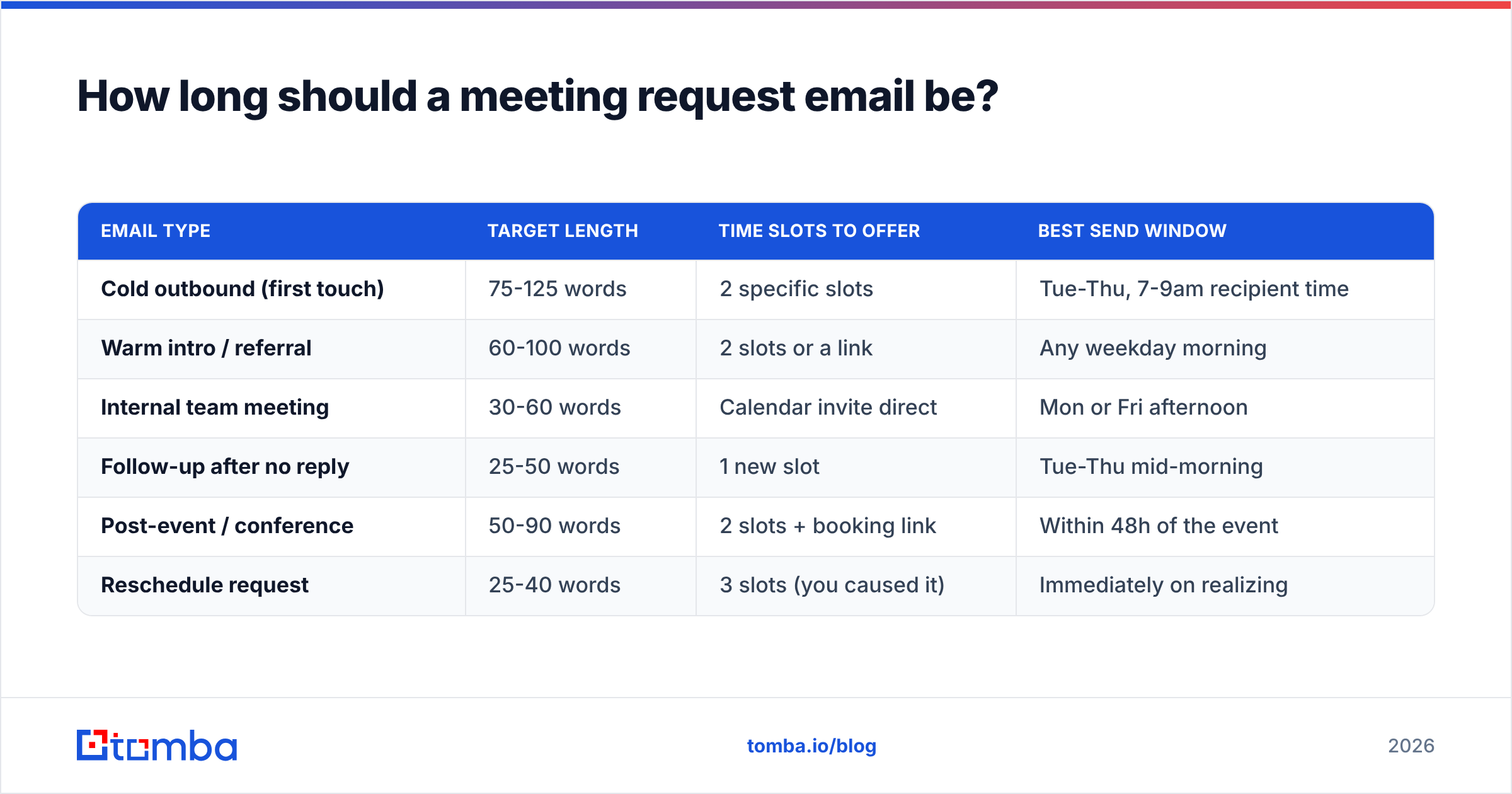
Between 50 and 125 words for cold outreach. Warm and internal requests can go shorter — 30 words is fine when the relationship is established.
The reason isn't a mystical attention-span statistic. It's mechanical: most B2B email is now read first on a phone, where the preview pane shows roughly 40-60 words before the fold. If your ask lives below the fold, you're relying on the recipient to scroll for a stranger. Most won't.
A useful test: paste your draft into a phone-width window. If the specific ask isn't visible without scrolling, cut until it is. Usually the first two sentences are the ones to delete — they're almost always warm-up.
| Email type | Target length | Time slots to offer | Best send window |
|---|---|---|---|
| Cold outbound (first touch) | 75-125 words | 2 specific slots | Tue-Thu, 7-9am recipient time |
| Warm intro / referral | 60-100 words | 2 slots or a link | Any weekday morning |
| Internal team meeting | 30-60 words | Calendar invite direct | Mon or Fri afternoon |
| Follow-up after no reply | 25-50 words | 1 new slot | Tue-Thu mid-morning |
| Post-event / conference | 50-90 words | 2 slots + booking link | Within 48h of the event |
| Reschedule request | 25-40 words | 3 slots (you caused it) | Immediately on realizing |
The send-window column is the part people over-optimize. Getting the day right (Tuesday through Thursday) matters more than getting the hour right, and both matter far less than whether the email is relevant. Timing is a tiebreaker, not a strategy.
Should you offer time slots or send a calendar link?#
Offer two specific slots on the first ask. Send the link after they say yes.
A booking link asks the recipient to do work: open a new tab, evaluate a grid, cross-reference their own calendar, commit. Two named slots ask them to type "Tuesday works." That difference in effort is the entire game on a cold email.
The link isn't wrong — it's just wrong first. Once someone has replied "sure, let's talk," a link is genuinely the fastest path and they'll happily use it. The sequence is: earn the yes with low friction, then hand over the scheduling tool.
There's a status dimension too. Sending a stranger a booking link on first contact implicitly says "my calendar is the constraint here." Proposing slots says "I'll work around you." With senior buyers, that reads very differently.
When a link on first touch is fine:
- Inbound replies. They filled out a form. They want the meeting. Reduce steps.
- Post-demo-request follow-ups. Intent is already established.
- Warm referrals where the introducer explicitly asked you to send one.
- Event follow-ups within 48 hours, where you met in person and the ask is already agreed.
What are the best templates to email and arrange a meeting?#
Nine templates below. Swap the bracketed parts. Do not swap them for something equally vague — if you can't fill [specific trigger] with something real, you don't have enough research to send the email yet.
1. Cold outbound, trigger-based
Subject: 15 min on [specific outcome]?
Hi [Name] — saw [company] just [trigger: hired 12 SDRs / launched in EMEA / raised a Series B]. When teams do that, list hygiene usually becomes the bottleneck within a quarter.
We helped [similar company] cut bounce rate from 14% to under 2% in six weeks.
Worth 15 minutes Tuesday at 10am or Wednesday at 2pm your time?
If it's not a priority, reply "not now" and I'll leave you alone.
2. Warm referral
Subject: [Referrer name] suggested I reach out
Hi [Name] — [Referrer] mentioned you're rebuilding the outbound stack at [company] and thought a conversation might be useful.
I run [thing] at [your company]; we work with [2-3 comparable logos] on exactly that problem.
Do you have 20 minutes Thursday morning, or is next week easier?
3. Post-content engagement
Subject: your comment on [post topic]
Hi [Name] — your point about [specific thing they said] on [platform] matched what we're seeing across [n] outbound teams.
I'd like to compare notes — genuinely, not a pitch. 15 minutes Monday at 3pm or Tuesday at 11am?
4. Re-engaging a stalled deal
Subject: closing your file?
Hi [Name] — we spoke in [month] about [specific problem]. I haven't heard back, which usually means priorities shifted.
Should I close this out, or is a 15-minute check-in next Tuesday worth it?
5. Internal cross-functional request
Subject: 30 min on [project] handoff — Thu or Fri?
[Name] — need to align on how [project] hands off between our teams before the [date] launch. Three open questions, 30 minutes should cover it.
Thursday 2pm or Friday 10am? I'll send an agenda either way.
6. Executive / senior buyer
Subject: [specific metric] at [company]
[Name] — one question: is [specific metric] a board-level priority this year at [company]?
If yes, I have benchmark data from [n] comparable companies I think you'd want to see. 15 minutes, and I'll send the data whether or not we talk.
7. Conference or event follow-up
Subject: following up from [event] — [specific thing you discussed]
[Name] — good talking at [event] about [specific topic]. You mentioned [their stated problem].
I pulled together [the thing you promised]. Want to walk through it — Wednesday 11am or Thursday 4pm? Or grab a slot here: [link].
8. Reschedule (you caused it)
Subject: need to move our Thursday call — apologies
[Name] — I have to move Thursday's call. My mistake, sorry for the churn.
Any of these work? Friday 10am, Monday 2pm, Tuesday 9am. Happy to work around whatever's easiest.
9. Final follow-up (the breakup)
Subject: last one from me
[Name] — I've sent a few notes about [topic] and haven't landed on anything useful. I'll stop here.
If [problem] becomes urgent later, reply to this thread and I'll pick it back up. Good luck with [specific thing].
The pattern across all nine: the ask is always a closed question. "Tuesday or Wednesday?" not "would you be open to a chat?" Closed questions get answered; open ones get archived.
How many times should you follow up?#
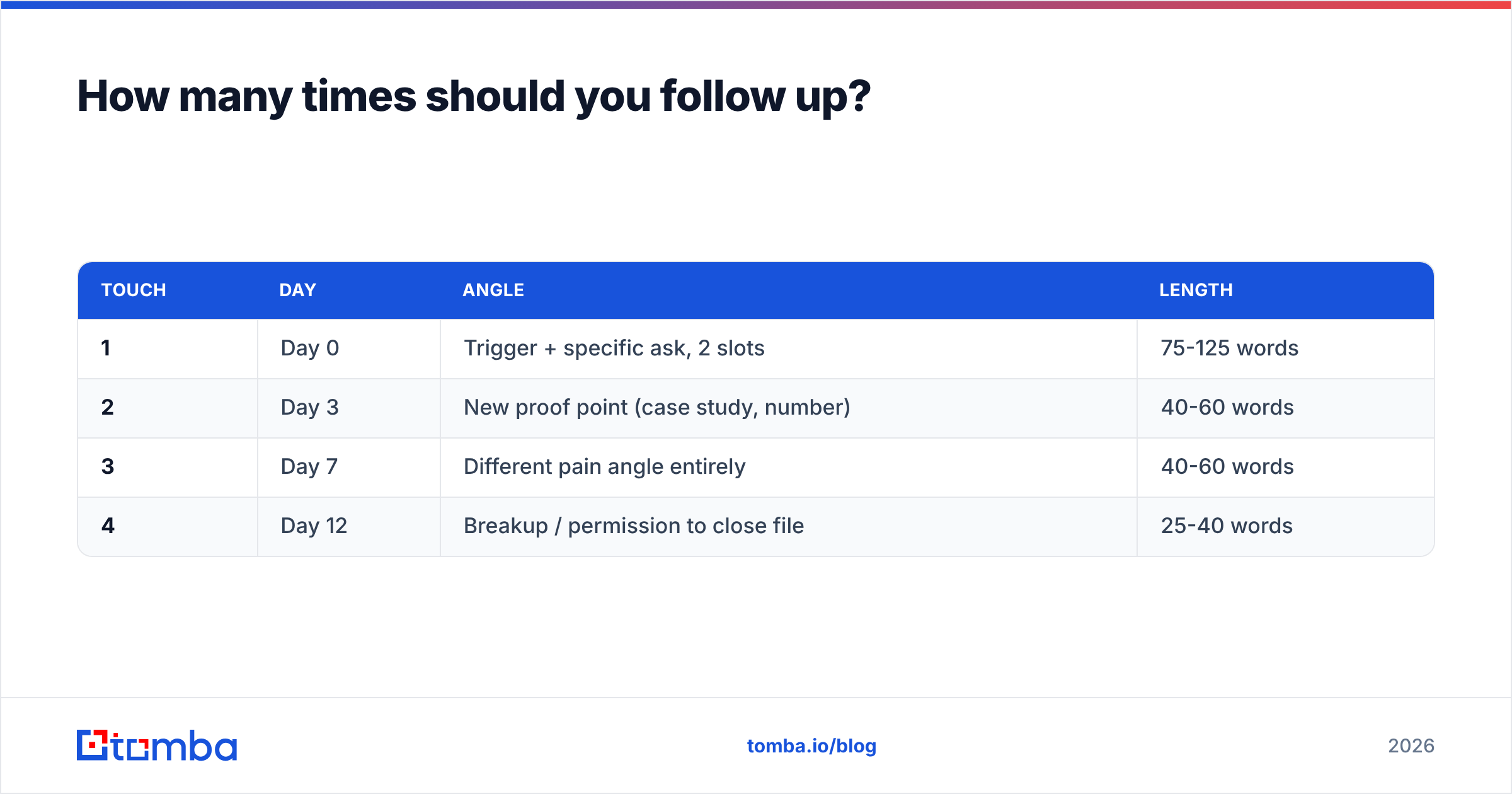
Three to four follow-ups over 12-14 days, each with a different angle. Then stop.
Most reply data across cold outreach reports the same shape: the first email gets the largest single share of replies, but the cumulative total from follow-ups two through four typically matches or exceeds it. Teams that send once and quit are leaving roughly half their meetings on the table. Teams that send eight times are burning their domain.
A cadence that holds up:
| Touch | Day | Angle | Length |
|---|---|---|---|
| 1 | Day 0 | Trigger + specific ask, 2 slots | 75-125 words |
| 2 | Day 3 | New proof point (case study, number) | 40-60 words |
| 3 | Day 7 | Different pain angle entirely | 40-60 words |
| 4 | Day 12 | Breakup / permission to close file | 25-40 words |
Two rules that matter more than the schedule. First, change the angle, don't repeat the ask — "just bumping this to the top of your inbox" adds no information and trains people to ignore you. Second, reply in-thread for touches 2 and 3, then start a fresh thread for the breakup. The thread carries context; the fresh subject line gets a second shot at the preview pane.
If you're running this at volume, the mechanics of sending matter as much as the copy. Watch your sender reputation, keep daily volume per mailbox conservative, and run a spam checker on templates before they go into a sequence. A template that trips filters at scale will quietly kill an entire cadence without ever showing up as a "no."

Why do meeting request emails bounce — and what does that cost you?#
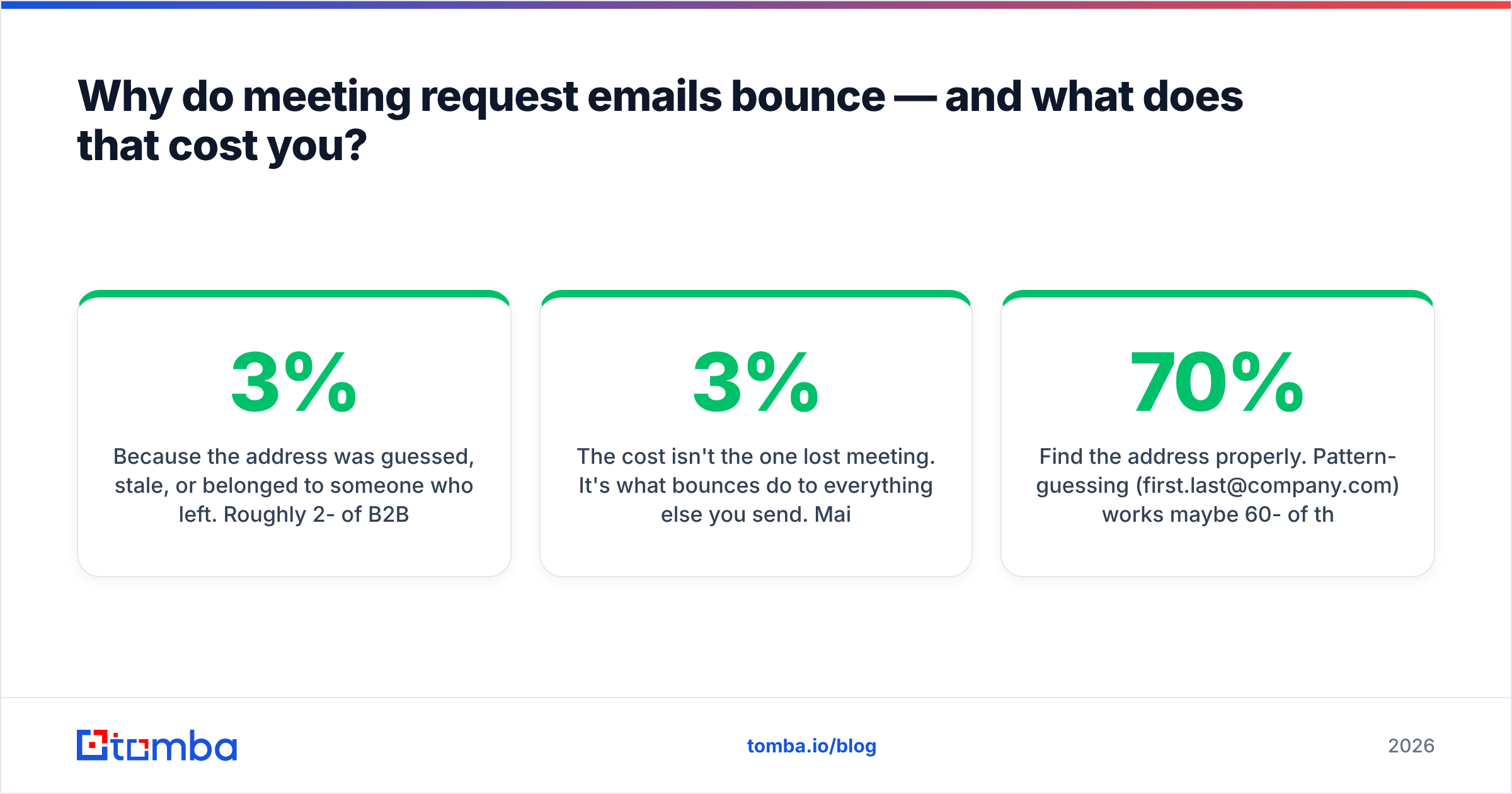
Because the address was guessed, stale, or belonged to someone who left. Roughly 2-3% of B2B contact data goes bad every month through job changes alone — call it 25-30% annual decay on a list you're not maintaining.
The cost isn't the one lost meeting. It's what bounces do to everything else you send. Mailbox providers read hard bounces as a signal that you're sending to a list you don't own or maintain. Cross a bounce rate of about 2-3% and your inbox placement drops for all recipients on that domain — including the prospects whose addresses were perfectly fine. You lose meetings you never knew you were close to booking.
This is why the verification step isn't optional hygiene, it's the highest-leverage thing in the whole workflow:
- Find the address properly. Pattern-guessing (
first.last@company.com) works maybe 60-70% of the time and fails silently. An email finder that checks against real sources, or a domain search to pull the confirmed pattern for a whole company, removes the guesswork. - Verify before every campaign, not once a quarter. Run the list through an email verifier immediately before send. Data that was clean in March is not clean in July.
- Handle catch-all domains explicitly. Catch-all servers accept everything, so standard verification returns "unknown." A catch-all verifier narrows those down instead of forcing you to gamble on the whole segment.
- Check the sending side too. SPF, DKIM, and DMARC need to be correct before volume goes up. Google and Yahoo's bulk-sender requirements made authentication a hard gate, not a best practice.
For teams building lists at scale, running finds and verifications through the Tomba API as part of the sequence-loading step catches decay automatically rather than depending on someone remembering to re-clean a CSV.
Which tools help you arrange meetings at scale?#
Different categories solve different parts of the problem. Most teams need two or three, not all of them.
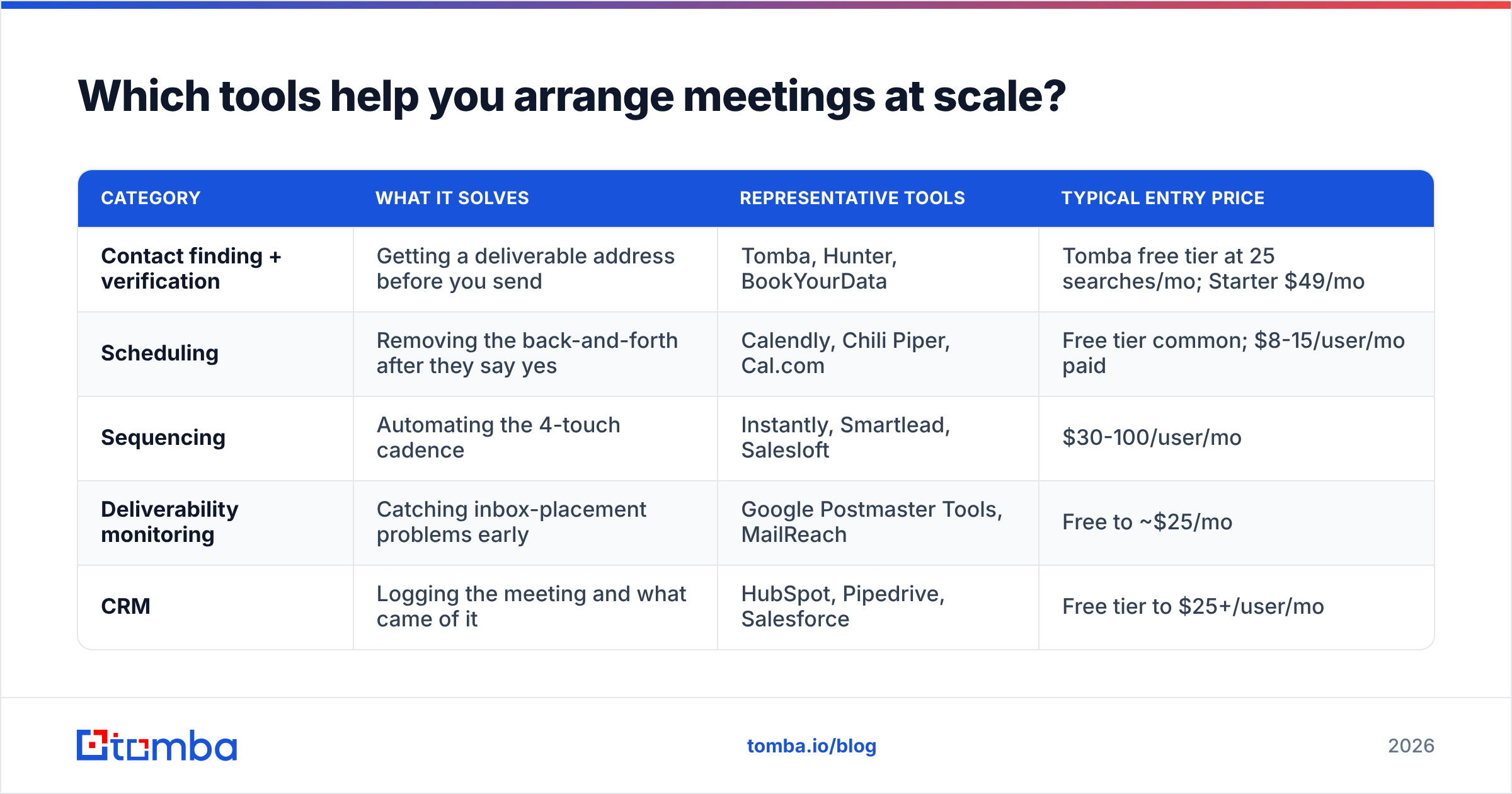
| Category | What it solves | Representative tools | Typical entry price |
|---|---|---|---|
| Contact finding + verification | Getting a deliverable address before you send | Tomba, Hunter, BookYourData | Tomba free tier at 25 searches/mo; Starter $49/mo |
| Scheduling | Removing the back-and-forth after they say yes | Calendly, Chili Piper, Cal.com | Free tier common; $8-15/user/mo paid |
| Sequencing | Automating the 4-touch cadence | Instantly, Smartlead, Salesloft | $30-100/user/mo |
| Deliverability monitoring | Catching inbox-placement problems early | Google Postmaster Tools, MailReach | Free to ~$25/mo |
| CRM | Logging the meeting and what came of it | HubSpot, Pipedrive, Salesforce | Free tier to $25+/user/mo |
The sequencing category is where teams overspend first. If you're sending under 200 emails a week, your existing mailbox plus a spreadsheet will do the job, and the money is better spent on data quality. Bad data inside an expensive sequencer just automates your bounce rate.
On the data side specifically: Tomba pricing runs a free tier at 25 searches/month, Starter at $49/mo, Growth at $99/mo, and Pro at $249/mo, with enterprise pricing on request. BookYourData takes a different approach with pay-as-you-go prebuilt lists, which suits teams that want to buy a defined segment rather than run continuous discovery — worth a look if your motion is campaign-based rather than always-on. For general vendor comparison, G2's sales intelligence category has enough review volume to be useful signal.
What are the most common mistakes when emailing to arrange a meeting?#
- Asking for 30 minutes when 15 would do. The number in your ask is a friction dial. Turn it down.
- Offering four or more time slots. Every added option increases decision cost. Two is the sweet spot; three is the ceiling.
- Burying the ask below a paragraph of company background. Nobody reads the background of a company they haven't agreed to talk to yet.
- Fake personalization. "I loved your recent post" with no evidence you read it is worse than no personalization — it signals automation and dishonesty at once.
- Attaching a deck to a first email. Attachments hurt deliverability and imply the meeting is a formality you've already scheduled in your head.
- No clear next step if they say no. A stated exit ("reply 'not now'") converts silent ignores into useful negative signal you can act on.
- Sending to unverified addresses. Covered above, and worth repeating because it's the mistake that damages future sends, not just this one.
One more that's less obvious: not naming the agenda. "Quick chat" is a request for unstructured time, which senior people protect hardest. "15 minutes to walk through the three benchmarks from your segment" is a request for a defined transaction. The second one gets accepted more often because the recipient can picture how it ends.
How do you write a meeting request that a senior executive will accept?#
Lead with a question about their business, not a statement about yours.
Executives get dozens of these weekly. What cuts through is evidence that you understand a problem they're actually accountable for, delivered in fewer words than anyone else in the inbox. Template 6 above is the shape: one question, one offer of value that stands alone whether or not they meet with you.
Three adjustments for senior recipients:
- Shorter. 50-75 words maximum. Their time-per-email is measured in seconds.
- Give the value unconditionally. "I'll send the benchmark data either way" removes the sense that you're holding something hostage for a calendar slot.
- Expect the delegation. Roughly half of positive executive replies are a forward to a director. Write the email so it survives being forwarded — meaning no "hey [Name], hope you're well" opener that reads oddly to a third party.
If you're not sure who the right senior contact actually is, working from a verified company roster beats guessing at titles. A contact database or data enrichment pass on your existing accounts usually surfaces the right person faster than another round of LinkedIn scrolling.
Where should you start?#
Start with the data, then the copy, then the cadence — in that order. A perfectly written meeting request sent to a dead address produces exactly nothing, and the bounce quietly degrades the next hundred emails you send to that domain.
Run your target list through Tomba Email Finder to get verified, deliverable addresses before you write a single template. The free tier gives you 25 searches a month to test the accuracy on accounts you already know, and Starter at $49/mo covers most individual reps' monthly prospecting volume. Then apply the templates above, hold your cadence to four touches, and measure meetings booked per hundred sends — not open rate, which stopped being trustworthy the moment Apple Mail Privacy Protection shipped.
Get the address right first. The rest of it is just writing clearly and asking once.
Related guides#
Ready to find emails that actually work?
Join 150,000+ professionals who stopped guessing and started sending. Free credits on signup — no credit card required.
Get the Tomba newsletter
Practical outbound tactics and product updates — once every two weeks.
About the author